LightBlog

lundi 28 octobre 2019

Android 10 custom GSI brings the latest Android OS to any Project Treble-supported device

Thanks to Project Treble, a major rearchitecting of the Android OS, it’s possible to boot a generic, AOSP-based system image without modifying the boot or vendor image. OEMs seeking Google certification are required to test their devices for Treble compliance by booting this “Generic System Image,” or GSI, and verifying basic hardware functionality, but they aren’t required to make sure that everything works. Unfortunately, that means GSIs are fairly functional on some devices and broken on others. That’s where the community, and in particular XDA Recognized Developer phhusson, comes in. The custom GSIs built by independent developers on our forums are designed to operate on as many devices as possible and with few bugs. For example, phhusson’s latest GSI brings Android 10 to any device that supports Project Treble, and it does so without breaking basic functionality like Wi-Fi, RIL, or brightness controls on many devices.

Google does offer its own Android 10 GSIs on its website, but their GSIs are only so developers can test their apps against the latest API level. Google’s GSIs aren’t designed for users to run as the daily-driver software on their phones, which is a bummer because AOSP is a lot cleaner than the stock software on many phones. If you own a popular phone with a thriving developer community, then you may be able to flash an Android 10-based custom ROM from our forums. If you can’t find any device-specific Android 10 ROMs on our forums, then give phhusson’s GSI a chance.

His custom GSI should boot on any Android device that supports Project Treble, which means most devices that launched with Android 8.0+. Note that Project Treble support is only required for devices with Google certification, so you may come across some issues if you’re trying to boot this GSI on devices imported from China. Regardless, you’ll be surprised by how functional the GSI can be, especially on lesser-known devices with MediaTek chipsets.
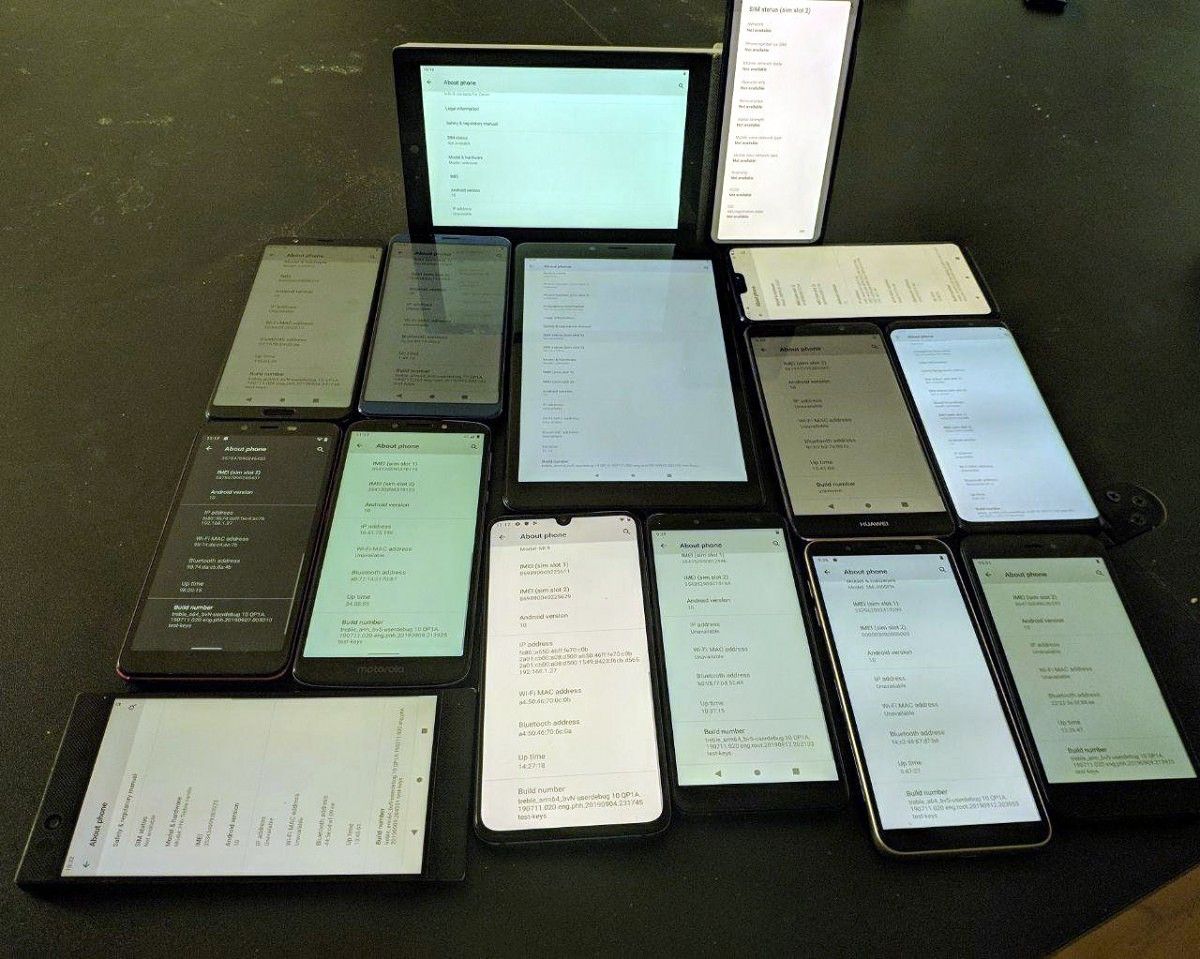
Unofficial Android 10 GSI running on 15 different Android devices, including the Razer Phone, Xiaomi Mi 9, Chuwi Hi9 Air, Archos Hello 7, Redmi Go, Cubot X18 Plus, Infinix Smart 2, Samsung Galaxy J6, Motorola Moto e5, Allview V3 Viper, Honor View 10, Samsung Galaxy S9+, ASUS ZenFone 6, Huawei Mate 9, and OnePlus 6. Credits: phhusson.

Interested in trying this out? The first thing you’ll need is an unlocked bootloader. Next, you can download the latest version of phhusson’s GSI from his GitHub page here and learn how to flash a GSI here. Before you do so, you should read phhusson’s XDA forum thread here and check which variant you should download by using the Treble Info app linked below. Due to the difficulties of supporting so many devices with just one system image, there are bound to be some bugs on certain devices. If you have any issues, you can report them here or in one of the chats linked here. I also recommend you check out our Project Treble forums as other custom ROM developers will eventually rebase their work on phhusson’s latest release, giving you more choice in case you aren’t a fan of stock AOSP.

Treble Info (Free+, Google Play) →

The post Android 10 custom GSI brings the latest Android OS to any Project Treble-supported device appeared first on xda-developers.


from xda-developers https://ift.tt/31VjjhX
via IFTTT

OnePlus says the 7 Pro 5G will get Android 10 in Q1 2020

We’ve been talking a lot about the OnePlus 7T series lately, which was first without a 5G device. That was surprising considering OnePlus was one of the first to launch a 5G phone. We now know the OnePlus 7T Pro McLaren Edition will be launching with 5G on T-Mobile, but we’ve also got good news for the OnePlus 7 Pro 5G: it’s getting Android 10 next year.

OxygenOS 10 based on Android 10 was released for the non-5G OnePlus 7 Pro and OnePlus 7 over a month ago. However, the 5G variant was left out in the cold, which certainly didn’t make owners happy. There’s a lengthy complaint thread over on the OnePlus Forums about the device. A OnePlus Community Manager took to that thread to share the news that they plan to release Android 10 for the OnePlus 7 Pro 5G EE in Q1 2020.

OnePlus 7 XDA Forums ||| OnePlus 7 Pro XDA Forums

As a reminder, this is what will be included with OxygenOS 10:

  • System
    • Upgraded to Android 10
    • Brand new UI design
    • Enhanced location permissions for privacy
    • New customization feature in Settings allowing you to choose icon shapes to be displayed in the Quick Settings
  • Full-Screen Gestures
    • Added inward swipes from the left or right edge of the screen to go back
    • Added a bottom navigation bar to allow switching left or right for recent apps
  • Game Space
    • New Game Space feature now joins all your favorite games in one place for easier access and better gaming experience
  • Smart display
    • Intelligent info based on specific times, locations and events for Ambient Display (Settings – Display – Ambient Display – Smart Display)
  • Message
    • Now possible to block spam by keywords for Message (Messages – Spam – Settings – Blocking settings)

“Q1 2020” puts the release date somewhere between the first of the year and the end of March. It should also be noted that the Community Manager explicitly mentions the EE model, so we have no idea when Android 10 will arrive for OnePlus 7 Pro 5G models in other parts of the world. That’s a pretty big bummer as the 5G model costs more and has received a lot less support.


Source: OnePlus

The post OnePlus says the 7 Pro 5G will get Android 10 in Q1 2020 appeared first on xda-developers.


from xda-developers https://ift.tt/2pp0Hd1
via IFTTT

Google says Chrome OS 80 will bring easier Android app sideloading for developers

Last week at the Android Dev Summit, Google announced a feature that Chrome OS enthusiasts have wanted for years: the ability to sideload Android apps without enabling Developer Mode. We’ve seen code commits in the past that would have enabled this feature, but none of those implementations ever made their way to the stable channel. Now that Google has officially confirmed this feature will arrive in Chrome OS 80, which is set for a stable release in the second week of February 2020, we no longer need to religiously monitor the Chromium Gerrit for this feature addition.

As you can see in the featured image above, retrieved via AboutChromebooks, Google is adding this feature to let Android app developers deploy their apps straight from Android Studio. With a 22% growth in year-on-year Chromebook sales (from September of 2018 to August of 2019) and the total amount of time spent on Android apps on Chrome OS grown by a factor of 4, Android app developers are incentivized to bring their work to Chromebooks. Developing for Chromebooks requires considerations like how your app reacts to changes in display modes (laptop and tablet), window management (multi-window and free-form windows), and keyboard/mouse input, so it’s recommended to test your app on native hardware. To that end, Google pushed to make Chrome OS more developer-friendly by adding a Linux container last year, enabling the ability to run the Linux version of Android Studio.

While you can develop and build Android apps on a Chromebook, deploying the app is a bit of a headache. Currently, the recommended way to sideload an Android app on Chrome OS is to enable Developer Mode. With Developer Mode enabled, sideloading an Android app is as simple as clicking on your compiled APK file. However, Developer Mode is inherently insecure as it relaxes verified boot protections and grants access to a root shell. It’s also a pain to deal with since it requires powerwashing (factory resetting) your device and dealing with an annoying warning screen that you have to manually bypass on every boot. Thankfully, when Chrome OS 80 rolls out in the stable channel in February 2020, all developers will be able to deploy their Android apps straight from Android Studio onto their Chromebook, without having to enable Developer Mode. If you’re on the Chrome OS Dev channel, you’ll be able to test this out as early as late next month.

Unfortunately, it doesn’t look like Google intends for this feature to be used by end-users. According to the commit that likely implements this feature, this feature requires Crostini (Linux app support) to be enabled, limiting which Chromebooks will have access to the feature. Furthermore, disabling the feature requires a powerwash. If you’re comfortable with the command line, though, sideloading Android apps should be as simple as using “adb install.” Alternatively, you could just “adb push” the APK, enter “adb shell,” and then use “pm install,” right now.

The post Google says Chrome OS 80 will bring easier Android app sideloading for developers appeared first on xda-developers.


from xda-developers https://ift.tt/2MVQI7K
via IFTTT

YouTube Music 3.39 for Android finally adds a widget

Google’s music situation has been frustrating for a lot of people. The company essentially has two separate platforms: Google Play Music and YouTube Music. The former has been around for a while and has a lot of loyal users. The latter is new and still lagging behind in features. One feature that has finally been added to YouTube Music is a home screen widget.

YouTube Music version 3.39 includes a handy widget that can be placed on the home screen of your favorite launcher. This is a pretty standard 4×1 widget that displays the album art and song details along with buttons for thumbs down, previous, play/pause, next, and thumbs up. The widget changes color to match the album artwork and it can’t be resized (though some 3rd-party apps can force it).

A feature like a widget may seem like a small thing to some people, but it’s one of the reasons why some haven’t been eager to switch to YouTube Music. Google Play Music, while not perfect by any means, is a much more feature-full experience. YouTube Music is still being fleshed out and small things like widget support go a long way towards improving the overall experience. Download the latest version of YouTube Music below.

YouTube Music - Stream Songs & Music Videos (Free, Google Play) →

The post YouTube Music 3.39 for Android finally adds a widget appeared first on xda-developers.


from xda-developers https://ift.tt/2NkN06L
via IFTTT

Qualcomm’s upcoming Snapdragon Wear 3300 may be the Wear OS smartwatch chip we’ve been waiting for

Google’s Android OS for smartwatches, Wear OS, isn’t nearly as successful as Android for smartphones, tablets, or televisions, and there’s a lot of blame to go around for that. We can blame Google for not having enough confidence to launch its own smartwatch hardware or for barely giving Wear OS the time of day at its big developer conference, or we can blame Qualcomm for failing to design a competitive smartwatch SoC. Smartwatches from Samsung, Huawei, and Apple, with their custom operating systems and SoCs, tend to have much better battery life than smartwatches with Wear OS and Qualcomm’s Snapdragon Wear 2100 or 3100. Qualcomm’s current wearable platforms are manufactured on a 28nm fabrication process; in comparison, Samsung’s Exynos 9110, found in the Galaxy Watch series, is manufactured on a 10nm fabrication process. Qualcomm may be bridging the gap with its next SoC for wearables, however, and it could come in the form of the Snapdragon Wear 3300.

We first heard about Qualcomm’s next wearable chipset back in July when WinFuture reported on the existence of two chipsets in a prototyping stage. It was believed that one of the chipsets could be marketed as the Snapdragon Wear 2700 and the other the Snapdragon 429 Wear, but the chipsets were still very early in development and there was no indication of when they would launch. Thanks to a tip from XDA Recognized Developer arter97, we know that Qualcomm is indeed preparing a chipset based on the mid-2018 Snapdragon 429 mobile platform, and it’ll likely be called the Snapdragon Wear 3300.

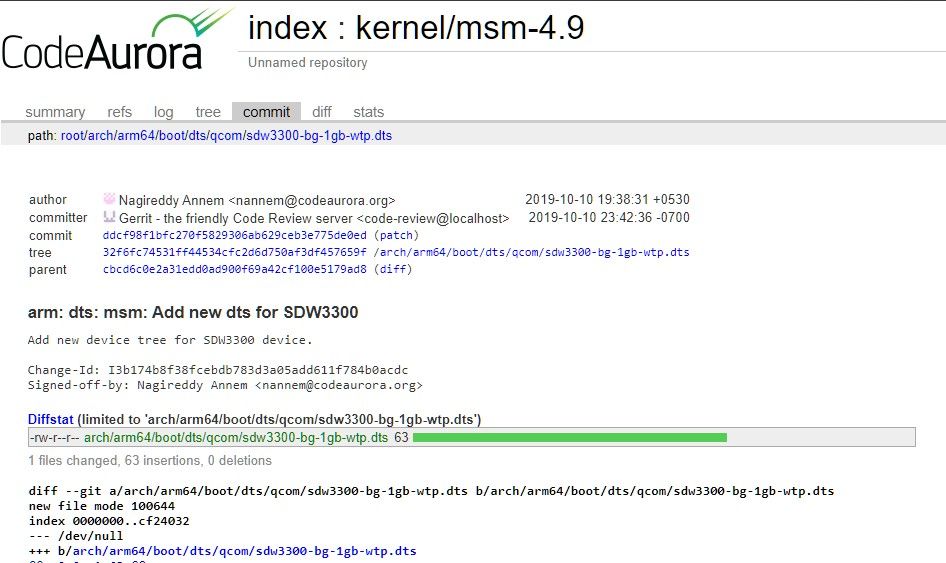
Over on the Code Aurora Forum, where Qualcomm uploads the Linux kernel source code for its various chipsets, a commit was uploaded that adds a device tree for a “SDW3300 device.” The device tree source (DTS) file that was uploaded is titled “sdw3300-bg-1gb-wtp.dts,” and the code indicates the new platform is based on the Snapdragon 429, code-named “Spyro.”

The Qualcomm Snapdragon 429 was introduced in mid-2018 as a 12nm chip with 4 ARM Cortex-A53 CPU cores clocked at up to 1.95GHz. Qualcomm will likely pair these 4 CPU cores with a low-power co-processor, a PMIC, an integrated DSP, and other components to form the new Snapdragon Wear platform. The biggest problem with the Snapdragon Wear 3100 was that its main application processor was still the 4 ARM Cortex-A7 CPU cores fabricated on a 28nm process, so the new wearable SoC should be much more power-efficient and thus provide better battery life. Paired with 1GB of RAM, future Wear OS smartwatches will also perform better than ever.

Of course, this is still just a rumor at this point. Qualcomm has yet to officially confirm any details about its next wearable SoC. We reached out to Qualcomm for comment and will update this article if we hear back.

The post Qualcomm’s upcoming Snapdragon Wear 3300 may be the Wear OS smartwatch chip we’ve been waiting for appeared first on xda-developers.


from xda-developers https://ift.tt/2MS1Cvg
via IFTTT

ARM now says it’ll continue supplying chip technology to Huawei

The trade war between the United States and China has brought a lot of chaos in the technology industry. Even some of the non-US companies decided to stop doing business with Huawei, ARM being one of the first. The United Kingdom-based chip manufacturer halted manufacturing the technology for the Chinese company right after Trump’s order to prohibit US companies from working with Huawei. The original ban was issued on the 16th of May, with ARM following on May 22nd. Though, now it turns out that ARM is ready to continue developing for Huawei.

As you probably already know, Huawei uses HiSilicon Kirin chips for its devices. While the Chinese OEM is responsible for the specifics and design of the system-on-chip, ARM is the architecture they’re using. It goes without saying that ARM’s hesitation to supply chip technology to Huawei would drastically affect the manufacturing plans of the devices. All of the latest Huawei SoCs, including the Kirin 990 5G chip is based on the ARM architecture. Due to the fact that outside of the United Kingdom ARM also operates from a couple of offices in the US, it was necessary to research whether its chip designs included “US-origin technology.”

After months of hesitation and confusion, it looks like ARM’s legal time has finally decided that the company’s relationship with Huawei will not breach the US’ trade ban on Huawei devices. In a talk with Reuters, an ARM spokeswoman confirmed that “ARM’s v8 and v9 are UK-origin technologies,” later also saying the company will continue developing for Huawei. This makes the manufacturing and production process for Huawei a lot easier, as they are striving to become the #1 smartphone manufacturer in the world. You can read our previous write-up about ARM’s distancing decision to get an idea about the situation.


Source: Reuters

The post ARM now says it’ll continue supplying chip technology to Huawei appeared first on xda-developers.


from xda-developers https://ift.tt/31UcVrk
via IFTTT

The ITIL Premier Club Is the Ultimate Learning Resource for Aspiring IT Professionals

The Information Technology Infrastructure Library, or ITIL, is a widely-respected framework for IT service management. If you want to get a job in this industry, it pays to become a certified practitioner. The ITIL Premier Club Essential Pack can help you fly through the exams, with unlimited access to 24 courses, plus Q&A sessions, quizzes, and even discounts on your exams. You can get a Lifetime Membership now for only $69.99 at the XDA Developers Depot.

Certifications are everything in the world of IT — recruiters are looking for people who know their stuff and putting ITIL certificates on your résumé is an easy way to make your application stand out.

You can prep for the ITIL exams by reading dense textbooks, but the ITIL Premier Club offers a better learning experience. This platform offers 20 ITIL V3 and 4 ITIL courses, delivered by expert instructors. As a member, you also get the opportunity to ask your instructors questions and join in with Q&A forums.

The Essential Pack also includes 12 months of access to AXELOS My ITIL. This service provides exam resources, quizzes, and tool kits to ease your progress, and Digital Badges to promote your new certifications.

Order now for $69.99 to get lifetime access to the ITIL Premier Club, worth $2,640.

 
ITIL® Premier Club Essential Pack: Lifetime Membership – $69.99

See Deal

The post The ITIL Premier Club Is the Ultimate Learning Resource for Aspiring IT Professionals appeared first on xda-developers.


from xda-developers https://ift.tt/2qTdAwt
via IFTTT