LightBlog

mercredi 30 octobre 2019

Galaxy Labs is a suite of Samsung apps to manage your files and optimize performance/battery life

The Android experience on Samsung devices has come a long way since the horrid TouchWiz days. The company’s One UI skin is much lighter, less intrusive, and relatively bloat-free. On top of that, it packs in a couple of great customization options for users to personalize their device. Among these is Samsung’s Good Lock — a suite of mods that allow you to customize the UI, automate tasks, or make the most out of your phone with a single hand. Now, Samsung is adding on to its lineup of useful apps with the new Galaxy Labs suite.

As reported by SamMobile, Galaxy Labs is a collection of device optimization apps for Galaxy smartphone and tablet owners. Much like Good Lock, which acts as a one-stop-shop for mods, Galaxy Labs houses a couple of apps that will let you optimize your device’s performance from a single location. As of now, there are four apps to choose from — File Guardian, Battery Tracker, Battery Guardian, and App Booster.


Out of the lot, File Guardian seems to be the most useful utility as it allows you to restore permanently deleted files from your phone’s internal and external storage. This proves to be especially useful, as file recovery using a PC is impossible due to the fact that the internal storage is not mounted on Windows or Mac as a standard USB disk. The Battery Tracker app allows you to track your phone’s battery usage and offers many more details than what’s available on Android’s built-in battery menu. With the app, you’ll be able to track battery usage since the last full charge and also check your battery usage for the last seven days. While these features will be available to users on Android 10 and One UI 2.0, the Battery Tracker app enables them for users on Android Pie.

In comparison, the Battery Guardian app doesn’t do anything new and only checks for existing battery optimization features. Lastly, the App Booster aims to optimize all apps on the device and boost their performance. The app takes a long time to complete the optimization process, but we aren’t sure what exactly goes behind the scenes during the process. Galaxy Labs, along with the aforementioned apps, are available on Samsung’s Galaxy Store in the Netherlands right now. However, you can easily sideload the apps on your Galaxy device by downloading the APKs linked below. Do note that you’ll first have to download Galaxy Labs and Galaxy Labs Agent on your device before you can install the other four APKs.

Download Galaxy Labs || Download Galaxy Labs Agent || Download Battery Guardian || Download Battery Tracker || Download File Guardian || Download App Booster


Source: SamMobile

The post Galaxy Labs is a suite of Samsung apps to manage your files and optimize performance/battery life appeared first on xda-developers.


from xda-developers https://ift.tt/2Wvqlst
via IFTTT

Unofficial TWRP and LineageOS 16 are now available for the ZTE Axon 10 Pro

ZTE recently entered the flagship smartphone game again with the launch of the Axon 10 Pro, which serves as an awesomely priced, decent-ish flagship entry that mostly stands out because of the value it gives you for your money. Starting at $549 and carrying full flagship specs, there’s not a lot of phones out there offering you a better bang for your buck. And if you’re the type of person to mod their phones, then you’ll also be pleased with the Axon 10 Pro, as the device has received both an unofficial TWRP build as well as an unofficial build of LineageOS 16, based on Android Pie.

This TWRP custom recovery build will allow you to flash fancy things to your device, such as Magisk, easily and painlessly. And if you’re not satisfied enough with your phone’s software, LineageOS should be enough to provide an alternative experience with different features that you might like better. Both of these things should be able to open the floodgates of Android modding in your own device, given, of course, that you’d already unlocked your bootloader, which you can easily do by following this tutorial in case you haven’t done so yet.

If you’re interested in getting your hands dirty with the Axon 10 Pro, now is the time to go into our forums and download TWRP, which you can then use to root your device using Magisk or, in case you’re more of a custom ROM person, flash LineageOS to your device. If you’re planning on installing LineageOS, though, keep in mind that you might come across bugs such as a broken fingerprint sensor as well as other things that may have gone unreported. Still, if you don’t mind the risk, then feel free to go ahead and flash it to your phone.

LineageOS 16 for the Axon 10 Pro | TWRP for the Axon 10 Pro

Axon 10 Pro XDA Forum

The post Unofficial TWRP and LineageOS 16 are now available for the ZTE Axon 10 Pro appeared first on xda-developers.


from xda-developers https://ift.tt/2N1F1g7
via IFTTT

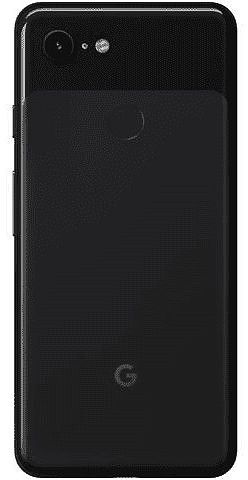
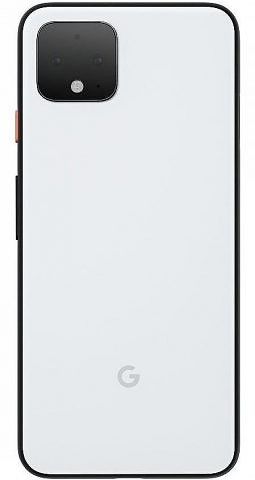
Google Pixel 4 vs Google Pixel 3: should you upgrade?

The Google Pixel 4 just launched a few weeks ago, so if you are interested in buying one, you’ll likely be wondering if it’s worth the upgrade from last year’s Pixel 3. That question isn’t as clear cut as it has been in previous years. Let’s take a look.

Pixel 3 Pixel 4
Display Fullscreen 5.5” display
FHD+ flexible OLED at 443ppi
18:9
Fullscreen 5.7″ display
FHD+ flexible OLED at 444 ppi
19:9
Ambient EQ
Smooth Display (up to 90 Hz)
Processor Snapdragon 845 Snapdragon 855
Storage and RAM 4GB RAM
64GB or 128GB UFS 2.1
6GB RAM
64GB or 128GB UFS 2.1
Dimensions and weight 68.2 x 145.6 x 7.9 mm
2.7 x 5.7 x 0.3 inches
148 g
68.8 x 147.1 x 8.2 mm
2.7 x 5.7 x 0.3 inches
162 g
Battery 2915 mAh 2800 mAh
Rear Camera(s) 12.2MP dual-pixel
1.4μm
f/1.8 aperture
16MP Telephoto
1.0μm
f/2.412.2MP Wide
1.4 μm
f/1.7
Front Camera(s) 8MP wide-angle and normal
FoV cameras
Wide-angle: f/2.2 aperture, 97° FoV
Normal: f/1.8 aperture, 75° FoV
8 MP
1.22μm
ƒ/2.0 aperture
Biometrics Rear mounted finerprint 3D facial recognition
Charging 18W/2A USB Type C charger
Qi wireless charging
18W/2A USB Type C charger
Qi wireless charging
Headphone Jack No No
Speakers Dual front speakers Stereo earpiece, bottom
Colors Not Pink, Just Black, Clearly White Oh So Orange, Just Black, Clearly White
Price $800 at launch, $500 now $800
Software Launched with Android 9, upgraded to Android 10 Launched with Android 10

Similarities

The Pixel 3 and Pixel 4 are more similar than they are different. At its core, the software is essentially the same with minor differences due to the new Pixel Neural Core or Motion Sense. Both devices are essentially the same size, coming in at barely a millimeter difference. The Pixel 3 and Pixel 4 both come with 64GB or 128GB of UFS 2.1 storage. A FHD+ OLED display is constant across both models as well.

The main rear cameras are almost the same with a f/0.1 difference in the aperture.  Both the Pixel 4 and Pixel 3 have an amazing wide front-facing camera. Along with all of this, both support Qi wireless charging and 18W/2A fast charging over USB Type-C. Both the Pixel 3 and Pixel 4 have amazing sounding stereo speakers.

Pixel 4 XDA Forums ||| Pixel 3 XDA Forums

Differences

The Pixel 4 has only a single front-facing camera, though it is 90 degrees, so it’s still pretty wide. Speaking of cameras, Google adds a second 16MP telephoto camera to the back. The Pixel 4 also has a Motion Sense sensor in the top bezel of the phone. It is used for air gestures and checking when you are reaching for the phone. Google also swaps the rear-mounted fingerprint sensor for an Apple-style 3D facial recognition setup. As for the display, it is slightly bigger coming in at 5.7-inches compared to 5.5-inches, but it is also at a taller 19:9 aspect ratio. The display also has a 90hz refresh rate for extra smoothness. To help this smoothness, Google also threw 2 extra gigabytes of RAM bringing it from 4GB to 6GB.

As for speakers, Google has switched from dual front-firing stereo speakers to a downward-firing and earpiece speaker combo. While this would normally be a little annoying because the sound quality might be lacking, the Pixel 4 speakers blow away the stereo front-firing speakers from the Pixel 3.  The Pixel 4 does have a slightly smaller battery than the Pixel 3, which may or may not be slightly worse than the Pixel 3, but that’s to be expected with a new 90hz display and radar technology. Lastly, the Pixel 4 comes in an all-new Oh So Orange color, but this is a limited edition color.

Is it worth it?

It’s probably not worth the upgrade to the Pixel 4. While it might seem like there are a lot of differences, they don’t drastically change the experience in any meaningful way. The phones are very similar in hardware and the camera isn’t a huge upgrade. Sure, you are getting a 90hz display, telephoto lens, and 3D facial recognition, but the price of the Pixel 4, even with a trade-in, isn’t worth it for three pretty minor features. If you were interested in doing it with a trade-in, Google would only be offering you up to $250.

For around $550, it’s not really worth the upgrade. Not everything is always worth it and you still might be interested in picking up a Pixel 4. If you’re still on the fence, I’d highly recommend you check out our article on the differences between the Pixel 4 XL and Pixel 3 XL to and which one is right for you.

The post Google Pixel 4 vs Google Pixel 3: should you upgrade? appeared first on xda-developers.


from xda-developers https://ift.tt/2Jy0Otw
via IFTTT

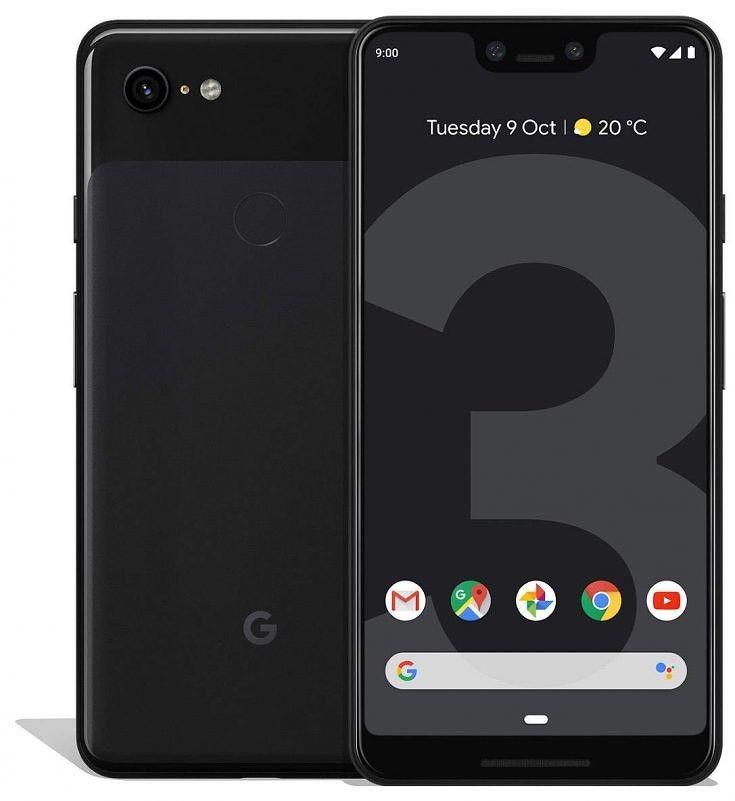
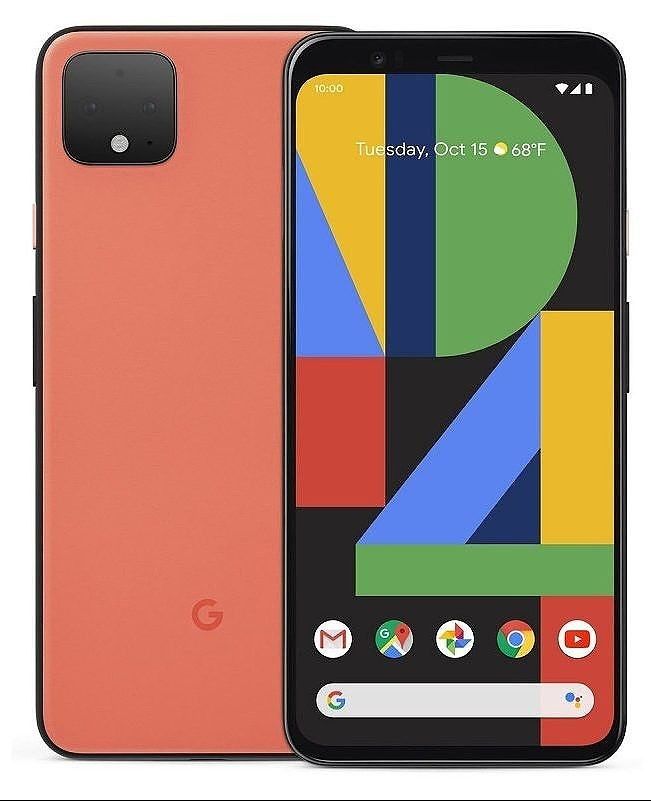
Google Pixel 4 XL vs Google Pixel 3 XL: should you upgrade?

Just a few weeks ago, Google launched the Pixel 4 and Pixel 4 XL. After a new phone launches, many people ask “is it worth the upgrade from last year’s model?” The same thing goes for the Pixel 4 XL this year. So, let’s go through the similarities and differences to see if it’s worth the upgrade.

Pixel 3 XL Pixel 4 XL
Display Fullscreen 6.3” display
QHD+ OLED at 523ppi
18.5:9
Fullscreen 6.3″ display
QHD+ flexible OLED at 537 ppi
19:9
Ambient EQ
Smooth Display (up to 90 Hz)
Processor Snapdragon 845 Snapdragon 855
Storage and RAM 4GB RAM
64GB or 128GB UFS 2.0
6GB RAM
64GB or 128GB UFS 2.1
Dimensions and weight 76.7 x 158.0 x 7.9 mm
3.0 x 6.2 x 0.3 inches
184 g
75.1 x 160.4 x 8.2 mm
2.9 x 6.3 x 0.3 inches
193 g
Battery 3430 mAh 3700 mAh
Rear Camera(s) 12.2MP dual-pixel
1.4μm
f/1.8 aperture
16MP Telephoto
1.0μm
f/2.412.2MP Wide
1.4 μm
f/1.7
Front Camera(s) 8MP wide-angle and normal
FoV cameras
Wide-angle: f/2.2 aperture, 97° FoV
Normal: f/1.8 aperture, 75° FoV
8 MP
1.22μm
ƒ/2.0 aperture
Biometrics Rear-mounted fingerprint 3D facial recognition
Charging 18W/2A USB Type C charger
Qi wireless charging
18W/2A USB Type C charger
Qi wireless charging
Headphone Jack No No
Speakers Dual front speakers Stereo earpiece, bottom
Colors Not Pink, Just Black, Clearly White Oh So Orange, Just Black, Clearly White
Price $900 at launch, $600 now $900
Software Launched with Android 9, upgraded to Android 10 Launched with Android 10

Similarities

The Pixel 3 XL and Pixel 4 XL are pretty similar. The software is pretty much the same with the only new features coming from the new Pixel Neural Core or Motion Sense. Both devices are basically the same size, coming in at barely a 2-millimeter difference. The Pixel 3 XL and Pixel 4 XL both come with 64GB or 128GB of UFS 2.1 storage. A QHD+ OLED display is constant across both models as well.

The main rear cameras are almost the same with a f/0.1 difference in the aperture.  Both the Pixel 4 XL and Pixel 3 XL have an amazing wide-angle front-facing camera. Along with all of this, both support Qi wireless charging and 18W/2A fast charging over USB Type-C. Both the Pixel 3 XL and Pixel 4 XL have amazing sounding stereo speakers.

Differences

The Pixel 4 XL has only a single front-facing camera, though it is 90 degrees, so it’s still pretty wide. Speaking of cameras, Google added a second 16MP telephoto camera to the back. The Pixel 4 XL also has a Project Soli sensor in the top bezel of the phone for Motion Sense. It is used for air gestures for controlling music and detecting when you are reaching for the phone. Google also swaps the rear-mounted fingerprint sensor for an Apple-style 3D facial recognition setup. As for the display, it comes in at 6.3-inches, but it is also at a taller 19:9 aspect ratio. The display also has a 90hz refresh rate for extra smoothness. To help this smoothness, Google also threw 2 extra gigabytes of RAM bringing it from 4GBs to 6GBs.

As for speakers, Google has switched from dual front-firing stereo speakers to a downward-firing and earpiece speaker combo. While this would normally be a little annoying because the sound quality might be lacking, the Pixel 4 XL speakers blow away the stereo front-firing speakers from the Pixel 3 XL.  The Pixel 4 XL does have a slightly larger 3700 mAh battery. Even though it has a bigger battery, the Pixel 4 XL has pretty similar battery life. That’s to be expected with a new 90hz display and radar technology. Lastly, the Pixel 4 XL comes in an all-new Oh So Orange color, but this is a limited edition color.

Is it worth the upgrade?

Even though there might be a decent amount of differences and changes, both Pixels are way too similar to make it worth the upgrade. With the only major upgrades being the telephoto lens, 90hz, motion sense, and extra RAM, it’s not really worth the price. If you were interested in getting it, Google is only offering up to $295 for the Pixel 3 XL.

For $605, the Pixel 4 XL really isn’t worth it coming from the Pixel 3 XL. Even though it’s not worth it, there will still be some interest. If you’re looking to upgrade and trying to decide between the smaller Pixel 4 or Pixel 4 XL, I recommend checking out our article on which phone is right for you.

The post Google Pixel 4 XL vs Google Pixel 3 XL: should you upgrade? appeared first on xda-developers.


from xda-developers https://ift.tt/2MZDEyj
via IFTTT

[Update: OnePlus 7 Rollout] OxygenOS Open Beta 4 for the OnePlus 7 series adds a new gesture, weather provider, and more

Update (10/30/19 @ 1:15 PM ET): OxygenOS Open Beta 4 is now rolling out for the OnePlus 7.

Earlier this month, OnePlus rolled out OxygenOS Open Beta 3 for the OnePlus 7 and OnePlus 7 Pro. As part of the update, OnePlus released a bunch of bug fixes and a couple of new features. Most notably, the company rolled out a new Work-Life Balance feature for users in India. This new feature allows users to sort notifications when at work or home, giving them some peace of mind. The update also included optimizations for the OnePlus Switch app and a new Activity mode in OnePlus’ Zen Mode. Now, the company is rolling out OxygenOS Open Beta 4 for the two devices with even more new features.

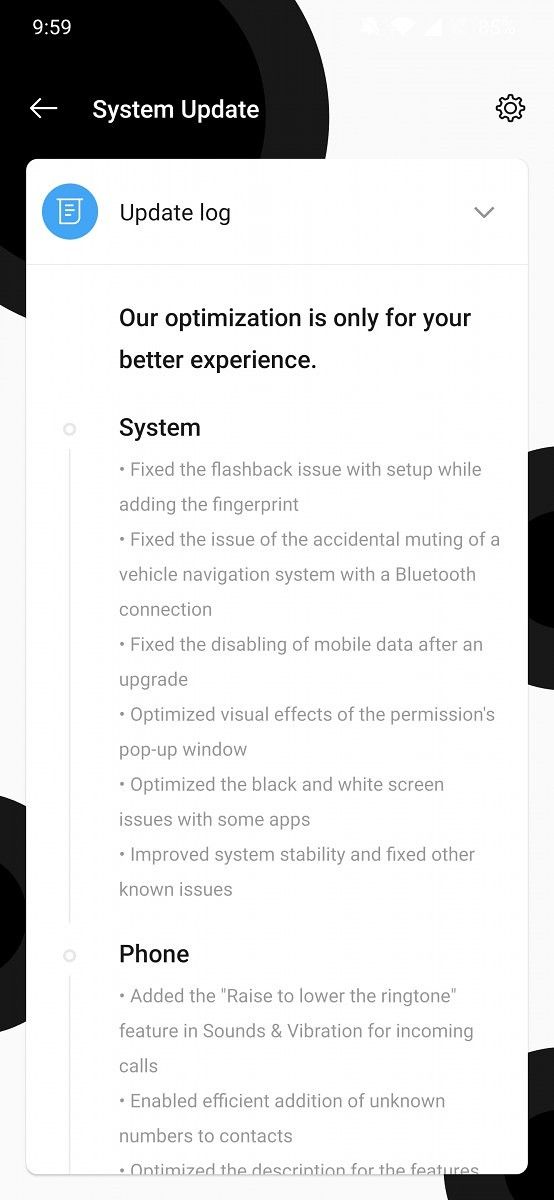
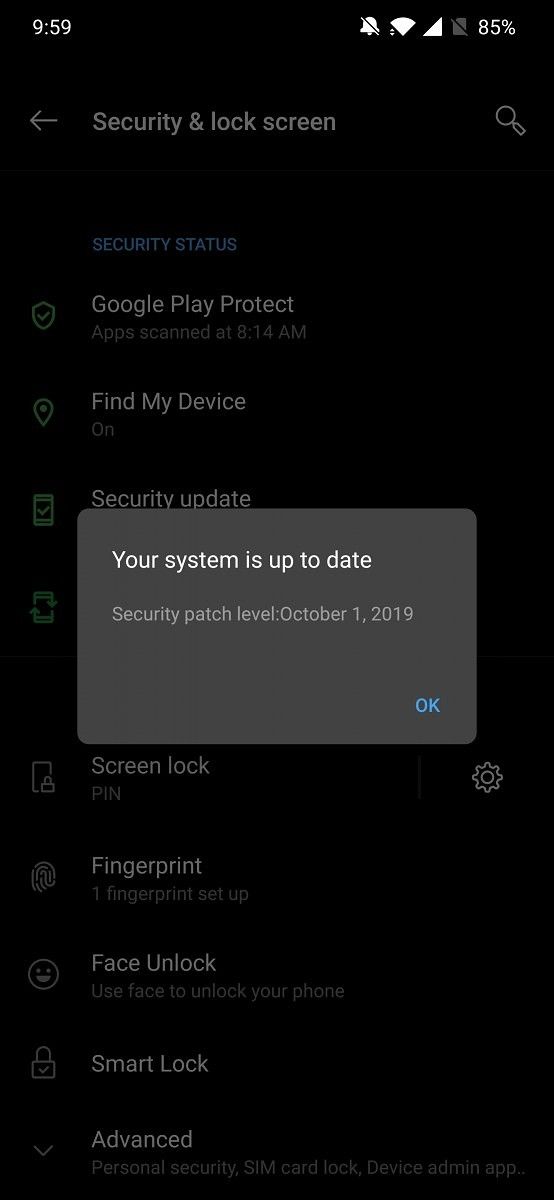
OnePlus 7 Pro OxygenOS Open Beta 4 changelog OnePlus 7 Pro OxygenOS Open Beta 4 Android Security patch

As per a recent post on the OnePlus forums, OxygenOS Open Beta 4 is now rolling out to the OnePlus 7 Pro and is expected to reach OnePlus 7 users next week. The update includes the usual bug fixes and improvements, along with some optimizations for some stock apps. Most notably, the update introduces a new “Raise to lower the ringtone” gesture within the Sounds & Vibration settings. When enabled, this feature will automatically lower the volume of your ringtone when you pick up your phone to answer an incoming call. Furthermore, the update adds The Weather Channel as a data source in OnePlus’ stock Weather app.

Here’s the complete changelog for the OxygenOS Open Beta 4:

  • System
    • Fixed the screen flashing issue with setup while adding the fingerprint
    • Fixed the issue of the accidental muting of a vehicle navigation system with a Bluetooth connection
    • Fixed the disabling of mobile data after an upgrade
    • Optimized visual effects of the permission’s pop-up window
    • Optimized the black and white screen issues with some apps
    • Improved system stability and fixed other known issues
  • Phone
    • Added the “Raise to lower the ringtone” feature in Sounds & Vibration for incoming calls
    • Enabled efficient addition of unknown numbers to contacts
    • Optimized the description for the features
    • Expanded the dial pad area to avoid mis-touches
  • Messages
    • Optimized the message sorting feature by verification code
  • Calculator
    • Optimized UI and interactive experience
  • OnePlus Switch
    • Supported transfer of iPhone data through iCloud
  • Weather
    • Added The Weather Channel as a data source for accurate weather data

The OnePlus Switch app has also received a new feature that will allow iPhone users to easily transfer their data through iCloud. We previously saw this feature in a beta release of the app. As mentioned earlier, the update is already rolling out to OnePlus 7 Pro users who are on the beta channel and is expected to reach the OnePlus 7 next week.

Download Links for OxygenOS Open Beta 4

If you haven’t received the OTA update yet, you can download the update package from the link below and manually flash it on your phone. If you’re already on the OxygenOS Open Beta 3 release, you’ll need to download the incremental OTA. However, if you’re on the stable channel then you’ll need to download the full OTA update on your device.

OxygenOS Open Beta 4 for the OnePlus 7 Pro (Full OTA) 

OxygenOS Open Beta 4 for the OnePlus 7 Pro (Incremental OTA)

OnePlus 7 Pro XDA Forums

Thanks to XDA Senior Member Some_Random_Username from the Oxygen Updater team for the download links!


Update: OnePlus 7 Rollout

OxygenOS Open Beta 4 rolled out for the OnePlus 7 Pro last week and now it’s rolling out to the non-Pro OnePlus 7. This is the same update that was outlined above. You can find the download links below for the incremental and full OTA.

OxygenOS Open Beta 4 for the OnePlus 7 (Full OTA) 

OxygenOS Open Beta 4 for the OnePlus 7 (Incremental OTA)

OnePlus 7 XDA Forums

The post [Update: OnePlus 7 Rollout] OxygenOS Open Beta 4 for the OnePlus 7 series adds a new gesture, weather provider, and more appeared first on xda-developers.


from xda-developers https://ift.tt/2JjHqR3
via IFTTT

Learn Essential Excel Tips and Techniques With This $19 Training Bundle

If you work with figures, Excel is almost certainly a major part of your workflow. The software is packed with great features, but some of them go under the radar. The Complete Excel Pro Tips Certification Bundle helps you discover these tools, along with the techniques used by Excel pros. The bundle includes six hands-on video courses, covering some of the biggest Excel productivity hacks out there. You can pick up the training now for only $19 via the XDA Developers Depot.

Analyzing data is an important skill in many industries, from sales to finance. Excel allows anyone to crunch the numbers, but you might be able to save time by doing things a little differently.

This bundle offers a vast selection of productivity hacks from Excel veterans. The training takes a deep dive into six key topics, including formulas and functions, data visualization, analytics tools, and formatting. 

Each course looks at how you can solve problems in half the time, using Excel’s most powerful features. The training includes plenty of hands-on practice, and you can claim a certificate of completion with each course to prove your knowledge.

The training is worth $294 in total, but you can grab the bundle now for $19 with lifetime access included.

Prices subject to change.

 
The Complete Excel Pro Tips Certification Bundle – $19

See Deal

The post Learn Essential Excel Tips and Techniques With This $19 Training Bundle appeared first on xda-developers.


from xda-developers https://ift.tt/332kNIK
via IFTTT

The Netflix button on the new SHIELD TV remote can be remapped

NVIDIA recently announced the newest additions to the SHIELD line of devices, which includes an upgraded set-top box and a brand new streaming stick. The streaming stick is simply named the NVIDIA SHIELD TV while the higher-end, more expensive set-top box gains the “Pro” moniker. These devices have been popular topics due to NVIDIA’s stellar track record with Android TV support, but one noteworthy aspect both devices have is a completely revamped remote.

The new SHIELD TV remote includes hardware keys for everything you’d expect, plus a shortcut to Netflix, which may come in useful if you’re deep into binge-watching. However, if you’re not a huge Netflix person, you might find this button sort of annoying. You might want to remap that button to something more useful. Luckily for you, users have figured out a way to remap this button to whatever you want. This method employs an app called “Button Mapper,” which has existed for a little over 3 years, yet Redditors managed to figure out how to use it in order to effectively remap the remote’s Netflix button.

If you’re interested in trying it out with your SHIELD TV, then head over to the Google Play Store and download the app to your device right now. It doesn’t require root or any other modifications. When you open the app for the first time you’ll want to select “Add Button.” You can then assign whatever function you want to the button. You can also choose to disable the button altogether.

Button Mapper: Remap your keys (Free+, Google Play) →


Source: Reddit

The post The Netflix button on the new SHIELD TV remote can be remapped appeared first on xda-developers.


from xda-developers https://ift.tt/2Jxi1TU
via IFTTT