LightBlog

vendredi 25 octobre 2019

Google Camera 7.2 mod brings Astrophotography, Super Res Zoom, and more to older Pixel phones

The Google Pixel 4 has only just launched, and we’re already getting new Google Camera ports with added features that previously weren’t available. One such feature that people really love is the new Astrophotography shooting mode, which is great for picking up stars and other cosmic activity with just your smartphone and a steady surface. We tested it a little while ago, which you can read more about here. A modification of Google Camera 7.2 has brought Super Res Zoom and the aforementioned Astrophotography mode to older Pixel smartphones. It was specifically tested on the Google Pixel 2, though should be universal for older Pixel smartphones. You can check out the changelog below from XDA Senior Member cstark27.

  • Enable Astro mode for Pixel 1 & 2
  • Enable Focus options in Night Sight (along with “infinity” – may be same as far)
  • Modded lib for Learned Depth in Portrait Mode (Pixel 2)
  • Enable Super Res Zoom while zoomed or in Night Sight (no zoom required) – this is like Pixel 3 stock
  • Enable auto timer (photobooth), it’s in the selfie camera in the Timer options
  • Enable synthetic fill flash for Pixel 2 and enable SFF in Camera mode for 3a

Generally speaking, features from newer Pixels have had to be ported to older Pixels before we’ve seen them ported to other devices too. Google Camera ports have been an extremely popular way to improve the camera on basically any device, largely in thanks to a number of unique features and enhanced photo quality over many stock camera applications. Features like Night Sight have been near-revolutionary when it comes to photo-taking, and these are the features that users typically want to be ported for their smartphone. If you don’t own a Pixel, this port won’t work just yet. We recommend checking out the XDA forums for your device to see if a Google Camera port is available.

If you do own an older Pixel smartphone, you can check out cstark27’s thread below to download the modified Google Camera 7.2 APK which has both Astrophotography and Super Res Zoom.

Download Google Camera 7.2 mod for older Pixel smartphones

The post Google Camera 7.2 mod brings Astrophotography, Super Res Zoom, and more to older Pixel phones appeared first on xda-developers.


from xda-developers https://ift.tt/2MK2K4i
via IFTTT

Huawei launches the Mate X foldable smartphone in China, teases the Kirin 990 Mate Xs for 2020

Earlier this year in February, we first got our first look at Huawei’s foldable smartphone — the Huawei Mate X. Revealed shortly after the Samsung Galaxy Fold, Huawei’s next-gen device took a slightly different approach and wowed enthusiasts worldwide. However, following the Galaxy Fold fiasco, Huawei has delayed its launch a fair few times. The device has even received some design changes in the past few months and the company has even upgraded its specifications since the original announcement. Now, it seems like the Huawei Mate X is finally ready for prime time, as it has officially been launched in China.

As reported by GSMArena, the Mate X was launched at a recent event in Shenzhen, China alongside the Mate 30 5G and the Mate 30 Pro 5G. The device has been priced at 16,999 Yuan (~$2,400) and is expected to hit the shelves on November 15. At the event, the company also announced the Mate Xs — a slightly upgraded version of the Mate X. While the Mate Xs seems to be identical to the regular Mate X on the outside, it features Huawei’s new flagship Kirin 990 5G SoC.

Huawei Mate Xs announcement

The newer and more powerful chipset from the company is built on the 7nm+ EUV process. The chip comes with an integrated 5G modem, as opposed to the external one used in the original Mate X. The chipset also packs in a more powerful NPU, in addition to overclocked Cortex A76 and A55 cores. While the Mali-G76 GPU remains the same as the Kirin 980, it now has six more cores, resulting in a total of 16 cores.

If you’re interested in purchasing the newer Huawei Mate Xs though, you’ll have to wait quite a while as Huawei has scheduled its launch for March 2020. It’s also worth noting that other than its chipset, we have no further information on the specifications of the Mate Xs, but we expect to learn more over the next couple of months.


Source: Droidholic

Via: GSMArena

The post Huawei launches the Mate X foldable smartphone in China, teases the Kirin 990 Mate Xs for 2020 appeared first on xda-developers.


from xda-developers https://ift.tt/340revJ
via IFTTT

Google Pixel 4 and Pixel 4 XL factory images and kernel source code are now available

Google launched the Pixel 4 and Pixel 4 XL about ten days ago at an event in New York. Thanks to the plethora of leaks around the phone, there weren’t many surprises to the phones. The Pixel 4 series was also slated to reach consumers from October 24, 2019, onwards. Between the extensive leaks and the time lag between pre-orders at launch and actual availability, we did admittedly get the feeling that the Pixel 4 has been around for much longer, and that too, without a factory image or kernel source code release. That is not the case though, as Google has released the factory images and the kernel source code for the Pixel 4 and the Pixel 4 XL right alongside its public availability.

Google Pixel 4 XDA Forums || Google Pixel 4 XL XDA Forums

Factory Images for Google Pixel 4 and Google Pixel 4 XL

Factory images are important for devices as they make experimenting with the software easier on the mind, as you know that you have an option to get back to a working device in case things go wrong (which they often will). Even for those who do have not purchased the phone, the factory images give access to the Pixel 4’s apps and other system files, which aid in porting over exclusive features to other devices.

Device Version Download Link
Google Pixel 4 “flame” Android 10.0.0, build QD1A.190821.007, Oct 2019 Security Patch Link
Google Pixel 4 XL “coral” Android 10.0.0, build QD1A.190821.007, Oct 2019 Security Patch Link

You can also find two older builds on the main download page.

Framework and Kernel Source Code

The framework sources, the kernel sources and the device tree for the new Pixels have also been uploaded. The framework sources will allow developers to peek into some of the decisions that Google has made with the Pixel 4’s software, such as why the PIxel 4’s 90Hz refresh rate is limited to high brightnesses only when used alongside the dynamic switching option. The kernel source code and device tree will be useful for custom kernel, recovery and ROM developers in order to kickstart third-party development efforts on the phone.

Framework and Device Tree for the Google Pixel 4

Kernel Sources for the Google Pixel 4

The post Google Pixel 4 and Pixel 4 XL factory images and kernel source code are now available appeared first on xda-developers.


from xda-developers https://ift.tt/2NftbO8
via IFTTT

jeudi 24 octobre 2019

Google Messages 5.2 adds chat reminders and prepares to support bubble notifications and suggested stickers

Google tests a number of features on its apps before they’re released to the stable or beta channel. If these features are implemented but made inaccessible, we are sometimes able to enable them before public release. And more often than not, these features gradually make their way to the stable channel. We’ve previously discovered features like Instagram-style effects, verified SMS and SMS reminders in the Google Messages app. Now, Google is finally rolling out SMS reminders with the latest stable update.

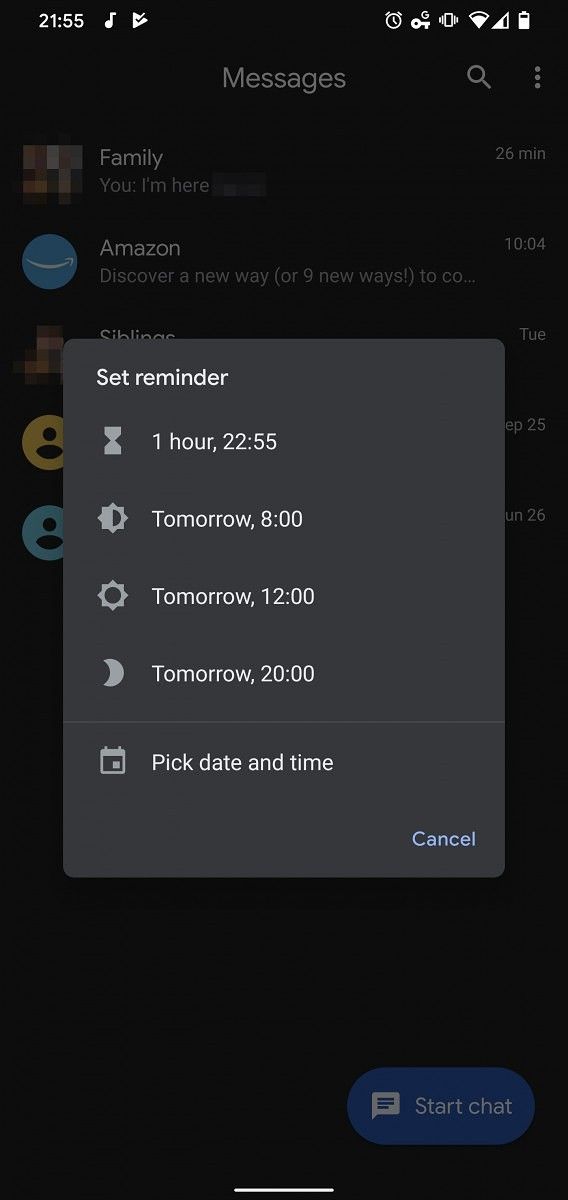
As reported by AndroidPolice, Google Messages version 5.2 has now officially enabled chat reminders for all users. This new feature will let you set a reminder for any chat if you wish to go back to them sometime later. To set a reminder you just need to tap and hold on the chat to reveal the new reminder icon in the top right corner. Tapping on the icon will bring up a new context menu, which will let you set a reminder for one hour, the next morning, noon, or night. The feature also lets you choose a specific date and time for the reminder in case none of the default options work for you.

Google Messages 5.2 reminders Google Messages 5.2 reminders Google Messages 5.2 reminders

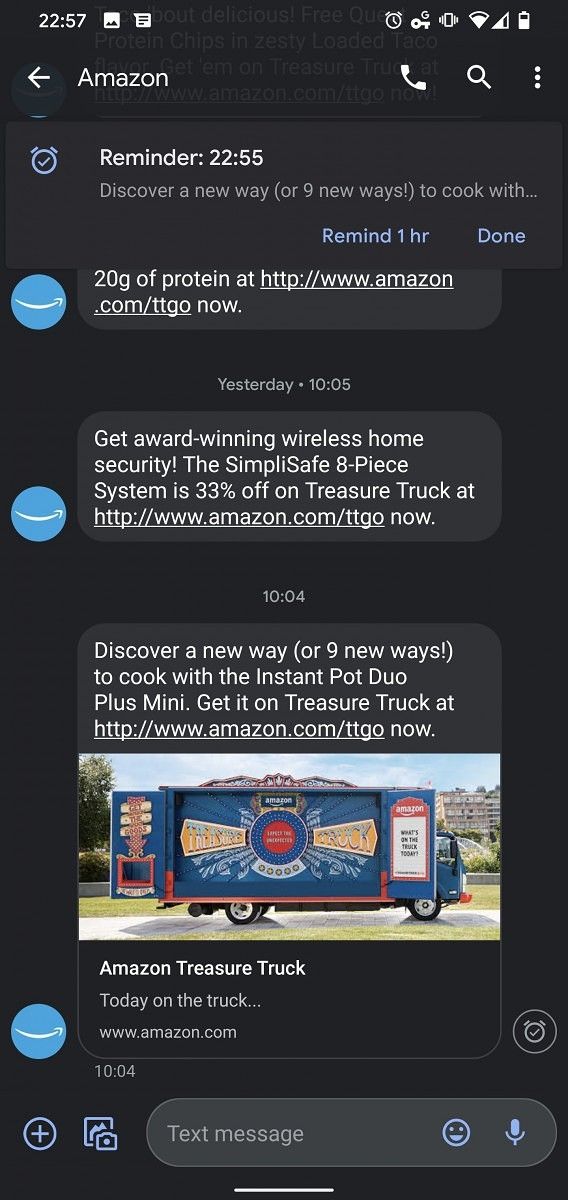
Once the reminder is set, you’ll notice a clock icon to the right of the chat. You can edit or remove the reminder by opening the conversation. When the time is up, you’ll receive a new notification of the last message in the chat. You can either tap to open it or delay it by an hour from the notification itself.

Google Messages 5.2 reminders Google Messages 5.2 reminders Google Messages 5.2 reminders

Additionally, recent tweets from Jane Manchun Wong reveal that Google Messages is also prepping up to add support for Android’s new Bubbles API which is currently in Developer Preview in Android 10. While we’ve previously seen this feature in action, it’s set to go live with Android 11 next year.

Furthermore, Wong also discovered that Google is testing a new Suggested stickers toggle within the Messages settings. When enabled, this feature will bring up intelligent sticker suggestions within a conversation.

As of now, Google Messages 5.2 is slowly rolling out to users via the Play Store. If you have the app installed on your phone already, you should receive the update notification soon. In case you don’t, you can download the latest version available on the Play Store from the link below.

Messages (Free, Google Play) →


Source: Android Police

The post Google Messages 5.2 adds chat reminders and prepares to support bubble notifications and suggested stickers appeared first on xda-developers.


from xda-developers https://ift.tt/2MN6jGR
via IFTTT

Why Google Limits 90Hz on the Pixel 4 to High Brightnesses

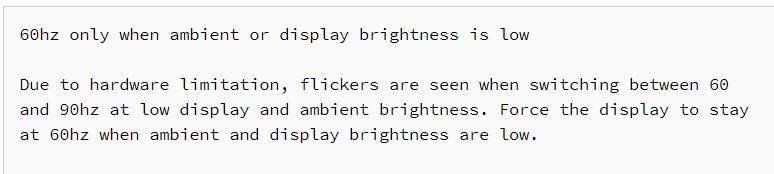
Just recently, a keen Reddit user figured out that the 90Hz “Smooth Display” on the Google Pixel 4 only stays at 90Hz during high brightness levels. Many early Pixel 4 adopters were able to notice that the display did not seem to stick to 90Hz very often, and this system behavior seems to have been the reason why. Naturally, some users were outraged about the matter, and some were curious about why Google would implement one of their products’ biggest features in this peculiar way. Many people believed the reason had to do with battery life, but that didn’t really make any sense — why would 90Hz be limited to higher brightness, when battery consumption is more of an issue? While digging through the updated Android 10 source code release coinciding with Pixel 4 launch day, XDA’s Editor-in-Chief Mishaal Rahman found a commit that explains the official reason why Google enabled this behavior:


Google says the reason they limit 90Hz to higher brightnesses on the Pixel 4 is that screen flicker may be visible when the display and ambient brightness are low, due to hardware limitation. This hardware limitation is related to the panels’ pulse-width modulation (PWM), which is how display brightness is primarily controlled for OLED displays. Google expands that their displays have different gamma curves for different refresh rates (which is true for most displays) and that it is difficult to match the brightness between the two calibrations. Since the display brightness is controlled by PWM, which flickers the screen on-and-off in very fast succession, the different calibration curves could ever-so-slightly alter the PWM “pattern,” and that could introduce a noticeable “flicker” upon switching between 90Hz and 60Hz.

Google’s Smooth Display system keeps the display at 60Hz whenever the screen is idle or displaying animation/video that is 60fps or less, and immediately switches back to 90Hz as soon as you touch the display or an on-screen animation (like a notification) occurs, so it switches between 90Hz and 60Hz very often — a slight flicker upon every switch may indeed become annoying. This seems to only be an issue at lower brightness because that is when the PWM pulses are shorter and more prone to its flicker being noticeable. No flicker issues are present with the “Force 90Hz” option in the developer options since that does not switch between the two refresh rates.

Furthermore, Google claims that human eyes are more sensitive to the flicker in darker viewing environments, which is suggested through some studies. This is the reason why Google allows the display to switch to 90Hz at lower display brightness levels, even though flicker may be visible, because the flicker may not be as apparent in a brighter environment.

Google released a statement to The Verge that the company “constantly assess whether these parameters lead to the best overall user experience,” and that they have “previously planned updates that [they’ll] roll out in the coming weeks that include enabling 90hz in more brightness conditions.” Hopefully, Google can improve the tuning, and perhaps provide an option to completely disable their brightness-conditioned throttling so we can still enjoy some of the battery savings from their “smart” switching.

Google Pixel 4 Forums ||| Google Pixel 4 XL Forums

The post Why Google Limits 90Hz on the Pixel 4 to High Brightnesses appeared first on xda-developers.


from xda-developers https://ift.tt/2okqySU
via IFTTT

Honor 9X Revisited: A New Phone with a Familiar Name [VIDEO]

The Honor 9X and 9X Pro were launched in China earlier this year with impressive specs. Now, the Honor 9X is being launched in Russia and will soon be coming to the Netherlands. However, despite having the same name, this is a different phone altogether. XDA TV‘s TK Bay took a look at this new device with a familiar name.

The Honor 9X is Europe turns out to actually be a rebranded Huawei Enjoy 10 Plus. We’re not sure why Honor decided to re-use the 9X name. There are several key differences between the Chinese 9X and European 9X. For starters, the European model features the Kirin 710F instead of the Kirin 810. The fingerprint scanner is on the back instead of the side. Camera-wise, it’s similar with 48MP, 8MP, and 2MP cameras on the back.

Honor 9X XDA Forums

TK talks about how the “new” Honor 9X still follows through on the promise of most Honor devices. You get more than what you pay for. Despite the odd name choice, this is a solid phone with good specs. Check out TK’s video below to see the full walkthrough.

Specification Honor 9X
Dimensions and Weight 163.5 x 77.3 x 8.8 mm;
196.8g
Display 6.59″ FHD+ (2340x1080p) IPS-LCD;
91% screen-to-body-ratio;
TUV Rheinland-certified
SoC 12nm HiSilicon Kirin 710F
RAM and Storage 4GB + 64GB;
6GB+128GB;
Expandable up to 512GB through dedicated microSD card slot
Battery 4,000 mAh
USB Type-C
Rear Camera 48MP, f/1.8 + 8MP, f/2.4 120-degree ultra-wide + 2MP, f/2.4 depth sensor
Front Camera 16MP, f/2.2
Android Version EMUI 9.1 based on Android 9 Pie

The post Honor 9X Revisited: A New Phone with a Familiar Name [VIDEO] appeared first on xda-developers.


from xda-developers https://ift.tt/2NbgKmv
via IFTTT

[Update: Launching Soon] Epic Games is launching an Android game store in 2019 with 88% revenue share

Update (10/24/19 @ 2:50 PM ET): It’s been a while in the making, but the Epic Games Store seems to finally be coming to Android.

When Fortnite arrived on Android, there was a lot of speculation as to where it would end up. Early reports indicated that it would forego the Google Play Store entirely, which did turn out to be true. Instead, Epic Games melded a partnership with Samsung, offering the application exclusively on the Galaxy Apps store. Following the end of that exclusivity deal, Epic Games allowed users to download Fortnite from their own website. That opened the door to the possibility of finding tons of unofficial APKs online.

Now Epic Games has announced their own application store, with one big attraction: developers will get 88% of revenue generated by their app. This means that the company will only take 12% of all profits. To contrast, the Google Play Store will earn developers 70% of all revenue generated, with 30% going to Google. What’s more, if you’re using Unreal Engine, then the 5% engine royalty will be taken out of Epic’s 12% profit, not your 88%.

Of course, the Epic Games store is being aimed entirely at gamers. It will open up in early 2019 with a set of curated games that run on PC and Mac, with it opening up to Android and other open platforms later on in the year. There are a number of principles that the store will operate on, and all of them are set on establishing a shared space for both developers, content creators, and gamers alike. Creators like YouTubers and Twitch streamers will be able to refer players to buy games on the store, where creators can earn money. To jumpstart the economy, Epic Games will cover the first 5% of creator revenue-sharing for the first 24 months of the service.

If you’re wondering whether you’ll only be allowed to release games running the Unreal Engine, don’t worry. The first set of curated games will run on other engines like Unity. Developers need not worry about advertisements being shown on their game pages either. There will be no store-placed ads or cross-marketing of competing games on your page, and no paid ads in search results.

The company has said that they will reveal more details on December 6th, at The Game Awards in Los Angeles.

Source: Epic Games


Update: Launching Soon

Today, Epic announced that the Fortnite Installer for Android is now the Epic Games app. Right now, it’s still just an installer for Fortnite. Only the name and icon have been changed. However, this is a clear sign that the full Epic Games Store will be launching soon on Android. We will update this post when that happens.

The post [Update: Launching Soon] Epic Games is launching an Android game store in 2019 with 88% revenue share appeared first on xda-developers.


from xda-developers https://ift.tt/2EdLKAn
via IFTTT