LightBlog

mardi 19 novembre 2019

Samsung opens a One UI 2.0 (Android 10) beta for the Galaxy Note 9 in Korea

Samsung kicked off the One UI 2.0 beta program for the Galaxy S10 series early last month. Shortly thereafter, the program was extended to the Galaxy Note 10 series in Korea. While the stable version of the update is yet to land on any of these devices, the company has now added another device to the beta program in its home country.

As per a recent post on Samsung’s community forums, the One UI 2.0 beta program is now available for the Galaxy Note 9. The update brings all of the new features included in Android 10, along with minor improvements to Samsung’s own Android skin. For instance, the caller notification and volume bar have been decreased in size so that they aren’t as intrusive as before. Additionally, Samsung has extended the dark mode to the home screen, ensuring that users don’t face any eye fatigue while using their devices at night. The new dark mode can now also adjust the brightness of images, text, and colors on the display.

On top of that, the One UI 2.0 update includes minor changes to the Smart Lock screen which now automatically adjusts the color of the text on the lock screen. There are some new tools for digital well and the Device Care menu has also received some new features. However, Live Transcribe is one of the coolest new features added to One UI 2.0 which will allow devices to automatically convert speech to text. You can check out our previous coverage of One UI 2.0 for an overview of all the new features making their way to Samsung’s updated Android skin.

The One UI 2.0 beta will be available for the Galaxy Note 9 in Korea this week, while the Galaxy S9 series is expected to join the beta program next week. The beta program will also be extended to a few other regions, including the US, Germany, Spain, France, the UK, and India. However, we don’t have any information on the release timeline for the same.


Source: Samsung Community 

The post Samsung opens a One UI 2.0 (Android 10) beta for the Galaxy Note 9 in Korea appeared first on xda-developers.


from xda-developers https://ift.tt/2XvZv41
via IFTTT

Xiaomi tests a new “Sunlight Mode” display setting in MIUI 11

The maximum display brightness is usually not something most consumers are worried about on a smartphone, but there are cases where the display might not be capable of getting bright enough to be used outdoors. In such cases, many OEMs employ a special “high brightness mode” that is automatically triggered when the ambient lighting is sufficiently bright. In the latest MIUI 11 nightly build for the Redmi K20 Pro/Mi 9T Pro, we found a new setting called “Sunlight Mode.” This new setting will bump the display brightness to its highest level when you’re using your phone in direct sunlight.

Specifically, the description for Sunlight Mode says the feature “[adjusts] brightness to strong ambient light when automatic brightness is off.” We dug into the framework code and found that this new mode activates when the ambient lighting surpasses 12,000 lux for 5 seconds. The display brightness is presumably increased to the maximum level when the mode activates. When the ambient lighting drops below 12,000 lux for 2 seconds, the display brightness is restored to the value it was set to before entering Sunlight Mode.

MIUI 11 Sunlight Mode

Credits: XDA Member kacskrz

This setting doesn’t seem to be tied to any special “high brightness mode,” but it’ll be useful for those of you who keep automatic brightness off. With this mode enabled, you won’t have to manually adjust the brightness to 100% every time you step outside. This feature seems to just use the ambient light sensor, so it’ll likely be available on most Xiaomi devices running MIUI 11.

The post Xiaomi tests a new “Sunlight Mode” display setting in MIUI 11 appeared first on xda-developers.


from xda-developers https://ift.tt/2XxdnuN
via IFTTT

Redmi K30 could have a 120Hz display, side-mounted fingerprint scanner, and Sony’s new 60MP IMX686

Facing increasing competition from brands like Realme, Xiaomi is building mid-range smartphones with flagship-tier hardware. The 48MP quad-camera Redmi K20 and the 108MP penta-camera Mi Note 10 are perfect examples of Xiaomi’s premium mid-range strategy, so when Xiaomi first confirmed the existence of the Redmi K30, we’ve been expecting to hear details confirming it’ll continue this trend. Last month we learned that the upcoming K30 will have dual punch-hole front cameras, a design that was previously exclusive to the Galaxy S10+. Now, we’ve uncovered evidence that indicates the Redmi K30 may have premium features like a 120Hz display refresh rate and Sony’s new IMX686 image sensor. We’ve also learned the device may have a side-mounted fingerprint scanner, too.

Redmi K30 – Code-named “Phoenix?”

Before I dive into any of the details, I want to clarify something really important: None of the features discussed in this article are guaranteed to debut on the Redmi K30. All of the features mentioned in this article—the 120Hz display, side-mounted fingerprint scanner, and Sony IMX686 image sensor—will definitely appear in a Xiaomi smartphone code-named “phoenix” that is likely the Redmi K30. Currently, the only thing linking the Xiaomi device code-named “phoenix” with the Redmi K30 is the side-mounted fingerprint scanner render we found that shows a device with dual punch-hole front cameras—just like the Redmi K30.

Thanks to XDA Member kacskrz for first finding these features in MIUI 11 code. He shared his findings with us and we confirmed that all of the code and files he found are indeed present in the latest MIUI 11 nightly builds.

Side-mounted Fingerprint Scanner

In recent versions of MIUI 11, a new method called “isBroadSideFingerprint” that returns true if the device’s code-name matches either “phoenix” or “picasso.” We don’t know much about “picasso” at the moment, but we’ll follow-up when we learn more on that device. In any case, the string that accompanies this code tells us that “BroadSide” refers to the right-side of the device: “Fingerprint sensor is located on the right edge of your device.” Furthermore, the graphic titled “core_scan_gesture_broadside” shows a generic smartphone with dual hole-punch front cameras and a right-side-mounted fingerprint scanner.
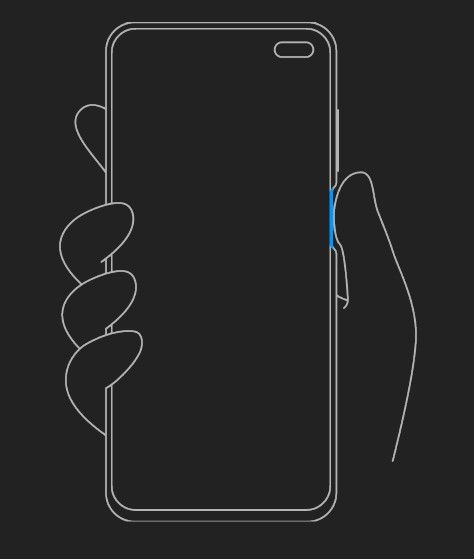
Redmi K30 side-mounted fingerprint scanner

core_scan_gesture_broadside

Since Xiaomi has already confirmed the Redmi K30 has a dual hole-punch design (see the featured image at the top of this article), we’re assuming this graphic was made with the likeness of the Redmi K30 in mind. That isn’t always the case, though. Still, we can expect at least two smartphones from Xiaomi with dual hole-punch designs and side-mounted fingerprint scanners.

120Hz Display Refresh Rate

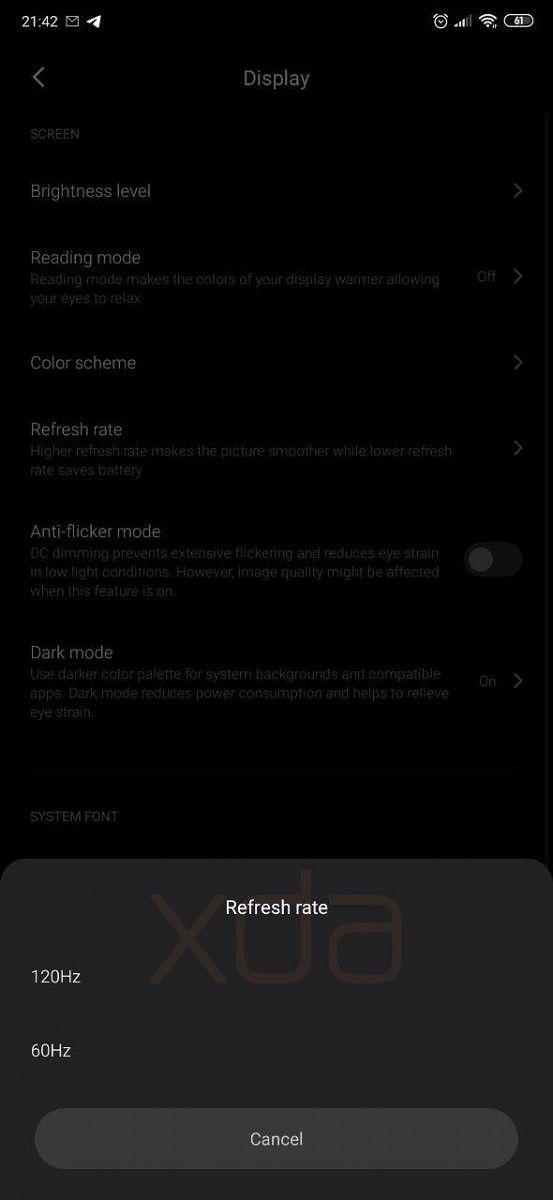
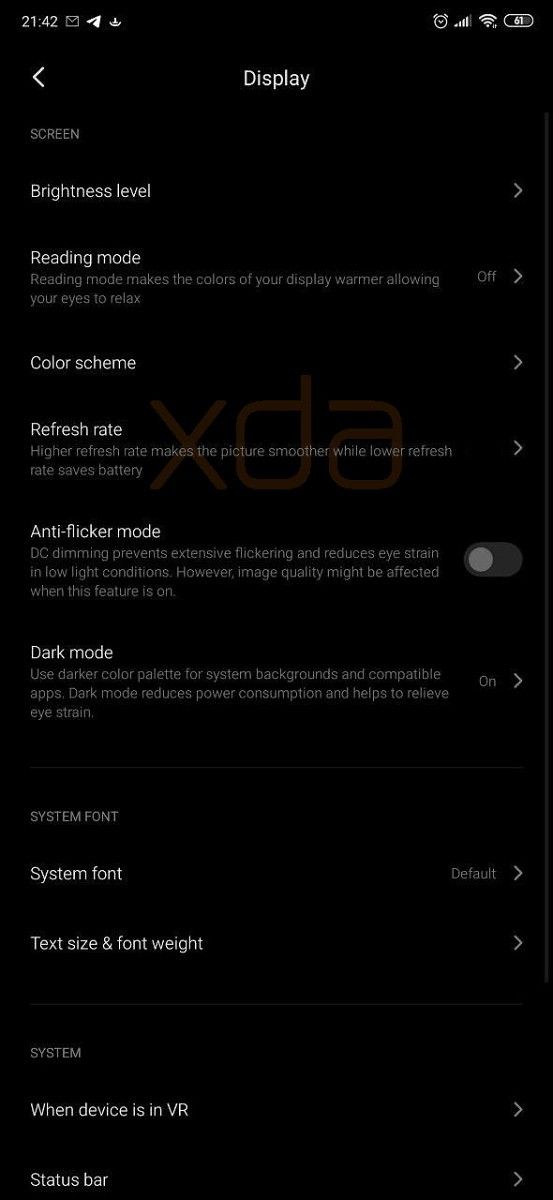
Last month, we discovered that Xiaomi is working on a 120Hz display smartphone. This was based on a hidden setting we found for changing the refresh rate from 60Hz to 120Hz. We forced the setting to show up, but it obviously didn’t work since no Xiaomi device has a high refresh rate display. However, we now know which Xiaomi device will have such a display: the device code-named “phoenix.” A method called “isSuppotHighFrameRate” (yes, there’s a typo, no, it’s not from us) returns true if the device code-named matches “phoenix.” Since the high refresh rate setting is defined to only switch between 60Hz and 120Hz, we expect “phoenix” to have a display with 120Hz refresh rate support.

Sony IMX686 Image Sensor

Earlier this month, Sony posted a teaser on its Weibo page for its upcoming IMX686 image sensor. We were curious why Sony only shared a teaser on Weibo—a Chinese social media site—but we now have a good idea. Xiaomi’s upcoming Redmi K30 could be the first device with the IMX686 and its upcoming launch in China is just a month away. We don’t know many details about the IMX686 other than it’s supposed to be a 60MP image sensor, sadly.

The evidence we found for the device code-named “phoenix” having Sony’s IMX686 comes from a Qualcomm camera library. Within, there are strings for “phoenix_imx686,” “phoenix_s5k3t2,” “phoenix_gc02m1_depth,” and “phoenix_gc02m1_front.” S5K3T2 is a 20MP image sensor from Samsung, though we don’t have much information on the GC02M1 image sensor. We also aren’t sure if these 4 are the only image sensors on the device.

Launch Date

According to IndiaToday, the Redmi K30 will be announced next month. We don’t know for sure if the Redmi K30 will launch in India or Europe, but given past history with the Redmi K20/Mi 9T, we expect it to launch internationally. However, it’s likely there will be differences between the Chinese and international/Indian models because the Chinese Redmi K30 will SA/NSA 5G.

We spotted the “phoenixin” and “picassoin” code-names in MIUI 11, so we know these devices will launch in India. Though, again, we haven’t found definitive proof linking “phoenix” with the Redmi K30, and we still don’t know much about “picasso.” If we learn anything new, we’ll let you know.


Thanks to PNF Software for providing us a license to use JEB Decompiler, a professional-grade reverse engineering tool for Android applications.

The post Redmi K30 could have a 120Hz display, side-mounted fingerprint scanner, and Sony’s new 60MP IMX686 appeared first on xda-developers.


from xda-developers https://ift.tt/2rc1m28
via IFTTT

[Update: AMOLED Black Theme] After Facebook Messenger, Viber now gets a dark mode on Android

Update (11/19/19 @ 5:15 PM ET): Viber adds an AMOLED black theme in the latest update.

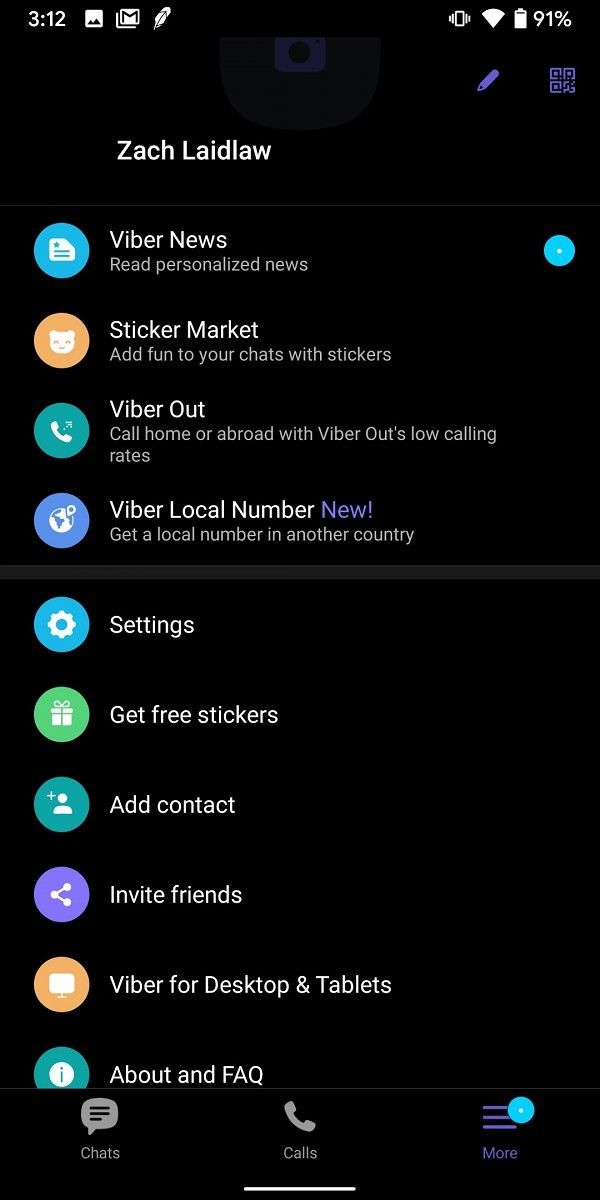
Dark themes have been popping up in tons of apps lately. Google has rolled out dark mode to numerous apps in the last few months. Recently, the long-awaited dark mode for Facebook Messenger arrived as well. The latest app to get this feature is the popular messaging service Viber.

Dark mode has become a highly requested feature for Android users and even Google has finally realized the benefits. Android Q is readying a system-wide dark theme that should work great. Dark themes can save battery life and be easier on your eyes, so we’re always glad to see more dark themes in the Android world.

As a messaging app, users are opening Viber dozens of times a day. So it’s nice to see a dark theme that can potentially save a little juice and your eyes. Viber’s dark theme is a dark charcoal color, not a pure AMOLED black. Download the latest version of the app for Android to try out the new dark mode feature.


Update: AMOLED Black Theme

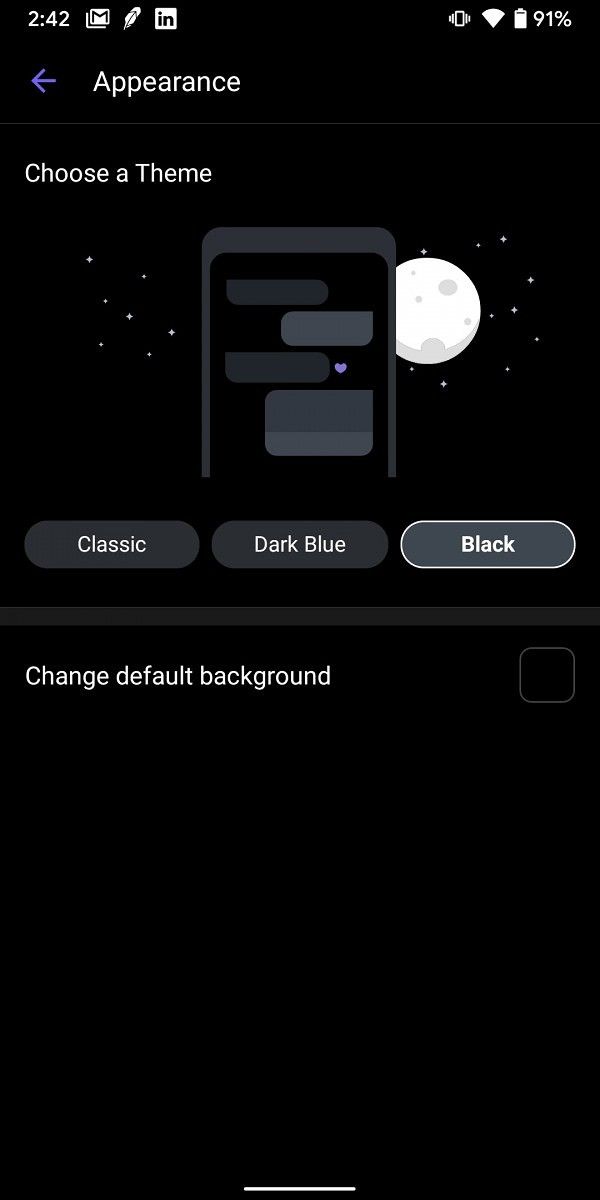
Following Viber’s release of a dark gray Dark Mode back in March, the app now has a true AMOLED black Dark Mode. You can choose between the Dark Mode and Black Mode by going to Settings > Appearance.

Viber Messenger - Messages, Group Chats & Calls (Free+, Google Play) →

Source: Android Police

The post [Update: AMOLED Black Theme] After Facebook Messenger, Viber now gets a dark mode on Android appeared first on xda-developers.


from xda-developers https://ift.tt/2NJt51a
via IFTTT

Google Assistant adds a curated news playlist called “Your News Update”

Google Assistant has had several different methods for reciting news over the years. You can set up a Routine that includes a rundown of news stories or simply ask for news in a specific genre. Google now is introducing a new service for Google Assistant called “Your News Update” that uses an algorithm to tailor news to your interests.

The idea of a curated or algorithmically created “news feed” is certainly not new, but Google is using it to read the news aloud with Google Assistant and Google Home devices. All you have to say is “listen to the news.” Google builds a custom news playlist with information it knows about you and your location. The result is short news updates from Google Assistant’s existing library of sources (ABC, Cheddar, The Associated Press, CNN, etc).

Google talks about how the “audio web” is booming right now with podcasts and so much audio content. This new “Your News Update” feature replaces the old method of telling Google what sources and topics you were interested in and putting it in the order you want to hear. The new feature is much more hands-off, which isn’t always a good thing, but Google is confident in its ability. The good news is users can choose between the old method and the new feature.

“Your New Update” is rolling out first in English in the US and it will expand next year. You can find it in the Google Assistant app under the You tab. Navigate to News and switch your News playlist format.


Source: Google

The post Google Assistant adds a curated news playlist called “Your News Update” appeared first on xda-developers.


from xda-developers https://ift.tt/2XvvJfG
via IFTTT

[Update 2: Available in Stable] Google adds Google Lens as a reverse image search option in Chrome

Update 2 (11/19/19 @ 4:10 PM EST): Reverse image searching through Google Lens is now available in all Google Chrome channels.

Update 1 (8/22/19 @ 8:43 PM EST): Google has merged the commit responsible for showing the “Search with Google Lens” context menu item. A screenshot of this new option is shown in the update below.

What used to only be a tool for Internet sleuths is now fairly mainstream thanks to services like Google Lens. Reverse image searching, or searching the web for the source of an image, is fairly easy to do on Google Images, but Google Lens takes things a step further by letting you isolate parts of an image or recognize text, barcodes, and other key items in an image. Lens is available through a shortcut in the Google Assistant and Google Photos apps, but it’s also available through Google Images on the web if you’re browsing on mobile. Now, it seems that Google will be adding a shortcut to Lens in Google Chrome for Android.

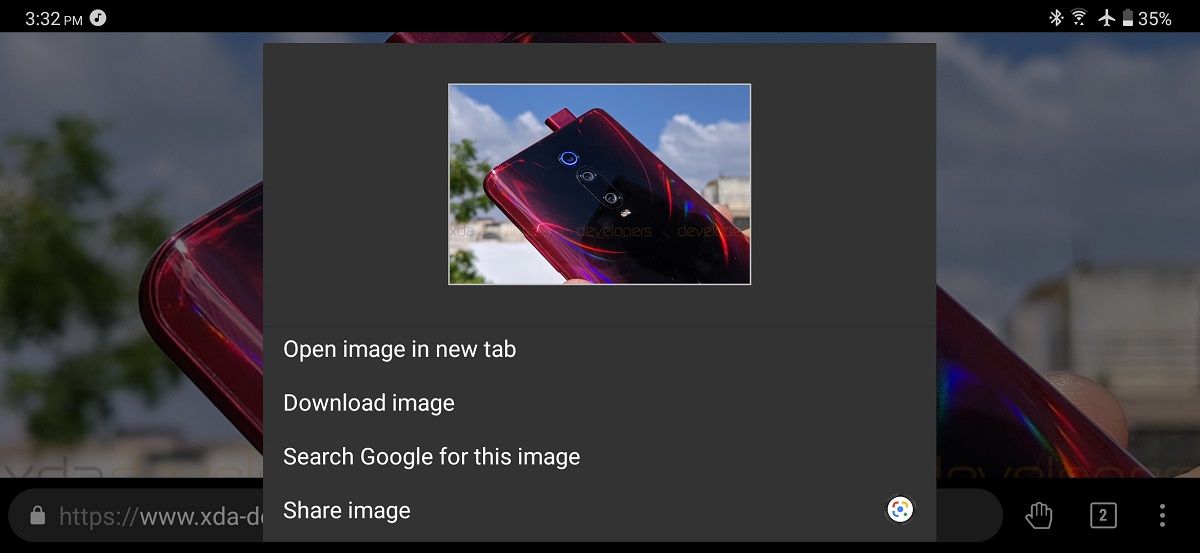
The other day, I spotted a commit in the Chromium Gerrit titled “Add support for intenting to Google Lens from the context menu.” Once merged, opening the context menu for any image in Google Chrome for Android will show a “Search with Google Lens” option in place of “Search Google for this image.” Tapping on the new option will send an intent with the selected image to Lens. You can do this now by tapping on “share image” and then selecting Lens in the share sheet, but this new feature will make the Lens option more prominent so you can reserve the share button for other actions.

Google Chrome image context menu

Google Chrome’s context menu for images shown in Kiwi Browser, a Chromium-based browser.

Once the commit is merged, we’ll be able to see this feature in action in the latest Chrome Canary builds.

Update 1: “Search with Google Lens” Now Available

The commit was merged tonight, so I grabbed a screenshot of the updated context menu with the new option. Here’s what it looks like.

Search with Google LensTo enable, simply search for “Lens” in chrome://flags once the flag becomes available in your particular Chrome channel. Currently, it’s only available in Chromium nightly builds.


Update 2: Available in Stable

Google Lens for Chrome is finally live in all stable versions. The feature is not enabled by default, however, so you’ll have to toggle a flag to get it. The flag is called “Context Menu Search with Google Lens.” Go to chrome://flags in your browser and search for the flag. When enabled, you’ll see an option to “Search with Google Lens” when long-pressing an image. Before, Google would search only for that identical image, but with Lens, it’s much more intelligent.

Via: Android Police

The post [Update 2: Available in Stable] Google adds Google Lens as a reverse image search option in Chrome appeared first on xda-developers.


from xda-developers https://ift.tt/2P6eIbE
via IFTTT

[Update: List of Topics] Twitter update lets you follow Topics you’re interested in, not just People

Update (11/19/19 @ 3:45 PM ET): Twitter will soon let you browse a list of topics you can follow.

Twitter has a strong gravitational pull and you can’t just occasionally browse, check your notifications, and move over. This is because of the dynamic and instant nature of Twitter and while this can be both engaging and informative, it can also get overwhelming. The astounding flow of information (as well as the banter and the trolling) on the platform can often drown its purpose of always being up-to-date. In an attempt to remedy this, Twitter is announcing a new feature called “Topics” that should help users follow the trends or discussions they are interested in besides following just people.

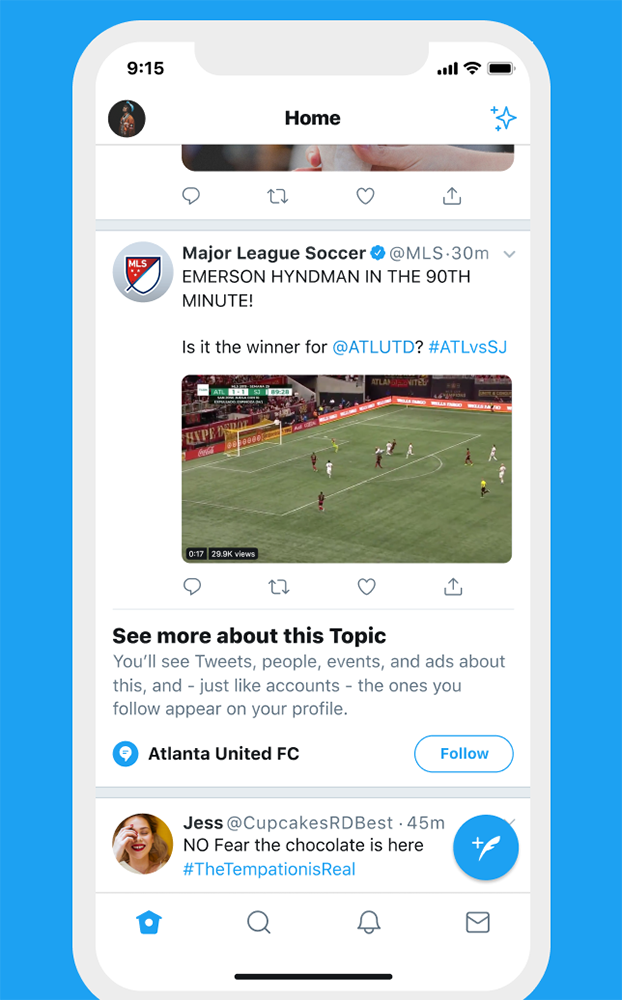
Twitter will automatically recommend you to follow topics based on your search and interaction patterns on Twitter. When you follow a topic on Twitter, you’ll be able to see tweets from other accounts even if you don’t follow them. For instance, you follow a particular sports team in Topics, you will start seeing tweets from their official handles, their fans, as well as other discussions about the team. The idea behind is to let you see the most “relevant and interesting Tweets” and in the “right amount.

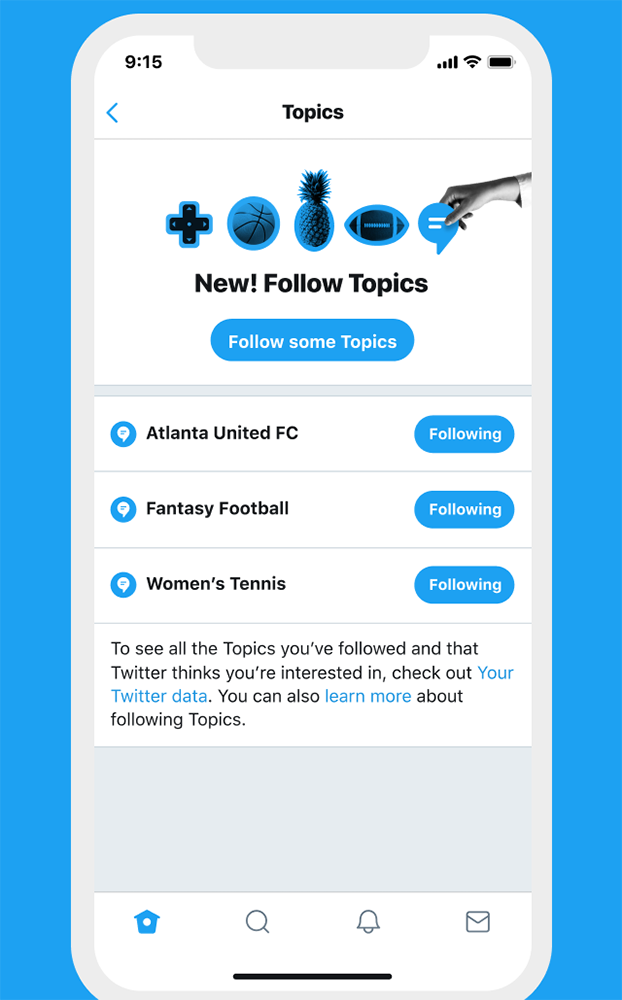
When you search for anything, you’ll see a suggestion to keep a track of that particular topic by pressing the Follow button. You can manage the Topics you follow by heading to the dedicated menu in Twitter’s Settings.

The feature is similar to the ability to follow hashtags on Instagram but much more refined. Twitter has not detailed how they will make sure to serve you the “right amount” of tweets related to the topic and if there’s any criteria basis which they will choose the right tweets. The feature will be coming to Twitter in the coming months but a specific date hasn’t been promised.

Meanwhile, Twitter 8.22.0-beta.01 is already rolling via the Google Play Store and the feature may be available for the beta testers before users on the stable channel can enjoy it.

twitter topics

One of my friends shared a screenshot of the Topics icon showing up on their Twitter feed (for Android app 8.23.0-alpha.02) here in India but the Follow button in search results is still missing. We cannot say with confidence if this whether this is because of the region but will update the article once we know better.

Thanks to Anmol Sachdeva for the screenshot!

Twitter (Free, Google Play) →

Source: Twitter Blog


Update: List of Topics

Rob Bishop from Twitter confirmed that there will be a way to browse a list of topics in the Twitter app. You won’t have to use the Search feature to bring up the topics you’re following. Tweets about these topics will still appear in the Explore section as well. There’s no timeline on when this feature will roll out, but it’s currently in testing.

The post [Update: List of Topics] Twitter update lets you follow Topics you’re interested in, not just People appeared first on xda-developers.


from xda-developers https://ift.tt/34VPyiN
via IFTTT