LightBlog

mercredi 20 novembre 2019

Google Photos 4.32 tests Manual Face Tagging and account switching gesture

Earlier this year in July, Google Photos product lead, David Lieb, revealed a couple of upcoming features for the app. Among these was the ability to add manual face tags, but Lieb didn’t confirm when the feature would be released. We recently discovered strings of code hinting towards manual face tagging in a teardown of Google Photos v4.30. And with the latest update, the feature can now be manually triggered within the app.

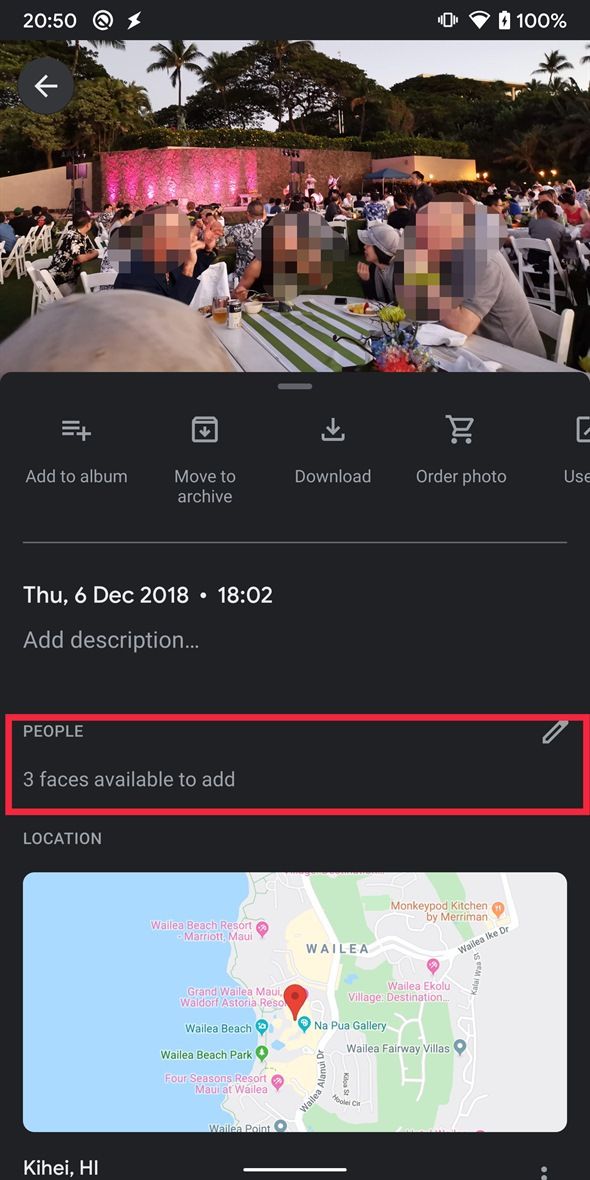
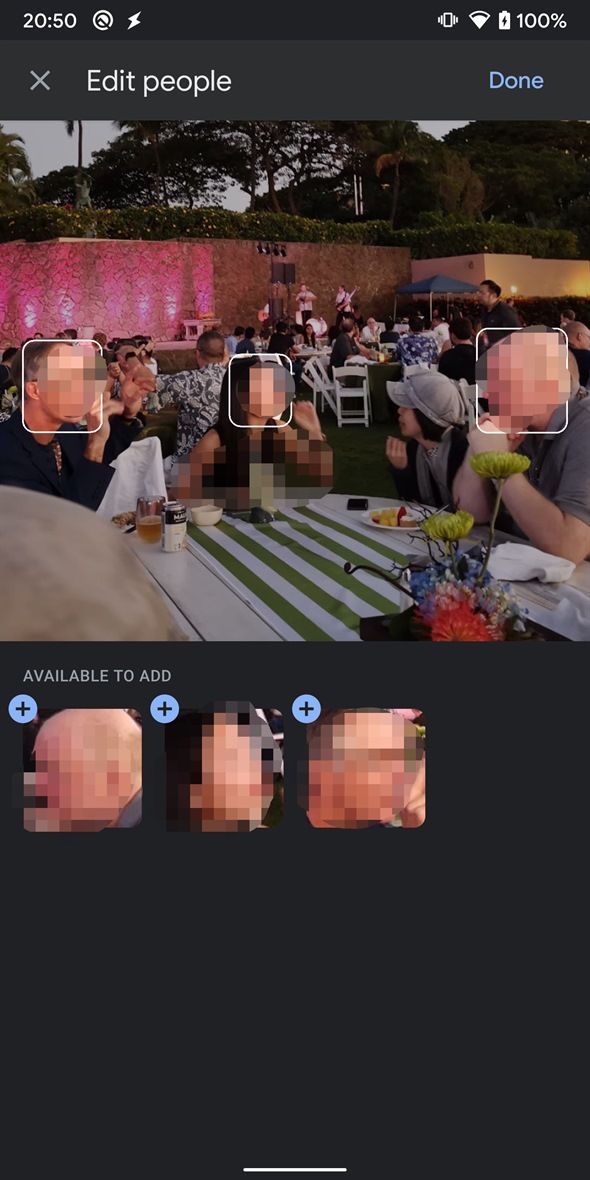
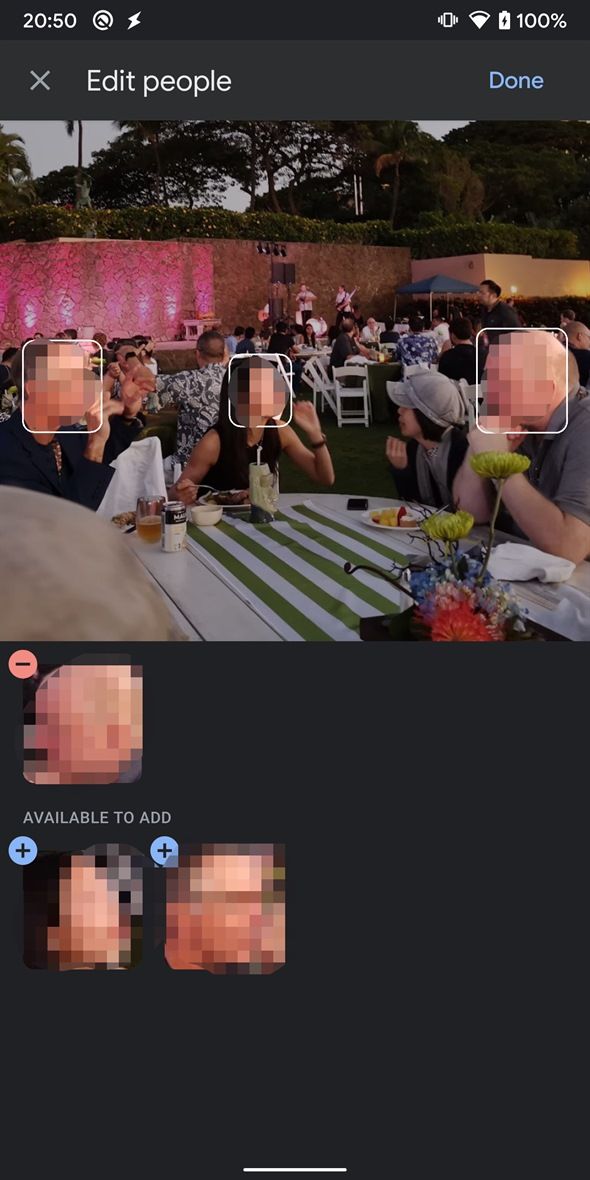
Our Editor-in-Chief Mishaal Rahman has successfully managed to activate manual face tagging in version 4.32 of Google Photos and we now have a clear look at the functionality it offers. As seen in the screenshots below, the feature will appear in the information section underneath photos in which the app has identified faces but failed to tag them automatically. Tapping on it will redirect you to a new edit window in which you’ll see all the faces that the app has identified.

Google Photos Manual face tagging Google Photos Manual face tagging

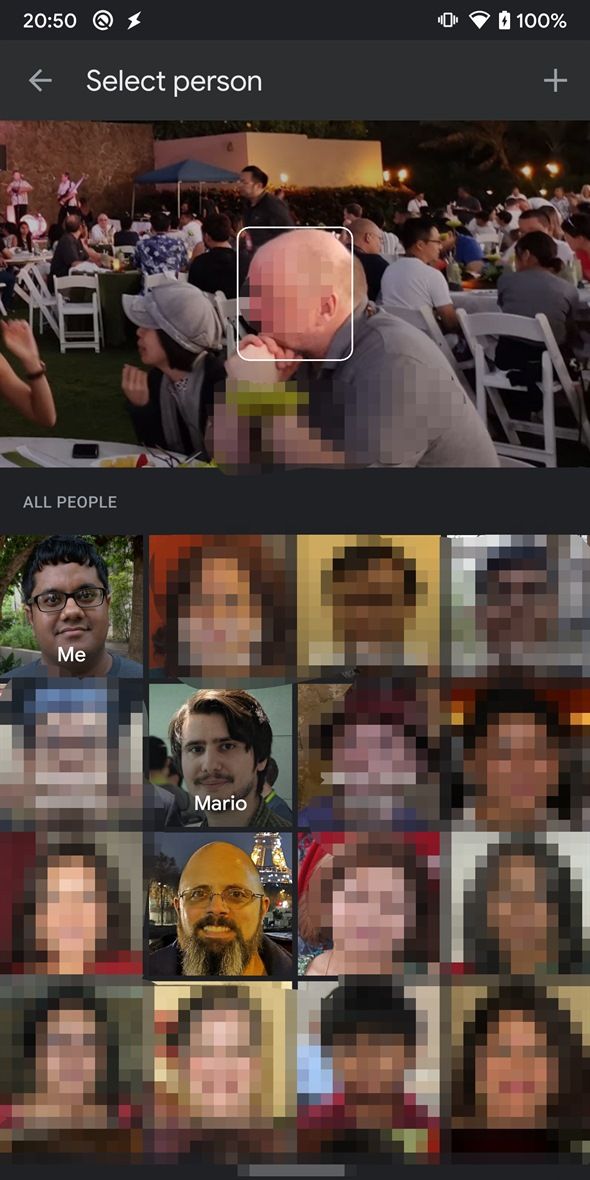
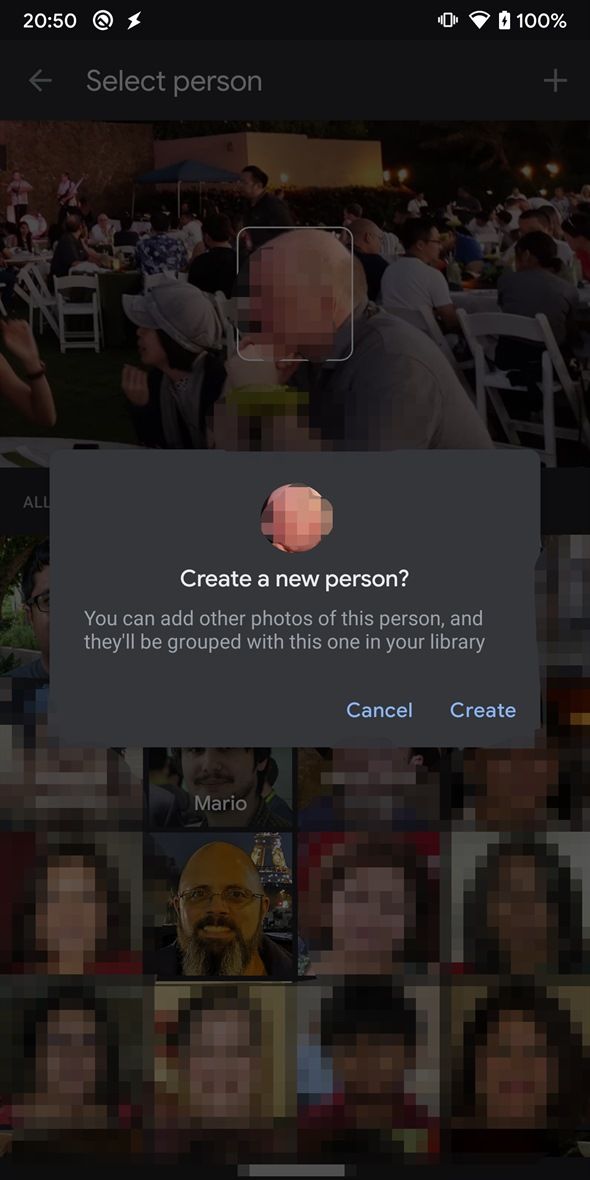
To tag a new person, you just need to tap on their face in the ‘Available to add’ section and select the person from a list in the following window. In case the person isn’t already in your Google Photos library, you’ll also get the option to add them to your library. The app will then automatically tag other photos of the person and add them to a group. In case you make a mistake, the app will also give you the option to remove the tag.

Manual face tagging Manual face tagging Manual face tagging

Along with the manual face tagging feature, v4.32 of Google Photos also brings the new account switcher UI that was previously discovered by renowned reverse engineer Jane Manchun Wong. The feature works exactly like the account switcher UI found on Gmail or Google Drive and allows you to swipe down on your profile picture in the top right corner to switch accounts.

Google Photos Account switcher UI Google Photos Account switcher UI

Tapping on your profile picture opens up a new pop-up menu in which you’ll be able to switch accounts, manage your Google Account, and check the status of the Google Photos backup. It’s worth noting that these features aren’t live in the latest update and we currently have no information on their release timeline.

The post Google Photos 4.32 tests Manual Face Tagging and account switching gesture appeared first on xda-developers.


from xda-developers https://ift.tt/2OafqCh
via IFTTT

Huawei Ability Gallery is Huawei’s comprehensive service distribution platform

Back in May 2019, the US government put Huawei on the entity list, forcing US companies to cease business with the Chinese giant. Consequently, Google had to withdraw its business and support from one of its key Android partners, leaving Huawei with the monumental task of building a Google-less world for its users. Many OEMs have tried to do so before, but most such attempts were in the face of prosperity when failure was still an option. Huawei’s journey on this end began during favorable times when it still could miss and slip, but the situation has devolved politically over the past few months. Now, Huawei cannot fold, and the company is betting all of its chips on its own homegrown alternatives. The Huawei AppGallery offered itself as an alternative to the Google Play Store, providing both developers and users a way to distribute and procure apps on Huawei and Honor devices. In a similar fashion, the HMS Core acts as an alternate for GMS Core and Google Play Services, providing developers with the needed APIs to build powerful apps and deliver functionality that users have grown accustomed to. The next leg in Huawei’s software ecosystem strategy is the Huawei Ability Gallery – a service that seeks to extend contextual support (suggested actions based on current information) from developers to users, and Huawei Assistant — the service that presents these endpoints to the users.

Huawei Ability Gallery and Huawei Assistant are akin to Google Feed’s Discover feature and Google Assistant, but slightly more versatile in its approach. A more apt comparison for Huawei Assistant and its Today pane will be Xiaomi’s App Vault, and to a (much) lesser degree of versatility, the OnePlus Shelf.

Huawei’s vision behind Ability Gallery is the fact that several average consumers and technologically-inept users do not exactly have the requisite knowledge or the motivation to sift through hundreds of apps and recommendations within an app store. They are only aware of their present needs but are unaware of the most preferred or most efficient mediums for the fulfillment of those needs. Experienced users who know how to search, install and use apps will have an ideal smartphone experience as they know their way around the environment; while average and technologically-inept consumers will struggle within such environments, and will end up with a sub-par experience. For example, suppose a user wants to travel from one country to another — in this instance, they would need to know, find, download and install, and learn to use several different apps to cover their needs such as flight bookings, hotel bookings, restaurant recommendations, last-mile travel, weather, local news, etc. This chain of tasks will be a cakewalk for experienced users but will be difficult to execute for inexperienced users.

Huawei Assistant, through the Huawei Ability Gallery, thus serves the needs of those who do not have enough experience with smartphones, by pulling and aggregating the content and services of apps, and presenting them to the end-user in a contextual manner. Assistant provides a unified interface for interaction with these services which are combined into a single visual stream on the basis of recommendations powered by AI (and not merely attempting to prioritize sponsored listings). The Ability Gallery can also display content without needing to install the app in several instances, which is a plus for the users who do not have the inclination to actively monitor the apps they install and retain on their devices.

Huawei Assistant and Huawei Ability Gallery ultimately aim to make an app store unnecessary for these inexperienced users. Of course, these co-exist alongside the Huawei AppGallery, Huawei’s app store, so users who are experienced can take the route they prefer as both the pathways are valid choices.


Huawei Ability Gallery

Huawei defines Huawei Ability Gallery as the link that bridges a user’s intention and needs with a service. Huawei Ability Gallery is thus a platform for developers to distribute specific portions of their service and its functionality through the Huawei Assistant, AI Lens, or HiVoice, as the case may be depending on the user’s form of interaction. Developers have to submit their content and service to Huawei Ability Gallery, who will then use Assistant/AI Lens/HiVoice as a unified distribution service to provide the content and service to various Huawei terminal devices and interfaces. This singular pipeline makes it convenient for developers to submit all types of content at once for targeted distribution across different scenarios. Huawei gives an example of a weather service app — the developer can provide weather information services, such as daily weather and AQI, and register these services as abilities on the Huawei Ability Gallery. Huawei will then display this information to users through Assistant, AI Lens, or HiVoice, when the user needs and requests for weather info, or when the context demands it. The code for abilities rests within the app itself, but the developer does need to register the ability with Huawei in order to inform them of its existence and allow for integration. If the app developer wants users to be redirected to their app or to their Quick App, the app or Quick App needs to be submitted to Huawei AppGallery. If the app developer wants users to be redirected to an HTML5 page, then only a link to the specific page is needed, and no submissions need to be made to the Huawei AppGallery.

While the idea behind Ability Gallery is to service users by providing them contextual action recommendations through Assistant, the platform also serves developers by giving them multiple mediums to bring their app and service to the surface, but through a single pipeline. Having another medium to surface the developer’s app also boosts discoverability, in turn affecting metrics of user retention and daily and monthly active users; meanwhile, the singular pipeline reduces the time and effort involved in the whole process, essentially saving money. User interaction is no longer restricted to just within the app, as there are several different touchpoints that open up access to the app’s services.

Huawei Ability Gallery – Ability Categories

Huawei Ability Gallery includes three broad types of abilities: App ability, Card ability, and Content ability.


App Ability

This type of ability is presented as an icon. This can either serve as a quick shortcut to the app or be linked to an activity within the app, or even to an HTML5 page. In the example below, the shortcuts presented within the Huawei Assistant on the homescreen link directly to the app activity, making it easy for a user to quickly book a taxi.

Huawei Ability Gallery - App Ability

Content Ability

In this type of ability, the developer only provides data, while Huawei handles the presentation of this data. This presentation can take the form of cards or text on Huawei Assistant or be voice dictated through HiVoice.

Huawei Ability Gallery - Content Ability

Developers interested in integrating their content through this ability need to provide service or content APIs to Huawei when registering the ability, based on Huawei’s API specifications. Once the developer offers a server address to Huawei to extract data from, Huawei accesses this data and presents it to the user in a suitable format.

Card Ability

Card ability is said to be a complete information service that is integrated as stand-alone smart cards which are then distributed to various Huawei terminal devices. Users can check these cards to view the information that the service provides and interact with them through touch to open the corresponding app.


Huawei Ability Gallery - Card Ability

For this type of ability, developers need to develop smart cards in the IDE tool provided by Huawei, keeping in mind data processing and display logic as well. This ability would make sense when the developer needs more control of how the data is displayed, but it comes with the drawback of taking away voice dictation for when the user wants it. Obviously, whether you choose card ability or content ability depends on how you want to integrate your service.


Huawei Ability Gallery – Touchpoints

While ability refers to the bits and pieces of the app that reside outside of the app, touchpoint refers to the various surface areas where these abilities are brought to the foreground for user interaction. Developing an ability would be pointless if the user did not have convenient means of accessing them, as the whole game for an app developer is to drive user engagement, grow their brand value and increase revenue through effective monetization — so if there are no rewards, why bother with the effort in the first place? Huawei answers this question by introducing a whole host of touchpoints throughout its ecosystem.

Instant Access

Instant Access is the first row visible on Huawei Assistant. Instant access can be considered a shortcut bar for quickly taking actions. According to Huawei, it displays automatic recommendations based on user habits and scenarios, bringing in “contextuality” to the situation. Clicking on an icon in Instant Access will redirect the user directly to the app’s call for action page, so there’s a shorter app navigation flow for the user. Users do need to have the app installed on their phone, or the app should be accessible through an installation-free Quick App.

Smartcare

Smartcare is a touchpoint on Huawei Assistant, and it appears when its preconditions are met. These pre-conditions can relate to time, location and event. For instance, if a user has booked a taxi, Smartcare can display ETA or reminder cards before the cab arrives. User interaction is required to enable a card, but the system does present suggestions contextually — for example, a sports data card could be suggested to the user to be activated during a popular ongoing Sports tournament in the region. Once the user consents, the card is activated. If the card relies on an app instead of a Quick App or HTML5 page and the app exists on the device, users are directed to the app; otherwise, the user is redirected to download the app from Huawei AppGallery.

Global Search

Global search is a touchpoint that can display app, card and content abilities. As the name would imply, this touchpoint surfaces when the user attempts to search, either from Huawei Assistant or from the downward swipe on the homescreen. Abilities matching the entered keyword are displayed in the search result. This is different from simply searching for an app, as the presence of abilities allows the user to glean more information and even take an action without leaving the results page.

For example, if a user searches for “London to Paris”, a matching card provided by an app developer will be displayed in the result. This result contains more information than just a simple app shortcut, and it smartly displays flight suggestions instead of say, directions. All of this is similar to the functionality that Google Now provides, but is being provided to phones that currently do not have access to GMS.

HiVoice

HiVoice, Huawei’s Voice Assistant, is also a touchpoint that can display App and Content Abilities. While HiVoice does focus on being a voice assistant, it also can display content in addition to reading them out. If a user asks HiVoice for restaurant recommendations in their geographical vicinity, HiVoice can display content registered as ability, and the developers can incorporate direct bookings or redirect users to the app after touching the content card.

AI Lens

AI Lens, Huawei’s object recognition feature that is similar to Google Lens, is also a touchpoint that can display App, Content, and Card Abilities. These abilities can be displayed as results when users search for relevant objects.


Huawei Ability Gallery – Integration

Huawei notes that integrating an ability with Huawei Assistant is a four-step plan:

  1. Defining and developing the ability:
    1. Defining the ability
    2. Choosing the ability categories for integration
    3. Developing the ability
  2. Registering the ability:
    1. Register service information
    2. Configure how the service will be provided
  3. Testing the ability:
    1. Release the service for testing
    2. Jointly test the service and ability with Huawei
  4. Releasing the ability:
    1. Release the ability on Huawei Ability Gallery
    2. The service is subsequently launched on touchpoints

Concluding Note

On the surface, Huawei Ability Gallery does not appear to be a fundamentally vital part of the experience, as much as HMS Core and AppGallery are, and that is true. The latter two form the basic pillars that Huawei needs to deliver a practical smartphone experience, while Ability Gallery builds upon these pillars to enhance the experience on EMUI — taking it away will dampen the experience but not destroy it. So the focus of this article was both: to enlighten the inexperienced user on what they could do on EMUI, and also to enlighten developers who are considering a venture into the Huawei ecosystem on how they can leverage existing tools to increase their business. If you are going to adapt to Huawei’s vision, you may as well do it properly.

For more information on Huawei Ability Gallery, check out Huawei’s Developer Website.


We thank Huawei for sponsoring XDA. Huawei had minimal involvement in the creation of or the content within this article. In particular, they were consulted for fact-checking. Any opinions expressed are those of the author. Our sponsors help us pay for the many costs associated with running XDA, including servers, developers, writers, and more. While you may see sponsored content alongside Portal content, all of it will be clearly labelled as such. The XDA Portal team will not compromise journalistic integrity by accepting money to write favorably about a company. Our opinion cannot be bought. Sponsored content, advertising, and the XDA Depot are managed by our marketing director and not the editorial team.

The post Huawei Ability Gallery is Huawei’s comprehensive service distribution platform appeared first on xda-developers.


from xda-developers https://ift.tt/2QCwTF1
via IFTTT

[Update 5: Licenses Being Given] Huawei will be allowed to buy from US suppliers again

Update 5 (11/20/19 @ 4:50 PM ET): US Commerce Department confirms some companies are being given licenses to do business with Huawei.

Update 4 (8/28/19 @ 10:10 AM ET): The US Commerce Department received over 130 requests to continue working with Huawei after the ban.

Update 3 (8/10/19 @ 2:30 AM ET): US Government is holding off on making a decision on the licenses for U.S. companies to restart business with Huawei as China retaliated with its own measures.

Update 2 (7/4/19 @ 7:20 AM ET): US Government Staff has been told to continue treating Huawei as “blacklisted”.

Update 1 (7/1/19 @ 3:28 PM ET): This should come as no surprise, but President Trump’s remarks needed some clarification by members of his administration. More details below.

The latest development in the Huawei trade ban saga comes directly from the ongoing G20 summit wherein US President Donald Trump announced that “U.S. companies can sell their equipment to Huawei.” This is a major reprieve to Huawei, which was suffering from the political tensions between the USA and China.

U.S. companies can sell their equipment to Huawei. We’re talking about equipment where there’s no great national security problem with it. I said that’s O.K., that we will keep selling that product, these are American companies that make these products. That’s very complex, by the way. I’ve agreed to allow them to continue to sell that product so that American companies will continue.

Mr. Donald Trump, President, USA

Donald Trump, President of the USA, and Xi Jinping, President of China, agreed to a cease-fire in the trade battle between the two countries. As negotiations are expected to resume on this political topic, Mr. Trump says he will grant Huawei some relief by allowing US-based companies to resume sales. The US administration is now expected to hold meetings on how to deal with Huawei and its presence on the “entity list,” as the relief does not explicitly remove Huawei from the said list. The announcement made during the summit does not go into any particular details with the scope of relief, so further details are awaited on this end.

Nonetheless, this announcement comes as a major relief for all stakeholders. After the first announcement of the executive order, US-based companies like Google, Qualcomm, and many others had suspended business with Huawei, only to resume it in a limited form after the Chinese company was granted a “temporary general license.” Even UK-based company ARM was affected by the trade restrictions. Because of the uncertainty around Huawei and its smartphones, the company was expecting its international smartphone sales to drop by as much as 40-60%. Devices like the Honor 20 Pro were one of the first victims of the trade ban, as the availability of the phone was no longer certain. Now, with this relief in hand, we expect companies to resume their business operations with Huawei and Honor.

Source: Bloomberg (Paywall), South China Morning Post

This article was updated at 3:25 PM ET to reflect that ARM is based in the UK.


Update 1: Only Widely Available Goods

Per Reuters, Larry Kudlow, the National Economic Council chairman, told Fox News Sunday that President Donald Trump’s decision to allow sales of U.S. technology supplies to Huawei only applies to products that are readily available around the world.

“All that is going to happen is Commerce will grant some additional licenses where there is a general availability…[U.S. microfirm chips in particular] are selling products that are widely available from other countries…This [is] not a general amnestry…The national security concerns remain paramount.” – Larry Kudlow, chairman of the National Economic Council

The details of this agreement are still vague and not final, so we’ll have to wait and see exactly what firms will no longer be restricted from selling products to Huawei. Two Senate Republicans, Marco Rubio and Lindsay Graham, are worried about this latest concession to Huawei, with the former proposing legislation to keep the restrictions in place and the latter warning of “a lot of pushback.” Democrat Chuck Schumer also expressed his disapproval with the trade talks. With bipartisan support for keeping American companies away from doing business with Huawei, it seems that the Chinese giant’s struggles are not over yet.


Update 2: US Government Staff told to treat Huawei as blacklisted only

As per another Reuters report, the US government staff has been told to treat Huawei as blacklisted, effectively nullifying the President’s word.

Mr. John Sonderman, Deputy Director of the Office of Export Enforcement within the Commerce Department’s Bureau of Industry and Security (BIS), sent an email to the enforcement staff clarifying how agents should approach license requests by firms seeking approval to sell to Huawei. According to the email, all such applications should be considered on merit and flagged with language noting that “This party is on the Entity List. Evaluate the associated license review policy under part 744”, citing regulations that include the Entity List and the “presumption of denial” licensing policy that is applied to blacklisted companies.

A presumption of denial implies strict review and most licenses reviewed under it are not approved. The email is the only guidance that enforcement officials have received after Trump’s announcement, and it does not improve Huawei’s practical position.


Update 3: US Government holds off on Huawei license decision

The US Government is holding off on deciding on the licenses to be issued to US companies to resume their business with Huawei. The Department of Commerce has received 50 requests from US companies for the special license that they need in order to supply goods to Huawei, but the government is unwilling to decide just yet as China has retaliated with a decision to not purchase US farming goods. The government maintains that the promise to allow reprieve to Huawei was contingent on China beefing up its purchases from American farmers. And as that has not happened, there was no reprieve. The trade war between USA and China does not appear to be de-escalating as the countries are acting and reacting to each other in politically inclined ways that go beyond the scope of our coverage as a technology portal.

In connected news, Huawei also announced its own first-party operating system called Harmony OS. The company still maintains that Harmony OS is not intended to compete against Android, and that Android remains the first choice for Huawei and Honor smartphones and tablets. Harmony OS is intended to be a “Plan B”, which will be used if and only if Plan Android is no longer realizable. The upcoming Huawei Mate 30 series has not received its Google Play Services certification yet because of the trade ban; so unless the trade ban situation is rectified, we might just see Huawei being forced to use the alternative.

Source: Bloomberg


Update 4: Over 130 License Requests

Reuters is reporting that the US Commerce Department received over 130 applications from companies for licenses to sell to Huawei. This is after the department postponed the trade ban for another 90 days. In July, US Commerce Secretary Wilbur Ross disclosed receiving only around 50 applications. No licenses have been granted yet as the Commerce Department is unclear on what to do. “Nobody in the executive branch knows what (Trump) wants and they’re all afraid to make a decision without knowing that,” said William Reinsch, a former Commerce Department official.


Update 5: Licenses Being Given

Back in August, in the previous update, we wrote about the report of the US Commerce Department receiving over 130 applications from companies to sell to Huawei. The US is now approving some of these licenses for tech sales to Huawei. The Commerce Department also notified other companies that it intends to deny their applications, in which case they have 20 days to appeal. We don’t know which companies were approved. A big one is Google, and if they are one of the approved companies, they will be able to certify Android devices with GMS, such as the Huawei Mate 30.

Source: Washington Post

The post [Update 5: Licenses Being Given] Huawei will be allowed to buy from US suppliers again appeared first on xda-developers.


from xda-developers https://ift.tt/2KLOOXs
via IFTTT

Galaxy S10 Lite confirmed via Samsung’s FCC filing

Back in October, we covered a rumor that claimed Samsung was working on a more affordable phone called the Galaxy S10 Lite. This was in addition to a rumored Galaxy Note 10 Lite. Thanks to a new FCC filing from Samsung, we can confirm the existence of this mysterious device.

The FCC filing is for a phone called “Galaxy S10 Lite” with model number SM-G770F. This is the same model number that was mentioned in the previous rumor. The FCC filing doesn’t include anything else of value, but we did hear some rumored specifications last time. It’s said to have the Snapdragon 855 SoC, 8GB of RAM, 128GB of storage, 48 _ 12 + 5MP cameras, a 32MP front camera, 4,500 mAh battery, 45W charging, and a 6.7-inch Full HD+ display.

The big question about this device is what exactly makes it a “Lite” Galaxy S10. Samsung already released the Galaxy S10e, which had a 5.8-inch display. A 6.7-inch display would be the same size as the Galaxy S10 5G. So it doesn’t seem to be “Lite” in terms of size, and a Snapdragon 855 and 8GB of RAM isn’t “Lite” on performance either. The specifications sound like a flagship phone that would easily compete with the other S10 devices.

Samsung will have new devices to show off in February. We’ll have to wait and see what happens with this Galaxy S10 Lite.

Thanks to XDA Senior Member cstark27 for the tip!

The post Galaxy S10 Lite confirmed via Samsung’s FCC filing appeared first on xda-developers.


from xda-developers https://ift.tt/35d7Lsu
via IFTTT

One UI 2.0 beta hints at future Samsung Galaxy phone with a 120Hz display

Smartphones with high refresh rate displays are becoming more of a norm. The OnePlus 7 series features 90Hz displays and the Pixel 4 does as well, though it’s not without controversy. Meanwhile, Razer is creating phones with 120Hz displays and it looks like a future Samsung Galaxy phone will do the same.

Samsung is no stranger to high-end display technology, of course. However, they’ve never released a phone with a 90Hz display, let alone 120Hz. The latest One UI 2.0 Android 10 beta for the Samsung Galaxy Note 9 hints at a future phone that will have a 120Hz display. There’s an option in the display settings to toggle between 60Hz and 120Hz. Obviously, the Galaxy Note 9’s display is not able to do the high refresh rate, but this could prepare for a future phone that will.

The screenshots from Ice Universe are in Chinese, but someone else replied with the English version. The two options are called “Best Display” and “Save Battery.” The Best Display is 120Hz and it says “Always use 120Hz for the smoothest possible display. This used more battery than usual.” The description for Save Battery reads “Save battery by automatically switching between 60Hz and 120Hz based on the apps you choose and the content currently shown on the screen.” It’s also possible to turn off the high refresh rate completely and only use 60Hz.

Ice Universe speculates that the Samsung Galaxy S11 will ship with the 120Hz “Best Display” option. That certainly seems like the most likely candidate for the 120Hz display. Samsung makes many of the high refresh rate displays used by other OEMs, so it would be no problem at all for Samsung outfit their own phones.

The post One UI 2.0 beta hints at future Samsung Galaxy phone with a 120Hz display appeared first on xda-developers.


from xda-developers https://ift.tt/2r6e9Tz
via IFTTT

Black Friday Deals – The Very Best Sales on Phones & Other Tech

Black Friday 2019 is very quickly approaching, maybe faster than some people would like. Nowadays, “Black Friday” is basically just a meaningless phrase we use for sales that take place all month. Some of the best sales are from tech companies and electronics stores. We’ll be compiling all of the best deals on smartphones and other gadgets right here. So grab your credit card and get ready to click that BUY button!

Key: Original Price –> Discounted Price

Note: Some of the links on this page are affiliate links. Using affiliate links is an easy way to help support XDA at no cost to yourself. Thanks!

Amazon

Amazon is obviously a very popular place to go for Black Friday deals. It can be a little overwhelming. Here’s the Amazon landing page for Smartphones & Accessories deals. These deals are constantly cycling, so you’re limited to what’s available when you visit the page. Check it throughout the month and you’ll probably stumble across some great deals.

Chromebooks

If you’re looking specifically for a Chromebook this Holiday season, Black Friday is a great time to buy one. We’ve compiled some of the best deals on popular Chromebooks below.

OnePlus

OnePlus is known for having good prices on phones all year long, but they’re no stranger to dropping prices even lower for Black Friday. This year they have minimal discounts on phones and some great accessory steals. Visit OnePlus’ Black Friday page for deals.

Google Store

Google usually goes all out on sales around the Holiday season, sometimes to the dismay of early adopters. This year they have practically their entire hardware line on sale, including the new Pixel 4 series. Google’s Black Friday deals go live on November 28th.

Motorola

Motorola focuses mainly on the budget phone market, so they are big on sales. This year, they have several options if you’re looking to get multiple phones. You can get a free Moto G6 by many any one of several devices. Motorola sales can be found here.

Best Buy

Being one of the largest electronics retailers in the US, Best Buy goes hard for Black Friday. You can find a deal on pretty much anything you might be interested in buying. Best Buy has deals on many top of the line Android phones, Samsung wearables, tons of smart home devices, and more. If you want to buy from one place, Best Buy is a good choice.

Smartphones (full list of deals)

Wearables (full list of deals)

Smart Home & Networking (full list of deals)

Tablets & TV (full list of deals, Page 2)

Walmart

Walmart may not be known for electronics like Best Buy is, but they also have a massive stock of deals. They don’t has as many smartphone sales to choose from, but you’ll find great deals on Chromebooks, tablets, and streaming media devices.

Chromebooks & Tablets

Smartphones & Wearable

Smart Home

TV & Streaming

Newegg

Newegg is one of the best lesser-known electronics outlets on the internet. They don’t have the large library like Best Buy, but you’ll find some sneaky good deals here. Newegg’s full page of Black Friday deals.

Smart Home & Networking

Smartphones & Headphones

Miscellaneous

Costco

People love Costco for their good prices year round, so when Black Friday comes around the sales are even better. You may not think of Costco as an electronics retailer, but they have a pretty good selection. If you’re looking for a Samsung phone or smartwatch, especially, they have some nice deals this year.

The post Black Friday Deals – The Very Best Sales on Phones & Other Tech appeared first on xda-developers.


from xda-developers https://ift.tt/2s2vltG
via IFTTT

Locate and Identify Website Visitors with IPStack

Anyone who owns a website knows how important it is to have information about your visitors. Knowing where your visitors come from can help websites aim content to their viewers. Websites can also use the information to show content in the language of the visitor, show the local currency, and more. This is where ipstack comes into play.

ipstack is an API that uses a series of connected internet providers to provide geographical data. The API can output real-time information about your visitor’s locations. This data can be downloaded in JSON or XML formats for viewing. Not only is this information valuable for adjusting the experience for your visitor’s location, but it can also make websites more secure. ipstack cand detect threats from risky IP address and keep your site safe.

ipstack is composed of 5 different modules (depending on your plan):

  • Location Module – Use ipstack’s extensive set of localization data to implement geographic restrictions on your site, optimize ad targeting or deliver user experiences customized based on the location of your website visitors.
  • Currency Module – Get instant and accurate information about the primary currency used in the location returned for the processed IP address and deliver a tailored shopping experience to your customers.
  • Time Zone Module – Find out about the time zone your users are located in without the need for them to fill out any forms, and act accordingly based on the time-related metadata returned by the ipstack API.
  • Connection Module – Make use of valuable information about the ASN and the hostname of the ISP your website visitors are using.
  • Security Module – Protect your site and web application and always be a step ahead of potential threats to your business by detecting proxies, crawlers or tor users at first glance.

Getting Started

Getting started with ipstack is as easy as creating an account. Simply go to the website and click “Get free API key.” You’ll be guided through the process of creating a free account and getting your API key. This API key can then be used in the target URL.

http://api.ipstack.com/111.222.33.4?access_key=YOURKEY&format=1

You would put the desired IP address in the correct space and add your API key in the correct space as well. You can look up multiple IP addresses by separating them with a comma in the target URL.

Pricing

The free version of ipstack includes 10,000 requests, the basic location module, and limited support. The Basic plan bumps requests up to 50,000 and adds the Currency module, Time Zone module, Connection module, SSL encryption, and premium support for $9.99 per month. The Professional plan includes 5000,000 requests and adds bulk endpoint for $49.99 per month.

We thank ipstack for sponsoring this post and providing the content. Our sponsors help us pay for the many costs associated with running XDA, including server costs, full time developers, news writers, and much more. While you might see sponsored content (which will always be labeled as such) alongside Portal content, the Portal team is in no way responsible for these posts. Sponsored content, advertising and XDA Depot are managed by a separate team entirely. XDA will never compromise its journalistic integrity by accepting money to write favorably about a company, or alter our opinions or views in any way. Our opinion cannot be bought.

The post Locate and Identify Website Visitors with IPStack appeared first on xda-developers.


from xda-developers https://ift.tt/349t7Xy
via IFTTT