LightBlog

jeudi 21 novembre 2019

Reddit for Android 3.41 adds spoiler and NSFW tagging, Account settings, and prepares to add GIF and animated emote comment support

Before even reading the first sentence of this article, some of you may have already started scrolling down to the comments section to tell us about the third-party Reddit client you think is superior. It’s an age-old debate that always starts an Internet slap fight, but for most people, the official Reddit mobile app does the job just fine. The official Reddit for Android and iOS mobile apps may not provide the best Redditing experience, but they do tend to be the first to add major new features like Chat support. In a more recent example, the latest Android beta release hints at adding support for embedded GIFs and animated emotes in the comments, but it also brings some new quality of life features.

Here’s the official changelog for the latest beta:

  • Spoiler and NSFW (not safe for work) tags can now be set when creating or editing a post. This is available under the ‘More’ (three vertical dots) button, just above the keyboard
  • Added a new ‘Account settings’ page to the ‘Settings’ screens
  • Minor bug fixes and performance improvements

From left to right, the following 3 screenshots show the new features that are accessible in this latest update. First, when creating or editing a post, you can tap the 3 dot menu in the bottom left-hand corner to reveal buttons to mark the post as NSFW (not safe for work) and/or containing Spoilers. Next, there’s a new Account settings section in Settings; in here, you can manage your Reddit profile’s settings just like on the mobile or desktop site. Lastly, we spotted a new notification toggle to alert you when your Reddit “Cake Day” happens (ie. the anniversary of when you made your Reddit account. A cake will show up next to your profile’s name whenever you comment. For some reason, people seem to care about that.)

An APK teardown can often predict features that may arrive in a future update of an application, but it is possible that any of the features we mention here may not make it in a future release. This is because these features are currently unimplemented in the live build and may be pulled at any time by the developers in a future build.

New strings in Reddit for Android v3.41 beta also reveal that the mobile app will soon support embedding GIFS in comments, using animated emojis in comments, and styling your username with color and up to 3 badges. These features will be available exclusively for Reddit Premium subscribers who comment on the /r/FortniteBR subreddit. The Reddit administrators have already made these features available for desktop users browsing the “new” Reddit interface, but they have been working to bring these features to mobile as well.

<string name="membership_crown_image_url">file:///android_asset/membership_paywall_crown.gif</string>
<string name="membership_demo_description_badges">Style your username with a badge and color</string>
<string name="membership_emotes_slide_description">Get access to premium animated emotes</string>
<string name="membership_emotes_slide_image_url">https://meta.redditmedia.com/public/all/mobile_assets/android/membership_tab_emotes.png</string>
<string name="membership_gifs_slide_description">Add GIFs to your comments</string>
<string name="membership_gifs_slide_image_url">https://meta.redditmedia.com/public/all/mobile_assets/android/membership_tab_gifs.png</string>
<string name="paywall_embed_gif_directly_in_your_comments">"Embed GIFs directly in your comments"</string>
<string name="paywall_get_up_to_3_badges">Get up to 3 badges</string>
<string name="paywall_loyalty_badges_subtitle">Show how long you’ve been supporting the subreddit.</string>
<string name="paywall_special_members_only">%1$s Only</string>
<string name="paywall_use_animated_emojis_in_comments">"Use animated emojis in comments"</string>
<string name="paywall_what_do_you_get">What do you get?</string>

You can download the latest stable version of the Reddit for Android app from the Google Play Store below. Version 3.41 is currently not available for the general public yet, however.

Reddit (Free+, Google Play) →

The post Reddit for Android 3.41 adds spoiler and NSFW tagging, Account settings, and prepares to add GIF and animated emote comment support appeared first on xda-developers.


from xda-developers https://ift.tt/2KHIrTD
via IFTTT

Google now pays up to $1.5 million for Titan M security vulnerabilities on the Pixel

Google created the Android Security Reward program back in 2015 to reward people who find and report Android security issues. Over the years, this program has helped fix thousands of issues, and Google has paid out over $4 million to researchers. Today, the company has announced an expansion of the program and new reward amounts to include Titan M security vulnerabilities on the Pixel.

The Pixel 3, Pixel 3 XL, Pixel 3a, Pixel 3a XL, Pixel 4, and Pixel 4 XL are some of the most secure Android phones on the market. Not only do they get consistent monthly updates, but they also include the Titan M security chip. Google is now introducing a top prize of $1 million in the Android Security Reward program for a “full chain remote code execution exploit with persistence which compromises the Titan M secure element on Pixel devices.”

That’s not all either. Google will also be launching a program that offers a 50% bonus for exploits found in Android Developer Previews. This means the top prize, theoretically, could be $1.5 million. Google says it added a dedicated prize for the Titan M because the Pixel series has been rated so highly in terms of the built-in security.

On top of the Pixel Titan M payouts, Google is also introducing some other categories of exploits. These new categories include data exfiltration, lock screen bypass, and more, with rewards going up to $500,000. You can read the full details on the Android Security Reward program rules page.

Google shared some year-end stats from the Android Security Reward program as well:

  • Total payouts in the last 12 months have been over $1.5 million.
  • Over 100 participating researchers have received an average reward amount of over $3,800 per finding (46%
    increase from last year). On average, Google paid out over $15,000 (20% increase from last year) per
    researcher.
  • The top reward paid out in 2019 was $161,337 to Guang Gong of Alpha Lab, Qihoo 360 Technology Co. Ltd for the first reported 1-click remote code execution exploit
    chain on the Pixel 3.

The post Google now pays up to $1.5 million for Titan M security vulnerabilities on the Pixel appeared first on xda-developers.


from xda-developers https://ift.tt/2O9FBJh
via IFTTT

This Turntable Plays Both Vinyl & Bluetooth Audio and It’s over 50% off Today

Music streaming platforms allow us to enjoy any song, any time. But the combination of rich sound and great cover art is attracting many music fans back to vinyl. The Altec Lansing ALT-500 Turntable provides the best of both worlds, with a three-speed deck and Bluetooth connectivity. You can currently get an extra 15% off the ALT-500 using coupon code BFSAVE15 at the XDA Developers Depot. With the code, the turntable is now just $63.74 for a limited time.

This belt-driven turntable tips a hat to its ancestors, while simultaneously ripping up the rulebook. For instance, when was the last time you connected a turntable to your phone via Bluetooth? 

You can with the ALT-500. The technology works both ways, meaning you can stream songs to the turntable or send vinyl sounds to your Bluetooth speaker. The ALT-500 also has RCA outputs, so you can hook up your home cinema or sound system. 

Vinyl lovers will be glad to note that the turntable has three speeds. This means you should be able to play any garage-sale record. 

Normally priced at $150, the ALT-500 is now only $63.74 in a Pre-Black Friday deal. Make sure to use code BFSAVE15 for the full discount.

 
Altec Lansing ALT-500 Turntable – $63.74

See Deal

Prices subject to change

Don’t wait for Black Friday—you can get these top-sellers at deep discounts today!

The post This Turntable Plays Both Vinyl & Bluetooth Audio and It’s over 50% off Today appeared first on xda-developers.


from xda-developers https://ift.tt/2D2Yffl
via IFTTT

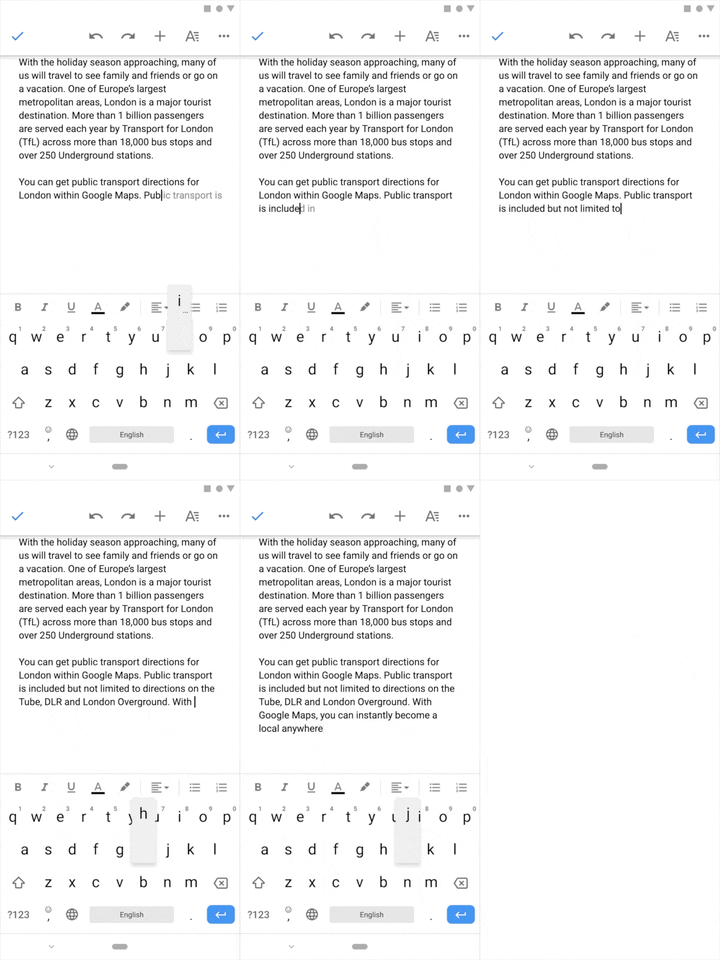
Gmail’s Smart Compose feature is coming to Google Docs for G Suite users

At Google I/O last year, the company introduced new machine learning features for Gmail and Google Photos. Among these was the new Smart Compose feature for Gmail. The AI-powered feature was designed to provide users with smart suggestions while writing an email. With the launch of the Pixel 3 last year, Google introduced the Smart Compose feature to the Gmail app. The feature was then ported over to all Android devices earlier this year in March. Most recently, we spotted a similar feature being tested on the Gboard app and now Google is planning to introduce it to Google Docs.

As reported by The Verge, the Smart Compose feature is making its way to Google Docs for G Suite users. The feature makes use of Google’s machine learning models that study your previous writing to provide suggestions. Adding the Smart Compose feature to Google Docs is expected to greatly improve its performance as it will get access to a larger range of writing styles.

If you wish to try out the Smart Compose feature on Google Docs, you can follow this link and sign up for the beta, but do note that Google is heavily limiting the reach of the feature and it’s only available to domain administrators at the moment. Once a domain administrator registers for the beta, the feature will be made available to all users in the domain. It’s also worth noting that Smart Compose in Google Docs currently only works in English, but we expect the company to release it to more users and in more languages in the near future.


Via: The Verge

The post Gmail’s Smart Compose feature is coming to Google Docs for G Suite users appeared first on xda-developers.


from xda-developers https://ift.tt/2D6pbuE
via IFTTT

Microsoft is planning to bring Gmail, Google Drive, and Calendar to Outlook.com

In order to help users seamlessly integrate Google services with Outlook, Microsoft is planning to add Gmail, Google Drive, and Google Calendar support to the service. According to a recent report from The Verge, Microsoft has already started testing the integration with some users. The feature was first spotted by Twitter users Florian B, who has shared some screenshots of the integration at work. In case you’re one of the lucky few who have access to the feature, you should see a new pop-up in Outlook that says, “Add your Google Mail and Calendar to Outlook and easily manage everything in one place.”

Following a quick setup process, you just need to link your Google account to an Outlook.com account and the platform will automatically display all the mail in your Gmail inbox, along with Calendar entries and Drive documents, right within Outlook. The feature looks a lot like how Outlook works on Android and iOS, with separate inboxes and side-by-side integration in the calendar. The feature wasn’t live for us at the time of writing, by Florian reveals that the integration seems to be an early test as it doesn’t allow you to add more than one Google account. It’s also worth noting that switching between your Outlook and Gmail accounts refreshes the entire page.

The Google Drive integration is also pretty neat and it allows you to view all the documents you have saved on your drive and quickly attach them to Outlook or Gmail emails. Microsoft has confirmed the test, with a spokesperson from the company saying, “We are always looking for new ways to extend the best email experience to our customers and can confirm that we’re experimenting with a small set of Outlook.com users to learn and gather feedback.” As of now, there’s no further information from the company regarding a broader rollout for this new integration.


Via: The Verge, Engadget

The post Microsoft is planning to bring Gmail, Google Drive, and Calendar to Outlook.com appeared first on xda-developers.


from xda-developers https://ift.tt/37s2tva
via IFTTT

Samsung Galaxy S11 gets certified with 5G and 25W charging support

Even though the Galaxy S11 series is months away from launch, leaks about the upcoming flagships from Samsung have already started surfacing online. Earlier this month, renowned leakster Evan Blass shared key details of the next-gen flagships. Shortly thereafter, a teardown of Samsung’s Camera app revealed strings of code that suggest that the Galaxy S11 might feature a 108MP camera and support for up to 8K video recording. Most recently, reputed tipster Ice universe shared a screenshot of One UI 2.0 beta running on the Galaxy Note 9 which suggests that the devices may even feature a 120Hz high refresh rate display. Now, a recent certification listing from China confirms a few more details about the upcoming Galaxy S11.

Galaxy S11 CCC Certification

The listing in question is from China’s CCC and it clears certification for a Samsung device with the model number SM-G9860. Believed to be the Galaxy S11, the device features support for 5G and 25-watt fast charging. The 5G support is in line with the previous leak from Evan Blass, but we had no prior knowledge of the 25-watt fast charging support. It’s worth noting that the Galaxy S10 series included support for 15-watt fast charging, however, the Galaxy S10 5G included support for up to 25-watt fast charging. While it’s good to see that Samsung is including support for faster charging speeds on its next-gen flagships, the 25-watt rating pales in comparison to the 50-watt fast charging support in the recently launched Realme X2 Pro. As of now, we have no further information on the hardware specifications of the Galaxy S11 series, but we expect to learn more over the coming weeks.

The post Samsung Galaxy S11 gets certified with 5G and 25W charging support appeared first on xda-developers.


from xda-developers https://ift.tt/338M8b8
via IFTTT

mercredi 20 novembre 2019

OnePlus 7/7 Pro get OxygenOS Open Beta 6 with November patches and Zen Mode disabling

OnePlus has been decently punctual with its Android updates as well as OxygenOS updates, much more than several other notable OEMs. While there is still room for improvement, OnePlus has been managing its device portfolio well, despite the release of multiple phones in a year. The OnePlus 7 and the OnePlus 7 Pro recently received OxygenOS 10.0.2 with October 2019 security patches and several other improvements. If you do not mind staying on the beta branch, both the devices also received OxygenOS Open Beta 5 with fixes and optimizations, as well as privacy alerts for apps that have access to key permissions. Now, both the devices are taking another step ahead with OxygenOS Open Beta 6.

OnePlus 7 Forums || OnePlus 7 Pro Forums
Buy OnePlus 7 from Amazon.in || Buy OnePlus 7 Pro from Amazon.in

OxygenOS Open Beta 6 for the OnePlus 7/7 Pro bump up the security patch level to November 2019. The update also adds a “Disable” option for Zen Mode, which on the face of it, sounds like something that would defeat the purpose of Zen Mode. But there can be genuine situations when you really do need your device, so perhaps this option will be appreciated in certain situations.

Changelog

The complete changelog for the Open Beta 6 update is as below:

  • System:
    • Fixed the visibility of the fingerprint icon
    • Fixed the issue with the interruption of Music in the ambient display
    • Improved the animation effect of fingerprint icon
    • Updated Android security patch to 2019.11
    • Improved system stability and General bug fixes
  • Zen Mode:
    • Added the “Disable” option in the app info section
  • OnePlus Care (India Only):
    • Bind your phone to get rewards, premium experience, and exclusive offers

Download OxygenOS Open Beta 6 for the OnePlus 7/7 Pro

If you are on the beta release channel, the update should be rolling out as an incremental OTA to your device. If you do not mind sideloading the update, we have download links available for both the devices.

OnePlus 7

Incremental OTA zip for OxygenOS Open Beta 5 –> Open Beta 6

OxygenOS Open Beta 6 Full OTA zip

OnePlus 7 Pro

Incremental OTA zip for OxygenOS Open Beta 5 –> Open Beta 6

OxygenOS Open Beta 6 Full OTA zip

You can alternatively use the Oxygen Updater app to get the latest incremental and full OTA download links. After downloading the incremental or full OTA zip file, you can sideload the update by going to Settings > System > System update > Local upgrade.

Oxygen Updater (Free+, Google Play) →


Thanks to XDA Senior Member Some_Random_Username for the download links!

The post OnePlus 7/7 Pro get OxygenOS Open Beta 6 with November patches and Zen Mode disabling appeared first on xda-developers.


from xda-developers https://ift.tt/2qo2gsk
via IFTTT