LightBlog

jeudi 21 novembre 2019

Samsung Galaxy A71 renders show off punch-hole display and quad-rear cameras

With the launch of the Galaxy S10 series early this year, Samsung introduced a new solution to house the front-facing camera on its devices — punch-hole displays. Instead of featuring a notch, Samsung’s flagships just had a small cutout at the top of their display for the selfie shooters. This new type of display also made an appearance on the Galaxy Note 10 series, along with several devices from other manufacturers. Earlier this month, we saw leaked renders of the upcoming Galaxy A51 which revealed that the device will also feature a punch-hole display. It seems like Samsung is convinced that punch-hole displays are the future because the company has reportedly included one on another upcoming smartphone.

Reputed leakster @OnLeaks has now shared high-resolution CAD renders of the Galaxy A71, showcasing a punch-hole display. The device, which is a slightly upgraded version of the Galaxy A51, features a similar design with a slightly larger display. The device packs in a quad-camera setup on the back which is arranged in an L-shape within a rectangular module.
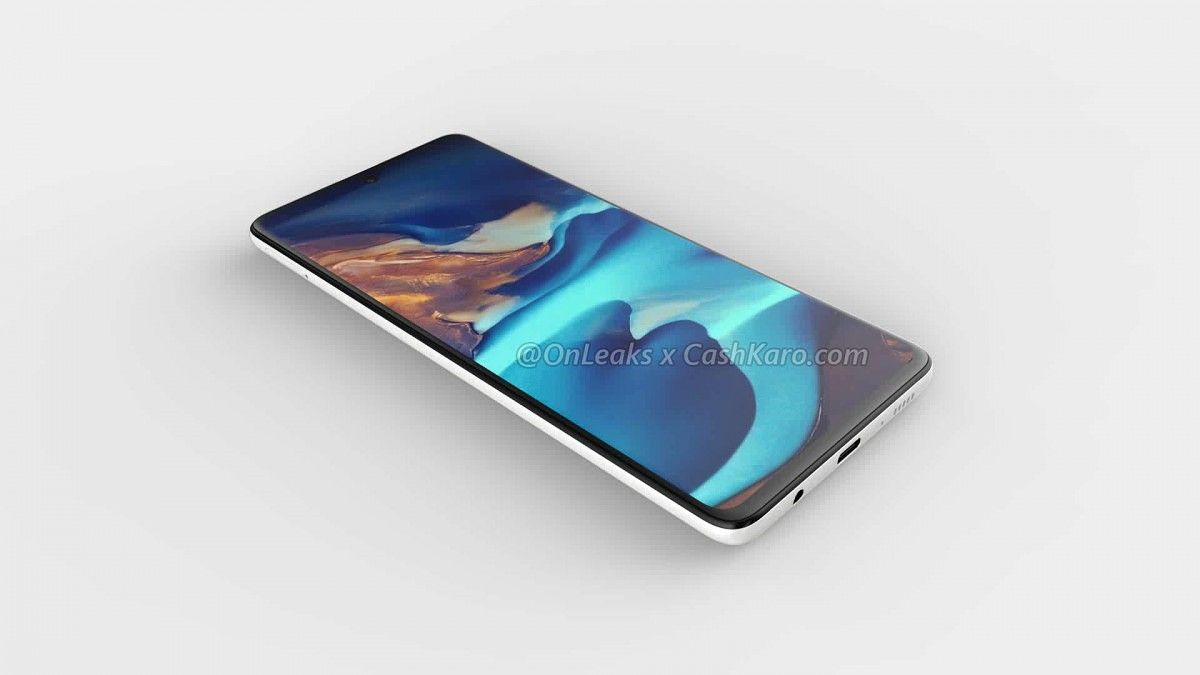
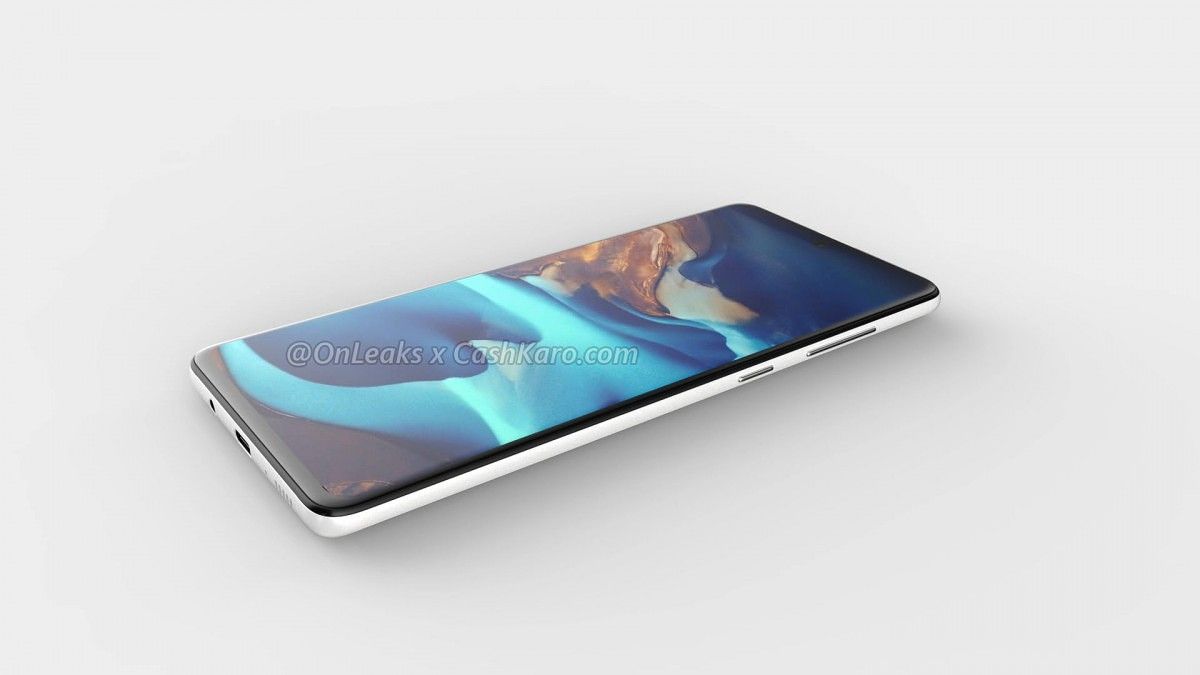
Galaxy A71 leaked renders Galaxy A71 leaked renders Galaxy A71 leaked renders

Other than the camera module, the back of the device looks pretty clean with its rounded edges and the Samsung logo in the center. The volume rocker and power button can be found on the right edge of the device, while the SIM card slot is on the left. Additionally, the device includes a USB Type-C port at the bottom, along with a 3.5mm headphone jack and a single speaker grille. On top of that, the lack of a physical fingerprint scanner leads us to believe that the device will feature an in-display fingerprint scanner.

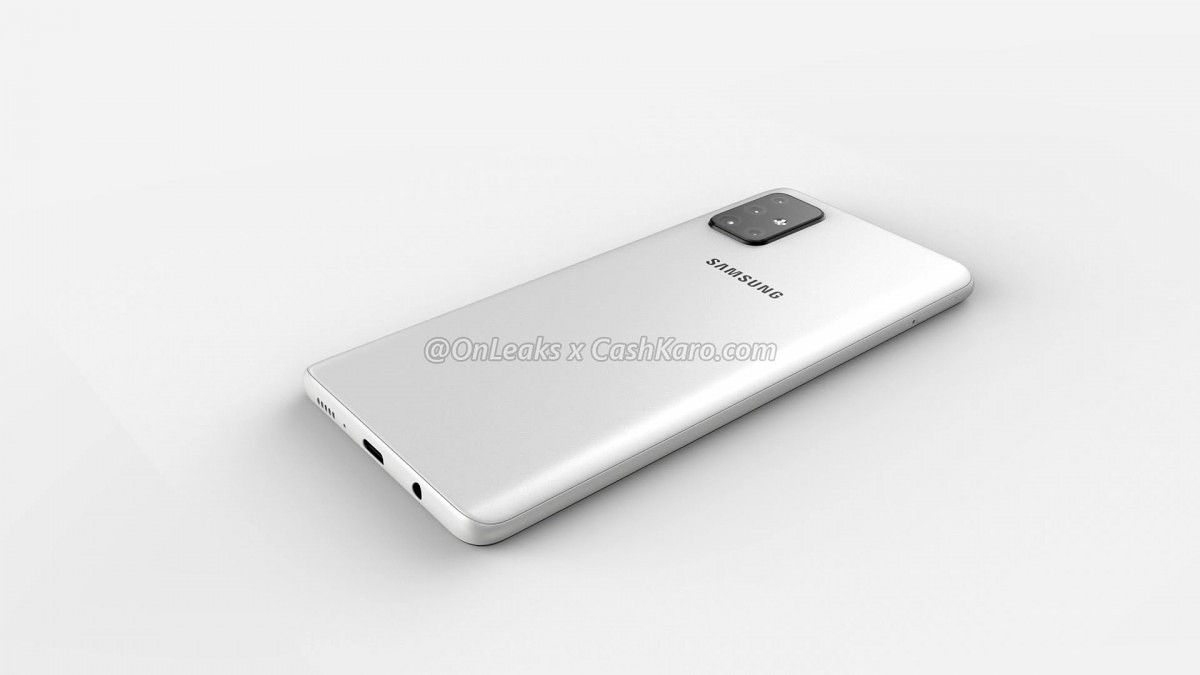
The renders also reveal that the Galaxy A71 will feature a large 6.7-inch display and its overall dimensions are around 163.5 x 76 x 7.9mm. However, the camera bump slightly increases the device’s thickness to 9.2mm. As of now, we have no word on the internal specifications of the device, but we expect to learn more as the launch draws closer.


Source: CashKaro

The post Samsung Galaxy A71 renders show off punch-hole display and quad-rear cameras appeared first on xda-developers.


from xda-developers https://ift.tt/2KJ28dL
via IFTTT

Google Cloud Print will be killed off in 2021

Google Cloud Print is one of the company’s older services. Launched in 2010, it’s a service that allows users to print from devices that are on a network with cloud-connected printers. It was created as a way for users to print from Chrome OS devices. Technically, Cloud Print has never left beta, and now Google is officially ending support.

Announced in a support document, Google says Cloud Print will no longer be supported starting January 1st, 2021. Devices across all operating systems, including Android and Chrome OS, will no longer be able to use Cloud Print. This gives users over a year to “identify an alternative solution and execute a migration strategy,” as Google puts it.

Cloud Print was a great method for printing from not only Chrome OS, but also Android phones. It doesn’t require a printer that can connect to the internet. All you had to do was add printers to your Google account from a PC and you could then print to them from your phone or Chromebook. Printing on Android has come a long way since Cloud Print was introduced, and Google talks about how Chrome OS’ native printing has been improved as well.

The following native print management features are currently or will be supported by Chrome OS by the end of 2019.

  • Admin console interface to manage thousands of CUPS-based printers for users, devices, and managed guests (the legacy 20-printer cap has been removed) by organizational unit
  • Admin console policy to manage user printing defaults for 2-sided (duplex) and color
  • Support for advanced printing attributes (stapling, paper trays, pin printing)
  • Admin console policy to include user account and filename in IPP header of print job over a secure IPPS connection, which enables third-party printing features such as secure printing and print-usage tracking
  • Admin console policy to manage PIN code printing, allowing users to enter pin code when sending the print job, and release the print job for printing when they enter the pin code into the printer keypad

The following print management features are being developed for Chrome OS and will be available prior to Cloud Print deprecation.

  • Support for external CUPS print servers, including authentication
  • Policy to configure connections to external CUPS print servers
  • APIs for third-parties to access print job metadata, submit print jobs and printer management capabilities

Source: Google

The post Google Cloud Print will be killed off in 2021 appeared first on xda-developers.


from xda-developers https://ift.tt/35nEbQX
via IFTTT

[Update: Rolling Out] Android Auto 4.8 hints at bringing back weather info on the car screen status bar

Update (11/21/19 @ 3:55 PM ET): Android Auto is showing the current weather condition in the status bar for some users.

At Google I/O earlier this year, Google introduced a redesigned version of the Android Auto car interface with a dark theme and simplified controls. Many users felt that Google went a bit too far in simplifying the UI, however. For example, the new interface doesn’t show you any weather information at a glance, requiring you to talk to Google Assistant or launch the weather shortcut to get that info. That can be annoying when you’re driving and want to check what the weather conditions are. Thankfully, it seems that Google will be adding weather information to the car screen once again, as we spotted a new toggle in the Android Auto app for showing the weather info on the status bar.

An APK teardown can often predict features that may arrive in a future update of an application, but it is possible that any of the features we mention here may not make it in a future release. This is because these features are currently unimplemented in the live build and may be pulled at any time by the developers in a future build.

Android Auto 4.8 rolled out today on the Google Play Store, and it’s already available on APKMirror. New strings in the update show that the app will add a setting to show weather information on the status bar of the car screen. The weather information is obtained from the location of the connected phone.

<string name="settings_weather_summary">Show weather information on the car screen status bar, obtained using your phone location</string>
<string name="settings_weather_title">Weather</string>

Once the feature goes live for all, it’ll appear in the Settings page of the Android app as shown below:

I don’t have an Android Auto-compatible vehicle or head unit, but we’ll update this article with images of the new feature once we get them. We’ll also keep an eye out on this feature to inform you when it goes live.

Android Auto - Google Maps, Media & Messaging (Free, Google Play) →

Thanks to PNF Software for providing us a license to use JEB Decompiler, a professional-grade reverse engineering tool for Android applications.


Update: Rolling Out

via /u/PCsector

People on Reddit are starting to see the temperature show up in the status bar for the new Android Auto design. Users are starting to see the Weather option in the Settings, as shown in the original article above. According to the comments, it doesn’t seem to matter which version of Android Auto you have, so this looks like a server-side update. It may also be going live in the US before other countries. Keep an eye out if you’re running the new version of Android Auto.

Source: Reddit

The post [Update: Rolling Out] Android Auto 4.8 hints at bringing back weather info on the car screen status bar appeared first on xda-developers.


from xda-developers https://ift.tt/2CfUYcp
via IFTTT

G Suite users get basic Google Assistant voice commands for Gmail and Google Calendar

People who regularly use G Suite accounts often complain about the lack of features compared to regular Google accounts. The company has slowly been fixing this as of late with a bunch of features added back in April. Now, Google is finally allowing G Suite accounts to use Google Assistant voice commands for Gmail and Google Calendar.

Google Assistant’s voice commands for G Suite users are pretty basic at the moment. Here’s what you can do:

  • Let you know when your next meeting is
  • Create, cancel or reschedule a Calendar event
  • Send a note to event attendees via email
  • Send an email
  • Dial into a meeting

g suite assistant

Google Assistant will only work with one account at a time. You’ll have to switch between accounts if you’re signed into a personal Google account and a G Suite account. To use these commands you will first have to apply to use them. Right now, the feature is in beta and not enabled by default. That means if you’re not an admin you’ll have to convince the higher-ups to apply. Admins can sign up here.


Source: G Suite Blog

The post G Suite users get basic Google Assistant voice commands for Gmail and Google Calendar appeared first on xda-developers.


from xda-developers https://ift.tt/2D3ZuuL
via IFTTT

Best Pop-up Camera Phones Under $300

Camera placement has been one of the biggest differing factors of phones in 2019. We have seen hole-punch notches, slider notches, flip cameras and pop-up cameras. The Honor 9X is one of the most prevalent phones to feature a pop-up selfie camera, which makes room for a large notch-free display. With this being a pretty desirable feature among consumers, we put together the top three pop-up camera phones under $300.


Honor 9X

€ 299.00

The Honor 9X is the first in the X-series line to feature a pop-up camera. This pop-up camera has a fully motorized design. When the selfie mode is activated, the camera will quickly rise from the top of the phone. To really enhance the full-screen notch-free effect of the phone, Honor fitter a larger display into the phone at 6.59″. The end result is a large full screen phone with a very convenient motorized pop-up camera.

Notch-Free Display on the Honor 9X

Aside from the pop-up camera, the Honor 9X sports some fantastic specs and features for a phone under $300. Get the Honor 9X using the link below.

Specifications

Honor 9X Specs
Display 6.59″ 1080 x 2340p (391 ppi)
Chipset HiSilicon Kirin 710F
RAM 6GB
Storage 128GB
Main Camera 48MP/8MP (Ultrawide)/2MP (Depth Sensor)
Selfie Camera 16MP Motorized Pop-up
Battery 4,000mAh
Operating System Android 9.1.0 EMUI 9.1.0
Buy the Honor 9X

Huawei y9 Prime

$242.50

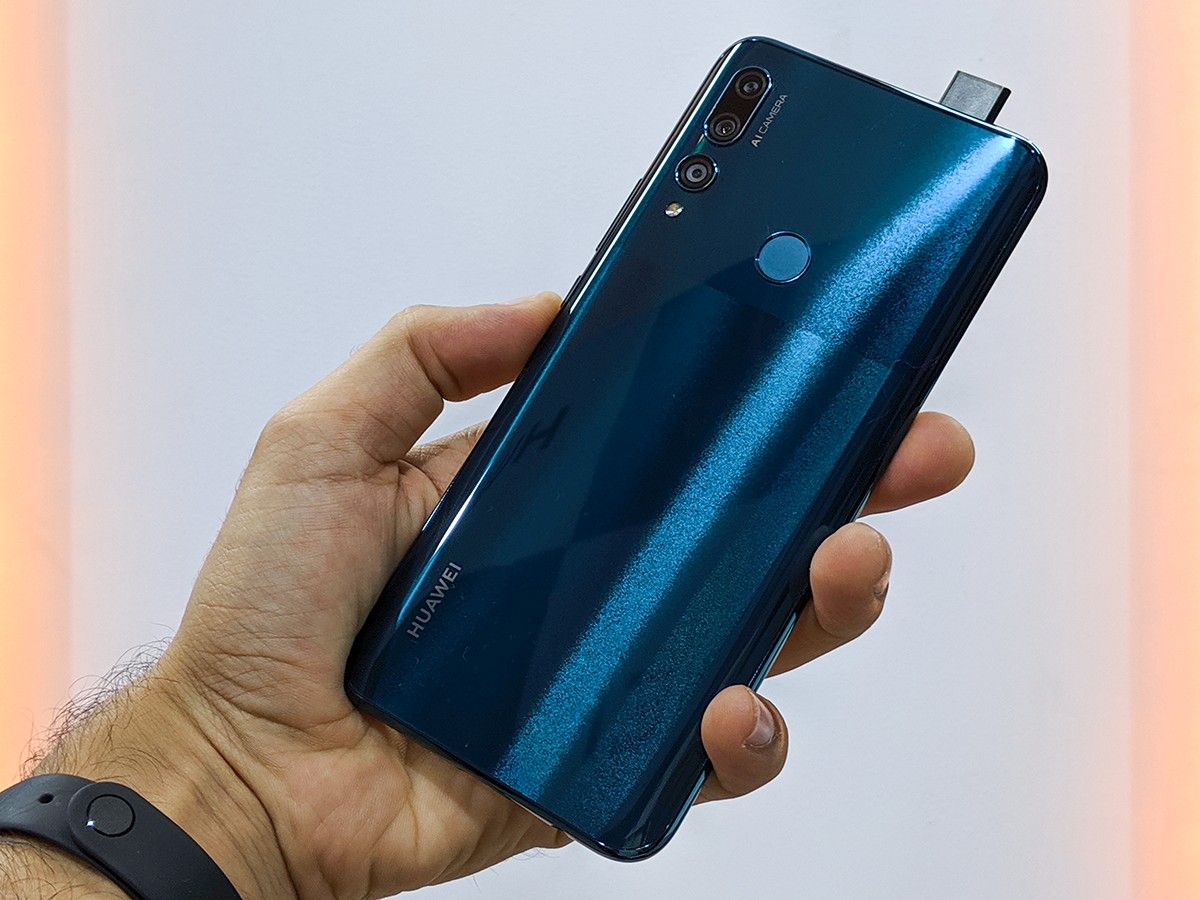
The Huawei y9 Prime is a very budget-friendly phone designed for people who are looking for large screen size and decent specs. This phone is very similar to the above mentioned Honor 9X. The large 6.59″ display stretches from one edge of the phone to the other, without any intrusive notch or sliding mechanism. The pop-up camera is mechanical and reveals itself when selfie mode is activated in the camera app.

huawei y9 prime hands on review

Huawei y9 Prime with Pop-Up Camera

The rest of the specs on the Huawei y9 Prime offer great performance at this price. the phone also has a really nice high quality design that does a great job in hiding any hint that this is a budget phone.

Specifications

Huawei Y9 Prime Specs
Display 6.59″ 1080 x 2340p (391 ppi)
Chipset HiSilicon Kirin 710F
RAM 4GB
Storage 64/128GB
Main Camera 16MP/8MP (Ultrawide)/2MP (Depth Sensor)
Selfie Camera 16MP Motorized Pop-up
Battery 4,000mAh
Operating System Android 9.1.0 EMUI 9.1.0
Buy the Huawei y9 Prime

Xiaomi Mi 9T

$290.98

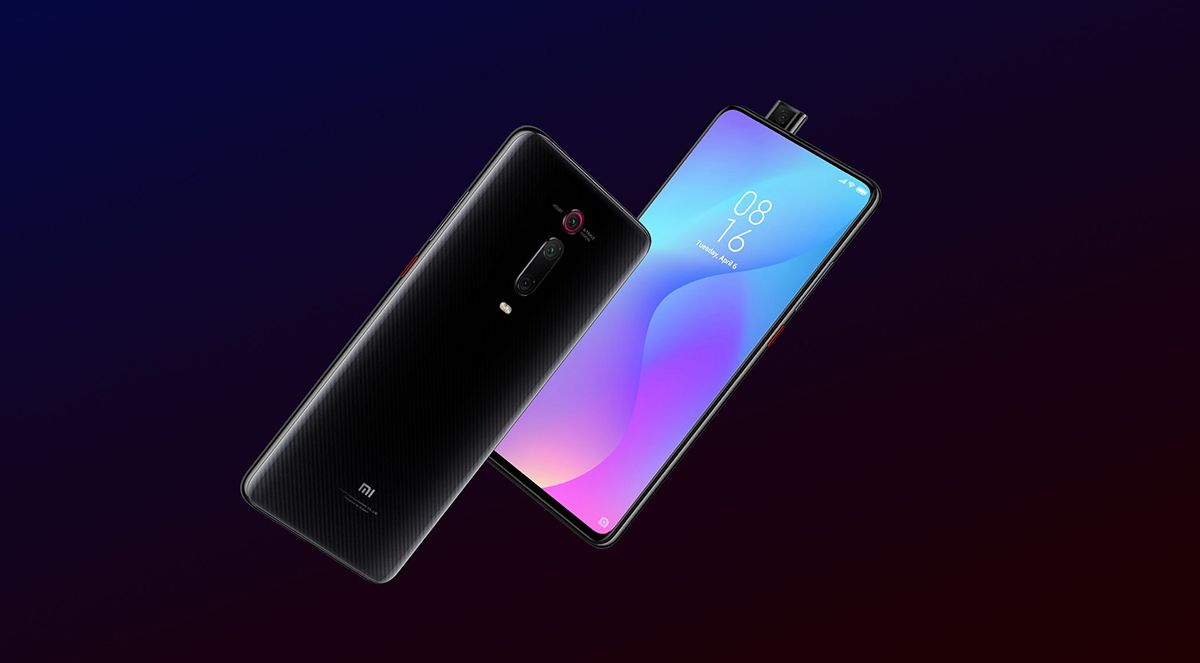
If you’re looking for a phone with a more developer-friendly chipset, the Xiaomi Mi 9T is powered by the Kirin 730 and has a large development community here on XDA. Once again, the phone features a motorized pop-up camera that houses the selfie sensor. The phone focuses on providing a high-end camera and a super fast software experience. For just under $300, this is one of the best options for anyone looking for a pop-up camera.

xiaomi mi 9t redmi k20
Specifications

The phone comes with high end specs and a large battery, making it a highly competitive phone at this price.

Xiaomi Mi 9T Specs
Display 6.39″ 1080 x 2340p (403 ppi)
Chipset Qualcomm SDM730 Snapdragon 730
RAM 6GB
Storage 64/128GB
Main Camera 48MP/8MP (Telephoto)/13MP (Ultrawide)
Selfie Camera 20MP Motorized Pop-up
Battery 4,000mAh
Operating System Android 9.0 MIUI 10
Buy the Xiaomi Mi 9T

These are the top three best options for pop-up camera phones under $300.

We thank Honor for sponsoring this post. Our sponsors help us pay for the many costs associated with running XDA, including server costs, full time developers, news writers, and much more. While you might see sponsored content (which will always be labeled as such) alongside Portal content, the Portal team is in no way responsible for these posts. Sponsored content, advertising and XDA Depot are managed by a separate team entirely. XDA will never compromise its journalistic integrity by accepting money to write favorably about a company, or alter our opinions or views in any way. Our opinion cannot be bought.

The post Best Pop-up Camera Phones Under $300 appeared first on xda-developers.


from xda-developers https://ift.tt/2KFtHV5
via IFTTT

[Update: Rolling Out] Google Assistant in Chrome brings Google’s Duplex AI to the web

Update (11/21/19 @ 2:35 PM ET): Google Assistant on Chrome is rolling out now for buying movie tickets.

At Google I/O 2019, one of the big announcements was Google Duplex being added to websites. The idea was to have Google fill in your information and simplify the process of buying movie tickets or reserving a car. While Google didn’t announce an official date during I/O, they did mention they would have more details later in the year. The company still hasn’t announced anything official, but it seems like they started to test Duplex on the web under the new name “Google Assistant in Chrome.”

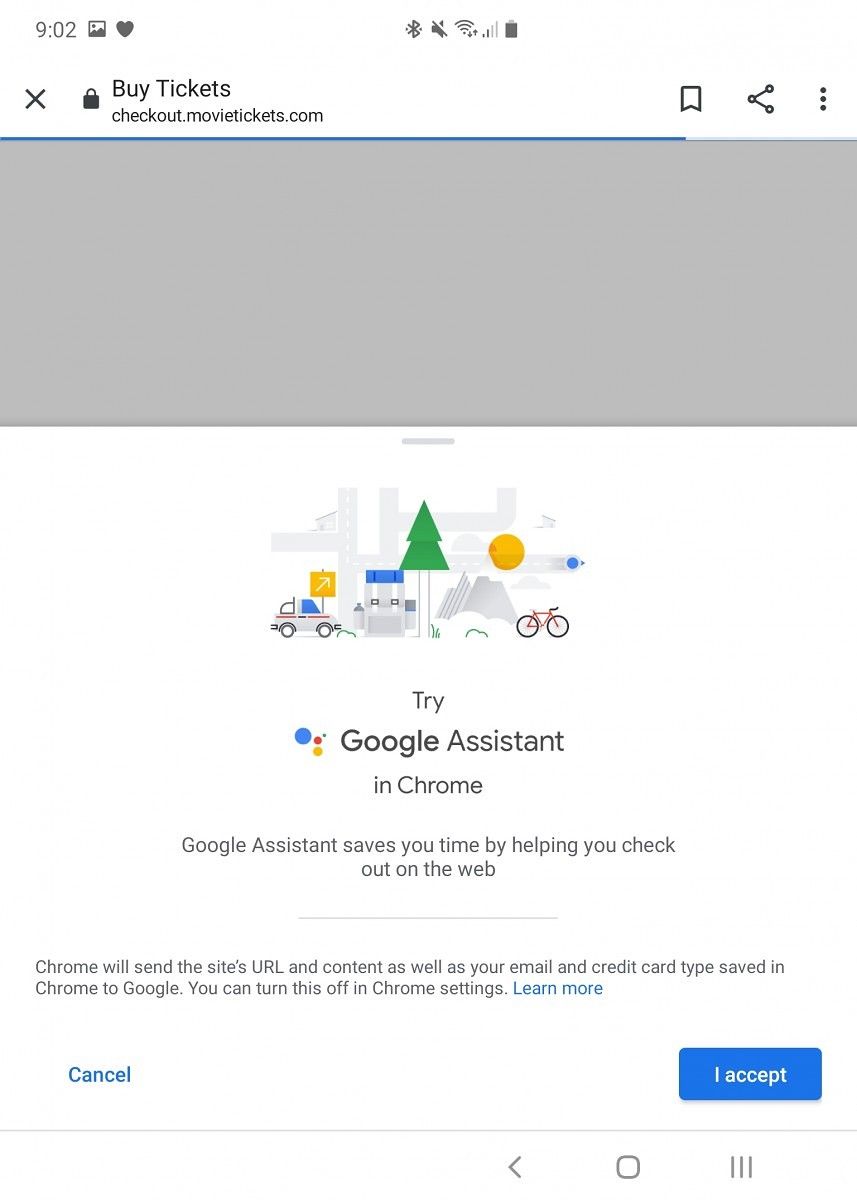
google duplex assistant for chrome google duplex assistant for chrome

As AndroidPolice noticed earlier today, Google Assistant started showing up as a way to buy movie tickets in Google Chrome. I checked my Galaxy Fold after seeing the article, and to my surprise, I had access to Google Assistant in Chrome. Clicking the Assistant button will open the page and start helping you fill out the information while simplifying the process. Below you can see a video of the process. Though the video doesn’t show it, at the end of the process, it asks for a contact email and payment method.

As I previously mentioned, Google showed this off working with more than just movies. Their main example was actually booking a rental car. While that isn’t available, Google did show it off and is likely testing it for the full release of Google Assistant in Chrome. Google also showed off filling information from earlier purchases. I wasn’t able to test this because I haven’t previously used Assistant in Chrome.

While we don’t know specifically when Google Assistant in Chrome will launch with its full feature set, we will wait patiently for it. It’s a very cool and useful service. It easily simplifies the process and makes it faster and easier. We can only hope for more services and wider support added to Assistant in Chrome later on.

Via: AndroidPolice


Update: Rolling Out

Google is now officially rolling out “Google Assistant on Chrome” for buying movie tickets. You can use movie commands that have been around for a while, like “show me showtimes for Star Wars” and next to the times you’ll see a “Buy tickets” button with the Assistant icon. Once you tap the button, Google will guide you through the process of picking seats and buying the tickets. It’s not a completely hands-off experience, like how Duplex can make reservations for you, but it is fast and easy. Google says they will be expanding this to more tasks in the future, including car rentals.

Source: Google

The post [Update: Rolling Out] Google Assistant in Chrome brings Google’s Duplex AI to the web appeared first on xda-developers.


from xda-developers https://ift.tt/2obyzJl
via IFTTT

Digital Wellbeing preps a “Minimal Phone” mode to help you Wind Down at night

Since Google initially showed off its Digital Wellbeing app at Google I/O last year, the app has gained a few useful features including Focus Mode and Chrome website integration. Google is also working on adding new enhancements to the “Wind Down” feature in Digital Wellbeing. A few days ago, we spotted a new “plug-in to unplug” feature in development, and now, we’re seeing a new “minimal phone” mode.

An APK teardown can often predict features that may arrive in a future update of an application, but it is possible that any of the features we mention here may not make it in a future release. This is because these features are currently unimplemented in the live build and may be pulled at any time by the developers in a future build.

Wind Down is a useful feature that helps you put down your phone at night by optionally enabling a grayscale filter on the screen to reduce the urge to browse your phone. You can also have Wind Down enable Do Not Disturb mode to silence notifications, and you can also have it enable Night Light to reduce eye strain from blue light. The latest version of the Digital Wellbeing app, version 1.0.281262011.beta, rolled out on the Google Play Store earlier today, and we managed to surface a new setting in Wind Down called “minimal phone.” When enabled, this feature will presumably allow you to block access to all apps except for a handful of preselected “bedtime” apps. This setting takes effect when Wind Down is enabled—either manually or automatically on a schedule.

Digital Wellbeing Minimal Apps

This feature is not yet available for users in the latest beta release, and it also doesn’t work yet even when manually surfaced. We’ll continue monitoring this and other features to keep you up-to-date on the latest developments of the Digital Wellbeing app.

Digital Wellbeing (Free, Google Play) →


Thanks to PNF Software for providing us a license to use JEB Decompiler, a professional-grade reverse engineering tool for Android applications.

The post Digital Wellbeing preps a “Minimal Phone” mode to help you Wind Down at night appeared first on xda-developers.


from xda-developers https://ift.tt/37qeEIP
via IFTTT