LightBlog

vendredi 22 novembre 2019

OnePlus says some customers’ personal data may have been exposed in data breach

Earlier today, OnePlus sent out emails to inform customers of a security breach in the OnePlus Store. The email explains that payment information, passwords, and accounts are safe, however, names, contact numbers, email addresses, and shipping addresses may have been exposed. The company has now released a statement on its forums about the situation.

OnePlus’ statement says “we have discovered that some of our users’ order information was accessed by an unauthorized party.” The company claims they took immediate steps to stop the intruder and notified users before making it public. They are currently “working with the relevant authorities to further investigate this incident.”

If you have purchased something from the OnePlus Store in the past and you did not receive the email, your information is safe. Unfortunately, that means those who did receive the email may have had information exposed. This isn’t the first time something like this has happened to the company, either. Back in January of 2018, there was credit card fraud involving the Store’s payment portal.

We’ve inspected our website thoroughly to ensure that there are no similar security flaws. We are continually upgrading our security program – we are partnering with a world-renowned security platform next month, and will launch an official bug bounty program by the end of December.


Source: OnePlus

The post OnePlus says some customers’ personal data may have been exposed in data breach appeared first on xda-developers.


from xda-developers https://ift.tt/2D9vqOo
via IFTTT

Pixel 4’s New Assistant prepares to add better email dictation in Gmail

At Google I/O earlier this year, Google showed off a much faster version of its Google Assistant service. During the demonstration, the presenter asked the Assistant to send an email to a contact named “Jessica,” launching Gmail with the contact “Jessica Kulla” prefilled in the “To” field. The presenter was then able to dictate the “Subject” and “Body” fields of the email entirely through the Assistant thanks to Continued Conversation support. The new Google Assistant launched with the Pixel 4 last month, but this new, better email dictation flow is not yet available. However, we’ve spotted evidence that it’s still in development and could appear in a future update to the Google Assistant.

Google Pixel 4 Forums ||| Google Pixel 4 XL Forums

An APK teardown can often predict features that may arrive in a future update of an application, but it is possible that any of the features we mention here may not make it in a future release. This is because these features are currently unimplemented in the live build and may be pulled at any time by the developers in a future build.

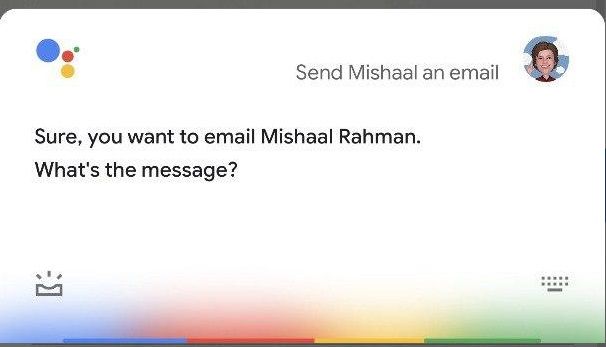
If you currently ask the Google Assistant on the Pixel 4 (or any other device for that matter) to send an email, you’ll be greeted with a dialog that looks like this:

The Google Assistant will guide you through sending an email by voice by asking you to say your message and subject. This email dictation flow doesn’t feel as well-integrated as the other new Assistant actions. In fact, sending an email isn’t even listed as an example of what the new Google Assistant can do on the Pixel 4. With a bit of tinkering, I was able to get the new Google Assistant to launch the Gmail app with one of my contacts, Max Weinbach, prepopulated in the “To” field.

However, I was unable to dictate the actual email subject or body. Looking into the Google App APK, there’s a disabled and exported service called com.google.android.apps.gsa.nga.engine.keyboard.KeyboardService that likely enables keyboard dictation for the new Google Assistant. Once this feature is ready to go live, you’ll be able to dictate keyboard input directly from the Google Assistant rather than Gboard or another keyboard app.


Thanks to PNF Software for providing us a license to use JEB Decompiler, a professional-grade reverse engineering tool for Android applications.

The post Pixel 4’s New Assistant prepares to add better email dictation in Gmail appeared first on xda-developers.


from xda-developers https://ift.tt/2D8xAxR
via IFTTT

Files by Google now lets you hide recommendations for 7 days or more

When it was initially released, Files by Google was called “Google Files Go” because it was intended to help manage the storage on Android Go Edition devices. Because of its simplicity, clean design, and smart suggestions, the app gained widespread popularity outside of Android Go devices. It’s now available on the Google Play Store for any Android device, and with each new release, it gains functionality that makes it even better. Recently, the app was updated to add Google Cast support, but sometime recently, the app also added a small quality-of-life enhancement that went unnoticed: The ability to snooze recommendations.

In the “Clean” tab, the Files by Google app will show cards that recommend you take certain steps to reduce clutter or increase storage space on your device. For instance, if it detects “junk files,” which usually include temporary app files stored in the external storage, or duplicate files, you can have the Files by Google app quickly clean them up. If there is a certain recommendation that you don’t want to take action on, you can swipe the card away to temporarily dismiss it. However, the app will eventually resurface the recommendation, so you will have to manually dismiss it again.

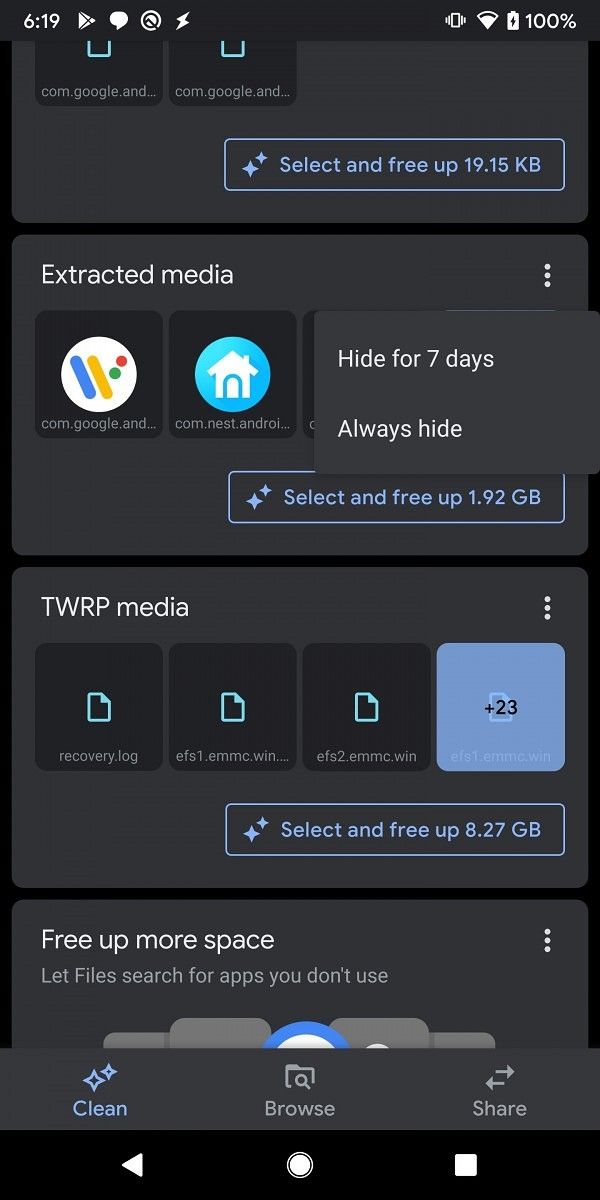
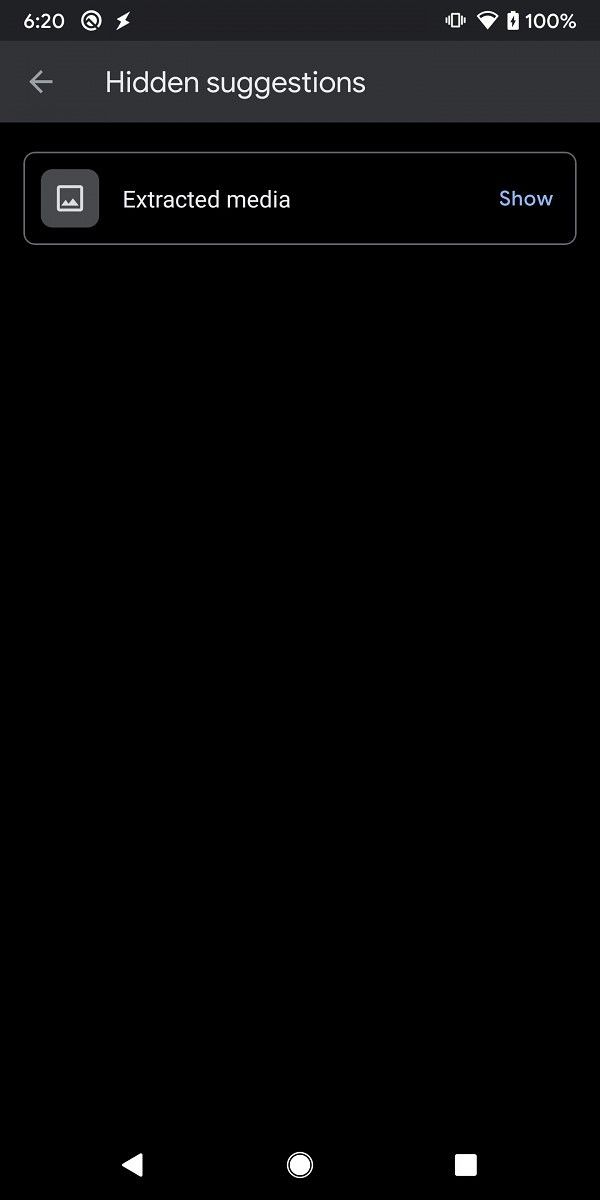
Version 1.0.278928638 of Files by Google has added an overflow menu to each recommendation card with options to hide the card for 7 days or forever. If you want to view hidden suggestions, you can do so in Settings > Hidden suggestions.

Files by Google snooze card Files by Google card snoozed

This version of the Files by Google app is available for everyone on the Google Play Store right now. You can download the app from the link below. We checked and saw that the feature is live on multiple devices, so it seems to have rolled out for most users on the latest version. This is admittedly a minor tweak to the app, but one we thought was worth bringing up since it appeared in an APK teardown from 9to5Google.

Files by Google: Clean up space on your phone (Free, Google Play) →

The post Files by Google now lets you hide recommendations for 7 days or more appeared first on xda-developers.


from xda-developers https://ift.tt/33gYKNP
via IFTTT

AT&T launches its 5G network next month with the Galaxy Note 10+ 5G

The race for rolling out 5G is now in full steam, but AT&T got in a bit of a controversy for, well, trying to cheat. The carrier launched what they called their “5GE” network, which is essentially just rebranded 4G LTE and not 5G at all. This, evidently, misled a number of users into thinking they actually had 5G on their phones when they actually didn’t. Nonetheless, AT&T is planning to roll out a real 5G network and this roll-out is set to happen as soon as next month.

The flagship phone that is set to carry AT&T’s 5G torch? The Galaxy Note 10+ 5G. The carrier will begin selling the 5G-enabled device for a $1,300 price tag next month. The device will work with the company’s 5G network, which will initially be offered in 5 US cities: Indianapolis, Pittsburgh, Providence, Rochester, and San Diego. The service will then be rolled out to 10 other cities “soon after” according to AT&T, while nation-wide coverage is set to come during the first half of 2020.

Galaxy Note 10+ XDA Forums

We should keep in mind, though, that this rollout will not include mmWave 5G connections, but rather “low-band” LTE, with speeds expected to be comparable to LTE Advanced. mmWave 5G, which AT&T brands as “5G+”, is already available in parts of 21 US cities, with planned expansions for 2020.

Unlike the differences found between the Galaxy S10 5G and the Galaxy S10+, which included a quad rear camera and a 3D face recognition system, the Galaxy Note 10+ 5G is mostly identical to the regular Galaxy Note 10+ with the only differences being that the former supports 5G while the latter doesn’t. So if you like the Galaxy Note 10+, your experience will be completely identical for the 5G-enabled model.

Are you looking forward to 5G service on AT&T?


Source: The Verge

The post AT&T launches its 5G network next month with the Galaxy Note 10+ 5G appeared first on xda-developers.


from xda-developers https://ift.tt/2s1FuXo
via IFTTT

This Agile Certification Training Bundle Can Help You Climb the Career Ladder

In the world of business, Agile is a pretty big deal. Thousands of top companies use it, and certified practitioners are always in demand. If you want to join their ranks, the Agile Certified Practitioner & Professional Scrum Master Training Bundle provides the perfect prep. The bundle includes six hours of video lessons, plus 10 full-length mock exams. You can get the training now for $16.99 with coupon code BFSAVE15 at the XDA Developers Depot.

Whether you want to become a highly-paid project manager or simply climb up the career ladder, learning Agile is a good idea. This training can help you master the management framework and fly through the official exams.

The training focuses on Agile for development, with lessons showing you how to initiate, plan, execute, monitor, and close any project. Along the way, you will learn how to apply Agile methods in the real world and get extensive prep for the exams.

Speaking of exams, the training includes those full-length mock exams. You can work through over 1,000 practice questions in total, with extensive explanations for each answer. In addition, the course provides 21 PDUs towards your exam entry.

Worth $349.85, the training is just $16.99 in the Pre-Black Friday Sale. Order now and use code BFSAVE15 for the full discount.

 
Agile Certified Practitioner & Professional Scrum Master Courses + Tests Training Bundle – $16.99 w/ code BFSAVE15

See Deal

Prices subject to change

Don’t wait for Black Friday—you can get these top-sellers at deep discounts today!

The post This Agile Certification Training Bundle Can Help You Climb the Career Ladder appeared first on xda-developers.


from xda-developers https://ift.tt/2QOs7V7
via IFTTT

Google Photos gets markup functions for its image editor

In a bid to make annotations easier, Google rolled out a new markup tool in Android 9 Pie last year. While it was initially limited to devices running Android 9, it was later unofficially ported over to phones running older versions of Android. Earlier this year in September, Google started testing a couple of new features in the Google Photos app. Among these were the new album sorting options and a similar markup tool for the image editor in the app. Now, the markup tool is finally rolling out in the latest update for Google Photos and it aims to make adding annotations a whole lot easier.

As reported by Android Police, the new markup feature appears in the editing UI within Google Photos, right next to the crop and rotate tool. The tool currently gives you the option to choose between a couple of colors and two different pen types. The feature works pretty much like you’d expect it to, just tap on the new icon, choose a color/pen type and scribble your annotation. Once you’re satisfied with your artwork, tap on Done and then save the edited photo.

Google Photos markup tool

As of now, the feature is only available to a handful of users and we didn’t have it on any of our devices at the time of writing. On top of that, since Google switched to app bundles, there’s no way to install updated APKs to trigger the feature manually. However, since the feature has already started appearing for some Google Photos users, we expect the company to roll it out to all users sometime in the next few days.

It’s worth noting that Google has been adding a ton of new features to Google Photos over the last couple of weeks. The app has already received a document cropping extension, new sorting options in the Albums tab, and a video frame exporter exclusively for the Pixel 4. Google has also started testing a new feature in version 4.32 of the app which will allow you to add face tags to photos manually.


Source: Android Police

The post Google Photos gets markup functions for its image editor appeared first on xda-developers.


from xda-developers https://ift.tt/35us70x
via IFTTT

[Update: Rolling out in India] You can order food with Google Assistant, Search, and Maps without needing delivery apps

Update 11/22/19 @ 7:10 AM ET: Food delivery integration is now rolling out to Google services such as Maps in India. Scroll to the bottom for more information. The article as published on May 23, 2019, is also preserved.

Do you enjoy the seamless integration that the Google Assistant offers with just about everything? A lot of people do, but it’s definitely not for everyone. Even still, there are huge upgrades on the horizon, and Google knows that there’s always room for improvement. If you live in the US, you are now able to order food from participating restaurants using the Google Assistant, Google Search, or Google Maps simply by asking out loud or by using the brand new “order online” button in the latter two. At the moment, services like DoorDash, Postmates, Delivery.com, Slice, and ChowNow are supported, with planned support for Zuppler and others coming in the future. You don’t need any other accounts either, your Google account will do just fine. There is no word on whether or not the feature will launch in other countries.

Ordering online using Google Search

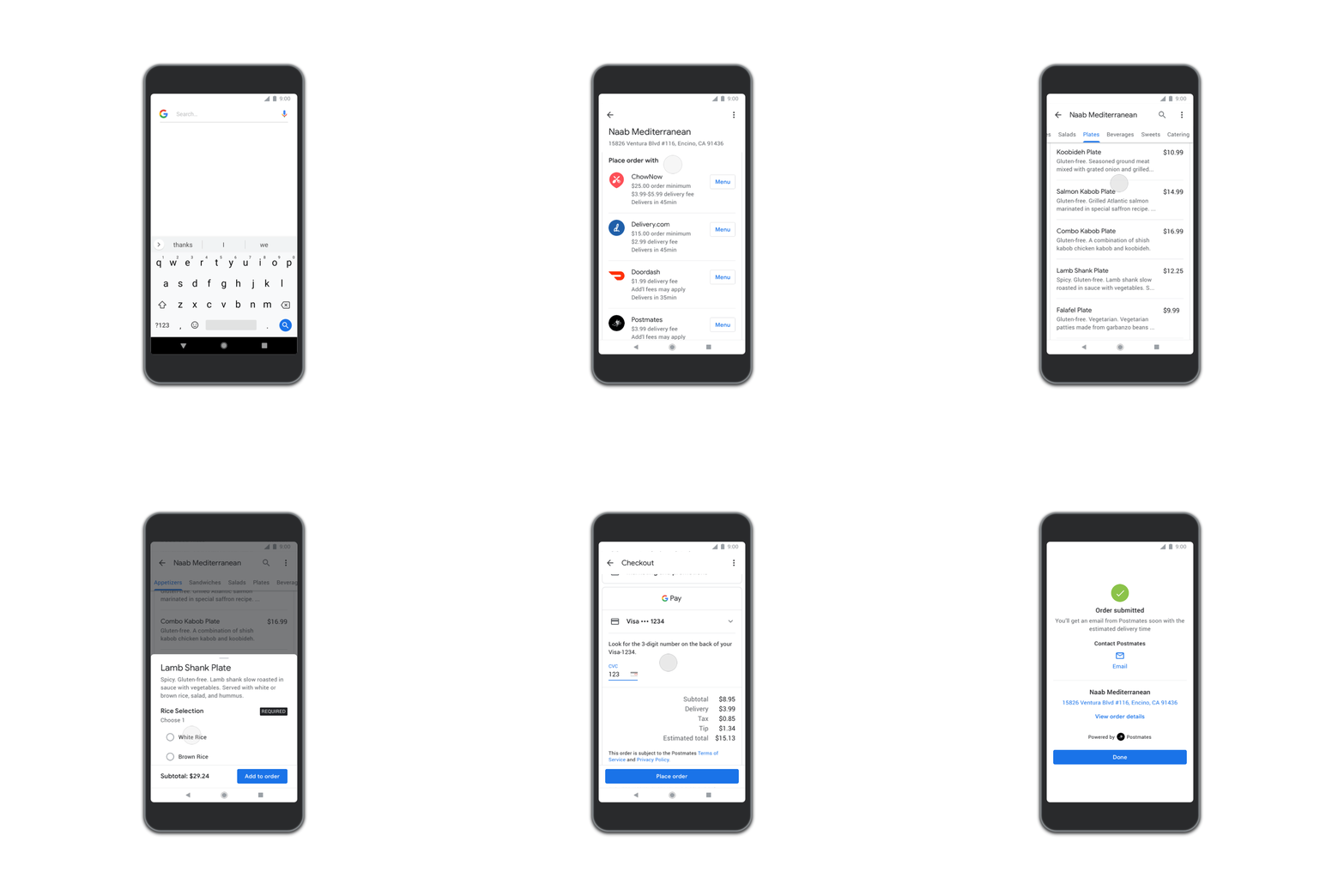
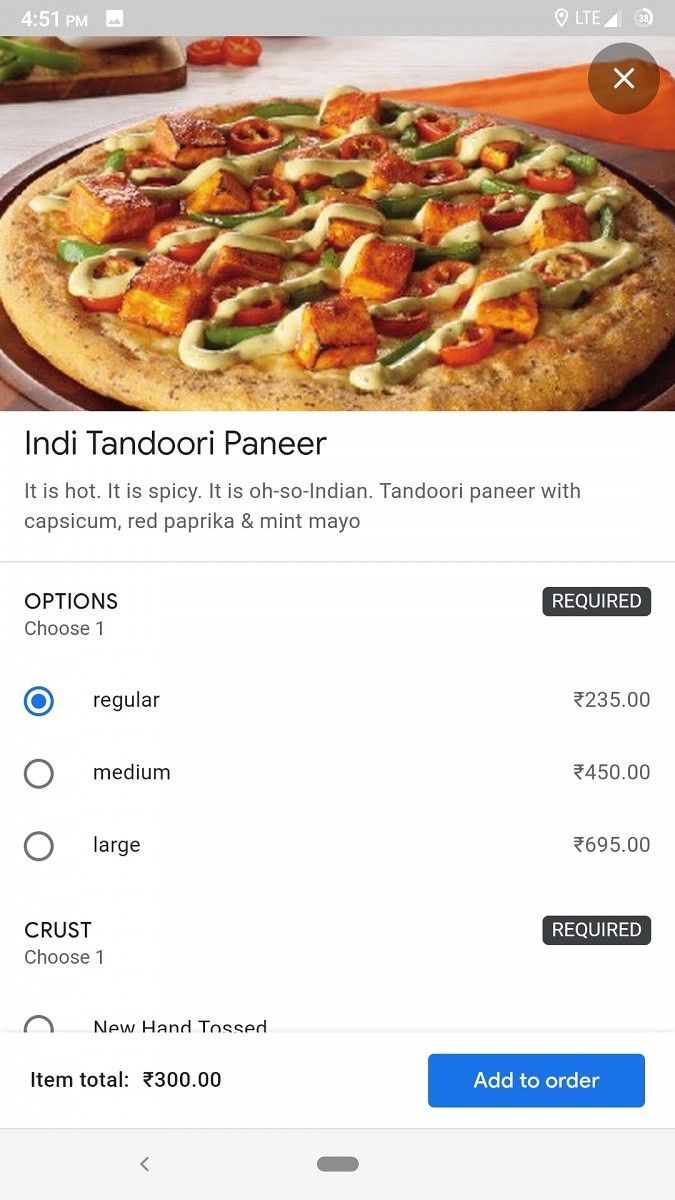
Menus are shown in their entirety, complete with all costs, extra add-ons for your food such as sides, and more. It’s all in one place and supports lots of different services. Everything you’d expect to see is here, including any delivery charges and the minimum order value.

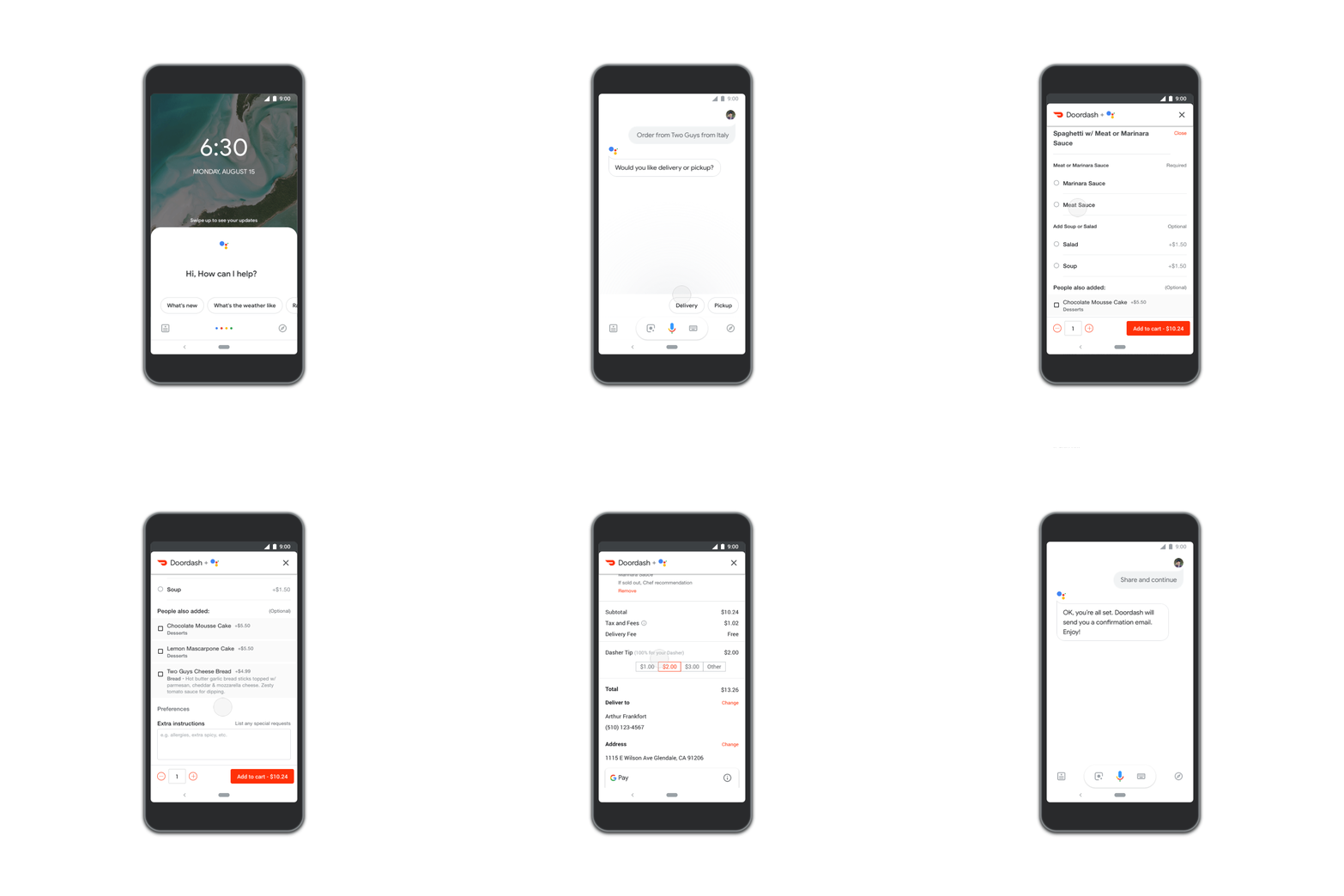
A demonstration of how to order online using the Google Assistant

To order via the Search or Maps applications, all you need to do is search for your favorite supported restaurant. In the case of Google Assistant, simply say “Hey Google, order food from [restaurant]” or “Hey Google, reorder food from [restaurant]” and your past dishes will be shown to you. Participating restaurants will also support Google Pay so that you can order and pay for your food in one go, without needing to go searching for your credit card. The feature should be available to all users now, so give it a go and let us know what you think in the comments!

Source: Google


Update: Food delivery integration rolling out in India

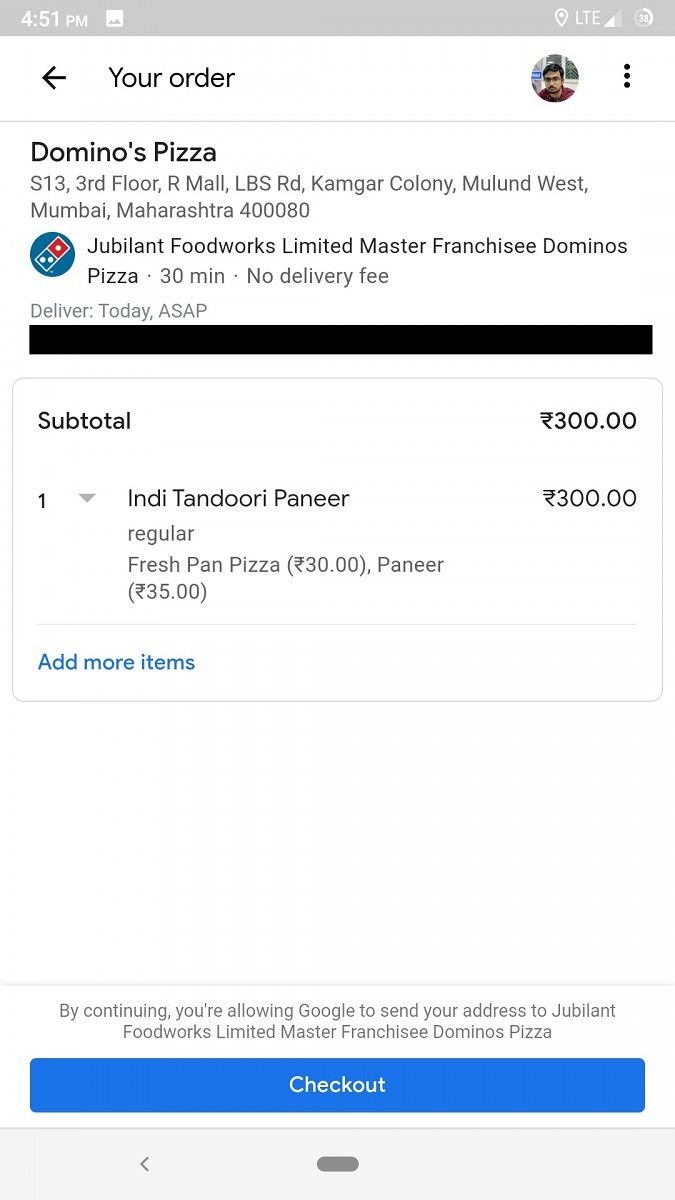
Food delivery integration for Google services has now begun rolling out in India. As spotted by one of our readers, users in India can now order food directly through Google Maps, Google Assistant and Google Search.

There is no dearth of food delivery apps in India, but having the option to order from Google services directly will be very convenient for users who do not wish to download and sign up for an additional app.


Thanks to Somesh Sharma for the tip!

The post [Update: Rolling out in India] You can order food with Google Assistant, Search, and Maps without needing delivery apps appeared first on xda-developers.


from xda-developers https://ift.tt/339txfj
via IFTTT