LightBlog

mardi 18 février 2020

U.S. Government considers blocking TSMC from making chips for Huawei

For close to a year, Huawei has been trying to stay competitive despite dire US sanctions hitting them very hard for certain regions. The company was placed on the Department of Commerce’s Entity List, meaning that US companies are barred from exporting products to Huawei. This sole fact by itself is already pretty devastating, as Huawei is blocked from conducting any business with Google, the company behind Android development and Google Play services (software is also considered an export), as well as with companies like Qualcomm. But for the most part, the company has managed to stay afloat, mainly in part thanks to the fact that they can source most of their components from places outside the US and they have access to Android since it’s open-source software.

Now, though, the company may be facing serious trouble as the Trump administration keeps trying to intervene in the company’s affairs with non-US companies, two sources familiar with the matter told Reuters. The newest measures against Huawei, which have reportedly been drafted but are still far from being approved, might come in the form of a modification to the Foreign Direct Product Rule, which oversees foreign-made goods based on American technology. Under this proposal, foreign companies using American chipmaking equipment would need to seek a license from the US government before supplying equipment to Huawei.

Such a restriction could have catastrophic consequences for Huawei as a whole. One of the companies that would be affected by this is TSMC, which uses American chipmaking equipment while being based in Taiwan. Huawei has managed to keep putting out smartphones since the entirety of their lineup uses HiSilicon Kirin processors, designed in-house by Huawei, instead of Qualcomm processors. The problem is, however, that Kirin chips, such as the Kirin 990 powering the Mate 30 and Mate 30 Pro, are manufactured by TSMC. If the US government goes forward with this, then this would effectively cut Huawei’s chip supply completely, thus hampering the company’s ability to manufacture and ship new devices almost completely.

TSMC is just a manufacturer, though, and it is Huawei themselves, through its subsidiary HiSilicon, who owns the chip’s designs. So can they just go to another chipset maker, such as Samsung Foundries? The answer is — it’s complicated. The new measure is not specific to any company in particular, and if Samsung Foundries is using US chipmaking equipment, then they would also be affected by this change. It is almost certain, however, that Huawei would have a hard time going forward if this change is approved, as the same report takes cognizance of a claim that there are no production lines in China that use only equipment made in China, making it difficult to produce any chipsets without U.S. equipment.

Huawei is right in the middle of the United States-China trade war, with the US government having major concerns regarding Huawei because of charges such as spying. As of now, though, these new sanctions have not entered into effect yet as they are just a draft right now, but we’ll keep you in the loop on any new developments regarding this story.


Source: Reuters

The post U.S. Government considers blocking TSMC from making chips for Huawei appeared first on xda-developers.


from xda-developers https://ift.tt/3bPdAjJ
via IFTTT

Pokémon GO’s aggressive root checking now looks for the existence of a TWRP folder

Pokémon GO was launched in 2016, and thanks to its blockbuster launch, it immensely contributed to the popularity of AR as a genre. We’re sure you’re already familiar with it, but for starters, it is pretty much a game where you can become a Pokémon Trainer yourself, go out into the real world and find Pokemon. With over 100 million installs on the Google Play Store, it has also seen a great degree of success globally, and it is a simple, yet exciting premise that’s easily accessible by anyone. Well, by anyone except for rooted/modded users, mind you. In an attempt to weed away cheaters, the game has become notoriously unfriendly for modded users, and a big part of the game’s active development goes into blocking these users and implementing better root detection methods.

The newest detection method in this list, which was first reported by Redditor fw85, involves potentially misusing filesystem access permissions to look for the existence of TWRP, which is the most popular custom recovery right now. Pokémon GO seems to be checking for the mere existence of a TWRP folder in your external storage, and if it manages to find it, then the game will lock you out. TWRP is used by many to install Magisk to get root access, which is why Niantic is blocking this in the first place. But it still seems like sort of a stretch, given how TWRP can be used to install a plethora of things that are not related to root methods.

Furthermore, according to XDA Recognized Developer Quinny899, the Pokémon GO app also manages to find the TWRP folder even if the app doesn’t have permission to read the external storage. That means you won’t be able to access Pokémon GO as long as that folder is there, even if you revoke storage permissions for the app since the game is reportedly exploiting a bug for its folder detection checks.

There could be easy ways to bypass this check, such as a TWRP build that names the folder as something else. But it does become a game of cat and mouse at this point, as Niantic will keep adapting to check for TWRP and other custom recoveries (and who knows what else they extend this to), and recoveries may try to work around the latest detection. It does seem like Niantic does not intend to back off from aggressively checking for root access in Pokémon GO anytime soon. So if you really and truly care about the game, you might want to stay completely stock for the sake of your virtual pocket monsters.

Pokémon GO & Magisk — XDA Discussion Thread


Source: Reddit

The post Pokémon GO’s aggressive root checking now looks for the existence of a TWRP folder appeared first on xda-developers.


from xda-developers https://ift.tt/2SRoSLX
via IFTTT

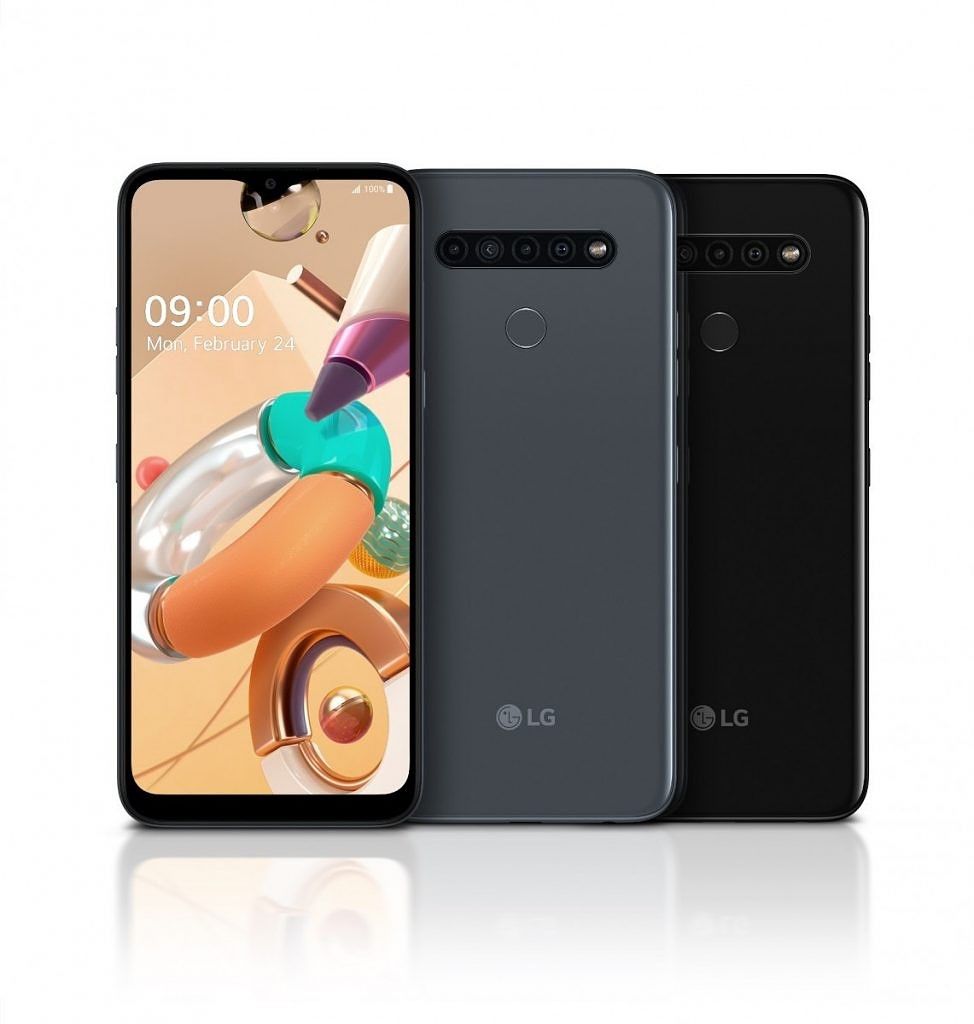
LG announces the K61, K51S, and K41S mid-range smartphones to compete with Samsung’s Galaxy A series

LG‌ is refreshing its mid-range K-series of smartphones with some new hardware for 2020. The company has just announced three new phones, namely the LG‌ K61, K51S, and K41S. All three phones pack quad cameras on the back and a premium-looking design. LG‌ says the new K series offers some of the best features from its premium flagship lineup while still maintaining an affordable price point — though LG did not actually reveal the price point.

LG K61

LG K61

LG K61

The LG‌ K61 is the most powerful of the trio. It features a 6.5-inch 19.5:9 full HD+ display, an octa-core processor running at 2.3GHz, 4GB of RAM 64GB/128GB‌ storage and a 4,000 mAh battery that charges via USB-C. On the camera front, it has four cameras on the back comprised of a 48MP primary sensor, 8MP ultra-wide angle, 2MP Macro lens, and 5MP depth sensor. The LG K61 comes in three colors: Titanium, White and Blue.

LG K51S

LG K51S

LG K51S

Moving to the LG‌ K51S, it features a slightly narrower 6.5-inch 20:9 HD+ display. It’s powered by an unknown octa-core SoC, 3GB RAM, and 64GB‌ onboard storage and a 4,000 mAh battery. On the back, it houses a 32MP primary, 5MP‌ ultra-wide angle sensor, 2MP‌ Macro, and 2MP‌ depth sensor. LG‌ K51S will be available in three color options: Titanium, Pink and Blue.

LG K41S

LG K41S

LG K41S

And finally, the LG K41S appears to be an entry-level model, packing a 6.5-inch 20:9 HD+ display, 3GB RAM and 32GB‌ storage, 2.0 GHz octa-core processor, 13MP standard, 5MP ultra-wide, 2MP Macro and 2MP depth cameras, 8MP front shooter and a 4,000 mAh battery.


Other common features among the devices include Bluetooth 5.0 support, a rear fingerprint sensor, microSD‌ card slot, NFC, a dedicated button to trigger Google Assistant, and MIL-STD 810G compliance. Moreover, LG says all three devices offer great sound experience over headphones thanks to DTS:X 3D Surround Sound support.

LG‌ hasn’t revealed the details regarding the pricing and international availability for any device yet.


Source: LG Newsroom

The post LG announces the K61, K51S, and K41S mid-range smartphones to compete with Samsung’s Galaxy A series appeared first on xda-developers.


from xda-developers https://ift.tt/37HLBQ4
via IFTTT

lundi 17 février 2020

Realme is launching its flagship X50 Pro 5G phone in India with a 90Hz AMOLED display, 64MP camera, and 20X zoom

Realme has come a really long way since their devices were first introduced in early 2018, first as an OPPO subbrand and then as an independent brand. The company is seeing a high degree of success in the Indian market due to its “India-first” strategy that they’ve been trying out so far, although recently they’ve also been prepping up for exploring more global ground. During 2019, they’ve managed to compete heavily with Xiaomi’s Redmi devices in their own game, offering a similar value proposition as well as a similar feature set, if not better. The company has also expanded beyond the budget market and ventured into flagship territory, starting with the Realme X2 Pro last year. Now, they’re preparing to launch their first 5G flagship smartphone in the Realme X50 Pro 5G.

We’ve already gone into detail about what this device will pack. The Realme X50 Pro 5G will be launching with a top-of-the-line Snapdragon 865 processor for its guts, up to 12GB of RAM, and 65W “Dart Charge” technology for ultra-fast charging: their current 50W SuperVOOC charger which is included with devices like the Realme X2 can charge the phone’s 4,000 mAh battery in roughly 30 minutes, so a 65W charger will likely be even better. We also know from official statements from Realme CMO Xu Qi Chase on Weibo that the device will carry a 90Hz AMOLED display, like the Realme X2 Pro, as well as a 64MP rear main camera sensor.

So what’s the news here? The company will be launching the Realme X50 Pro 5G in the Indian market on February 24th, next Monday, around the same time as the Madrid launch (originally an MWC launch before MWC 2020 was canceled due to the COVID-19 outbreak) that same day.

This means that the company will be holding a parallel event for the Indian launch as well as for the global launch — the image cites New Delhi as the place for the launch instead of Madrid. They are also calling the X50 Pro 5G “India’s first 5G smartphone,” hinting at the phone being available sooner rather than later. So it is definitely something we should keep an eye out for. We hope to try out the device briefly during the Indian launch, so let us know if you have any specific questions!

The post Realme is launching its flagship X50 Pro 5G phone in India with a 90Hz AMOLED display, 64MP camera, and 20X zoom appeared first on xda-developers.


from xda-developers https://ift.tt/3223uYk
via IFTTT

Microsoft Surface Pro 7 arrives in India for ₹70,990 ($995) onward

Back in October of last year, Microsoft refreshed its Surface hardware with three new devices in the form of Surface Pro X, Surface 7 Pro and Surface Laptop 3. While all three Surface devices were only available in the U.S, the UK‌, and some European markets at the time being, it appears at least one of them is coming to the Indian market:‌ the Surface 7 Pro. In fact, the device is already up for sale. Although Microsoft India has yet to make any official announcement about the device, the product page for the Surface Pro 7 has gone live on Amazon India which, in turn, has revealed the pricing and other details about the device.

As per the Amazon listing, the Surface 7 Pro in India comes in 4 configurations with price starting at  ₹70,990 ($995) for the base variant.

Surface Pro 7 India Pricing

Processor RAM & Storage Pricing
i3-1005G1 10th Gen 4GB / 128GB SSD ₹70,990 ($995)
i5-1035G4 10th Gen 8GB / 128GB SSD ₹85,990 ($1205)
i5-1035G4 10th Gen 8GB / 256GB SSD ₹1,13,990 ($1597)
i7-1065G7 10th Gen 16GB / 256GB SSD ₹1,37,990 ($1933)

The Surface comes in two color options: Platinum and Matte and can be purchased right now through Amazon India from the below link.

For the starters, the Surface Pro 7 is the latest entry in Microsoft’s 2-in-1 catalog. While it may not be a drastic upgrade over its predecessor, the Surface Pro 6, it brings along many much-needed improvements including a long-awaited switch to USB‌-C, improved performance, and support for the Surface Pen. It features a 12.3-inch PixelSense display with a resolution of 2,736 x 1,824, Intel 10th gen processor, up to 16GB‌ of RAM, and 25GB SSD storage, 5MP front and 8MP‌ rear cameras, Wi-Fi 6 support, and 1.6W stereo speakers tuned by Dolby.


Source: Amazon India | Via: @baxiabhishek

The post Microsoft Surface Pro 7 arrives in India for ₹70,990 ($995) onward appeared first on xda-developers.


from xda-developers https://ift.tt/2SRxYs6
via IFTTT

Tasker 5.9.3 beta adds full Do Not Disturb customization and Sensor actions

Tasker has become an incredibly useful Android app for those that like to automate their devices, and it’s gotten even better over the years. You can consider it the “Swiss Army knife” of automation apps. In case you’re not familiar with it (which we’re guessing you are since we cover it a lot), it allows you to create Profiles that trigger based on certain conditions to execute Tasks. Profile triggers can be anything from changes to device settings to pending notifications to web alerts, and the same level of flexibility is true for the kinds of Actions you can add to Tasks. The app does have a learning curve, but once you get the hang of it, it can completely change the way you use your smartphone. Now, Tasker beta 5.9.3 is adding new features that significantly extend its functionality.

New Sensor States and Events

The new Tasker beta includes options to let Tasker access your phone’s sensors. In a nutshell, all sensors on your phone are now available for you to act off of using Tasker. The automation app can check the values from these sensors and, from there, launch whatever Tasks you set up. Tasker could already listen for sensors like the light sensor, magnetic field sensor, gyroscope, pressure sensor, proximity sensor, and a few others, but now the app supports any sensor on your device. The list of available sensors depends on your phone; for example, on the Pixel 2, you can read sensor data from the Active Edge sensor, gravity sensor, or double twist sensor. To reduce power use, you can select one of four Interval Types to determine how often Tasker reads the sensor values.

Lastly, Tasker has also added two new actions: Test Sensor and Sensor Info. The former outputs the current value from the desired sensor, while the latter outputs the details of the sensor such as the delay, range, mode, etc.

Do Not Disturb Customization

Additionally, the new Tasker beta allows you to customize your phone’s Do Not Disturb mode using Tasker. This means you can now dynamically change the same Do Not Disturb settings that can be manually changed from your phone’s Settings page. You can

Full Changelog

One other notable feature that has been added is the ability to display a text dialog with text as well as 3 possible buttons, which, again, you can customize to your liking. The developer sees this as a better alternative to the Popup action.

The full list of changes as published by the developer on Reddit goes as follows:

  • Added Any Sensor event and state and Test Sensor action and Sensor Info action
  • Added way to fully customize Do Not Disturb mode when turning it on with Tasker
  • Added Text Dialog action
  • When you use the alert() function in Javascript it will now use this new dialog
  • Added Continue Task On Error option to Get Voice action
  • Added Get Sims function to Tasker Function action
  • Changed how ADB Wifi is checked before running an action that needs it
  • Show Your First Project video tutorial if you have a lot of profiles/tasks and only 1 project
  • Added Your First Project video to Tasker menu
  • Updated What’s new video so that it shows the ADB Wifi video
  • Fixed bug that said that wrong type argument when editing the Calendar Insert action
  • Fixed bug where sometimes if you changed your phone’s orientation at the wrong time it could cause app checking to stop working
  • Fixed some crashes

You can sign up for the beta here and then download the latest update from the Google Play Store link below. You can also download the most recent APK from right here.

Tasker ($3.49, Google Play) →

The post Tasker 5.9.3 beta adds full Do Not Disturb customization and Sensor actions appeared first on xda-developers.


from xda-developers https://ift.tt/2HuRjtB
via IFTTT

Microsoft’s revamped Office app for Android is now out, combines PowerPoint, Word, Excel, and OneDrive

Microsoft Office on Android has always been incredibly useful for modifying documents, spreadsheets, and presentations on the go. While Google’s own suite of apps, namely Docs, Sheets and Slides, could do the job most of the time, Microsoft’s apps served better for offline editing as they worked mostly the same as the Microsoft Office suite of apps that could be used on Windows 10 and other desktop operating systems, which is what you’re probably using if you’re carrying offline documents anyway. You could download Microsoft Word, Microsoft Excel, and Microsoft PowerPoint for doing all of the productivity tasks you might want to do, but given how they’re slimmer versions of the desktop apps and each app takes a considerable amount of space by themselves, Microsoft thought it viable to unify all of them under a single umbrella. And so they did.

Now, the new Microsoft Office app unifies these 3 apps as well as OneDrive, Microsoft’s own cloud storage service and a competitor of Google Drive. In fact, the whole app is actually pretty similar to what Google Drive was pre-2014: you could display and edit documents from the Google Drive app without requiring separate apps whatsoever. Microsoft’s Office app actually goes the opposite way and unifies everything under one single app. This is actually good: if you’re anything like me, you probably have a whole bunch of Microsoft apps installed, so all this does is cut down on bloat.

Other features include synchronizing with your computer’s Notes application, a variation of the Office Lens scanner, as well as a QR code reader in case your phone doesn’t have one. Android Police points out that the app does not have built-in support for tablets, which is a bummer as the dedicated apps actually supported tablets pretty well–and also provided a comfortable experience for those using Microsoft Office on Chrome OS. This is actually the kind of app that could benefit from tablet support, so it could be a matter of time before we see an update coming.

The app is now officially out of beta, so you should go ahead and give it a look.

Microsoft Office: Word, Excel, PowerPoint & More (Free+, Google Play) →

The post Microsoft’s revamped Office app for Android is now out, combines PowerPoint, Word, Excel, and OneDrive appeared first on xda-developers.


from xda-developers https://ift.tt/39ImOMU
via IFTTT