LightBlog

mercredi 19 février 2020

How to download Android 11 Developer Preview for Google Pixel and other Android devices

Google has officially kicked off the Android 11 Developer Preview program, just five months after the stable release of Android 10. They’re starting things a little earlier this year (the first Android Q beta dropped in March). If you’re curious about the next version of Android, you can download Android 11 right now for the Pixel 2, Pixel 2 XL, Pixel 3, Pixel 3 XL, Pixel 3a, Pixel 3a XL, Pixel 4, and Pixel 4 XL (the original Google Pixel and Pixel XL are not officially supported).

This page will serve as an archive for all the Android 11 developer preview/beta releases. We will keep the page updated with the latest OTAs and factory images for supported devices. You can learn how to install the Android 11 developer preview with our guide for Pixel devices here.

Android 11 Developer Preview 1

GSI Downloads

ARM64+GMS Link
x86+GMS Link

The post How to download Android 11 Developer Preview for Google Pixel and other Android devices appeared first on xda-developers.


from xda-developers https://ift.tt/2HzKjvE
via IFTTT

How to install the Android 11 Developer Preview on your Google Pixel smartphone

It’s a fresh new year and that means we can move ahead with the annual Android release cycle with the arrival of new developer previews and betas for Android 11. Even though Google has chosen to dump the dessert branding with Android 10, they have still continued to internally refer to the next Android update with the alphabet sequence — Android R in this case. Android 11/Android R’s first Developer Preview has just been released for supported devices, which means that experienced developers can now load the bleeding edge of Android software onto their test devices and ensure that their own apps are ready for the changes that the new OS update would bring about. If you’re looking to install Android 11 Developer Preview 1 on your Pixel smartphone, read along.

The following instructions are for supported Google Pixel devices only, namely the Pixel 2Pixel 2 XLPixel 3Pixel 3 XL, Pixel 3a, Pixel 3a XL, Pixel 4, and Pixel 4 XL.

Also note that these updates are intended for developers only, and not for everyday casual use. It goes without saying that these Developer Previews and Betas will contain bugs. We highly recommend backing up all of your important data before proceeding, even if the steps do not result in a data wipe.


Method 1: Sideload Android 11 Developer Preview 1 via Recovery and ADB

To install the first Developer Preview, you need to sideload the OTA package from Recovery through ADB. This method will work for devices with a locked bootloader. One drawback of this method is that you do need a computer with ADB installed to install the update.

  1. Download the update .zip file on your computer from here. For convenience, you can rename this file to a simpler name and place the file in the directory where ADB is located on your computer.
  2. Optional but recommended: Verify the SHA-256 checksum of the file you have downloaded to ensure that the file has been downloaded completely and correctly.
  3. Enable USB Debugging on your phone — Go to Settings > About Phone > Tap “Build Number” 10 times to enable Developer Options, and then navigate to Settings > Developer Options > Enable “USB Debugging”.
  4. Connect your phone to your computer. Authorize your computer connection on your phone when the prompt comes up on your phone, if this is the first time you are connecting with this ADB computer.
  5. On your computer, run the command:
    adb reboot recovery
  6. Your phone should now be in Recovery mode.
  7. On your phone, select the option “Apply Update from ADB”
  8. On your computer, run the command:
    adb devices

    This should return a device serial with the “sideload” next to its name, indicating that your device is connected to the computer in sideload mode.

  9. On your computer, run the command:
    adb sideload "filename".zip

    Where “filename” is to be replaced with the name of the file downloaded in Step 1

  10. The update should install on your phone. Once the installation is complete, choose “Reboot system now” on your phone to reboot into Android 11.

Method 2: Flashing full Factory Image via Fastboot

If you have an unlocked bootloader, you need to flash the full factory image of the Android 11 Developer Preview 1 via Fastboot. Usually, this is done through a flash-all.sh script file that is included in the downloaded file, but this also wipes the device completely. You can, however, retain your data by deleting the “-w” wipe attribute from the command within the script.

  1. Download the factory image .zip file on your computer from here.
  2. Optional but recommended: Verify the SHA-256 checksum of the file you have downloaded to ensure that the file has been downloaded completely and correctly.
  3. Extract the .zip file, and copy and paste the resultant files onto your ADB and fastboot folder on your computer for convenience.
  4. Optional: The resultant files would contain a flash-all.sh script file. Open the flash-all.sh script file with a text editor and remove/delete the -w flag. This will skip the data wipe for your phone. To avoid compatibility issues, a data wipe is recommended though.
  5. Enable USB Debugging on your phone — Go to Settings > About Phone > Tap “Build Number” 10 times to enable Developer Options, and then navigate to Settings > Developer Options > Enable “USB Debugging”.
  6. Connect your phone to your computer. Authorize your computer connection on your phone when the prompt comes up on your phone, if this is the first time you are connecting with this ADB computer.
  7. On your computer, run:
    adb reboot bootloader

    This will reboot your phone into Fastboot mode.

  8. On your computer, run:
    flash-all

    This command executes the flash-all.sh script file, which will then install the necessary bootloader, baseband firmware, and operating system.

  9. Once the script finishes, your device will reboot into the new OS.

If you’d like to check out all that is new with Android 11, follow along our coverage!

The post How to install the Android 11 Developer Preview on your Google Pixel smartphone appeared first on xda-developers.


from xda-developers https://ift.tt/2uPJJaA
via IFTTT

Here are the new developer features in the Android 11 Developer Preview

Today, Google announced the first Android 11 Developer Preview in an official blog post. The company has already released system images for any developer interested in installing the new Android OS. We recommend you do install it as soon as possible in order to test your app against the latest behavioral changes and platform features in Android 11. Before you dive into the docs, here’s a summary of all the major new developer-focused features in the first Android 11 Developer Preview.

New Networking/Connectivity Features

5G connectivity is going to be all the rage this year and next: Samsung is making 5G-enabled smartphones widely available with the Galaxy S20 series while Qualcomm continues raising the bar on 5G smartphone connectivity. With Android 11, Google is adding two new APIs to prepare developers for the reality of 5G connectivity. Not only these, but other connectivity-based APIs are also gaining some polish.

Bandwidth Estimator API

Google is updating ConnectivityManager to make it easier to check downstream and upstream bandwidth without needing to poll the network or needing developers to compute their own estimates. If the modem does not support providing this data, the API will make a default estimation based on the existing network connection.

Dynamic Meteredness API

This API allows developers to check whether the user is on an unmetered connection, and if so, offer a higher resolution or quality media that could potentially use much more data. With Android 11, this API has been extended to include cellular networks, so that developers can now identify users whose carriers are offering truly unmetered data services on their 5G network.

Call screening service improvements

Google introduced the concept of “roles” in Android 10. They’re a bit similar to “default apps” in that granting a role to an app allows it to have access to certain APIs. For instance, there’s a call screening role that allows a third-party app to block or identify incoming calls before the user is made aware of them. In Android 11, call screening apps can now get the incoming call’s STIR/SHAKEN verification status as part of the call details. They can then customize a system-provided post-call screen to let users perform actions such as marking a call as spam or adding the caller to contacts. This will help call screening apps do more for the user by streamlining reactions after an unknown caller.

Wi-Fi suggestion API enhancements

The Wi-Fi suggestion API will now allow connectivity management apps greater ability to manage their own networks. For example, connectivity management apps will now be able to force a disconnection by removing a network suggestion, manage Passpoint networks, receive more information about the quality of connected networks, and more.

Passpoint enhancements

Wi-Fi Passpoint, according to the Wi-Fi Alliance, is a solution that streamlines network access to Wi-Fi hotspots by enabling automatic network discovery and selection, simplifying online sign-up, and seamlessly enabling hotspot roaming. Android 11 will allow for enforcement and notification about the expiration date of a Passpoint profile, as well as support Common Name specification in the profile and allow self-signed CAs for Passpoint R1 profiles. And as mentioned above, the Wi-Fi suggestion API will also allow connectivity apps to manage Passpoint networks.

New UI/UX Features

UI support for hole-punch and waterfall displays

Android smartphone OEMs lead innovation in the hardware space, and one of the most notable hardware changes we have seen in recent times is the introduction of display cutouts. The Samsung Galaxy S20 series, for instance, features single centered hole-punch displays. Hole punch displays, or pinhole displays as Google refers to them, are displays that have a camera surrounded by display pixels on its entire edge—almost as if someone used a hole-puncher on the display. Another display innovation is the waterfall display: displays that have a much more pronounced display curve on the side edges, overflowing down to the sides of the device.

galaxy s20

Left: The Samsung Galaxy S20+ with a single centered hole-punch display. Right: Huawei Mate 30 Pro and Vivo Nex 3 5G with curved “waterfall” displays.

Android 11 is now extending support to hole-punch displays and waterfall displays through the display cutout API. If developers want, the API will also allow them to build apps that can use the entire waterfall screen including the edges, with insets to help manage interactions near the edges.

Dedicated conversations section in notifications

A lot of us receive a ton of notifications in a day, but not every notification is equally important. Generally, notifications from messaging apps tend to be more important than other app-originated notifications. To that end, Android 11 is introducing a dedicated conversations section in the notification shade. This will allow users to easily find their ongoing conversations with people in their favorite apps, and help developers create deeper conversational experiences.

Bubbles API

Last year, we had pointed out how the Bubbles API introduced in Android 10 will replace the overlay API in a future Android version. With Android 11, Google is pushing developers of messaging and chat apps to make the transition to Bubbles to keep conversations in view and accessible when a user is multitasking on their phone.

Image insertion into notification replies

Android 11 will now allow apps that support copy/pasting images to let their users insert these images directly into the inline reply in the notification, meaning that users can long-press and have the Paste context menu option available to them when replying to a notification from the notification shade. Google Chrome was already working towards support for copying images directly to Android’s clipboard, and Gboard was preparing to let users paste images directly into social media and messaging apps. Google now mentions that these features will be available on Android 11 Developer Preview 1.

Image and Camera Improvements

HEIF Animated Drawables

The ImageDecoder API will now let developers decode and render image sequence animations that are stored in HEIF (High-Efficiency Image Format) files. This will allow developers to make use of high-quality assets while minimizing the impact on network data and APK size. HEIF image sequences offer drastic file-size reductions when compared to GIFs, so HEIF is in a good position to be a better alternative in mobile-based use cases. Developers will be able to display HEIF image sequences in their apps by calling decodeDrawable with a HEIF source. If the source contains a sequence of images, an AnimatedImageDrawable is returned.

Native image decoder

Android 11 is introducing new NDK APIs that will let apps decode and encode images from native code for graphics or post-processing while retaining a smaller APK size as there is no need to bundle an external library. The native decoder also takes advantage of Android’s process for ongoing platform security updates.

Muting during camera capture

New APIs allow apps to mute vibration from ringtones, alarms, and notifications when a camera capture session is active, as these vibrations can tend to introduce shake into the recording, which can be amplified even further if the user is zooming in.

Bokeh modes

Apps can now use metadata tags to enable bokeh modes on camera capture requests on devices that support it.

Low-latency video decoding

Apps can now use new APIs to check and configure low-latency playback for a specific codec.

Low latency video is critical for real-time video streaming apps and services like Stadia. Video codecs that support low latency playback return the first frame of the stream as quickly as possible after decoding begins.

HDMI low-latency mode

New APIs now allow apps to check for and request auto low latency mode (also commonly known as game mode) on external displays and TVs. In this mode, the display or TV disables graphics post-processing in order to minimize latency.

Miscellaneous New and Updated APIs

Neural Networks API 1.3

Neural Networks API (NNAPI) is designed to run computationally intensive operations for machine learning on Android devices. With Android 11, Google is expanding the operations and controls available to developers under this API:

  • Quality of Service APIs support priority and timeout for model execution.
  • Memory Domain APIs reduce memory copying and transformation for consecutive model execution.
  • Expanded quantization support through signed integer asymmetric quantization wherein signed integers are used in place of float numbers to enable smaller models and faster inference.

App Compatibility

New platform updates can bring potential app compatibility issues for app developers, so Google is also doing work on prioritizing app compatibility. With Android 11, Google is adding in new processes, developer tools, and release milestones that aim to minimize the impact of platform updates and thus, minimize compatibility issues.

  • Minimizing the impact of behavior changes: Google has made a conscious effort to minimize behavioral changes that can affect apps. All such changes have been closely reviewed alongside their impact, and an attempt has been made to make as many of them opt-in as possible until developers set their app’s targetSdkVersion to Android 11. It is not yet possible to publish applications targeting API level 30 yet, but Google will enable the ability to do so in a future Android 11 Developer Preview.
  • Easier testing and debugging: Inline with what we had reported last month, the first Android 11 Developer Preview comes with an “App Compatibility” Developer Option to help devs test new platform changes. A lot of breaking changes introduced in the Android 11 Developer Preview have been made toggleable—allowing devs to force-enable or disable the changes individually from Developer Options or through ADB. This should help alleviate pains when testing for app compatibility as developers would not need to recompile their app for basic testing or change targetSdkVersion.
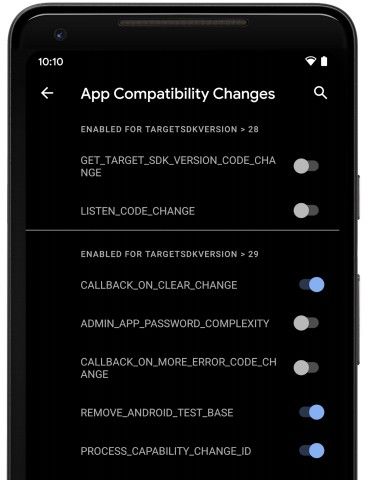
Android 11 Developer Preview App Compatibility Developer Option

  • Updated greylists: Google has updated the list of restricted non-SDK interfaces. The Android 11 Developer Preview release has also removed the meta-reflection workaround that some developers were using.
  • Dynamic resource loader: Developers had asked for a public API to load resources and assets dynamically at runtime, and in Android 11, Google has added in a Resource Loader framework.
  • New platform stability milestone: Preparing apps for early compatibility was a challenge for developers during the Developer Preview/Beta phase as there were no clear dates for final changes to the platform for that version. Thus, with Android 11, Google is adding in a new release milestone called “Platform Stability”, which Google expects to reach in early June. This milestone release will not only include the final SDK and NDK APIs, but it will also include final internal APIs and other system behaviors that may affect apps. More information on the release timeline is available on Google’s developer site.

If you want to test out the new Android 11 Developer Preview, you can flash a prebuilt system image onto a Pixel 2, Pixel 2 XL, Pixel 3, Pixel 3 XL, Pixel 3a, Pixel 3a XL, Pixel 4, or Pixel 4 XL. Alternatively, you can flash a prebuilt, Google-signed Generic System Image (GSI) onto any Project Treble-supported device with an unlocked bootloader. If you don’t have one of the supported Pixel phones or a device that supports Project Treble with an unlocked bootloader, then you can download the latest system image for the emulator in Android Studio. The Android Emulator running the Android 11 system image has experimental support to run ARM 32 and 64-bit binary code on 64-bit x86 system images.

In addition to setting up the Android Emulator, you can also download the Android 11 Developer Preview SDK and NDK inside Android Studio. Google recommends you update Android Studio to the latest Canary release to take advantage of the IDE’s latest features. Once you’re all set up, you can explore the latest platform features and behavioral changes in the Android 11 Developer Preview by checking out the API overview, API reference, and API diff report. If you have any feedback to offer, you can let Google know through any of their official channels. If you find a bug in the Developer Preview, you can file a report on the Google Issue Tracker. Lastly, be sure to follow our news tag for the latest updates on Android 11—there are many platform features and behavioral changes that we find that Google just doesn’t document!

Android 11 News on XDA

The post Here are the new developer features in the Android 11 Developer Preview appeared first on xda-developers.


from xda-developers https://ift.tt/2SGjOef
via IFTTT

Android 11 Developer Preview: All the new Privacy and Security features

Ahead of schedule, Google today released the first Developer Preview of the next version of the Android OS: Android 11. System images are available for the Pixel 2, Pixel 3, Pixel 3a, Pixel 4, but if you don’t own one of these devices, you can also try out the Developer Preview via the Android Studio emulator or the Generic System Image. Although Google is saving most of the exciting new user and developer features for a grand announcement at Google I/O 2020, the company has shared a plethora of changes that are available in the first Developer Preview. Here’s a summary of all the new privacy and security-related features that Google has announced in Android 11 Developer Preview 1.

Android 11 Developer Preview 1 – New Privacy Features

One-time Permission Access

Android controls what kinds of data apps can access through its permission system. Before Android 6.0 Marshmallow, apps requested to be granted permissions at installation, so users had to decide whether they were okay with an app having certain permissions before installing it. Android 6.0 Marshmallow introduced runtime permissions for a select set of sensitive permissions, including location access, microphone access, and camera access. Runtime permissions can only be granted after installation, and the app requesting them must prompt the user through a system-provided dialog to allow access. Finally, in Android 10, Google introduced a special version of the runtime permission which allows the user to grant access only while the app is in active use; however, Google only introduced the “while app is in use” option for the location permission.

In Android 11, Google is giving users more fine-grained control over other sensitive permissions, including camera and microphone access. The company has introduced a new “one-time permission” feature in the Android 11 Developer Preview that allows the user to temporarily grant an app access to a permission so long as that app is in the foreground. Once the user navigates away from the app, the app loses access to that permission and must request it again.

Scoped Storage changes

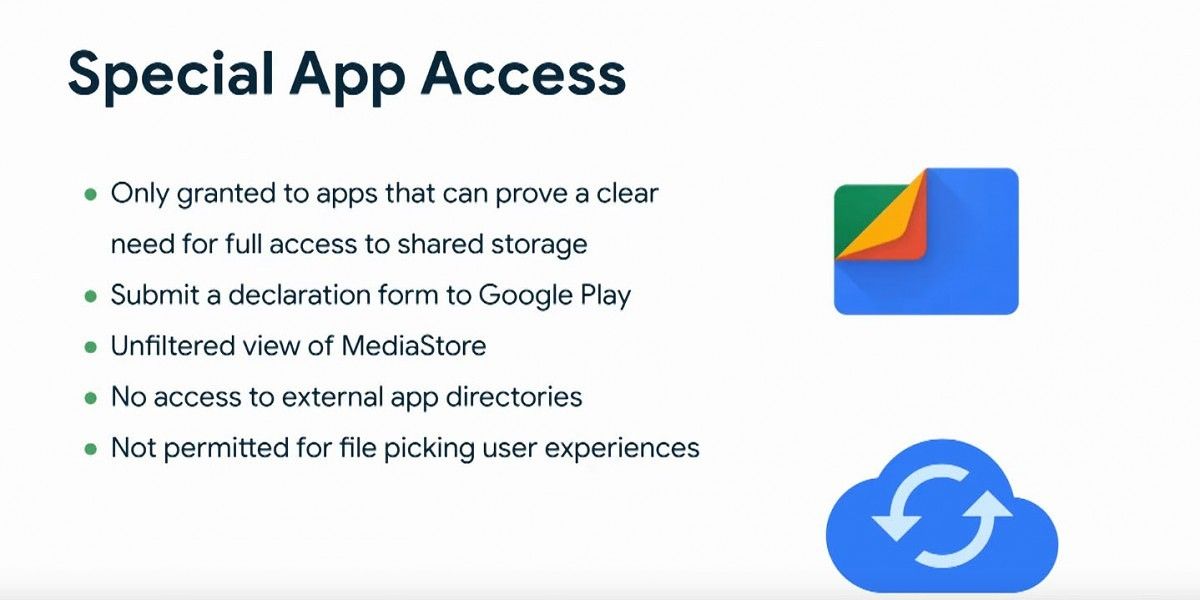
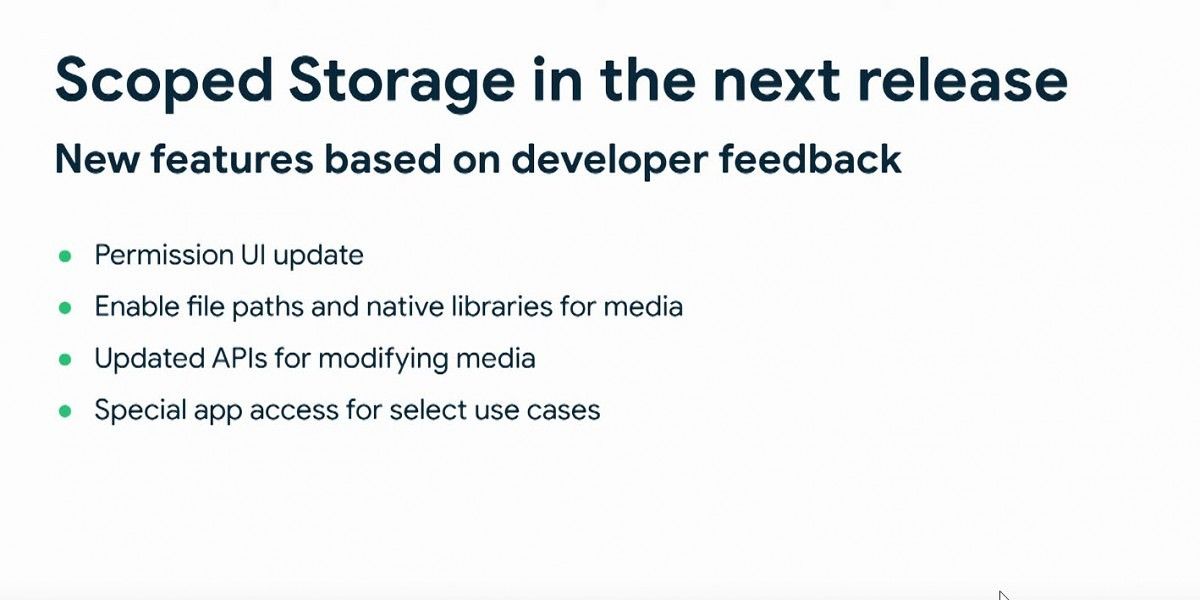
In Android 10 beta 2, Google proposed a radical change to the way that apps access the external storage on Android. (External storage, here, is defined as the data visible to the user and other apps located in /data/media.) The change, dubbed “Scoped Storage,” was aimed at eliminating the overly broad use of the READ_EXTERNAL_STORAGE permission. Too many apps on the Google Play Store were requesting and being granted access to the entire external storage where users were saving their private documents, photos, videos, and other files. With Scoped Storage, apps would, by default, only be granted the ability to see their private data directories. If an app holds the READ_EXTERNAL_STORAGE permission under Scoped Storage enforcement, then it can view certain media files accessible through the MediaStore API. Alternatively, the app can use the Storage Access Framework to have the user manually select files through the system file picker. Finally, apps that need broad access to the external storage, such as file managers, can use the Storage Access Framework to request the user to grant the app access to the root directory of the external storage, thereby granting access to all its subdirectories, too.

Enforcement of Scoped Storage was set to take effect for all apps in Android 10, but after feedback and criticism from developers, Google relaxed the changes, only requiring them for apps targeting API level 29 (Android 10). After August 1st, 2020, all new apps submitted to the Google Play Store must target Android 10, and the same is true for all updates to existing apps after November 1st, 2020. Furthermore, in Android 11, developers of file manager apps must submit a declaration form to Google to be allowed broad access to the external storage; once accepted, file manager apps will have an unfiltered view of MediaStore but will not have access to external app directories.

In addition, Google has introduced other changes to Scoped Storage in the Android 11 Developer Preview. Apps can opt-in to get the raw file path and perform batch edit operations for media files in the MediaStore. The DocumentsUI has been updated to be simpler for users. These changes were announced at the Android Dev Summit last year, and we’re promised additional enhancements to Scoped Storage in future Android 11 releases.

Android 11 Developer Preview 1 – New Security Features

Mobile Driver License Support

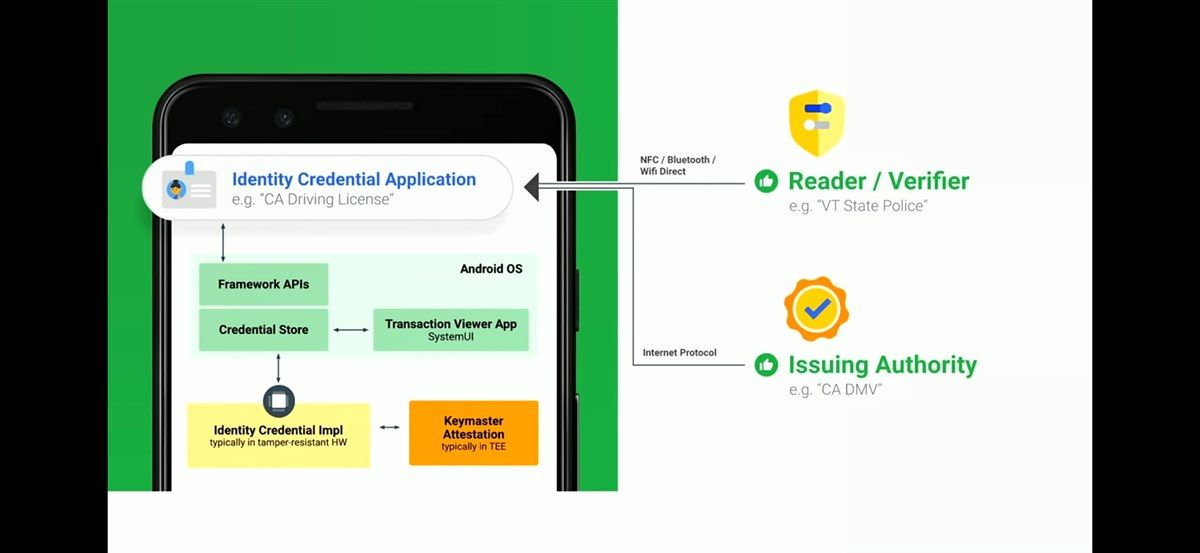
Since early last year, Google has been working on the IdentityCredential API and HAL in AOSP. This feature lays the groundwork for securely storing identification documents on your mobile device, and in particular, ISO 18013-5 compliant mobile driving licenses. Google officially announced this feature at Google I/O 2019, and now it’s finally supported in Android 11 Developer Preview 1.

Google didn’t have a lot to say about this feature in the press release, but because the feature is being developed in the open, we already know a lot of what’s planned. At I/O 2019, Google stated that they were working with the ISO to standardize an implementation of electronic passports; we still don’t have an inkling of when ePassports will be available, but there are already several U.S. states where eDLs are implemented or are in the trial phase. Google also said they are working to provide a Jetpack library so developers can create identity apps. We don’t know how soon developers will be able to test this feature, though, since proper support requires secure hardware on the device. The Secure Processing Unit on the Qualcomm Snapdragon 865 supports the IdentityCredential API, though it may not support the API’s Direct Access mode since the SPU is integrated into the SoC; Direct Access mode would allow the user to pull up a stored electronic ID even when there isn’t enough power to boot Android. For more information on this API, I recommend reading our initial coverage where Shawn Willden, the Android hardware-backed security team lead, provided his input.

New Project Mainline Modules

One of the biggest changes in Android 10 for newly launched devices was the introduction of Project Mainline, which despite its name, has nothing to do with supporting the mainline Linux kernel on Android. (That project, by the way, is called Generic Kernel Image and is still a work-in-progress.) Instead, the purpose of Project Mainline is for Google to wrest control of key framework components and system applications away from OEMs. Each Mainline module is encapsulated as either an APK or an APEX file and is updateable by Google through the Play Store. The user sees updates as a “Google Play System Update” (GPSU) on their device, and updates are released on a regular cadence as a train (ie. they’re downloaded and installed at the same time).

The benefits of Project Mainline. Source: Google.

Google mandates the inclusion of specific Mainline modules, which at the time of Google I/O 2019, included 13. Now, Google is mandating a total of 20 Mainline modules in Android 11 Developer Preview 1.

Initial Mainline Modules (@ Google I/O 2019) Current Mainline Modules (for Android 11 Developer Preview 1)*
ANGLE Captive Portal Login
Captive Portal Login Conscrypt
Conscrypt DNS Resolver
DNS Resolver Documents UI
Documents UI ExtServices
ExtServices Media Codecs
Media Codecs Media Framework Components
Media Framework Components Module Metadata
Module Metadata Network Stack
Network Stack Network Stack Permission Configuration
Network Stack Permission Configuration Permission Controller
Permission Controller Time Zone data
Time Zone data New permissions module
New media provider module
New neural networks API (NNAPI) module

*Note: at the time of publication, Google has not provided us the full list of Mainline modules that are currently required. We will update this table once we have the full list.

BiometricPrompt Changes

Android 9 Pie introduced the BiometricPrompt API, a unified API for biometric authentication hardware. The API provides developers a way to challenge the user through their saved biometrics, whether that be fingerprint, face, or iris. Before BiometricPrompt, developers had to create their own authentication dialog and use the FingerprintManager API, which only supported fingerprint authentication, to challenge the user. On Galaxy smartphones with iris scanners, developers had to use Samsung’s SDK to challenge the user. With BiometricPrompt, developers can challenge the user with any supported biometric method, and the system provides the dialog to the user. Thus, developers no longer need to worry about specifically providing support for a particular kind of biometric hardware, and they also no longer had to code the UI for the authentication dialog. The Pixel 4’s secure facial recognition hardware, for example, can be used for authentication in apps that use BiometricPrompt.

Facial authentication using BiometricPrompt.

What’s new for BiometricPrompt in Android 11 Developer Preview 1? Google has added 3 new authenticator types: strong, weak, and device credential. Before Android 11, developers could only query the device’s secure biometric hardware—fingerprint scanner, 3D facial recognition scanner, or iris scanner—when using BiometricPrompt. Starting in Android 11 Developer Preview 1, developers can also query biometric methods deemed “weak” such as the software-based facial recognition solutions found on many phones. For example, Google previously blacklisted multiple Samsung Galaxy phones for returning a weak facial recognition authenticator when attempting crypto-based authentication. It’s now up to the developer to decide what level of biometric authentication granularity their app needs.

Secure Storage and Sharing of BLOBs

A new API called the BlobstoreManager will make it easier and more secure for apps to share data blobs with one another. Google cites apps sharing machine learning models as an ideal use case of the new BlobstoreManager API.

Platform Hardening

In an effort to reduce the attack surface of Android, Google uses LLVM sanitizers to identify “memory misuse bugs and potentially dangerous undefined behavior.” Google is now expanding the use of these compiler-based sanitizers to several security-critical components including BoundSan, IntSan, CFI, and Shadow-Call Stack. To catch memory issues in production, Google is enabling “heap pointer tagging” for all apps targeting Android 11 or higher. Heap pointer tagging is supported on ARMv8 64-bit devices with kernel support for ARM Top-byte Ignore (TBI), a feature in which “the hardware ignores the top byte of a pointer when accessing memory.” Google warns developers that these hardening improvements may “surface more repeatable/reproducible app crashes,” so developers should thoroughly test their apps on the new Android 11 Developer Preview. In order to find and fix many memory errors in the system, Google used a memory error detection tool called hardware-assisted AddressSanitizer (HWASan). Google is offering HWASan-enabled prebuilt system images on the AOSP build server in case you’re interested in finding and fixing memory errors in your own apps.


Google is sure to announce additional features to protect user privacy and improve security, so be sure to keep an eye out on our Android 11 coverage to stay up-to-date.

Android 11 News on XDA

The post Android 11 Developer Preview: All the new Privacy and Security features appeared first on xda-developers.


from xda-developers https://ift.tt/2HFF2CV
via IFTTT

Android 11 Developer Preview 1 is now available for Google Pixel smartphones, Android Studio emulator, and Project Treble devices

Today, Google officially released the first Android 11 Developer Preview for Pixel smartphones. Although the release is still internally referred to as Android R, Android 11 won’t be getting a dessert name as Google changed Android’s branding with Android 10 last year. Like previous beta releases, this first Android 11 Developer Preview is aimed at helping developers test the latest Android OS release ahead of the stable launch in August. In fact, Google has released this build a few weeks earlier than expected, just so they could give developers more time to prepare. Google will continue to release new previews until stable, but don’t expect the main features and APIs to be revealed until Google I/O 2020 in May.

The first Developer Preview is available now for manual flashing on the Pixel 2, Pixel 2 XL, Pixel 3, Pixel 3 XL, Pixel 3a, Pixel 3a XL, Pixel 4, and Pixel 4 XL. Sadly, the Essential Phone won’t be joining the list now or in the future as the company has ceased all operations. However, smartphones from other manufacturers could be supported in future preview releases as we’ve seen with Android 9 and Android 10 betas. Google typically shares the source code of the latest Android release with its biggest partners so that they can prepare for the new Android update, after all. Expect to see more Android 11 Developer Preview releases in the coming months followed by a stable update for Pixel phones in August.

For developers interested in reading up on the new APIs and behavioral changes, you can get started at the preview site that Google set up.

Android 11 Developer Preview Site

To get started with the latest release on one of the aforementioned Pixel devices, you can download the latest system image from the link below. This release is only intended for developers to test their apps against the latest behavioral changes and platform features, which is why Google hasn’t opened up sign-ups on the Android Beta site and why this first release is called a Developer Preview rather than an Android Beta. If you have a Project Treble-compatible device with an unlocked bootloader that launched with Android 9 Pie or Android 10, you can flash an Android 11 Generic System Image using fastboot. For developers who don’t have a supported Pixel or Project Treble-enabled device, you can download the latest system image from the SDK Manager in Android Studio.

Download Android 11 Developer Preview 1 System Images for Pixel Phones

Download Android 11 Developer Preview 1 OTA Images for Pixel Phones

Download Android 11 Developer Preview 1 GSI Images for Project Treble devices

Stay tuned to XDA for our extensive coverage on the new Android OS Developer Previews and Betas. We’ll be flashing it on several of our own Pixel devices and will dive into the firmware to detail everything that’s new on the surface and under-the-hood. Be sure to follow our Android 11 tag to catch up on all the news we’re going to be posting soon.

Android 11 News on XDA

The post Android 11 Developer Preview 1 is now available for Google Pixel smartphones, Android Studio emulator, and Project Treble devices appeared first on xda-developers.


from xda-developers https://ift.tt/2SKjpI1
via IFTTT

[Update 2: Settlement Checks Sent] Google will pay up to $500 to Pixel owners with defective microphones

Update 2 (2/19/20 @ 12:35 PM ET): Checks for the Pixel settlement are now being sent out and owners are beginning to receive them.

Update (8/13/19 @ 9:15 AM ET): The claim period for Google Pixel owners with defective microphones has opened.

The Google Pixel and the Pixel XL were, for the most part, exceptional devices when they launched back in 2016. They were the first devices to mark the death of the Nexus legacy, and also signified a big change of direction for Google in several aspects. Nowadays, they’re still receiving love—they even have Android Q! However, as good as they were, they also had certain flaws going on. One of them being a microphone-related issue—certain Pixel and Pixel XL devices came with defective microphones.

Google acknowledged there was an issue with defective microphones in early 2017, when the company admitted that a number of devices had a “hairline crack in the solder connection on the audio codec” which, of course, caused issues with calling and Google Assistant functionality. The company first offered to address the issue with a software update but continued to knowingly sell these defective devices, a course of action which, expectedly, earned them a lawsuit from angered customers.

Pixel XDA Forum Pixel XL XDA Forum

Now, the lawsuit has allegedly been settled for $7.25 million pending court approval, and Google Pixel device owners affected by this issue could get up to $500. If your device was manufactured before January 4th, 2017, it means that your device is covered by the lawsuit and, therefore, is eligible. According to the proposed settlement, if you returned your defective Pixel/Pixel XL device only to get another defective phone from Google, then you may be eligible to the highest compensation, which is $500. If you only had a single defective device, then you may be eligible for up to $350. Even eligible Pixel owners who didn’t experience any issues at all could get up to $20 from this settlement.

The court hasn’t approved this yet, so you can’t submit a claim just yet. However, you should keep an eye on the case if you want to receive compensation for your defective device.

Via: The Verge


Update 1: Settlements Open

The settlement website for the class action lawsuit regarding Google Pixel phones with defective microphones has opened. Owners of the 2016 Pixel and Pixel XL can file a claim and get anywhere from $350-500 in return, depending on the number of defective units they had. People who paid an insurance deductible to replace a phone will get a refund, and even if you had no issues with your Pixel, you can get $20. File a claim at the link below.

Via: Android Police


Update 2: Settlement Checks Sent

Pixel owners who filed a claim for the class action lawsuit are starting to receive their settlement checks. Users have reported receiving $20 – $500, depending on the severity of their claim. If you filed a claim and met the qualifications, you should be getting something in the mail soon.

Source: Reddit

The post [Update 2: Settlement Checks Sent] Google will pay up to $500 to Pixel owners with defective microphones appeared first on xda-developers.


from xda-developers https://ift.tt/2YMAFRl
via IFTTT

The next ASUS ROG Phone will come pre-loaded with Stadia

Google’s Stadia is one of the most high-profile cloud game streaming services. Its competitors include NVIDIA’s GeForce Now, Microsoft’s Xbox Live, and Sony’s PlayStation Now. The paid version of Stadia (Stadia Founders’ Edition) launched in November 2019 for the Google Chrome browser, the Google Pixel phones, and any Chromecast-connected TV. It received its fair share of criticism as many reviewers didn’t find the performance to be satisfactory, and a few features were missing. The service is also limited to only a few developed markets. However, the premise of Stadia still remains enticing for those users who don’t have gaming consoles or a gaming PC. A free version of the service is also scheduled to release this year. While the Google Pixel-only limitation proved to be a limiting factor for Stadia’s adoption on smartphones, this is set to change this week as many more phones are now compatible with it, including Samsung’s Galaxy flagship phones, and a few gaming phones from the likes of ASUS and Razer. Now, ASUS Republic of Gamers (ROG) has announced a partnership between Stadia and the ROG Phone.

ASUS states that the Stadia app will be pre-loaded onto every next-generation ROG Phone in participating territories. The next-generation ROG Phone will release in 2020 as the successor of the ASUS ROG Phone II. The Stadia partnership with ROG covers the following territories: Belgium, Canada, Denmark, Finland, France, Germany, Ireland, Italy, Netherlands, Norway, Spain, Sweden, United Kingdom, and the United States. The partnership runs until 2021.

ASUS notes that with Stadia, users can stream the latest games via Wi-Fi directly to any ROG Phone, including the upcoming next-generation ROG Phone, without needing to download them. (Users still need to buy the games.) Stadia supports gaming at up to 4K at 60fps, with HDR and 5.1-channel surround sound support. It’s a good match for the hardware of the ROG Phones. According to ASUS, it cements the position of the ROG Phone as the most desirable gaming phone on the planet. While a lot of this is marketing speak, ASUS did achieve first-mover status here, as competitors such as the Nubia Red Magic series and the Black Shark series haven’t announced any partnerships with Stadia yet.

We don’t know much about the upcoming next-generation ROG Phone (ROG Phone III) yet. It’s a certainty that it will have the new Qualcomm Snapdragon 865 SoC, though, as most flagship Android phones this year will have the chip. It can also be expected to have a big 120Hz display and a 6,000mAh battery, just like its predecessor.

The post The next ASUS ROG Phone will come pre-loaded with Stadia appeared first on xda-developers.


from xda-developers https://ift.tt/3bMWhjD
via IFTTT