I’m sure that everyone has accidentally swiped away a notification before they got a chance to read it fully. You’re then left checking half a dozen apps to see if you missed an important message. That can be a frustrating experience because you just don’t know if you’re missing out on something important. What you may not know is that Android has had a built-in notification log for many years now, since Android 4.3 Jelly Bean in 2012, in fact! Unfortunately, Google never made the notification log accessible in settings, so its Holo UI looks wildly outdated compared to Google’s more modern Material Theme. The feature has effectively been abandoned for years now, and many OEMs even remove access to it! However, it looks like Google is finally giving the feature some attention, as they’ve not only tweaked the UI of the old notification log, but they’ve also implemented a brand new “Notification History” page in Android 11!
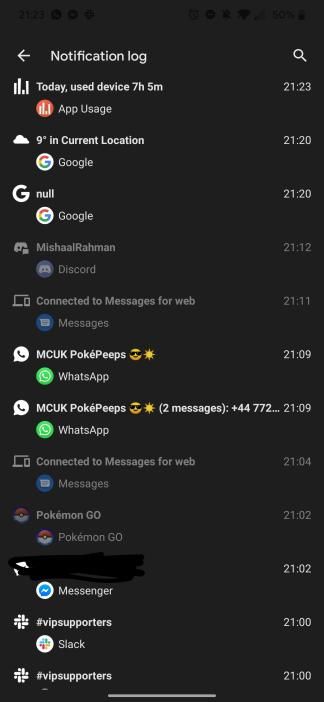
First, let’s start with the Notification Log. As seen in the screenshots below, courtesy of XDA Recognized Developer Quinny899, this shows a pretty basic timeline of all the notifications that arrived on your phone. The UI has been cleaned up a little bit for Android 11, but it’s the same idea. You can see the notification title, app, some contents, and the time it arrived. Pretty simple, but valuable information.
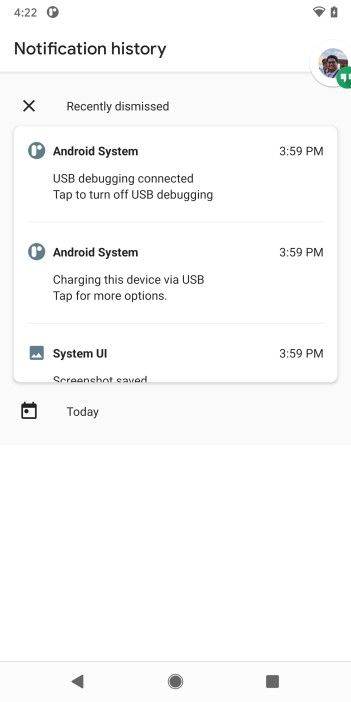
The more interesting discovery is a brand new “Notification History” page in Android 11. To our initial surprise, this is a completely separate page from the Notification Log that’s been around for years. The Notification History page is more polished and looks like something meant for consumers to use. It shows “Recently dismissed” notifications at the top that you can scroll through as a list. You get the same information about the notifications that are shown in the Notification Log, but this UI looks a lot nicer.
If you’re interested in seeing this feature for yourself, you can create a shortcut to it using the activity launcher in the custom launcher of your choice (eg. Nova Launcher, Action Launcher, etc.) or you can use the dedicated Activity Launcher app from the Google Play Store below. Just find “Settings” and then scroll down to “notification history.”
We hope Google surfaces this feature in a later Developer Preview or public Beta release. Any potential privacy concerns can be addressed by the fact that someone has to already have physical access to the unlocked device in order to view this page. Adding this feature to the Settings app of Android 11 would mean users won’t have to manually launch either the activity for Notification Log or Notification History.
Today, Google released the first Android 11 Developer Preview for Pixel devices (excluding the first generation models), and we’ve in the process of detailing everything we’ve found so far. While digging into the Android 11 system dump for the Pixel 4, I noticed a new activity in SettingsGoogle, the Settings app for Pixel smartphones, called “Battery Share.” Intrigued, I launched the activity and discovered what looked to be an upcoming feature. The logo is clearly a placeholder—it’s the same one from the Adaptive Battery page—but the strings, which are new, suggest that Google is working on a reverse wireless charging feature, possibly for the Pixel 5.
Since the activity name was prefaced with “com.google.android” rather than “com.android,” this “Battery Share” activity is most likely a Google feature rather than an AOSP one. This pattern is true for other Google features such as Active Edge and Pixel Stand wireless charging, so we think we’re looking at the beginnings of Google’s reverse wireless charging feature rather than a generic AOSP implementation. The strings for the Battery Share page state that “your phone’s battery will run out faster when using battery share. Battery share works with compatible ear buds, watches, phones, and more.” While this doesn’t explicitly mention wireless charging or reverse wireless charging, the implication is clear: You’re sharing your phone’s battery, which means it’ll run out faster, with certain compatible ear buds, watches, and phones. We can assume this is referring to using your device to charge other Qi-compatible accessories and smartphones.
Google’s Pixel 3, Pixel 3 XL, Pixel 4, and Pixel 4 XL support Qi wireless charging. The Pixel 3 and Pixel 3 XL support 10W wireless charging using the proprietary Pixel Stand charger, though they also support 5W Qi wireless charging on other wireless chargers. The Pixel 4 and Pixel 4 XL also support 10W wireless charging on the Pixel Stand, but Google increased the wireless charging rate to 11W for compatible Qi wireless chargers. No Pixel phone currently supports reverse wireless charging at the moment; whichever device ends up having this feature, which is likely the Pixel 5, will be the first in Google’s Pixel line to support the feature. This feature would pair nicely with the new truly wireless Pixel Buds.
We’ll continue digging into the Android 11 Developer Preview to see if we can find more information about this feature, the upcoming Android OS stable release, or the Pixel 5.
Google has officially kicked off the next version of Android by releasing the first developer preview for Android 11. This first preview is intended for developers, but there are also several consumer-facing features to note. We will be updating this post throughout the day and week with all of the new features we uncover while digging around.
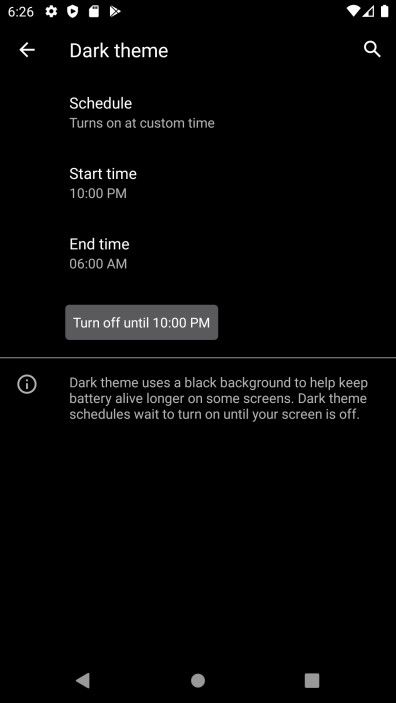
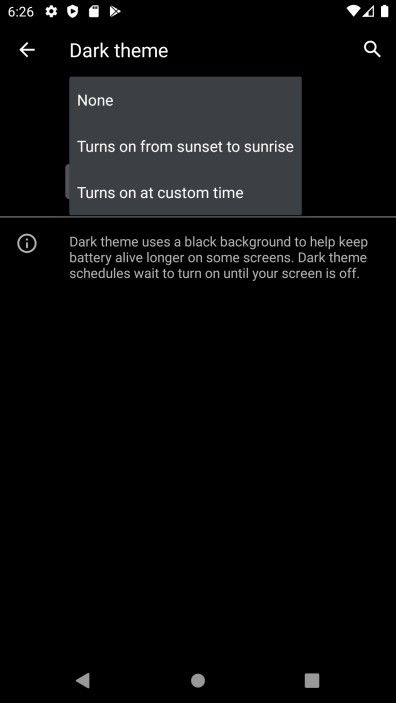
This will make a lot of people happy. As the name implies, you can now schedule the Dark Theme to come on at specific times. The options are the same as what we get for Night Light: sunset to sunrise or a custom time.
Bubbles Notifications Enabled by Default
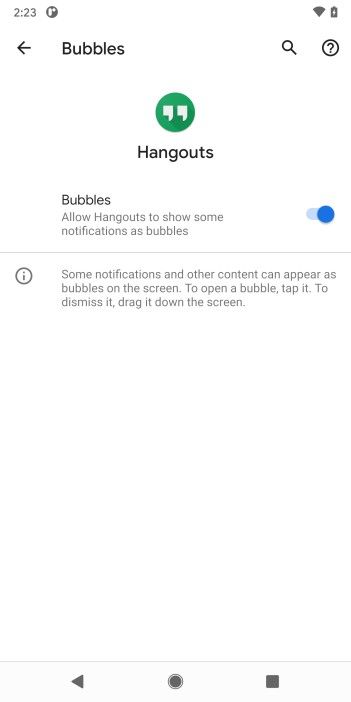
Bubbles were introduced in Android 10 and we’ve known Google intends to do more with them. In Android 11 DP 1, bubbles notifications are enabled by default. You still have to long-press the notification and tap “bubble” to use this feature, and the app has to actually support it. You just don’t have to enable the option in Developer Options anymore.
“Conversations” Section in Notifications
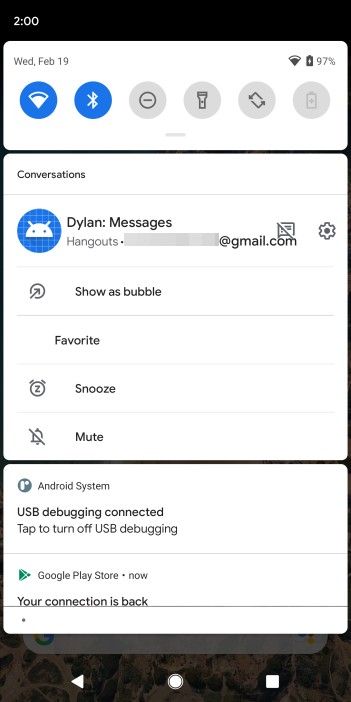
There is a new section in the Notifications pull down for “Conversations.” This is where notifications from messaging apps will appear, and there are some new quick actions you can take on them. You have the option to “Snooze” a notification, mute it, show it as a bubble, or “favorite,” which we’re not sure what that does. The crossed-out messaging icon next to the Settings icon (second screenshot) removes the notification from the conversation section.
Screen Record Toggle in Quick Settings
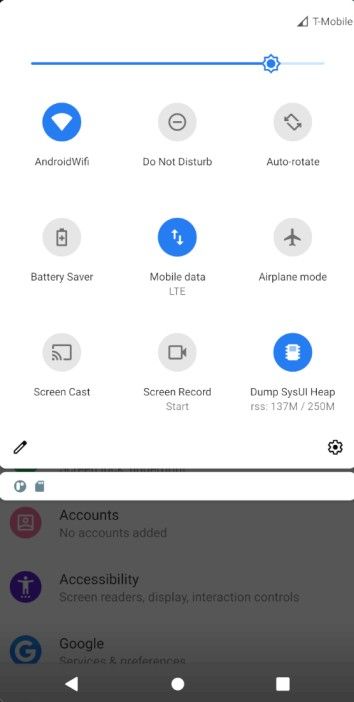
If you take a lot of screen recordings you’ll be happy to see there is now a toggle for “Screen Record” in the Quick Settings pull down. Screen recordings do not capture internal app audio at this time, however.
New UI for Do Not Disturb settings
Do Not Disturb has been reorganized once again. Exceptions are organized into People, Apps, and Alarms & other interruptions. The other settings are the same, but moved around a bit.
New “Ask Every Time” option for permissions
Permissions were a big deal in Android 10 and there some new features in Android 11 as well. There is a new “Ask Every Time” option, which means the app will ask your permission every single time it wants to use your camera, contacts, etc.
Apps won’t annoy you with repeated permission requests
Ever get frustrated with apps that constantly ask you for permissions? Android 11 will stop this by preventing apps from asking for permissions if you tap Deny twice for a specific permission.
These actions will also be taken into account:
If the user presses the back button to dismiss the permission dialog, this doesn’t count as a “deny” action.
If the user is taken to system settings from your app using requestPermissions() and then presses the back button, this does count as a “deny” action.
Gesture Settings in More Places
One of the most notable changes in Android 10 was the full gesture navigation system. In Android 11, the settings for gestures have been put in the Accessibility settings as well as the old location of Settings > System > Gestures. This should make it easier to find.
Android 11 Dynamic System Updates installer in Developer Option
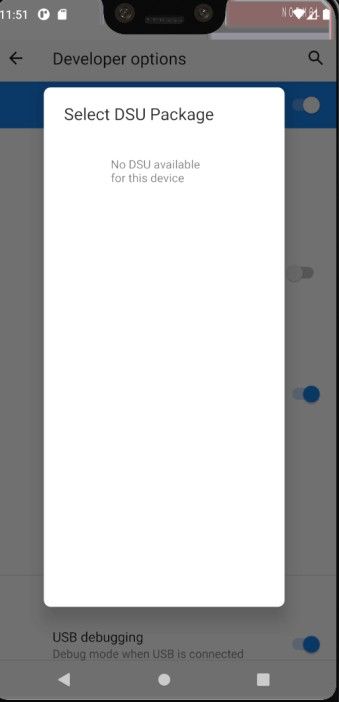
Dynamic System Updates are now in the Developer options in Android 11. In the screenshot above, you can see what the installer looks like for installing a Dynamic System Update package.
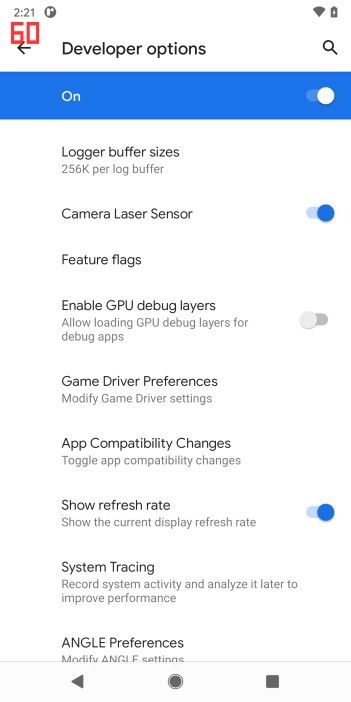
New setting to show the display refresh rate in Developer Options
For people who like to see information on the screen, there is a new toggle in the Developer Options to show the current display refresh rate.
Bluetooth devices stay connected in Airplane Mode
As we previously reported, Android 11 changes the behavior of Airplane Mode. If you are currently using a Bluetooth device connected to your phone, Bluetooth will not be turned off when you enable Airplane Mode.
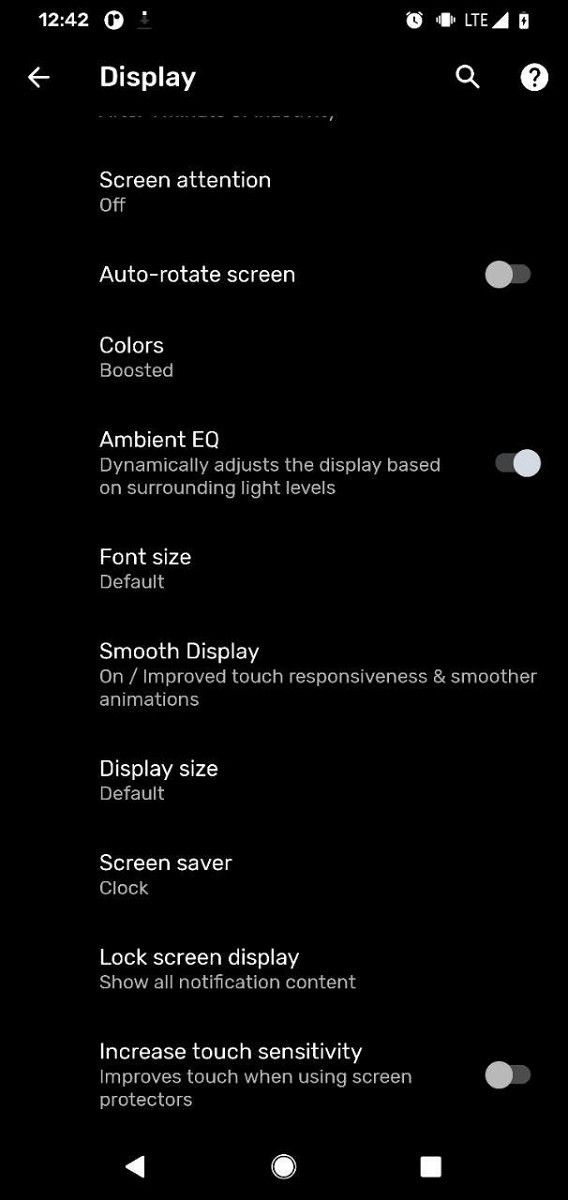
Pixel 4 gets a new increased touch sensitivity option
An interesting new feature for Pixel 4 users is “Increase touch sensitivity” in the Display options. The description says it “improves touch when using screen protectors.” That’s a handy feature if you’re using a particularly thick screen protector, such as tempered glass. Whether or not people will know this toggle exists is another story.
New screenshot preview with scrolling screenshot support
Way back in May of 2019, Dave Burke said they would add support for scrolling features in “Android R.” Android 11 (the artist previously known as Android R) is here and so are scrolling screenshots. There’s a catch though: it doesn’t work yet. We were able to manually activate the UI element, as shown above, but it’s not functional. We’ll likely see it in an upcoming release.
New Motion Sense gesture to pause music on the Pixel 4
Motion Sense was a headlining feature of the Pixel 4 but the media control functionality is pretty limiting. You could only use it to skip songs or go back to the previous song. Android 11 adds a gesture to play/pause music by mimicking a tap with your whole hand in front of the display.
Pin an app to the Share Menu
Android’s native share menu has changed a lot in recent years and many people still don’t like it. In Android 11, Google is attempting to make it easier to use by allowing apps to be pinned to the menu. This means those apps will always be at the top and easy to find.
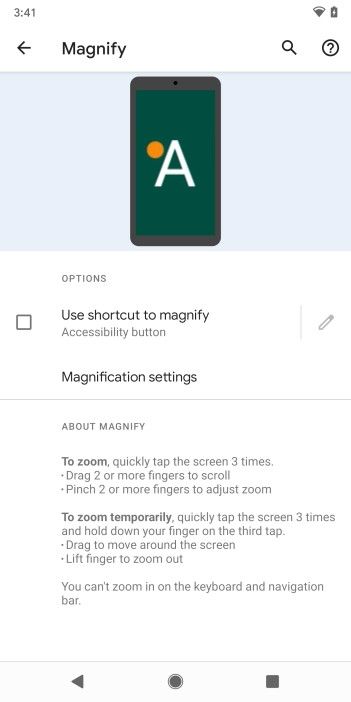
New Magnify Settings
Google has revamped the magnifications settings page in Android 11. The first page shows the option to “Use shortcut to magnify” and “Magnification settings.” The settings page has options for the magnification area and to enable full-screen magnification. This is a much nicer and more useful menu for these important accessibility options.
Keep an eye on this post as we will continue to add more discoveries from Android 11!
When Google announced the Pixel 4, one of the main things they showed off was Motion Sense. These are air gestures using Google’s proprietary Soli chip. It is basically a miniature radar chip built into the phone. At launch, it could control music by skipping tracks and it could detect when you were picking up the phone. With Android 11, released today as the first developer preview, Google has added a few new features including a play/pause gesture for controlling music.
This new gesture in Android 11 is like a tap in the air above the phone. It’s definitely hard to get just right, but it is a good gesture to have. It is one of the few controls that I felt was really missing from the whole music control suite. Thankfully, Google has added it. It’s more of a light tap in the air instead of an intentional tap. It’s like touching an invisible touch screen instead of pressing a big button.
In my brief testing after installing Android 11, I do find the other Motion Sense gestures to be a bit more accurate. I’ve found that I don’t need to intentionally make the actions and more natural motions are working to control the device. It’s a good upgrade as Motion Sense was largely known as a bad gimmick by the tech community. Hopefully, with these improvements, Google has brought it past the point of a bad gimmick and turned it into an actually meaningful feature.
It’s good to see Google is adding new features to Motion Sense in Android 11. I know a lot of the community was worried Google would add it then completely ignore it until the Pixel 5. Luckily, they are improving and upgrading it to make the bezel vs notch trade-off more worth it.
Android 11 Developer Preview 1 was released today, and as expected, we have a flurry of activity going on. The download links are available for the Google Pixel devices and GSIs for other Android phones, and we have explained the installation procedure. We have detailed the new privacy-focused features as well as the new developer features. We are also working on showing all the user-facing changes in the first developer preview. One basic user-facing change is that the Google Pixel 4 phones have got a new increased touch sensitivity option in Android 11.
Increased touch sensitivity option on the Google Pixel 4 in Display Settings
The new option lives in the display settings. Its purpose is to increase the touch sensitivity of the display for users using screen protectors. This is a fairly common option across the smartphone industry. Some screen protectors, particularly of the tempered glass variety, introduce issues with touchscreen sensitivity if they are not precisely applied on the display. The advent of 2.5D glass and then curved 3D glass has only made life harder for users of tempered glass screen protectors, and that is why this option exists in many custom user interfaces. Now, Google has brought it to the Pixel 4 on Android 11 Developer Preview 1.
It should be noted that touch sensitivity is different from the refresh rate of the display. The ASUS ROG Phone II has a refresh rate of 120Hz, for example, while sampling touch data at 240Hz. The Apple iPhone 11 Pro has a 60Hz screen refresh rate while having a 120Hz touch sample rate. Touch sensitivity on Android phones was problematic in the past, but over the last couple of years, it has generally improved to the point where it is a non-issue. However, phones with high refresh rate (HFR) displays will still feel more responsive to the touch (UI fluidity) as they are refreshing the display image thirty or sixty times more per second in case of 90Hz and 120Hz displays respectively.
For Google Pixel 4 users using a tempered glass screen protector, the new increased touch sensitivity option should come in helpful. This will almost certainly be carried over to the first Android 11 beta, so users not wanting to mess with fastboot to install a developer preview will have to wait a bit more.
Thanks to XDA Senior Member cstark27 for the tip and screenshot!
Android 11’s first Developer Preview is upon us, and there are going to be a ton of changes under the hood to discover and analyze. Given that it only just came out, we’re only just beginning to discover new features. On Google’s Android Developer blog, however, they’ve outlined one change that may go a long way towards ensuring the privacy of users, and it won’t be reserved for just Android 11. Developers will eventually need to get approval straight from Google in order for their Play Store app to get location services in the background.
With the release of Android 10, Google made it so that the user had to explicitly allow an app to access location services in the background. When an app requests location, currently, a prompt will appear to allow access, allow while using the app, or decline access entirely. Google appears to have taken that a step further, and developers will now need to go through the company directly. In their blog post, Google said that over half of all users selected the “while app is in use” option. With Android 11, users will also have the ability to select to allow an app access to location data one time only, where the app will then need to request it again the next time that it is launched.
As for apps accessing location data in the background, Google discovered that many apps “didn’t actually need it.” The factors the company will look at in order to decide whether an app requires the ability to access the location in the background will be the following.
Does the feature deliver clear value to the user?
Would users expect the app to access their location in the background?
Is the feature important to the primary purpose of the app?
Can you deliver the same experience without accessing location in the background?
These are the factors Google will be looking at after updating the Google Play policy. All requests for this permission will be reviewed by members of the Trust & Safety team at Google Play. Google gave the following three app examples as to how the permission will be granted for devices running Android 11.
An app that sends emergency or safety alerts as part of its core functionality – and clearly communicates why access is needed to the user – would have a strong case to request background location.
A social networking app that allows users to elect to continuously share their location with friends would also have a strong case to access location in the background.
An app with a store locator feature would work just fine by only accessing location when the app is visible to the user. In this scenario, the app would not have a strong case to request background location under the new policy.
This policy change is not immediate and will take time to implement. Google anticipates the following roll-out timeline.
April: official Google Play policy update with background location
May: developers can request feedback on their use case via the Play Console with an estimated reply time of 2 weeks, depending on volume
August 3rd: all new apps submitted to Google Play that access background location will need to be approved
November 2nd: all existing apps that request background location will need to be approved or will be removed from Google Play
Google currently encourages all developers to review their applications and ensure that when they request background location access, it’s for the right reasons. Developers are also responsible for any third-party SDKs that may try and access location in the background. This change affects more than just Android 11, as the apps will be removed from the Google Play Store entirely.
Android 11 is here, and with it comes loads of new features and under-the-hood improvements. While we’re trying to discover them all, it may take some time before we find all of them. You may remember that before we knew that Google would drop the letter naming scheme entirely for Android versions, the company said that the addition of scrolling screenshots was planned for Android R. While the feature isn’t actually enabled by default or even fully working yet, we managed to manually surface the new feature so that it shows up in the screenshot UI. The screenshot preview UI is also completely new, and not something that we’ve seen before.
Keep in mind that we manually activated the UI element and that the feature does not actually work yet. Tapping “Extend” prompts a pop-up that says “Not implemented!” This does give hope that we’ll see the feature in a future developer preview or beta though. However, it does appear that the ability to take a scrolling screenshot is indeed on its way to stock Android. Scrolling screenshots were previously deemed “infeasible“. The screenshot preview UI is also new and has the option to share your screenshot to other apps or even edit it.
Stock Android is pretty barebones as it acts as more of a base for manufacturers to work off of to implement their own features. Not even the Google Pixel runs it, with Google instead opting to use their own version of Android with extra features. Even still, Google’s Android on the Pixels does bare the most resemblances of pretty much any other manufacturer’s implementation, bar a select few. Because of that, though, devices from the likes of Samsung and Xiaomi have a lot more features implemented over some competitors, though obviously, features aren’t everything. Scrolling screenshots are on most smartphones, and now it looks like they’ll finally be a part of AOSP.