LightBlog

jeudi 20 février 2020

[Update: India availability] Samsung Galaxy Z Flip announced with 6.7-inch foldable display, Snapdragon 855+, and more

Update 1 (02/20/2020 @ 05:45 AM ET): Samsung has announced availability related details for the Galaxy Z Flip for India. Scroll to the bottom for more information. The article as published on February 11, 2020, is preserved as below.

In 2019, Samsung, Huawei, and Motorola kicked off the foldable phone craze with the Galaxy Fold, Huawei Mate X, and Motorola Razr, respectively. Each of these 3 phones approached foldable smartphone design in different ways, with Razr’s arguably being the most intuitive as it’s a throwback to the iconic clamshell design. The Motorola Razr’s uniqueness will be shortlived, however, as Samsung has officially announced the Galaxy Z Flip. Samsung, like Motorola, is taking the vertical flip phone design of days past and modernizing it with a foldable display and more modern internals and software. We’ve seen tons of leaks and heard a lot of rumors about the device leading up to this point, so let’s see how much was correct.

Galaxy Z Flip XDA Forums

Samsung Galaxy Z Flip: Design

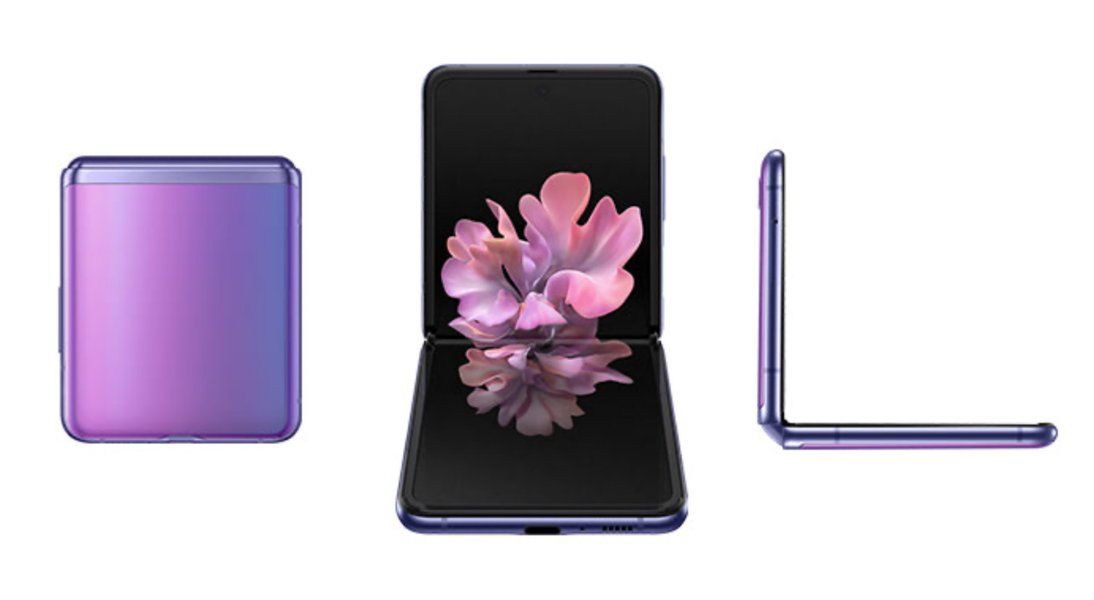
The design of the Galaxy Z Flip is one of the more intuitive foldable designs. It is a tall smartphone that simply folds vertically in half, just like flip phones of years past and the more recent Motorola Razr. While unfolded, the Galaxy Z Flip will have a 6.7-inch display at a 22:9 aspect ratio. It is tall and long but works out well for a foldable phone.

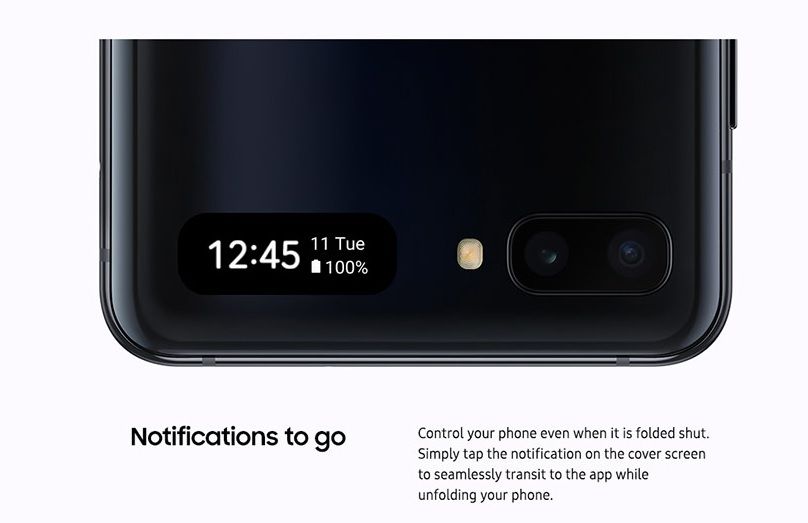
On the front, there are two important areas. The smaller 1.06-inch sAMOLED display and the dual camera. We’ll get to cameras in a moment. The smaller 1.06-inch display is made to match the color on the Mirror Purple and Mirror Black models, so while it’s off you shouldn’t be able to see the display. All you will see is the time, date, battery info, incoming calls, and more.
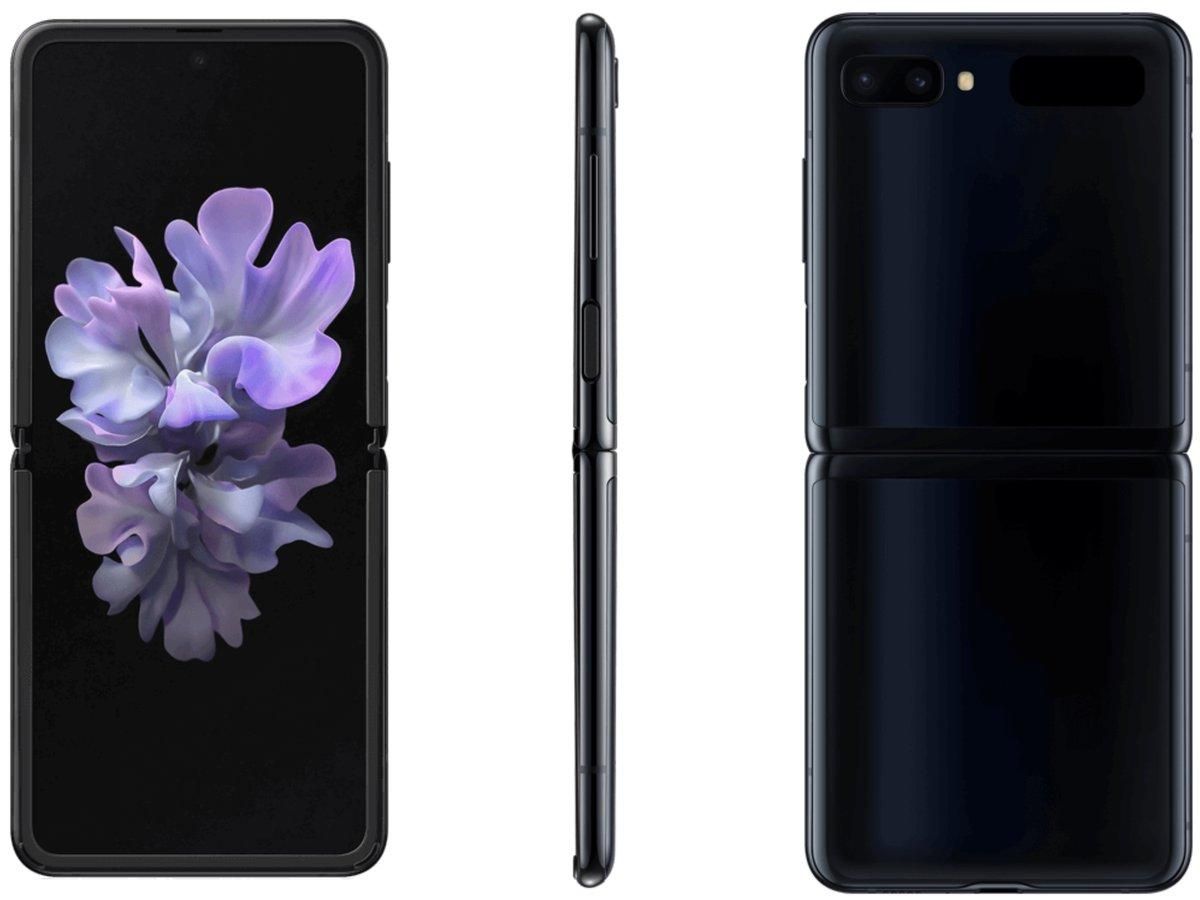
Samsung Galaxy Z Flip in Mirror Black Samsung Galaxy Z Flip in Mirror Purple

Just like the current Galaxy Fold, the Galaxy Z Flip will have a bit of a gap when folded. This isn’t a bad thing, though. This gap is needed for Samsung’s new “Ultra Thin Glass” to fold over without breaking. The gap also makes the phone easier to open. If it were closed fully flush, it would be much harder to open than most flip phones. On the outside of the phone is the aluminum hinge and glass front and back.

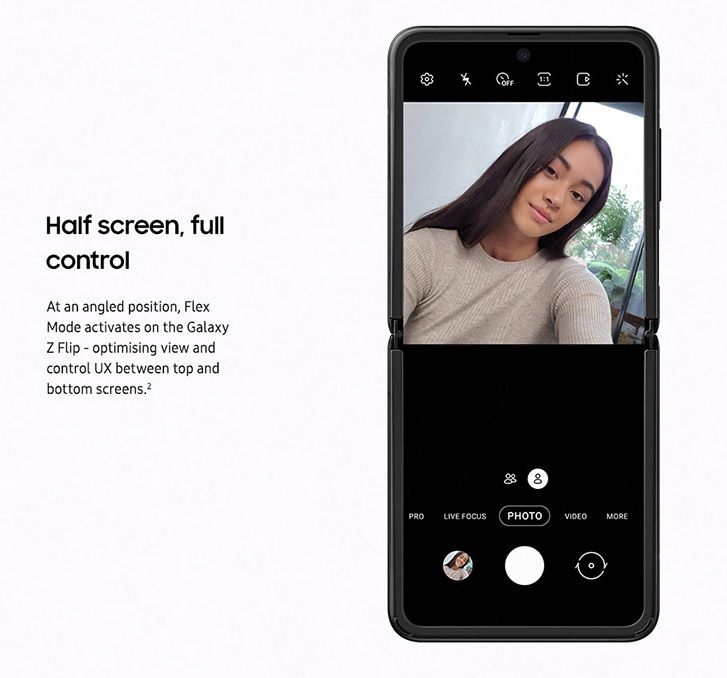
The hinge of the phone won’t work like the Galaxy Fold or Moto Razr, instead, it will actually lock into different positions using the double pivot hinge. You will be able to free lock it into any angle between around 90 and 180 degrees. This becomes super useful for video calls or vlogging because the phone is essentially its own kickstand. It will also, of course, fold flat and into its smaller size.

The Galaxy Z Flip will come in two main colors: Mirror Purple and Mirror Black. There will also be a limited edition Thom Browne edition. Thom Browne, a fashion designer based out of New York City, partnered with Samsung to design a Galaxy Z Flip and a set of accessories specifically for a limited edition bundle. This bundle will come with a limited edition case, limited edition pair of Galaxy Buds+, and a limited-edition Galaxy Watch Active 2.

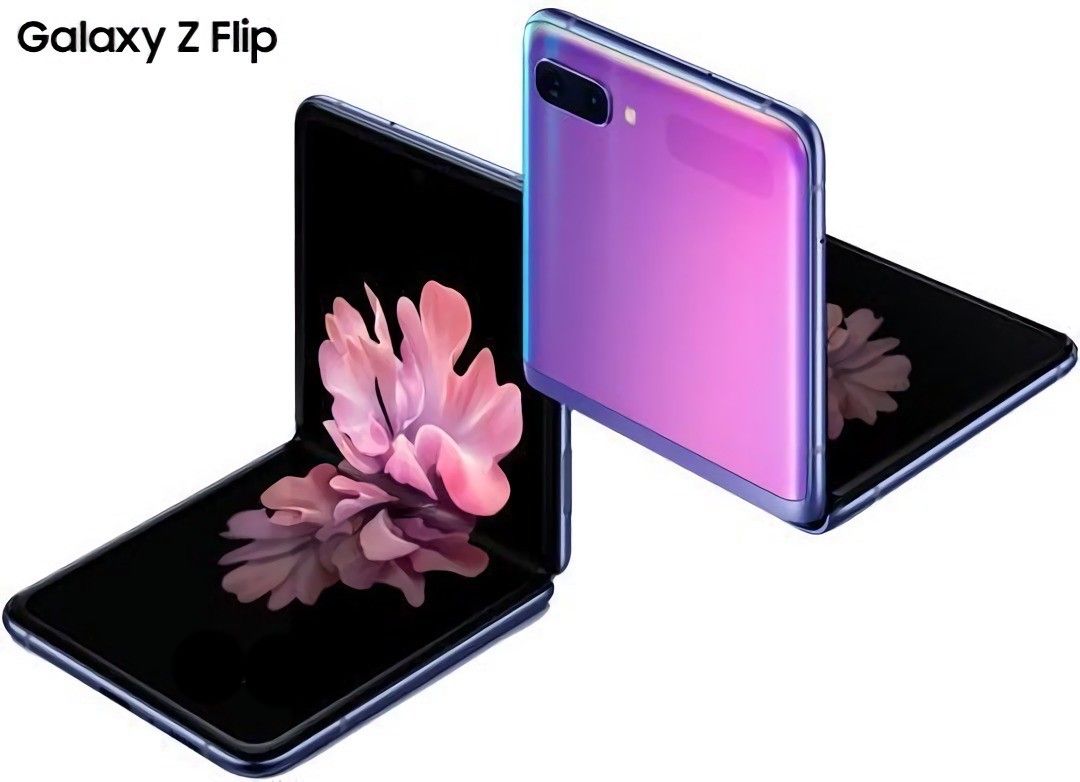
Samsung Galaxy Z Flip Thom Browne Edition

This device will have a fingerprint scanner, though it will not be under the Infinity Flex Display. There will be a capacitive fingerprint scanner on the top right side of the phone. The fingerprint scanner will double as a power button.  Above that will be the volume rockers.

Samsung Galaxy Z Flip: Display

The display on the Galaxy Z Flip is very different from the Galaxy Fold in terms of actual size, aspect ratio, the axis of the fold, and the layer over the OLED. The display, as previously mentioned, has a 22:9 aspect ratio. The display resolution is 2636 x 1080 pixels. Samsung is employing a Dynamic AMOLED display with support for HDR10+. This is a folding Infinity-O display in that it has a hole-punch for a single camera.

Unfortunately, Samsung will not be employing a high refresh rate display in the Galaxy Z Flip. This is likely due to the Infinity Flex display. The display panel used in the Galaxy Z Flip is a flexible display which means it’s much thinner than a normal display panel. It’s likely Samsung just couldn’t get above 60Hz running on the device.

Samsung Galaxy Z Flip folding Samsung Galaxy Z Flip folding

The display will be layered in Samsung’s “Ultra Thin Glass.” This is basically very thin glass that will actually be able to bend. The Galaxy Z Flip will be the first device with Ultra Thin Glass. This glass will be layered in a layer of a flexible polymer, just like the Galaxy Fold. This extra layer of plastic is included for the protection of both the Infinity Flex Display and the glass. There is also a very small front display on this device that measures 1.06-inches and comes in at a resolution of 300×116 pixels. As I mentioned, it’s only useful for checking the time, calls, date, and battery status.

Camera

The Galaxy Z Flip camera setup is pretty decent, though it doesn’t have a 108MP sensor as some have speculated. It has a dual-camera setup on the rear/folded front. There are two 12MP cameras consisting of a main wide and a secondary ultra-wide camera. The main and ultra-wide cameras on the Galaxy Z Flip will be the same cameras as the Galaxy S20.

The main sensor is, as previously mentioned, a 12MP sensor. Samsung has chosen to use the Sony IMX 555. It will have an aperture of f/1.8 and a pixel size of 1.8 microns. The ultra-wide will be 12MP as well and have an aperture of f/2.2.

The front camera is a 10MP Sony IMX 374. This is the same 10MP sensor from the Galaxy S20, Galaxy S10, Galaxy Note 10, and Galaxy Fold. Unlike the Galaxy S20, this won’t support 4K 60fps video recording. It will be limited to 4K 30fps video recording but it does have autofocus, though. Something else Samsung is doing with the cameras is on the software side. It will be able to move the viewfinder of the camera to match the position of the hinge. Basically, you can fold the phone to around 100° and use it as a kickstand on a table to record video and the phone will match it. This will also work in apps like Google Duo.

Specifications

So as with every phone, the specifications are important. The Galaxy Z Flip is no exception. The SoC in the phone is the Qualcomm Snapdragon 855+. It might be one generation old, but it helps bring the price down and will likely help with battery life. That’s because there isn’t going to be a massive battery in this phone. Samsung is throwing in a 3300mAh battery. Samsung is actually going with a dual battery setup as they did with the Galaxy Fold. One of the batteries will be 900mAh while the other will be 2400mAh. Both will support wireless charging, reverse wireless charging, and 15W wired charging.

The phone comes with 8GB of LPDDR4X RAM. This isn’t as much memory capacity as the Galaxy S20 series or the Galaxy Fold, but once again, this is likely a cost-cutting measure to be able to get the phone out to more people. Another place where Samsung has possibly cut costs is storage. It has 256GB of UFS 3.0 storage, down from the 512GB capacity in the Galaxy Fold.

The phone, when unfolded, isn’t going to be small. It has a 6.7-inch 22:9 display. This is very tall, but luckily, it won’t be unfolded in your pocket. While unfolded, it will be between 6.9mm and 7.2mm in thickness. While folded, it will be between 15.4mm and 17.3mm in thickness. Unlike other foldables, the Galaxy Z Flip will not fold perfectly flat. There will be a gap, and it might actually be useful for this fold. The gap is a perfect place to put your finger to open the foldable display.

Something else Samsung has done is add a new sensor to track the angle the phone is folded at. Since it can free lock into any angle between 90 and 180, the phone needs to know which angle it’s at to be able to adapt the software to fit. Developers will be able to use a Samsung SDK to use this in their own apps.

Galaxy Z Flip
Display Main Display 6.7“ FHD+ Dynamic AMOLED Display(21.9:9) Infinity Flex Display
2636 x 1080
425ppi
*Screen measured diagonally as a full rectangle without accounting for the rounded corners. The actual viewable area is smaller due to the rounded corners and camera hole.
Cover Display 1.1“ Super AMOLED Display
300 x 112
303ppi
Dimension & Weight Folded 73.6 x 87.4 x 17.3mm (Hinge) – 15.4mm (Sagging)
Unfolded 73.6 x 167.3 x 7.2mm – 6.9mm (Screen)
Weight 183 g
Camera Front Camera 10MP Selfie Camera: F2.4
Pixel size: 1.22μm
FOV: 80 ˚
Rear Dual Camera 12MP Ultra Wide Camera: F2.2
Pixel size: 1.12μm
FOV: 123 ˚
12MP Wide-angle Camera: Super Speed Dual Pixel AF, OIS, F1.8
Pixel size: 1.4μm
FOV: 78 ˚
OIS for Rear Wide-angle Camera (Optical Image Stabilization)
Up to 8x digital zoom
HDR10+ recording
Tracking AF
AP 7 ㎚ 64-bit Octa-Core Processor
※ 2.95 ㎓ (Maximum Clock Speed) + 2.41 ㎓ + 1.78 ㎓
Memory 8GB RAM with 256GB internal storage
Battery 3,300 mAh (typical) dual battery
Charging Fast Charging compatible via power cord and wireless
Wireless PowerShare
OS Android 10
Network Enhanced 2X2 MIMO, 5CA, LTE Cat.16 Up to 1.0Gbps Download
LTE Cat.13 Up to 150Mbps Upload
Up to 1.0Gbps Download / Up to 150Mbps Upload
Connectivity Wi-Fi 802.11 a/b/g/n/ac (2.4/5GHz),VHT80 MU-MIMO,256QAM
Bluetooth® v 5.0 (LE up to 2Mbps), ANT+, USB Type-C, NFC, Location (GPS, Galileo, Glonass, BeiDou)
Payment Samsung Pay (Link)
Credit & debit cards: supports MST or/and NFC, Prepaid card, Global remittance, Transit, Memberships, Gift cards, Rewards
Sensors Capacitive Fingerprint sensor (side), Accelerometer, Barometer, Gyro sensor, Geomagnetic sensor, Hall sensor (digital, analog), Proximity sensor, RGB Light sensor
Authentication Lock type: pattern, PIN, password
Biometric lock type: Fingerprint sensor, Face recognition
Audio Mono speaker
Surround sound for Bluetooth and earphones with Dolby Atmos technology (Dolby Digital, Dolby Digital Plus included.)
UHQ 32-bit &DSD64/128 support
PCM: Up to 32 bits, DSD*: DSD64/128
Audio playback format: MP3, M4A, 3GA, AAC, OGG, OGA, WAV, WMA, AMR, AWB, FLAC, MID, MIDI, XMF, MXMF, IMY, RTTTL, RTX, OTA, APE, DSF, DFF
Bluetooth
Dual Audio: connect two Bluetooth devices to the Galaxy Z Flip to play audio through the two devices simultaneously.
Scalable Codec: Enhanced Bluetooth connection under ambient radio frequency interference.
Recording
Recording quality is improved with the High AOP Mic that minimizes distortion in noisy environments.
Video Video playback format
MP4, M4V, 3GP, 3G2, WMV, ASF, AVI, FLV, MKV, WEBM
TV connection
Wireless: Smart View (screen mirroring 1080p at 30fps)
Security Knox platform: real-time monitoring and protection.
Virus, malware prevention. (Powered by McAfee)
Secure Folder: a secure space on the device to isolate and protect content such as apps, photos, movies, and private files.
In the Box Galaxy Z Flip, Data Cable, Travel Adapter, Ejection Pin, USB Connector (OTG), Quick Start Guide, Clear Cover, Earphones (USB Type-C) with sound by AKG

Software

The software on the Galaxy Z Flip will be basically stock One UI 2.1 based on Android 10. It will have all the same software features as on the Galaxy S20 in One UI 2.1, but some features might be a bit more limited due to the different SoCs. One new feature Samsung is including is the new Quick Share service, which is basically AirDrop for Galaxy phones.

A few of the fun software features Samsung is working on are based around the flip phone design. The first was actually teased at SDC back in October 2019 then just a few days ago in an ad during the Oscars. This will work in the camera app and apps like Google Duo in unison with the double pivot hinge. Another hinge feature is a classic from the old flip phone days. If you are on a phone call and close the phone, it will end the call. I know this isn’t a groundbreaking feature, but I thought it would be worth mentioning.
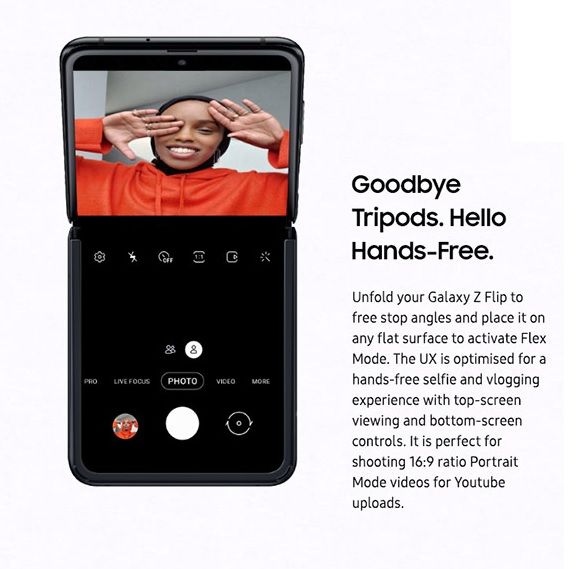
Galaxy Z Flip Flex Mode

Samsung Galaxy Z Flip: Pricing & Availability

The Galaxy Z Flip will be available (in limited quantities) starting on Friday, February 14th. It will be available in stores and online through AT&T, Best Buy, Sprint, Samsung Experience Stores and Samsung.com. The Galaxy Z Flip is priced at $1,380. Black and Purple will be offered first, followed later by Mirror Gold.

Indian Pricing and Availability

Samsung has announced pre-bookings for the Galaxy Z Flip in India, beginning from February 21, 2020, across Samsung e-shop and select retail stores. The Samsung galaxy Z Flip will cost consumers in India a cool ₹1,09,999 ($1535). The device is expensive, yes, but a lot of us were predicting an even higher price tag. Deliveries for pre-orders will begin from February 26, 2020, and buyers from Samsung e-shop will be offered premium white glove delivery in 10 Indian cities.

Curiously, the Galaxy Z Flip in India will retain the Qualcomm Snapdragon 855+ and not swap over to an Exynos processor.

The post [Update: India availability] Samsung Galaxy Z Flip announced with 6.7-inch foldable display, Snapdragon 855+, and more appeared first on xda-developers.


from xda-developers https://ift.tt/2SAdV17
via IFTTT

Android 10’s hidden Quick Access Wallet for Google Pay is now a generic feature in Android 11

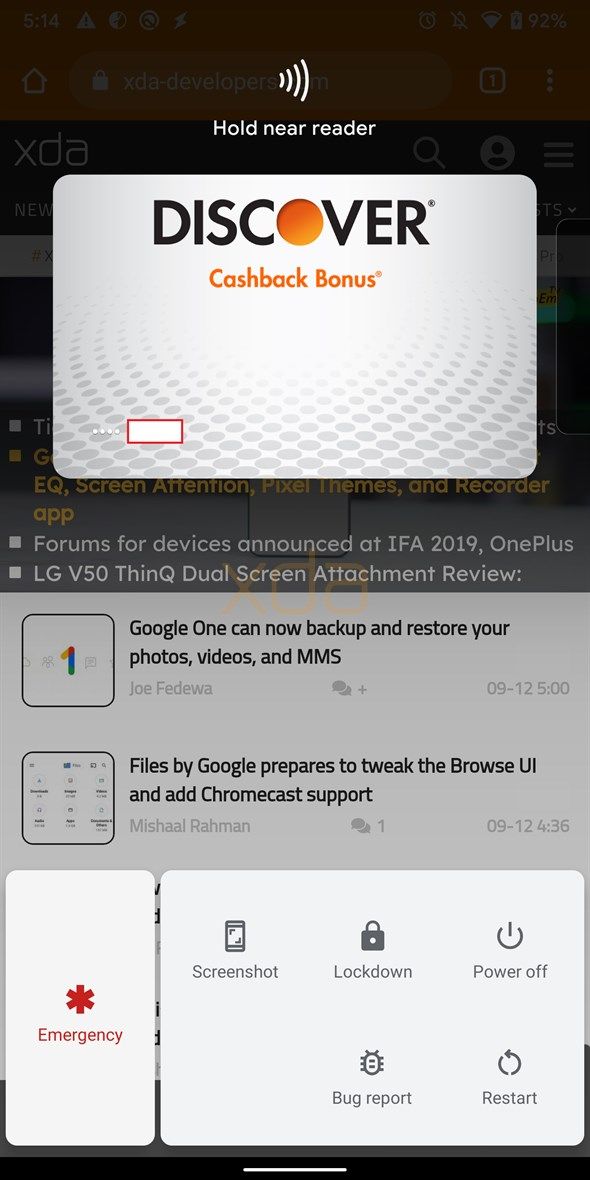
Google just released the Android 11 Developer Preview with a focus on improving the security and usability features in the OS. Besides the variety of new developer options and changes over Android 10, a few other features that were teased in previous versions of Android but not released are now present in the Android 11 Developer Preview. One such addition is the Quick Access Wallet feature, which lets you pull up cards saved in Google Pay directly from the power menu.

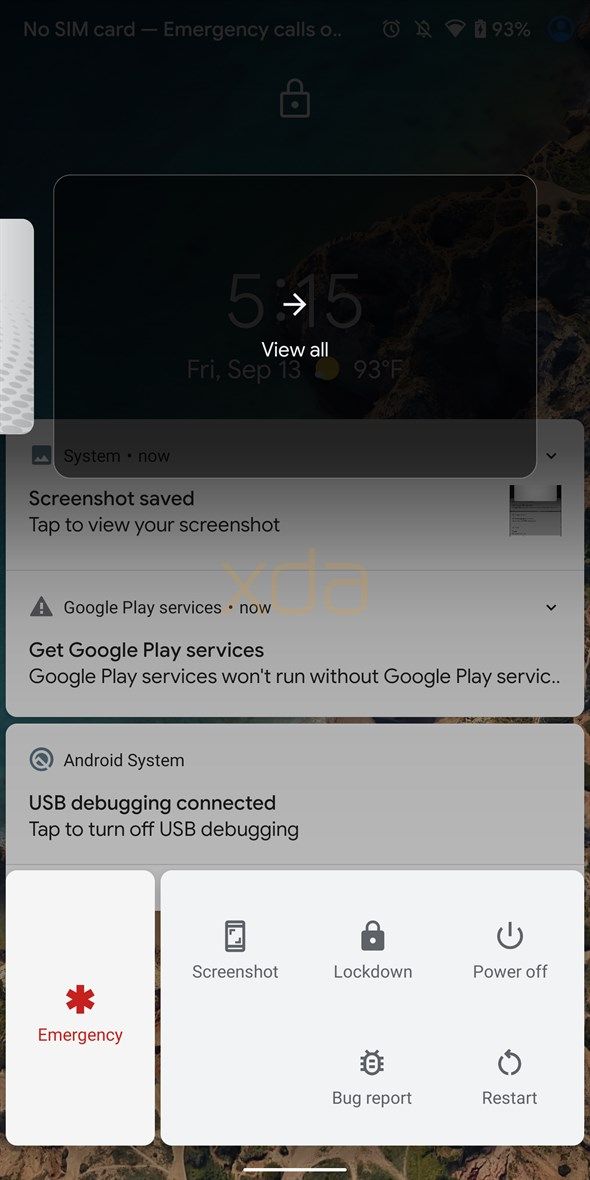
Quick Access Wallet first surfaced in the fourth Android Q beta version as “Show cards & passes“. It wasn’t working at the time and even while Google listed it as “Quick wallet access” among the Android 10 features after the stable release, the feature was still surprisingly absent. XDA’s Editor-in-Chief, Mishaal Rahman, later managed to activate the feature wherein he was able to add his cards or access the ones that were already saved in Google Pay by simply opening the power menu (i.e. long-pressing the power button).

Android 10 Quick Wallet Access

Quick Access Wallet preview in Android 10

In Android 10, the Quick Access Wallet feature was evidently limited to the Google Pixel devices and only worked with payments using Google Pay. For several months, Google didn’t share any further detail about the feature. But with Android 11, Google is expectedly making a move to improve it by extending support beyond Google Pay. Any payment app will now be able to implement the QuickAccessWalletService API so that users can access cards, coupons, or tickets saved in that specific app directly from the power menu.

To implement the feature, the payment app will be required to add the required permission, i.e. android.permission.BIND_QUICK_ACCESS_WALLET_SERVICE, in its Manifest. This will allow the system to bind the service and not kill the app even when it is not used for long enough. To be able to use Quick Access Wallet with other apps in Android 11, users will be required to enable the feature from Settings > System > Gestures. Users will also have to select their default payment app in the Tap & Pay option in Settings.

If you have a Pixel device and want to try out the new Developer Preview, you can click on the links below and flash the system packages for your specific device. Do note that you’ll require an unlocked bootloader and you’ll have to back up your data before starting the process.

How to download Android 11 Developer Preview for Google Pixel and other devices

How to install the Android 11 Developer Preview on your Google Pixel smartphone

Android 11 News on XDA

The post Android 10’s hidden Quick Access Wallet for Google Pay is now a generic feature in Android 11 appeared first on xda-developers.


from xda-developers https://ift.tt/2P7yCR0
via IFTTT

The OmniVision OV64C is OmniVision’s first 64MP image sensor

As we have explained before, the smartphone camera megapixel wars have resumed in full swing. In 2019, most mainstream lower mid-range, upper mid-range and affordable flagship phones opted to use some form of a 48MP Quad Bayer sensor. In 2020, it seems 64MP will be the new standard resolution for smartphone cameras. Both Samsung and Sony have released their 64MP sensors in the form of the Samsung ISOCELL GW1 and the Sony IMX686 respectively. Samsung has even gone a step higher by releasing two 108MP sensors in the form of the ISOCELL HMX and the ISOCELL HM1, the latter of which is used in the Samsung Galaxy S20 Ultra. While the two companies battle it out for superiority, a third contender is quietly launching its own products in the market. The contender OmniVision, and so far, it hasn’t achieved success yet. It aims to keep trying, though, and it has now announced its own 64MP image sensor in the form of the OV64C.

In recent years, OmniVision’s image sensors have found use as secondary cameras on dual-camera, triple-camera, and quad-camera phones. However, in terms of the primary image sensor, we have to go all the way back to the Xiaomi Mi A1 and the OnePlus 2 to find smartphones using OmniVision’s image sensors as primary cameras. OmniVision launched the 48MP OV48C image sensor at CES with theoretically better specifications than the current 64MP sensors on the market, as it had a higher pixel size achieved by keeping the resolution constant. With the announcement of the OV64C, OmniVision has come back to competing on a level playing field as the sensor’s specifications are similar to that of its competitors. What this means is that it doesn’t offer any major fundamental advantages over something like the IMX686, unlike the OV48C. This is because a major constraint in cameras is pixel size, and the OV48C’s 1.2-micron pixel size and 2.4-micron “effective pixel size” is unparalleled for a high megapixel smartphone camera, while the 0.8-micron pixel size and 1.6-micron “effective pixel size” of the OV64C is on par with its competitors.

The OV48C is a 1/1.7-inch sensor, making it just as big as the ISOCELL GW1 and the IMX686. It has a corresponding 0.8-micron pixel size. It uses OmniVision’s PureCel Plus stacked die technology to provide “leading edge still image capture” and “exceptional 4K video performance” with electronic image stabilization (EIS) for high-end phones. The sensor also offers features such as 4-cell remosaic for full resolution Bayer output as well as digital crop zoom, and a CPHY interface for greater throughput using fewer pins. This makes it suitable for the main rear-facing camera in multi-camera configurations.

OmniVision notes that according to TSR (a market research company), there will be 127 million image sensors with 64MP or higher resolution shipped to smartphone manufacturers in 2020. This confirms the market reality where having a high megapixel sensor is seen as a must due to Huawei’s successful execution of the 40MP cameras in its flagship phones. This is the case even though flagship phones from the likes of Samsung, Google, and Apple still have 12MP primary cameras with excellent results. It’s promoting the OV64C as a well-positioned sensor to address “this ramp in demand among high-end smartphone designers.”

The OV64C integrates an on-chip 4-cell color filter array and hardware remosaic to provide high quality 64MP Bayer output in real time. (This makes it seem as if it’s a Quad Bayer sensor as all Quad Bayer sensors have a QCFA, but the meaning of the “64MP Bayer output” terminology is unclear.) In low light, the sensor can use “near-pixel binning” to output a 16MP image with 4x sensitivity as it offers a 1.6-micron equivalent performance for previews and still captures. In either case, OmniVision assures us that the sensor can consistently capture the best quality images. It also has 2x digital crop zoom with 16MP resolution and a fast mode switch.

Interestingly, the sensor features type-2, 2×2 microlens phase detection autofocus (microlens-PDAF) to boast autofocus accuracy, especially in low light. (This solution is similar to Sony’s 2×2 autofocus lens solution, which is confirmed to be a feature of the OPPO Find X2’s camera.) Output formats include 64MP at 15fps (indicating the lack of zero shutter lag), 16MP with 4-cell binning at 30fps, 4K video at 60fps, and 4K video with EIS at 30fps. (This makes it clear that 4K video at 60fps won’t support EIS, which is, unfortunately, a common omission across the Android smartphone industry.) In addition, the OV64C supports 3-exposure, staggered HDR timing for up to 16Mp video modes.

OmniVisoin says that the samples of the OV64C image sensor are available now. It remains to be seen whether major smartphone vendors will choose this sensor over the IMX686 and the ISOCELL GW1 in their 2020 smartphone launches.


Source: OmniVision

The post The OmniVision OV64C is OmniVision’s first 64MP image sensor appeared first on xda-developers.


from xda-developers https://ift.tt/3bLCtwO
via IFTTT

Samsung begins mass production of 7nm and 6nm EUV chips at new EUV-equipped line

Samsung Foundry, a division of Samsung Electronics, has been going through tough times lately. At one time, it supplied chips for both Qualcomm and Apple, fabricating the Qualcomm Snapdragon 820/821, Snapdragon 835, Snapdragon 845, and partly supplying the Apple A9. However, over the last four years, Samsung has lost both Qualcomm and Apple as customers, as both companies have migrated to rival Taiwan Semiconductor Manufacturing Co. (TSMC). Apple fully migrated to TSMC with the A10 SoC, and kept using it for the A11, A12, and A13 SoCs. TSMC got the order to manufacture the 7nm Snapdragon 855. This year, it seemed as if Samsung could get back Qualcomm’s orders for the Snapdragon 865 with its cutting-edge 7nm EUV process. However, for reasons that are still unclear, Qualcomm opted to go with TSMC’s 7nm N7P (DUV) process for the Snapdragon 865, while using Samsung’s newer 7nm EUV process for the mid-range Snapdragon 765. It was indeed a piece of bad news, but Samsung hasn’t admitted defeat yet in its battle against market leader TSMC.

The company recently won a contract to supply some part of the 5nm chips for the Qualcomm Snapdragon X60 5G modem, which will make its way in flagship phones in 2021. Now, it has announced that it has begun mass production at its “cutting-edge” semiconductor fabrication EUV-equipped line in Hwaseong, South Korea. The facility is named V1, and it’s Samsung’s first semiconductor production line dedicated to the extreme ultraviolet (EUV) lithography process. It currently produces chips of 7nm and below (that is currently limited to 6nm). The line opened in February 2018, and began test wafer production in the second half of 2019. Its first products will be delivered to customers in the first quarter of this year.

Samsung says that the V1 line is currently producing mobile chips with 7nm and 6nm EUV process technology. It will continue to adopt finer circuitry up to the 3nm process node (which is currently in a design and testing phase). By the end of 2020, the cumulative total investment in the V1 line will reach $6 billion in accordance with the company’s plan. Also, the total capacity from 7nm and below process nodes is expected to triple from that of 2019. Along with the S3 line, the company expects the V1 line to play a “pivotal role” in responding to “fast-growing market demand for single-digit node foundry technologies.”

It has become a great achievement for the industry to reach ever-difficult new process nodes, and Samsung notes that as semiconductor geometries grow smaller, the adoption of EUV lithography technology has become increasingly important. That’s because it enables scaling down of complex patterns on wafers and provides an “optimal choice” for next-generation applications such as 5G, AI, and automotive. The company concludes by stating it now has a total of six foundry production lines in South Korea and the US, including five 12-inch lines and one 8-inch line.

The reason why Qualcomm opted to skip Samsung’s 7nm EUV process for the Snapdragon 865 to use a theoretically inferior 7nm N7P TSMC process and yet use Samsung for the Snapdragon 765 becomes clearer now. At this point, this remains only speculation, but it’s apparent that there were supply issues with Samsung’s 7nm EUV process. Even TSMC’s 7nm EUV N7+ node was used exclusively for the HiSilicon Kirin 990 5G in 2019. Samsung has only now begun mass production at the V1 line, which means that it was probably a quarter late to get a contract for the Snapdragon 865. It remains to be seen who will be manufacturing the upcoming Apple A14 and the Qualcomm Snapdragon 875 later this year. The company was curiously silent about progress on its 5nm process node in this announcement as well, so we will have to wait to know more about it.


Source: Samsung

The post Samsung begins mass production of 7nm and 6nm EUV chips at new EUV-equipped line appeared first on xda-developers.


from xda-developers https://ift.tt/3bSpYzH
via IFTTT

mercredi 19 février 2020

Custom ROM throwback: Android 11 tests separating the Quick Settings panel from the notification shade

The first builds of Android 11 were released a few hours ago, coming to us in the form of Developer Preview 1. This new release of Android brings along a lot of new privacy and security-focused changes, several developer-oriented updates, and a whole bunch of changes that were not part of the announcement post from Google. While we were looking around for more new, unannounced changes in the newest version of Android, we stumbled upon something that surprised us…but not really. With Android 11, Google is testing a separation of the Quick Settings panel from the Notification Shade — a feature that used to exist in several older custom ROMs.

As Mishaal demonstrates on his Google Pixel 2 Xl running Android 11 Developer Preview 1, Android 11 is testing a feature that separates the Quick Settings dropdown from the Notification Panel dropdown, allowing you to quickly jump into either depending on which side of the status bar you pull down from. In the video, you can spot a white line on the status bar indicating the point of separation — swiping down from the left of this line will pull down the notification shade, while swiping down from the right of this line will pull down the Quick Settings panel. If your intent is to access the Quick Settings panel, this will streamline your experience by eliminating the double swipe that is currently needed to access them.

As is evident from the video, this feature is still very much a Work-in-Progress. The notifications do not align themselves properly to the top of the notification shade, and the Quick Settings panel has an odd line where the notifications would normally appear. This feature is thus not available for toggling by default and needs to be manually activated.

One theory with this UI test is that Google could be trying it out alongside other UI tests on the Quick Settings panel and Notification Shade, such as integrating music controls in the Quick Settings panel instead of the Notification panel. It could also be tied to the dedicated Conversation view in the Notification Shade, and coupled with the aforementioned music controls change, can be seen as an attempt to declutter the Notification Shade and improve the overall experience.

If you have been around the custom ROM scenes in the era of Gingerbread and Ice Cream Sandwich, you would realize that this isn’t exactly a new feature. I personally recall having used this feature on Touchwiz-based custom ROMs based on Android 2.3.4 Gingerbread as well as on heavily modified CyanogenMod builds that were based on Android 4.0 Ice Cream Sandwich. It appears that Google has now taken inspiration from custom ROMs for this UI test, though at this stage, there’s no guarantee that this feature will make its way to the final release of Android 11.

Android 11 News on XDA

The post Custom ROM throwback: Android 11 tests separating the Quick Settings panel from the notification shade appeared first on xda-developers.


from xda-developers https://ift.tt/2SHVx7P
via IFTTT

Wild Android 11 test puts a music player in the Quick Settings panel

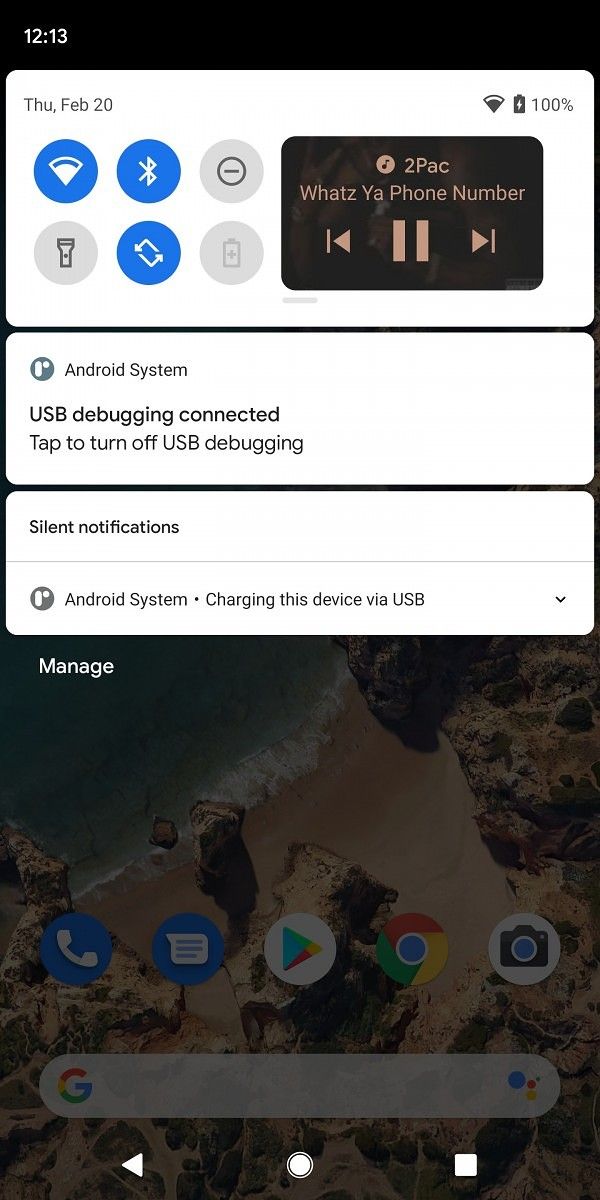
The first Android 11 developer preview is out and we’ve already covered some of the changes we found from Android 10 so far. The latest iteration of Android also comes with some new privacy and security features, along with a few new features for developers. But that’s not all. Google is scheduled to roll out two more developer previews and three betas before the final stable release and while the company won’t be announcing any of the new features till Google I/O 2020, we’ll continue to tinker with the latest build to find upcoming features in Android 11. We’ve already uncovered several such features, including a new increased touch sensitivity option for the Pixel 4, a Motion Sense gesture for controlling music playback on the device, new screenshot previews, and even a fully redesigned Notification History page. And now, our Editor-in-Chief Mishaal Rahman has managed to manually enable a new feature that puts a music player in the Quick Settings in the notification shade.

In current builds of Android, whenever you’re listening to music on your phone a music player appears in the notifications shade. Sometimes, when you receive too many notifications, the music player is moved to the bottom and you have to open the notification shade all the way in order to access it. This could prove to be a bit of an annoyance, especially if you’re someone who receives a ton of notifications.

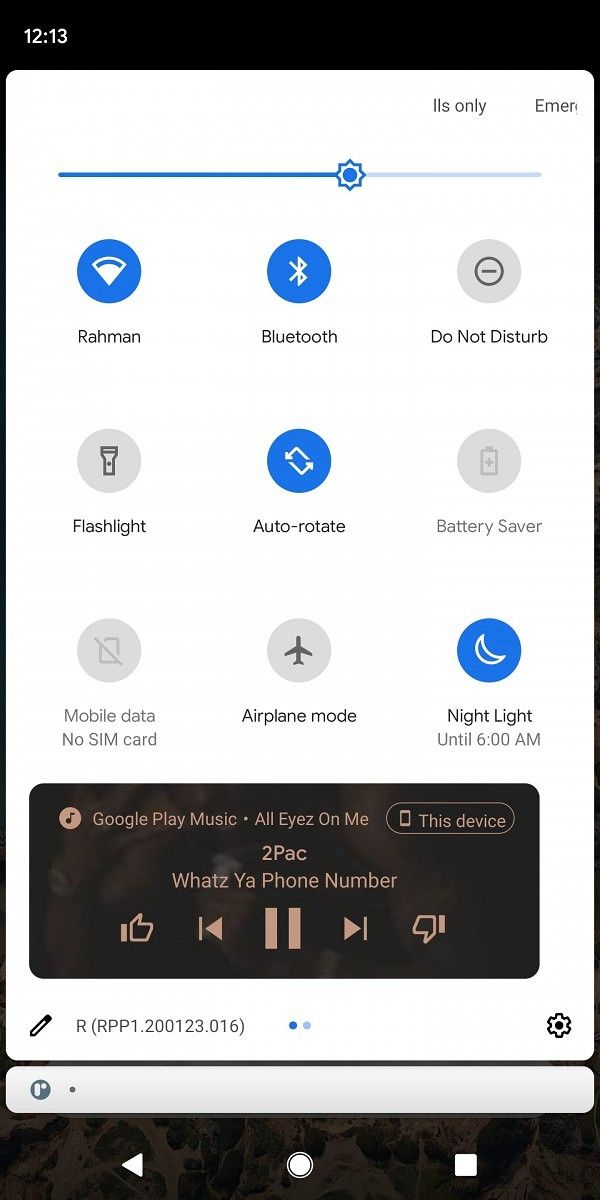
It seems like Google is aware of this issue and might be addressing it in a future build of Android 11 by putting the music player in the Quick Settings panel. As you can see in the screenshots above, the music player will appear as a part of the Quick Settings panel right next to the other toggles. In order to accommodate the music player, the Quick Settings panel will expand from one to two rows and will display the Quick Settings toggles on one side, while the music player will take up the other side.

Opening the Quick Settings panel completely by swiping down once again will move the music player to the bottom of the panel, with all the toggles right above it. In a bid to accommodate the music player, the Quick Settings panel will take up more space than it does currently but, on the positive side, the music player will always be accessible right at the top. As of now, this feature is not accessible by default on the first Android 11 developer preview and we had to manually enable it in order to take these screenshots. It’s also worth mentioning that this is one of several UI tests in Android 11, so it may or may not appear in the stable build. In case it does, there’s also a chance that Google might make some significant changes to it before launch.

The post Wild Android 11 test puts a music player in the Quick Settings panel appeared first on xda-developers.


from xda-developers https://ift.tt/3bPdY1L
via IFTTT

Android 11 will have 2 more developer previews and 3 betas before stable

Google just released the first Android 11 developer preview and you can now install it on your Google Pixel or Project Treble supported Android device. While this is just the first developer preview of the next iteration of Android, we’ve already managed to uncover a few new security and developer-facing features in the software. There’s a new screenshot preview with scrolling screenshot support, an increased touch sensitivity option for the Pixel 4, a new Motion Sense gesture to pause music, and a fully redesigned Notification History page. But that’s not all that will be new in Android 11. We expect to see even more new features in the months leading up to Google I/O 2020, as Google will be rolling out 2 more developer previews and 3 betas before the stable release.

In a recent post on the Android Developer website, Google has shared a detailed timeline for the Android 11 rollout, along with some information about what will be included in each developer preview/beta release. As per the timeline, the Android 11 Developer Preview program will run till the final public release in Q3 2020 and Google will be releasing two more developer previews and three betas before the final release. The second developer preview will be rolled out in March and it will be an incremental update with additional features, APIs and behavior changes. This will be followed by the third developer preview in April, which will be another incremental update for stability and performance.

Android 11 release timeliene


The first Android 11 beta will be released over-the-air in May to early adopters who’ve enrolled in the Android Beta program. With the first beta, Google will continue compatibility testing, collect feedback from beta users, and start early testing with targeting Android 11. The second beta, which will be a Platform Stability milestone for Google, will be rolled out in June and will bring final APIs and behaviors. It will also open Play publishing and developers will be urged to start final compatibility testing for apps, SDKs, and libraries. The third, and final, beta will be a release candidate build and is expected to be rolled out in Q3 2020. Following its release, developers will be required to release compatible updates for apps, SDKs, and libraries. The final release to AOSP and the ecosystem will follow soon thereafter.

This time around, Google is introducing a new Platform Stability milestone (as mentioned above) which is expected to help developers plan and test their final releases. The milestone signifies that Android 11 will reach its final internal and external APIs, final app-facing behaviors, and final non-SDK graylists by the second beta release, following which there will be no further changes that will affect third-party apps. Google has urged developers to target the milestone for final planning, compatibility testing, and public release of their Android 11 compatible apps.


Source: Android Developers

The post Android 11 will have 2 more developer previews and 3 betas before stable appeared first on xda-developers.


from xda-developers https://ift.tt/3bRkzZJ
via IFTTT