Realme, as a smartphone manufacturer, has been putting a surprisingly decent amount of focus on Android updates despite the fact that their phones run a fairly heavy OEM UX skin (first ColorOS, now Realme UI). Not only have they managed to roll out Android 10 to a large number of devices by now, but we’ve also seen them roll out security updates to these phones on a fairly regular basis. The latest smartphones to receive security updates include the Realme X, the Realme XT, the Realme 5 Pro, the Realme 5i, and the lower-end Realme C2.
Realme X
First up, we have the X, which recently received its Android 10 update and kernel source code release just a couple of days back. The newest RMX1901EX_11.C.02 OTA update includes the latest March 2020 security patches and some small feature improvements and fixes. The full changelog for the update goes as follows:
RMX1901EX_11.C.02 Changelog
Security
Android security patch: March, 2020
Settings
Added screen light effects
Fixed
Fixed the probabilistic issue of stuck after upgrade
Optimized the effect of game audio
Fixed the probability error of boot animation display
Fixed the low probabilistic stuck issue while using third-party applications
Optimized system power consumption
Fixed low probability stuck issue due to the memory leak of system
Fixed the probabilistic issue of fingerprint recognition failure
Fixed the probability issue that photos or screenshots are not displayed after upgrading
Then, we have the Realme XT, which received its respective Android 10 update at the end of January. This new RMX1921EX_11.C.03 update comes with March 2020 security patches and some small fixes. The changelog includes:
RMX1921EX_11.C.03 Changelog
Security
Android security patch: March, 2020
Fixed
Optimized the effect of game audio
Fixed the probability error of boot animation display
Fixed the low probabilistic stuck issue while using third-party applications
Fixed low probability stuck issue due to the memory leak of system
Fixed the probability issue that photos or screenshots are not displayed after upgrading
Lastly, we have the 5i and the C2, two mid-range and lower-end phones. Neither of these phones has received Android 10 as of yet, and they are both running ColorOS 6 as of the time of writing. As such, both of these updates only bring the newest March 2020 security updates as well as very small fixes for both devices (and some camera improvements for the 5i). The changelog for the 5i includes:
RMX2020EX_11_A.18 Changelog
Security
Android security patch: March, 2020
Camera
Optimized rear color of Chroma Boost
Improved brightness of front video call while using third-party applications
Optimized color performance of front camera while using third-party applications
Optimized clarity of front camera while night environment
Fixed
Fixed the low probability issue of inaccurate automatic brightness adjustment under the sunlight
It’s almost April, which means we’re expecting to learn more about the next OnePlus smartphones soon. There doesn’t seem to be much left to learn about, though, since both the OnePlus 8 and the OnePlus 8 Pro have been the subject of multiple leaks. We expect both smartphones will feature the Qualcomm Snapdragon 865 processor, generous amounts of RAM, high refresh rate displays, and other bleeding-edge features. After getting renders of the 8 Pro in green and the 8 in Black, we now have many more renders of the OnePlus 8 in all its expected colors. We also now know what the color variants will be called.
The OnePlus 8 in Interstellar Glow, Glacial Green, and Onyx Black.
These renders, courtesy of Roland Quandt from WinFuture, show that the new OnePlus 8 has some design similarities to last year’s OnePlus 7 Pro and OnePlus 7T Pro. There’s a prominent, vertically-aligned triple rear camera setup and a curved display at the front. OnePlus’ new design language is also prominent, showing the new logos on the back and the new “Never Settle” lettering on the display wallpaper. There is a couple of key design changes in the OnePlus 8, though, including the fact that the motorized front-facing camera is no longer here. Instead, we have a left-aligned hole-punch camera similar to the one in the Xiaomi Mi 10 and other devices. The display cutout is not that large as we’ve seen in some devices from last year, but some people may not be fans of this design.
The other big change is in the colors. Whereas the OnePlus 7 came in Blue, Red, and Black, the OnePlus 8 comes in more interesting color options, including one called “Interstellar Glow,” a gradient that starts in a dull purple on top and ends in bright orange on the bottom. There is also “Glacial Green” which is basically a very bright turquoise as well, and the classic black which will be called “Onyx Black” this time around. We were made aware of these names thanks to Ishan Agarwal on Twitter, who recently revealed the full specifications of both the OnePlus 8 and 8 Pro. We previously saw a render of the OnePlus 8 Pro in Glacial Green, but we don’t know exactly what other colors will be available. OnePlus teased a prototype OnePlus 7T with a marbled back cover, so we’re hoping that this design finish shows up on the new 8 series.
For now, though, this is all we have on the two devices, and it sure looks exciting. The devices are expected to be announced in mid-April, albeit with the current COVID-19 pandemic, we may see either the announcement date or the phone’s release date face a slight setback. There’s also a rumored “Lite” model in the series, which XDA’s own Max Weinbach reports will be called the OnePlus Z. The alleged OnePlus Z may launch a few months later, and it’s expected to feature the MediaTek Dimensity 1000L rather than the Qualcomm Snapdragon 865.
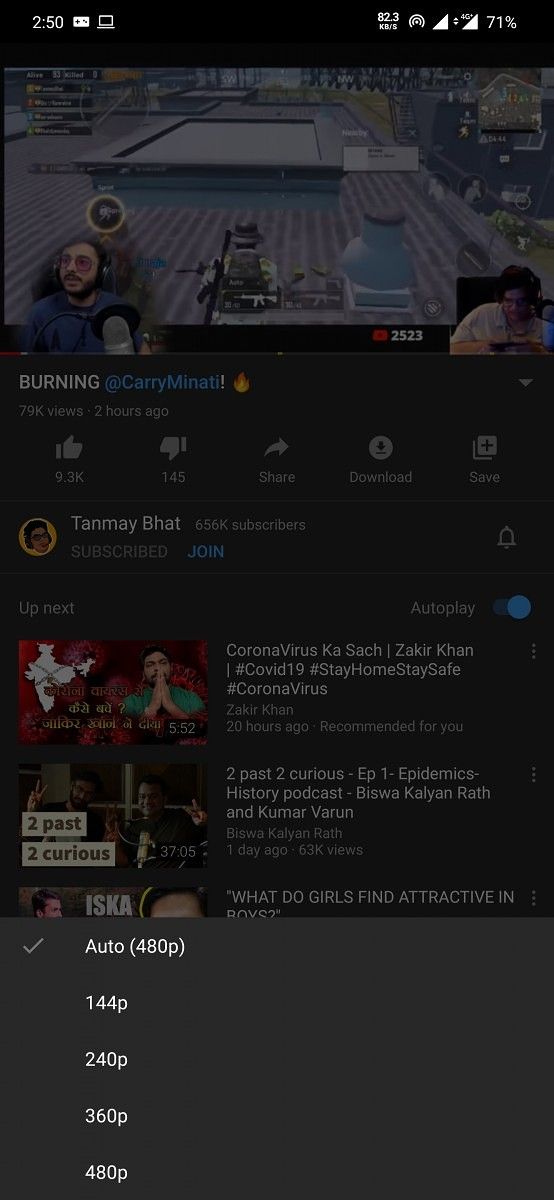
COVID-19 has affected the world in more ways than one. Within the narrow scope of the smartphone and related tech industry, the pandemic has caused widespread supply chain disruptions as well as led to cancellations to major events such as MWC 2020 and Google I/O 2020. Further, the health advisories issued because of the pandemic have led to a heavy load on the internet infrastructure, as more people are turning towards the Internet to beat the boredom that comes along with staying indoors for a long period of time. Consequently, streaming services had decided to lower their quality proactively to ensure that the infrastructure does not collapse. Within this context, YouTube had mentioned that it would set 480p as the default quality for its videos while giving users a choice to switch to higher resolutions. Now, we are learning that YouTube for Android has restricted its maximum video quality to 480p in some parts of India.
We noticed that YouTube for Android had begun limiting the maximum video quality for playback to 480p for some of us in India. This restriction came into play even on videos that were uploaded in resolutions as high as 4K and which were previously playable in these qualities.
These restrictions appear to be rolling out regionally, with most reports centering in Mumbai and Delhi, while cities like Bangalore and areas of Gujarat, so far appear to be free of these restrictions (though these may very well get the same restrictions in the coming hours and days). The restrictions are in place irrespective of your internet connection and its quality, so it does not matter whether you are on mobile data (4G LTE) or on Wi-Fi. The ceiling is apparently in place for YouTube Premium users too.
Meanwhile, videos on YouTube on desktop appear to be unaffected, even starting off on a decently high 1080p by default on the same network.
YouTube on Desktop appears to be unaffected
YouTube has not yet communicated anything on these new restrictions. A maximum ceiling of 480p Standard Definition appears to be rather harsh, and 720p would have been a much more pleasant middle-ground. While we understand that the step taken is likely in the interest of the general public and to alleviate the avoidable load on the internet infrastructure, we do feel that 480p is just too low to be considered a feasible maximum for pleasant user experience. Since YouTube did communicate this change to creators or viewers, viewers are blaming creators for uploading videos in Standard Definition. Note, YouTube had communicated only an intention to change the default quality to 480p with an option to jump higher, but this unannounced change removes all higher qualities entirely.
We hope YouTube becomes more proactive in its communication, and that it considers raising the hard limit to at least 720p.
There’s a long-running joke on the Internet that you can tell if someone’s using an Android phone by the bad quality of their selfies. While the memes are definitely exaggerating quite a bit, there’s, unfortunately, a bit of truth behind them. Android phones have usually been ahead of iPhones in terms of camera performance, at least on paper. OEMs like LG and Samsung tend to use cameras with more pixels and larger apertures than competing iPhones. Specs aren’t everything, though. Part of why Apple can compete in the camera game is because of iOS’ software. All OEMs, from Apple to ZTE, use some software magic to make photos and videos look better. The companies use algorithms to reduce noise, tweak color saturation and contrast, and even brighten up dark scenes, all to make the end results more pleasing. This is, historically, where Android OEMs have fallen short of Apple.
Software Developments
More recently, though, things have begun to change. The biggest example of this change is probably Google and the Pixel lineup. In terms of hardware, the Pixel cameras really can’t compare to other flagships. Software is where Google makes up the difference, though. With features like Portrait Mode, Night Sight, HDR+, and Super Res Zoom, the Pixels have earned a reputation for having some of the best smartphone cameras on the market.
Other Android OEMs are following Google’s lead. Samsung, OPPO, Xiaomi, Vivo, OnePlus, etc, have all introduced their own versions of the Pixel’s more popular camera features, and they even have some unique features of their own. With buzzwords like “AI” and “machine learning,” Android OEMs are trying to convince you that their software is the software you want to enhance your photos and videos. We’ve gotten to a point where Android phones can genuinely compete against iPhones in all aspects of camera performance.
The Problem
Unfortunately, there’s still one major exception: third-party apps. Your super-duper 50-camera flagship might take amazing photos with the built-in camera app, but switch to Instagram, Snapchat, or even a third-party camera app, and it’s basically a guarantee that what you capture won’t look nearly as good. As if that weren’t enough, you also lose out on all the cool camera features and modes. This is because, unlike iOS, Android doesn’t really have a unified camera framework. Sure, the basic features are there. A third-party app can still take photos and videos, and use the flash. But what happens if your phone has a secondary sensor for wide-angle or telephoto? It’s possible that developers will be able to access that second sensor, but the method they use will have to be specific to your device.
Say you have an LG V40 (I know, I know, just imagine you do). The V40 has three sensors: standard, telephoto, and ultrawide. The built-in camera app has no problem switching between all these different sensors. But forget about using the ultrawide sensor on Instagram. Now, Instagram could take a look at how LG’s camera app uses the different sensors and develop a way for users to take wide-angle or zoom shots. But that would probably only work on the LG V40. Even though the Galaxy S10 has the same three sensor modes (standard, telephoto, and ultrawide), the Instagram team would have to develop another method for Samsung.
Now add Huawei, Vivo, OnePlus, Xiaomi, OPPO, Nokia, ZTE, HTC, and whatever other brand you can possibly think of to the mix. As you can imagine, trying to develop a method for accessing just the potential extra sensors for each phone from each brand would get incredibly tedious. And then you have to maintain compatibility with all current and new phones.
These limitations apply to camera features as well. Things like Portrait Mode, Night Sight, and HDR+ either need specific per-device methods to use, or are completely inaccessible to third-party apps.
Obviously, for an app like Instagram, this isn’t too big a deal. It’s not their focus, and you could always use your phone’s camera app to take the shot first. But what about dedicated camera apps?
The Effects
Open the Google Play Store and search for “camera.” You’re going to find hundreds of results. Even with the improvements in first-party camera software, third-party camera apps are still very popular. Some aim to provide more technical features like manual exposure and focus (features that your phone’s camera app may not have). Others aim to provide a consistent UX across your devices.
Especially for the latter reason, Android’s camera fragmentation can make it incredibly difficult to develop and maintain a widely-compatible camera app. If you’re looking to provide extra features, how are you going to include all the potential features of all the potential first-party apps? If you’re looking for a consistent experience, how can you realistically guarantee that accessing the wide-angle sensor on every device that has it will work?
The answer is: you can’t. You can try to support as many features on as many devices as possible, but in the end, it’s going to be a lot of work for relatively little reward. It isn’t hard to imagine that at least a few developers have simply given up on making a fully-featured camera app for Android. In fact, several have.
The Casualties
Go do a search for camera apps on the Play Store. You’ll notice a few things. One, there are a lot of options. Two, most of them do pretty similar things (apply filters after-the-fact and such). Three, the more advanced options probably aren’t updated that frequently. You may even find results on Google that are no longer on the store.
Recently, we’ve gotten a pretty major example of someone calling it quits. Moment decided to cease development on its Pro Camera app for Android.
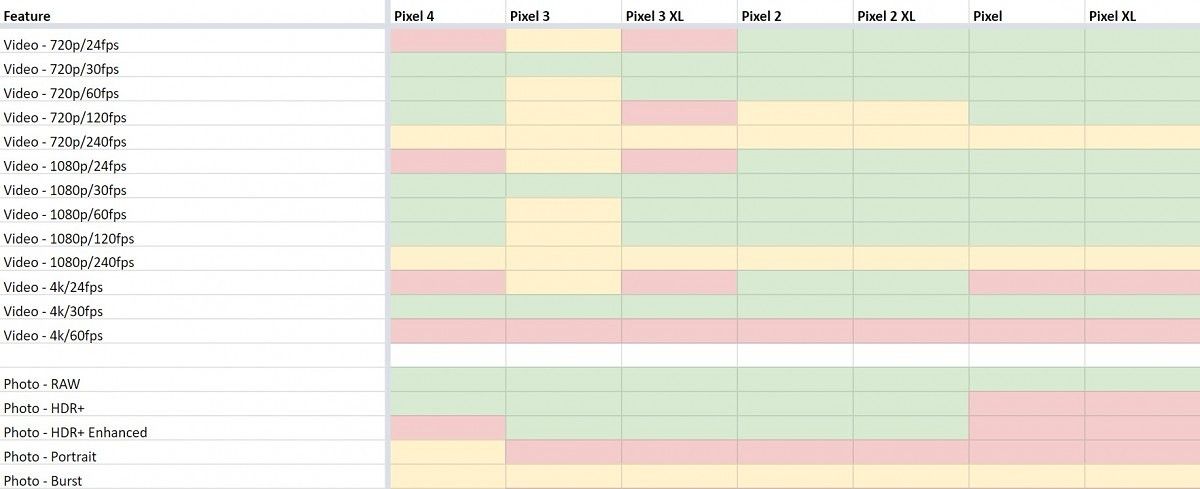
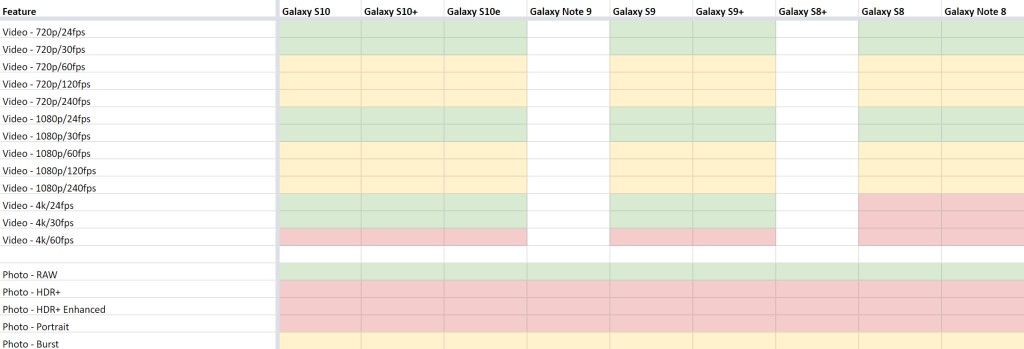
The problem is that a lot of these features simply don’t work on a lot of devices. Looking at Moment’s feature compatibility list is like looking at a picture of a dance floor. Even within the same product line, feature support is incredibly fragmented. After two years of development, Moment no longer has the capacity to continue development on its app.
Green = supported by Moment Pro Camera. Yellow = supported by device but not my Moment Pro Camera. Red = not supported by device. Image source: Moment. Retrieved via: 9to5Google.
The Solution?
It’s been nearly 12 years since Android was first released, but we may finally have a solution to the camera fragmentation.
This solution comes straight from Google, although it isn’t built directly into Android. Instead, it’s a Jetpack support library. If you’re familiar with developing Android apps, you’ve probably run into the AppCompat and AndroidX support library suites. These libraries from Google aim to make it easier for developers to maintain backwards compatibility with older Android versions, while still being able to introduce new features and styles.
A newer addition to Jetpack (sort of), is the CameraX library. Similar to other Jetpack libraries, CameraX’s goal is to make camera development easier. In its most basic form, CameraX wraps Android’s Camera2, an API that allows apps to probe the camera features on a device, provided the OEM exposes those camera features to the API. Users can check what camera features are exposed to the Camera2 API using the Camera2 API Probe application and then compare that to the features available in the stock camera application.
The benefit of using CameraX as a wrapper for the Camera2 API is that, internally, it resolves any device-specific compatibility issues that may arise. This alone will be useful for camera app developers since it can reduce boilerplate code and time spent researching camera problems. That’s not all that CameraX can do, though.
While that first part is mostly only interesting to developers, there’s another part that applies to both developers and end users: Vendor Extensions. This is Google’s answer to the camera feature fragmentation on Android. Device manufacturers can opt to ship extension libraries with their phones that allow CameraX (and developers and users) to leverage native camera features. For example, say you really like Samsung’s Portrait Mode effect, but you don’t like the camera app itself. If Samsung decides to implement a CameraX Portrait Mode extension in its phones, any third-party app using CameraX will be able to use Samsung’s Portrait Mode. Obviously, this isn’t just confined to that one feature. Manufacturers can theoretically open up any of their camera features to apps using CameraX.
Unfortunately, there is a caveat, which I mentioned earlier: this isn’t a requirement for manufacturers. Google says they’ll support Extensions on all new and upcoming Pixel devices, starting with the Pixel 4. OPPO says they’ve opened up their Beauty and HDR modes. Other OEMs could choose to make only their Night Modes available to CameraX, or they could choose to not implement any extensions at all. It’s completely up to the manufacturer which device supports which CameraX extensions (if any). Google used to maintain a list of devices that support Vendor Extensions and what camera features they opened up, but they have not updated the list for the past several months. We reached out to Google a few weeks ago asking them if they could provide an updated list, but the company has not yet responded with a list. For what it’s worth, a recent Google blog post states that devices from Samsung, LG, OPPO, Xiaomi, and Motorola (on Android 10) provide some extension functions, but the blog post does not specify exactly which devices are supported or what functions they provide.
If enough manufacturers do decide to implement extensions, Android’s third-party camera scene will be a whole lot brighter. Developers won’t have to waste time reimplementing a camera feature for every device they possibly can since CameraX’s framework will take care of it. There will be less feature fragmentation since similar features across devices will be accessible through a common interface. And there are many more possibilities.
Of course, this all depends on Google’s ability to convince manufacturers to implement CameraX Vendor Extension libraries going forward. Unless CameraX is widely implemented, it will just add to the current fragmentation. Personally, though, I’m hopeful. Google can be very convincing when it wants to be, and it seems like a lot of work is going into CameraX. It’s exciting to see a possible solution to Android’s camera issues on the horizon, and I look forward to seeing how CameraX will improve and expand over time.
What do you think about CameraX? Will Google succeed in making a unified camera experience for Android?
Being able to watch TV shows and movies from Netflix at the highest possible quality on mobile depends heavily on what kind of device you have. It’s not enough to have a device that has an HD or HDR display. To support playing Netflix video content in HD, your phone needs to be certified for the Widevine DRM’s L1 certification level and must also pass Netflix’s own internal testing, meaning that Netflix needs to manually whitelist devices. These DRM certification requirements and testing are also expected for supporting HDR video playback, but with the obvious additional requirement of having an HDR-capable display. One certification doesn’t guarantee the other, though, and once a device is certified to playback video in HD and/or HDR, Netflix updates its list of supported devices.
There are lots of Android devices that support HD playback on Netflix, but even fewer support HDR video playback. Luckily for owners of the latest OnePlus and OPPO flagships, though, HDR videos can be viewed on Netflix as the company has just added 4 new OnePlus and OPPO phones to their list of supported devices. Here are the models that have been added:
OnePlus 7T
OnePlus 7T Pro
OPPO Find X2 (PDEM10, PEDT10, CPH2023)
OPPO Find X2 Pro (PDEM30, CPH2025)
This means that these devices can now stream Netflix content in HDR as well as in HD. Keep in mind that in order to be able to stream Netflix content in HDR, you’ll need to sign up for the more expensive plan that also supports Ultra HD (4K) streaming. These OnePlus and OPPO devices join the list of devices from Google, Huawei, Xiaomi, and Samsung smartphones among many others.
We’re glad to see Netflix introduce these phones to their HDR whitelist, and we hope many other flagship phones will follow suit, given how HDR displays are becoming increasingly common among the smartphone ecosystem. Even cheap devices like the Redmi Note lineup and the POCO X2 have started to come out with HDR-capable panels.
A good app ecosystem is one of the most important pillars of the success of an operating system. Both Google and Apple recognize the value of having good applications on their platforms, and so both companies try to balance the needs of their users and their app developers. Users keep pushing for changes in the OSes, and while most people generally appreciate new features, these changes are not always fun for app developers as they can alter a lot of the core functionality and behavior. For developers who are constantly working to keep their apps relevant, dealing with these changes adds to their growing worklist. Even if these changes do not directly affect their applications, developers still need to make sure that their apps will work on the new OS update. Google has done many changes over the years to make this process easier for Android app developers, and now, a new feature in Android 11, called DSU Loader, will make it even easier for app developers to test their apps on new Android versions.
Project Treble, introduced in Android 8.0, is a major re-architecting of the Android OS. The goal of Project Treble was to split the Android OS into two big chunks: the framework and the vendor implementation (“vendor” here refers to the maker of any proprietary hardware component found within a device, usually referring to the silicon). The Android OS framework is the operating system itself, including all the system apps, the UI and its components, and the APIs that are shared across Android devices. The vendor implementation contains the vendor HALs (Hardware Abstraction Layers) and the Linux kernel and Linux kernel modules.
Since OEMs ship smartphones with many different hardware components from many different vendors, they have to do a lot of work just to get the hardware up and running on a single Android OS release. Then with each new Android OS update, they have to do even more work to make sure that their hardware works with the new version. But with Project Treble standardizing the ABI (Application Binary Interface) between the Android OS framework and HALs for a particular Android version, Android OEMs can start testing updates to their devices without needing to wait for silicon manufacturers and other component makers to update their side of the code. This change noticeably sped up the way Android updates are handled.
That’s the gist of what Project Treble has done for Android updates, but what’s more important for app developers here is that Treble has enabled the use of Generic System Images (GSIs) for compatibility testing.
The Emergence of GSIs
In order for OEMs to test if they’ve properly implemented Project Treble, Google mandates that the OEM should be able to boot a clean build of Android from AOSP on the device. This clean build of Android is called the Generic System Image, or GSI. If the GSI boots and most basic hardware functions properly, then the OEM knows that their device meets Project Treble’s requirements. The initial purpose of the GSIs was thus for testing Treble compatibility, but as we’ve seen with the development community here at XDA-Developers, they can be used for other purposes. We saw how GSIs could essentially allow devices with heavy Android UXs to enjoy the latest version of Android with working features within days of a new release. But Google envisions another purpose behind the GSI: giving app developers the ability to test their apps on a new Android version on a physical device that they already own.
With Android 10, Google released its own GSI builds for developers. Google cemented the idea that app developers should use a GSI to boot a clean build of Android on their own hardware, making it easier to test their application’s behavior against stock Android. This method thus added on to the existing options of testing app compatibility on stock Android without OEM behavior changes, the others being using a Pixel smartphone, using the official Android Emulator within Android Studio, or deploying app builds to a device instance on the cloud.
Despite all the convenience that GSIs brought along, their installation was still a cumbersome process. App developers may not be comfortable with manually flashing a system image on an Android device as this is something typically only hobbyists or Android OS developers will be familiar with. Installing a GSI required flashing a system image over fastboot, which requires disabling Android Verified Boot and unlocking the bootloader. Bootloader unlocking, in turn, requires a complete user data wipe. And as we all know, there isn’t exactly a single process or guide for unlocking the bootloader of every Android device out there, so there is no consistency to be found. For instance, Samsung devices do not have fastboot while Xiaomi devices make you jump through a few hoops to unlock the bootloader. It’s a convenient mess that has the potential of being untangled into something simpler.
This is where Dynamic System Updates come in.
Dynamic System Updates simply installing GSIs
Google realized that the current method of installing GSIs was not a perfect solution, so they started working on a better solution. In Android 10, Google began testing Dynamic System Updates, or DSU. DSU is a new way to temporarily install a GSI without needing to use fastboot commands to flash a system image, overwriting the original installation. With DSU, you can boot into a GSI, test your app, and then conveniently reboot back into your original installation which has remained untouched.
The reason that DSU can install a GSI without touching the original installation is that it creates new system and data partition images that are temporarily stored in /data/gsi. These images are then mounted during boot rather than the original system and data partitions. Because the phone needs additional storage space for these new, temporary images, your phone must have “logical partitions” on board, which are dynamically resizable partitions. Logical partitions are a new userspace partitioning system for Android, which is mandatory for devices launching with Android 10. If your device launched with Android 10, then it should support installing GSIs through DSU.
In Android 10, all you need to do to install a GSI via DSU is to change a system property and then launch the DynamicSystemUpdatesInstallationService by sending an intent with the path to the GSI as an intent extra.
Got Android 11 temporarily installed on the Pixel 3 XL without wiping the Android 10 install thanks to Dynamic System Updates (DSU). Unfortunately, it requires an unlocked bootloader to boot. pic.twitter.com/6TfUFD3ut9
While this process may seem unfamiliar, it is by far easier and less intrusive when compared to using fastboot commands and dealing with the hassle of everything, including the original installation, being wiped. You do require some knowledge of ADB and intents to make use of DSU, but this shouldn’t be a problem for most app developers out there. Still, there’s no reason the process couldn’t be made even simpler. Plus, there’s the fact that installing a GSI through DSU still requires you to unlock the bootloader, wiping all user data in the process. To that end, Google has implemented changes to improve both aspects of GSI installation. In Android 11, they’ve eliminated the need to use the command line at all to install a GSI. Separately, they’ve also made it possible to install a GSI without unlocking the bootloader.
DSU Loader in Android 11
DSU Loader is a new tool present in Android 11’s Developer Options that allows you to download and install the latest GSI from Google without needing to input any fastboot or ADB commands. Simply tap the DSU Loader option within Settings and a dialog box will appear with a list of supported GSIs straight from Google. These supported GSIs will be based on your current OS and architecture, so you can only install GSIs that are newer than your OS version and that match your SoC architecture. Simply choose the GSI that you want to install and it will be downloaded from Google’s servers and installed in the background automatically.
DSU Loader on Android 11
With DSU Loader, developers never have to touch the command line to install a GSI. At least, that’s the dream, because there’s still one issue left to solve.
The way forward
Currently, to install a GSI via DSU Loader, you need an unlocked bootloader. While this may defeat the purpose of the whole ordeal, it is not supposed to be this way, and we’re told that it will get fixed. Google has planned for users to be able to boot Google-signed GSIs through DSU without needing to unlock the bootloader. In fact, Google mandates that all Android 10 launch devices include the Android Verified Boot public keys of Google-signed Android 10, Android 11, and Android 12 GSIs. Including the AVB public keys in the device’s ramdisk will ensure that AVB will not reject the GSI that you are trying to boot. This is why the current method involves unlocking the bootloader – by flashing an empty vbmeta image to the vbmeta partition, you disable AVB so that it will not reject the GSI you are about to flash. Disabling AVB is a major security risk, though, as it means that any modified system/boot/product/vendor partition can be loaded onto the device, which is why Google wants to do away with that requirement.
Android 10 GSI Launch Requirements
So when can you expect to boot a GSI through DSU without having to unlock the bootloader or use any command-line tools? Hopefully soon, as Google mentioned to us that they had a few kinks to iron out with the initial Android 11 Developer Previews before they can get this all working properly. Moving forward, one can expect to install future Developer Preview GSIs via DSU without needing to unlock the bootloader. Perhaps when Android 12 Developer Previews are made available, you’ll even be able to boot it entirely by using DSU Loader in Android 11’s Developer Options. For app developers, this means there will be yet another way for you to test your applications on physical hardware running a new Android version.
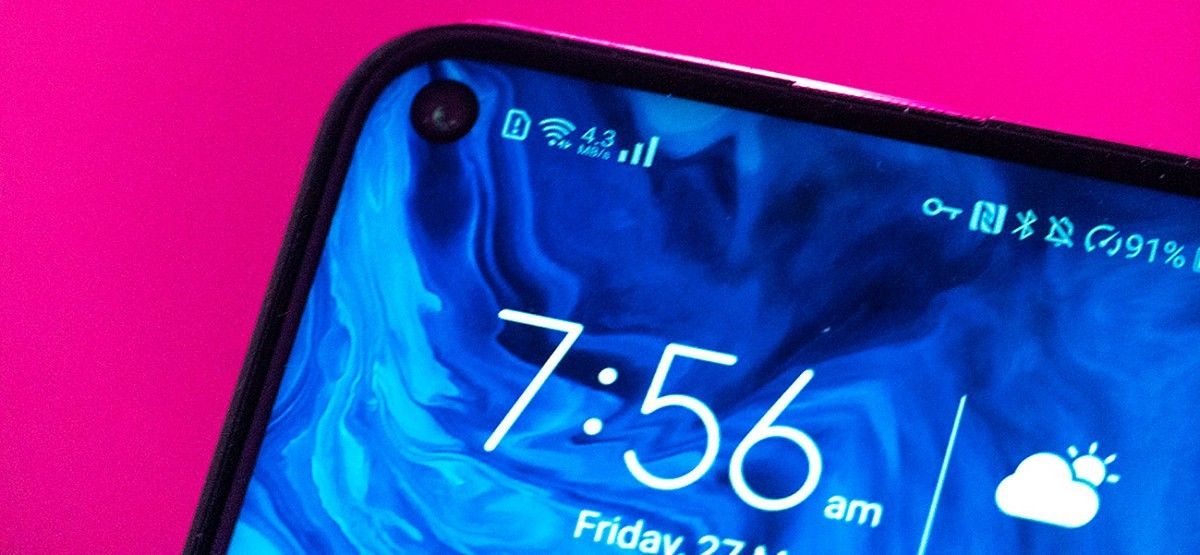
XDA Recognised Developer Paget96 has developed an app that helps you monitor your network speed in real-time. Monitor your current upload and download speeds right from your status bar. This is an important feature that many Android phones just skip over. You should know your phone’s data usage, as some apps can upload or download massive amounts of data in the background. This app helps you monitor all these activities easily.
Besides seeing your network traffic in real-time, you can monitor previous days to see how your usage changes over time. Net Speed Indicator creates different categories for data stats, Wi-Fi stats, and Wired stats. All of this data can be viewed by the day, or by the month.
Net Speed Indicator with status bar monitor
Keep an eye on specific apps with the app usage page. This will display all of your apps and how much data they are using. You’ll be able to see your Wi-Fi usage separate from your mobile data usage. Customize the app to your liking in the settings menu, where you can change your theme and the way the app behaves.
It’s a fantastic network monitoring app from developer Paget96 and it is free to download and the Google Play store.