LightBlog

lundi 6 avril 2020

[Update 2: Out of Preview] Google announces the local home SDK, full-screen app support for smart displays, and third-party availability for App Actions

Update 2 (4/6/20 @ 2:25 PM ET): Google’s Local Home SDK reaches version 1.0 and exits Developer Preview.

Update 1 (7/9/19 @ 2:25 PM ET): Google is launching the Local Home SDK Developer Preview today.

Google I/O is wrapping up, but there are still some announcements to cover that flew under the radar a bit. After all, there’s so many talks and events during the conference that it’s hard to keep up with it all. One such area that was overlooked is Actions on Google. At Google I/O 2019, the company announced a new local home SDK, full-screen app support for smart displays, and 3rd-party access to App Actions.

For those who may be unfamiliar with Actions on Google, it’s basically the developer side of Google Assistant integrations. It’s what allows developers to create the awesome integrations with Assistant that we use every day, and Google is always expanding the functionality. The platform is getting new tools for web, mobile, and smart home. Let’s take a look at what all of this means.

Local Home SDK

Smart home integration is a big part of Google Assistant and Google says there are now more than 30,000 compatible connected devices. The Local Home SDK is a step toward making the integration with smart devices even better.

The Local Home SDK allows smart home code to be run locally on Google Home speakers and Nest Displays, which can then use their radios to communicate locally with smart devices. This speeds up commands and makes them more reliable by reducing the number of cloud calls.

The Local Home SDK also improves the setup experience for smart devices. Google already started this with GE last year and you can set up their lights right from the Google Home app. This is a much easier and seamless experience for users. Google has already begun working with partners including Philips, Wemo, and LIFX on this SDK.

Full-screen Apps

Smart displays are becoming a bigger part of the Google Assistant hardware ecosystem. At I/O this year, Google launched the Nest Hub Max with a big 10-inch display. Google is letting developers take full advantage of these displays with a preview of “Interactive Canvas.” This allows apps to use the full screen for voice, visuals, and touch, but it’s not only limited to smart displays. It can also work on Android phones. Interactive Canvas is available for games right now (like HQ University), but soon Google will add more categories.

More App Actions
Lastly, let’s talk about new features for App Actions. App Actions were announced at last year’s Google I/O, but it has been pretty limited so far. Now Google is opening it up to more apps. App Actions allow developers to use intents from Assistant to deep link into specific parts of apps. Essentially a voice-launched shortcut, but a lot more powerful.

Google announced four new categories for these intents: Health & Fitness, Finance and Banking, Ridesharing, and Food Ordering. One example of a new use is starting a workout in a fitness app. You can say “Hey Google, start my run in Nike Run Club” and the app will open and start tracking your run. No need to find the app and manually start the workout.

They say it’s incredibly easy for developers to add these integrations. Apparently, the Nike Run Club feature was implemented in less than a day with the addition of an Actions.xml file. In the example above, Assistant jumped right into the app, but it can also show cards (Slices) right in the Assistant conversation.

These tools will allow developers to do more with Google Assistant, which is great for consumers. Homes are only getting smarter, displays will only become more prevalent, and users will rely on voice assistants, even more so now, to get stuff done. Check out the Actions website to learn more about building apps with these tools.

Source: Google


Update 1: Developer Preview

After announcing the Local Home SDK back in May during Google I/O, the company is now launching the SDK in a developer preview. Google has been testing the platform with partners and they’re ready to bring more into the fold. As mentioned during I/O, the SDK will allow developers to deeply integrate their smart devices into Assistant. Google has published an API reference and developer guides and samples to help people get started. Feedback during testing can be submitted through the bug tracker and /r/GoogleAssistantDev.

Source: Google


Update 2: Out of Preview

Google’s Local Home SDK arrived in a developer preview last July and now it’s ready for prime time. The Local Home SDK has left the developer preview stage and is now available in version 1.0 through the Action console.

The release adds a number of new features. Developers can add local fulfillment to smart home actions, which routes commands to a device through the local network instead of the cloud. This reduces latency and improves reliability. The SDK can discover local devices over Wi-Fi through mDNS, UDP, or UPnP protocols. Apps can then send a command using TCP, UDP, or HTTP.

Google has also improved scan configurations in the Actions console. Developers can enter multiple scan configurations, which allows local fulfillment apps to handle multiple devices that could be using different discovery protocols. Lastly, the SDK config page now accepts uploading JavaScript files for local fulfillment apps.

Source: Google

The post [Update 2: Out of Preview] Google announces the local home SDK, full-screen app support for smart displays, and third-party availability for App Actions appeared first on xda-developers.


from xda-developers https://ift.tt/2JpqdGa
via IFTTT

OnePlus 6 and 6T get OxygenOS Open Beta 6 with March 2020 patches, Launcher fixes, more

Near the end of February, OnePlus rolled out OxygenOS Open Beta 5 for the OnePlus 6 and 6T. The update brought the February 2020 Android Security Patch Level, work-life balance features to Indian users, Zen Mode v1.5.0, and many bug fixes and optimizations. Today, the company started rolling out OxygenOS Open Beta 6 for the two devices. The update brings the March 2020 Android Security Patch Level and a few bug fixes, but not much else has been added.

OnePlus 6 Forums ||| OnePlus 6T Forums

The full changelog can be found below. The update does not add any new features, though we may see new features arrive in future OxygenOS updates. OnePlus may be waiting for the release of the OnePlus 8 series before announcing new features, but we already know the company is working on features like an Always on Display, Instant Translation, and an expanded dark mode. The OnePlus 7T series also recently got Live Caption support. We don’t know which of these features will make their way to the OnePlus 6 and 6T, though.

The March 2020 Android Security Bulletin was published at the beginning of March but was made available to Google’s Android partners near the beginning of February. OnePlus has thus likely had the March 2020 patches since early February 2020 and they also likely already had the new patches mentioned in the April 2020 Android Security Bulletin since early March 2020. However, because of the many changes that OnePlus and other OEMs make to the Android Framework and Linux Kernel, as well as OnePlus’ own timeline for update rollouts and beta testing, they aren’t able to make the latest security patches available immediately after Google publishes them.

OxygenOS Open Beta 6 Changelog

System

  • Now unlock the LockBox without any problems in File Manager
  • No more crashes in the Launcher with apps in full-screen display
  • Got rid of blank screens while clearing up the background apps
  • Updated Android Security Patch to 2020.03

Download OxygenOS Open Beta 6 for the OnePlus 6 and 6T

If you don’t want to wait for OnePlus to roll out the latest update to your device, you can sideload one of the incremental or full OTA zip files linked below.

OnePlus 6: OxygenOS Open Beta 5 –> 6 Incremental OTA ||| Open Beta 6 Full OTA

OnePlus 6T: OxygenOS Open Beta 5 –> 6 Incremental OTA ||| Open Beta 6 Full OTA

Thanks to XDA Senior Member Some_Random_Username for providing the download links!

The post OnePlus 6 and 6T get OxygenOS Open Beta 6 with March 2020 patches, Launcher fixes, more appeared first on xda-developers.


from xda-developers https://ift.tt/2V4Px9e
via IFTTT

Google Maps now makes it easier to find restaurants that do takeout or delivery

With much of the world in lockdown due to the COVID-19 pandemic, people are eating at home a lot. While you may be cooking for yourself more than ever, it’s still possible to get food from restaurants and other eating establishments. A lot of places are not allowed to seat customers inside right now, but many are still offering takeout and delivery. Google is now making it easier to find these places in Google Maps.

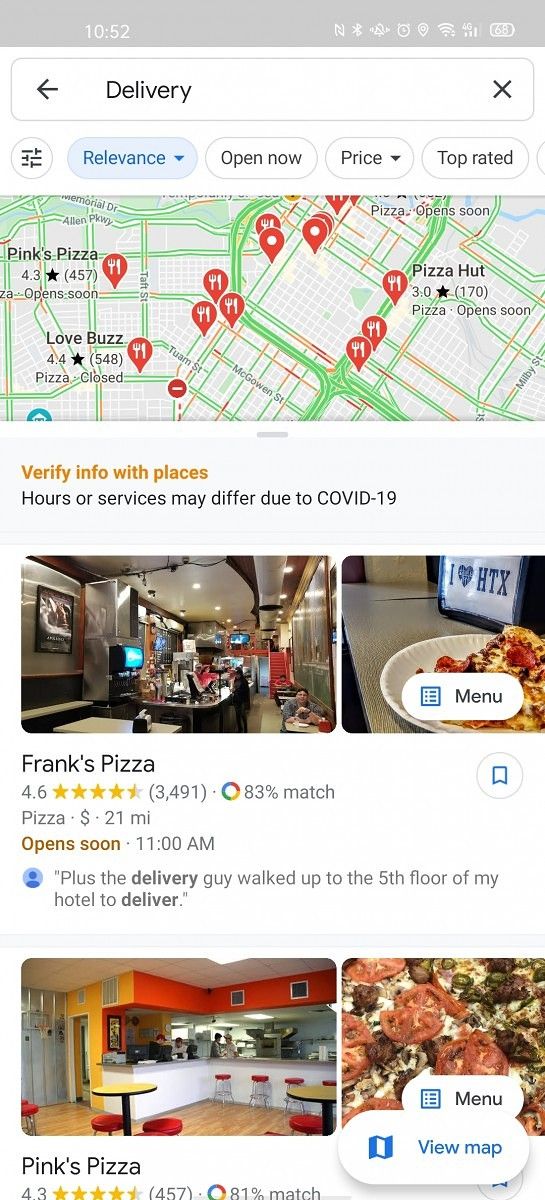
When you open up Google Maps you’ll see some new shortcuts under the search bar at the top of the screen. These shortcuts are the same as the ones you’ve probably seen for gas stations and grocery stores, in fact, they’ve been around for a while. However, Google is now placing them in a much more prominent location.

Tapping these shortcuts will simply perform a search for “Takeout” or “Delivery” and bring up businesses that mention those keywords. Some businesses even have their ordering processes integrated into Google Maps, as we’ve talked about in the past. You’ll also notice a new message encouraging users to verify information with places before ordering. On top of that, Google is allowing businesses to label themselves as “temporarily closed.”

Google Maps is a widely-used app even in times when people may not be traveling as often. It’s important that Google is keeping things as up-to-date as possible. Hopefully, these changes will make it easier for people to find food and know which places are still open.

Maps - Navigate & Explore (Free, Google Play) →


Via: Engadget

The post Google Maps now makes it easier to find restaurants that do takeout or delivery appeared first on xda-developers.


from xda-developers https://ift.tt/2VkHW6D
via IFTTT

ASUS ZenFone 6/ASUS 6Z update brings VoLTE and VoWiFi to more carriers, March 2020 security patches, more

The ASUS ZenFone 6, or the ASUS 6z as it is called in India, sports an innovative 48MP flip camera while offering some solid specifications such as the Qualcomm Snapdragon 855 SoC, a massive 5,000 mAh battery, and even a headphone jack. The phone picked up the stable Android 10 update rather quickly, thanks to the efforts of the ASUS ZenUI team. ASUS continues to deliver periodic OTA updates to the phone to bring in new functionality while fixing exisiting bugs, and now we have such an update for the ZenFone 6.

ASUS ZenFone 6/ASUS 6Z XDA Forums

The version number of the latest software build is 17.1810.2003.144, which bumps the Android security patch level (SPL) to March 2020. The company has also added Jio VoWiFi and Tele2 VoLTE/VoWiFi support in this release. Lastly, the update also adds a pop-up confirmation dialog whenever third-party applications running in the background request to access the front camera. The official changelog for the update is as follows:

  1. Updated Android security patch(2020/3/1)
  2. Optimized system stability
  3. Enabled Reliance VoWiFi in India
  4. Enabled Tele2 VoLTE and VoWiFi in Sweden
  5. Added pop-up confirmation when 3rd-party apps request for front camera in the background

zenfone_6_17.1810.2003.144_ota

ASUS has approved this particular build for worldwide rollout, thus regional variants (India, EU, Japan), as well as global ZenFone 6 units, should get the OTA very soon. The incremental and full Recovery ROM can also be downloaded using the links below. The build-specific kernel source is already up on the company’s server, although ASUS has yet to index it in their download page.

17.1810.2002.137 –> 17.1810.2003.144 Incremental OTA

17.1810.2003.144 Full OTA

17.1810.2003.144 Kernel Source

The phone is known for being developer-friendly, thus several popular custom ROMs (like LineageOS 17.1) officially support it. The phone is also supported by TWRP and has a robust Google Camera port available for it.

The post ASUS ZenFone 6/ASUS 6Z update brings VoLTE and VoWiFi to more carriers, March 2020 security patches, more appeared first on xda-developers.


from xda-developers https://ift.tt/2RjQ3z4
via IFTTT

Digital Wellbeing 1.0.3 tests a revamped Wind Down feature with new options and a Quick Settings tile

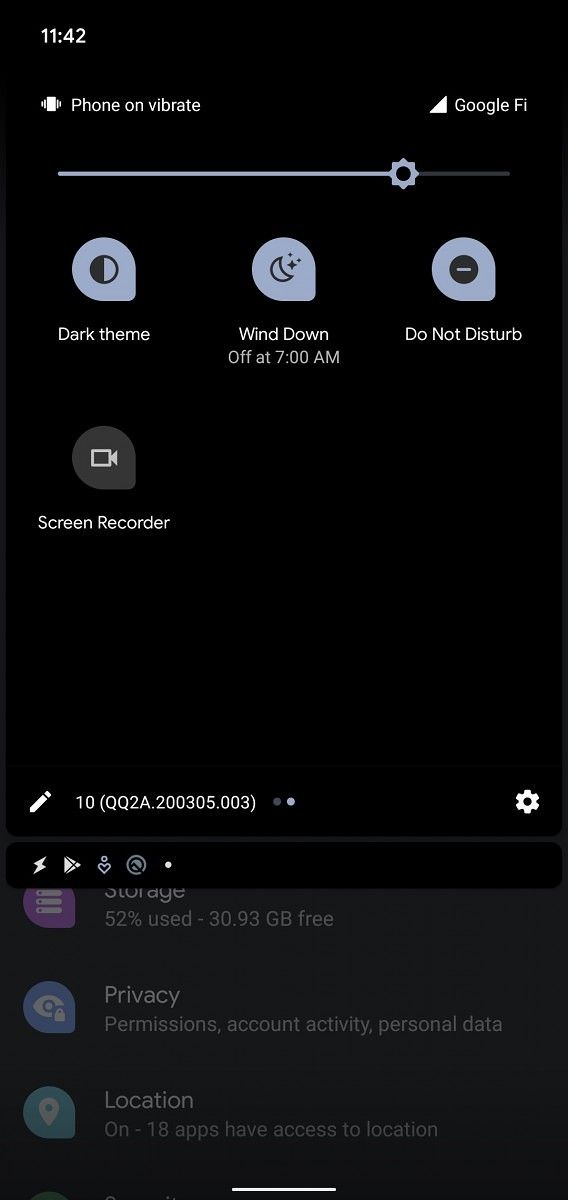
Today, Google rolled out version 1.0.302017577.beta of the Digital Wellbeing app on the Google Play Store. Digital Wellbeing is Google’s app to help users limit their smartphone use with features such as a Dashboard summarizing your phone use, Focus Mode to minimize distractions, Wind Down to help you put down the phone at night, and more. The latest update tweaks the settings screen for Wind Down and adds a Quick Settings tile to allow users to more quickly toggle the mode.

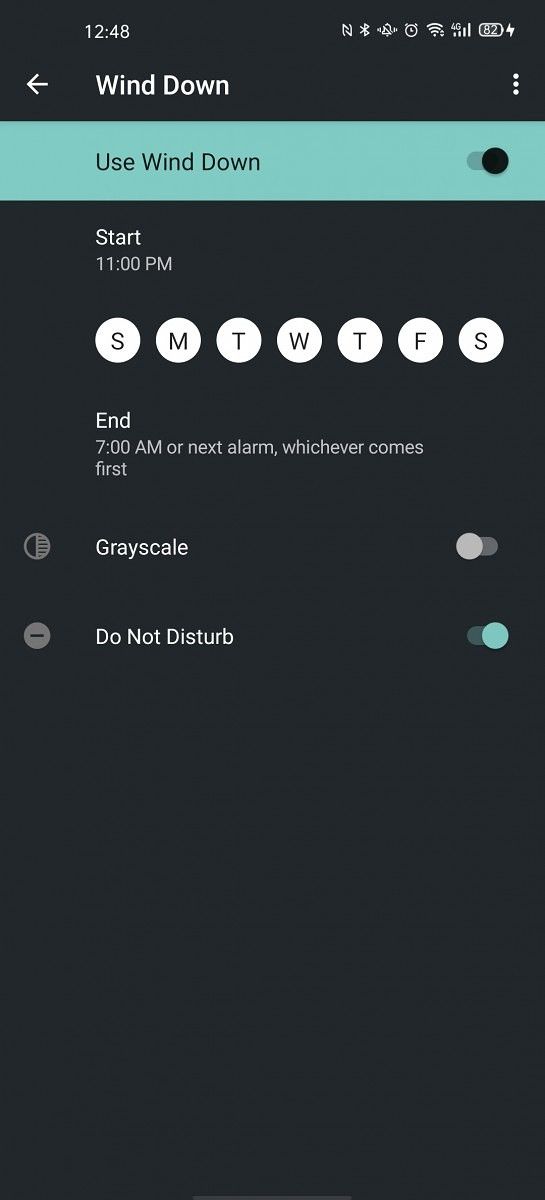
Google has redesigned the “Start” and “End” entries so that they both appear above the day selector. The Start and End times are now shown in a much larger text size with different colors to differentiate them. Meanwhile, the new Quick Setting tile, which we’ve noticed isn’t fully working for everyone, allows one to quickly toggle the Wind Down state.

An APK teardown can often predict features that may arrive in a future update of an application, but it is possible that any of the features we mention here may not make it in a future release. This is because these features are currently unimplemented in the live build and may be pulled at any time by the developers in a future build.

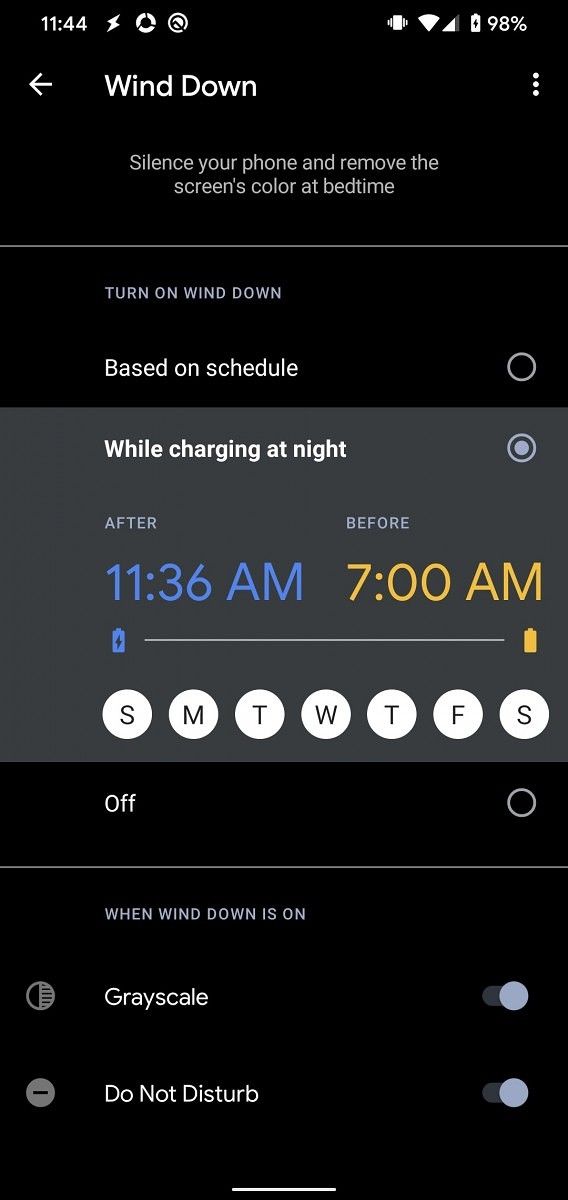
We also enabled an even newer settings screen for the Wind Down feature in Digital Wellbeing. In this revamped version, the on/off toggle is no longer located at the top. Rather, Google has separated the options into what triggers Wind Down and what happens when Wind Down is on. Besides scheduling, Google has now added the option to enable Wind Down whenever you plug in your phone at night. You can customize the time so that it doesn’t activate when you’re charging your phone at work or in the car, though. We spotted this feature back in November alongside a new “Minimal Phone” mode, though the latter feature is not yet available.

You can download the latest version of the Digital Wellbeing app from the Google Play Store below.

Digital Wellbeing (Free, Google Play) →


Thanks to PNF Software for providing us a license to use JEB Decompiler, a professional-grade reverse engineering tool for Android applications.

The post Digital Wellbeing 1.0.3 tests a revamped Wind Down feature with new options and a Quick Settings tile appeared first on xda-developers.


from xda-developers https://ift.tt/39Kdms1
via IFTTT

Google publishes April 2020 Android Security Bulletin and patches for Pixel devices

Google has a monthly tradition of releasing new updates for its Pixel devices as well as publishing a new Android Security Bulletin. While the world around us seems to have come to a halt due to various lockdowns imposed by governments and authorities to contain COVID-19, Google is keeping up with this tradition. Google’s April 2020 security patches along with some bug fixes specific to the Pixel 4, Pixel 4 XL, Pixel 3, Pixel 3 XL, Pixel 3a, Pixel 3a XL, Pixel 2, and Pixel 2 XL are now available.

Fixes that are specific to the Pixel devices include a patch for a memory leak that can prevent additional Bluetooth Low Energy (BLE) connections, a patch for dropped Bluetooth audio input in call in certain situations, and a patch for occasional lag while opening the keyboard in certain applications. The build number for the April update on Pixel devices is QQ2A.200405.005. While the OTAs will be reaching your Google Pixel device in a matter of a few days, you can also manually sideload the update either by flashing the latest factory image, sideload the OTA file from recovery, or use the Android Flash Tool to do it all for you.

Build Numbers
  • Pixel 2 (XL): QQ2A.200405.005
  • Pixel 3 (XL): QQ2A.200405.005
  • Pixel 3a (XL): QQ2A.200405.005
  • Pixel 4 (XL): QQ2A.200405.005

Download Factory Images | Download OTA Images

Android Security Bulletin | Pixel Security BulletinPixel Functional Changes

For more information on how Google’s monthly Android Security Bulletins work, refer to our article here.

The post Google publishes April 2020 Android Security Bulletin and patches for Pixel devices appeared first on xda-developers.


from xda-developers https://ift.tt/34dJ5AV
via IFTTT

Boost Your Earning Potential in 60 Minutes With This AWS Course

According to research firm 451, nine out of ten companies now rely on cloud services. Out of those companies that have made the jump, around one third use Amazon Web Services. This platform is by far the most popular, thanks to powerful tools and reasonable pricing. If you want to build any kind of technical career, you need to know AWS.

With the AWS Cloud Essentials Course, you can explore the fundamentals in just one hour. This highly-rated course is normally priced at $200, but you can get it now for just $12.99 at the XDA Developers Depot.

There are many good reasons to learn about cloud computing. Recruiters are regularly looking for people with knowledge of this topic, and a survey by GlobalKnowledge found that AWS-certified IT professionals earn $129,868 on average

Want to take your first steps towards a bigger paycheck? This training can help. Designed for complete beginners, the course takes you on a guided tour of AWS — from data storage to security. In just one hour, you can get up to speed with the fundamentals.

The course is split into two parts: AWS Cloud Practitioner Essentials and AWS Technical Essentials. These cover the same content as Amazon’s official courses, at a fraction of the cost. You get 13 video lessons in total, and your guide is an IT expert with 25 years in the business.

Along the way, you learn key AWS terminology and how to navigate the AWS Management Console. You also get an introduction to AWS Identity and Access. This knowledge is essential, and it can help you work with data in other career paths.

The course has been taken by over 244,000 students to date, who have left more than 60,000 positive ratings. It’s a great way to learn about cloud computing and prepare for AWS certification exams.

This deal includes lifetime access to all the content on mobile and desktop, meaning you can study at your own pace. You should come away with valuable skills and a certificate of completion to add to your résumé.

It’s worth $200, but you can get the AWS Cloud Essentials Course for only $12.99 today.

 
AWS Cloud Essentials Course – $19.99

See Deal

Prices subject to change

The post Boost Your Earning Potential in 60 Minutes With This AWS Course appeared first on xda-developers.


from xda-developers https://ift.tt/2UNcY7U
via IFTTT