LightBlog

mardi 14 avril 2020

YouTube tests video chapters to help you jump forward to specific parts

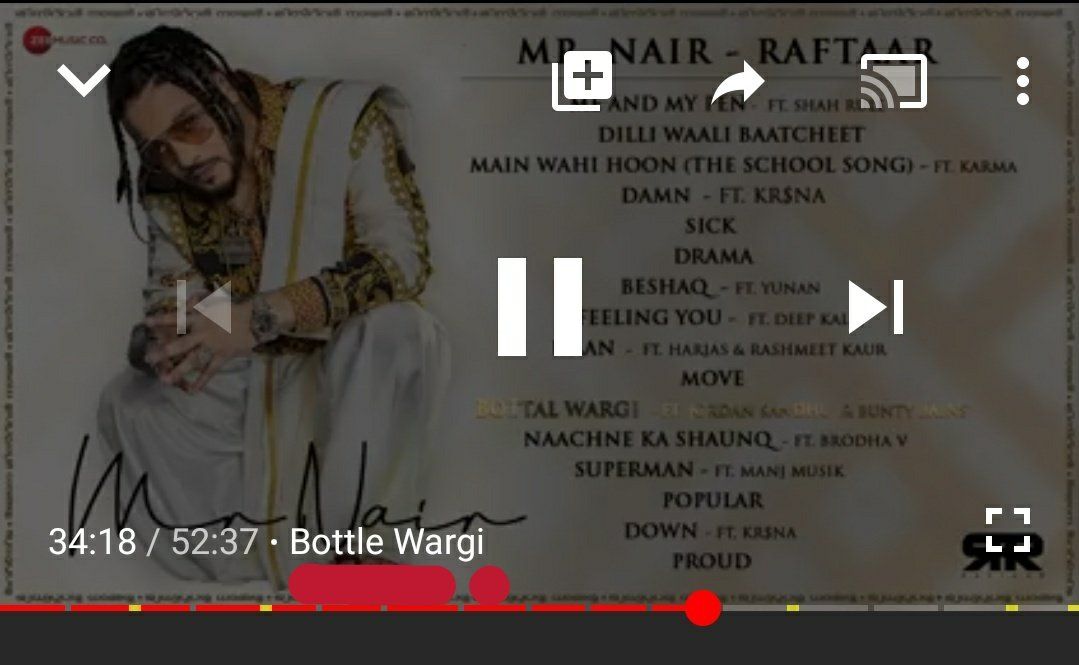
YouTube videos are available in a variety of lengths, starting from 30-second short videos and going all the way up to 12 hours, even though you can even find much longer videos from the past. While watching long content like tutorials, it is common to skip forward to the intended time. So to help with that, YouTube is adding new functionality in the form of “video chapters” that lets you can skip forward or rewind to any specific part of the video without having to drag the scrubber.

Video chapters on YouTube are based on the timestamps for different parts of the video as mentioned in the description. For instance, a video with an entire album or a live concert can have timestamps for different songs. So, with video chapters, users will be able to jump to different tracks through the entire video by clicking or tapping on the different parts of the scrubber. When you just hover the mouse pointer above any section or chapter, you will see the title which is also fetched from the video description along with your current progress in the section.

youtube video chapters

Image by Android Police

Android Police confirms that as of now, chapters are solely based on description time stamps and YouTube will not add chapters automatically. However, we can expect Google to infuse some of its machine learning prowess to slice the videos into chapters.

YouTube’s video chapters are already available to some users on the web player interface. Some others also reported having received the feature in the Android app and the same has been confirmed by Google to be a “test.” The feature is said to be available on certain videos on the web as well as Android and iOS apps. If you’re a creator and want to opt out, make sure the first timestamp in your video description is anything but 0:00.

Don’t worry if the feature is not available to you since it is still under evaluation by the YouTube team. It appears to be rolling out to a small group of users and we’ll let you know when it reaches a wider userbase.

Thanks to Twitter user @QueBottler for the screenshots.

The post YouTube tests video chapters to help you jump forward to specific parts appeared first on xda-developers.


from xda-developers https://ift.tt/2RBFtDL
via IFTTT

Image Warp helps you transform pictures with manually adjustable grids

When it comes to photo editing apps, the Google Play Store offers a boatload of options to choose from and each app offers something unique. You have apps like B612 that pack in a range of interesting filters, to ones like Google’s Snapseed that offer a vast range of image manipulation tools to edit your photos. If you’ve ever used Snapseed before, then I’m sure you’d already be familiar with its Perspective tool which, as its name suggests, lets you change the perspective of your image. However, the adjustments offered on Snapseed could prove to be a bit limiting for those of you who want to make several perspective adjustments in one image. This is exactly where the Image Warp app comes in.

Image Warp Image Warp

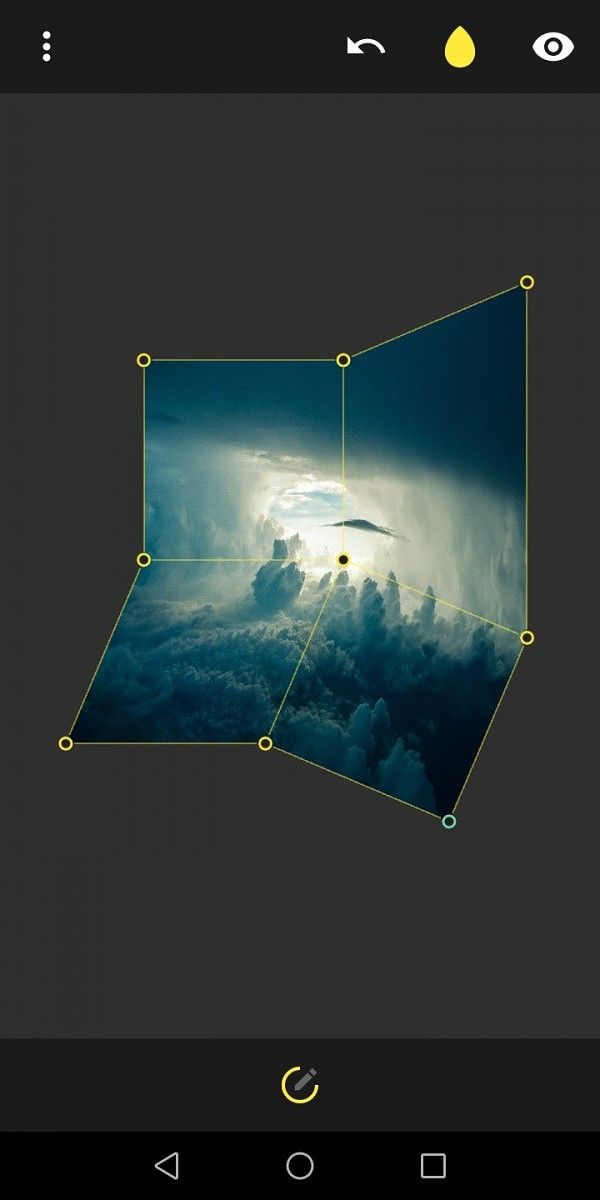
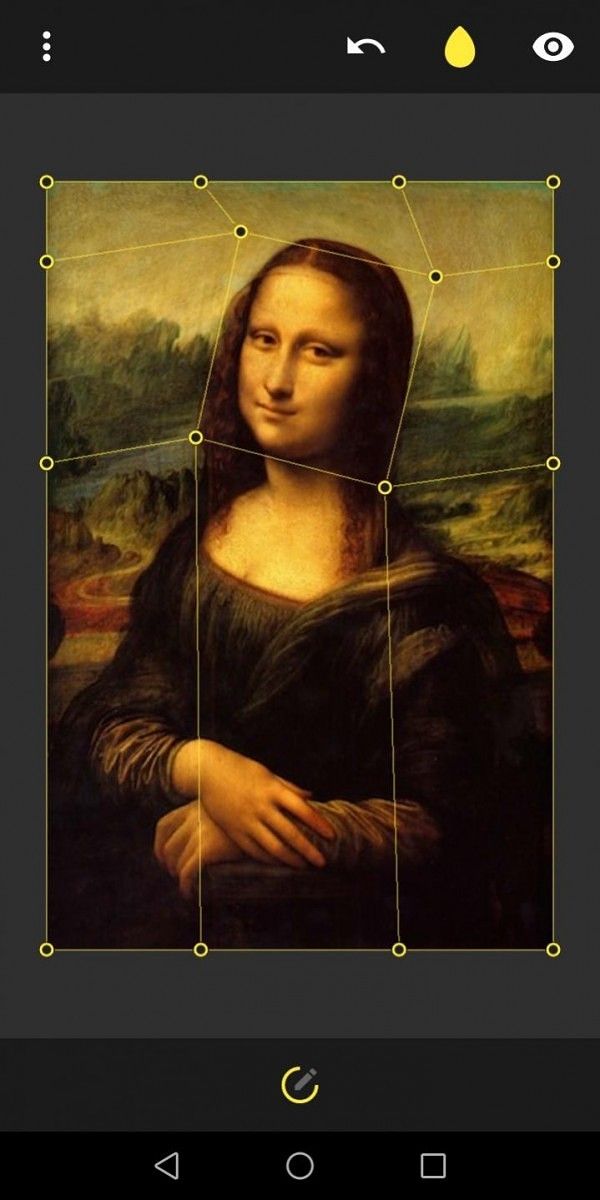
The Image Warp app is essentially Snapseed’s Perspective tool on steroids. It gives you access to a manually adjustable grid that you can use to skew, scale, distort, rotate and completely transform your image. Unlike the Perspective tool on Snapseed, which just lets you change the perspective of the entire image, the Image Warp app lets you set grid points to change the perspective of individual parts on any image. The app has an easy to use interface and it includes support for all commonly used image formats. Once you’re satisfied with an edit, the app lets you export images as a PNG file or as a cropped JPG up to 16MP in size. Additionally, it offers support for some unique gestures like double-tap to reset picture zoom and long-press undo button to rest grip which can come in handy while you’re editing your photos. If all of this sounds interesting, then you should definitely try out Image Warp by downloading it from the Play Store link below.

Image Warp - Grid Modifier (Free, Google Play) →

The post Image Warp helps you transform pictures with manually adjustable grids appeared first on xda-developers.


from xda-developers https://ift.tt/3a8kPkW
via IFTTT

Download Android 10 custom ROMs for the Realme 5 Pro: LineageOS, Pixel Experience, more

The budget-friendly Realme 5 Pro (review) from last year was among the first few devices from the company to receive the Android 10-based Realme UI update. Shortly after rolling out Realme UI for the device, the company also shared its Android 10 kernel source code in an effort to promote third-party development. Just a few weeks since developers first got access to the kernel source code, our forums are chock full of custom ROMs for the device. In case you own a Realme 5 Pro and wish to try out a custom ROM on your phone, here are all the Android 10-based custom ROMs that you can flash right away:

Realme 5 Pro XDA Forums || Buy the Realme 5 Pro from Amazon.in (starts at ₹13,999)

Unofficial LineageOS 17.1

An unofficial build of the popular LineageOS 17.1 custom ROM is now available for the Realme 5 Pro. The Android 10-based ROM offers a stock Android experience with a few additional customization features, making it a great alternative for those of you who don’t quite enjoy Realme’s new UI. For those of you who have already installed the Realme UI update, do note that you’ll need to downgrade to ColorOS before flashing this ROM on your device.

Unofficial LineageOS 17.1 for the Realme 5 Pro

Official Pixel Experience ROM

The Pixel Experience ROM based on Android 10 is another great option if you wish to enjoy stock Android on your Realme 5 Pro. The AOSP based ROM not only offers a stock Android experience but it also comes with all the goodies that you’d usually find on a Google Pixel device, including the Pixel launcher, wallpapers, icons, fonts, and even the boot animation.

Official Pixel Experience ROM for the Realme 5 Pro

AOSPExtended ROM

Just as its name suggests, the AOSPExtended ROM for the Realme 5 Pro is an AOSP-based ROM that packs in some useful UI/UX customizations on top of stock Android. These include options like power menu customizations, fingerprint gestures, advanced ambient display customizations, status bar date customizations, and much more. Follow the instructions in the forum post below to get it up and running on your device.

AOSPExtended ROM for the Realme 5 Pro

Arrow OS

While all the aforementioned ROMs offer a ton of customization options, if you’d much rather go for a more minimal experience then you should try Arrow OS on your Realme 5 Pro. The AOSP-based ROM offers a stock Android experience with just the most essential add-ons to enhance the overall experience. Even though the ROM may not be feature-packed, it offers a fast and functional experience that you might enjoy.

Arrow OS for the Realme 5 Pro

ExtendedUI ROM

Based on the Pixel Experience ROM, the ExtendedUI ROM aims to provide a UI that’s unlike any other ROM out there. On top of that, it offers a bunch of useful features like ambient edge lighting, FOD icon picker, double-tap to sleep on the status bar, a smart replies toggle, and much more. To try it out for yourself, just head to the forum post linked below and follow the instructions to flash the ROM on your device.

ExtendedUI ROM for the Realm 5 Pro

EvolutionX ROM

Much like the Pixel Experience ROM, the EvolutionX ROM aims to give you a Google Pixel-like experience on your Realme 5 Pro. Unlike the Pixel Experience ROM, however, it packs in a boatload of customization features like an RGB accent picker, different system fonts, edge lighting, FOD icon picker, and much more. Follow the instructions in the forum post linked below to flash the ROM on your device.

EvolutionX ROM for the Realme 5 Pro

DerpFest ROM

Rounding things off is the DerpFest ROM which aims to offer the best features from the most popular ROM, along with its own unique set of features. The ROM will let you completely change the look of your device using its extensive theming features and make it more functional using the status bar, quick settings, gestures, and button customizations. Head over to the forum post linked below and follow the instructions to flash the ROM on your phone.

DerpFest ROM for the Realme 5 Pro

Unofficial TWRP custom recovery for the Realme 5 Pro

Before you can flash any of the aforementioned custom ROMs on your device, you’ll need to flash a custom recovery. Thankfully, an unofficial build of the popular TWRP custom recovery is already available for the Realme 5 Pro and you can flash it by following the instructions in the forum post linked below.

Unofficial TWRP recovery for the Realme 5 Pro

The post Download Android 10 custom ROMs for the Realme 5 Pro: LineageOS, Pixel Experience, more appeared first on xda-developers.


from xda-developers https://ift.tt/2XwGvEI
via IFTTT

Red Magic 5G is now available for pre-order, global sales begin April 21st

The Red Magic 5G was announced in early March as Nubia’s latest gaming-focused smartphone. The brand is no stranger to this growing market, and the Red Magic 5G brings a few new features to the fold. The device is now available for prospective buyers to pre-order and will be available globally on April 21st.

Red Magic 5G Forums

The headlining feature of the Red Magic 5G is not the 5G support that gives it its name. Instead, it is the fact that is the first smartphone on the market with a 144Hz refresh rate display. Of course, as with any other high refresh rate display on smartphones these days, it’s only used to its full potential if certain applications. Games that do support running at higher frame rates will feel great to play. If you’re worried about heat and power consumption, Nubia says the device is kept cool with the “Turbo Fan” system.

The other striking thing about the Red Magic 5G is the design of the phone. There are three color options to choose from, and they each offer a very bold look. “Gaming phones” tend to have a specific aesthetic, and the Red Magic 5G certainly fits into that mold. Another great design feature is the touch-sensitive shoulder buttons. Check out the full specifications below the video.

From April 14th to 21st, 100 customers each day can buy a voucher worth $50 for just $5.79. This voucher can be used to buy the Red Magic 5G and other accessories. Here is how pricing for the device breaks down by region:

Storage/RAM Color USD EUR GBP
8GB/128GB
  • Eclipse Black
  • Hot Rod Red (Coming Soon)
$579 €579 £539
12GB/256GB
  • Pulse
$649 €649 £599

Specification Nubia Red Magic 5G
Dimensions and Weight
  • 168.56 x 78 x 9.75 mm
  • 218g
Display
  • 6.65″ FHD+ AMOLED;
  • 19.5:9 aspect ratio
  • 144Hz high refresh rate
  • 240Hz touch sampling rate
  • In-display fingerprint sensor
SoC Qualcomm Snapdragon 865Adreno 650
RAM and Storage
  • 8GB LPDDR5 + 128GB UFS 3.0
  • 12GB + 128GB
  • 12GB + 256GB
  • 16GB + 256GB
Battery & Charging
  • 4,500 mAh battery
  • 55W fast charging
  • Compatible with Quick Charge 4.0 and Power Delivery 3.0
Rear Camera
  • Primary: 64MP Sony IMX686 sensor, f/1.8
  • Secondary: 8MP, Wide-Angle Camera
  • Tertiary: 2MP, Macro
Front Camera 8MP
Other Features
  • Active cooling through rotating fan within the phone
  • 3.5mm headphone jack
  • Low latency game screencasting
  • Touch-sensitive shoulder buttons
  • WiFi 6
  • Dual-frequency GPS
  • Side pins for further docking
Android Version Red Magic OS based on Android 10

The post Red Magic 5G is now available for pre-order, global sales begin April 21st appeared first on xda-developers.


from xda-developers https://ift.tt/2XFtKaK
via IFTTT

Google Play Services 20.15.13 prepares to add a page to list RCS/Chat apps

Messaging in the U.S. differs majorly from the rest of the world. While apps like WhatsApp and Telegram have become the staple communication platforms in most countries, Android users in the U.S. still pretty much rely on SMS chats, especially because their counterparts using iPhones are hooked to iMessage. This has inspired Google to draw a parallel and work on RCS messaging – Rich Communication Services; more colloquially known as “Chat” – with multimedia features and read receipts. While the feature has been limited to Google’s own SMS app – Messages, it might soon be extending to other messaging apps.

Google will soon be adding a new page to show the list of all installed apps that support RCS or Chat messages. We discovered references to this upcoming feature in the latest Google Play Services by tearing down the latest APK package.

An APK teardown can often predict features that may arrive in a future update of an application, but it is possible that any of the features we mention here may not make it in a future release. This is because these features are currently unimplemented in the live build and may be pulled at any time by the developers in a future build.

The new strings we found in Google Play Services v20.15.13 indicate that the new Settings page in Google Play Services will show the list of RCS supported apps on your phone. The page will also guide users on how to set up and use RCS messaging in these apps. The update, however, does not add any new option to switch RCS on or off per app and that functionality may be limited to the individual app. Given you can only use one Messaging app to send and receive SMSes at a time, RCS features will only be available via the default app for text messages.

The following strings found in the Google Play Services v20.15.13 suggest how the upcoming feature might work:

<string name="c11n_chat_features_activity_label">Chat features</string>
<string name="c11n_chat_features_learn_more">Learn more about Chat features</string>
<string name="c11n_chat_features_privacy">Privacy Policy</string>
<string name="c11n_chat_features_terms_of_service">Terms of Service</string>
<string name="c11n_chat_features_text">"Chat features lets you send upgraded, high-quality images and videos over Wi-Fi and mobile data using Rich Communication Services (RCS).&lt;br/>&lt;br/>When you turn on Chat features from Google, you agree to the %1$s. Google will occasionally verify your number with your carrier (SMS charges may apply). Google's %2$s describes how data is handled. %3$s."</string>
<string name="c11n_connected_apps">Connected apps</string>

We also found the following string that refers to a tutorial on how to enable RCS messaging in the Samsung Messages app:

<string name="c11n_samsung_steps">To turn Chat features on/off&lt;br/>1. Open %1$s&lt;br/> 2. Go to More options &lt;b>⋮&lt;/b> and tap &lt;b>Settings&lt;/b>&lt;br/> 3. Tap &lt;b>Chat Settings&lt;/b> and turn Rich Communication settings on/off</string>

This suggests that Samsung may be one of the earliest smartphone makers to receive support for the service. We’re not sure whether it will be exclusive to the flagship series like the Galaxy S20 lineup just like the 1080p calling feature on Duo, or available basis the Android version, or available for all Samsung phones unequivocally. The seamless exchange of RCS messages between Google and Samsung devices was first announced back in 2018.

google play services chat features rcs

We will update you when the feature starts rolling but thanks to JEB Decompiler, we have been able to reverse engineer and get a preview. The screenshot above shows the same for the Messages app on a Google Pixel device. We also have a guide on how to activate RCS Messaging on Android Messages irrespective of your carrier.

Messages (Free, Google Play) →


Thanks to PNF Software for providing us a license to use JEB Decompiler, a professional-grade reverse engineering tool for Android applications.

What are your thoughts on Google’s Chat messaging and where does it stand in comparison to iMessage? Let us know in the comments below!

The post Google Play Services 20.15.13 prepares to add a page to list RCS/Chat apps appeared first on xda-developers.


from xda-developers https://ift.tt/2K1JHQJ
via IFTTT

lundi 13 avril 2020

Motorola will announce the Edge+ 5G flagship smartphone next week

The Motorola Edge and Edge+ have been on our radar for a while. We first shared photos of a new 5G Motorola phone with a “waterfall display,” a first for the company, back in February. That was for the standard Edge, but then the Edge+ model showed up a little earlier in leaked press renders. Now, Motorola has announced they will be unveiling at least one flagship smartphone next week.

Due to the COVID-19 pandemic and lockdown precautions throughout the world, Motorola will obviously not be holding a physical event. Instead, the online “e-vent” is scheduled for April 22nd at 11:00 AM CT (12:00 PM ET). The teaser video shows off the aforementioned curved “waterfall” display that will be present on both the Motorola Edge and Edge+.

We don’t know for certain if Motorola will be showing off the Edge, but we do know for certain that the Edge+ is coming to Verizon. It’s very possible that both devices will be announced, but it’s not a sure thing. The Motorola Edge+ is the higher-end device with the Qualcomm Snapdragon 865, while the Edge has the Qualcomm Snapdragon 765.

Here’s a little recap on what we know about the Motorola Edge series: The display is 6.67-inches with a resolution of 2340 x 1080 and a 90Hz refresh rate. There is a tiny, singular hole-punch cutout in the top left corner. The Edge+ device will have up to 12GB of RAM, a 5,000mAh+ battery, support for 5G, and Android 10. We have a lot more details about the two phones in our exclusive report from last month.

The post Motorola will announce the Edge+ 5G flagship smartphone next week appeared first on xda-developers.


from xda-developers https://ift.tt/3celhiX
via IFTTT

OnePlus 8 pre-launch leaks reveal Google One promotion, André limited edition cases, Pop-up box, more

The highly anticipated OnePlus 8 series — namely the OnePlus 8 and the OnePlus 8 Pro — are finally launching tomorrow. We already know in deep detail how both devices will look as well as what they’re packing inside. Both phones are launching with Snapdragon 865 processors, multi-camera arrays, and curved displays with hole-punch front cameras. The OnePlus 8 series will also be packing a 120Hz display, a first for OnePlus, who previously popularized 90Hz displays with the OnePlus 7 Pro last year.  But the leaks keep coming nonetheless. Now, less than 24 hours until the phone’s announcement, we’re getting confirmation of a few of the phone’s features as well as some extra launch goodies.

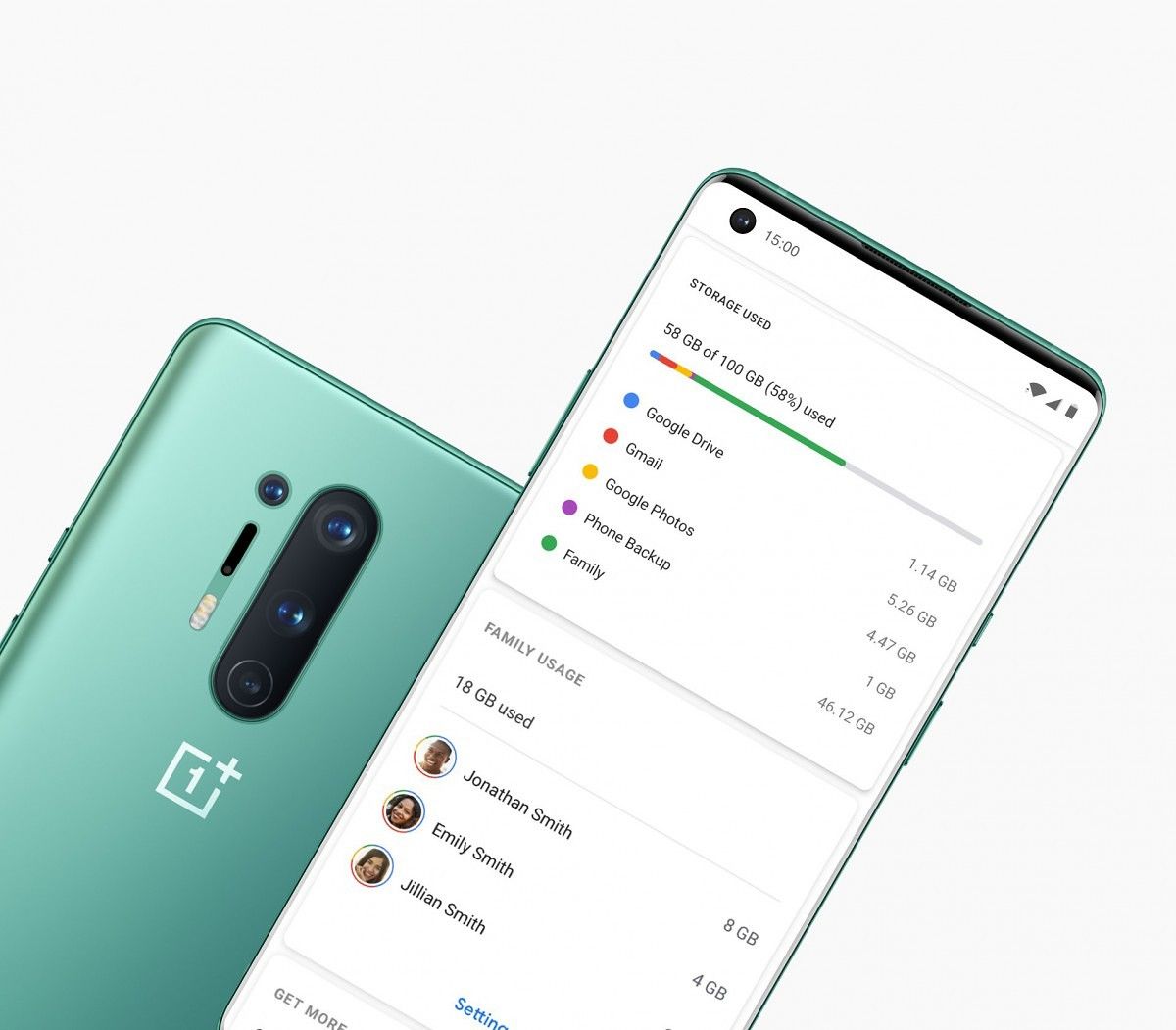
The extra launch goodies bit comes from renowned leaker Evan Blass, who recently posted extra bonuses that OnePlus 8 buyers will be able to get. One of these extra features is the fact that the OnePlus 8 will be coming with 3 months of free Google One storage. Other smartphones such as the Google Pixel 4 series, the Nokia 6.2, and the Nokia 7.2 have also come with free Google One storage, which is a cool bonus over the free storage Google already gives you with your Google account.

Last week, OnePlus announced a partnership with André Saraiva, an artist who designed the Mr. A character. As part of this partnership, OnePlus is obviously launching a number of products based on this image. Again, courtesy of Evan Blass, we also know what these products are: we can see some renders of OnePlus 8 cases based on his Mr. A character.

Lastly, we know OnePlus loves pop-up events and it looks like the OnePlus 8 phones will be get their own version of “pop-up” packages. Evan Blass shared an image of the OnePlus 8 series that showcases what users will get if they buy the device during a pop-up event. We can see the new Bullets Wireless Z as well as the new cases. Obviously, with the COVID-19 pandemic, a real pop-up event with a gathering of people is unlikely to happen, so it will be interesting to see what OnePlus does with this packaging.

Popular Youtuber Marques Brownlee has also shared a brief teaser of the OnePlus 8, confirming a lot of the details we already knew. Marques showed the device in a protective black case that hides most of the phone’s design features, and he talks about and shows off the various display settings, such as the 120Hz refresh rate, the 240Hz touch sampling rate, the 1440p WQHD+ resolution (compatible with 120Hz refresh rate unlike S20), the under-display fingerprint scanner, and other things such as the fact that the “aggressively” curved display is “noticeably” brighter than last year’s model.

Be sure to check out OnePlus’ online event tomorrow to know more about the phone.

Source: Evan Blass on Patreon

The post OnePlus 8 pre-launch leaks reveal Google One promotion, André limited edition cases, Pop-up box, more appeared first on xda-developers.


from xda-developers https://ift.tt/2XvANmn
via IFTTT