LightBlog

jeudi 16 avril 2020

Developers port Windows 10 on ARM to the Samsung Galaxy S8 and other Snapdragon 835-powered phones

Developer-friendly OEMs like OnePlus and Sony are known for publishing kernel sources as well as device trees; the latter serves as a mechanism to describe the hardware to the Linux-based kernel of Android on ARM platform as soon as the primary bootloader boots. Operating systems like Microsoft Windows, however, utilize the Advanced Configuration and Power Interface (ACPI) for the same task, while the low level hardware initialization is handled by the Unified Extensible Firmware Interface (UEFI) nowadays. Interestingly, it is possible to port UEFI and ACPI support to existing ARM devices with ample hacking, thus you can technically boot Windows 10 on devices like the Raspberry Pi.

Windows 10 does natively support the ARM architecture, which is indeed a plus in this porting game. A developer known as Evsio0n has now published a proof-of-concept method to boot Windows 10 on ARM on the Qualcomm Snapdragon 835-powered Samsung Galaxy S8. This is not the first time we have seen Windows 10 up and running on Android phones, but Evsio0n has also shared the source code to build the barebone UEFI firmware for the Galaxy S8 based on the TianoCore project.

At the time of reporting, the firmware is capable of booting Windows Preinstallation Environment (AKA WinPE), but the lack of complete ACPI implementation prohibits full-blown Windows 10 to be booted. The memory management unit (MMU) is working to some extent, which is enough for Debian Linux with mainline Linux 5.x kernel to boot.

Evsio0n has credited Bingxing Wang, AKA imbushuo, and fxsheep for their contributions in this field. Another tinkerer named Tom Christopher Daniel Perez did tease (but later deleted) a similar development on the Xiaomi Mi 6 (probably based on fxsheep’s existing UEFI port for the device), which indicates that other Snapdragon 835-powered phones could eventually be supported by the project. While the current port is far from being a daily driver, especially when compared to the Lumia WOA project, Windows 10 might be useful to significantly extend the lifetime of these legacy flagships.

Download UEFI firmware for the Samsung Galaxy S8

Samsung Galaxy S8 Forums

The post Developers port Windows 10 on ARM to the Samsung Galaxy S8 and other Snapdragon 835-powered phones appeared first on xda-developers.


from xda-developers https://ift.tt/3bg8IDF
via IFTTT

What do you think of the new Apple iPhone SE?

Here at XDA-Developers, we don’t really talk about the Apple iPhone as much as we could. This is despite the fact that the latest iPhones have consistently been the benchmark against which Android flagships are compared against, and thus parallels will always be drawn. Everything that Apple does draws attention from competitors, and each of its moves becomes a trend, whether we like them to or not. This week, Apple did something that stole the thunder from the Android world once again, but in a rather surprising fashion. The company quietly launched the new Apple iPhone SE, also popularly referred to as the iPhone SE 2 or iPhone SE 2020.

The iPhone SE 2 is more of a refresh of the iPhone 8 from 2017 rather than a direct refresh of the original SE from 2016. There are a lot of familiar aspects about this new device, but there are two things that really stand out to us: the processor and the price tag. The iPhone SE 2 comes with Apple’s A13 Bionic SoC, which is the same SoC found on Apple’s current flagships, the iPhone 11, iPhone 11 Pro, and iPhone 11 Pro Max. For a starting price tag of $399 / €479 / £419 / ₹42,500, the new iPhone SE is the cheapest smartphone from Apple that offers flagship-level performance. The rest of the package is arguably modest: The design is dated and the camera only singular. Despite this, there’s no denying that the iPhone SE 2020 stands out from the sea of phones that are trying to do too much and costing us an arm and a leg.

Apple new iPhone SE 2 2020

Why we’re acknowledging this “budget” iPhone is the fact that Android flagships are now more expensive than ever, riding upon the seemingly-mandatory 5G adoption wave even though the technology still needs to grow and mature (and even come into existence in some markets in the first place). While the iPhone SE 2 is not particularly cheap—it still costs more than what we consider “budget” in the Android world—it offers Apple fans a cheaper option to stay within the iOS ecosystem if they haven’t updated in recent years. Apple is also very good at software support for its limited lineup.

Coupling the latest flagship processor with a decent price tag, a pocketable form factor, a sense of familiarity and simplicity, and Apple’s software support promise gives you an excellent option at a time when people are cutting down their spending because of COVID-19 and the economic changes that have been brought about. The world needs a flagship killer now more than ever……and it seems that Apple is the one to have provided one? Oh, how the tables have turned.

We would like to know your thoughts on this topic:

What do you think of the Apple iPhone SE 2? Do you agree with the approach Apple has taken with its “budget” flagship? What has Apple gotten right, and what has it gotten wrong? Who is Apple targeting with this phone? How important is the processor to the target audience, for them to even appreciate the A13 Bionic? Will this phone convert any Android users to Apple? Which is the closest current and/or future competitor to the iPhone SE 2 from the Android side? Do Android OEMs need to be worried?

For your reference, here are the specifications and pricing of the new device (via MacWorld):

  • A13 Bionic processor
  • 64GB/128GB/256GB of storage
  • 4.7in (1334×750 at 326 ppi) display, 625 nits brightness, 1400:1 contrast, True Tone
  • 12Mp (f/1.8) rear-facing camera with flash, Portrait mode, 4K video
  • 7Mp (f/2.2) front-facing camera, Portrait mode
  • IP67 water and dust resistance
  • 138.4 x 67.3 x 7.3 mm; 148g
  • iPhone SE (2020, 64GB): £419/$399
  • iPhone SE (2020, 128GB): £469/$449
  • iPhone SE (2020, 256GB): £569/$549

Let us know your thoughts in the comments below!

The post What do you think of the new Apple iPhone SE? appeared first on xda-developers.


from xda-developers https://ift.tt/2KnccbX
via IFTTT

Google Play announces policy changes on location access, subscriptions, and deceptive apps

The app landscape is constantly changing and Google tries to keep the Play Store evolving to match it. The company is announcing a number of policy changes for Google Play that cover things such as location access, subscriptions, and deceptive apps. The changes will be rolling out over the next few months.

Location access is one of the biggest privacy concerns for users. Google has taken steps to make it easier to control which apps have access to location data. Building on the new options in Android 10, Android 11 gives users the option to grant an app “one-time” location access.

In February, Google announced they would require developers to get approval to access background location in their app. This policy is now live, however, Google is extending the timeline to make changes. No action will be taken on new apps until August 2020 and no action will be taken on existing apps until November 2020.

Nest up is more transparent subscriptions. It can sometimes be a little confusing to figure out what exactly you are signing up for. The goal of this new Google Play policy is to make sure users understand subscription terms, free trials, and introductory offers. Developers are urged to be explicit about subscription details.

Users should know if a subscription is required to use all or parts of the app, and if a subscription isn’t required, it should be easy to dismiss the offers. Price and billing cycle should be clearly stated as well. Free trials and introductory offers need to tell users the duration, pricing, what’s included, when the trial will end, and how to cancel. Developers have until June 16, 2020 to comply with this policy.

Furthermore, Google has made some platform-level product changes to increase user trust without additional work from developers. The Google Play checkout cart has been updated to increase transparency. Users are emailed before a free trial or intro price ends and also when 3, 6, or 12-month plan renewals are coming up. Subscribers will be notified that uninstalling an app does not cancel the subscription.

All of these Google Play policy changes should make it easier for users to decide which apps get location access and understand what they’re signing up for. Deceptive apps come in many shapes and sizes, so it’s great to have these policies to weed them out.

The post Google Play announces policy changes on location access, subscriptions, and deceptive apps appeared first on xda-developers.


from xda-developers https://ift.tt/3bgxKCP
via IFTTT

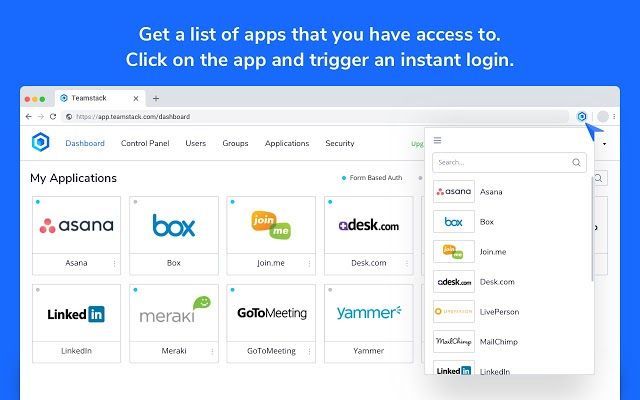
Automate Identity Management for your Team with Teamstack

Teamstack offers a complete solution for anyone looking to have more control over their workforce, and the apps they use on a daily basis. With secure and convenient access, you’ll be able to simplify your employee’s access to your work-related apps. Teamstack is a cloud identity management platform that makes growing your team easy.  It is compatible with over 500 apps and trusted by more than 750 teams worldwide.

Connecting people with technology, securely. Take advantage of pre-built integrations, Single Sign-On and one-click user provisioning and allow your team to conveniently sign in to any application passwordless with multi-factor authentication.

Teamstack

You’ll be able to quickly grant access to your workplace apps for new employees. You can also easily manage each employee’s access to your work apps, and have better security through strong password management tools. Multi-Factor Authentication supports many different login and verification methods including WebAuthn, TOTP, SMS codes and more.

Login to Teamstack using the Chrome extension

Manage team passwords and custom expiration dates

One-Click Provisioning takes the pain out of onboarding (and offboarding) users with Teamstack’s one-click provisioning. A single click can add or remove users from all of your applications. This reduces risk and increases efficiency. You can also put into place geo-restrictions, which prevent anyone from accessing your Teamstack from outside of a dedicated area.

Addons are an important part of Teamstack and allow you to structure your system exactly how you want it. Add additional features to your setup, like Extended Audit Trail which keeps detailed logs of user logins and app usage. Another useful addon is Custom MFA which lets you add an additional layer of security over specific apps.

Teamstack is the best solution for connecting your workforce through technology. Download it today and use the code below to get six months free.

Use code “blogdumoderateur” for six months free [Basic plan + all add-ons]

Get Teamstack
We thank Teamstack for sponsoring this post. Our sponsors help us pay for the many costs associated with running XDA, including server costs, full time developers, news writers, and much more. While you might see sponsored content (which will always be labeled as such) alongside Portal content, the Portal team is in no way responsible for these posts. Sponsored content, advertising and XDA Depot are managed by a separate team entirely. XDA will never compromise its journalistic integrity by accepting money to write favorably about a company, or alter our opinions or views in any way. Our opinion cannot be bought.

The post Automate Identity Management for your Team with Teamstack appeared first on xda-developers.


from xda-developers https://ift.tt/2RGcVc2
via IFTTT

Tasker 5.9.3.beta.4 adds “Contact Via App” to automate WhatsApp calls, WireGuard integration, and more

As far as automation apps on Android are concerned, Tasker is widely regarded as one of the best options out there. The app allows you to create Profiles that automatically trigger based on certain conditions to execute Tasks and it offers a vast variety of plugins that can help you automate pretty much anything on your Android device. For instance, a recent beta release of the app introduced full Do Not Disturb customization and Sensor actions, that let you completely personalize your phone’s Do Not Disturb mode and launch tasks that are triggered by values collected from your phone’s sensors. Now, the app is getting another significant update in the beta channel which brings even more to the table.

XDA Tasker Tips & Tricks Forum

As per a recent post on Reddit, Tasker v5.9.3.beta.4 is now rolling out to users and it includes a plethora of interesting new features. Here are some of the most noteworthy features in the latest Tasker beta release:

Contact Via App

If you’ve ever wanted to automate an action to start a WhatsApp chat, video call, or navigate to a contact’s address in Google Maps, you can now use the new “Contact Via App” action to do just that. The action lets you pick any contact on your device and then, depending on the apps you have installed, choose an action to perform. As you can see in the video demo, you can use this new action to launch Google Maps navigation to a particular contact’s address, initiate a Skype call with that contact, view their profile information in WhatsApp, or start an audio/video call with them on WhatsApp. While you could technically do all of this already by sending an intent, the new feature now takes some of the legwork away and makes the whole process easier.

WireGuard Integration

For the unaware, WireGuard is a brand new, modern VPN protocol that just made its way into the Linux kernel. In case you’re running a custom kernel with WireGuard support on your device, you can use the WireGuard Android app to control WireGuard VPN tunnels. However, turning the WireGuard VPN tunnel on/off is a manual process that could get cumbersome if you do it frequently. In case you wish to automatically enable/disable the VPN tunnel based on your current location, you can now do so with Tasker. Check out the demo video below to see how you can configure it on your device.

Along with these two features, the latest Tasker beta update includes several other changes that you can see in the changelog section below. If you’re interested in trying out these features for yourself, you can enroll in the Tasker beta by following this link and then download the latest release from the Play Store link below.

Full Changelog

  • Added new Contact Via App action that allows you to communicate with your contacts via third party apps (eg Video call via Whatsapp, audio call via skype, etc)
  • Added action to Control WireGuard tunnels in the Tasker Function action
  • Allow Tasker Secondary app to be triggered by URLs like tasker://secondary?text=hello&other=hi where every parameter will be made available as a Tasker variable in the triggered task
  • Added Query option to Do Not Disturb action
  • Add option in Test Net to get your phone’s Wifi IP Address
  • Fixed File Modified event in a variety of situations
  • Added Event filter to File Modified event so that you can react to just a single event instead of all of them
  • Changed %evtprm(1) for File Modified event from the path that is being monitored to the path of the actual file that changed
  • Allow File Modified event to work with variables in the File Modified field
  • Added %evtprm() to the variable list in actions that are in a profile that has an event condition
  • Added Wait For File Event function to Tasker Function action so that you can wait for example for a file to finish writing
  • Made moving projects left and right easier by asking how many positions you want to move the project instead of having to move 1 by 1
  • Fixed issues with clipboard getting while in the background
  • Fixed taking screenshots on Android 10, shouldn’t show the prompt on the screenshot anymore
  • Fixed HTTP Request action when a gzipped response was gotten. Now automatically unzips it
  • Fixed automatic redirections in HTTP Request action in some cases
  • Added line separators in List Dialog action
  • Made Get Sims action in Tasker Function action request the READ_PHONE_STATE permission
  • Added Biometric permission to kid apps if needed
  • Added tip about List Dialog action when using the Menu action
  • Tried to make Tasker only check for root access if root actions are used

Tasker ($3.49, Google Play) →


Source: Reddit

The post Tasker 5.9.3.beta.4 adds “Contact Via App” to automate WhatsApp calls, WireGuard integration, and more appeared first on xda-developers.


from xda-developers https://ift.tt/2wIhP0U
via IFTTT

Samsung became the third largest smartphone SoC vendor globally in 2019

Qualcomm has been the dominant player in the smartphone SoC vendor market for much of the last decade. MediaTek has long performed the role of providing cheaper SoCs in the smartphone market. Samsung and Huawei’s HiSilicon, on the other hand, make custom SoCs that are intended for use in their own smartphones. Samsung System LSI’s Exynos SoCs were used only by Samsung Mobile’s phones, for example, while HiSilicon’s Kirin chips are used in Huawei and Honor phones. In 2019, this equation changed as Samsung System LSI started selling Exynos chips to other vendors such as Motorola and Vivo. This has helped the company achieve the position of being the largest smartphone application processor (AP) vendor globally in 2019, according to a report by Counterpoint Research.

Counterpoint Research has released its latest quarterly handset report. According to the report, Samsung Electronics and HiSilicon were the only vendors among the top smartphone SoC vendors to see positive share growth in 2019, while Qualcomm, MediaTek, and Apple all saw declines.

Smartphone application processor vendor market share

Source: Counterpoint Research

Qualcomm remained the top vendor of application processors, despite suffering a 1.6% decline through the year. It still accounts for one-third of smartphone AP shipments in 2019. Its shares exceeded 30% in all markets except Middle East & Africa (MEA), where lower demand for high-end phones tempered demand for Qualcomm chips in comparison to other markets. This is because Qualcomm’s chips are traditionally more expensive than MediaTek’s chips, for instance.

MediaTek also saw a slight decline in its market share in 2019, while maintaining its second-place position. It had strong performance in markets like MEA, India, and Southeast Asia, with the demand being driven by low-to-mid-end phones. The company achieved one-quarter market share of global smartphone AP sales.

Huawei (HiSilicon), on the other hand, saw its market share decline in many markets outside China due to the US trade ban. Ironically, the company was able to offset these issues by “significantly expanding presence and share” in its domestic market of China.

Application processor market share by region

Source: Counterpoint Research

Samsung performed particularly well in Europe, India, and Latin America, and its market share increased in other regions such as North America as well. Counterpoint Research notes that competition between these AP vendors intensified in 2019, as the focus was getting the balance right between processing speeds and price. Samsung’s share increased by 2.2% year-over-year in a declining market. However, the company outsourced some of its A-series smartphone manufacturing to Chinese ODMs since the last year, and Counterpoint says this will drive some share gains for Qualcomm and MediaTek. Also, the rising proliferation of 5G phones in the US and China will increase Samsung’s dependence on Qualcomm chips in its flagship and high-tier phones in these regions. (Currently, the company relies on Snapdragon chips for the North American/Chinese/Japanese/South Korean/Latin American variants of the Galaxy S20 series, which are sold only in a 5G configuration. The Exynos 990 global variants are further bifurcated into 5G and 4G variants.)

Counterpoint further noted that Samsung is horizontally scaling with an aim to sell its 5G SoCs to Chinese brands this year, in order to help drive Exynos chip volumes in 2020. (The Vivo X30 and X30 Pro feature the company’s upper-tier Exynos 980 SoC, for example.) Samsung is also increasingly adopting its Exynos chips across its own portfolio designed and manufactured in-house for global regions except for the US/Japan/China. Therefore, the company estimates Samsung’s overall share of the smartphone application processor market to grow further in 2020.

5G will be an important part of the story as well. 5G integrated chips with support for sub-6GHz networks will start to factor in as a competitive advantage, according to Counterpoint. Examples of such chips include the Qualcomm Snapdragon 765, MediaTek Dimensity 1000/L, and the MediaTek Dimensity 800. These chips reduce power consumption by reducing the need for an external 5G modem, and they also take up less space within the phone. Counterpoint estimates the cheapest 5G phone to be powered by an integrated 5G chip to go to sub-$300 prices in the second half of 2020, as vendors from HiSilicon, Qualcomm, MediaTek, Samsung, and even Unisoc are all pushing. In the premium segment, however, discrete 5G modem solutions will continue to be seen in the upcoming 5G iPhones as well as the Qualcomm Snapdragon 865 + X55 modem-powered flagship Android phones.


Source: Counterpoint Research

The post Samsung became the third largest smartphone SoC vendor globally in 2019 appeared first on xda-developers.


from xda-developers https://ift.tt/2RHQOlM
via IFTTT

Netflix adds the OPPO Reno3, some Sony Xperia phones, and the unannounced Xiaomi Mi Note 10 Lite to its HD/HDR supported list

The regular Android community started to care about Google’s Widevine DRM when they discovered the connection between the DRM level and HD playback capability in streaming apps like Netflix and Amazon Prime Video. Having Widevine L1 status is indeed a mandatory requirement, but it doesn’t necessarily ensure the ability to play Netflix content in HD, as the streaming provider has to manually whitelist the devices for the facility. A similar certification procedure for Netflix HDR10 playback also exists, with the obvious prerequisite of having an HDR display.

Netflix maintains a publicly accessible list of HD and HDR playback supported devices so that consumers can pick the right one for binge-watching. The certifications aren’t correlated with each other, though. Netflix tends to update its list once a device is certified to playback video in HD and/or HDR10. The company has now added a bunch of Sony Xperia, Xiaomi, and OPPO phones to their index of supported devices.

New HD-compatible devices:

New HDR10-compatible devices:

Interestingly, one of the newly listed devices is the unreleased Xiaomi Mi Note 10 Lite. This could be a mistake and Netflix intended to list the Mi Note 10 instead, but this wouldn’t be the first time that Netflix has listed an unreleased device by accident. They did this very recently with the Samsung Galaxy Tab S6 Lite and the Google Pixel 4, for example.

It is also worth mentioning that the OPPO Reno3 and Reno3 Pro that have been added to this list are the global models with the MediaTek Helio P90 and P95 SoCs, and not the Chinese variants. On the other hand, the Sony Xperia 1 II, Sony Xperia 5, Xiaomi Mi 10, and Xiaomi Mi 10 Pro were already added to the list of devices that support HDR10 playback on Netflix back in March. Thus, their additions to the list of devices that support Netflix playback in HD is merely a formality.

Netflix (Free+, Google Play) →


Source: Netflix
Via: Android Police

The post Netflix adds the OPPO Reno3, some Sony Xperia phones, and the unannounced Xiaomi Mi Note 10 Lite to its HD/HDR supported list appeared first on xda-developers.


from xda-developers https://ift.tt/2XFINBB
via IFTTT