LightBlog

vendredi 17 avril 2020

Magisk Module enables Camera during call, Call Recording, AppLock, and more on Samsung Galaxy S20

OEM Android skins, such as Xiaomi’s MIUI or OnePlus’ OxygenOS, often feature multiple regional variants. While a few region-exclusive services can be controlled from the server side, some manufacturers prefer to ship a complete set of features inside the firmware, with selective access to regional features being controlled via hidden parameters that are not visible to regular users. In the case of Samsung, they define those features via their Consumer Software Customization file (CSC). Fiddling with the CSC is not everyone’s cup of tea, so XDA Senior Member Orphee has come up with an interesting Magisk Module named Decoded_CSC_Features_Files for the Samsung Galaxy S20 lineup that can unlock a bunch of features that are not otherwise available in certain regions.

XDA Forums for Samsung Galaxy: S20 || S20+ || S20 Ultra

Buy from Amazon.in — Samsung Galaxy: S20 || S20+ || S20 Ultra

As you may expect, this mod requires having an unlocked bootloader, thus it can only be installed on Exynos-powered variants of the Samsung Galaxy S20. The latest Canary version of Magisk is capable of patching the boot image of this phone, and the procedure is fairly similar to the Galaxy S10 rooting guide. Once you have Magisk up and ready, flashing the Decoded_CSC_Features_Files module can unlock the following features:

  • Disable shutter sound menu
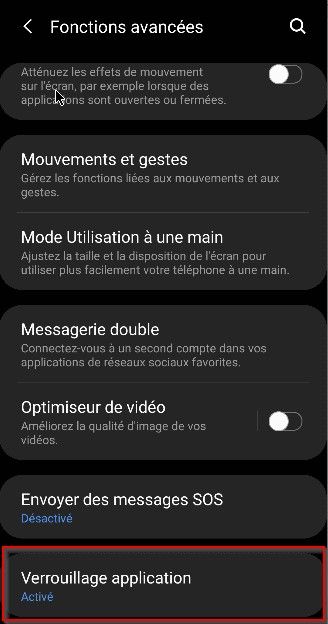
  • Enable AppLock Protection menu
  • Enable real-time network speed
  • Enable camera during call
  • Enable call recording (regular voice calls only)
  • Data usage view on the quick panel
  • Block call number menu
  • Enable eSIM support
s20_applock_option s20_realtime_network_speed

This module is based on work by XDA Senior Member m8980, but Orphee has further expanded upon it by adding numerous other features, such as support for eSIM. The package is compatible with the latest official firmware for the Galaxy S20 series (G98xFXXU1ATCT) and should work with future software revisions with little to no modification. The operator software version might be changed to “G981B” after installing this mod, but this is a harmless side-effect and can be ignored.

Download Decoded_CSC_Features_Files Magisk Module — XDA Thread

This post contains affiliate commerce links that will earn XDA a commission if you purchase through them.

The post Magisk Module enables Camera during call, Call Recording, AppLock, and more on Samsung Galaxy S20 appeared first on xda-developers.


from xda-developers https://ift.tt/3bkK2Kj
via IFTTT

Samsung launches a handwashing app for Galaxy watches

Proper handwashing techniques have received a lot of attention in recent months due to the COVID-19 pandemic. The simple act of washing your hands plays an important role in preventing the spread of the virus. Hot on the heels of Google’s handwashing timer for Wear OS, Samsung is doing its part and releasing a similar app for Galaxy smartwatches.

Samsung’s app is a little different from Google’s. Simply named “Hand Wash,” this is a stand-alone app rather than an extra feature tacked on to the existing Clock app. Users have to manually seek it out and install the app from the Galaxy Store, which, unfortunately, means fewer people will know about it. On the plus side, this allows the app to have more features.

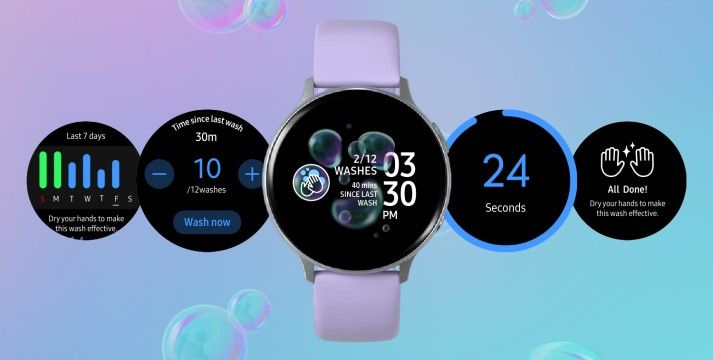
The “Hand Wash” app can be set as your watch face, making it much easier to launch quickly. The watch face shows how many times you have washed your hands and how long it has been since your last wash. While Google’s app has a 40-second timer, Samsung is going with a less aggressive 25 seconds (still longer than the CDC recommends). The watch will vibrate when the time is up.

CDC’s handwashing instructions:

  1. Wet your hands with clean, running water (warm or cold), turn off the tap, and apply soap.
  2. Lather your hands by rubbing them together with the soap. Lather the backs of your hands, between your fingers, and under your nails.
  3. Scrub your hands for at least 20 seconds. Need a timer? Hum the “Happy Birthday” song from beginning to end twice.
  4. Rinse your hands well under clean, running water.
  5. Dry your hands using a clean towel or air dry them.

Launching the app from the app carousel will allow you to manually enter how many times you have washed your hands. There is also a chart that shows how many times you washed your hands each day and the week’s average. The Hand Wash app will also remind you to wash your hands periodically. There are 8 reminders by default, but you can add more or delete up to 3 of the reminders.

The Hand Wash app seems to be available for all Samsung watches in the Galaxy Store. Samsung only mentions “Galaxy Watch” users, but I was able to download it on my non-Galaxy branded Gear Sport as well. Open the Galaxy Store and search for “Hand Wash” by Samsung Electronics to see if it’s available for your smartwatch.


Source: Samsung

The post Samsung launches a handwashing app for Galaxy watches appeared first on xda-developers.


from xda-developers https://ift.tt/3ag6ZNA
via IFTTT

Google Calendar prepares to add cross-profile support for work and personal calendars

Work profiles in Android isolate all applications and synced account information from the personal profile so users don’t accidentally mix information from their work and personal lives. While work profiles can help employees manage their work-life balance and avoid accidentally leaking information, there are a few inconveniences that they introduce. For example, many work-managed calendar applications don’t support cross-profile calendar sync, meaning users have to check their calendar app in both their personal and work profiles to make sure they don’t miss an important meeting or event. Even Google Calendar doesn’t support cross-profile calendar visibility yet.

In Android 10, however, Google added support for showing work calendar details in the personal calendar and vice versa. With cross-profile calendar visibility, you can see work events in your personal calendar, and if you attempt to edit an event created in your work calendar, you are directed to edit the event in the calendar app from your work profile. This maintains proper separation between personal and work profiles while also making things more convenient for workers. However, in order to support cross-profile calendar visibility, calendar applications have to be updated to support the new APIs. There’s evidence in the latest version of the Google Calendar app for Android that Google is preparing to enable cross-profile calendar support.

An APK teardown can often predict features that may arrive in a future update of an application, but it is possible that any of the features we mention here may not make it in a future release. This is because these features are currently unimplemented in the live build and may be pulled at any time by the developers in a future build.

In the latest version of Google Calendar, version 2020.14-1, we spotted new strings that hint at cross-profile calendar connections. One set of strings will appear as part of a promo message informing the user that they can “see all [their] events here, including [their] personal calendars.” Another set of strings describes the preference in Settings that the user must enable to show calendar events from their personal Calendar app in their work Calendar app. Enabling this preference will “[let] you see your work events alongside your personal events.” Once enabled, “you can then quickly jump to your personal Calendar app to change events.” To maintain privacy, “your calendars are still stored separately.”

<string name="cross_profile_drawer_promo_text">To see all your events here, include your personal calendars</string>
<string name="cross_profile_drawer_promo_title">Add your personal calendars</string>
<string name="cross_profile_learn_more">Learn more</string>
<string name="cross_profile_promo_dismiss">Dismiss</string>
<string name="crossprofile_connection_off">Not connected</string>
<string name="crossprofile_connection_on">Connected</string>
<string name="crossprofile_preference_activate_info">"Turning this on lets your work Calendar app show the calendar events from your personal Calendar app. This lets you see your work events alongside your personal events. You can then quickly jump to your personal Calendar app to change them. To Protect your privacy, your calendars are still stored separately."</string>
<string name="crossprofile_preference_activate_link">Turn on in Settings</string>
<string name="crossprofile_preference_deactivate_info">To keep your calendars separate across apps, update access in Settings. Once turned off, your personal Calendar events will stop showing in your work Calendar app.</string>
<string name="crossprofile_preference_deactivate_link">Turn off in Settings</string>
<string name="menu_crossprofile_preferences">Personal calendars</string>
<string name="work_profile_header_title">Work profile</string>

I set up a local work profile using the Island app, but I was unable to get cross-profile calendar visibility working. It’s likely this feature will roll out in a future update of the Google Calendar app or will be enabled via a server-side configuration change. Once the feature rolls out, we’ll let you all know.

Work Profile on a Google Pixel 4 running Android 10

Google Calendar (Free, Google Play) →

The post Google Calendar prepares to add cross-profile support for work and personal calendars appeared first on xda-developers.


from xda-developers https://ift.tt/2yqjhW5
via IFTTT

This‌ ‌Top-Rated‌ ‌VPN‌ ‌Is over 70% ‌off‌ ‌for‌ ‌a‌ ‌Limited‌ ‌Time‌

We are all spending a little more time than usual online at the moment. But with every click and tap, we gift information to advertisers, government agencies, and even cybercriminals. If you would like to maintain some kind of privacy, HideMyAss! VPN can help. This top-rated service offers a range of great features to secure your connection and block ads. For a limited time, you can get a two-year subscription for just $79.99 at the XDA Developers Depot.

By routing your data through masking servers, HideMyAss! VPN allows you to stay truly anonymous online. No one can trace your IP address or physical location, making it impossible to track you across the web. 

The service also applies AES-256 encryption to keep your connections secure, and a strict no-logging policy ensures that there is no record of your online activity. Rated at 4.5 stars on TechRadar, this service even blocks ads and malware to improve your browsing experience.

Despite these layers of protection, HideMyAss! won’t slow you down. “It’s rare that a VPN can achieve such consistently fast connection speeds,” according to VPN Mentor. As a result, you can stream HD movies and enjoy multiplayer games without lag. 

HideMyAss! VPN has a range of apps to download on major platforms, and one subscription covers five devices with unlimited bandwidth.

It’s worth $287.76, but you can get two years of service now for $79.99.

 
HideMyAss! VPN: 2-Yr Susbcription – $79.99

See Deal

Prices subject to change

The post This‌ ‌Top-Rated‌ ‌VPN‌ ‌Is over 70% ‌off‌ ‌for‌ ‌a‌ ‌Limited‌ ‌Time‌ appeared first on xda-developers.


from xda-developers https://ift.tt/3aeVjdW
via IFTTT

Moto G Power, Moto G Stylus, and Samsung Galaxy S10 Lite go on sale in the U.S.

While much of the U.S. is still under lockdown to prevent the spread of COVID-19, smartphone brands are still moving forward with releasing products, no matter how ill-timed. We’ve seen both new product launches as well as already-announced products starting to go on sale. Just yesterday, Motorola announced that the Moto G Power and Moto G Stylus, two affordable mid-range smartphones, have gone on sale in the United States. Today, the value-flagship Samsung Galaxy S10 Lite has gone on sale. These 3 devices are a bit more affordable than your typical mid-range and flagship smartphones, so they may be more palatable to consumers in this tough economy.

Moto G Power & Moto G Stylus

Motorola announced the G Power and G Stylus back in February as part of the brand’s 2020 Moto G line. While we expected these devices to bear the “Moto G8” name, Motorola decided to drop the numbering from the branding entirely. Both of these phones went up for pre-order over 2 weeks ago, but on April 16th, Motorola opened up general sales. The Moto G Power retails for $250 while the Moto G Stylus retails for $300.  You can buy both devices online through Motorola.com, Best Buy, or B&H Photo right now. If you’re on Google Fi, you’ll also be able to buy the two phones through the Google MVNO, albeit at a later, unspecified date.

Moto G Power Forums ||| Moto G Stylus Forums

Buy Moto G Power: Motorola.com, Best Buy, B&H Photo, Google Fi (coming soon)

Buy Moto G Stylus: Motorola.com, Best Buy, B&H Photo, Google Fi (coming soon)

Both devices feature the Qualcomm Snapdragon 665 SoC, 4GB of RAM, a 6.4-inch LCD at FHD+ resolution with a left-sided hole-punch cutout, a 16MP front-facing camera, triple rear cameras, a 3.5mm headphone jack, a USB Type-C charging port, and Android 10. The Moto G Stylus has a higher resolution primary rear camera, a better wide-angle camera, and of course, a stylus pen. The Moto G Power has a larger battery than the Moto G Stylus, though.

Moto G Power and Moto G Stylus Specifications

Moto G Power Moto G Stylus
Size 159.85 x 75.84 x 9.63mm, 199g 158.55 x 75.8 x 9.2mm, 192g
SoC Snapdragon 665 Snapdragon 665
RAM 4GB 4GB
Storage 64GB 128GB
Display 6.4-inch, FHD+, LCD, hole-punch 6.4-inch, FHD+, LCD, hole-punch
Rear Cameras
  • 16MP (f/1.7, 1.12μm)
  • 2MP (f/2.2, 1.75μm) macro
  • 8MP (f/2.2, 1.12μm) 118° ultra-wide angle
  • 48MP (f/1.7, 1.6μm)
  • 2MP (f/2.2, 1.75μm) macro
  • Action Cam 16MP (f/2.2, 2.0μm, 117-degrees FOV)
Front Camera
  • 16MP (f/2.0, 1μ)
  • 16MP (f/2.0, 1μ)
Battery 5,000 mAh 4,000 mAh
Ports USB-C, Headphone jack USB-C, Headphone jack
Software Android 10 Android 10

Samsung Galaxy S10 Lite

At the Consumer Electronics Show (CES) earlier this year, Samsung announced the Galaxy S10 Lite and Galaxy Note 10 Lite. The Samsung Galaxy S10 Lite (our review) has a Galaxy S20-like design but with the previous generation Qualcomm Snapdragon 855, a 6.7-inch FHD+ Super AMOLED display at 60Hz, a 4,500mAh battery, a 32MP front-facing camera, up to 8GB of RAM, and a triple rear camera setup consisting of a 48MP primary wide-angle sensor with “Super Steady OIS”, 12MP secondary ultra wide-angle sensor, and a 5MP tertiary macro camera. The display on the Galaxy S10 Lite is also notable for being flat, which some people might appreciate, but on the other hand, there’s no 3.5mm headphone jack.

Samsung Galaxy S10 Lite Forums

While the Samsung Galaxy S10 Lite retails for ₹39,999 in India, the price in Europe is a whopping €649. The price in the U.S. is $650, which is similarly high compared to the price in India. This price is only $50 less than the OnePlus 8, but it’s also hundreds of dollars less than the highest-end flagship smartphones currently on sale. If you like what Samsung has to offer in the Galaxy S10 Lite, you can order it online through Samsung.com, Amazon, or Best Buy. It’s only available in the U.S. in a single color: Prism Black. Orders for the Silicone Cover have also gone up on Samsung.com.

Buy Samsung Galaxy S10 Lite: Samsung.com, Amazon, Best Buy

Samsung Galaxy S10 Lite Specifications

Specification Samsung Galaxy S10 Lite
Weight and dimensions
  • 75.6 x 162.5 x 8.1mm
  • 186g
Display
  • 6.7-inch Full HD+
  • Super AMOLED Plus Infinity-O Display
  • 2400×1080 (394ppi)
Rear camera Triple Camera:
  • Primary: 48MP Sony IMX586, Super Steady OIS AF F2.0
  • Ultra Wide: 12MP, F2.2
  • Macro: 5MP, F2.4
Front camera 32MP Sony IMX616, F2.2
SoC 7nm 64-bit Octa-core Snapdragon 855
  • 1x 2.84GHz Kryo 485 Gold
  • 3x 2.42GHz Kryo 485 Gold
  • 4x 1.8GHz Kryo 485 Silver

Adreno 640 GPU

RAM and Storage
  • 6GB/128GB
  • 8GB/128GB
  • 8GB/512GB
Battery
  • 4,500mAh (typical)
  • 45W fast charging
  • 25W charger included in-box
OS One UI 2.1 based on Android 10

The post Moto G Power, Moto G Stylus, and Samsung Galaxy S10 Lite go on sale in the U.S. appeared first on xda-developers.


from xda-developers https://ift.tt/3eEAlZo
via IFTTT

Samsung Galaxy Note 10 Lite receives One UI 2.1 with April 2020 patches

Samsung’s flagship Galaxy S20 series, which was launched earlier this year in February, featured the company’s latest One UI 2.1 software release with a few new features. Shortly after the launch, we learned that Samsung was planning to roll out One UI 2.1 to older flagship devices and, as expected, the update finally hit the Galaxy S10 and Galaxy Note 10 series towards the end of last month. Earlier this month, the company then rolled out One UI 2.1 to the Galaxy S10 Lite and now, it’s finally rolling out to the Samsung Galaxy Note 10 Lite.

Samsung Galaxy Note 10 Lite XDA Forums

Buy the Samsung Galaxy Note 10 Lite on Flipkart (₹40,999)

According to a recent post on our forums, the One UI 2.1 update (software version N770FXXU2BTD4) is now rolling out to Galaxy Note 10 Lite users in Spain and UAE. Much like the One UI 2.1 update for the Galaxy S10 Lite, the latest release brings a handful of new features that made their debut with the Galaxy S20 series and the Android security patches for April 2020.

Following the update, Samsung Galaxy Note 10 Lite users will be able to enjoy improved AR Emoji with manual editing and enhanced facial expression recognition. The update also includes Quick Share and Music Share, along with new camera modes like Single Take and Pro Mode for video, My Filters, Selfie Tone, and AR Zone. On top of that, the Samsung Keyboard app has received a new multilingual translation feature, improved search for emoji and sticking, and a new text undo/redo feature. As mentioned earlier, the update is currently only available for Note 10 Lite users in Spain and UAE, but it should roll out to more regions in the coming days.


Source: XDA Forums

The post Samsung Galaxy Note 10 Lite receives One UI 2.1 with April 2020 patches appeared first on xda-developers.


from xda-developers https://ift.tt/2yjnc7p
via IFTTT

ASUS releases AOSP-based Android 10 beta updates for the ZenFone Max M1, ZenFone Lite, and the ZenFone Live L1/L2

ASUS has yet to release a phone under the Android One program, but they still do care about vanilla Android lovers. The OEM has significantly trimmed down their custom Android skin, ZenUI on their flagship ZenFone 6, while the ZenFone Max Pro M1 and its successor, the ZenFone Max Pro M2, come with near-stock Android. The company also publishes AOSP-based beta builds for existing phones running ZenUI from time to time. ASUS has now released similar AOSP-based Android 10 beta updates to a bunch of entry-level devices from their portfolio, which includes the ZenFone Max M1, the ZenFone Lite and the ZenFone Live (L1/L2).

The ASUS ZenFone Max M1 has quite a vibrant aftermarket development community, as this nifty device is officially supported by TWRP as well as the Pixel Experience project. Owners of this phone can now evaluate the first public beta build of Android 10 from ASUS, bearing version number WW-17.00.2003.23. The update package weighs about 1.78GB and can be sideloaded using the stock recovery. The transition is not foolproof though, as you may need to wipe the userdata, so do perform a backup beforehand, as you should anyway when trying out betas.

ASUS ZenFone Max M1 XDA Forums

Download Android 10 Beta for the ASUS ZenFone Max M1

The ZenFone Lite and the ZenFone Live are nothing but rebranded editions of each other, thus, they share a common firmware. The data transition bug is also present in the Android 10 beta build for these phones, which is tagged as WW-17.07.2003.405.

Download Android 10 Beta for the ASUS ZenFone Lite/Live

As a matter of interest, all these phones are powered by either the Snapdragon 425 or the Snapdragon 430 SoC (and likely to be based on the same BSP). Keeping track of the enormous number of device variants from ASUS is indeed a cumbersome task, especially when some regional models of the aforementioned phones got the Android Go edition on top of 1GB RAM SKU, which are still running Android Oreo and not officially compatible with the current Android 10 beta packages.


Source: ASUS (1, 2, 3)

The post ASUS releases AOSP-based Android 10 beta updates for the ZenFone Max M1, ZenFone Lite, and the ZenFone Live L1/L2 appeared first on xda-developers.


from xda-developers https://ift.tt/2XEbq1Y
via IFTTT