LightBlog

dimanche 19 avril 2020

Latest Magisk Canary release adds support for Android 11

Magisk by XDA Recognized Developer topjohnwu is the most popular root solution for Android devices, but because of the modifications it has to do to allow for systemless-root, it usually needs to be updated to be compatible with the latest Android release. The first Developer Preview for Android 11 was released back in February followed by the second Developer Preview last month. Today, topjohnwu released a Canary build of Magisk that can root the Android 11 Developer Preview.

This initial Canary build is designed to work for the latest Android 11 Developer Preview releases for Pixel smartphones, though initial reports from Pixel 2 owners suggest it isn’t working for them. Bugs are to be expected given this is a Canary release, though. According to topjohnwu, SafetyNet Attestation currently passes, but it’s uncertain how long that’ll last once Google fully rolls out hardware attestation for SafetyNet.

To get started with root on Android 11, download the latest Canary Manager release or switch to the Canary release channel in Manager’s settings and then update Magisk. If you experience any issues, file a bug report on the project’s GitHub repository.

The post Latest Magisk Canary release adds support for Android 11 appeared first on xda-developers.


from xda-developers https://ift.tt/2ROfuJl
via IFTTT

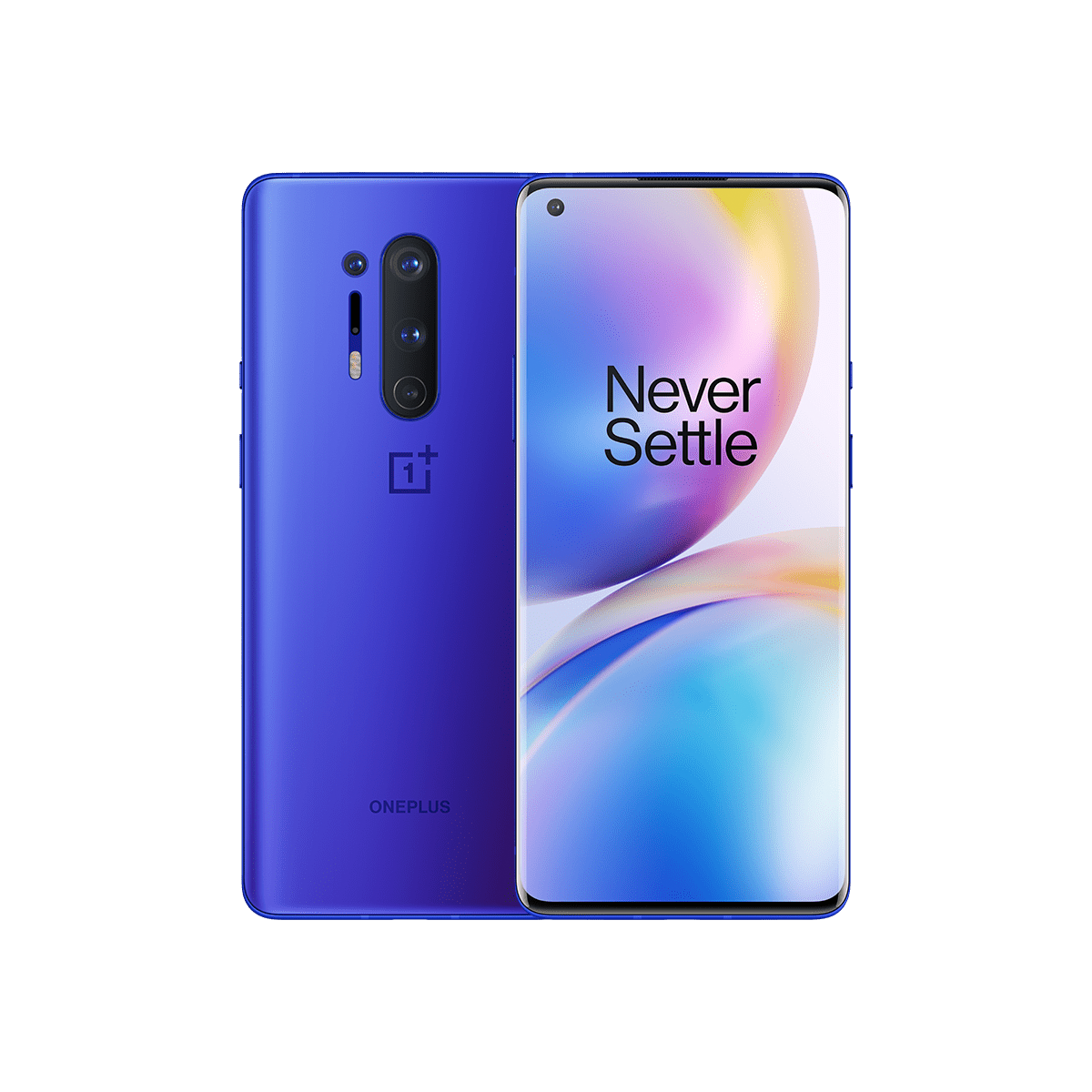
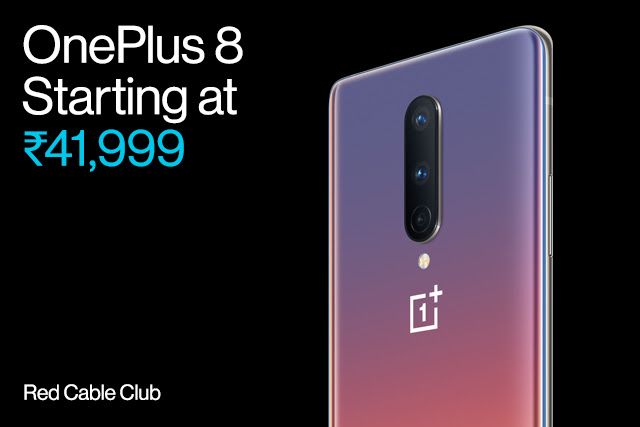
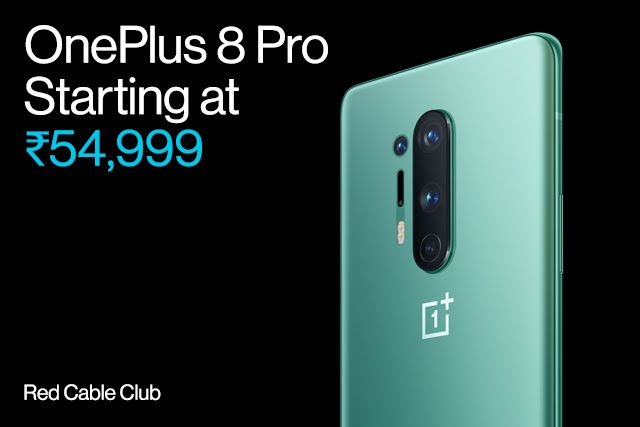
OnePlus 8 and OnePlus 8 Pro launched in India, starting at ₹41,999 ($549)

After months of leaks and teasers, OnePlus finally launched the OnePlus 8 series earlier this month. However, unlike previous years, the company didn’t launch the OnePlus 8 series in India and China at the same time as the global launch. While OnePlus launched the devices in China just a day after the global launch, the company has now finally gotten around to launching the OnePlus 8, OnePlus 8 Pro, and OnePlus Bullets Wireless Z in India.

OnePlus 8 OnePlus 8 Pro

OnePlus 8 XDA Forums || OnePlus 8 Pro XDA Forums

OnePlus 8 Series Specifications

Full Specification Table

Specification OnePlus 8 OnePlus 8 Pro
Dimensions & Weight
  • 160.2 x 72.9 x 8.0 mm
  • 180g
  • 165.3 x 74.35 x 8.5 mm
  • 199g
Colors, Materials, Finish
  • Onyx Black (glossy)
  • Glacial Green (matte-frosted)
  • Interstellar Glow (glossy)
  • Polar Silver
  • Onyx Black (glossy)
  • Glacial Green (matte-frosted)
  • Ultramarine Blue (matte-frosted)
Display
  • 6.55″ Fluid AMOLED, single hole-punch (3.8mm) cutout
  • FHD+ resolution (2400 x 1080), 20:9 aspect ratio, 402ppi
  • 90Hz refresh rate, 180Hz touch sampling rate
  • HDR10+
  • 3D Corning Gorilla Glass
  • Features
    • Vibrant Color Effect
    • Reading Mode
    • Night Mode
  • No Active Digitizer for Active Pen support
  • 6.78″ Fluid AMOLED, single hole-punch (3.8mm) cutout
  • QHD+ resolution (3168 x 1440), 19.8:9 aspect ratio, 513ppi
  • 120Hz refresh rate, 240Hz touch sampling rate
  • HDR10+
  • 1300 nits peak brightness, 4096 levels of adjustment
  • 3D Corning Gorilla Glass
  • Features
    • Vibrant Color Effect
    • Reading Mode
    • Night Mode
    • MEMC
    • HDR Boost
    • Adaptive Display
  • No Active Digitizer for Active Pen support
Cameras (Rear)
  • Primary
    • 48MP Sony IMX586, f/1.75, 0.8µm pixels, OIS, EIS
  • Secondary
    • 16MP, ultra-wide-angle, f/2.2, 116° FOV
  • Tertiary
    • 2MP, macro, f/2.4, 1.75µm pixels
  • Flash
    • Dual LED Flash
  • Autofocus
    • PDAF + CAF
  • Video
    • 4K @ 30/60 fps
    • 1080p @ 30/60 fps
    • Slow Motion
      • 1080p @ 240 fps
      • 720p @ 480 fps
    • Time Lapse
      • 4K @ 30 fps
      • 1080p @ 30 fps
    • Miscellaneous features
      • CINE aspect ratio
      • Ultra Steady at 4K @ 30 fps
  • Other sensors
    • Flicker ambient light sensor (front)
  • Primary
    • 48MP Sony IMX689, f/1.7, 1.12µm pixels/48MP; 2.24µm [4 in 1]/12MP, OIS, EIS
  • Secondary
    • 48MP, ultra-wide-angle, f/2.2, 119.7° FOV
  • Tertiary
    • 8MP, telephoto, f/2.4, 1.0µm pixels, OIS, 3x Optical Hybrid Zoom
  • Quaternary
    • 5MP, color filter, f/2.4
  • Flash
    • Dual LED Flash
  • Autofocus
    • All pixel omni-directional PDAF+CAF+LAF
  • Video
    • 4K @ 30/60 fps
    • 1080p @ 30/60 fps
    • Slow Motion
      • 1080p @ 240 fps
      • 720p @ 480 fps
    • Time Lapse
      • 4K @ 30 fps
      • 1080p @ 30 fps
    • Miscellaneous features
      • HDR Video, CINE aspect ratio
      • Ultra Steady at 4K @ 30 fps
      • Audio Zoom
      • Audio 3D
      • Audio Windscreen
      • Color Filter Camera
  • Other sensors
    • Flicker ambient light sensor (front and back)
    • Laser sensor
    • Front RGB sensor
Camera (Front) 16MP Sony IMX471, f/2.0, 1.0µm pixels, fixed focus, EIS, 1080p@30fps 16MP Sony IMX471, f/2.45, 1.0µm pixels, fixed focus, EIS, 1080p@30fps
Software OxygenOS 10 based on Android 10

2 years of software updates (Android 11 and Android 12 planned), 3 years of bi-monthly security updates

A/B partitions for Seamless Updates

System-on-chip Qualcomm Snapdragon 865 CPU

1x Kryo 585 (ARM Cortex-A77-based) Prime core @ 2.84GHz
3x Kryo 585 (ARM Cortex-A77-based) Performance core @ 2.4GHz
4x Kryo 385 (ARM Cortex A55-based) Efficiency cores @ 1.8GHz

Adreno 650 GPU

RAM 8/12GB LPDDR4X 8/12GB LPDDR5
Storage 128/256 GB UFS 3.0+ Dual-Lane
Battery 4300 mAh 4510 mAh
Wired Charging 30W Warp Charge 30T (5V/6A)

15W USB-C Power Delivery (5V/3A)

Wireless Charging No Warp Charge 30 Wireless (30W), 10W Qi EPP

Reverse Wireless Charging (3W)

IP Rating No IP68
Security

Optical under-display fingerprint scanner

Software-based facial recognition

Ports & Buttons

USB 3.1 (Gen 1) Type-C with video out (DisplayPort Alternate Mode)

Alert Slider

Dual nano-SIM slot*

*Second SIM will be activated in a post-launch update

Audio & Vibration Dual stereo speakers. Audio tuned by Dolby Atmos.

X-axis linear motor

Multimedia Codec Support

Audio Playback: MP3, AAC, AAC+, WMA, AMR-NB, AMR-WB, WAV, FLAC, APE, OGG, MIDI, M4A, IMY, AC3, EAC3, EAC3-JOC, AC4

Audio Recording: WAV, AAC, AMR

Video Playback: MKV, MOV, MP4, H.265(HEVC), AVI, WMV, TS, 3GP, FLV, WEBM

Video Recording: MP4

Image Viewing: JPEG, PNG, BMP, GIF, WEBP, HEIF, HEIC, RAW

Image Output: JPEG, PNG

Connectivity
  • Qualcomm Snapdragon X55 modem + Qualcomm FastConnect 6800
  • Wi-Fi: 2×2 MIMO, 802.11 a/b/g/n/ac/ax, 2.4GHz/5GHz
  • Bluetooth: Bluetooth 5.1, with Qualcomm aptX, Qualcomm aptX HD, LDAC and AAC
  • NFC: Yes
  • Positioning: GPS (L1+L5 dual-band), GLONASS, BeiDou, Galileo (E1+E5a dual-band), SBAS, A-GPS
  • LTE/LTE-A:
    • 4x4MIMO
    • Supports up to DL Cat 18 (1.2Gbps)/UL Cat 13 (150Mbps) depending on carrier.
  • Bands (NA)
    • 5G NSA: n2, n5, n66, n71, n41
    • 5G SA: n71, n41
    • MIMO-LTE: B2, 4, 7, 25, 66, 41, 48
    • NR: n2, n66, n41
    • FDD-LTE: B1, 2, 3, 4, 5, 7, 8, 12, 13, 17, 18, 19, 20, 25, 26, 28, 29, 30, 66, 71
    • TDD-LTE: B34, 38, 39, 40 (Roaming), 41, 46, 48
    • GSM: 850, 900, 1800, 1900
    • WCDMA: B1, B2, B4, B5, B8, B9, B19
    • CDMA: BC0, BC1, BC10
  • Bands (IN)
    • 5G NSA: n78
    • 5G SA: n78
    • MIMO-LTE: B1, 3, 41, 40
    • NR: n78
    • FDD-LTE: B1, 2, 3, 4, 5, 7, 8, 12, 17, 18, 19, 20, 26
    • TDD-LTE: B34, 38, 39, 40, 41, 46
    • WCDMA: B1, B2, B4, B8, B9, B19
    • CDMA: BC0 (Roaming)
    • GSM: 850, 900, 1800, 1900
  • Bands (EU)
    • 5G NSA: n1, n3, n28, n78
    • 5G SA: n78
    • MIMO-LTE: B1, 3, 7, 38, 40, 41
    • NR: n1, n3, n7, n78
    • FDD-LTE: B1, 2, 3, 4, 5, 7, 8, 12, 13, 17, 18, 19, 20, 25, 26, 28, 32, 66
    • TDD-LTE: B34, 38, 39, 40, 41, 42, 46
    • WCDMA: B1, B2, B4, B5, B8, B9, B19
    • CDMA: BC0
    • GSM: 850, 900, 1800, 1900

Indian Pricing and Availability

India is currently in the middle of a lockdown because of COVID-19, because of which, many OEMs have had to shelve their plans. Nonetheless, the company is going ahead with a price reveal.

OnePlus 8 OnePlus 8 Pro OnePlus Bullets Wireless Z

The OnePlus 8 series will be available in the following RAM and storage variants at the below-mentioned prices:

  • OnePlus 8:
    • 6GB + 128GB: ₹41,999 (Amazon.in exclusive) (Glacial Green)
    • 8GB + 128GB: ₹44,999 (Onyx Black, Glacial Green)
    • 12GB + 256GB: ₹49,999 (Onyx Black, Glacial Green, Interstellar Glow)
  • OnePlus 8 Pro:
    • 8GB + 128GB: ₹54,999 (Onyx Black, Glacial Green)
    • 12GB + 256GB: ₹59,999 (Onyx Black, Glacial Green, Ultramarine Blue)
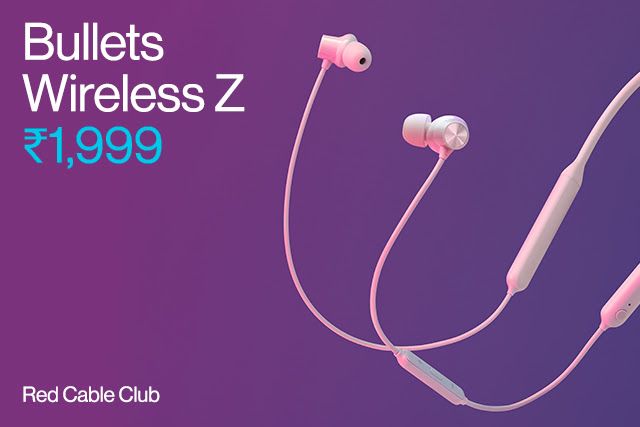
  • OnePlus Bullets Wireless Z: ₹1,999 (Black, Blue, Mint, Oat)

XDA Review: OnePlus 8 || OnePlus 8 Pro

Interestingly, India gets a lower RAM variant and an even lower starting price point ($549). Even the matching variants are priced lower in India. For instance, the starting 8GB + 128GB variant of the OnePlus 8 costs ~$588, which is a good ~$100 cheaper than the US pricing of $699. Similarly, the OnePlus 8 Pro’s 12GB + 256GB variant costs ~$785, which is a far cry from the $999 price tag for the top variant. Even the OnePlus Bullets Wireless Z is half the price. Keep in mind that the Indian variant lacks some 5G bands, which is a non-issue for India because the country does not have 5G anyway.

The phones and accessories will be available across all online and offline channels when the sale is made possible in India in line with the government’s COVID-19 advisories.

The post OnePlus 8 and OnePlus 8 Pro launched in India, starting at ₹41,999 ($549) appeared first on xda-developers.


from xda-developers https://ift.tt/2KjunyW
via IFTTT

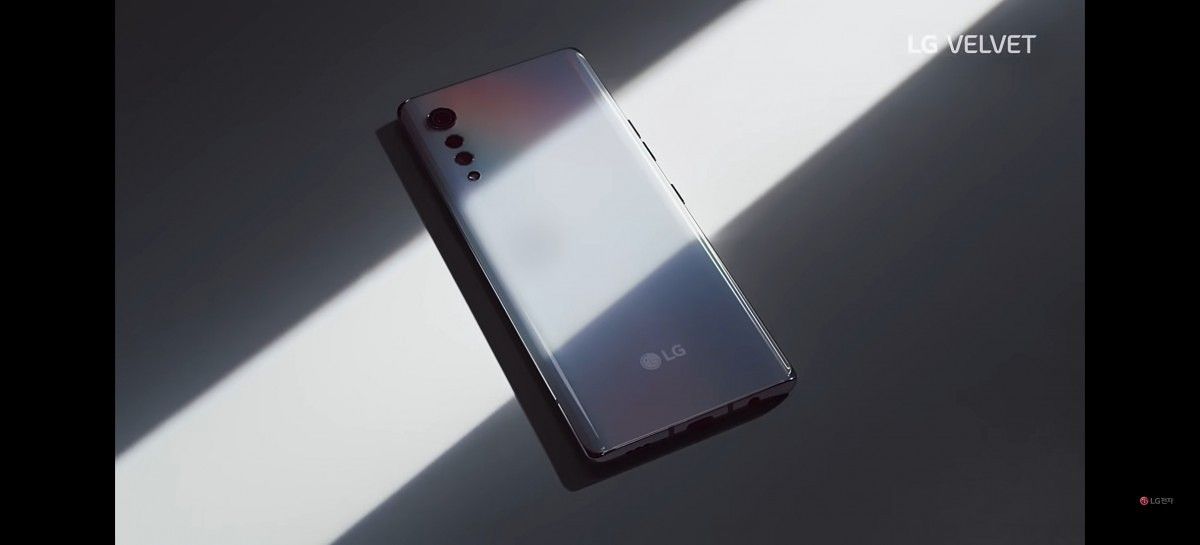
LG shows off the design of its Velvet smartphone and confirms it has the Snapdragon 765

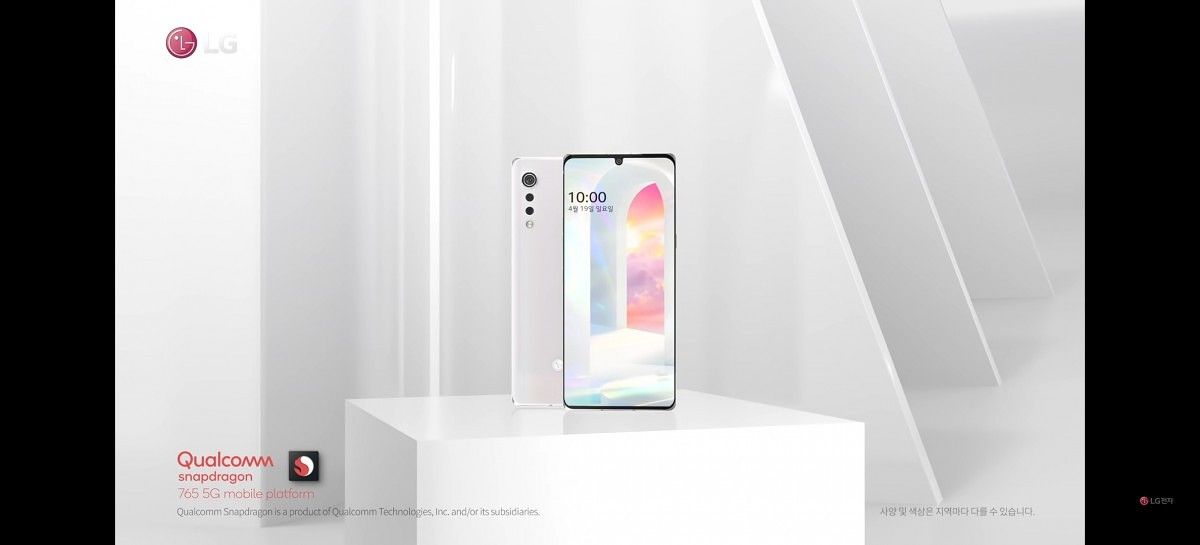
LG’s smartphone business struggled in 2019, so the company is hoping to turn things around this year with an “offensive pricing policy” for “mass-premium and mass-tier 5G products.” While the LG V60 ThinQ (our review) is definitely less expensive than its direct competitors, it’s likely not what LG meant when they were talking about their new “offensive pricing policy.” Instead, it’s believed that the new “LG Velvet,” the first smartphone in the Velvet line that’s expected to replace the LG G line, will be the standard-bearer for LG’s revitalized smartphone business. LG teased the design of the Velvet through sketches they published last week, but now the company has published a teaser video that shows off the phone in its entirety.

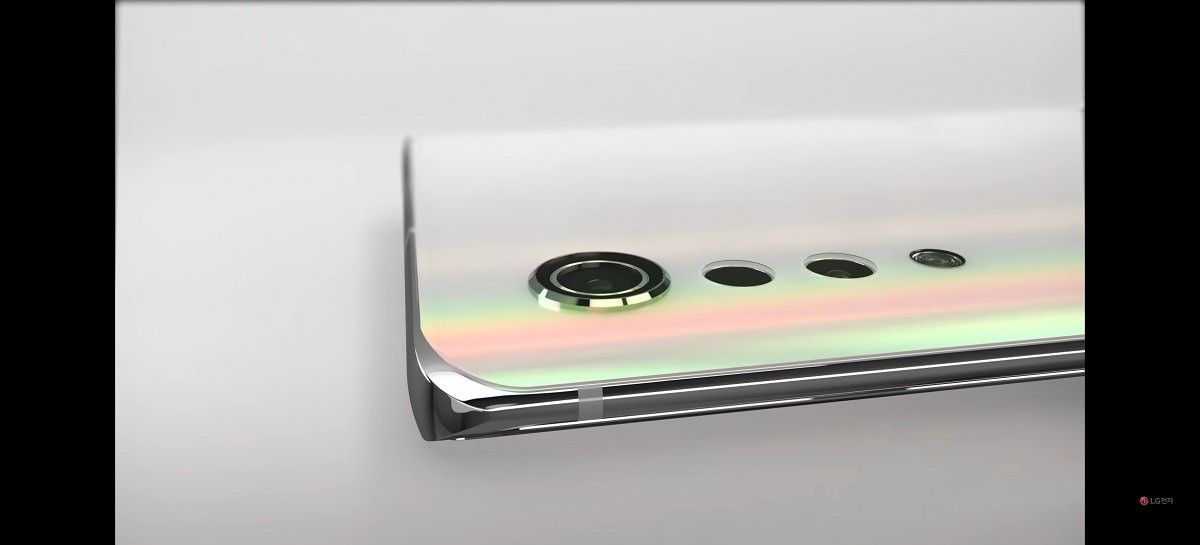
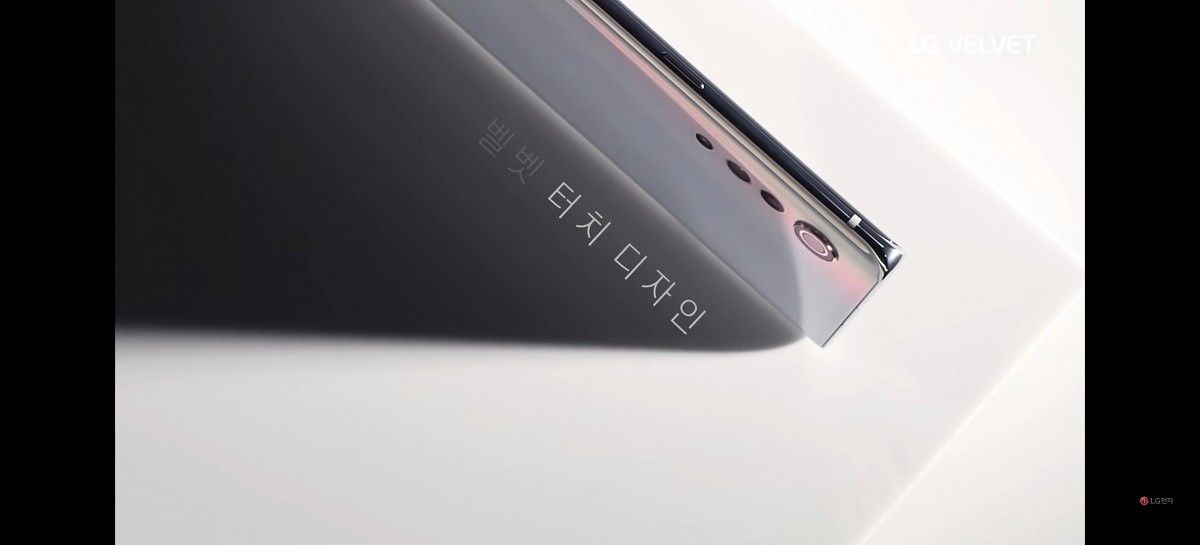
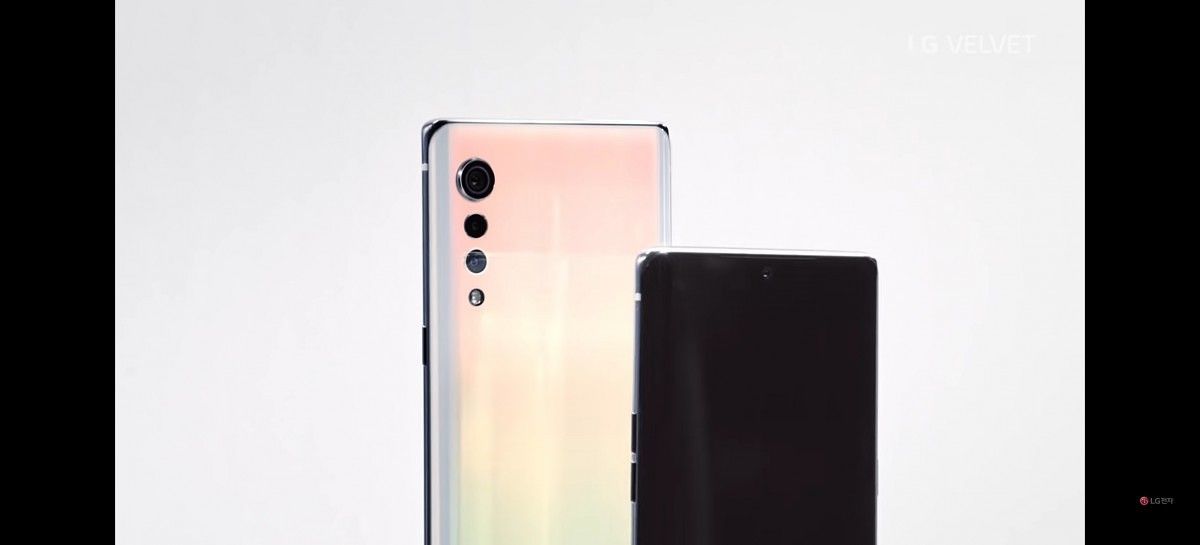
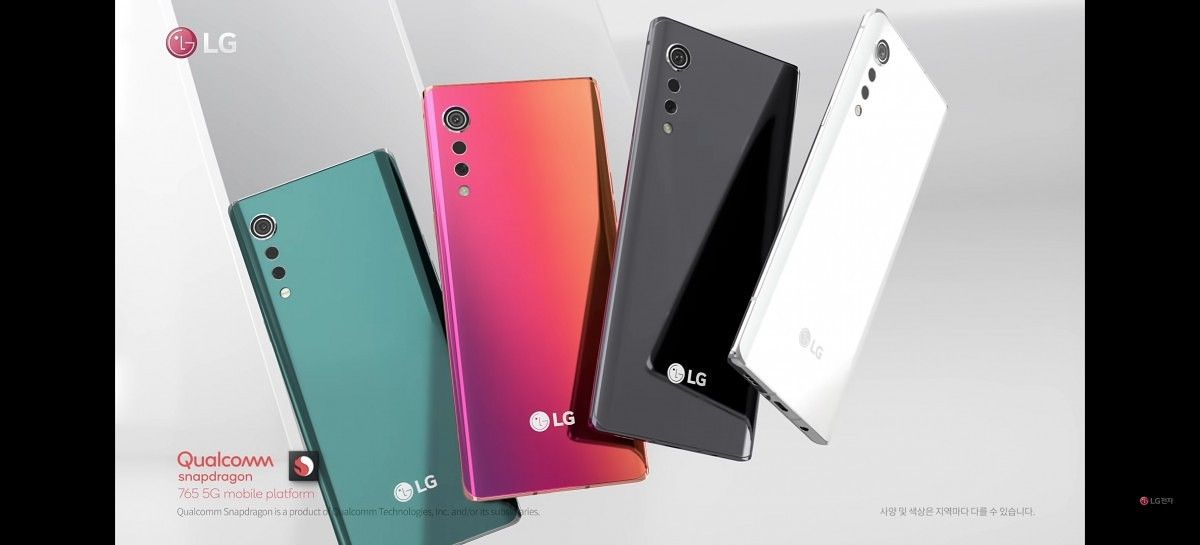
Today, LG published a video titled “LG Velvet – Design” over on its Korean YouTube channel. The video showcases the upcoming smartphone with its “3D Arc Design” and “Raindrop” camera module. The three cameras and LED flash are arranged vertically in descending order by size on the left side of the rear. Each camera is separated from one another rather than contained in a traditional rectangular camera bump; LG says this design is intended to evoke the image of a falling raindrop. The 3D Arc Design on the LG Velvet, meanwhile, refers to the symmetrically curved display and back cover edges.

Through the rest of the images shown off in the teaser video, we can see that the LG Velvet will have a 3.5mm headphone jack on the bottom and dual stereo speakers (one bottom-firing and one in the top bezel). There seem to be 3 sets of buttons: a power button on the right, volume up and down buttons on the left, and a dedicated Assistant button on the left below the volume buttons. The SIM card tray is placed on the top of the frame while the USB Type-C port is located at its traditional place on the bottom.

Finally, we can see that the LG Velvet has a U-shaped notch cutout and comes in 3 colors: Aurora White, Aurora Grey, and Aurora Green. LG calls the material finish its “Velvet Touch” that delivers a “Stunning Sunset” shimmering effect under particular lighting angles.

LG Velvet LG Velvet LG Velvet

The last few images show Qualcomm’s Snapdragon 765 logo in the bottom left-hand corner, indicating that the LG Velvet will be powered by Qualcomm’s latest upper mid-range processor. Unlike the flagship Snapdragon 865, the Snapdragon 765 has not been featured in that many different smartphone models, so it should be interesting to see a mass-market phone with this processor. The inclusion of this processor suggests the Velvet be cheaper than most premium flagship smartphones on the market today, but we won’t know the exact pricing until LG unveils the phone sometime next month.

Earlier rumors suggest the LG Velvet will have a 48MP main camera, a 4,000mAh battery, and support LG’s Dual Screen attachment. The screen size will supposedly be between 6.7 to 6.9-inches diagonally, making this a rather large smartphone. We also expect this phone to support 5G network connectivity given Snapdragon 765’s integrated Snapdragon X52 modem is 5G-capable.

The post LG shows off the design of its Velvet smartphone and confirms it has the Snapdragon 765 appeared first on xda-developers.


from xda-developers https://ift.tt/3anIPk2
via IFTTT

samedi 18 avril 2020

Cloverplay adds touch screen controls to Google Stadia and Microsoft xCloud on rooted Android phones

With more people than ever staying at home due to COVID-19, there’s never been a better time to learn a new skill, work on your resume, catch up on the latest show, or play that new video game. If you’re itching to play some video games during all this downtime and you don’t already have a gaming PC or the latest consoles, then you may be interested in the cloud game streaming offerings from Google, Microsoft, and NVIDIA. For those of you with Google Stadia or Microsoft xCloud, we wanted to bring your attention to a cool new application developed by XDA Member refi64. Called Cloverplay, the app brings touch screen controls that overlay on top of the Android apps for Stadia and xCloud.

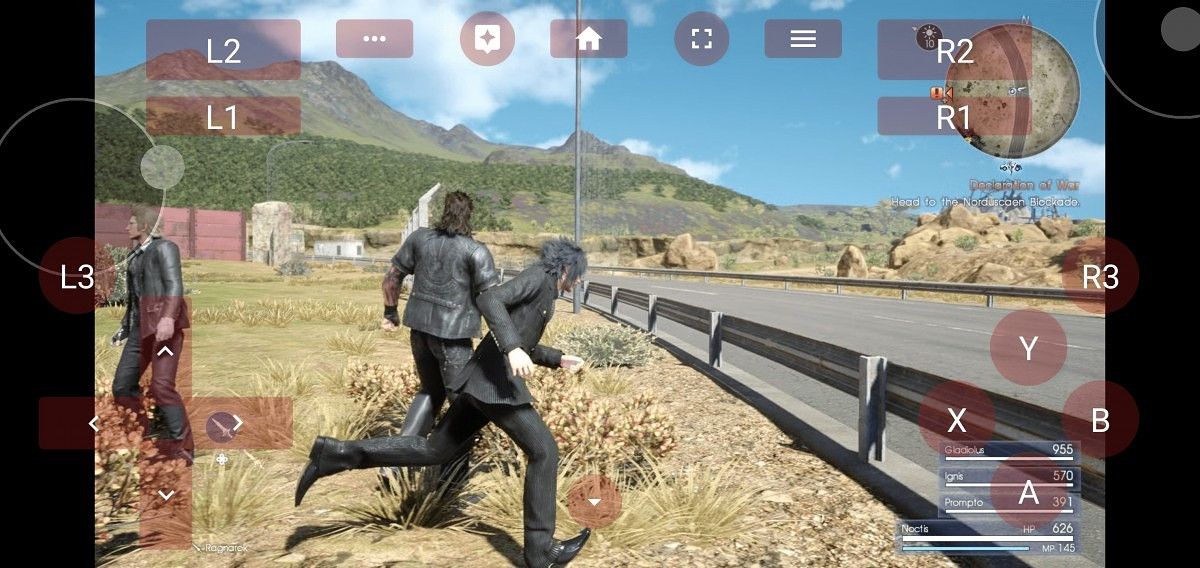
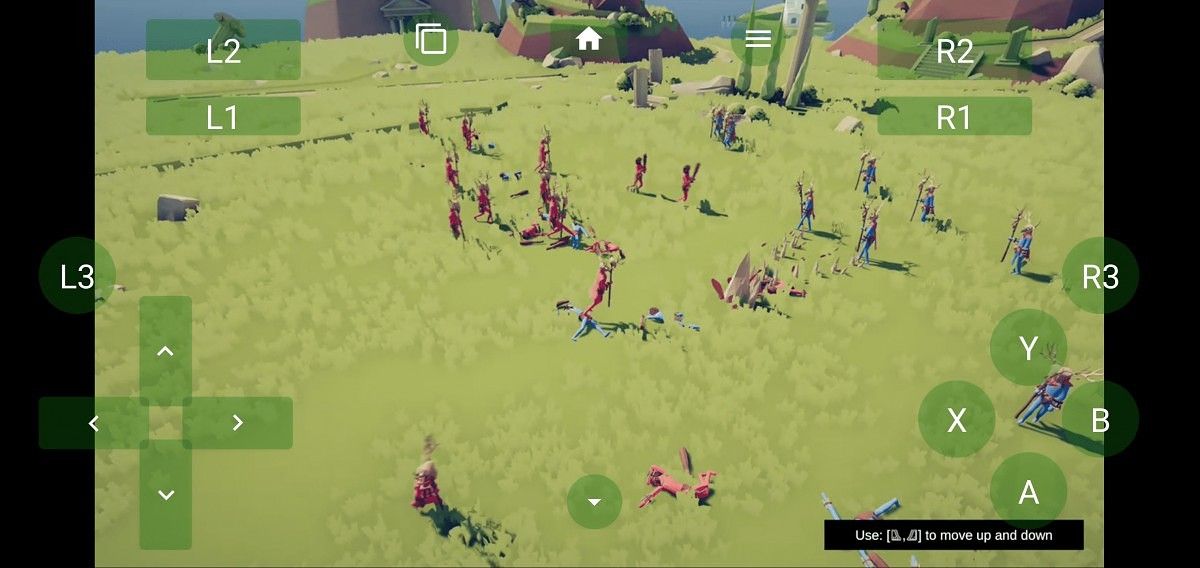
As you can see in the screenshots below, Cloverplay lets you play games from Stadia or xCloud on your Android phone without needing a physical controller. The app provides a set of on-screen controls that emulate button presses and joystick inputs from the Google Stadia controller (for Stadia) and Xbox One S controller (for xCloud). To demonstrate this, the developer published screenshots showing touch screen controls in Final Fantasy XV (on Google Stadia) and Totally Accurate Battle Simulator (on Microsoft xCloud)

Touch screen controls on Google Stadia with Cloverplay Touch screen controls on Microsoft xCloud with Cloverplay

We previously covered a tool called “TouchStadia” that also enables touch screen controls for Google’s cloud gaming service. While TouchStadia can work without root access, it only works when playing Stadia games through the mobile browser. In comparison, Cloverplay works with the official Google Stadia app, and it also works with Microsoft xCloud. The developer summarizes the advantages and disadvantages of Cloverplay versus TouchStadia as follows:

  • TouchStadia advantages compared to Cloverplay:
    • Works on any device. (You can use Xtadia on Android to make Stadia run on non-approved devices, but Xposed is needed for that to work.)
    • No root access required.
    • Can be combined with Stadia+ if you use a browser with extension support (e.g. Yandex).
    • Supports custom control layouts.
  • Cloverplay advantages compared to TouchStadia:
    • Allows you to use the official app (this tends to yield slightly better performance IME).
    • Works with xCloud.
    • Significantly easier to use (no copying scripts or custom extensions required).
    • Joysticks are visible without incurring extra lag.
    • Has support for the Stadia-specific assistant and screenshot buttons.

Here’s a screen recording from the developer demonstrating Cloverplay:

According to the developer, Cloverplay uses root access to set up a virtual joystick using uinput. As for the Accessibility Service, it appears the app uses it to create an overlay of TYPE_ACCESSIBILITY_OVERLAY.

The app is available for download on XDA Labs. The main app costs $1.99 but there’s a 2-day trial version of the app you can download to see if it’s worth it for you. The developer says they chose not to initially submit the app to Google Play because they believed that Google will remove the app for misusing Accessibility Services. As far as I’m aware, though, Google has yet to remove any application for using Accessibility Services outside of its intended use. After we informed the developer of this, they have submitted the app to the Play Store for review.

For more information on Cloverplay, visit the app’s website linked below. If you have feedback or want to ask a question, check out the app’s forum thread on XDA. You can also view the app’s source code on GitHub.

Cloverplay Website ||| XDA Forum Thread ||| Source Code

Cloverplay [ROOT] ($1.99, XDA Labs) →

Cloverplay [TRIAL][ROOT] (Free, XDA Labs) →

The post Cloverplay adds touch screen controls to Google Stadia and Microsoft xCloud on rooted Android phones appeared first on xda-developers.


from xda-developers https://ift.tt/2VlUWdo
via IFTTT

OnePlus 7 and 7 Pro get OxygenOS Open Beta 12 with April 2020 patches, camera lens dirt detection, and more

Earlier this week, OnePlus unveiled the OnePlus 8 series. Although the company’s attention is mostly focused on promoting its two new smartphones, the company is still providing support for its previous generation flagships as promised. Now, the 2019 OnePlus 7 and OnePlus 7 Pro are receiving OTA updates to OxygenOS Open Beta 12.

OnePlus 7 Forums ||| OnePlus 7 Pro Forums

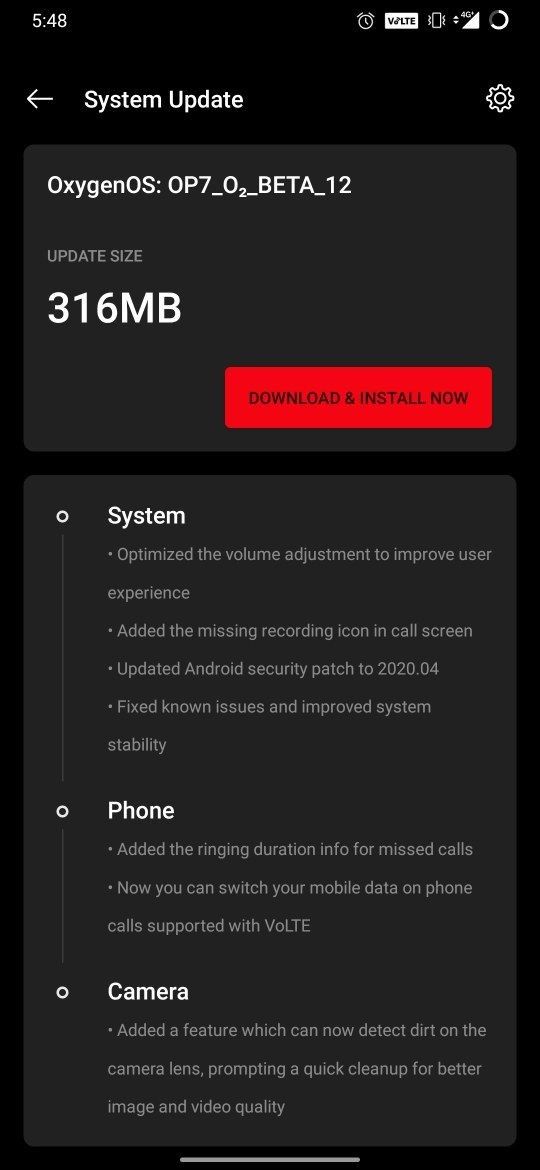
OxygenOS Open Beta 12 brings the April 2020 Android Security Patch Level (SPL), a new feature in the OnePlus Camera app to detect dirt on the camera lens, ringing duration information for missed phone calls, and more. This update follows Open Beta 11 last month which brought the Android Security Patch Level to March 2020 and also added the Instant Translation feature. The stable update for the 7 series also rolled out last month with the March 2020 SPL.

Changelog – OxygenOS Open Beta 12 for the OnePlus 7 series

  • System
    • Optimized the volume adjustment to improve user experience
    • Added the missing recording icon in call screen
    • Updated Android security patch to 2020.04
    • Fixed known issues and improved system stability
  • Phone
    • Added the ringing duration info for missed calls
    • Now you can switch your mobile data on phone calls supported with VoLTE
  • Camera
    • Added a feature which can now detect dirt on the camera lens, prompting a quick cleanup for better image and video quality.

The update is rolling out now for users. The incremental OTAs for both devices are about 316MB in size.

OxygenOS Open Beta 12 for OnePlus 7 Pro

OxygenOS Open Beta 12 Downloads

If you don’t want to wait for the OTA to reach your device, you can download the incremental OTA file or the full OTA file from the links below. Simply download one of the files and then use the “local upgrade” option in the System Update screen under Settings to initiate the update.

Download OxygenOS Open Beta 12 for OnePlus 7: Incremental OTA from Open Beta 11 ||| Full OTA

Download OxygenOS Open Beta 12 for OnePlus 7 Pro: Incremental OTA from Open Beta 11 ||| Full OTA

Thanks to XDA Senior Member Some_Random_Username for providing some of the download links!

The post OnePlus 7 and 7 Pro get OxygenOS Open Beta 12 with April 2020 patches, camera lens dirt detection, and more appeared first on xda-developers.


from xda-developers https://ift.tt/2yt2Ete
via IFTTT

Kiwi Browser goes open source, allowing other Chromium-based browsers to add Extensions

The open-source Chromium project, based on the Blink engine, serves as the basis for dozens of web browsers. There’s the most popular, Google Chrome, along with others like Microsoft Edge, Vivaldi, Brave, and more. Most Chromium-based web browsers offer a handful of additional features not found in Google Chrome, but there are some that radically change the experience. Kiwi Browser by XDA Senior Member arnaud42 is one such web browser, and for the browser’s second anniversary, the developer has fully open-sourced the web browser and all its features.

Back in 2018, arnaud42 released the first version of his Chromium-based web browser. When we first covered the project several months later, we were impressed by the feature-set it offered at the time, which pales in comparison to what the browser offers today. It had features like a built-in content blocker, dark mode, background video playback, AMP skipper, and more. The browser got better and better with each update, but what really made it shine is the fact that it was the first Chromium-based browser for Android that supports Chrome Extensions.

Maintaining such an ambitious project has proven challenging for the lone developer. The latest version of Kiwi Browser on the Google Play Store is based on Chromium version 77.0.3865.92, which is far behind the upcoming Chromium version 83 release that Google is planning. Rather than let the project go to waste, arnaud42 has decided to release the source code for Kiwi Browser on GitHub. He says that “everything is released, including extensions code” with “no strings attached” (the browser is licensed under the BSD 3-Clause.) He encourages developers of other Chromium-based web browsers to integrate Kiwi’s code into their projects. He states that in the last few weeks, he worked with other browser developers to help them integrate some of Kiwi’s functionality, so we may hear some good news from other web browsers on Android soon.

Arnaud42 will continue to review code submissions on the project’s GitHub if you’re interested in contributing to the project. The code is written in Java and C++ and all dependencies are already included in the repository to help developers who face difficulties setting up the Chromium build system.

Kiwi Browser Source Code on GitHub ||| XDA Forum Thread

Kiwi Browser is one of the most impressive projects we’ve seen on our forums for some time. The developer, arnaud42, is also a friend of XDA, so we would like to thank him for his work on this project over the last two years. We hope that other Chromium-based browsers incorporate some of Kiwi’s features soon because I’m really missing the ability to use Extensions on mobile!

Kiwi Browser - Fast & Quiet (Free, Google Play) →

Kiwi Browser (Free, XDA Labs) →

The post Kiwi Browser goes open source, allowing other Chromium-based browsers to add Extensions appeared first on xda-developers.


from xda-developers https://ift.tt/2xEN6lV
via IFTTT

vendredi 17 avril 2020

Leaked Google Pay screenshots reveal “Google Card” debit card

One of the surprising “tech” product launches last year was the Apple Card. The company pitched it as a way to help Apple customers make smarter financial decisions through the help of a more intuitive app. The Apple Card has some interesting ideas, but it’s basically just a cash-back credit card. A new report and leaked images reveal that Google is developing a similar product tentatively called “Google Card.”

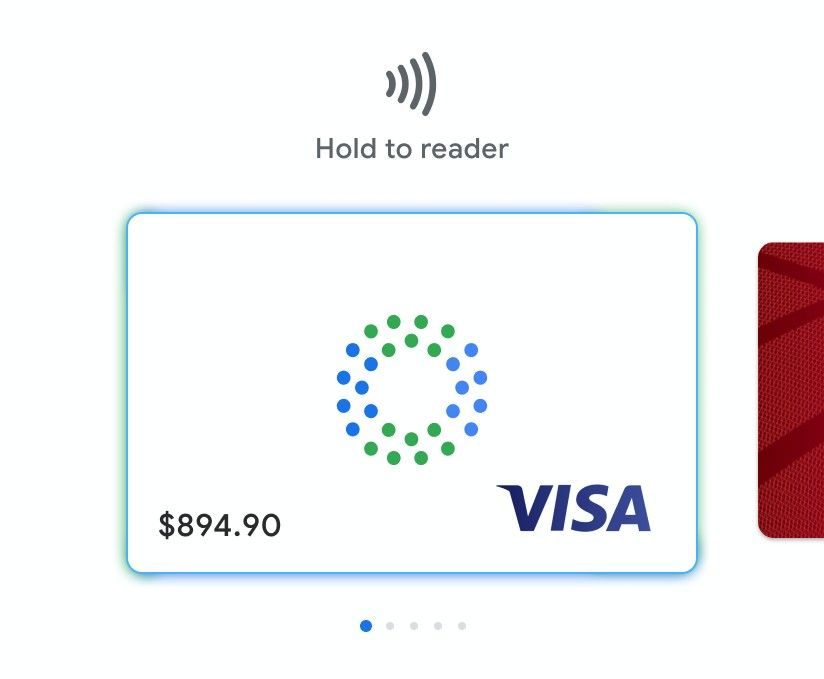
The report comes out of TechCrunch and they refer to the Google Card as a “smart debit card.” Many of the concepts are similar to the Apple Card. This is a physical card that also exists as a virtual card in Google Pay, just like any other credit card you’ve added. The big difference between the Google Card and a different credit card will be integrated and detailed financial tracking.

Like any credit card, the Google Card will come with a checking account. Users will be able to access this account to check their balance, track purchases, lock, and other features in a new Google app. The card will be co-branded with bank partners such as CITI and Stanford Federal Credit Union. Leaked images give us a look at some of the other details.

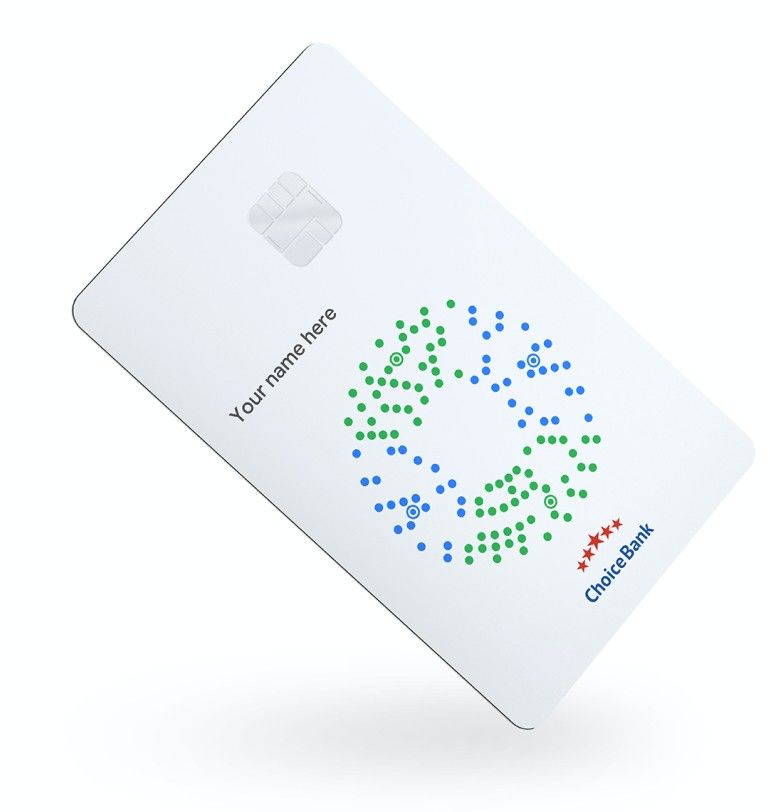
The physical card itself is white with the logo of the partnered bank and Google. We can see that it’s a chip card on the Visa network, but there could be other networks included. The card design (which may not be final) also features a strange blue and green dot pattern. More important than the plastic, however, is the app experience, which is what should really set the Google Card apart from other credit cards.

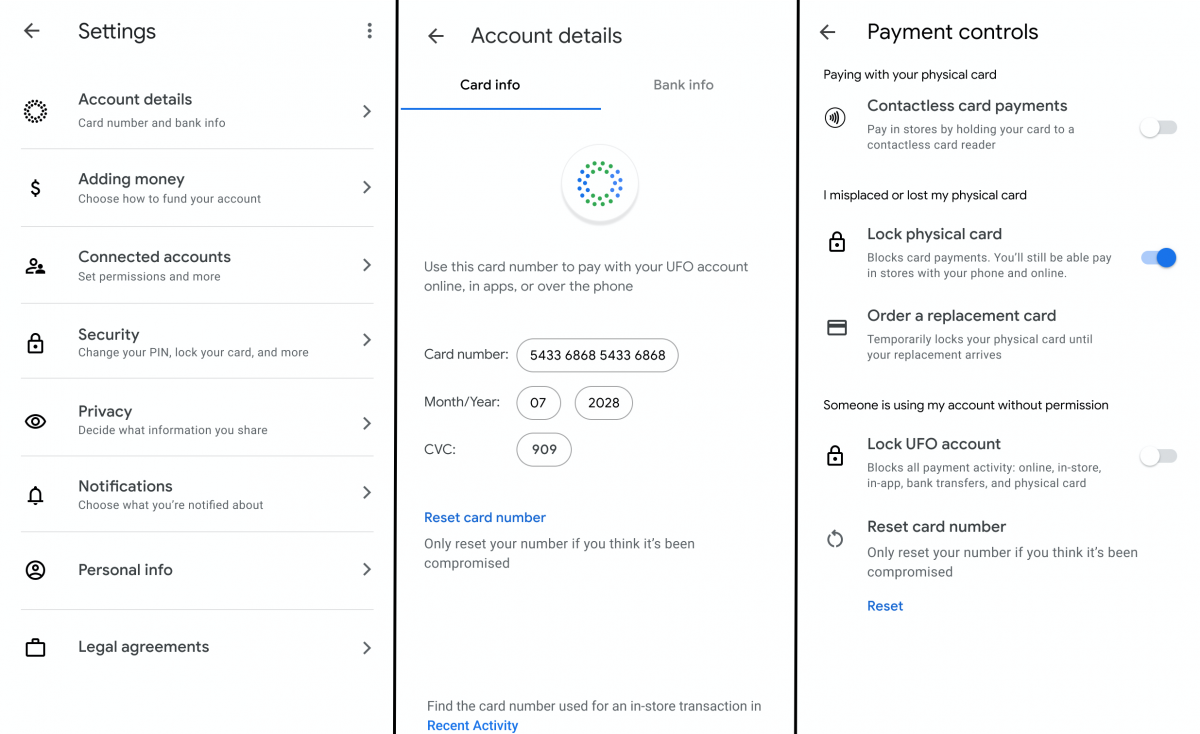
The app will show recent transactions with merchant and date details. Since this is Google, there will be a wealth of information available as well. You will be able to see the location of the purchase on a map. If a card is lost or foul play is suspected, the user can lock the card immediately from the app and order a replacement. The virtual card will remain active as it has a different number than the physical card, so you won’t be completely out of luck. If the virtual card is the card in question, the user can rest it quickly.

In the app settings, we can see notification options and privacy controls. Users will be able to decide what information they want to share. Privacy is obviously going to be a big topic around the Google Card. People don’t have the same amount of trust for Google as they do for Apple. Many of us already give Google a lot of our personal information, but handing over the reigns on personal finance may be a bridge too far.

Some of this may sound familiar if you remember Google Wallet, which also had a physical component, but was ultimately replaced by Google Pay. Tech companies like Google and Apple are better suited for making software that’s easy to use and understand. That’s the appeal of signing up for an Apple Card or Google Card. TechCrunch did not give a timeline for when to expect the Google Card to become a reality. Are you interested in this product?


Source: TechCrunch

The post Leaked Google Pay screenshots reveal “Google Card” debit card appeared first on xda-developers.


from xda-developers https://ift.tt/2VH20zY
via IFTTT