LightBlog

mercredi 10 juin 2020

Adobe Photoshop Camera is now available for download on the Google Play Store

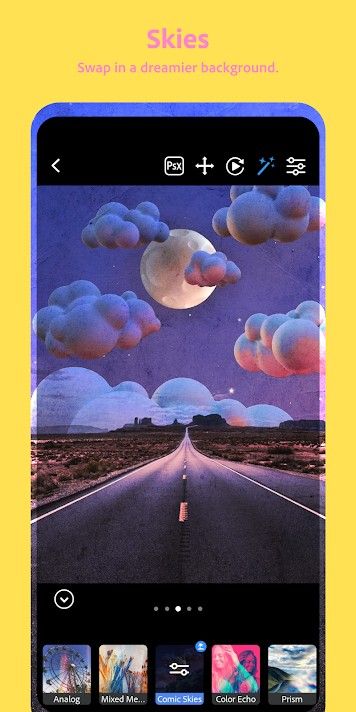
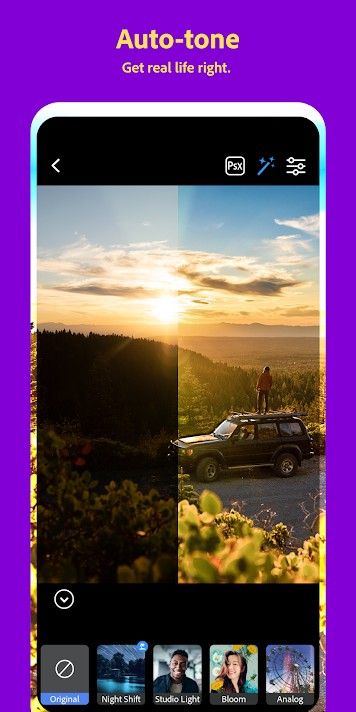
The AI-powered Adobe Photoshop Camera app, which was announced late last year in November, is now available for download on the Google Play Store. The latest app from Adobe joins the long list of third-party camera apps available on the Play Store, but it has something unique to offer. The app makes use of Adobe’s artificial intelligence platform Sensei to recognize subjects in your photos and recommends the best filters that you can use to take your photos to the next level. We got our first look at the app back in December last year when Adobe released a preview version and we were quite impressed by its capabilities. Now, you can follow the Play Store link below to try it out for yourself.

Adobe Photoshop Camera Adobe Photoshop Camera Adobe Photoshop Camera

The Photoshop Camera app aims to simplify the way you edit your photos by providing a variety of features that will help you make adjustments with minimal effort on your part. The app offers over 80 custom filters that you can try either in real-time on the viewfinder or while editing your photos at a later stage. These include filters like Portrait, Studio Light, Bloom, Pop Art, Spectrum, Desync, Food, Scenery, Natural Skies, and more. Along with the filters, the app also offers real-time Photoshop effects that will help you capture better photos using AI-powered editing, an auto-tune feature to automatically adjust brightness and shadows, content-aware recommendations, auto-masking, and portrait controls.

Furthermore, the app offers influencer-inspired lenses that will help you edit your photos using custom-designed lenses from your favorite creators. Adobe has already roped in Billie Eilish, who has released a limited edition lens for the app that you can try right away. In case you don’t like any of the influencer lenses, you also get the option to create your own and share them with other users on the app.

Adobe Photoshop Camera (Free, Google Play) →

The post Adobe Photoshop Camera is now available for download on the Google Play Store appeared first on xda-developers.


from xda-developers https://ift.tt/3dTYqub
via IFTTT

Redmi Earbuds S Review: Inarguably the best entry-level TWS earbuds

While truly wireless earbuds have been around for several years now, a lot of the good options out there are pricey while most of the affordable ones are rather unimpressive. Xiaomi aims to change that with its new Redmi Earbuds S which were launched in India late last month. Priced at ₹1,799, the Redmi Earbuds S seem to be a great pair of wireless earbuds, at least on paper. But with so many mediocre options currently available in this price segment, it’s natural for one to be skeptical of Xiaomi’s new wireless earbuds. However, after using the Redmi Earbuds S extensively over the last two weeks, I can assure you that they’re easily one of the best, if not the best, TWS earbuds that you can get at this price point.

The Redmi Earbuds S check almost all the boxes for a good pair of TWS earbuds thanks to their compact and comfortable design, decent audio output, and a good selection of features. While the earbuds aren’t perfect by any means, almost all of the shortcomings can be overlooked when the price is taken into account, and that’s exactly what makes the earbuds a great buy. That being said, here’s our review of the Redmi Earbuds S.

Note: Xiaomi India sent us a pair of Redmi Earbuds S for review. However, the company did not have any input into the content of this review.

Design

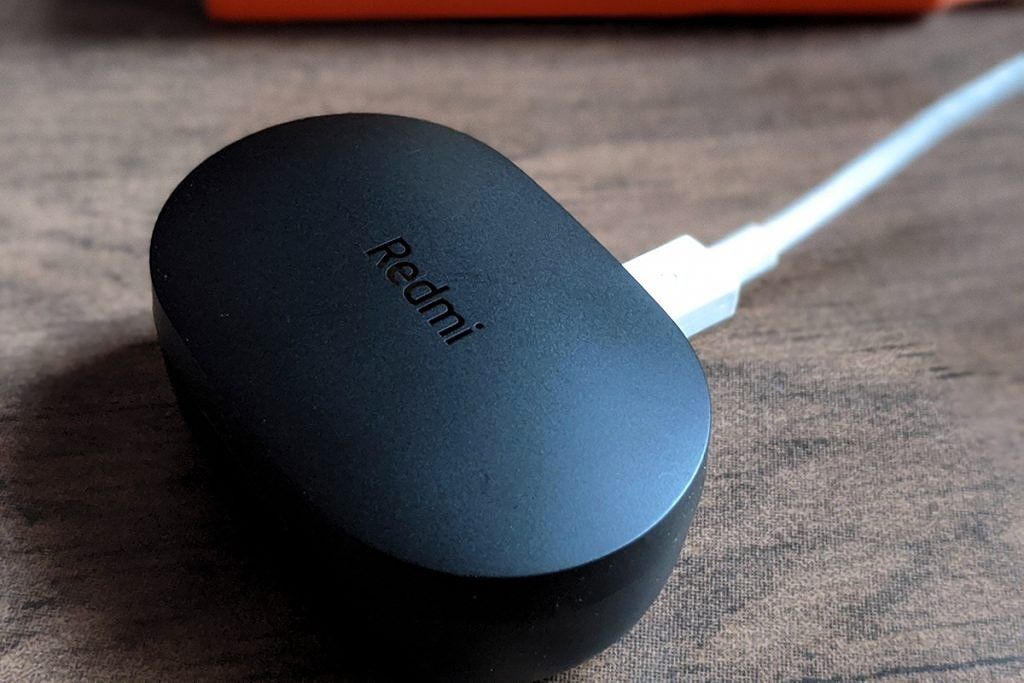
The Redmi Earbuds S come in a compact pill-shaped charging case that has a matte black finish and minimal Redmi branding on the lid. The case features a micro-USB port for charging, precise cutouts with magnets to safely house the earbuds, and a magnetic lid to keep everything secure when the earbuds are not in use. The case doesn’t include any buttons or indicator LED, with the latter meaning that there’s no way to tell the current battery level of the case.
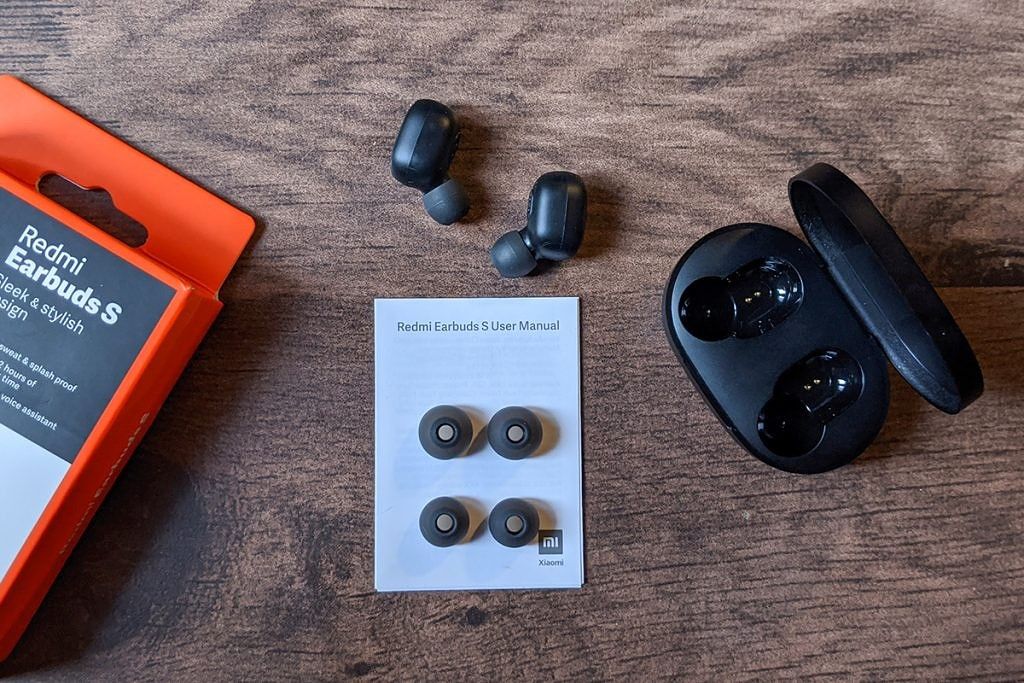
The earbuds are also pill-shaped and have the same matte black finish. Each earbud has a single tactile button on the outer surface, which also houses the indicator LEDs. The LEDs glow red when the earbuds are charging, white when they’re completely charged, and blink white when they’re in pairing mode. Over on the other side, the earbuds have the charging contacts and a silicone tip. The earbuds come with the medium-sized silicone tips preinstalled and Xiaomi includes both small and large-sized tips in the box. Thanks to the silicone tips and the compact shape, the earbuds fit securely and don’t fall out even during intense workout sessions or while running. They can easily be worn for hours on end without any discomfort. The earbuds are rated IPX4 for water resistance, so they’re protected against occasional splashes and sweat, but the case itself isn’t water-resistant.

Redmi Earbuds S

As far as the design is concerned, I don’t have any major complaints with the Redmi Earbuds S. However, there are a couple of things worth noting that might be deal-breakers for you. The case is made of cheap plastic and doesn’t seem durable. It creaks and clicks when you press lightly between the earbud cutouts which made me initially think that there was an unmarked button there. The lid and hinge also feel quite flimsy, which leads me to believe that the case might not survive a fall from waist height. I haven’t tried that, though, and I would advise that you don’t try that either. It’s also worth noting that Xiaomi doesn’t ship a micro-USB charging cable with the Redmi Earbuds S which is definitely disappointing but can be written off as a cost-cutting measure.

Features

Now that we’ve got the design out of the way, let’s take a look at the features. The Redmi Earbuds S offers a substantial list of features for a pair of truly wireless earphones in this price range. Starting off with the pairing process, Xiaomi has done away with the complicated master-slave pairing process from the Mi AirDots S and has opted for a much simpler and faster pairing process for the Redmi Earbuds S. The earbuds automatically start pairing to each other as soon as you pull them out of the case and the process takes about 2-3 seconds.

Once the earbuds are paired with each other, the LED indicator slowly blinks white after which you can pair it with your smartphone. After you pair the earbuds to your smartphone, they will automatically connect to the device as soon as they’re pulled out of the case. Due to the fact that the earbuds don’t make use of a master-slave connection, they can also be used individually. To do so, you can place one of the earbuds back into the charging case and the remaining earbud will switch to the single-earbud mode. Removing the other earbud from the charging case will automatically turn on the dual-earbud mode.

As mentioned earlier, both the earbuds feature a single tactile button on the outer surface that can be used to perform a variety of functions. You can accept/end calls by clicking the button once, reject calls by pressing and holding the button for one second, play/pause music by clicking the button once, and double click to bring up the voice assistant. When you’re in a call and you receive another call, you can answer the other call by clicking the button once and switch between calls by double-clicking. To switch to your smartphone during a call, you can press and hold the button for 1 second. During an ongoing call, you can also mute/unmute the earbuds by double-clicking the button.

Additionally, the Redmi Earbuds S also features a low-latency Game Mode which can be enabled by clicking the button three times. The Game Mode greatly reduces audio delay, and Xiaomi claims that turning on the Game Mode can reduce the latency to just 122ms. In my testing, I noticed that turning on the Game Mode did, in fact, reduce the latency considerably which was quite useful while playing shooting games like PUBG Mobile and Call Of Duty: Mobile. However, the latency with Game Mode still isn’t nearly as good as when using wired earphones. Additionally, using Game Mode can take a toll on battery life, so your gaming sessions might not last all that long.

Redmi Earbuds S review

For connectivity, the Redmi Earbuds S supports Bluetooth 5.0 and includes support for the SBC Bluetooth audio codec. The earbuds also include environmental noise cancellation for voice calls for better call quality in noisy environments. While the feature set on offer is pretty extensive, there are a few features that I sorely missed on the Redmi Earbuds S. The lack of any volume adjustment and track switching options on the earbuds was a bit annoying, but that’s a sacrifice you have to be willing to make if you’re going to purchase a pair of sub-₹2,000 TWS earbuds.

Redmi Earbuds S Audio Quality

Before coming to the most crucial part of this review, the audio quality of the Redmi Earbuds S, I would like to clarify that human interpretation of audio is largely subjective and heavily depends on your preferred genre of music. This is why there’s a chance you might not agree with my observations about the audio quality of the Redmi Earbuds S.

The Redmi Earbuds S are powered by 7.2mm drivers, and Xiaomi claims that it has tuned the sound profile of the earbuds to match the music preferences of Indian buyers. In effect, this means that the earbuds offer punchy bass, muddled mids, and clean highs. Even though they’re limited to the SBC Bluetooth audio codec, the Redmi Earbuds S sound good when compared to other truly wireless earbuds in this price range. For the purpose of this review, I listened to the following playlist which consists of songs across a decent range of genres.

Playlist

  • Hometown – French 79
  • Teardrop – Massive Attack
  • Safety – Gashi (ft. DJ Snake)
  • Panda – Meute
  • Time Goes By – Kupla
  • Seven Nation Army – The White Stripes
  • Mad World – Gary Jules (ft. Michael Andrews)
  • The Blower’s Daughter – Damien Rice
  • Tadow – FKJ
  • Rockstar – Post Malone (ft. 21 Savage)
  • Young Folks – Peter Bjorn and John
  • Wasted Years – Iron Maiden
  • Purusha – NVDES
  • Parallel Jalebi – Four Tet
  • Who We Want to Be – Tom Day

Note: The lack of Bollywood tracks on my list is due to my personal bias. I did not want to listen to music that doesn’t suit my taste, which might have resulted in an unfair rating of the audio quality.

With this selection of songs, I was able to draw the following conclusions about the audio quality of the Redmi Earbuds S. The overall sound signature is quite inoffensive and is best suited for pop music. The earbuds can get pretty loud at max volume but there’s a minor drop in clarity when you turn up the volume over 80%. Even though the bass is punchy, it isn’t overpowering and you can clearly differentiate the mids and highs in bass-heavy tracks at a reasonable volume. If you’re an audiophile (unlike me), you might be able to find a few more shortcomings. But for the average user, the Redmi Earbuds S is capable of offering a pleasant music listening experience.

As far as the call quality is concerned, I faced no issues while taking calls with the Redmi Earbuds S. However, I can’t say the same for the person on the other end. The microphones on the earbuds are just about average at best and don’t sound particularly good in comparison to other, more premium, truly wireless earbuds that I’ve tried so far.

Battery Life

The Redmi Earbuds S pack in a 43mAh battery in each earbud while the charging case features a 300mAh battery. Xiaomi claims that the earbuds can be used for approximately 4 hours on a single charge and, in my testing, I found that figure to be largely accurate. During a binge-watching weekend, the earbuds lasted me about 3 hours and 45 minutes on a single charge at 80% volume. Turning up the volume to 100% while listening to music dropped the battery life to about 3 hours and 20 minutes.
As mentioned earlier, the low-latency Game Mode also takes a toll on battery life, and I was able to use the earbuds for just about 3 hours while playing PUBG. The volume was set at 80% during the entire gaming test. Once the battery runs out on the Redmi Earbuds S, you can use the case to charge the earbuds back up about three times over. This gives us a total playback time of around 11 hours and 15 minutes, which is close to Xiaomi’s 12-hour playback rating. Charging the earbuds from 0-100% using the case took about 2 hours. Due to the lack of a battery level indicator, I wasn’t able to test the charging time of the battery case.

Conclusion

If you’re someone who’s looking to get their first pair of TWS earbuds and have just ₹2,000 to spare, then the Redmi Earbuds S is a no brainer. The earbuds feature a sleek design, offer a comfortable fit, and provide decent audio output. The single button operation, in my opinion, is far better than the finicky touch interfaces on other similarly priced earbuds and the battery life is also quite impressive.

However, if you’re not restricted by budget, you can consider purchasing the more premium Xiaomi Mi True Wireless Earphones 2 which are priced at ₹4,499 and offer significantly better audio output. Furthermore, if you aren’t completely sold on the audio quality and don’t mind neckband style wireless earphones, then you can also go for the recently released OnePlus Bullets Wireless Z which offers better audio quality and fast charging support at ₹1,999.

Buy the Redmi Earbuds S: Amazon.in ||| Mi.com

This article contains affiliate links, which will net XDA a small commission if you purchase a product from clicking a link.

The post Redmi Earbuds S Review: Inarguably the best entry-level TWS earbuds appeared first on xda-developers.


from xda-developers https://ift.tt/2Uv9IgM
via IFTTT

5 Microsoft Surface Deals You Can Save Big with Right Now

Many of the best computers in the world right now are made by Microsoft. In particular, the Surface range is packed with remarkable specs at reasonable prices. If you are seeking an upgrade, take a look at these five deals on Surface devices — now with up to 27% off the MSRP via the XDA Developers Depot.

Microsoft Surface Laptop 2 13.5″ Touch Core i5 8GB (Cobalt Blue)

Offering up to 15 hours of battery life, the Microsoft Surface Laptop 2 was made for working on the move. Running Windows 10 on a crisp 13.5″ LED display, it offers excellent performance thanks to an Intel i5 chip and 8GB of RAM. PCMag called it a “sleek ultraportable with a top-notch build.” Originally priced at $1,299, it’s now only $979.99.

Microsoft Surface Pro 12.3″ Tablet 4GB RAM – Silver (Wi-Fi + 4G LTE)

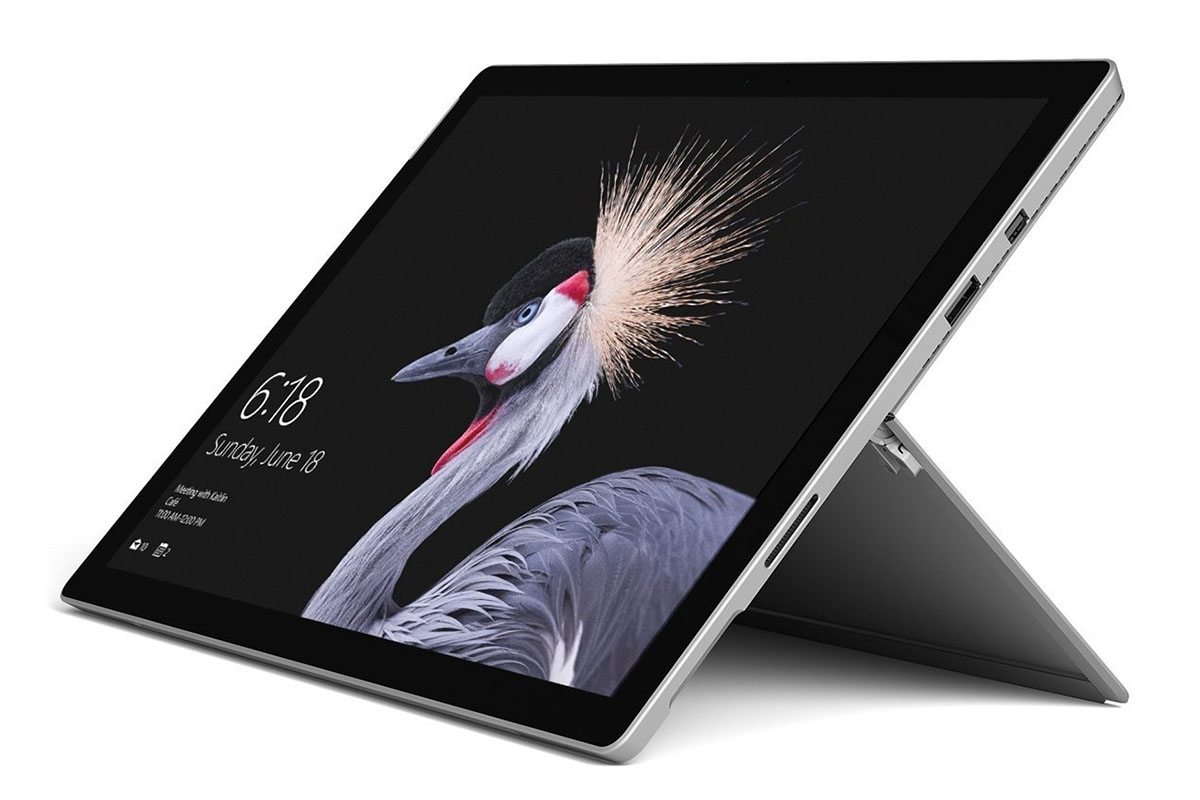
This lightweight device boasts 50% more power than most tablets and a stunning 2736 x 1824 touch display. Under the hood, a 7th Gen Intel Core i5 processor offers smooth multitasking. You get 13.5 hours of battery life, and the 128GB SSD offers plenty of room for media. Worth $1,299.99, this 4G-enabled model is now 15% off at $1,099.99.

Microsoft Surface Pro 6 Tablet 1.9GHz Intel Core i7 with 512GB SSD

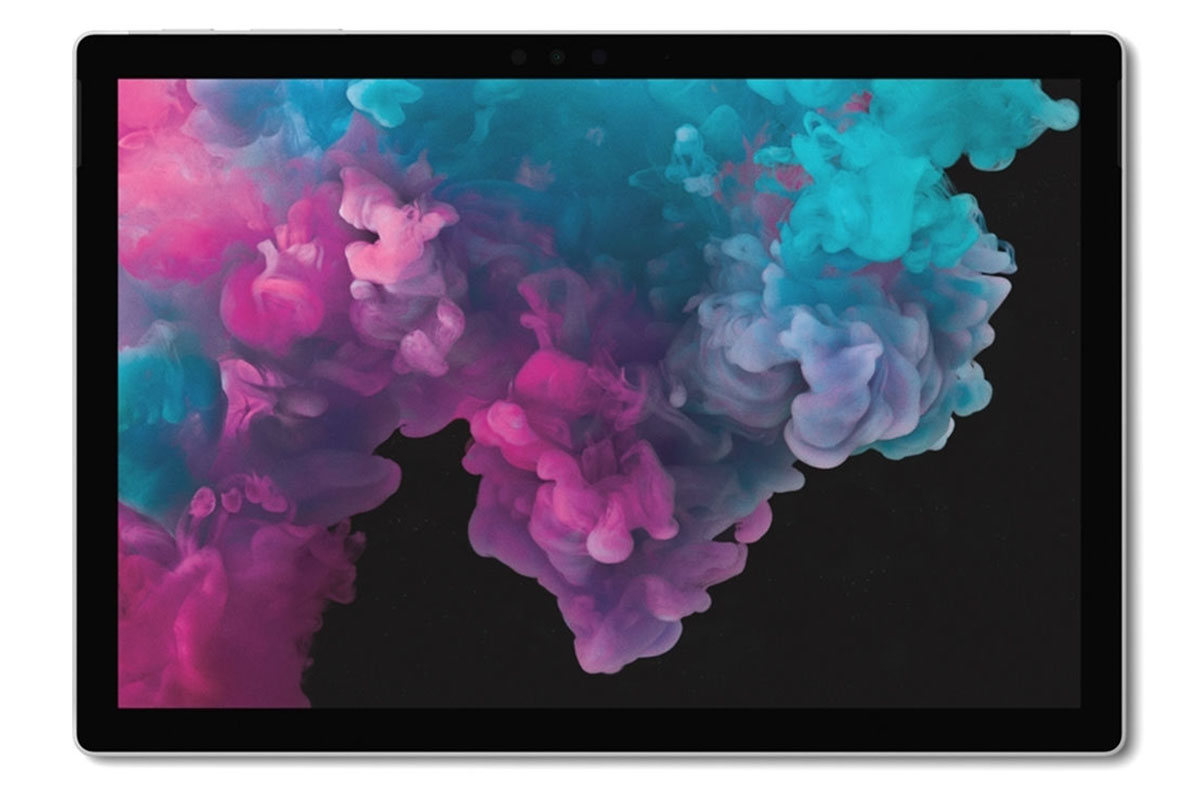
The updated Surface Pro is “arguably the best-made Windows 10 tablet going” according to The Guardian. This version has a remarkable 16GB of RAM and a speedy i7 processor packaged inside a sleek frame. You also get plenty of solid-state storage, 13.5 hours of battery, and a 12.3-inch PixelSense display. It’s usually $1,499.99, but you can get yours now for $1,279.99.

Microsoft Surface Pro 6 256GB 12.3″ WiFi Intel Core i7

If you don’t need crazy specs, this version of the Surface Pro 6 is a great option. You still get that i7 chip and crisp display bolted into a body that measures only 0.33 inches thick. This version also has 256GB of solid-state storage, great battery life, and Intel graphics. Worth $1,499.99, it’s now down to $1,089.99

Microsoft Surface Pro 6 Tablet 1.9GHz Intel Core i7 with 1TB SSD

Need more storage space for photos, movies, and games? This Surface Pro 6 has you covered, thanks to a huge 1TB SSD. It runs Windows 10 Pro on an i7 processor and 16GB of RAM — a combination that delivers “big performance gains” in the words of CNET. Originally $1,499.99, this lightweight monster is now only $1,429.99.

Prices subject to change

The post 5 Microsoft Surface Deals You Can Save Big with Right Now appeared first on xda-developers.


from xda-developers https://ift.tt/2MI16PQ
via IFTTT

The Samsung Galaxy Fold 2 reportedly won’t have an S Pen because of technical limitations

The Samsung Galaxy Fold is arguably one of the most innovative phones in the past decade. It was the first publicly available mass-market foldable phone and was easily my favorite phone. In my review of the phone, I called it the future of smartphones. This future is fantastic and foldable, but this foldable future is still a while away from matching our current reality of glass slab smartphones. There’s plenty more that foldable can do to make them better smartphones for the mass-market, and one such feature would be the S Pen. The S Pen would be the perfect addition to this small tablet form factor, but unfortunately, the tech isn’t there yet despite previous rumors pointing towards its inclusion. According to a new report, there are some technical limitations that prevent Samsung from adding the S Pen to the Galaxy Fold 2.

A new report from The Elec out of South Korea, there will not be an S Pen on the Galaxy Fold 2. Since the last Galaxy Fold, there have long been rumors about the Galaxy Fold 2 picking up the S Pen. As much as it seemed like a bad idea because of the plastic screen, consumers wanted to see a convergence of the Note series and Fold series. Unfortunately, this year is not the year it happens. As Mr. Ross Young of DSCC hinted, Samsung had to make the decision between Ultra Thin Glass and no S Pen or a thicker plastic display with an S Pen. If this new report is right, Samsung has opted for the Ultra Thin Glass option.

Another reason Samsung might have decided to skip the S Pen on the Galaxy Fold 2 is because of the hinge. According to a few internal sources, the hinge on the phone would have caused the digitizer layer for the S Pen on the display to die over time, creating a massive dead zone across the middle of the display. This, of course, would not be a product Samsung would want to release. There were also issues with the S Pen tip leaving dents on the plastic cover, and worse, the S Pen could have pierced the display when used with extreme force on the display panel.

While the S Pen on the Galaxy Fold 2 might have been the device of the future we are all hoping for, it’s good to see Samsung taking the time to perfect the technology instead of rushing it and having another breaking Galaxy Fold issue. The Galaxy Fold 2 is likely going to launch at the August 5th virtual Unpacked with an official release in early September. I know I’m very excited to see all that this device has to offer!

The post The Samsung Galaxy Fold 2 reportedly won’t have an S Pen because of technical limitations appeared first on xda-developers.


from xda-developers https://ift.tt/2XORCsf
via IFTTT

This open source Galaxy Buds client lets you manage your Buds from your Windows PC

The Galaxy Wearable app allows users to connect Samsung wearable devices to their smartphones. One can also manage the Galaxy Buds family of wireless earbuds through the same app after installing appropriate plugins. For PC and Mac users, Samsung provides a similar companion application named Galaxy Buds Manager in order to check for software updates and install the new firmware on the Galaxy Buds/Buds+. Samsung utilizes a proprietary communication protocol between the buds and the companion app, but a developer has now managed to reverse-engineer it. The person, Tim Schneeberger, has also released an unofficial open-source Galaxy Buds client, which is far more versatile than the official app.

The initial version of the unofficial client, which is also named as Galaxy Buds Manager, is released as a Windows-only app. You need .NET Framework 4.7.2 or higher to run it, which means porting the app to Linux and macOS using Mono may be possible in the near future.

The client offers the following features:

  • Display detailed sensor statistics on the dashboard, this includes:
    • Voltage and Current of the in-built ADC (Analog-to-Digital Converter) of both Earbuds
    • Temperature of both Earbuds
    • More precise battery percentage (instead of steps of 5)
  • Perform a self-test with all onboard components
  • Display various (debug) information, including:
    • Hardware Revision
    • (Touch) Firmware Version
    • Bluetooth Addresses of both Earbuds
    • Serial Numbers of both Earbuds
    • Firmware Build Info (Compile Date, Developer Name)
    • Battery Type
    • Other sensor data
  • Equalizer: unlock ‘Optimize for Dolby’ feature
  • Touchpad: Combine Volume Up/Down with other options

galaxy_buds_manager_screencap

The initial version of this unofficial companion app is designed for the original Galaxy Buds. 2020’s Galaxy Buds+, however, are not supported by the client at this moment, since Tim doesn’t own a pair, and we confirmed that they are not compatible. We hope the Galaxy Buds community will help the developer by providing required logs and message dumps to expand the device compatibility list.

Unofficial Galaxy Buds Manager for Windows: Download || Source Code

The developer has also shared the structure of the custom RFComm Serial protocol used by the Buds to receive and send binary data, which should be beneficial for other tinkerers.


Source: r/galaxybuds


The post This open source Galaxy Buds client lets you manage your Buds from your Windows PC appeared first on xda-developers.


from xda-developers https://ift.tt/3dLgbfj
via IFTTT

OPPO F9 and F9 Pro are getting the ColorOS 7 stable update with Android 10

Oppo is updating the Oppo F9 and F9 Pro to ColorOS 7, the latest version of Oppo’s custom skin. The Chinese OEM last month rolled out stable ColorOS 7 updates to a wide range of phones, including Find X, Reno 10X, Reno, Reno 2, and more. At the time, the company promised that the Oppo F9 and F9 Pro would be next to receive the update with the official rollout starting June 10th. And that’s exactly what they’re doing today.

Oppo says the update will be rolling out in batches — a small part of the user base will receive the OTA initially, with the rollout gradually expanding to more users. ColorOS 7 is a significant departure from the previous iterations of ColorOS, offering a cleaner and clutter-free UI with a bunch of new features. After updating the F9 and F9 Pro, users can look forward to things like system-wide dark mode, new navigation gestures, new Digital Wellbeing tools with Focus mode, revamped Camera UI, updated system apps, and a whole lot more.

You can check for the update by visiting Settings > Software Updates and clicking on Trial Version from the gear menu. Other Oppo phones which are also scheduled to receive the ColorOS 7 based Android 10 update this month include the Oppo A5 (2020), A9 (2020), and F7. Meanwhile, the F15 and R15 Pro will get their updates in July.

Oppo F9 XDA Forums

Here’s the full changelog of ColorOS 7 update for the F9 and F9 Pro:

  • Visuals:
    • Brand new borderless design makes visuals more attractive and operation more efficient.
    • Added OPPO Sans as the default font. The new font delivers a refreshing feel and fits well with OPPO’s pursuit of blending beauty and technology.
  • Smart Sidebar:
    • Optimised user interfaces and improved one-handed operation.
    • Drag an app out of Smart Sidebar to open it in Split-screen mode.
    • Added two settings: Assistive Ball Opacity and Hide Assistive Ball on Fullscreen App.
    • Optimised the Floating Window feature for more apps.
    • Added a bubble: A bubble is displayed when you open an app in a floating window from the Smart Sidebar. Tap the bubble to collapse and open the app.
  • Screenshot:
    • Optimised 3-Finger Screenshot: Use 3 fingers to touch and hold the screen and swipe your fingers to adjust the screenshot size. Use 3 fingers to touch and hold the screen and swipe your fingers outwards to capture a long screenshot.
    • Added screenshot settings: You can adjust the position of the screenshot preview floating window and set the screenshot sound.
    • Optimised screenshot preview floating window: After taking a screenshot, drag it up and release to share it, or drag it down and release to take a long screenshot.
  • Navigation Gestures 3.0:
    • New gesture: Swipe inward from both sides of the screen and then hold to switch to the previous app.
    • Optimised gestures: All gestures are supported in landscape mode.
  • System:
    • Added Dark Mode: Protects your eyes while reducing power consumption.
    • Added Focus Mode: Shields you from outside distractions when you are learning or working.
    • Added all new charging animation.
    • Optimised the Quick Settings user interface for easier one-handed operation.
    • Swipe left or right to ignore banner notifications.
    • Added a pause function for screen recording.
    • Added a floating window and settings for screen recording.
    • New sounds added for file deletion, calculator key touches, and compass pointer.
    • Optimised system pre-loaded ringtones.
    • Added TalkBack floating prompts for Accessibility.
    • Colour Accessibility Mode added to improve the user experience for visually impaired users.
    • New management function for recent tasks: You can view memory information about recent tasks and lock apps.
  • Games:
    • Optimised visual interaction for Game Space.
    • Optimised the startup animation for Game Space.
  • Home Screen:
    • More live wallpapers.
    • Added Art+ static wallpapers.
    • Customise whether to open Global Search or the notification drawer when swiping down on the Home screen.
    • Customise the size, shape, and style of app icons on the Home screen.
    • Swipe up on the Lock screen to switch unlock methods.
    • Optimised the graphic design of password unlocks to facilitate one-handed operations.
    • Supported live wallpapers on the Lock screen.
    • More screen-off clock styles.
    • Added a simple Home screen mode, featuring larger fonts and icons and a clearer layout.
  • Security:
    • Connect your phone to Wi-Fi networks using a random MAC address to avoid targeted ads and protect your privacy.
  • Tools:
    • In Quick Settings or Smart Sidebar, you can open Calculator in a floating
    • Added the trim feature in Recordings.
    • Added the Weather (dynamic) ringtone, which automatically adapts to the current weather.
    • Added weather-adaptive animations in Weather.
  • Camera:
    • Optimised the Camera UI for better user experience.
    • Optimised the Timer UI and sound.
  • Photos:
    • Optimised the Album UI for a clear hierarchy and quick lookup of photos.
    • Added Album Recommendations that recognises more than 80 different scenes.
  • Communications:
    • OPPO Share now supports sharing files with vivo and Xiaomi devices.
    • Optimised the Contacts UI for a more efficient experience.
  • Settings:
    • Search Settings now supports fuzzy match and contains a search history.
  • Applications:
    • Soloop Video Editor: Create your video with one tap.
    • Added DocVault, an app for easy management and use of your digital ID cards (available only on phones sold in India).

Source: ColorOS Community

The post OPPO F9 and F9 Pro are getting the ColorOS 7 stable update with Android 10 appeared first on xda-developers.


from xda-developers https://ift.tt/2YodfP5
via IFTTT

Xiaomi Redmi 9 with quad cameras, 5020 mAh battery launched in Spain, starting at €139

Earlier this month, we learned that Xiaomi’s budget-friendly sub-brand Redmi was prepping up to launch the entry-level Redmi 9 series. While the company had revealed no official information about the devices, leaked live images and certification listings had revealed quite a bit of information. Then, just a few days ago, the Redmi 9 popped up on a Filipino retailer’s website with even more information about its specifications, features, and pricing. Now, Xiaomi has finally announced the Redmi 9 in Spain, confirming all of the details we’d learned so far.

Xiaomi Redmi 9 Specifications

Specifications Xiaomi Redmi 9
Dimensions & Weight
  • 163.32 × 77.01 × 9.1 mm
  • 198g
Display
  • 6.53-inch LCD
  • 2340 x 1080
  • 19.5:9
  • 400 nits
  • Gorilla Glass 3
SoC
  • MediaTek Helio G80
    • 12nm
    • 2x ARM Cortex A-75
    • 6x ARM Cortex A-55
  • Mali-G52 GPU
RAM 3GB/4GB LPDDR4x
Storage
  • 32GB eMMC 5.1
  • 64GB

Dedicated microSD slot

Battery
  • 5,020mAh
  • Supports Quick Charge 3.0 (18W)
  • 10W charger included
Rear Camera
  • 13MP primary camera, f/2.2
  • 8MP wide-angle camera, f/2.2
  • 5MP macro camera, f/2.4
  • 2MP depth sensor
Front Camera
  • 8MP, f/2.0
Colors Carbon Gray, Sunset Purple, Ocean Green

The Xiaomi Redmi 9 packs in MediaTek’s Helio G80 chip, coupled with up to 4GB of LPDDR4x RAM and 64GB of eMMC 5.1 storage. The device features a 6.53-inch FHD+ display with a water-drop style notch for the selfie camera. The display has an aspect ratio of 19.5:9, peak brightness of 400 nits, and it’s protected by Gorilla Glass 3.

Xiaomi Redmi 9 display

In the camera department, the Redmi 9 features a quad-camera setup on the back with a 13MP f/2.2 primary camera, an 8MP f/2.2 wide-angle camera, a 5MP f/2.5 macro camera, and a 2MP sensor for depth perception. Over on the front, the device features a single 8MP f/2.0 selfie camera.

Powering the device is a massive 5,020mAh battery with support for Quick Charge 3.0 (18W). However, in order to utilize the fast charging capabilities, buyers will have to purchase a compatible charger as the one included in the box offers a maximum output of 10W. Connectivity options include a USB Type-C port, Bluetooth 5.0, NFC, and 802.11 a/b/g/n/ac Wi-Fi. The device also features a rear-mounted fingerprint scanner which resides right underneath the vertical camera array.

Pricing and Availability

According to a recent tweet from @XiaomiEspana, the Redmi 9 will be available for pre-order in Spain between June 15 and June 17. During the pre-order period, the Redmi 9 3GB/32GB variant will be available for an introductory price of €139 (~$158), while the 4GB/64GB variant will be available for €169 (~$192).

The Redmi 9 will go on sale starting from June 18, priced at €149 (~$169) and €179 (~$203), across all major online and offline retailers in the country, including mi.com, mi stores, Amazon, Alcampo, Carrefour, Phone House, Worten, and more. Buyers will get three color variants to choose from — Carbon Gray, Sunset Purple, and Ocean Green. As of now, we have no information about the launch schedule for the other devices in the Redmi 9 series.

The post Xiaomi Redmi 9 with quad cameras, 5020 mAh battery launched in Spain, starting at €139 appeared first on xda-developers.


from xda-developers https://ift.tt/2AVsze6
via IFTTT