LightBlog

jeudi 16 juillet 2020

The Vivo X50 and Vivo X50 Pro launches in Europe and India alongside the Vivo TWS Neo Earphones

Vivo has been steadily making inroads in a lot of key markets, including India and its home market China. And the company has also been innovating with its product series. For instance, the Vivo X50 series sports an ambitious camera system, with the Pro variant coming in with a gimbal camera. The Vivo X50, Vivo X50 Pro, and X50 Pro+ were launched early last month in China. Now, Vivo is bringing over two of these devices to India and Europe, alongside the Vivo TWS Neo Earphones.

XDA Forums: Vivo X50 || Vivo X50 Pro || Vivo X50 Pro+

Vivo X50 Series: Specifications

Specifications Vivo X50 Vivo X50 Pro Vivo X50 Pro+
Dimensions and Weight
  • 159.54mm x 75.39mm x 7.49mm
  • 170g
  • 158.46mm x 72.8mm x 8.04mm
  • 181.5g
  • 158.46mm x 72.8mm x 8.04mm
  • 181.5g
Display
  • 6.56″ FHD+ AMOLED
  • 90Hz refresh rate
  • Flat display
  • Single-hole punch
  • HDR 10+
  • 6.56″ FHD+ AMOLED
  • 90Hz refresh rate
  • Curved display
  • Single-hole punch
  • HDR 10+
  • 6.56″ FHD+ AMOLED
  • 120Hz refresh rate
  • Curved display
  • Single-hole punch
  • HDR 10+
SoC Qualcomm Snapdragon 765G Qualcomm Snapdragon 765G Qualcomm Snapdragon 865
RAM and Storage
  • 8GB LPDDR4X + 128GB UFS 2.0
  • 8GB + 256GB
  • 8GB LPDDR4X + 128GB UFS 2.1
  • 8GB + 256GB
  • 8GB LPDDR4X + 128GB UFS 2.1
  • 8GB + 256GB
  • 12GB + 256GB
Battery and Charging
  • 4200 mAh battery
  • 33W fast charging
  • 4315 mAh battery
  • 33W fast charging
  • 4315 mAh battery
  • 44W fast charging
Rear Camera
  • Primary: 48MP Sony IMX598 custom sensor, f/1.6, four-axis OIS
  • Secondary: 13MP portrait, f/2.48
  • Tertiary: 8MP ultra-wide-angle, 120° FoV, f/2.2
  • Quarternary: 5MP macro, f/2.48, 1.5cm super macro
  • Primary: 48MP Sony IMX598 custom sensor, f/1.6, gimbal OIS
  • Secondary: 13MP portrait, f/2.46
  • Tertiary: 8MP periscope, f/3.4
  • Quarternary: 8MP ultra-wide-angle, 120° FoV, f/2.2, 2.5cm macro
  • Primary: 50MP Samsung ISOCELL GN1 custom sensor, f/1.6
  • Secondary: 13MP portrait, f/2.46
  • Tertiary: 8MP periscope, f/3.4
  • Quarternary: 8MP ultra-wide-angle, 120° FoV, f/2.2, 2.5cm macro
Front Camera 32MP, f/2.48 32MP, f/2.45 32MP, f/2.45
Other Features
  • NFC
  • WiFi 6
  • Bluetooth 5.1
  • SA & NSA Dual-mode 5G
  • In-Display Fingerprint Scanner
  • NFC
  • WiFi 6
  • Bluetooth 5.1
  • SA & NSA Dual-mode 5G
  • In-Display Fingerprint Scanner
  • AK4377A Hi-Fi Sound chip
  • NFC
  • WiFi 6
  • Bluetooth 5.1
  • SA & NSA Dual-mode 5G
  • In-Display Fingerprint Scanner
  • CS43131 Hi-Fi Sound chip
Android Version Funtouch OS 10.5 on top of Android 10 Funtouch OS 10.5 on top of Android 10 Funtouch OS 10.5 on top of Android 10

Factsheets:

The highlight of the Vivo X50 series is the gimbal camera system on the X50 Pro. The main camera on this model utilizes a gimbal camera system that is modeled after a full-sized professional gimbal, which moves the camera module in the direction opposite to that of the shake, increasing the stability of the main camera. As against simpler OIS, a gimbal system widens the rotation angle and anti-shake area. Note that the Vivo X50 and X50 Pro+ do not have a gimbal camera — it’s only present on the middle phone. Consequently, the camera islands on the three phones have their own subtle differences — but otherwise, the design language is identical.

Vivo X50 Pro+ Vivo X50 Pro+

Vivo X50 Pro+

Vivo is also adding a Gimbal Radar within the camera UI, depicting it as an animated ball that reflects the gimbal’s movement. The idea behind it is to let users know when the frame is stable. There are other neat tricks at play too, like motion-deblur algorithms and continuous focus tracking to enhance the image and video clarity. Camera modes include Super Night Mode and Astro Mode, which enable users to capture photos of city and country scenes at night, respectively.

Vivo X50 Pro

Vivo X50 Pro

If the new Gimbal system is only on the Vivo X50 Pro, what is the draw on the X50 Pro+? It’s the new 50MP ISOCELL GN1 sensor that has a big 1/1.3″ optical format and 1.2μm pixels — the sensor size is actually bigger than the Galaxy S20 Ultra’s 108MP sensor. Further, you also get a bump up to the Snapdragon 865 — while the other two phones come with the Snapdragon 765G, as well as a 120Hz display. However, note that the Pro+ variant is currently not available outside of China.

Vivo X50

Of course, the standard Vivo X50 is the humblest sibling with a flat display, lack of gimbal OIS, and lack of a periscope lens.

Vivo X50 series: Pricing and Availability

India

In India, the new Vivo X50 series will be available for the following prices:

  • Vivo X50 — Glaze Black and Frost Blue with Snapdragon 730:
    • 8GB + 128GB: ₹34,990
    • 8GB + 256GB: ₹37,990
  • Vivo X50 Pro — Alpha Grey:
    • 8GB + 256GB: ₹49,990

Both the devices have already gone on pre-booking and will go on sale starting July 24, 2020, across offline retail partners including Reliance, Croma, Vijay Sales, and others. Further, the devices will also be available for purchase from Vivo India’s e-store, Amazon.in, Flipkart, Paytm Mall, Tata Cliq, and others.

Launch offers for the devices include these for online purchases:

  • Up to ₹4,000 Instant Cashback with HDFC & ICICI Bank
  • Up to ₹3,000 additional exchange bonus
  • V-shield – Exclusive complete mobile protection against all damages for a period of 6 months. Offer can be availed by paying ₹2,990 anytime during the first 6 months
  • ₹2,000 off on TWS Neo with X50 series
  • No Cost EMI up to 12 months
  • Vodafone Idea Ltd.: Additional 2GB Data Offer

Buy from Amazon.in: Vivo X50 || Vivo X50 Pro

Europe

The Vivo X50 series will be available in certain regions of Europe such as Russia, Ukraine, and Kazakhstan.


Vivo TWS Neo Earphones

The Vivo TWS Neo mark Vivo’s entry into the truly wireless earphone segment, with a stemmed half in-ear design. These earphones are powered by Qualcomm QCC3046 platform and come with a 14.2mm driver unit, alongside AI noise cancellation. You also get Bluetooth 5.2 for a maximum range of 10m. Vivo is also claiming a latency of 88ms on its X50 series devices. For codec, these earbuds offer aptX Adaptive codec on supported devices.

Vivo TWS Neo

The Vivo TWS Neo will be available in two colors — Moonlight White and Starry Blue. The earbuds will cost ₹5,990 in India and will be available from July 24 onwards.

Buy Vivo TWS Neo Earphones from Amazon.in

The post The Vivo X50 and Vivo X50 Pro launches in Europe and India alongside the Vivo TWS Neo Earphones appeared first on xda-developers.


from xda-developers https://ift.tt/2OxmR5S
via IFTTT

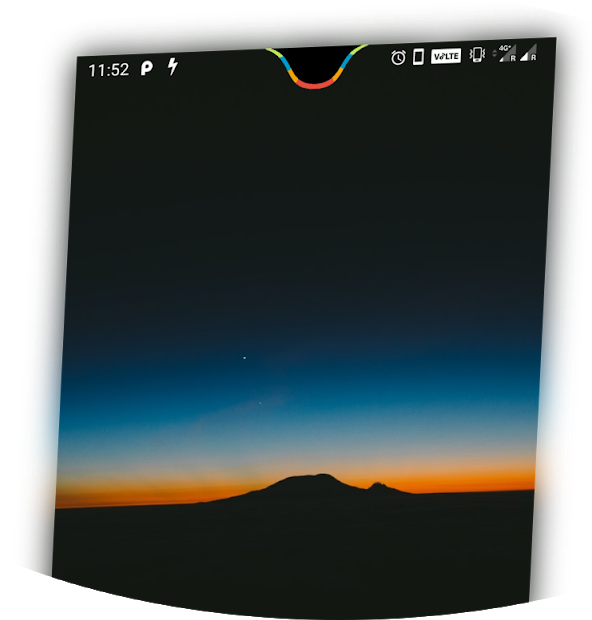
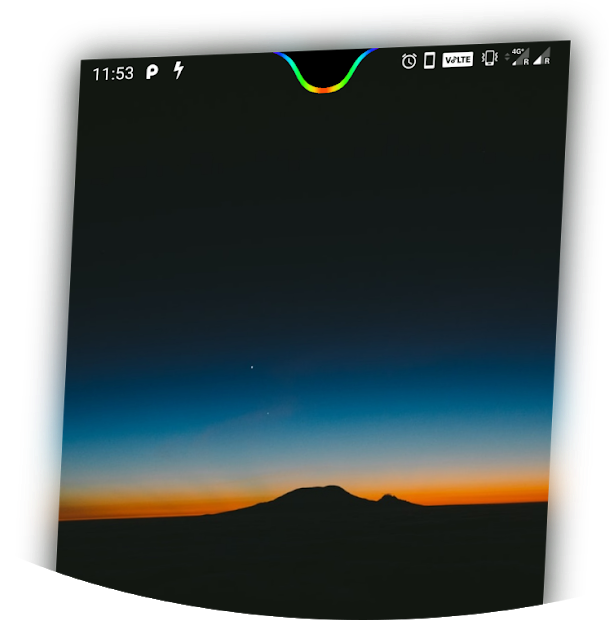
Energy Notch shows a battery indicator around the notch of the OnePlus 6T

Smartphone manufacturers have been pushing boundaries in the attempt to minimize bezels and increase the screen area as much as possible. In this crusade against bezels, companies have opted for wide or mini U or V-shaped bezels, or even hole-punch cutouts while also purging the notification LED. Notches aren’t preferred by everyone but if you wish to utilize the notch area constructively, Energy Notch is an application that lets you add a colorful and animated battery indicator around the notch of your phone. Energy Notch is created by the developer of Energy Ring which serves similar purpose for hole-punch cutouts and is now available for the OnePlus 6T.

OnePlus 6T XDA Forums

Energy Notch simply works by displaying a colored area in an overlay. The creator of the app, XDA Recognized Developer jagan2, notes in the Forum thread that the app has a negligible impact on the CPU and does not consume much battery on the OnePlus 6T. This is done by ensuring the app only wakes when the battery percentage is updated.

Energy Notch thread on XDA Forums

Besides adding single or multiple colors to the notch, you can also use a gradient and these configure these colors to change with the battery percentage. You can also add an animation that is displayed when the phone is charging and configure the flow of the animation between left-to-right or right-to-left. You can also modify the width of the notch as per your preference.

Energy Notch resembles Notch Pie and Battery Notch Indicator that serve the similar purpose of sprucing the notch area. However, unlike theses apps, Energy Notch is exclusive to the OnePlus 6T at the moment and will not work on any other device. This hopefully indicates that the app is well optimized for the OnPlus 6T and you can just install it and roll without having to adjust the width and the shape of the notch – something that is usually required for other apps.

Energy Notch - camera notch as battery indicator! (Free+, Google Play) →

The post Energy Notch shows a battery indicator around the notch of the OnePlus 6T appeared first on xda-developers.


from xda-developers https://ift.tt/3j8fz6p
via IFTTT

Samsung Galaxy M01s with MediaTek Helio P22 and Android 9.0 launched in India for ₹9,999 ($133)

Samsung’s Galaxy M-series attempts to capture the online sales segment in the entry-level for Samsung, clashing against the likes of Xiaomi and Realme on this end. Over the years, Samsung has launched many devices within the M-series lineup, including the Galaxy M01 and Galaxy M11 that were launched just last month in India. Samsung has now arrived with a new smartphone in the form of the Samsung Galaxy M01s, and it occupies a curious position within Samsung’s existing portfolio.

Samsung Galaxy M01s: Specifications

Specification Samsung Galaxy M01s
Dimensions & Weight
Display
  • 6.2″ HD+ LCD TFT
  • Infinity-V notch
SoC MediaTek Helio P22
RAM & Storage 3GB + 32GB
Expandable up to 512GB
Battery & Charging 4000mAh
Fingerprint sensor Rear
Rear Camera
  • Primary: 13MP, f/1.8
  • Secondary: 2MP, f/2.4
Front Camera 8MP
Android Version Android 9.0

Considering Samsung just launched the Galaxy M01 last month, the Galaxy M01s may not be intending to phase out the Galaxy M01 just yet, and may instead co-exist alongside as an alternative option. Though, we’d argue that it does dilute what the “s” moniker stands for, and confuses users on the underlying specifications. There are a few upgrades on the Galaxy M01s compared to the Galaxy M01, but there are a fair few downgrades as well.

Samsung Galaxy M01s

For one, the display on the Galaxy M01s is larger. Seeing that this is intended to be a budget device, we can’t fault the HD+ resolution, though obviously FHD+ would have been sweeter. Further, the front camera is also seeing an increase in MP count. There’s also a fingerprint sensor onboard. Unfortunately, the regression comes in the form of the MediaTek Helio P22 SoC, which is a mid-range SoC (at launch) that is two years old at this point. Also disappointing is the fact that the device comes with Android 9.0 Pie.

Pricing and Availability

The Samsung Galaxy M01 has also seen a price increase in recent days, so the Galaxy M01s slots in cheaper at ₹9,999 for the sole 3GB + 32GB variant. The device will be available in two colors — Light Blue and Gray — and will be available for sale across Samsung’s retail stores, Samsung.com, and other major e-commerce platforms.

Buy the Samsung Galaxy M01s from Amazon.in

The post Samsung Galaxy M01s with MediaTek Helio P22 and Android 9.0 launched in India for ₹9,999 ($133) appeared first on xda-developers.


from xda-developers https://ift.tt/2B4bkYB
via IFTTT

Realme’s 125W UltraDart brings along compatibility with multiple charging protocols

Chinese OEM OPPO recently unveiled its new 125W flash charge technology, which is capable of charging a 4,000mAh battery up to 41% in 5 minutes and 100% in 20 minutes. Now, just a few days since the announcement, OPPO’s sister company Realme has come out with its own 125W fast-charging solution called UltraDart. Realme’s new 125W UltraDart charging technology, which is most likely a rebranded version of OPPO’s tech, is capable of charging a 4,000mAh battery up to 33% in just 3 minutes and 100% in 20 minutes.

Much like OPPO’s flash charge technology, Realme UltraDart charging includes support for a variety of charging protocols, including USB-PPS at 125W, USB-PD at 65W, and QC at 36W. The technology is also backward compatible with older fast-charging solutions like OPPO’s VOOC, SuperVOOC, and SuperVOOC 2.0, Realme’s SuperDart, and OnePlus’ Warp charge.

In order to combat overheating, Realme’s UltraDart features ultra-temperature control with 14 temperature sensors and a vapor cooling system on supported devices. Along with that, Realme’s solution also makes use of a reversed battery layout, dual board-to-board connectors, and Multiple Tab Winding (MTW) battery cells to keep the temperatures low. Realme claims that its solution is designed to keep the average temperature at 40°C or less during the entire charging process and that without temperature control, it’s solution is capable of charging a 4,000mAh battery to full in approximately 13 minutes.

Along with the 125W UltraDart solution, Realme has also revealed plans to launch two SuperDart ultra-thin chargers rated at 50W and 65W. While the company hasn’t revealed any details about these upcoming chargers, the 50W SuperDart charger will, most likely, be based on OPPO’s 50W GaN mini SuperVOOC charger which was announced just a couple of days ago. The charger measures 1.05cm in thickness and it supports USB-PD at 27W and USB-PPS at 50W. While Realme’s charger may not feature the same design or dimensions, it might support the same charging standards as OPPO’s offering.

The post Realme’s 125W UltraDart brings along compatibility with multiple charging protocols appeared first on xda-developers.


from xda-developers https://ift.tt/2CFfab7
via IFTTT

OnePlus Gallery 3.12.33 adds a Google Cast button for beaming photos

OnePlus released the Android 11 Beta 2 builds for the OnePlus 8 and 8 Pro smartphones earlier this week. These builds come with OnePlus’ OxygenOS on top and the company is referring them to as “Developer Preview 2” builds to avoid any confusion with OxygenOS Open Beta program – even though they are based on Android 11 Beta 2 that was released by Google earlier this month. As part of this build, OnePlus is adding a Google Cast shortcut to the Gallery application to beam photos to TVs or smart displays.

The Google Cast feature surfaced on OnePlus Gallery version 3.12.33 and follows the Google Lens shortcut added to the app in the previous update. Although the latest Gallery app comes with the Android 11 beta, it can be installed on other OnePlus series devices but the feature may not work on all of the phones. One user did confirm they could successfully use the feature on their OnePlus 8 Pro running OxygenOS 10.5.11 to cast images to their OnePlus Q1 55 Pro TV. You can grab the APK from the link below and try it on your phone.

OnePlus Gallery 3.12.33 on APK Mirror 

Notably, the feature only works for images for now and does not cast videos. The same is corroborated to strings discovered in the APK Teardown of the Gallery app.

Coming back to the Android 11 beta, the builds for OnePlus 8 and 8 Pro are strictly meant for developers and advanced users even though vanilla Android 11 has already reached the Platform Stability stage. This may be due to the improper migration of Android 11 features over to OxygenOS and we do not recommend installing the build on your device if you’re using it as your daily driver.

Even if you still wish to proceed and get a taste of Android 11 on your phone, do note that by installing the beta or upgrading from the first beta, you will lose your data. So make sure to back it up before starting the process.

Thanks to XDA Senior Member Some_Random_Username for the screenshot.

The post OnePlus Gallery 3.12.33 adds a Google Cast button for beaming photos appeared first on xda-developers.


from xda-developers https://ift.tt/2OtXiT5
via IFTTT

AutoHz lets you control the per-app refresh rate on the OnePlus 8 and OnePlus 8 Pro [Giveaway]

OnePlus is among one of the few OEMs around that both, ship a 120Hz high refresh rate display and also allow the same to be set on the maximum QHD+ resolution on the panel. However, even the maximum 120Hz setting is not set across all the apps uniformly — as OnePlus notes, “the refresh rate will be switched dynamically based on scenarios“. OnePlus does not explicitly mention the scenarios when the refresh rate will be scaled back down on the OnePlus 8 Pro, but we know from a past AMA on the OnePlus 7 Pro that the phone uses a variable refresh rate to drop down for scenarios like watching videos, using the camera app, and in phone calls. If you would like to have a finer level of control on the refresh rate on a per-app basis, XDA Recognized Developer arter97‘s AutoHz app lets you set refresh rates for every app on your phone.

Within the stock OnePlus settings, the 60Hz mode option makes the device run at a constant 60Hz like most other smartphones. The 90Hz/120Hz (depending on the max refresh rate) mode option practically acts as an “auto” option which switches the refresh rate back to 60Hz in certain conditions. There is a true 90Hz/120Hz setting hidden which you can enable through ADB commands, but that would increase the power consumption on your device, even if you would not necessarily benefit from a higher refresh rate in that scenario. For 90Hz, Dylan measured the increase in power draw to be about 30mW per hour, or about an additional 0.5% of the OnePlus 7 Pro’s total battery per hour for the display only, and there is likely to be additional power draw from the SoC and the GPU to push those many frames every second.

This is where AutoHz comes in. We’ve covered AutoHz in the past, back when it was called Auto90. Since then, the app has expanded its support across multiple OnePlus devices, extending it to the 90Hz OnePlus 8 and the 120Hz OnePlus 8 Pro. The app lets you control how and when your OnePlus device switches to 60Hz or 90/120Hz, or let it automatically decide for itself. The app is specifically made for OnePlus devices with high-refresh-rate displays (i.e. OnePlus 7 Pro, OnePlus 7T, OnePlus 7T Pro, OnePlus 8, and OnePlus 8 Pro (120Hz)) and works only on OxygenOS. The app also requires a one-time setup with ADB too.

Within the app, you see a list of installed apps and a toggle beside each app. The 60Hz setting sets the display to 60Hz within that app, the 90/120Hz setting sets the display refresh rate to 90/120Hz within that app, and the Auto setting keeps the system’s default behavior for that particular app. Note that for the OnePlus 8 Pro, there is no 90Hz midway setting — so you can either choose 60Hz or 120Hz. The app already contains some recommended settings for common apps, but it lets you exercise full control.

Giveaway for AutoHz app

AutoHz is a paid application, so not every user may be willing to shell out the price for finding this right balance between performance and battery. For the same reason, we are giving out 20 promo codes to our readers at random. To get a promo code for this app, simply drop in your XDA forum username in the comments section below. We’ll check back after 24 hours, enter the usernames in a random list picker, and PM you the promo code to your forum profile. No other forms of entry are accepted for this giveaway.


AutoHz ($1.49, Google Play) →

The post AutoHz lets you control the per-app refresh rate on the OnePlus 8 and OnePlus 8 Pro [Giveaway] appeared first on xda-developers.


from xda-developers https://ift.tt/3exRq5X
via IFTTT

YouTube finally re-enables 1080p streaming in India, but only on WiFi

In an attempt to ensure that the sudden increase in Internet traffic didn’t cause any issues with its infrastructure, YouTube in India restricted video streaming quality on its mobile apps to 480p earlier this year in March. Since then, YouTube users in India have had to bear with pixelated streams on mobile devices while the rest of the world could enjoy the same videos at higher resolutions. As a result, Indian users were forced to look for workarounds like browsing YouTube via Chrome on mobile, using unofficial apps like NewPipe, or watching videos on desktop. Now, over three months since the restrictions first came into effect, YouTube is finally re-enabling 1080p streaming in India.

The YouTube app on Android and iOS now lets you switch to 1080p quality if you’re connected to a WiFi network. The change seems to have been enabled via a server-side switch and doesn’t require you to update the YouTube app. However, the default streaming quality is still set at 480p. In case you wish you watch videos in 1080p on mobile, all you need to do is connect your device to a WiFi network, tap on the three-dot menu button in the top right corner of the video, and then select 1080p from the quality settings.

YouTube India mobile app streaming limit (2)

In case you don’t have access to a stable WiFi connection and you wish to stream at 1080p on mobile data, there’s a simple workaround. But for it to work, you’ll still need to have access to a temporary WiFi connection. To stream videos at 1080p on mobile data, you’ll need to connect your device to WiFi and then open a video on YouTube. You can then disconnect your device from the WiFi network and switch to 1080p quality as mentioned above. The video should stream at 1080p on mobile data without any issues. Do note that 1080p streaming, and the aforementioned workaround, don’t seem to work with mobile hotspots.

The post YouTube finally re-enables 1080p streaming in India, but only on WiFi appeared first on xda-developers.


from xda-developers https://ift.tt/2ZuTZRY
via IFTTT