LightBlog

mercredi 22 juillet 2020

OnePlus 8 and OnePlus 8 Pro’s latest update brings over support for OnePlus Buds, and more

Update 1 (07/23/2020 @ 02:12 AM ET): We’ve added download links for the latest OxygenOS update for the OnePlus 8 and OnePlus 8 Pro for the global variants. Scroll to the bottom for more information. The article as published on July 19, 2020, is preserved below.

OnePlus is gearing up for the launch of the OnePlus Nord and the OnePlus Buds in just a few days now. But the company hasn’t forgotten its current generation flagships. OnePlus is rolling out a new set of OxygenOS updates to the OnePlus 8 and OnePlus 8 Pro that brings over the latest July 2020 security patches, as well as support for OnePlus Buds.

OnePlus 8 XDA Forums || OnePlus 8 Pro XDA Forums

The update has currently been spotted for OnePlus 8 Pro in the Indian region, but it should also make its way to other regions and to the other device as well. And we presume that the update will arrive sooner rather than later as it contains a fix for ARCore failure on the devices, which would be much needed considering that the OnePlus Nord is launching through an AR event.

The exact version of OxygenOS will change according to device and region, but the underlying changelog should majorly be the same across both the devices and regions, with the exception of the Red Cable Club (which remains India-exclusive so far) and wireless charging. Here is the full changelog:

Changelog

  • System
    • Newly adapted OnePlus Buds, easier to take advantage of wireless connection
    • Provided a variety of clock styles for you. You can customize on your own. (Go to Settings > Customization > Clock style)
    • Optimized the touch experience in game mode to enhance the user experience
    • Fixed the issue that the wireless charger base re-started automatically
    • Fixed the ARCore failure
    • Updated Android Security Patch to 2020.07
    • Updated GMS package to 2020.05
    • Improved system stability
  • Network
    • Improved the performance and stability of Wi-Fi transfers
    • Improved connection stability of mobile network to improve user experience
  • Shelf
    • Newly added Red Cable Club membership card

Download OxygenOS for the OnePlus 8 and OnePlus 8 Pro

The update should be gradually rolling out to all users. But in case you want to sideload the update, you can download it from the following links:

OnePlus 8

OnePlus 8 Pro


Thanks to XDA Senior Member Some_Random_Username for the download links!

The post OnePlus 8 and OnePlus 8 Pro’s latest update brings over support for OnePlus Buds, and more appeared first on xda-developers.


from xda-developers https://ift.tt/2ZIEYvP
via IFTTT

Download: ASUS ROG Phone 3 wallpapers and live wallpaper ports

In 2018, ASUS ventured into the then-nascent gaming smartphone market by extending its uber-popular Republic of Gamers (ROG) brand to mobile devices. While the first-gen ASUS ROG Phone received a lukewarm response due to its high price, the ROG Phone II was received very well for its extremely competitive pricing; and its time for ASUS to replicate this success once again. The ASUS ROG Phone 3 has just been officially announced and it comes with incredible specifications such as the Snapdragon 865 Plus, a 144Hz AMOLED display, up to 16GB of RAM, RGB lighting, and a lot of improved gaming features and accessories over the previous generation. Even if you cannot experience the beastly hardware of the latest gaming smartphone in the ROG lineup, you can grab the 4 live wallpapers and 29 wallpapers that come with the device.

ASUS ROG Phone 3 XDA Forums

There are 4 live wallpapers of which 2 are rendered at 60fps while the other two at 30fps. All of these live wallpapers are available as videos with a resolution of 2352 x 2353 pixels. Thanks to XDA Recognized Contributor linuxct, who is well known for their work on porting live wallpapers and other APK mods, we have modified versions of the 4 live wallpaper APKs that you can install on any Android device running Android 9 Pie or later.


In addition, there are 29 total still wallpapers, 12 of which have a resolution of 2340 x 1080 pixels while 9 are available in a 1:1 aspect ratio available at a resolution of 2340 x 2340 pixels. The remaining 8 wallpapers are stills taken from the aforementioned 4 live wallpapers. These snapshots from the live wallpapers have 2 versions each as they change color when the ROG Phone 3 enters the X-Mode, a special mode for boosted gaming performance.

The images added above are only intended to be used for a preview in this article, and you can get these wallpapers in high resolution using the link below.

Download the ASUS ROG Phone 3 wallpapers

XDA Review: ASUS ROG Phone 3 Review: The King of Gaming Smartphones is back

How to Install the ASUS ROG Phone 3’s Live Wallpaper Ports

In order to get the live wallpapers working as developer linuxct explains, you’ll need to install a companion app he made called X-Mode Toggler. This app adds a Quick Setting tile, that when toggled, tricks the live wallpapers into thinking that X-Mode is active. This triggers a change in the appearance of the live wallpapers. This is necessary on non-ROG devices since, well, X-Mode only exists on ROG devices.

To get started, first, download the ZIP file from the link below:

Download official ASUS ROG Phone 3 live wallpaper ported APKs by linuxct

Then, extract the zip and install the live wallpaper APKs. Next, open up a command prompt or terminal window and enter the following ADB shell command:

adb shell pm grant space.linuxct.rogcontroller android.permission.WRITE_SECURE_SETTINGS

(If you haven’t set up ADB on your PC yet, we have a tutorial on how to do that here.) Finally, use the Quick Setting tile from X-Mode Toggler to “enable” X-Mode.

The post Download: ASUS ROG Phone 3 wallpapers and live wallpaper ports appeared first on xda-developers.


from xda-developers https://ift.tt/3hkHKNY
via IFTTT

ASUS launches the ROG Phone 3 with the Snapdragon 865 Plus, 144Hz display, and 6000mAh battery

The ASUS ROG Phone is a gaming smartphone series from ASUS that is unapologetic about being “gaming first”. While this is certainly not the only gaming smartphone series around, it is one of the more widely available gaming phones that have consistently been pushing the boundaries of how much overkill can you really go on a phone. ASUS is now releasing the successor to the surprisingly successful ROG Phone II, coming in the form of the ASUS ROG Phone 3 and the ASUS ROG Phone 3 Strix Edition.

ASUS ROG Phone 3 XDA Forums

ASUS ROG Phone 3: Specifications

Specification ASUS ROG Phone 3
Dimensions & Weight
  • 171 x 78 x 9.85 mm
  • 240g
Display
  • 6.59″ FHD+ AMOLED
  • 19.5:9 aspect ratio
  • 144Hz refresh rate
  • 10-bit HDR
  • 650 nits outdoor brightness; 1000 nits peak brightness
  • DCI-P3 support
  • Supports glove touch
  • Corning Gorilla Glass 6
SoC
  • ROG Phone 3 Strix Edition:
    • Qualcomm Snapdragon 865 SoC
      • 1x Kryo 585 (ARM Cortex-A77-based) Prime core @ 2.84GHz
      • 3x Kryo 585 (ARM Cortex-A77-based) Performance core @ 2.4GHz
      • 4x Kryo 385 (ARM Cortex A55-based) Efficiency cores @ 1.8GHz
    • Adreno 650 GPU
  • ROG Phone 3:
    • Qualcomm Snapdragon 865 Plus SoC
      • 1x Kryo 585 (ARM Cortex-A77-based) Prime core @ 3.1GHz
      • 3x Kryo 585 (ARM Cortex-A77-based) Performance core @ 2.4GHz
      • 4x Kryo 385 (ARM Cortex A55-based) Efficiency cores @ 1.8GHz
    • Adreno 650 GPU (10% faster bin)
RAM & Storage
  • ROG Phone 3 Strix Edition:
    • 8GB LPDDR5 + 256GB UFS 3.1
  • ROG Phone 3:
    • Up to 16GB LPDDR5 + up to 512GB UFS 3.1
Battery & Charging
  • 6000mAh
  • 30W ROG HyperCharge direct charging
  • 30W USB PD 3.0
Fingerprint sensor In-display fingerprint sensor
Rear Camera
  • Primary: 64MP Sony IMX686, f/1.8, 1/1.7″ sensor, 0.8µm pixel
  • Secondary: 13MP wide-angle, 125° FoV, f/2.4
  • Tertiary: 5MP macro, f/2.0

Video:

  • 8K @ 30fps
  • 4K @ 30fps, 60fps (main rear camera)
  • 4K @ 30fps (wide-angle)
  • 1080p @ 30fps, 60fps
  • Slow-motion:
    • 4K @ 120fps
    • 1080p @ 240fps, 120fps
    • 720p @ 480fps
  • Time-lapse: 4K
Front Camera 24MP, f/2.0, 0.9µm pixel
Other Features
  • Ultrasonic sensors for AirTrigger 3 and grip press
  • Wi-Fi 6 — 802.11a/b/g/n/ac/ax 2×2 MIMO
  • Bluetooth 5.1 (BR/EDR+LE)
  • NFC
  • GNSS:
    • GPS (L1/L5)
    • Glonass (L1)
    • Galilio (E1/E5a)
    • BeiDou (B1/B2a)
    • QZSS (L1/L5)
    • NavIC (L5)
  • 2x USB Ports:
    • Side:
      • Custom USB Type-C
      • Supports USB 3.1 Gen 2
      • Supports DisplayPort 1.4 (4K UHD)
      • Supports 30W USB PD 3.0
      • Supports 30W ROG HyperCharge direct charging
    • Bottom:
      • USB Type-C
      • Supports USB 2.0
      • Supports 30W USB PD 3.0
      • Supports direct charging
  • Dual front-facing speakers (stereo) with dual NXP TFA9874 smart amplifiers
  • Band Support:
    • A-version:
      • 5G: N1, N2, N3, N5, N28, N41, N66, N71, N77, N78, N79
      • FDD-LTE: 1, 2, 3, 4, 5, 7, 8, 12, 13, 17, 18, 19, 20, 25, 26, 28, 29, 30, 32, 66, 71
      • TD-LTE: 34, 38, 39, 40, 41, 42, 48
      • WCDMA: 1, 2, 3, 4, 5, 6, 8, 19
      • GSM: 850, 900, 1800, 1900
    • B-version and Strix Edition:
      • 5G: N41, N77, N78, N79
      • FDD-LTE: 1, 2, 3, 4, 5, 7, 8, 20, 28
      • TD-LTE: 34, 38, 39, 40, 41
      • WCDMA: 1, 2, 3, 4, 5, 8
      • GSM: 850, 900, 1800, 1900
Android Version Android 10 with ROG UI or ZenUI

While other OEMs go around adding the “Pro” moniker to their flagships to indicate a step up from a flagship to a true flagship, ASUS has decided to stick with the vanilla ROG branding to refer to its overpowered beast. And in the same breath, a slightly saner variant of the ROG Phone 3 comes in the form of the ROG Phone 3 Strix Edition, but even this is squarely within flagship territory. The only differences between the two variants are that the Strix Edition comes with a Snapdragon 865 instead of the Snapdragon 865 Plus, and lower amounts of RAM and storage (but still retaining the latest RAM and storage technologies). No matter which ROG Phone you pick up, you do end up getting the ultimate gaming smartphone.

ASUS ROG Phone 3

The ASUS ROG Phone 3 largely has the same design aesthetic as the previous phones in this series, as we’ve seen in the leaks before. It isn’t meant to attract the average consumer but that’s okay because they aren’t the target audience here. While it is still debatable whether smartphone gamers do appreciate this design aesthetic, we all can unanimously agree that the spec-chasers would much rather focus on what is inside the phone. While the phone might look like it has a metallic back, it is a glass sandwich with covers for the air vents and a metallic mid-frame. There’s also the ROG logo with a multicolor LED underneath, as well as sharp angular patterns for the camera island and LED flash.

ASUS ROG Phone 3

The ROG Phone 3 also stands out for its size and display. The dimensions of the device indicate that this is a big and thick phone and that 240g weight will surely be noticeable when holding the phone. But the screen is only 6.59″ diagonally because the phone also accommodates dual front speakers — making it perhaps the only phone this year with this feature. ASUS also takes pride in the display on the phone, and for good reason, as it comes with a 144Hz maximum refresh rate along with options to switch to 120Hz, 90Hz, and 60Hz according to your preference. ASUS also claims a 1ms response time and a 270Hz touch sampling rate to provide 25ms touch latency. The display is also 10bit and supports HDR10+ for high dynamic range content. The display is also protected by Corning Gorilla Glass 6.

On the inside, the ROG Phone 3 is an absolute monster. We already knew that it would be coming with the latest Qualcomm Snapdragon 865 Plus. ASUS is also helping this SoC with up to 16GB of the latest LPDDR5 RAM and up to 512GB of UFS 3.1 internal storage. Much thought has also been extended to heat dissipation, as the device features a vapor chamber, a large graphite film behind the screen, an enlarged heat sink, and vents in the back cover — ASUS claims this is one of the most effective thermal solutions available on a mobile device. The whole package should not only allow the ROG Phone 3 to reach one of the best raw performance levels on an Android smartphone but to also sustain this peak for a longer duration without needing to throttle. And this longer duration is also promised by the 6000mAh battery, which explains the weight of the device and should be a necessity to let you keep gaming for a few hours on a 144Hz display. And since you have the Snapdragon 865 on-board, you also get 5G support on the smartphone.

The ROG Phone 3 adopts a landscape-first ergonomics, in-line with its focus on smartphone gaming. The device also features ultrasonic sensors for AirTrigger 3, and this time, ASUS has upgraded what you can do with the side buttons and gestures. You can use the whole length of the ultrasonic button on each side as a single action button, or you can adopt a dual partition layout to divide the longer button into two shorter buttons. You can also swipe left and right to trigger different touchpoints, and you can also set vertical and horizontal slides for in-game actions like view controls. You can also press and hold for a continuous trigger. And if you still need more options, you can also shake the phone to activate a touchpoint. All of these actions will help simplify the experience of games that have a plethora of actions on-screen, such as PUBG Mobile.

ASUS ROG Phone 3 AirTrigger Gestures

And then there’s the 2x USB Type-C ports: one at the bottom and one at the side, so gamers will appreciate the convenience of using either for charging. The port on the side also connects to accessories such as the AeroActive Cooler 3, which in turn features a pass-through USB Type-C connector, a 3.5mm headphone jack, and a kickstand.

ASUS ROG Phone 3 with AeroActive Cooler 3

Perhaps the only areas where the ROG Phone 3 does compromise is on the lack of an IP rating, the missing 3.5mm headphone jack, and missing wireless charging. The camera hardware also appears decent on paper, but past experiences from gaming smartphones indicate that we should keep our expectations grounded when it comes to them.
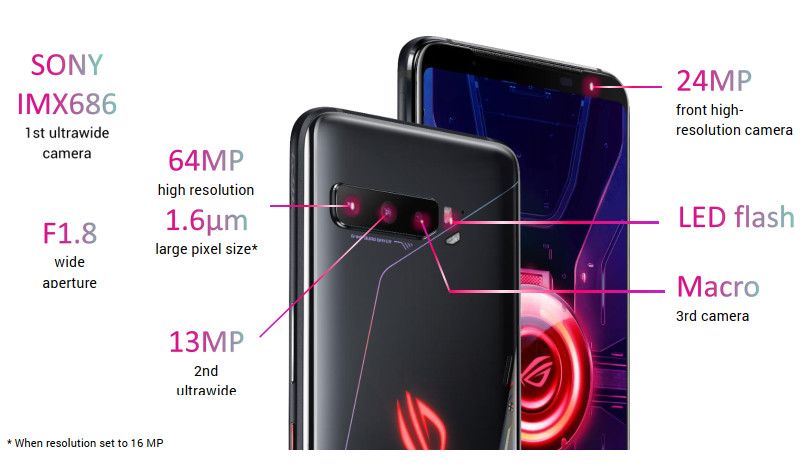
ASUS ROG Phone 3

For the software, the ASUS ROG Phone 3 allows users to choose between the gaming-aesthetic ROG UI or the more cleaner looking ZenUI. The base Android version is Android 10, and ASUS claims to stick close to stock Android on both the skins apart from the visual identity and some gaming-specific features.

ASUS is also launching accessories alongside the ROG Phone 3. These include a new modular ROG Kunai 3 Gamepad which adds physical gamepad controls to the phone; a new ROG Lighting Armor Case; a ROG Clip to attach the phone to some selected console controllers; a new TwinView Dock 3 that provides a second 144Hz display for dual-screen gameplay; and a Mobile Desktop Dock to allow gamers to connect a desktop keyboard and mouse for a desktop-like gaming experience on an external TV or monitor.

Pricing and Availability for the ASUS ROG Phone 3

The global pricing of the ASUS ROG Phone 3 is as mentioned below:

Europe

  • ROG Phone 3 Strix Edition (8GB + 256GB): €799
  • ROG Phone 3 (12GB + 512GB): €999
  • ROG Phone 3 (16GB + 512GB): €1,099

The device will be available from the end of July 2020 in Europe.

India

  • ROG Phone 3 (8GB + 128GB): ₹49,999 (~$670)
  • ROG Phone 3 (12GB + 256GB): ₹57,999 (~$777)

The Indian box includes a 3.5mm headphone jack adapter as well as a case in the box. The device will be available from Flipkart.com from August 6, 2020, onwards.

We’ll update pricing and availability for more regions as soon as it gets announced. Pricing and availability for accessories will also vary across regions.

ASUS ROG Phone 3 XDA Forums


What are your thoughts on the ASUS ROG Phone 3? Let us know in the comments below!

The post ASUS launches the ROG Phone 3 with the Snapdragon 865 Plus, 144Hz display, and 6000mAh battery appeared first on xda-developers.


from xda-developers https://ift.tt/2EaJqLJ
via IFTTT

You can now watch Netflix on the Google Nest Hub and Nest Hub Max

Google Assistant Smart Displays are great for getting visuals that aren’t possible on audio-only smart speakers. But smart displays aren’t only for viewing typical Google Assistant commands and routines. They can also be used similarly to any Chromecast-enabled display. One service that has been notably absent, however, is Netflix. That’s finally changing.

The Nest Hub and Nest Hub Max can do a lot of handy things with their displays. You can view Google Photos slideshows, make and receive Google Duo video calls, check-in on connected security cameras, and more. They can also be used for watching media streaming services like YouTube. Netflix has been missing, though, and now it’s officially available for both Smart Displays.

Currently, Netflix is limited to the Nest-branded Smart Displays, so it won’t work on devices like the Lenovo Smart Display. To set it up on your display you can go to the settings in the Google Home app and link your Netflix account under the “Videos and Photos” section. From there you can simply use voice commands to start playing a specific show or movie. You can also bring up a browsing interface and use the touchscreen by saying “Hey Google, open Netflix.”

Google mentions there are a number of other streaming services available on Nest smart displays. Netflix, NBC Peacock, and HBO Max are some of the newer additions, but there’s also Disney+, CBS All Access, Sling TV, Hulu, SHOWTIME, and many more. Not all of these can be initiated with voice commands, but you can use the cast button to send content to the display.


Source: Google

The post You can now watch Netflix on the Google Nest Hub and Nest Hub Max appeared first on xda-developers.


from xda-developers https://ift.tt/39kXZI2
via IFTTT

Need to Host Video Calls? This Course Will Make You an Expert Microsoft Teams Admin

Over the past few months, video calls have become the primary method of communicating with our coworkers. On a small scale, setting up calls is relatively easy. But when you need to hold large meetings, things get trickier. The Microsoft Teams for Enterprise Administrators Course helps demystify one of the most popular platforms, with 18.5 hours of easy-to-follow tutorials. Right now, you can get the training for just $19.99 at the XDA Developers Depot.

Even if you don’t have to work from home, using Teams is a smart move. According to Microsoft, companies who switch to this software make decisions 17.7% faster than before. Little wonder that many recruiters are looking for project managers who really understand video calling.

This course helps you acquire such knowledge. Through 60 concise tutorials, you learn how to deploy and manage Teams in any workplace.

This includes everything from scheduling meetings and setting up calls to sharing content with coworkers. In addition, the training looks at governance, security, and compliance — all important details you need to get right. 

The content comes from iCollege, an online learning provider that has been delivering technical courses since 2003. As a student, you get lifetime access and the opportunity to earn certification.

It’s normally priced at $295, but you can pick up the course now for just $19.99.

 
The Microsoft Teams for Enterprise Administrators Course – $19.99

See Deal

Prices subject to change

The post Need to Host Video Calls? This Course Will Make You an Expert Microsoft Teams Admin appeared first on xda-developers.


from xda-developers https://ift.tt/3huPr3Z
via IFTTT

Samsung announces Galaxy Z Flip 5G with Qualcomm Snapdragon 865 Plus and a familiar design

In 2019, Samsung, Huawei, and Motorola set out to create and conquer the segment of foldable smartphones with their respective contenders. Out of these, Samsung undeniably received most of the spotlight for the Galaxy Fold, primarily owing to its worldwide popularity. The Galaxy Fold was followed by Samsung’s vertically folding and relatively much more compact Galaxy Flip Z that was unveiled alongside the Galaxy S20 series. Although the Galaxy Z Flip is projected as futuristic, it has one major hurdle that deters it from being future-ready i.e. the lack of 5G connectivity. That changes today as Samsung is launching an overhauled Galaxy Z Flip with 5G. Even though the Galaxy Z Flip 5G was expected to launch alongside the Galaxy Note 20 series at the live Samsung Unpacked event next month, the Korean giant has officially announced the new device, presumably to avoid chaos at the already packed (pun unintended) launch event.

Samsung Galaxy Z Flip 5G XDA Forums

The Samsung Galaxy Z Flip sports the exact same design and primarily the same features as the previous 4G variant. It features the same 6.7-inch Full HD+ “Infinity Flex Display” with a pixel density of 425ppi. Just like the previous model, there’s another tiny display outside that measures 1.1 inches and has a resolution of 300 x 112 pixels. The 12MP wide and 12MP ultra-wide cameras outside and the 10MP selfie camera remain the same as well.

Powering the Galaxy Z Flip 5G is Qualcomm’s latest and the most powerful Snapdragon 865 Plus mobile platform on which the Prime Core is overclocked from 2.84GHz to 3.1GHz. 5G connectivity is facilitated by Qualcomm’s Snapdragon X55 5G modem-RF system that can render speeds up to 5Gbps in theory. In practice, however, the Galaxy Z Flip 5G supports sub-6GHz spectrum bands on NSA and SA 5G networks along with Dynamic Spectrum Sharing (DSS). The smartphone does not support mmWave spectrum bands.

As per its purported TENAA listing, the Galaxy Z Flip 5G supports N41, N78, and N79 bands for both SA as well as NSA 5G networks, although that could be limited to the Chinese variant.

Price & Availability

The Samsung Galaxy Z Flip 5G comes to the U.S.A. in Mystic Gray and Mystic Bronze colors. The unlocked variant is priced at $1449.99 which can be bought at Samsung.com, Amazon, and Best Buy starting from August 7, 2020. The carrier model will be available via AT&T and T-Mobile from the same date.


Samsung Galaxy Z Flip 5G Specifications

Samsung Galaxy Z Flip 5G
Display Main Display 6.7″ FHD+ Dynamic AMOLED Display(21.9:9) Infinity Flex Display
2636 x 1080
425ppi
Cover Display 1.1″ Super AMOLED Display
300 x 112
303ppi
Dimension & Weight Folded 73.6 x 87.4 x 17.3mm (Hinge) – 15.4mm (Sagging)
Unfolded 73.6 x 167.3 x 7.2mm – 6.9mm (Screen)
Weight 183 g
Camera Front Camera 10MP Selfie Camera: F2.4
Pixel size: 1.22μm
FOV: 80˚
Rear Dual Camera 12MP Ultra Wide Camera: F2.2
Pixel size: 1.12μm
FOV: 123˚
12MP Wide-angle Camera: Super Speed Dual Pixel AF, OIS, F1.8
Pixel size: 1.4μm
FOV: 78˚
OIS (Optical Image Stabilization) for Rear Wide-angle Camera
Up to 8x digital zoom
HDR10+ recording
Tracking AF
CPU & GPU Qualcomm Snapdragon 865 Plus (7nm DUV (N7P) process)
  • 1 x Kryo 585 (based on ARM Cortex-A77) Prime Core @ 3.09GHz
  • 3x Kryo 585 (based on ARM Cortex-A77) Performance cores @ 2.4GHz
  • 4x Kryo 385 (based on ARM Cortex-A55) Efficiency cores @ 1.8GHz

Adreno 650 GPU

Memory 8GB RAM with 256GB internal storage
Battery 3,300 mAh (typical) dual battery
Charging Fast Charging compatible via power cord and wireless
Wireless PowerShare reverse charging
OS Android 10
Network
  • 5G Non-Standalone(NSA), 5G Standalone(SA), Sub6, Dynamic Spectrum Sharing(DSS)
  • Enhanced 4X4 MIMO, 6CA, LTE Cat.20
    • Up to 2.0Gbps Download / Up to 200Mbps Upload
Connectivity
  • Wi-Fi 802.11 a/b/g/n/ac (2.4/5GHz),VHT80 MU-MIMO,1024QAM
  • Bluetooth v5.0 (LE up to 2Mbps)
  • ANT+
  • USB Type-C
  • NFC
  • Location (GPS, Galileo, Glonass, BeiDou)
Payment
  • Samsung Pay (Link)
  • Credit & debit cards: supports MST or/and NFC, Prepaid card, Global remittance, Transit, Memberships, Gift cards, Rewards
Sensors Capacitive Fingerprint sensor (side), Accelerometer, Barometer, Gyro sensor, Geomagnetic sensor, Hall sensor (digital, analog), Proximity sensor, RGB Light sensor
Authentication Lock type: pattern, PIN, password
Biometric lock type: Fingerprint sensor, Face recognition
Audio Mono speaker
Surround sound for Bluetooth and earphones with Dolby Atmos technology (Dolby Digital, Dolby Digital Plus included.)
UHQ 32-bit &DSD64/128 support
PCM: Up to 32 bits, DSD*: DSD64/128
Audio playback format: MP3, M4A, 3GA, AAC, OGG, OGA, WAV, WMA, AMR, AWB, FLAC, MID, MIDI, XMF, MXMF, IMY, RTTTL, RTX, OTA, APE, DSF, DFF
Bluetooth
Dual Audio: connect two Bluetooth devices to the Galaxy Z Flip to play audio through the two devices simultaneously.
Scalable Codec: Enhanced Bluetooth connection under ambient radio frequency interference.
Recording
Recording quality is improved with the High AOP Mic that minimizes distortion in noisy environments.
Video Video playback format
MP4, M4V, 3GP, 3G2, WMV, ASF, AVI, FLV, MKV, WEBM
TV connection
Wireless: Smart View (screen mirroring 1080p at 30fps)
Security Knox platform: real-time monitoring and protection.
Virus, malware prevention. (Powered by McAfee)
Secure Folder: a secure space on the device to isolate and protect content such as apps, photos, movies, and private files.
In the Box Galaxy Z Flip, Data Cable, Travel Adapter, Ejection Pin, USB Connector (OTG), Quick Start Guide, Clear Cover, Earphones (USB Type-C) with sound by AKG

The post Samsung announces Galaxy Z Flip 5G with Qualcomm Snapdragon 865 Plus and a familiar design appeared first on xda-developers.


from xda-developers https://ift.tt/3jxknm3
via IFTTT

Realme X3 SuperZoom gets unofficial bootloader unlock method, while Realme C3 receives it officially

Realme usually ships their phones with an unlockable bootloader, but you can’t simply use a typical Fastboot unlock command to accomplish the task. Unless you’re dealing with the Realme 2 or C1, you have to first install a model-specific app known as In-Depth Test to validate the eligibility of bootloader unlocking. The app sends a bunch of unique identifiers from the target device to Realme servers in order to generate an unlock token. After a successful server-side validation, the app itself installs the token on the phone, and then only you can proceed with fastboot flashing unlock to carry out the remaining unlock process. However, it seems that an existing In-Depth Test app can be forced to run on an unsupported model in some cases. The “hack” is stable enough to unlock the bootloader of the Realme X3 SuperZoom.

While reviewing the Realme X3 SuperZoom, our very own Zachary Wander, better known in the forums as XDA Recognized Developer Zacharee1, has discovered that the In-Depth Test app intended for the Realme 6 Pro can also be used to perform the bootloader unlocking on the X3 SuperZoom. The app might throw some errors regarding device incompatibility, but you can easily change the region settings on your Realme X3 SuperZoom to bypass them. Unlocking the bootloader will factory reset your device, but it’s absolutely essential if you wish to root your device.

Realme X3 SuperZoom XDA Forums
Guide to unlock the bootloader of the Realme X3 SuperZoom

According to Zachary, the trick might work on the regular Realme X3 as well, while we can spot conflicting reports of Realme 6 bootloader unlock using the same app. The OEM has yet to publish the kernel sources for the Realme X3 series, thus don’t expect a source-built custom ROM for the device duo at this moment even if you manage to unlock the bootloader.

The Realme C3 has also gained bootloader unlocking support, albeit via the official channel. The company published the kernel sources for this device back in April, and now finally they have released the In-Depth Test APK for the Realme C3. We hope that the availability of the kernel source and the bootloader unlocker app should be useful to kickstart development on this phone.

Download Realme C3 In-Depth Test APK || Bootloader Unlock Guide

Realme C3 XDA Forums

The post Realme X3 SuperZoom gets unofficial bootloader unlock method, while Realme C3 receives it officially appeared first on xda-developers.


from xda-developers https://ift.tt/39uHKbD
via IFTTT