LightBlog

mercredi 2 septembre 2020

Samsung Galaxy Z Fold 2 Hands on: Probably my favorite phone of the year

When the original Galaxy Fold began malfunctioning in the hands of major reviewers in April 2019, it seemed like Samsung’s vision of a foldable future had crashed before it could even start. But a relatively problem-free relaunch six months later, followed by the successful launch of a second foldable device, put Samsung back on track. Now, with the Galaxy Z Fold 2, Samsung’s making a strong case that the foldable form factor is not just here to stay, but should be the next evolution of smartphones.

Samsung Galaxy Z Fold 2 specifications (click to reveal the specs)

Specification Samsung Galaxy Z Fold 2
Dimensions & Weight
  • Folded: 159.2 x 68 x 16.8 mm
  • Unfolded: 159.2 x 128.2 x 6.9 mm
  • 282g
Display
  • Outer Display:
    • 6.23″ HD+ Super AMOLED
    • 2,260 x 816 pixels
    • 25:9 aspect ratio
    • Infinity-O
    • 60Hz refresh rate
    • HDR10+ support
  • Inner Display:
    • 7.6″ FHD+ Dynamic AMOLED 2X
    • 2,208 x 1,768 pixels
    • 22.5:18 aspect ratio
    • Infinity-O
    • 120Hz refresh rate
    • Dynamic refresh rate
    • HDR10+ support
SoC Qualcomm Snapdragon 865 Plus:
  • 1x Kryo 585 (ARM Cortex-A77-based) Prime core @ 3.1GHz
  • 3x Kryo 585 (ARM Cortex-A77-based) Performance core @ 2.4GHz
  • 4x Kryo 385 (ARM Cortex A55-based) Efficiency cores @ 1.8GHz

Adreno 650 (10% overclock)

RAM & Storage 12GB LPDDR5 + 256GB UFS 3.1
Battery & Charging
  • 4,500 mAh
  • 25W wired fast charging
  • 11W wireless charging
  • Reverse wireless charging
Fingerprint sensor Side-mounted fingerprint scanner
Rear Camera
  • Primary: 12MP, f/1.8, OIS
  • Secondary: 12MP, f/2.2, ultra-wide-angle
  • Tertiary: 12MP, f/2.4, telephoto
Front Camera
  • Folded: 10MP, f/2.2, fixed focus
  • Unfolded: 10MP, f/2.2, fixed focus
Other Features
  • Folding design
  • 5G: SA, NSA, mmWave
  • NFC
  • MST
Android Version Android 10 with One UI

Almost every issue (except for perhaps water resistance) that I and many other reviewers/consumers had with the original Fold is resolved with the Galaxy Z Fold 2. The outside “cover screen” is much larger; the inside screen got rid of the unsightly notch, and the hinge feels significantly more sturdy. There are also improvements in multitasking, closer partnerships with Google and Microsoft to optimize the experience, and further enhancements to the whole experience.

Galaxy Z Fold (left) vs Galaxy Fold (right)

That first change is the most crucial, in my opinion. As someone who writes and read on my phone often, I enjoyed using the Fold as my daily driver, but the 4.5-inch cover screen always felt too cramped, mainly when typing. It was a device I felt like I had to unfold to get real work done.

The Galaxy Z Fold 2’s 6.2-inch cover screen, because it feels much closer to a typical phone screen size, makes it easier to use, thus reducing the need to unfold the device every time. But you’ll want to unfold it whenever you have the chance because the inside screen is stunning: a 7.6-inch Samsung AMOLED panel with all the vivid colors and vibrant contrast that we expect from a Samsung flagship. The internal screen supports 1768 x 2208 pixels resolution and 120Hz refresh rate, while the external cover display features 816 x 2260 pixels resolution and 60Hz refresh rate.

The multitasking and typing experience on the Galaxy Z Fold 2

The same multitasking system from the first Fold returns, but everything feels more fluid and zippy. You can run up to three apps on the screen at once in split-view, and you can adjust orientation on the fly: for example, have two apps show vertically side-by-side or horizontally on top of each other. You can also drag and drop files and photos between native Samsung apps and Microsoft apps, for example, a photo from the gallery to Microsoft Outlook or Samsung’s messaging app.
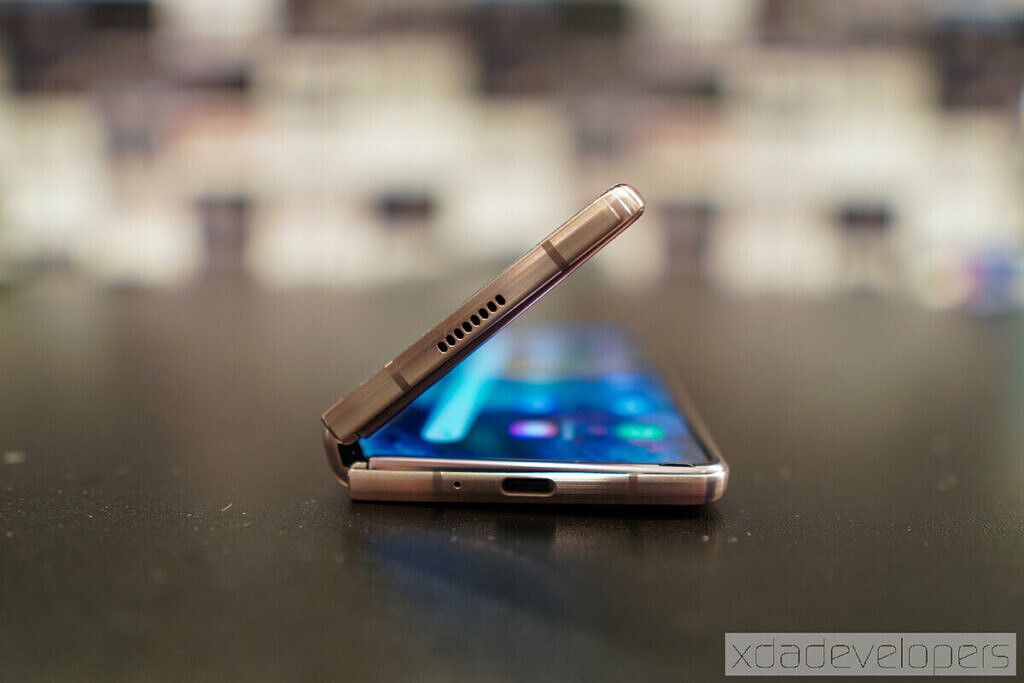
The new hinge lets you stop it at any angle

Another significant upgrade is the improved hinge, which, just like on the Z Flip, can now keep a partially folded angle. Samsung calls this “Flex Mode,” and it brings several new use cases, such as hands-free video calls or photo taking. Unlike the first Galaxy Fold, the hinge also feels far more refined and reliable, and the differences between the first and second generation Folds are immediately noticeable.

Samsung developed some new UI tricks to accommodate this new Flex Mode; certain apps will jump into a split view as soon as it’s partially folded. For example, in the YouTube app, you get a full-screen video when the device is opened all the way. But fold the device slightly, and the video jumps to the top half of the screen, with the bottom half showing video comments; other suggested videos, etc. While a marked improvement on the Galaxy Fold, it’s not 100% perfect as more apps need to be optimized to take full advantage of the real estate. For example, the Kindle app doesn’t allow you to display the pages in two individual columns split across the screen; instead, it’s full-screen only).

Another feature that makes a lot of sense given the phone’s form factor: you can take selfies using the primary camera system, with the cover screen as a camera viewfinder. Borrowed from the Galaxy Z Flip, it’s a nice improvement to have, especially as the dual selfie camera on the inside has been replaced with a single pinhole camera.

I didn’t get a chance to test the cameras, but the main system consists of a trio of 12-megapixel sensors, offering the usual wide, ultrawide, telephoto focal lengths. The latter camera can only do 2X optical zoom as opposed to 3X and 5X of the Note 20 and Ultra, respectively. Still, I suppose the foldable form factor made putting the latest camera components difficult. Still, I expect camera performance to be on par with the Galaxy Note 10 or Galaxy S20. Is the Galaxy Z Fold 2 going to have the best smartphone camera around? It almost certainly will not, but it should be good enough. Chances are, the camera isn’t the main reason you are buying a Galaxy Z Fold 2.

Unlike last year where some regions got 5G, and others got 4G, this year, all devices support 5G. You’ll also get the Snapdragon 865 Plus processor regardless of where you buy the Galaxy Z Fold 2; there’s no Snapdragon-Exynos split like on previous Samsung smartphones. There’s 12GB of RAM and either 256GB or 512 of storage, and it isn’t great to see Samsung half the base storage of the Galaxy Fold.

Ultimately, Samsung delivered the changes that were needed most. After just an hour with the device, I already know I want it as my daily driver, and barring an unlikely surprise from Apple or Huawei later this year, the Galaxy Z Fold 2 is shaping up to be my favorite phone of the year. It’s one of the most expensive devices of the year, but at $1,999, it’s only $20 more than the original Galaxy Fold despite the vast number of improvements it brings.
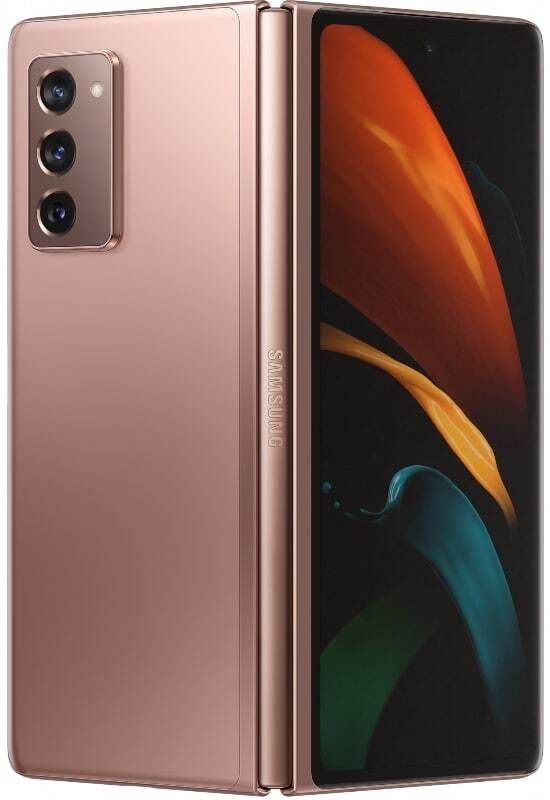
    Up to $800 instant trade-in credit at Samsung
    If you want to save a bundle on your unlocked Galaxy Z Fold 2 and have a recent phone, Samsung's trade-in offer is the best. You can get up to $650 credit and if you have the original Z Flip or Galaxy Fold, you can save $800 on your new Galaxy Z Fold 2!

You might also like:

The post Samsung Galaxy Z Fold 2 Hands on: Probably my favorite phone of the year appeared first on xda-developers.


from xda-developers https://ift.tt/2Goit8r
via IFTTT

Samsung unveils Galaxy A42 5G, Galaxy Tab A7, Galaxy Fit 2, Wireless Charger Trio at “Life Unstoppable” virtual experience

Hot on the heels of the Galaxy Z Fold 2 announcement yesterday, Samsung has just announced several brand new products across different categories at its “Life Unstoppable” virtual event. The list of the products announced today includes the Galaxy A42 5G smartphone, Galaxy Tab A7, Galaxy Fit 2, and Wireless Charger Trio. Most of the product details, including pricing and availability, were not mentioned, so we expect to learn more over the coming months.

Samsung Galaxy A42 5G

Samsung is positioning the Galaxy A42 5G as an affordable 5G-enabled smartphone in the Galaxy A series. Succeeding the Galaxy A41 that launched in May this year, the A42 5G will feature a 6.6-inch Super AMOLED display with a waterdrop notch. The phone will have a quad-camera setup on the back; however, the company didn’t reveal much about the exact hardware. Consequently, details about the SoC, battery size, charging speed, software, etc. also remain under the wraps for now. Samsung says the Galaxy A42 5G will be made official later this year, but it didn’t share an exact timeline.

Samsung Galaxy Tab A7

The new Galaxy Tab A7 will take charge as the latest affordable offering in Samsung’s tablet portfolio. The leaked renders of the tablet surfaced just yesterday, and looking at the official renders, they were right on the money. In terms of specification, the Samsung Galaxy Tab A7 offers fairly modest internals. On the front, you have a 10.4-inch TFT display with 2000 x 1200 resolution, an unspecified octa-core processor on the inside, 3GB of RAM with either 32GB or 64GB flash storage, an 8MP rear and 5MP front cameras, and a 7,040 mAh battery running the show. The tablet also packs four Doly Atmos speakers, a 3.5mm audio jack, and a USB Type-C port. Details about the pricing and availability remain unknown for now.

Galaxy Fit 2

The Galaxy Fit 2 is the brand new entry in Samsung’s fitness tracker portfolio. It’s a direct successor to the last year’s Galaxy Fit and brings along many improvements, including a sleeker body, improved battery life, and an increased set of fitness features. The Galaxy Fit 2 sports a 1.1-inch color AMOLED display and has a virtual button at the bottom. The band has up to 70 different watch faces to choose from and features a larger 159 mAh battery, which lasts up to 15 days, according to Samsung. Just like other fitness trackers, the Galaxy Fit 2 can also measure your heart rate, your sleep quality, track footsteps, and count calories burned. Samsung hasn’t yet revealed any details about the pricing and availability of the Galaxy Fit 2.

Wireless Charger Trio

The Wireless Charger Trio is a successor to the Wireless Charger Duo, which launched last year. As you might have guessed from its name, the Wireless Charger Trio can wirelessly charge up to 3 devices at once. The charger comes with a USB-C to USB-C cable and will be available in Black and White colors. Samsung didn’t mention which charging speeds the charge will offer and whether it will be compatible with other Qi devices as well.


Source: Samsung Newsroom

The post Samsung unveils Galaxy A42 5G, Galaxy Tab A7, Galaxy Fit 2, Wireless Charger Trio at “Life Unstoppable” virtual experience appeared first on xda-developers.


from xda-developers https://ift.tt/2F1ibDS
via IFTTT

Best Galaxy Tab S7 Plus deals: where to pre-order the Galaxy Tab S7 series

The Samsung Galaxy Tab S7 series has just launched, and both provide an excellent Android tablet experience. With flagship specifications and an excellent display in the Plus variant, this is the Android tablet to beat. Flagship smartphones are expensive though, and flagship tablets are too. Looking to pick one up? We have some of the best Galaxy Tab S7 Plus deals here.

As Nirave put it in his hands-on of the Samsung Galaxy Tab S7 Plus, “a lot” of Android tablets suck. This tablet is different though, and for anyone who wants a large Android-based device for consuming media and getting work done, this will likely suffice. The Samsung Galaxy Tab S7 is split into two variants, with the souped-up Plus variant costing a little bit more.

There’s not a huge world of difference between them though, so don’t feel like you’re missing out if you decide to pinch a few pennies. The Plus variant gets a larger screen, bigger battery, and an AMOLED 120Hz panel (vs the still 120Hz IPS panel of the regular Tab S7), and that’s about it. Oh, and the fingerprint sensor is moved from a side-mount to an in-display in the Plus variant too.

Samsung Galaxy Tab S7 series deals in the US

The Samsung Galaxy Tab S7 series is available for pre-order in the US now and will begin shipping on the 18th of September. With a trade-in offer on Samsung’s own website, you can get the Samsung Galaxy Tab S7 series for substantially cheaper.

Samsung Galaxy Tab S7

    Samsung Galaxy Tab S7 | $649 at Samsung
    You can pick up your Samsung Galaxy Tab S7 from Samsung's website, and you can get it even cheaper if you take on one of their trade-in offers!
    Samsung Galaxy Tab S7 | $649 at BestBuy
    BestBuy is also offering the Samsung Galaxy Tab S7 for $649, but you'll also get $29.99 worth of free security software with your purchase, if you're into that.
    Samsung Galaxy Tab S7 5G | $849 at Verizon
    This is the 5G version of the Samsung Galaxy Tab S7, and you can pick it up from Verizon starting at $849. Seem a bit steep? Knock at least $100 off the price by trading in a selected tablet, or $250 off the price if you purchase any Android device alongside it!

Samsung Galaxy Tab S7 Plus

    Samsung Galaxy Tab S7 Plus | $849 at Samsung
    You can pick up your Samsung Galaxy Tab S7 Plus from Samsung's website, and you can get it even cheaper if you take on one of their trade-in offers!
    Samsung Galaxy Tab S7 Plus | $849 at BestBuy
    BestBuy is also offering the Samsung Galaxy Tab S7 for $849, but you'll also get $29.99 worth of free security software with your purchase, if you're into that.
    Samsung Galaxy Tab S7 Plus 5G | $1049 at Verizon
    This is the 5G version of the Samsung Galaxy Tab S7 Plus, and you can pick it up from Verizon starting at $1049. Seem a bit steep? Knock at least $100 off the price by trading in a selected tablet, or $250 off the price if you purchase any Android device alongside it!

Samsung Galaxy Tab S7 series deals in the UK

There’s not a lot of official retailers to buy the Galaxy Tab S7 series through in the UK. However, Samsung’s own store has the tablet in stock and ready to ship, as does everyone’s favorite retailer, Amazon. Unlike the US where the tablet isn’t on sale for a few more weeks, you can buy one and have it shipped straight away in the UK!

Samsung Galaxy Tab S7

    Samsung Galaxy Tab S7 | £599 at Amazon
    Already Amazon UK is running an offer so that you can get the Samsung Galaxy Tab S7 for just a little bit cheaper! You'll even get 15% off a Galaxy Watch 3 or the Samsung Galaxy Buds with your purchase.
    Samsung Galaxy Tab S7 | £619 at Samsung
    You can pick up the Samsung Galaxy Tab S7 from Samsung's website, with the Wi-Fi only variant starting at just £619. You can get it even cheaper if you take on one of their trade-in offers!

Samsung Galaxy Tab S7 Plus

    Samsung Galaxy Tab S7 Plus 5G | £799 at Amazon
    You can get the Samsung Galaxy Tab S7 Plus 5G from Amazon for £999, along with 15% off a Galaxy Watch 3 or the Samsung Galaxy Buds with your purchase.
    Samsung Galaxy Tab S7 Plus | £799 at Samsung
    You can pick up your Samsung Galaxy Tab S7 Plus from Samsung's website, and you can get it even cheaper if you take on one of their trade-in offers! The Wi-Fi only variant will set you back £799, with the LTE and 5G models costing more.

The post Best Galaxy Tab S7 Plus deals: where to pre-order the Galaxy Tab S7 series appeared first on xda-developers.


from xda-developers https://ift.tt/3jQasrp
via IFTTT

PUBGM, APUS Launcher, Baidu, ShareSave by Xiaomi and 114 other apps banned by Government of India

Following up on the ban of 59 apps, including TikTok and Mi Community, in India in June 2020, and then another 47 apps in July 2020, the Government of India has now banned 118 more apps, including some big names like PUBG Mobile, PUBG Mobile Lite, APUS Launcher, Baidu, AFKArena, ShareSave by Xiaomi, GO SMS Pro, and many more. Much like the previous order, these apps have been found to be “prejudicial to [the] sovereignty and integrity of India, defence of India, security of state and public order.”

Here is the complete list of apps that have been banned this time:

List of Banned Apps in Wave 3

  1. APUS Launcher Pro- Theme, Live Wallpapers, Smart
  2. APUS Launcher -Theme, Call Show, Wallpaper, HideApps
  3. APUS Security -Antivirus, Phone security, Cleaner
  4. APUS Turbo Cleaner 2020- Junk Cleaner, Anti-Virus
  5. APUS Flashlight-Free & Bright
  6. Cut Cut – Cut Out & Photo Background Editor
  7. Baidu
  8. Baidu Express Edition
  9. FaceU – Inspire your Beauty
  10. ShareSave by Xiaomi: Latest gadgets, amazing deals
  11. CamCard – Business Card Reader
  12. CamCard Business
  13. CamCard for Salesforce
  14. CamOCR
  15. InNote
  16. VooV Meeting – Tencent Video Conferencing
  17. Super Clean – Master of Cleaner, Phone Booster
  18. WeChat reading
  19. Government WeChat
  20. Small Q brush
  21. Tencent Weiyun
  22. Pitu
  23. WeChat Work
  24. Cyber Hunter
  25. Cyber Hunter Lite
  26. Knives Out-No rules, just fight!
  27. Super Mecha Champions
  28. LifeAfter
  29. Dawn of Isles
  30. Ludo World-Ludo Superstar
  31. Chess Rush
  32. PUBG MOBILE Nordic Map: Livik
  33. PUBG MOBILE LITE
  34. Rise of Kingdoms: Lost Crusade
  35. Art of Conquest: Dark Horizon
  36. Dank Tanks
  37. Warpath
  38. Game of Sultans
  39. Gallery Vault – Hide Pictures And Videos
  40. Smart AppLock (App Protect)
  41. Message Lock (SMS Lock)-Gallery Vault Developer Team
  42. Hide App-Hide Application Icon
  43. AppLock
  44. AppLock Lite
  45. Dual Space – Multiple Accounts & App Cloner
  46. ZAKZAK Pro – Live chat & video chat online
  47. ZAKZAK LIVE: live-streaming & video chat app
  48. Music – Mp3 Player
  49. Music Player – Audio Player & 10 Bands Equalizer
  50. HD Camera Selfie Beauty Camera
  51. Cleaner – Phone Booster
  52. Web Browser & Fast Explorer
  53. Video Player All Format for Android
  54. Photo Gallery HD & Editor
  55. Photo Gallery & Album
  56. Music Player – Bass Booster – Free Download
  57. HD Camera – Beauty Cam with Filters & Panorama
  58. HD Camera Pro & Selfie Camera
  59. Music Player – MP3 Player & 10 Bands Equalizer
  60. Gallery HD
  61. Web Browser – Fast, Privacy & Light Web Explorer
  62. Web Browser – Secure Explorer
  63. Music player – Audio Player
  64. Video Player – All Format HD Video Player
  65. Lamour Love All Over The World
  66. Amour- video chat & call all over the world.
  67. MV Master – Make Your Status Video & Community
  68. MV Master – Best Video Maker & Photo Video Editor
  69. APUS Message Center-Intelligent management
  70. LivU Meet new people & Video chat with strangers
  71. Carrom Friends : Carrom Board & Pool Game-
  72. Ludo All Star- Play Online Ludo Game & Board Games
  73. Bike Racing : Moto Traffic Rider Bike Racing Games
  74. Rangers Of Oblivion : Online Action MMO RPG Game
  75. Z Camera – Photo Editor, Beauty Selfie, Collage
  76. GO SMS Pro – Messenger, Free Themes, Emoji
  77. U-Dictionary: Oxford Dictionary Free Now Translate
  78. Ulike – Define your selfie in trendy style
  79. Tantan – Date For Real
  80. MICO Chat: New Friends Banaen aur Live Chat karen
  81. Kitty Live – Live Streaming & Video Live Chat
  82. Malay Social Dating App to Date & Meet Singles
  83. Alipay
  84. AlipayHK
  85. Mobile Taobao
  86. Youku
  87. Road of Kings- Endless Glory
  88. Sina News
  89. Netease News
  90. Penguin FM
  91. Murderous Pursuits
  92. Tencent Watchlist (Tencent Technology
  93. Learn Chinese AI-Super Chinese
  94. HUYA LIVE – Game Live Stream
  95. Little Q Album
  96. Fighting Landlords – Free and happy Fighting Landlords
  97. Hi Meitu
  98. Mobile Legends: Pocket
  99. VPN for TikTok
  100. VPN for TikTok
  101. Penguin E-sports Live assistant
  102. Buy Cars-offer everything you need, special offers and low prices
  103. iPick
  104. Beauty Camera Plus – Sweet Camera & Face Selfie
  105. Parallel Space Lite – Dual App
  106. “Chief Almighty: First Thunder BC
  107. MARVEL Super War NetEase Games
  108. AFK Arena
  109. Creative Destruction NetEase Games
  110. Crusaders of Light NetEase Games
  111. Mafia City Yotta Games
  112. Onmyoji NetEase Games
  113. Ride Out Heroes NetEase Games
  114. Yimeng Jianghu-Chu Liuxiang has been fully upgraded [translated name]
  115. Legend: Rising Empire NetEase Games
  116. Arena of Valor: 5v5 Arena Games
  117. Soul Hunters
  118. Rules of Survival

As is with the previous ban wave, we expect the Google Play Store and the Apple App Store to remove access for Indians to these apps in the next few days. Simultaneously, these apps and games themselves will shutter access to their servers for Indian users if they wish to remain compliant with Indian laws, if TikTok’s reactions are any yardstick.

This ban comes mere days before PUBG Mobile’s big v1.0 update, and also takes into its crosshairs Xiaomi’s ShareSave crowdfunding platform. The total tally of banned apps is now at 224 across three waves. This new wave takes into account some of the 275 previously flagged apps, but not all of them — so there might be some more additions in the future. As is with the previous ban, the government continues to cite section 69A of the Information Technology Act, 2000 in its decision.

The post PUBGM, APUS Launcher, Baidu, ShareSave by Xiaomi and 114 other apps banned by Government of India appeared first on xda-developers.


from xda-developers https://ift.tt/2Dnblbh
via IFTTT

Kernel sources for the Samsung Galaxy Tab S7, Moto G Stylus, Motorola One Zoom, Motorola One Fusion, and Moto E (2020) are live

Access to the kernel sources gives power users a chance to dive deeper into the code that runs the corresponding Android-powered device. Besides improving the overall performance, tweaking such sources allow the modding community to add new capabilities that are otherwise not offered in the stock configuration. Kernel source releases also help developers to port popular custom ROMs (e.g. LineageOS) for the device which, in turn, benefit users who aren’t satisfied with the stock ROM. Most Android OEMs nowadays release the sources within a short period of their devices hitting the market, fulfilling their legal obligation of the General Public License v2. Manufacturers like Samsung and Motorola have a particularly good track record of releasing these sources and we now have another example of their diligence. The kernel sources for the recently released Samsung Galaxy Tab S7 series as well as a bunch of Motorola phones are now up for grabs.

Samsung Galaxy Tab S7

Kernel sources for the “Pro” variant of the Samsung Tab S7 lineup are now available on Samsung’s Open Source website (linked below). These include the Wi-Fi only variant  SM-T970) and the regional cellular models (SM-T976B and SM-T978U). We can’t spot any occurrence of the regular Galaxy Tab S7 variants (SM-T87x) as of yet, which may indicate towards a unified release from the company.

Samsung Galaxy Tab S7 / Tab S7+ Kernel Sources ||| Samsung Galaxy Tab S7 / Tab S7+ XDA Forums

Moto G Stylus

Despite the possibility of combining the sources of Motorola’s every SD665 phone, they still prefer to release device-specific packages. Sources for the Moto G Stylus (code-name “sofiap”), for example, are now available on the GitHub repository of the OEM.

Moto G Stylus Kernel Sources ||| Moto G Stylus XDA Forums

Motorola One Zoom

Motorola previously released sources for the Android Pie build for the Motorola One Zoom (code-name “parker”). Now, following the arrival of Android 10 soak test builds for the device, the company has refreshed their repository and published a new package. This also means that the final soak test build has been greenlit for stable rollout.

Motorola One Zoom Android 10 Kernel Sources |||  Motorola One Zoom XDA Forums

Motorola One Fusion

Just like the One Fusion+, the Motorola One Fusion (code-name “astro”) has also received a dedicated kernel source release from the company. You can take a look and download the sources from the link below.

Motorola One Fusion Kernel Sources ||| Motorola One Fusion XDA Forums

Moto E (2020)

Lastly, we have the 2020 edition of the Moto E, an entry-level phone powered by the Qualcomm Snapdragon 632 SoC. If you are a developer working on this device, you might be able to start taking advantage of the kernel source.

Moto E (2020) Kernel Sources

The post Kernel sources for the Samsung Galaxy Tab S7, Moto G Stylus, Motorola One Zoom, Motorola One Fusion, and Moto E (2020) are live appeared first on xda-developers.


from xda-developers https://ift.tt/2Gndtko
via IFTTT

LG may show off its dual screen “Wing” smartphone on September 14th

In a blogpost today, LG has revealed details about kicking off its new Explorer Project along with a video teaser of what’s believed to be its crazy LG Wing smartphone. LG describes the new Explorer Project as “both an initiative and a category and will include devices that deliver distinctive and yet unexplored usability experiences.” The announcement will take place on September 14 at 10:00 (EDT) and will be streamed on LG Mobile’s YouTube channel and Facebook page.

LG says the new Explorer Project will solely focus on discovering new usabilities and bringing innovative smartphone designs. In contrast, its “Universal Line” will focus on delivering competitive devices such as the LG Velvet.

Although LG hasn’t yet officially revealed much info about the LG Wing, we already know quite a few bits about this upcoming smartphone, including its design, form factor as well as a possible price. A report from ETNews back in May gave us our first glimpse at this crazy dual-screen smartphone. As per the report, the LG Wing will feature a radical dual-screen design in which the secondary screen swivels horizontally behind the main display. This was followed by a release of two leaked video clips, which demonstrated how LG plans to utilize the dual-screen setup for different use cases.

As for availability, LG Wing is expected to be first launched in its home country South Korea. However, the company also plans to bring it to the US market subsequently. As per our source, the LG Wing will hit the US shores this fall and will be priced around $1000.

LG Wing XDA Forums

Information regarding the exact specifications of the Wing remains unknown. However, if the ETNews report is to be believed, the LG Wing will have a 6.8-inch primary display, a 4-inch secondary display, a triple camera setup featuring a 64MP primary sensor, and a Snapdragon 700-series processor with 5G support (likely the Snapdragon 765 or Snapdragon 768G).


Source: LG Newsroom

The post LG may show off its dual screen “Wing” smartphone on September 14th appeared first on xda-developers.


from xda-developers https://ift.tt/31QKaz1
via IFTTT

OnePlus Nord now supports Google AR Core

The OnePlus Nord was announced in July 2020 with the Qualcomm Snapdragon 765G SoC, 90Hz display, and a quad rear camera setup at an exciting starting price of ₹24,999/€399. The phone has made its way into the hands of reviewers and users alike, and the reception for the smartphone has largely been positive so far. OnePlus has also been updating the device frequently to improve upon the complaint points of early adopters. Now, the OnePlus Nord has gained support for Google AR Core.

Google Play Services for AR is automatically pushed to new devices once Google whitelists them. For the OnePlus Nord, Google has not yet whitelisted the device as an “ARCore Supported Device“, but we reckon that this will happen shortly. Users report that they can now update the Google Play Services for AR app through the Play Store (the app already exists on the phone as a stub APK). We tried it out on our unit and can confirm that the app can be updated without an issue, and doing so enables normal AR functioning.

The whitelisting mechanism ensures that only devices with sensors that have properly calibrated by the OEM and Google for an optimal augmented reality experience can download and use ARCore-enabled apps. The OnePlus Nord hasn’t been added to the list just yet, but it has been whitelisted — so just the formality of adding it to the list remains.

OnePlus Nord Review: Great Performance at a Great Price
XDA Forums

The OnePlus Nord already has a few key milestones under its belt. It’s a certified YouTube Signature Device, and is also expected to be Android Enterprise Recommended soon. Kernel sources for the phone are already available, which in turn has helped with third-party development efforts such as TWRP, Pixel Experience, and LineageOS 17.1. Of course, you can also easily root the phone with Magisk, and if you do end up with a brick somehow, unbricking and fixing your phone is fairly easy with the MSMDownloadTool. If you don’t have the phone yet and just want to use the static and live wallpapers on your existing device, we got you covered there as well. And now, you can use it with AR Core too.


Thanks to XDA Senior Member Some_Random_Username for the tip!

The post OnePlus Nord now supports Google AR Core appeared first on xda-developers.


from xda-developers https://ift.tt/2EOMqhs
via IFTTT