LightBlog

vendredi 4 septembre 2020

Samsung updates the Galaxy S10 Lite with One UI 2.5 and September 2020 patches

Samsung has been slowly rolling out its One UI 2.5 update to its vast library of devices, starting with its older flagship smartphones, and now the company is bringing the software to yet another such device. Galaxy S10 Lite owners can now download the One UI 2.5 update, which introduces a host of new features.

The One UI 2.5 OTA for the Galaxy S10 Lite is currently rolling out to users in Spain. The firmware version is G770FXXU3CTH4. Samsung also merged the September 2020 Android security patches.

We don’t currently have a full changelog of what’s been updated, but if we were to go by what was previously rolled out to the Galaxy S10 and Galaxy S10 Plus, we would say that the update brings a lot of new features to the table, including Wireless DeX and an enhanced Pro Video mode. Unfortunately, that doesn’t seem to actually be the case, as according to SamMobile, the One UI 2.5 update for the Samsung Galaxy S10 Lite does not include Pro Video’s new granular resolution controls and mic selection as well as Wireless DeX. The lack of Wireless DeX makes sense, though, since the phone doesn’t even support wired DeX in the first place. The update does improve the duration of Single Take selection intervals in the camera app, though.

Samsung Galaxy S10 Lite Forums

The One UI 2.5 update is Samsung’s next stop before it issues an update to One UI 3.0, which will be based on Android 11. Samsung is currently testing that update in closed beta, so hopefully, it won’t be long before an open beta and then stable build is released.

With a rollout beginning in Spain, more Galaxy S10 Lite owners around Europe should see the update soon. Has your device received the update?

The post Samsung updates the Galaxy S10 Lite with One UI 2.5 and September 2020 patches appeared first on xda-developers.


from xda-developers https://ift.tt/2QSxHEJ
via IFTTT

You’ve Been Talking. We’ve Been Listening. All of Our 5G Samsung Smartphone Deals are Available to New and Existing Customers

You have been talking, and at AT&T we have been listening.  Our top priority is making sure our customers feel heard, valued and appreciated.  It turns out, it’s not complicated to know what they want.  One thing continues to rise to the top of focus groups, survey data, and social media posts:

Why do new customers get better deals than existing customers?

Our research shows that 84% of all postpaid wireless customers think this is unfair.  

That’s why in early August, we celebrated the launch of our fast, reliable, and secure nationwide 5G by including 5G in all of our postpaid unlimited wireless plans at no additional cost.*  And by offering the same great deal to new and existing customers on our best Samsung 5G smartphones.  Switch, add a line or upgrade – everyone gets the same great price.  Right now, when you sign up for an AT&T unlimited plan and make your purchase on a qualifying installment plan, you can get:** 


In fact, this deal is so good, that the internet didn’t believe it.  Twitter even asked if we’d made a mistake.  Well, nope, it’s not a mistake.

Blake, we heard you.  We really are listening that’s why in celebration of our recent nationwide 5G launch, we have teamed up with Samsung to expand this offering by making our current 5G Samsung smartphone deal available to new and existing customers. 


Beginning Friday, Sept. 4, new and existing customers will also be able to get $700 off the Samsung Galaxy S20+ 5G or the Samsung Galaxy S20 Ultra 5G when they purchase on a qualifying installment plan with an eligible AT&T unlimited plan and trade in a qualifying device.** 

That means customers can switch, add a line, or upgrade and get the same great deals on all 5G Samsung smartphones at AT&T.  Keep on telling us what you think – we’re listening.

*0% APR 30-mo. installment agmt. For well-qual. customers. 5G req’s compatible plan. 5G may not be in your area. See att.com/5Gforyou for coverage details.
*AT&T 5G requires compatible plan and device. 5G not available everywhere. Go to att.com/5G for details
**AT&T may temporarily slow data speeds if the network is busy. Ltd. Time Offer. Req’s min. $500 on 0% APR 30-mo. agmt. $0 down for well-qual. customers only. Prices/discounts shown are after credits over 30 mos. No credits for optional $5/mo. Next Up upgrade feature. If svc cancelled, device balance due. For new lines, if svc. on other lines cancelled w/in 90 days credits stop. $30 Activation/Upgrade and other terms apply. See store for details.

The post You’ve Been Talking. We’ve Been Listening. All of Our 5G Samsung Smartphone Deals are Available to New and Existing Customers appeared first on xda-developers.


from xda-developers https://ift.tt/2Gwfue9
via IFTTT

Today’s Top Tech Deals: $30 Razer Gaming Mouse, $900 Acer Gaming Laptop, and More!

It’s Friday! Thank goodness. It seems a shady, but working Switch emulator launched for Android phones, but unfortunately it needs a specific controller to work, so you can’t spend the weekend playing Breath of the Wild on your phone with it… yet. If you already have a Nintendo Switch, though, you might want to grab a pre-order for Super Mario 3D All-Stars, which will have a limited physical release and will be out in a couple weeks. A little gaming FOMO always gets me to open my wallet…

Anyway, today’s top tech deals include $100 off the OnePlus 8, Motorola’s excellent G8 Power for just $170 unlocked, Satechi’s Labor Day sale, and more!

Moto G8 Power (Unlocked) for $170

You know, it’s always good to have a back-up phone handy. Who knows when your main phone may have a battery issue, or needs to go in for repairs? Be prepared by picking up this unlocked Moto G8 Power phone for $170 on Amazon, which is $70 off its current MSRP. It’s not the most powerful phone around, but it has all the basics you need to get through the day, and charges quickly to boot. Just note that this is an international GSM phone!

    Moto G8 Power (Unlocked)
    With a 5000 mAh battery with quick-charging, a Qualcomm Snapdragon 665 processor, and a quad camera system, the Moto G8 Power is a solid budget phone choice. This is an International GSM phone, so it won't work with CDMA carriers. Make sure you're able to use it before purchasing!

Satechi Labor Day Sale Offers 15% Off

From now until September 7th, you can save 15% off all of Satechi’s wares if you use the code SATLDAY15 at checkout. Now that’s my kind of Labor day sale! Satechi provides great accessories for your tech and mobile devices, so it’s definitely worth looking through their store page and seeing if there’s something you need. My personal recommendations? This headphone stand with USB 3.0 ports and this strong looking charging cable!

    Satechi Labor Day Sale
    Satechi provides quality accessories for your computer and mobile device. Take 15% off anything in their store by using the code SATLDAY15at checkout. You have until September 7th to stock up!

Acer Nitro 5 Gaming Laptop for $900, Today Only

If you’ve been wanting a gaming laptop but really don’t want to pay above $1,000, today and today only is your chance to nab the Acer Nitro 5 Gaming Laptop. One of Amazon’s daily Gold Box deals brings 15.6″ gaming laptop to a nice $900. With a NVIDIA GeForce RTX 2060 graphics card, 16GB DDR4 RAM, and a 144Hz display, you won’t even miss your gaming desktop when you pick this baby up.

    Acer Nitro 5 Gaming Laptop
    Your search for a good but sub $1,000 gaming laptop is over, because the Acer Nitro 5 Gaming Laptop is it. But, you only have until the end of the day to pick it up for $900, so don't delay!

OnePlus 8 for $700

OnePlus’s motto is never settle, so why settle for paying full price? By using the coupon code OPLD100OFF when checking out, you can get the Interstellar Glow model of the OnePlus 8 for $700, $100 off the MSRP. Our review says the OnePlus 8 has some similar functions to the OnePlus 7T, but by chopping $100 off the asking price, this very pretty looking phone is now worth looking at. Too bad the code doesn’t work with Glacial Green model of the phone, as well.

     OnePlus 8 (Interstellar Glow)
    Never settle for paying full price! The Interstellar Glow model of the OnePlus 8 is $100 off if you use code OPLD100OFFat checkout.

Razer Basilisk Essential Gaming Mouse for $30

It wasn’t until I seriously got into PC gaming that I realized how important a decent mouse is. Nothing is more frustrating than getting killed in a battle royale because your mouse lost its bluetooth connection or suffers from mysterious lag. Resolve those issues now with the Razer Basilisk Essential Gaming Mouse, which is $20 off today! This fancy mouse has a 6400 DPI sensor, seven programmable buttons for whatever you may need, and of course, it also lights up. Who doesn’t love some RGB goodness?

    Razer Basilisk Essential Gaming Mouse
    On sale for $30, the Razer Basilisk Essential Gaming Mouse has seven programmable buttons, a fun RGB palette, and a DPI toggle for FPS gameplay. Grab this one before it sells out!

More Tech Deals

Looking for even more tech deals? We have them for you below! As a matter of fact, the Dell Inspiron 15 7000 has dropped another $50 since we featured it on Wednesday! Meanwhile, the OnePlus 7T has shot up $50, but it’s still $150 off so B&H Photo’s price is better than you’ll find elsewhere.

The post Today’s Top Tech Deals: $30 Razer Gaming Mouse, $900 Acer Gaming Laptop, and More! appeared first on xda-developers.


from xda-developers https://ift.tt/2EXqcK4
via IFTTT

[Update: Print Job Available] Chrome OS may soon get a native printing and scanning app

Update 1 (09/04/2020 @ 10:46 AM ET): . Scroll to the bottom for more information. The article as published on March 11, 2020, is preserved below.

Late last year, Google announced that Cloud Print will be killed off in 2021. Cloud Print was a service that allowed users to connect a local printer to the cloud to print to it from any device. This tool was especially useful for Chrome OS devices, which left us wondering if some sort of replacement would be introduced. Google appears to be working on a solution.

There are several methods to print from a Chrome OS device, but the functionality is greatly lacking when compared to Windows or macOS. There’s no way to see current and queued jobs, which can be annoying if you want to cancel something. There’s also no real way to manage the printers you’ve used or to see errors when something inexplicably doesn’t print correctly.

The good news is Google appears to be working on a printing solution for Chrome OS. Last month, work began on a “Print Management app” for Chrome OS. This was discovered through a Chrome OS flag with that same title. The flag description reads: “Enables the print management app that allows Chrome OS users to view and manage their native print jobs.” This should be a web-based System Web App that will be launched from the Settings app. You’ll be able to see a list of recent printing jobs along with information about them.

What’s even more difficult than printing with Chrome OS? Scanning. Thankfully, Google appears to be working on something for this as well. Another new flag titled “Scanning UI” has a description that reads: “An experimental UI that allows users to interact with a connected scanner.” This UI will be included in the Print Management app, so it should be a nice one-stop for all your printing and scanning needs.

As Chrome OS has evolved over the years, it has continued to gain more abilities. Some of the things seem pretty basic, such as this printing and scanning app. There’s still a lot of work that needs to be done for the operating system to be on par with Windows and macOS.

Source: 9to5Google


Update: Print Job available in Chrome OS 85

Chrome OS 85 has added a new app to the launched “Print Jobs”, which is the same “print management app” as mentioned above. This new app will give you a hub for viewing active and historical print jobs.

Source: ChromeUnboxed

The post [Update: Print Job Available] Chrome OS may soon get a native printing and scanning app appeared first on xda-developers.


from xda-developers https://ift.tt/33b41rs
via IFTTT

Google Phone app’s call recording feature now available on multiple Xiaomi phones globally

Google has been working on native call recording support in its Phone app for some time now. We first spotted some evidence back in January this year, and even managed to fully activate the feature a few days later. As expected, the owners of the Google Pixel series of smartphones received this feature first, followed by a bunch of Nokia devices that are part of the Android One initiative. It seems that the Mountain View giant is getting ready to expand the roster as several Xiaomi users now have access to the call recording module on the Google Phone app.

Here’s a quick refresher of Xiaomi’s stance regarding call recording: MIUI comes with its own version of the dialer app which does support call recording. However, recent Xiaomi phones sold outside of China, India, or Indonesia come with preinstalled Google Phone (and Google Messages) app, and not their MIUI-equivalent app. Unless Google decides to flip a server-side switch, these variants don’t have access to the call recording feature out of the box. Well, apparently the waiting period is over.

As reported by PiunikaWeb, the native call recording feature on the Google Phone app is already accessible on global variants of the Redmi Note 8 Pro, Redmi Note 9S, and the Redmi Note 9 Pro. Many users have chimed in on the Mi Forum to confirm that they have received the feature out of the blue on the dialer. In some cases, the option disappears after a reboot, which does sound like a server-side A/B testing. The Mi A series, which runs on Android One instead of MIUI, also gained call recording support using the Google Phone app in the last few months.

At the time of writing, there is no known way to force the call recording option to show up in the app. You may try installing the beta build of the Google Phone app and let us know in the comments below if it enables the feature on your device!

The post Google Phone app’s call recording feature now available on multiple Xiaomi phones globally appeared first on xda-developers.


from xda-developers https://ift.tt/31YG8EQ
via IFTTT

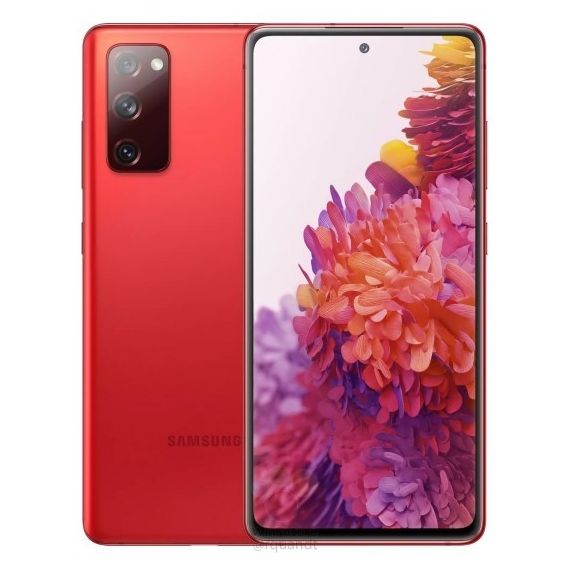
Samsung Galaxy S20 FE leaked specs mention two versions: 5G with Snapdragon 865 and 4G with Exynos 990

Back in June this year, we first heard rumors about an upcoming Samsung device called the Samsung Galaxy S20 FE. At the time, sources familiar with the matter had revealed that the device would be a follow up to the Galaxy S10 Lite from earlier this year. Then, leaked renders of the device popped up last month, giving us our first look at Samsung’s next affordable flagship. The renders were accompanied by more rumors which suggested that the device would be powered by the Qualcomm Snapdragon 865 SoC, coupled with 128GB of internal storage.

A report from Korean publication The Elec also revealed that the device would feature a triple camera setup on the back, with a 12MP primary sensor, a 12MP wide-angle sensor, and an 8MP telephoto camera. This was followed by more leaked renders that confirmed that the Galaxy S20 FE will feature a flat display with wider bezels and will be offered in six color variants. Now, we have more information about the device’s hardware specifications, courtesy of noted leaker Roland Quandt (@rquandt).

As per a recent report from WinFuture on the matter, the Samsung Galaxy S20 FE will be offered in two variants — a 5G enabled variant powered by the Snapdragon 865 and a 4G variant powered by Samsung’s Exynos 990 SoC. The Snapdragon 865 variant of the device, unlike the Snapdragon variant of the flagship Galaxy S20 series, will be available in European markets where Samsung usually sells the Exynos version of its devices. The processor will be accompanied by 6GB of RAM and 128GB of onboard storage.

Samsung Galaxy S20 FE Samsung Galaxy S20 FE

The report further reveals that the Samsung Galaxy S20 FE will pack in a 6.5-inch SuperAMOLED display with a resolution of 2400 x 1800 pixels. The display will have a centered hole-punch cutout for the selfie camera and it won’t feature curved edges like the flagship Galaxy S20 models. Furthermore, the display on the upcoming Galaxy S20 FE will offer a maximum refresh rate of 120Hz and it will be protected by Corning’s Gorilla Glass 3. The device will also feature an in-display fingerprint sensor, however, it isn’t clear if it’ll be of the ultrasonic or optical variety.

Samsung Galaxy S20 FE

In the camera department, the Samsung Galaxy S20 FE will feature a triple-camera configuration on the back with a 12MP f/1.8 main sensor, a 12MP f/2.2 ultra-wide sensor with a 123-degree FOV, and a 12MP f/2.0 telephoto camera with 3x optical zoom. Over on the front, the device will include a 32MP f/2.0 selfie shooter. For connectivity, the device is expected to feature support for Wi-Fi 6, Bluetooth 5.0, and NFC. As of now, it isn’t clear whether the Galaxy S20 FE will feature a glass or plastic back panel, but the wireless charging support leads us to believe that the device will, most likely, feature a glass back.

Samsung Galaxy S20 FE Samsung Galaxy S20 FE Samsung Galaxy S20 FE

Additionally, the report reveals that the device will feature two stereo speakers tuned by AKG and IP68 dust and water resistance. To keep the phone up and running, Samsung is expected to pack in a 4,500mAh battery with support for fast charging, however, the device will come with a 15W charger in the box. The device is rumored to measure in at just 8.4mm thick and weigh 190 grams. As seen in previous leaks, the Galaxy S20 FE will be launched in a variety of color variants, however, the available colors will depend on the model you choose. For example, the dark navy blue color variant might be limited to the 5G variant. As of now, Samsung hasn’t released any official information about the device but we expect to learn more in the coming days as the device is expected to hit the market later this month or early next month.


Source: WinFuture

The post Samsung Galaxy S20 FE leaked specs mention two versions: 5G with Snapdragon 865 and 4G with Exynos 990 appeared first on xda-developers.


from xda-developers https://ift.tt/3lRBxfm
via IFTTT

Honor MagicBook Pro Hands On Preview: a fantastic Ryzen-powered laptop

Honor isn’t exactly known for their laptops. The company has a large focus on smartphones and wearables, so I’m not too surprised that many don’t know about their laptops.

The Honor MagicBook Pro just got announced at IFA 2020, and I’ve been using mine daily to complete all of the tasks that I would normally do on my MacBook Pro. The Honor MagicBook Pro is a major win in my book, and while we’re going to be putting together a more in-depth review in the future, I’m really enjoying my time with it so far.

Honor MagicBook Pro Front

About this review: I received the Honor MagicBook Pro from Honor on the 31st of August, 2020. Honor did not have any input in the contents of this review.

Honor MagicBook Pro Specifications

Specification Honor MagicBook Pro
Dimensions & Weight
  •  369.00mm x 234.00mm x 16.90mm
  • 1.7kg
Display
  • 16.1-inch IPS LCD FHD (1920×1080)
  • Matte finish
  • 16:9
  • 300 nits
Processor
  • Ryzen 5 4600H APU
GPU
  • AMD Radeon RX Vega 6
RAM & Storage
  • 16GB DDR4 @2666MHz Dual DIMM
  • 512GB M.2 NVMe Western Digital SN730 SSD
Battery & Charging
  • 56Wh
  • 65W fast charging
I/O
  • 3x USB 3.1 Type-A
  • 1x USB Type-C
  • 1x HDMI 2.0
  • 3.5mm headphone/microphone combo jack
Connectivity
  • Wi-Fi 802.11a/b/g/n/ac
  • Bluetooth 5.0
OS
  • Windows 10 Home Edition
Other Features
  • Microsoft Office 365, 30-day trial
  • Honor Magic Link
  • 1MP hidden webcam

Design and Build Quality

The Honor MagicBook Pro struck me as a premium device from the getgo. It features a full aluminum chassis with a sandblasted shell, imposed upon only by a large “HONOR” engraving on it. The laptop itself is quite thin, especially when opened up, and it’s only 1.7kg in weight. It’s small and light enough that I’ve been able to carry it one-handed with no concerns about dropping it.

The keyboard is backlit, though it’s fairly dim compared to my Macbook Pro. It works fairly well in low light but isn’t very useful when there’s moderate ambient lighting. Obviously that doesn’t really matter though, as the purpose of a backlit keyboard is so that you can see what keys you are hitting when it’s dark. It definitely achieves that goal.

Honor MagicBook Pro backlit keyboard

Speaking of that keyboard though, it’s nice enough to use, though it’s obviously not a mechanical keyboard. It’s a membrane keyboard, and the actuation is higher than I’m used to as a result. It’s fine for general usage and I have been typing a lot on it, but sometimes it can be a bit jarring coming from my mechanical keyboard. It’s one of the better membrane keyboards that I’ve used, which is the main thing.

I didn’t really find that it affected my typing speed much, as when I did a TypeRacer test, I was getting anywhere from 110-120WPM. Generally, I would get 120WPM on my mechanical keyboard at my computer, so I’m happy with this keyboard. I also found my typing to be quite accurate when using it.

Honor MagicBook Pro typing speed

The trackpad is larger than previous Honor keyboards, but the larger trackpad means I’ve often brushed the trackpad resulting in the cursor moving over to something else.

The keyboard has one neat little feature though; much like the Huawei Matebook series, it houses a 1MP camera that isn’t great but gets the job done. For those who are privacy-conscious, the camera being stowed away in the keyboard may grant you peace of mind as well. To deploy the camera, you click it back into the keyboard and it pops out! This webcam’s position is what allows for the 16.1-inch display to fit into what would typically be a 15.6-inch form factor. I’ve had no trouble putting the Honor MagicBook Pro in bags that were sized for 15.6-inch laptops.

On the left and right-hand side of the keyboard, you’ve got a pair of dual speakers. The quality isn’t the best, but they get the job done and are quite loud. I found them fine for movies and YouTube watching, though the audio quality for music left a lot to be desired. At the top of the right-hand side speaker, there’s a power button with a built-in fingerprint sensor.

Finally, there are 2x USB-A ports on the right side of the laptop along with a headphone jack, while the left side has a USB-C port, an HDMI port, and a USB-C port.

Display

The display of the Honor MagicBook Pro is quite good. It’s an IPS 1080p 16.1-inch display with a peak brightness of 300 nits. The colors feel really accurate, which is probably thanks to the 100% sRGB color gamut that this laptop uses. It has a 90% screen-to-body ratio, which is why the webcam is located inside of the keyboard. It was that, or do what Xiaomi did with the Mi Notebook 14 and remove it entirely. There’s also a built-in eye comfort mode that filters out blue light. You can enable it by right-clicking the desktop and clicking “Display Manager”.

Performance

So, the performance section will be a much larger focus in the actual review, but for now, I’ve taken some basic readings and benchmarks. I’m overall very impressed with the Ryzen 5 4600H for a number of reasons.

First and foremost, this thing is fast. The Ryzen 5 4600H is an entry-level CPU, but you wouldn’t know it just from using it. Performance has been excellent in practically everything, and it doesn’t even run all that hot. I was able to play a game of Valorant with some friends where it ran within 110-140FPS consistently. It peaked at a rather high temperature of 89°C, but most of the time it sat around the 70°C mark. This heat was kept away from the keyboard as well, and I didn’t notice any thermal throttling in-game. Minecraft gets around the same FPS with a far render distance of 16 chunks.

I also did a quick benchmark test on that Western Digital nVME drive, and I was rather impressed by the results.

Finally, I did a quick CineBench test on the best performance battery preset, just to see what it is capable of. I’ll be doing more benchmarks a little bit more in-depth for the full review. A score of 2971 is extremely impressive and is just about in-line with what you’d have expected from the 2nd generation of Ryzen desktop CPUs.

For now though, as you can see, the Ryzen 4600H is no slouch. The Honor MagicBook Pro is a fantastic performer, and I’m really looking forward to seeing how it fares in more in-depth testing.

Battery life

The AMD Ryzen 5 4600H boasts a rather low TDP of 45W, which means that for general usage, most of the time, the TDP will be a lot lower. Coupled with the massive 56 Wh battery in the Honor MagicBook Pro, I’ve had no issues with battery life. I’ve been getting consistently 6-7 hours of usage on a single charge. That’s primarily web browsing and non-intensive work like writing, but it’s still impressive nonetheless. Honor claims you’ll get 11 hours of offline 1080p video playback on a single charge, and I’d be inclined to agree that to be the case.

When that battery does die, you’ll be able to charge up to 50% in just half an hour with the included 65W USB-C charger. This same charger will also fast charge your Huawei and Honor devices.

Honor MagicBook Pro First Impressions

While this isn’t our full review just yet, the Honor MagicBook Pro is an intriguing purchase. On the French and German HiHonor websites, you can pick it up for €899 (~$1,065), with an ongoing promotion meaning that you can knock that price down to €799 (~$946). In the UK, it’ll cost £849, and you can also choose to get a free Honor Magic Watch or the Honor Router 3. I’m currently loving the Honor MagicBook Pro, and if you’re on the fence, check back in a few weeks’ time to get my full thoughts!

    Honor Magicbook Pro
    The Honor MagicBook Pro is a fantastic Ryzen-powered laptop that has caught me by surprise. After just a few days, I'm already loving this laptop!

The post Honor MagicBook Pro Hands On Preview: a fantastic Ryzen-powered laptop appeared first on xda-developers.


from xda-developers https://ift.tt/3gVKzEt
via IFTTT