LightBlog

mardi 8 septembre 2020

Android 11 Features – What developers need to know about the new APIs

Android 11 is here, and with it, a whole bunch of changes from Android 10. And those changes mean that developers are going to need to update their apps to take advantage of everything Android 11 has to offer (and everything it restricts).

This article goes over the more important API and feature changes and additions in Android 11. W have a separate article on the more user-focused features that you can also check out. Now, let’s get started!

Device Controls

One of the bigger features introduced in Android 11 is known as Device Controls. Device Controls’ intended purpose is to make controlling your smart devices easier. Open the power menu, and you’ll be able to see and quickly interact with any connected smart devices you have. This isn’t a closed feature, either. Any developer can make their own widgets for Device Controls.

Currently, there are 5 different widget types available: Toggle, which is a simple status indicator with on/off functionality; Range, which can be used to adjust some value between 0-100%; Toggle with Slider, which combines the functionality of Toggle and Range; Stateless, which is a simple button with no status indicators; and Temperature Panel, which allows you to view and control the temperature settings of a thermostat.

Android 11 Device Controls API

While it’s clear that these widgets are meant to be used to things like lights and window blinds, there’s certainly a potential to “abuse” them for more functionality. If you want to get started developing your own Device Controls widget, check out Google’s docs. If you want to learn more about why Device Controls might be useful, check out our editorial.

Media Controls

Controlling media in Android 11 is pretty interesting. Instead of the standard playback notification, you can have your media controls show up in the quick settings panel. This part of the panel will also show up to 5 total media “sessions,” allowing the user to swipe through and easily resume playback from other apps and devices. It seems that there can even be multiple sessions from a single app.

Android 11 redesigned media player Android 11 redesigned media player

Implementing this isn’t fully automatic, though. Your app needs to support the new Media Controls. Check out Google’s documentation and our article for more information.

Screen Recording

At long last, Android has built-in screen recording. In Android 11, recording your screen is as simple as adding a quick settings tile and tapping it. Before you start recording, you can choose whether you want to record audio from the microphone and if you want to show touches on-screen.

This has some implications for developers, though. There are an absolute ton of screen recording apps on the market. While Android 11 doesn’t break their functionality, it does mean that third-party screen recorders will need to provide some compelling features if they want to be used instead of what’s built into Android.

One-Time & Auto-Revoking Permissions

Google has been concentrating a lot on user privacy features in Android lately, and they haven’t stopped with Android 11. This release has two very important changes to the runtime (or “dangerous”) permissions model.

In previous versions of Android, if your app needed a dangerous-level permission, it would request access from the user, and that was pretty much it. Your app would keep that permission until it was uninstalled, its data was cleared, or the user manually revoked it.

Android 11, however, no longer has this guarantee. Now, when a user is prompted to grant a permission, they’ll have the option to grant it “only this time.” The permission will be granted to the app only as long as it’s in the foreground. Here’s how Google describes its behavior:

“While your app’s activity is visible, your app can access the data.

If the user brings your app to the background, your app can continue to access the data for a short period of time.

If you launch a foreground service while the activity is visible, and the user then moves your app to the background, your app can continue to access the data until that foreground service stops.

If the user revokes the one-time permission, such as in system settings, your app cannot access the data, regardless of whether you launched a foreground service. As with any permission, if the user revokes your app’s one-time permission, your app’s process terminates.”

Obviously, there are some pretty major implications for developers here. Since a permission revocation acts like a force-stop, it can cause things like alarms and jobs to fail. According to the Commonsware blog, that “short period of time” your app can work in the background is only about a minute. So if your app has something that relies on precise wakeups, you’re going to need to recommend that the user not use the one-time permission option for your app.

One-time permissions aren’t the only thing added in Android 11, though. If Android detects that you haven’t used an app for a while, it’ll automatically revoke all granted permissions. This is a nice privacy feature in theory, but again, it has some serious implications, especially for apps whose primary purpose is to run and collect data in the background (like battery trackers).

Android 11 permission auto-revoke

Messaging App Notifications

Android 11 is apparently very “people-focused.” While that’s a bit of a vague term, at least part of it involves a better messaging experience, with properly-marked message notifications appearing in their own category at the top of the notification center. It also means supporting Android’s Bubbles feature, which is similar to Facebook Messenger’s Chat Heads.
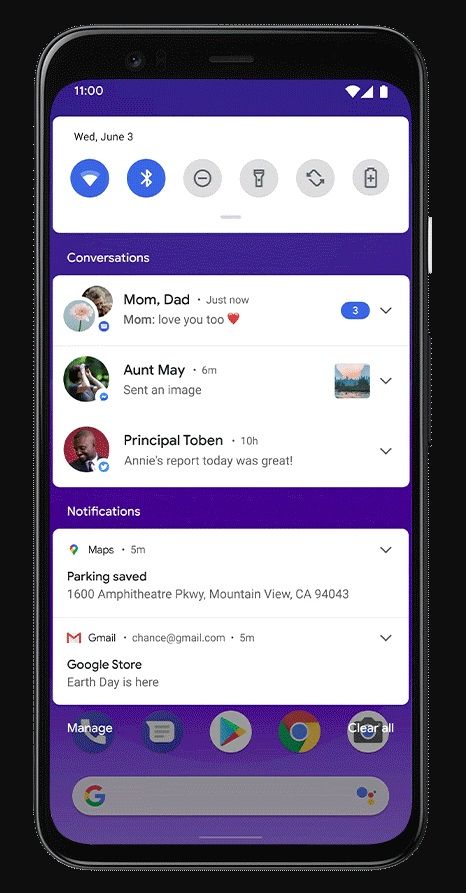
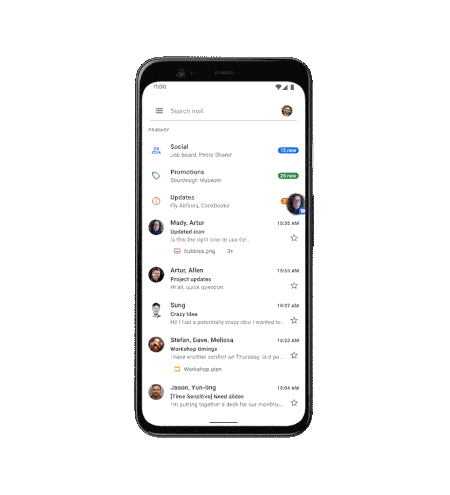
If you’re interested in implementing the new “people-focused” messaging features in your app, head on over to Google’s documentation.

File Managers and Scoped Storage

Scoped Storage is a mess. There, I said it. As a feature, it’s confusing enough for developers, and Google is only making things worse with its weird semi-rollouts and policies.

Previously, in Android 10, developers had the ability to opt-out of using Scoped Storage with the requestLegacyExternalStorage flag. This is still possible in Android 11 if your app is still targeting Android 10. But as soon as you target Android 11, this flag is ignored.

If you’re working on migrating your data model to support Scoped Storage, you can use the preserveLegacyExternalStorage flag. This will allow your app to continue accessing external storage as long as the user upgraded to the version containing this flag. If the user clears the app’s data, reinstalls, or is a new user, this flag won’t have any effect.

Google does at least partially recognize the importance of full user-space filesystem access, though. There is a new permission (MANAGE_EXTERNAL_STORAGE) to allow you to have mostly-full access again. However, this permission is not allowed in apps published to the Play Store until sometime in 2021. If you have a file manager or antivirus app on the Play Store, you’ll need to hold off on targeting API 30 for now.

These aren’t the only changes to Scoped Storage, though. The data and obb directories under /sdcard/Android/ are no longer accessible under any circumstances, even with the MANAGE_EXTERNAL_STORAGE permission. You also aren’t able to use ACTION_OPEN_DOCUMENT_TREE to target the root of any “reliable” storage or the Download folder anymore. What constitutes as “reliable” storage is up to the manufacturer of the device, but it’s safe to say internal and adopted storage probably both count.

Background Location

If your app needs access to location data in the background, the process is now more involved. Android 10 added the ability to only allow an app access to location data when it’s in the foreground or to allow it all the time. Android 11 further separates these options.

Now, instead of a user choosing one or the other, they have to first allow access to location while using the app, and then go to Settings to allow background access. If your app targets Android 11 (API 30), and you need access to location data in the background, you’ll need to update your permission flow to keep this into account. Take a look at Google’s documentation for instructions on implementing this.

BiometricPrompt API

As authentication methods like fingerprint readers and face recognition become more widespread, it’s important to be able to specify what forms of authentication you want to allow. A new API in Android 11 will let you specify the “strength” of the biometric authentication you want to allow.

Identity Credential API

With our payment methods going virtual through apps like Google Pay and Samsung Pay, it’s only natural that there would be a push to make various forms of identity virtual, as well. Android 11 is working on functionality to properly support virtual identities. The native API is there in Android 11, but Google is also working on a Jetpack library for Android versions as far back as Android 7.0 Nougat.

5G APIs

“Yay! 5G!” – said no one ever.

Android 11 has some new APIs to help app developers learn more about the current 5G network that the device is connected to. You can do things like check the type of 5G (5Ge, 5G sub6, 5G mmW), check if it’s metered, and even get a value for the estimated bandwidth of the connection. On top of that, if you don’t have a 5G-capable device (or 5G service in your area), the Android emulator is getting support for virtual 5G, so you’ll be able to properly test how your app responds to the different network modes.

Display Cutout APIs

Notches, holes, screen curves, whatever. Android devices have a lot of obstructions in their screens these days. Whether or not those obstructions look good is up to you.

Working around cutouts from a developer perspective can be a bit of a nightmare, though. While Android has had display cutout APIs for a while now, they’re not complete. Android 11 is working to fix this issue by adding more flexibility to the cutout APIs, along with support for working around curved or “waterfall” displays.

Hinge Fold API

Foldable phones have been getting pretty popular lately. With the large manufacturers like Samsung and Huawei and even smaller ones like Motorola releasing quite a few different spins on the foldable design, they’re only going to get more popular.

Android 11 is ready for this with a new API that lets apps detect when a device is folding. You can check it out here. The Android emulator in Android Studio is also getting a “hardware” upgrade to support hinges.

Call Screening

Spam calls are a pretty big problem right now. And with things like number spoofing, it’s gotten pretty difficult to tell whether an incoming call is real or spam. In the US and other regions, carriers have implemented the STIR/SHAKEN standards in an attempt to authenticate caller ID and prevent number spoofing. However, not every carrier will actually block calls that fail to validate, so you might still receive some unwanted calls.

Android 11 has a new API to allow apps to check the STIR/SHAKEN status of incoming calls. This means that third-party (and first-party) call-blockers can better filter calls without having to resort to unstable hacks. You can learn more about this here.

Binder Caching

Privacy isn’t the only focus of Android 11, though. Google has been working on general performance improvements, too. Android has an interesting system of communication between processes that allows third-party apps to interact with the system server, using AIDLs/Binders. The separation this system provides is great for security, but there’s a significant trade-off in terms of performance. Calls between processes can take a lot longer than a similar call within the same process.

To help combat this, Android 11 will cache the return values of certain Binder calls to improve performance for apps that use them. Google says it’s currently focusing on highly-used and relatively-static APIs.

WindowInsetsAnimation.Callback

One of the more janky parts of Android is how apps deal with appearing and disappearing input methods and system bars. While some manufacturers may implement custom animations in their skins or apps, transitions aren’t universal.

Unfortunately, Android 11 doesn’t quite fix the problem, but it at least provides the tools to help developers do it themselves. There’s a new API added that lets you listen and respond to changes in the window insets for your app. With the right window configuration, this will let you detect when the keyboard or system bars are showing or hiding, and resize your app’s layout accordingly.

If you’re interested in putting this into your own app, check out this Medium article.

Animated HEIF Support

GIFs are terrible. Sure, they let you share animations, but they’re huge. For people with slow internet and/or data caps, loading GIFs just isn’t feasible. In some cases, it’s possible to use the more-efficient WebM format, but Android 11 now also has native support for animated HEIFs.

NDK Image Decoder

If you develop parts of your Android app in C++ using NDK, you may have noticed the lack of a framework-side image decoder and encoder. Including C libraries can be costly in terms of app size, especially if you’re building for multiple architectures.

Well, Android 11 adds an image decoding and encoding API to the framework. Obviously, this isn’t very helpful right now, but over the next few years, it’ll definitely help make some apps smaller and easier to maintain.

Low-Latency Video Decoding

Low-latency video is a pretty important feature for things like streaming video, especially with the upcoming launch of cloud gaming platforms like NVIDIA’s GeForce NOW, Google’s Stadia, and Microsoft’s xCloud. Android 11’s MediaCodec API now has full support for encoding and decoding low-latency video streams.

Variable Refresh Rate

With high-refresh-rate displays becoming more and more ubiquitous, functionality across devices with the hardware is becoming more and more fragmented. To combat this, Android 11 introduces an option to set the preferred frame rate of your app. So if you need the display to run at a specified refresh rate (e.g 24Hz for a film movie), this API can help.

Check out the details at Google’s documentation site.

Dynamic Resources

Possibly one of the most exciting additions to Android 11 is the ability to dynamically load and modify resources. Previously, this wasn’t possible. If you wanted to “change” a resource, you’d have to either have pre-defined values in XML or avoid using XML resources altogether and rely on code.

Now you can use the ResourcesLoader and ResourcesProvider APIs to load in additional resources and assets or change/override existing ones.

App Exit Reasons

It’s always frustrating when your app crashes on a device you don’t control, since it makes it harder to find out why. You can implement libraries like Crashlytics to get more details on what happened, but these don’t capture everything.

Android 11 adds the ActivityManager.getHistoricalProcessExitReasons() API, which allows you to query if and why your app may have force-quit. Reasons include ANRs, crashes, native crashes, and quite a bit more.

ADB Incremental

If you’re developing a large app, you probably know how tedious it can be to try to install it through ADB. It might fail halfway through, and even if it doesn’t, there’s a lot of wasted time just waiting for the APK to transfer.

Android 11 is here to save the day, with ADB Incremental. This feature installs enough of the app to allow it to run while streaming the extra data in the background. The threshold for this feature is currently 2GB, and it requires that your app be signed with the APK Signature Scheme v4. It also requires the target device supports the Incremental File System, which is currently only supported on the Pixel 4 but is a launch requirement for Android 11.

More Nullability Annotations

Kotlin has become one of the more popular languages for developing Android apps. Thanks to some handy syntax features, like built-in null-protection, it’s become the favorite of quite a few developers (including me).

Because of this rise in popularity, Google has been working on the Android framework to make it more Kotlin-friendly. This mostly comes in the form of adding explicit nullability annotations to methods and variables. While Kotlin can handle ambiguous method returns from Java, it does so at the cost of explicit null-protection.

Android 11 adds even more nullability annotations to the framework, making it even easier to use Kotlin to develop Android apps.

Compatibility Tools

Because of all the new privacy restrictions in Android 11, it may be difficult to see how they affect your app, without targeting API 30 and hoping for the best.

To help make debugging and updating easier, Android 11 has a feature that allows you to manually toggle the new restrictions, even if your app isn’t targeting API 30. You can enable them individually for more granular testing or all at once to see if anything breaks.

Check out Google’s documentation for more details.

Data Access Auditing

On a similar note to the compatibility tools, Android 11 also adds the ability to audit what data your app is accessing. You can use this to make sure you won’t run into issues with the new Scoped Storage restrictions on Android 11.

For the implementation and usage instructions, visit Google’s documentation.

APK Sideloading Permissions

Thanks to the new Scoped Storage model being further enforced on Android 11, sideloading APKs has gotten a little more difficult, at least on the developer end.

In earlier developer previews of Android 11, granting permission to an app to sideload APKs would immediately force-quit it. This is a confusing experience for both users and developers, as users get thrown out of the app they were using and developers have to handle their app being force-stopped.

While the full release of Android 11 hasn’t fully solved this issue, it’s at least made it manageable. Now, instead of quitting the entire app, granting the permission merely causes the current Activity to restart. If your app installs APKs from an Activity with nested Fragments or some other form of navigation, make sure you properly save the state of it in anticipation of a potential recreation.

Listing Installed Packages

Another privacy feature in Android 11 is its restrictions on retrieving the list of installed apps. In previous versions of Android, using the PackageManager.getInstalledPackages() method would list all matching applications on the device.

In Android 11, however, this method will only return your app and a list of preinstalled applications. The supposed reasoning for this is to avoid apps being able to fingerprint your device by checking what other apps you have installed. However, it’s pretty easy to work around this restriction, at least partially. If your app needs to see user-installed packages, you can use the <queries> manifest element to say what types of apps you want to see. This doesn’t require any user interaction; you’ll be automatically granted the ability to see apps matching your queries.

Check out this Commonsware blog post for more details.

Quick Access Wallet

Partially introduced in Android 10, this feature allows developers to have payment methods show up right in the power menu. In Android 10, the feature was disabled by default and only worked on Pixel devices with Google Pay. Android 11, however, adds a proper API to access it.

To see more about how it works, check out our previous article on Quick Access Wallet.

Third-Party Camera App Restrictions

A big advantage of Android is the ability to specify which app you want to use for a certain service. Unfortunately, this has gotten harder, at least for the camera app.

In general, with Android 11, third-party camera apps will no longer show up in the camera picker when an app requests a photo to be taken. For the full details and reasoning, check out our previous article on this.

Auto Low-Latency Mode

Android 11-based TVs and TV boxes now allow apps to request that the TV disable all post-processing on the displayed image, to allow for lower latency. Take a look at our article on the new Android TV features to learn more.

Block Store Library

Android 11 adds the ability for developers to have users’ app credentials backed up to Google Drive for easier sign-in on new devices. While this feature is optional, it should make migrating to a new device easier for apps that implement it.

Gallery Recycle Bin

While a bunch of manufacturers have added a Trash or Recycle Bin feature to their own gallery apps, it’s a feature that’s been missing from Android itself. Android 11 adds a new API to MediaStore to allow “trashing” photos and videos instead of outright deleting them.

New MediaStore Trash API in Android 11. Credits: Yuriy Mysochenko.

No More Overscan

Overscan was a feature in Android that allowed, well, overscan. While it was mainly meant for TVs, the APIs were present in mobile Android as well and were particularly useful for things like third-party navigation gestures apps. Unfortunately, Google has entirely removed overscan from Android 11.

AsyncTask Deprecation

If you use AsyncTask, it may be time to find an alternative, such as RxJava or Kotlin’s coroutines. Android 11 is officially deprecating the AsyncTask API. While this is only a deprecation and not a removal, it’s still probably a good idea to migrate to something else as soon as possible.

Meta Reflection Patched

Android 9 introduced the hidden API blacklist with the goal to prevent third-party app developers from using parts of the Android framework that aren’t part of the SDK, in the name of stability. Through the use of meta (or double) reflection, though, it was pretty trivial to work around and even disable this restriction altogether.

Android 11, however, is cracking down on this bypass. Meta reflection will no longer work, and even more hidden APIs are restricted. While it still seems to be possible to bypass the new restrictions, the bypass involves using native code, which might not be desirable for all developers.

Share to Print

Printing on Android should be easier with Android 11, thanks to the new Share to Print Intent. This allows developers to share a document directly to a print service, bypassing the normal sharing screen, making printing more convenient for users.

Still No Call Recording API

A feature was introduced in Android 11 Developer Preview 2 that allowed third-party dialer apps to record calls. However, this was quickly removed in Developer Preview 3. If you were seeing stories about this feature, sorry to disappoint, but it’s not available in Android 11.

DSU Loader

Android 10 added the ability to “temporarily” install a GSI straight from Google, to more easily test your apps on newer versions of Android. This feature worked on any Google-certified device running Android 10. Unfortunately, it required an unlocked bootloader, since proper signature verification wasn’t fully implemented.

In Android 11, however, it should now be possible to select and install a Google GSI straight from Developer Options without an unlocked bootloader. Keep in mind that we haven’t been able to test this, so if you have, let us know how it goes!


As you can see, an awful lot has happened with Android 11. There have been changes to how file access works, new features involving smart devices, and even the potential ability to install GSIs without an unlocked bootloader.

Hopefully, this article helped you learn what you’ll need to consider going forward in Android app development. If not, oh well. If you’re interested in booting Android 11 on your Pixel device, we have the download links for you here. If you have an OEM device from OnePlus, Xiaomi, OPPO, or Realme, check out this article to see if your device is eligible for a beta. Alternatively, you can fire up Android Studio to launch the latest Android 11 emulator build, or you can flash one of the Android 11 GSIs released today. Happy developing!

The post Android 11 Features – What developers need to know about the new APIs appeared first on xda-developers.


from xda-developers https://ift.tt/327nOcC
via IFTTT

Today’s Top Tech Deals: OnePlus 7 Pro for $430, $1,200 Samsung Galaxy Book Flex, $65 off Galaxy Watch 3 and More!

I don’t know why Garfield hates Mondays–frankly, I feel Tuesdays are the worst. At least Monday you’re somewhat well-rested from the weekend. By the time Tuesday rolls around, you’ve probably spent all of Monday working and not separating that work and personal time properly. It’s tiring, and it’s not like the rest of the week, there’s rarely anything to look forward to! Well, we’ll have awesome deals every day of the week, so you can now look forward to that every Tuesday.

Today’s top tech deals include an unlocked OnePlus 7 Pro for a low $430, $150 off the Samsung Galaxy Book Flex, and more!

Samsung Galaxy Watch 3 for $365 ($65 off!)

Looking for a smartwatch to motivate you to move again? Or maybe one that looks stylish and will give you notifications? The Samsung Galaxy Watch 3 is both of those, and more, and you can grab one for $365 at Amazon. You can monitor your heart-rate (helpful for exercising and at rest), it looks great on your wrist, and the watch will last for days on a single charge. At $65 off, what more could you ask for?

    Samsung Galaxy Watch 3 (45mm)
    The Samsung Galaxy Watch 3 has great fitness tracking technology, looks great, and last days without a charge. It even knows when you trip and fall so it can signal help if needed. That's a pretty helpful feature, no matter your age and health!

10-Pack of USB-C to USB-C Charging Cables for just $22

Being able to charge your devices is essential to a high-tech life. Most modern products have moved to USB-C charging, which is great for the consumer–you no longer need 20 different cables just to charge everything. It’s also inevitable that these cables will wear out, though, so why not save the hassle of trying to find a replacement when that happens and grab a 10-pack of AmazonBasics charging cables for just $22? It’s USB-C to USB-C, so make sure your power adapters are good, but you can pick these up and stash them everywhere. Put some in your car, your purse, or your desk at the office, and never have to search for a cable again.

    AmazonBasics USB-C to USB-C Charging Cables (10-pack)
    It never hurts to have some extra charging cables around. Grab a 10-pack of USB-C to USB-C cables for just $22 and don't fret about finding replacement cables anytime soon.

Samsung Galaxy Book Flex 13.3” $150 Off

If you need a smaller but still powerful laptop to easily carry with you while travelling, the Samsung Galaxy Book Flex is a great bet. With a long battery life, compatibility with the S Pen, and an outdoor mode, the Book Flex is designed to go everywhere and anywhere you’ll go. The 13.3″ size makes it easy to slide into a carry-on or purse too, and it’s $150 off at Amazon.

    13.3-inch Samsung Galaxy Book Flex
    If you travel a lot, whether it's for work or leisure, the Samsung Galaxy Book Flex is the laptop you'll want to take with you. With a long battery life, slim design, and productivity features, this laptop is worth the price tag.

Anker’s PowerCore Slim Bank 10000 mAh at $20

Power banks are essential for emergencies, and also helpful if you have an aging phone with a “not as good as it used to be” battery. Anker’s PowerCore Slim power bank can hold a lot of charges and is small and light, making it easy to have with you anywhere. The pack even has PowerIQ quick charging technology, and if you clip the coupon on the Amazon pages, you can have this handy accessory for just $20. Also, it’ll work perfectly with those USB-C to USB-C charging cables!

    Anker PowerCore Slim Bank (10,000 mAh)
    Everyone should have a power bank ready for power outages and other emergencies, but why settle for an average power bank when you can get one that can quick charge? The Anker PowerCore will give you the charges you need while not being a pain to lug around.

OnePlus 7 Pro 256GB (Unlocked Sprint + GSM) For $430, Today Only

Available for today only (or until stock runs out), Woot! has the Nebula Blue OnePlus 7 Pro with 256GB of memory for just $430. That’s an incredible deal, seeing as the next best deal I’ve seen on the OnePlus 7 line is B&H Photo’s OnePlus 7T 128GB Smartphone for $450. This is an unlocked phone, but this only works on GSM and MVNO networks, so you won’t be able to use this with Verizon. If that’s not a deal-breaker, act fast, as these might sell out if you wait too long!

    OnePlus 7 Pro 256GB (Unlocked)
    Available today only, don't sleep on this awesome deal on the unlocked OnePlue 7 Pro! This phone is compatible with GSM and MVNO networks, this very blue phone is a good budget option.

More Tech Deals

Looking for even more tech deals? We have them for you below!

The post Today’s Top Tech Deals: OnePlus 7 Pro for $430, $1,200 Samsung Galaxy Book Flex, $65 off Galaxy Watch 3 and More! appeared first on xda-developers.


from xda-developers https://ift.tt/328i3vb
via IFTTT

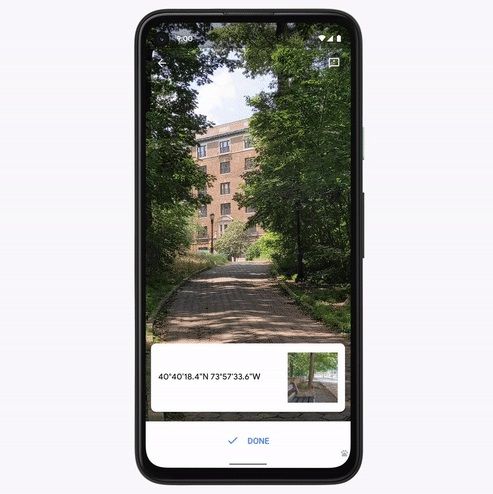
You can now use Live View with Location Sharing in Google Maps, starting with Pixel phones on Android 11

As part of today’s release of Android 11, Google on Tuesday detailed a slew of features that are exclusive to Pixel devices, including a new feature that wasn’t found in an earlier beta or developer preview. Starting with Pixel owners on Android 11, Google is introducing Location Sharing support to Live View in Google Maps. If friends or family have shared their location with you, the updated Live View mode will allow you to see where they’re located in relation to you. The same view will also show their distance from you.

Live View with Location Sharing on Google Pixels running Android 11

“Tapping on start will then show you arrows and directions placed right on top of your world so you can see exactly which way to go,” Google said. For friends planning to meet up for a social distance hangout, this new feature could really come in handy, especially if it works as seamlessly as Google demonstrates. It sure beats calling someone and trying to explain exactly where you’re standing.

The new feature arrives with the Android 11 update, which is available now in stable for Google Pixel phones and is also in beta for some devices made by OnePlus, Xiaomi, Realme, and OPPO. It’s not clear if this feature actually requires the Android 11 update as it mixes two of Google Maps’ existing features: its ARCore-powered, augmented reality Live View mode and real-time Location Sharing feature. It’s likely that Google is simply taking advantage of today’s big Android 11 launch event to roll out this new feature in Google Maps. After all, it’s been a while since the last Pixel Feature Drop was released.

Some of the other new features found in Android 11 for all devices include a built-in screen recorder, floating bubble notifications, a conversations section in the notification shade, and much more. If you own a Google Pixel smartphone, you can download Android 11 now. If you own a device from another OEM, check out our list of major phones getting Android 11 or stay tuned to the XDA forums for custom ROMs once the full source code gets uploaded.

Maps - Navigate & Explore (Free, Google Play) →

The post You can now use Live View with Location Sharing in Google Maps, starting with Pixel phones on Android 11 appeared first on xda-developers.


from xda-developers https://ift.tt/2FduAVr
via IFTTT

Android 11 Update Tracker: List of major phones getting the latest release!

It’s that time of year again when Google releases the new version of its mobile operating system, and after a long few months of beta testing, the American tech giant is finally rolling out the stable version of Android 11. But of course, it’s not just Pixel users who are getting this update. A range of OEMs have announced that they plan to roll it out to their users, and as Android is an open-source operating system, we’ll no doubt see manufacturers unveil their own custom software that runs on Android 11. But which Android devices are getting the much anticipated update? Read on to find out.

Google

What’s great about owning a Pixel smartphone is that because it’s created by Google, you’re guaranteed to get the latest Android updates first. And that’s not changed in 2020 as the stable version of Android 11 has now landed on the current lineup of Pixel handsets.  As is often the case, you can expect a stock Android experience when you update your Pixel to the new version. Android 11 is available officially on the Pixel 2, Pixel 2 XL, Pixel 3, Pixel 3 XL, Pixel 3a, Pixel 3a XL, Pixel 4, Pixel 4 XL, and Pixel 4a.

Sr. No. Phone (Codename, Forum Link) Android 11 Update Status Added On/Status Last Updated
1. Google Pixel 2 (walleye) Stable Rollout September 8, 2020
2. Go0gle Pixel 2 XL (taimen) Stable Rollout September 8, 2020
3. Google Pixel 3 (blueline) Stable Rollout September 8, 2020
4. Google Pixel 3 XL (crosshatch) Stable Rollout September 8, 2020
5. Google Pixel 3a (sargo) Stable Rollout September 8, 2020
6. Google Pixel 3a XL (bonito) Stable Rollout September 8, 2020
7. Google Pixel 4 (flame) Stable Rollout September 8, 2020
8. Google Pixel 4 XL (coral) Stable Rollout September 8, 2020
9. Google Pixel 4a (sunfish) Stable Rollout September 8, 2020

As of September 8, 2020, the latest stable Android release has rolled out for all eligible Google Pixel smartphones. We’ll update the post for older Google Pixel and Nexus devices as and when they receive their first unofficial builds.

ASUS

ASUS recently kickstarted a limited beta testing program for the Android 11 update, albeit the ZenFone 6 (also known as the ASUS 6Z) is the only eligible device till date. The current generation of ROG Phone and ZenFone branded devices are also expected to get the taste of Android 11 before the end of the year.

Sr. No. Phone (Codename, Forum Link) Android 11 Update Status Added On/Status Last Updated
1. ASUS ZenFone 6 (I01WD) Expected Beta August 21, 2020

As of September 8, 2020, ASUS has not rolled out its ZenUI stable release based on Android 11 for any of its devices.

OnePlus

After working with Google to offer a developer preview program for Android 11 early on, the Chinese smartphone maker has since announced its Open Beta for HydrogenOS 11. Owners of the OnePlus 8 and OnePlus 8 Pro are set to benefit from Google’s latest major Android release and are first in line for their respective updates, with other devices to follow.

Sr. No. Phone (Codename, Forum Link) Android 11 Update Status Added On/Status Last Updated
1. OnePlus 8 (instantnoodle) Expected OxygenOS 11 Open Beta September 8, 2020
2. OnePlus 8 Pro (instantnoodlep) Expected OxygenOS 11 Open Beta September 8, 2020

As of September 8, 2020, OnePlus has not rolled out the OxygenOS 11 stable release for any of its devices. The company has, however, announced its first HydrogenOS 11 Open Beta for the OnePlus 8 series. By logical extension, we expect there to be an OxygenOS 11 Open Beta released for the OnePlus 8 series soon.

OPPO

OPPO has also confirmed that a number of its handsets will receive Android 11 updates. Its Android 11-based ColorOS Beta is available for the OPPO Find X2 (Global & China), OPPO Find X2 Pro (Global & China), OPPO Ace2 (China), the OPPO Reno3 4G (Global), and OPPO Reno3 Pro 4G (Global). The company recently recruited beta testers and is holding a virtual event next week to unveil the new version of ColorOS, which will run on Android 11.

Sr. No. Phone (Codename, Forum Link) Android 11 Update Status Added On/Status Last Updated
1. OPPO Find X2 Color OS 7.2 Beta 2 September 5, 2020
2. OPPO Find X2 Pro Color OS 7.2 Beta 2 September 5, 2020
3. OPPO Reno 3 4G Color OS 7.2 Beta 2 September 5, 2020
4. OPPO Reno 3 Pro 4G Color OS 7.2 Beta 2 September 5, 2020
5. OPPO Ace 2 Color OS 7.2 Beta 2 September 5, 2020

As of September 8, 2020, OPPO has not rolled out the ColorOS stable release based on the latest Android version for any of its devices. A beta release based on ColorOS 7.2 is available, though we expect the next version of ColorOS to be announced shortly.

Realme

Realme, another Chinese technology company known for developing affordable handsets that don’t compromise on specs, is offering an Android 11-based Realme UI Beta for the Realme X50 Pro (Global & China). Users can expect a new version of Realme UI 1.0, perhaps called Realme UI 2.0, to roll out soon.

Sr. No. Phone (Codename, Forum Link) Android 11 Update Status Added On/Status Last Updated
1. Realme X50 Pro (RMX2071/RMX2076) Realme UI 1.0 Beta 1 July 2, 2020

As of September 8, 2020, Realme has not rolled out its Realme UI stable release based on Android 11 for any of its devices. A beta release is available for the Realme X50 Pro, but it’s based on the old version of Realme UI. Once OPPO unveils its next-gen ColorOS, we can expect Realme to follow shortly.

Samsung

Back in August, Samsung opened up a developer beta initiative targeting the Galaxy S20 lineup for its Android 11-based One UI 3.0 update. The Korean OEM has not yet disclosed its plans on Android 11 rollout for other models. We can speculate that the current generation flagship series will get before the end of the year, and others will get it later. We’ll update this article when Samsung officially releases a timeline.

Sr. No. Phone (Codename, Forum Link) Android 11 Update Status Added On/Status Last Updated
1. Samsung Galaxy S20 (x1s/x1q) One UI 3.0 Developer Beta August 5, 2020
1. Samsung Galaxy S20+ (y2s/y2q) One UI 3.0 Developer Beta August 5, 2020
1. Samsung Galaxy S20 Ultra (z3s/z3q) One UI 3.0 Developer Beta August 5, 2020

As of September 8, 2020, Samsung has not rolled out the One UI 3.0 stable release based on the latest Android version for any of its devices.

Xiaomi

Xiaomi has also been preparing for the eventual rollout of Android 11. Like OPPO, the company recently launched a beta testing program for its Android 11-based MIUI 12 update, and the Mi 10 and Mi 10 Pro are the first in the line across both Global and China branches. The Chinese OEM is expected to eventually reveal a new version of MIUI — MIUI 13 — with new features in the near future. For now, though, a MIUI 12 beta based on the latest Android release is available for the Xiaomi Mi 10 and Xiaomi Mi 10 Pro.

Sr. No. Phone (Codename, Forum Link) Android 11 Update Status Added On/Status Last Updated
1. Xiaomi Mi 10 (umi) MIUI 12 Stable Beta September 5, 2020
2. Xiaomi Mi 10 Pro (cmi) MIUI 12 Stable Beta September 5, 2020

As of September 8, 2020, Xiaomi has not rolled out a MIUI 12 stable release based on Android 11 for any device. “Beta stable” releases are available for the Mi 10 and Mi 10 Pro, though, so the actual stable release should be announced shortly.

The post Android 11 Update Tracker: List of major phones getting the latest release! appeared first on xda-developers.


from xda-developers https://ift.tt/2Zk3AKW
via IFTTT

Google starts uploading the Android 11 source code to AOSP

Google has officially released the stable version of Android 11 for its range of Pixel smartphones going back to the Pixel 2. The much-anticipated software update sports a range of exciting new features, such as conversation bubbles, a screen recorder, quick access to smart home controls in the power menu, one-time permission prompts, and much more.

Now, the software giant is starting to upload the Android 11 source code onto the Android Open Source Project website. Google uploads the source code for every major Android release under the Apache License version 2.0. This license provides all developers with the ability to modify and distribute AOSP freely, without requiring developers to open source their own modifications. Thus, the release of the source code for every new version of Android is a vital part of the mobile ecosystem, enabling OEMs to create their own forks of Android (like Samsung’s One UI, Xiaomi’s MIUI, OnePlus’s OxygenOS, and so on), and it also gives independent software developers the ability to create and customize their own custom Android releases. Now that Google is publishing the Android 11 framework source code, you can expect to see custom ROMs based on the latest release appear on the Internet (and, indeed, our forums).

As well as making the Android 11 source code available to developers, Google has also uploaded the commit history of the release online. Because of this, developers will be able to find the reasoning behind different changes that Google made to its mobile operating system.

If you’d like to take a look at the source code for Android 11, all you need to do is head over to the AOSP repository and look for the new Android 11 branches and tags. As is always the case, Google will continue to make changes, mainly backports and security patch mergers, so keep an eye out for new tags each month. Development in the master branch is already underway for the next major version of Android, Android 12, so look forward to that about a year from now.

Android Open Source Project

The post Google starts uploading the Android 11 source code to AOSP appeared first on xda-developers.


from xda-developers https://ift.tt/2Fm0fUg
via IFTTT

Android 11 is now available in stable for Google Pixel phones and in beta for some OnePlus, Xiaomi, Realme, and OPPO phones

Android 11 is the latest update to the world’s most popular smartphone operating system, and the first set of stable builds are finally rolling out to support Google Pixel smartphones. We’ve gone through four developer previews (DP 1, DP 2, DP 3, and DP4) and three betas (Beta 1, Beta 2, Beta 3) to get to this point, and we’ve tracked every little detail along the way as best as we could. And now with the stable release of Android 11, we can finally look forward to Google’s vision arriving in the hands of consumers across the world!

Android 11 stable official

All Android 11 News on XDA

Android 11 comes with a fair few changes, but Google is highlighting some of the major ones.

Communication on Android 11

Conversations section in the notification shade

Conversations across messaging apps are now moved to a dedicated space in the notifications section. This will make it easier to manage ongoing conversations with people, and not have these notifications drown out in the flood of miscellaneous app notifications. Google mentions that you can also prioritize conversations from key individuals if you so want. This conversation section was first present in Developer Preview 1.

Android 11 Conversations section in notifications

Bubbles

Last year, we had pointed out how the Bubbles API introduced in Android 10 will replace the overlay API in a future Android version. With Android 11, Google is pushing developers of messaging and chat apps to make the transition to Bubbles to keep conversations in view and accessible when a user is multitasking on their phone.

As users, you can now respond to important conversations without having to switch back and forth between a messaging app and other apps on your phone.

Built-in screen recording

While you could take screenshots from the very early days of Android, you couldn’t really record the contents of your screen on Google Pixel phone without needing a third-party app. Android 11 for the Google Pixel finally adds a built-in screen recorder, so you can easily capture and share what is happening on your Pixel. You can record with sound from the microphone, from the device (internal audio), or both; and you can do this without needing any third-party apps.

Android 11 screen recorder

The screen recorder within Android was first spotted in Android 10 Developer Previews, but the feature was not user-accessible in the stable release. It was spotted again in Android 11 Developer Preview 1, and the feature received more polish in Developer Preview 2.


Device Controls in Android 11

Power Menu Device Control

Android 11 gets a new power menu that allows you to quickly access your connected smart devices. Simply long-press the power button to reach the new menu and control connected devices like thermostats and smart locks with a tap, without needing to open multiple apps.

Android 11 Power Menu Smart Home Device Controls


With this new addition, it finally feels that Google has brought the smartphone to the smart home!

Redesigned Media Controls

Media controls on Android 11 have been redesigned, now gaining a consistent spot in the Quick Settings menu. You can also quickly switch media playback to another device using a shortcut.

Android 11 redesigned media player Android 11 redesigned media player

The new media player in the Quick Settings panel caused quite a stir when it was first spotted in Developer Preview 1. Over the course of development, the UI has been refined, and the feature itself has been upgraded with the ability to store up to five previous media sessions.

Wireless Android Auto

Android 11 now allows all devices to work wirelessly with Android Auto, as long as you have a compatible head unit or aftermarket receiver. We’re already heard about this change, and Google is confirming that wireless Android Auto will require support for 5GHz Wi-Fi networks. Consequently, some areas in the EU, Japan, and Russia will not have this function available because of specific requirements for 5GHz Wi-Fi being used in cars.


Privacy and Data on Android 11

One-Time Permissions

As the name implies, Android 11 allows users to grant single-use, one-time permission access to apps that request access to the device’s microphone, camera, or location. The next time that an app needs to access these device features, it needs to request those permissions once again.

Android 11 one-time permission use for location

The feature was first spotted in Developer Preview 1, and it allows the user to temporarily grant an app access to a permission so long as that app is in the foreground. Once the user navigates away from the app, the app loses access to that permission and must request it again. This is different from the behavior introduced in Android 10 in which users could grant the location permission to apps “while the app is in use.” One-Time Permission gives users even more control over sensitive permissions.

Permissions Auto Reset

The average user might not remember to revoke access to sensitive permissions after their use, so Android 11 will auto-reset all the runtime permissions of an app and notify the user if the app has not been used for “an extended period of time”. The app can request the permissions once again the next time the app is used.

Android 11 permission auto-revoke

This feature addition was first spotted in Developer Preview 3, and we’re glad to see it make its way to the stable release.

Google Play System Update — Project Mainline modules

One of the biggest changes in Android 10 for newly launched devices is the introduction of Project Mainline. The purpose of Project Mainline is for Google to take control away from OEMs of framework components and system applications that are critical to security and maintaining development consistency. Each Mainline module is encapsulated in either an APK or an APEX file and is updateable by Google through the Play Store. The user sees updates as a “Google Play System Update” (GPSU) on their device, and updates are released on a regular cadence as a train (ie. they’re downloaded and installed at the same time).

Google mandates the inclusion of specific Mainline modules, which at the time of Google I/O 2019, included 13. With Android 11 Developer Preview 1, Google mandated a total of 20 Mainline modules. Now, with Android 11 (starting from the Beta 1), Google has mandated a total of 12 Mainline Modules in addition to the ones present on Android 10. The total is now at 25 modules.

Android Enterprise Changes

Android 11 brings some changes for Android Enterprise users, with the work profile now giving the organization’s IT department the tools to manage a device without monitoring their personal profile data or activity. The announcement from Google leaves out most of the details, but you can view the changes here.


Exclusive features for Pixel users

There are some new features reserved for Google Pixel devices, likely being made available through the closed-source Pixel Launcher, Device Personalization Services, and other Pixel-exclusive applications. Google mentions that supported Pixel devices will get additional tools to organize and manage the phone, like app suggestions based on daily routines, new actions for selecting text and images, and for screenshots.


Android 11: Download and Rollout

Android 11 will begin rolling out today in stable for all Pixel devices going back to the Pixel 2, but beta releases are also now available for select OnePlus, Xiaomi, OPPO, and Realme smartphones. The OnePlus 8, OnePlus 8 Pro, Xiaomi Mi 10, Xiaomi Mi 10 Pro, OPPO Find X2, OPPO Find X2 Pro, OPPO Ace2, OPPO Reno3 4G, OPPO Reno3 Pro 4G, and the Realme X50 Pro are the devices getting new Android 11 beta builds today.

Download Android 11 for Google Pixel devices

The Android 11 update should be arriving through an OTA update to your supported Google Pixel device. But in case it hasn’t, you can download Android 11 for supported Google Pixel devices from the following links, and sideload it very easily:

Google Pixels

Device, Codename, XDA Forums OTA System Image
Pixel 2 (walleye) Download Link Download Link
Pixel 2 XL (taimen) Download Link Download Link
Pixel 3 (blueline) Download Link Download Link
Pixel 3 XL (crosshatch) Download Link Download Link
Pixel 3a (sargo) Download Link Download Link
Pixel 3a XL (bonito) Download Link Download Link
Pixel 4 (flame) Download Link Download Link
Pixel 4 XL (coral) Download Link Download Link
Pixel 4a (sunfish) Download Link Download Link

GSI Downloads

x86+GMS Download Link
ARM64+GMS Download Link
x86_64 Download Link
ARM64 Download Link

You can track the other phones getting the update by visiting our Android 11 update tracker article. And if you’d like to take a peek under the hood, Google has also started uploading the Android 11 source code to AOSP. We’ll of course be digging into AOSP ourselves, so stay tuned for more news on Android 11!


What are your thoughts on Android 11? Have you tried it out on your device? Let us know in the comments below!

The post Android 11 is now available in stable for Google Pixel phones and in beta for some OnePlus, Xiaomi, Realme, and OPPO phones appeared first on xda-developers.


from xda-developers https://ift.tt/2ZldUlP
via IFTTT

Google Phone app is coming to non-Pixel devices, helps you detect spam and fraud callers

People don’t agree on much, but one thing everyone can agree on is how much it sucks to receive spam calls. To reduce how many spam calls people are tricked into picking up, Google is launching a new feature that provides users more information about who’s calling.

Known as Verified Calls by Google, the feature will show a caller’s name, logo, reason for calling, and a verification symbol that indicates the business has been authenticated by Google. The goal is to protect people from spam calls and fraud. The feature is available through the Google Phone app, which comes preloaded on Pixel and Android One devices. Last month, Google brought the Google Phone app to some non-Pixel phones, and in today’s release, the company said the app will soon be available on even more Android devices.

In order to have Verified Calls detect spam calls, a few things need to happen on the other side. Businesses must pass a verification process, and information must be sent to Google’s Verified Calls server. “When the business calls you, your device compares the incoming call information with the information Google received from the business,” Google explains in a support document. “If there’s a match, the Phone app displays the call as a Verified call.” Information is sent to Google’s servers over a Transport Layer Security (TSL) encrypted network. No personally identifiable information is collected or stored, while information that is sent to Google’s servers is deleted “within minutes.”

Google said it has been testing Verified Calls for a few months, and in that time, data has shown that people are more likely to answer their phone with the feature turned on. As an example, Google said banks calling to alert a customer about a possible fraudulent transaction can increase answer rates by stating the call reason.

Verified Calls is rolling out in the U.S., Mexico, Brazil, Spain, and India, with more countries to come later this year. The Google Phone app, meanwhile, will be available to download on more Android devices later this week.

Phone (Free, Google Play) →

The post Google Phone app is coming to non-Pixel devices, helps you detect spam and fraud callers appeared first on xda-developers.


from xda-developers https://ift.tt/2FiqJpI
via IFTTT