LightBlog

jeudi 10 septembre 2020

EMUI 11 Hands-on: Huawei’s latest Android update makes multitasking easier

At its annual Developer Conference today, Huawei unveiled EMUI 11, the company’s latest Android-based software release for smartphones and tablets. EMUI, formerly called Emotion UI, is now in its 9th iteration, having initially released back in 2012 using Google’s Android 2.3 as a base. After Google released Android 8 Oreo back in 2017, Huawei bumped the EMUI version from 5 to 8 in order to match the Android number version. Thus, today’s EMUI 11 release was widely expected to be based on Google’s new Android 11 update, but that’s not the case on the beta we loaded onto our Huawei P40 Pro unit the other day. Instead, Huawei’s latest Android software is still based on Google’s Android 10 release from last year—but that doesn’t mean there aren’t enough upgrades here to justify an EMUI version bump.

EMUI 11 Beta on the Huawei P40 Pro

EMUI version 11 brings with it improvements to Huawei’s Always on Display feature, new animations, improved multitasking capabilities, and new multi-screen collaboration integrations. Here are my first impressions based on a pre-release EMUI 11 beta on the Huawei P40 Pro.

Always on Display

Huawei’s EMUI 10 release brought a bit of style to the Always on Display with new colorful themes. The Always on Display in EMUI 11 has even more flair to it with the addition of a new “Mondrian style” option inspired by the abstract art of Dutch painter Piet Mondrian. This new “Mondrian” style option is the first AOD in the “Artistic” section.

If you select the “Mondrian” style AOD, you can choose from 1 of 3 layout options, 1 of 6 predefined color palettes, or extract color from a photo to give your AOD a more personal flair.

The new “Mondrian style” AOD isn’t the only option, of course. There are other still and even animated options, categorized into “Images” for AODs with concrete imagery, “Grafitti” for text-based logos, “Analogue” for stylish analog clocks, “Digital” for more a traditional AOD look and feel, and the aforementioned “Artistic” category with what Huawei calls “Paradox” and “Memphis” style AODs. You can see some of these options in the screen recording I embedded below.

If none of the pre-installed AOD options appeal to you, you can create your own by tapping on the first option in the “Images” category. You can add any image, including an animated GIF or a live photo. Still not satisfied? Scroll to the bottom and tap “MORE” to browse the Huawei Theme store for free or paid AODs made by other users.

Animations

High refresh rate display panels have become the norm in the flagship Android smartphones of 2020, though we’re also starting to see the tech trickle down into mid-range smartphones. The Huawei P40 Pro and P40 Pro+ have Full HD+ resolution OLED panels that support up to a 90Hz refresh rate, but I would argue that the higher refresh rate of the P40 Pro and Pro+ isn’t the only thing that makes the two smartphones feel fluid. The fluidity of the transition animations also plays a big part in making EMUI feel smooth on the P40 Pro. Huawei revamped EMUI’s animation engine in EMUI 10 to achieve this fluidity, and in EMUI 11, the company further refined transition animations to tackle another design problem: ergonomics.

In a briefing, Huawei told us they conducted “human factor research” to optimize EMUI 11’s animation engine for ergonomics. The company tracked the eye movements of its beta testers to see where their gazes moved as elements shifted around in the UI. Based on this research, Huawei designed a new “One Take”, or “Oner”, transition animation in certain apps that mimics the “one-shot” effect in film. They accomplished this by implementing “area sharing” in certain system apps like Calendar and Gallery, in which pages within the app are transitioned in and out within the same screen. For example, in the Calendar app, transitioning from the monthly view to the agenda involves swiping up from the bottom so your eyes remain focused near the center of the screen. Likewise, in the Gallery app, swiping up on any photo or video brings up the information panel right where you’re already looking.

You can see these “One Take” transition animations in the Calendar and Gallery apps by watching the short video I embedded below. I also showed off some of EMUI 11’s other animations, such as the one that occurs when swiping between apps in the recent apps carousel or the one that occurs when launching apps from the home screen.

Multitasking

Perhaps the biggest changes in EMUI 11 are related to multitasking. Huawei is extending Android’s native split-screen and freeform multi-window features so they’re front-and-center to users rather than tucked away behind a Developer Option or long-press context menu. It all starts with the new “Smart Multi-Window” panel in EMUI 11.

EMUI 11 Beta on the Huawei P40 Pro

This is a vertical panel that slides in from either edge of the screen. You access it by swiping inward and holding from either edge until you see a window icon; this gesture works even if you have “three-key navigation” enabled in Settings > System > System navigation. Once you reveal the “Smart Multi-Window” panel, you can choose to launch the Email, Notepad, Gallery, Files, or Calculator app, or you can customize the panel by adding and removing apps. The panel can hold up to 15 apps of your choice.

Tapping on an app launches it in a floating window. The window can be moved anywhere on the screen by dragging on the handle in the titlebar—even all the way to the bottom edge wherein only the titlebar will remain visible, though when you drag the window to the left or right edges, only half of the window’s visible area can be hidden offscreen. The window can be resized by dragging outward or inward from either the left or right corners at the bottom. The 3 buttons in the titlebar close, expand, or minimize the window—the close and expand buttons simply quit the app like normal or launch the app in its normal fullscreen view, as you’d expect, but the minimize button interestingly shrinks the window into a “bubble” that anchors to the closest edge. You can also automatically minimize the bubble by navigating away from the app in the background, for example by launching another app or by going to the home screen. Once minimized, the bubble acts like Facebook’s floating chat head—or Android 11’s bubble notifications feature, whichever you’d prefer to compare to—in that it can be dragged around on screen and dismissed by dragging to the bottom.

Tapping the bubble once it’s minimized predictably opens the window in a floating state again, but what’s interesting is that you can shrink multiple floating windows into bubbles. The bubbles can’t be separated from one another, though, because of when you tap on them, EMUI 11 shows a special multitasking view with previews of your minimized apps. It’s a neat way to integrate Android’s native freeform multi-window feature and makes multitasking on a phone screen much easier. If you have the foldable Mate X or Mate Xs running EMUI 11, you can even open multiple floating windows at the same time to drag and drop content between them.

I mentioned split-screen multitasking before because it’s also integrated into EMUI 11’s Smart Multi-Window. You can launch an app into split-screen view by long-pressing on any app icon in the Smart Multi-Window panel. Simply drag the app icon to either the top or the bottom to split the screen horizontally or vertically, depending on the screen orientation. You can resize the split-screen view by dragging the handlebar in the middle, or you can long-press on the titlebar of either app to rearrange them. Lastly, another way to launch an app into split-screen mode is to press and hold on the handle in the titlebar of any floating window—this way, you can quickly switch between a floating window and split-screen.

To give you a better sense of how this all works in practice, I recorded this brief video on my Huawei P40 Pro running the EMUI 11 beta.

EMUI 11 System Apps

EMUI’s various system applications, most notably the Gallery and Notepad apps, have received some upgraded functionality.

EMUI 11 Beta on the Huawei P40 Pro EMUI 11 Beta on the Huawei P40 Pro

Gallery

In the Photos tab of the Gallery app, you can now switch between the Month and Day view by pinching the screen with two fingers. The new 4:3 layout of the Albums tab lets you quickly see items at a glance. EXIF data can also be removed, and a hidden album can be made to hide photos behind a password or biometrics. Huawei also took a cue from Google with automatically generated highlights of your photos; the company says photos and videos stored in the Gallery are analyzed by on-device machine learning algorithms to generate highlights, so no data ever leaves the device.

Notepad

Huawei’s Notepad app has added a Hidden Memo feature that lets you lock notes with a password or biometric authentication. Also added is a document scanner that can extract text from images using OCR. Notes can be exported as Word files, or you can share the text with any other app using the share menu. If you have a Huawei PC or tablet (which I don’t), you can open the Notepad app there and tap the camera icon to use your phone’s camera to add images to your notes, provided both your PC/tablet and your phone are on the same Wi-Fi network, are within range of Bluetooth, and are signed into the same Huawei account.

Miscellaneous

Here’s a brief summary of some of the other features that Huawei added in EMUI 11:

  • When mirroring your phone’s screen via “Easy Projection” to an external display such as a monitor or TV, your notifications, phone calls, and incoming SMS are automatically hidden to protect your privacy. You may not want other people to see what notifications you’re getting on your phone, after all.
  • If any app running in the foreground is using the camera, microphone, or location, EMUI 11 will display an icon in the status bar to tell you the permission is being used. I tried to test this but was unable to spot the status bar icon in question.
  • EMUI 11 blocks background apps from accessing the microphone or camera. I’m pretty sure this feature was added to AOSP in Android 9 Pie, though.
  • Huawei has ported Android 11’s new one-time permission use prompt to EMUI 11. There’s a new “allow this time” permission request in addition to the “allow only during use” option that Google added in AOSP Android 10.
  • Synchronized vibrations – the vibration of the phone during an incoming phone call will match the ringtone sound.
  • MeeTime, Huawei’s video call service that launched with EMUI 10.1 on the Huawei P40 series, is expanding to become a more comprehensive messaging platform. It’ll support video, audio, and screen sharing, not just for consumers but as an SDK for developers. MeeTime will be available in 12 countries: Germany, France, Italy, Spain, Malaysia, Thailand, Indonesia, Poland, Singapore, Philippines, Saudi Arabia, and South Africa.
  • Multi-screen collaboration 3.0. Simultaneously control 3 phone apps on your Huawei PC. The initial beta version of this feature will be available for the P40 and Mate 30 series, though you’ll only be able to control 2 windows on your PC at launch. This is similar to the Your Phone “Apps” integration between Samsung Galaxy phones and Microsoft Windows, though Huawei’s version requires a Huawei device with EMUI 11 and a Huawei PC.
  • The Celia Voice Assistant is available in 11 countries and 7 languages, 2 of which are new launches: Italy and German.

During my brief time testing the EMUI 11 beta on the Huawei P40 Pro, I was surprised by how fast it felt. Just to confirm, I decided to compare the Huawei P40 Pro against the ASUS ZenFone 7 Pro, which is one of the fastest phones I’ve recently reviewed. The P40 Pro running EMUI 11 holds up quite well in a head-to-head comparison of real-world performance even though the ZenFone 7 Pro has the superior Qualcomm Snapdragon 865 Plus system-on-chip. The P40 Pro launches apps extremely quickly—even faster than the ZenFone 7 Pro in multiple cases—and also demonstrates remarkable consistency in maintaining its target frame rate of 90fps.

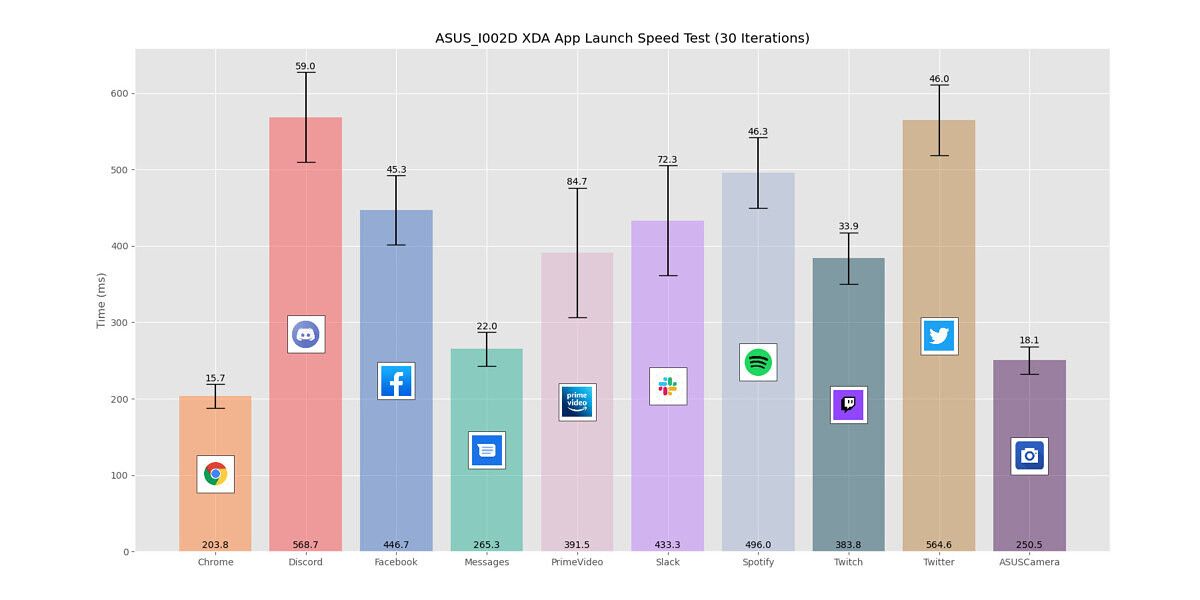
Huawei P40 Pro App Launch Speed Test ASUS ZenFone 7 Pro App Launch Speed Test


EMUI 11 Changelog, Availability

Here’s the full EMUI 11 beta changelog that was pushed to my Huawei P40 Pro.

EMUI 11 Beta Changelog on Huawei P40 Pro

This update introduces EMUI 11, providing a rich array of possibilities for you to stay connected in all scenarios. This new system version carries forward Huawei’s All Scenario design concept and provides a richer and more integrated cross-device experience. Based on the idea of “Technology for people”, EMUI 11 brings a more artistic interface design, friendlier interactions, and a more innovative and convenient cross-device connection experience for people to perform better at work and in life.

  • Technology for people
    • Smart AOD
      • EMUI 11 refines the user experience and brings vivid, dynamic visual elements for the Always On Display (AOD). AOD now allows you to customize your screen and showcase your personal style with text and images even when the screen is off.
    • Multi-Window
      • Multi-Window allows you to open apps in a floating window for multitasking. You can relocate the floating window to the desired location or minimize it to a floating bubble for easier access later.
    • Smoother animations
      • The brand new, intuitive animations throughout EMUI 11 create a smoother, more unified, and visually pleasing user experience when touching items or sliding on the screen.
    • Subtle effects
      • Whether you’re toggling switches on or off, subtle effects have been enhanced throughout the OS for greater visual satisfaction.
  • Seamless connections
    • Multi-screen Collaboration
      • This is a special feature that enables your devices to work together to achieve their full potential. You can mirror your phone to your laptop’s screen to improve your productivity with multiple app windows readily available. (This feature requires a Huawei laptop with PC Manager of version 11.0 or later.)
    • Privacy-based screen projection
      • When you project your phone onto an external display, messages and incoming calls are displayed only on your phone screen, both protecting your privacy and ensuring the continuity of screen projection.
    • Super Notepad
      • Notepad now supports editing notes simultaneously from multiple Huawei devices. For example, you can insert a photo from your phone to the note being edited on your tablet.
      • You can now quickly identify and extract text from images or documents, edit the text, and then export and share it. Creating a digital version of a paper document has never been easier.

Huawei says the EMUI 11 release will be pre-installed on upcoming flagship smartphones and tablets and will also roll out to supported devices like the Huawei P40 series and Huawei Mate 30 series. Now, you may be wondering when Huawei plans to roll out an Android 11-based EMUI update. Because of the ongoing U.S. trade restrictions, Huawei was likely unable to receive early access to Android 11’s source code, which was just made public the other day. That means the company has only had access to the Android 11 source code for a few days now, making it nearly impossible for them to have an Android 11-based EMUI build ready for launch. We’ll keep an eye out for when Huawei is ready to launch an upgraded EMUI on top of an Android 11 base.

The post EMUI 11 Hands-on: Huawei’s latest Android update makes multitasking easier appeared first on xda-developers.


from xda-developers https://ift.tt/3k1qD55
via IFTTT

Huawei unveils its latest Android software: EMUI 11

Chinese smartphone giant Huawei kicked off its annual Huawei Developer Conference (HDC) today in Dongguan, China. During the conference, the company unveiled EMUI 11 — the latest version of the company’s custom Android skin. While the latest software version is not based on Google’s latest Android 11 release just yet, the EMUI 11 update packs in a bunch of new features and improvements that are expected to make their way to Huawei devices in the coming months. Here’s a quick rundown of everything new in EMUI 11:

EMUI 11 UX changes

EMUI 11 includes several new features that are designed to improve the user experience on Huawei devices. The UX improvements include changes to the Always-on Display (AOD) feature, which now gives users access to a host of customization options.

EMUI 11 AOD

AOD themes

With the new software release, users will get access to various customization options for the AOD feature, new themes, customizable animated elements on the AOD, and the ability to show any image, live video, GIF on the AOD.

EMUI 11 AOD

AOD customizations

Along with the AOD improvements, EMUI 11 includes an updated design for the stock gallery app. The Photos tab in the updated gallery app now includes support for a new pinch gesture that will let users easily switch between the Month and Day view.

EMUI 11 Gallery app update

The Albums tab, on the other hand, has received a new 4:3 layout and new settings to sort your photos. The animation engine in EMUI 11 has also received some optimizations based on Huawei’s human factor research. Thanks to this, the transition animations can now mimic the visual effect of continuous ‘one-shot’ footage, which is expected to decrease distractions as a user browses through the UI.


EMUI 11 Smart Multi Window

Resizeable floating windows

EMUI 11 also brings support for a new feature called Live Icons, which adds a bunch of animated icons across the UI. These animated icons can be found in the notifications panel, in the stock Phone app, and other default Huawei apps like Huawei Notepad and Huawei Music. EMUI 11 also introduces a new synchronized vibrations feature that will synchronize the device vibration with the ringtone audio.

Minimize floating windows


The update also includes a feature called Smart multi-window, which will let users adjust the size of floating windows and minimize them when they’re not in use. The feature will also allow users open apps in floating windows from a dock, and all minimized windows will be shown in a sidebar for easy access. On the Huawei Mate X and other foldable phones/tablets, the smart multi-window mode will let users open multiple windows at the same time.

New AI and privacy features

EMUI 11 brings a host of new and updated AI features for Huawei devices. The new AI features include Multi-screen collaboration 3.0, which will let users simultaneously control three phone apps on their PC, accept calls on a connected PC, and use the device as a document scanner. The update also brings improvements to Huawei’s video calling app MeeTime, and enhancements for the company’s voice assistant Celia.

Huawei has also included a host of new privacy and security features in EMUI 11. These include a new indicator icon in the status bar that will alert users when an app is using their device’s camera, mic, or location, a new feature that will prevent background apps from accessing the mic and camera, and new permission requests for location, camera, and mic use. The Gallery app has also received privacy and security improvements, including on-device AI processing support, the option to remove EXIF data from images, and a hidden album to store sensitive photos.

Furthermore, the update brings a new hidden memo feature for the Huawei Notes app and a Safety Cast feature to prevent sensitive information from showing up on your TV while you’re casting to it. As of now, Huawei hasn’t announced a release timeline for EMUI 11. But since the company has already started testing the software, we expect a beta version to arrive on its P40 and Mate 30 flagships soon.

The post Huawei unveils its latest Android software: EMUI 11 appeared first on xda-developers.


from xda-developers https://ift.tt/33cowol
via IFTTT

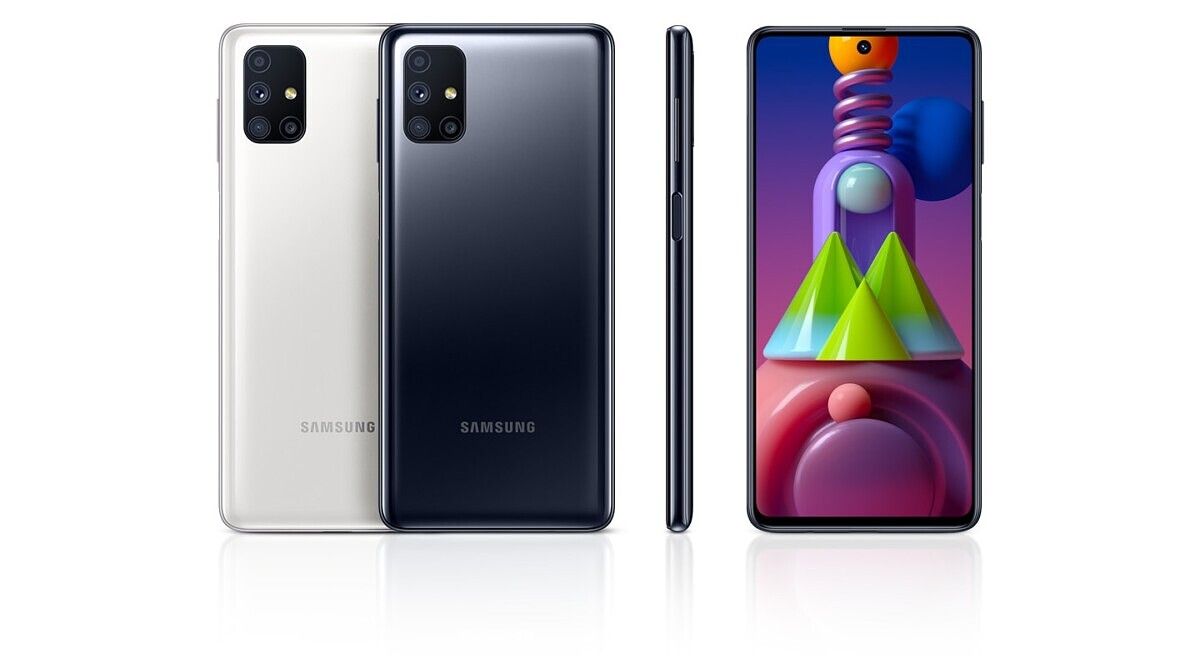
Samsung Galaxy M51 launched in India with Snapdragon 730G and a 7,000mAh battery

It can be argued that this year’s lower and upper mid-range smartphone launches in India don’t have the same value proposition as last year’s launches. Higher taxes coupled with price increases generation over generation has meant that 2019 was better for consumers looking for the most bang for the buck. However, that hasn’t stopped vendors such as Xiaomi, Samsung, and Realme from releasing new phones. Samsung’s Galaxy M series was a hit last year, coming after years of lowly efforts in the mid-range price spectrum. This year, Samsung has refreshed phones such as the Galaxy M30s with the Galaxy M31 (hands-on) and then the Galaxy M31s (review). While last year’s Galaxy M lineup was completed with the Galaxy M40, this year, Samsung has so far not released a successor to the Galaxy M40, instead releasing a higher-targeted phone with the Galaxy M51 (there was no Galaxy M50 last year). The Galaxy M51’s unique feature is the presence of a 7,000mAh battery, but it’s no slouch in some other respects too. Samsung launched the phone in Germany at the end of August, and now the phone has made its way to India.

Galaxy M51

Specification Samsung Galaxy M51
Dimensions & Weight
  • 9.5 mm thickness
  • 213 grams
Display
  • 6.7-inch (16.95cm)
  • Super AMOLED
  • Centered hole-punch, 20:9 aspect ratio
  • Full HD+ (2400×1080)
  • Corning Gorilla Glass 3
SoC Qualcomm Snapdragon 730G
RAM & Storage
  • 6GB RAM + 128GB storage
  • 8GB RAM + 128GB storage
  • Dedicated microSD card slot with up to 512GB expandable storage
Battery & Charging
  • 7,000mAh battery
  • 25W fast charging with 25W fast charger inside the box
Fingerprint sensor Side-mounted fingerprint sensor
Rear Camera
  • Primary: 64MP, Sony IMX682 sensor, f/1.8 aperture
  • Secondary: 12MP ultra-wide, f/2.2 aperture, 123-degree FOV
  • Tertiary: 5MP depth sensor
  • Quarternary: 5MP macro sesnsor
Front Camera 32MP, Sony IMX616 sensor
Android Version Android 10 with One UI 2.1

Samsung Galaxy M51: 7,000mAh battery with Snapdragon 730G

The USP of the Samsung Galaxy M51 is its monstrous 7,000mAh battery. To put it simply, it’s the first phone launch in India to have such a huge battery capacity, which is something that was previously seen only in some niche phones in China. The Galaxy M51 is the logical progression from the 5,000mAh battery of the original Galaxy M30 and the 6,000mAh battery of the Galaxy M30s, Galaxy M31, and Galaxy M31s. It’s a notable achievement, especially when considering that Samsung has been able to keep the weight at a relatively bearable 213 grams. Of course, the battery capacity is not the only determinant of battery life, but all other factors being constant, a phone with a higher battery capacity will have better battery life than a phone with a smaller battery capacity. 25W fast charging means that charging time will be as low as 110 minutes from 0 to 100%, according to Samsung.

It’s also good to see Samsung using the Qualcomm Snapdragon 730G SoC instead of using its own inferior mid-range Exynos chips. In terms of performance, buyers will get the same performance as Snapdragon 720G-powered phones, which are available for much lower price points. The OnePlus Nord’s Snapdragon 765G SoC is also a step higher. However, the choice of the Snapdragon 730G does represent that the Galaxy M51 is Samsung’s most powerful phone in this price segment yet.

Galaxy M51Other notable features include a side-mounted fingerprint sensor that is said to unlock the phone in 0.21 seconds, as well as a 6.7-inch Full HD+ Super AMOLED display (sadly, with a 60Hz refresh rate). The camera setup of the phone is identical to the Galaxy M31s in terms of hardware.

Samsung Galaxy M51: Pricing and availability

The Samsung Galaxy M51 will be available in two variants in India: 6GB RAM with 128GB storage, and 8GB RAM with 128GB storage. The 6GB RAM variant costs ₹24,999 ($340), while the 8GB RAM variant slots in at ₹26,999 ($368). The phone will be available in Electric Blue and Celestial Black colors.

The first sale of the Galaxy M51 will be held at 12 PM on September 18 through Amazon, Samsung Shop, as well as select retail stores. A ₹2,000 discount for users buying the device with HDFC Bank cards is available if they buy the phone through Amazon during the days of September 18-20.

The Galaxy M51 has the OnePlus Nord (review) as its primary competitor, but it also competes with phones such as the OPPO Reno 4 Pro (review), Realme X3, Realme X2 Pro (review), and others.

We have the review unit of the Galaxy M51, so stay tuned for our review to be published in the coming days.

The post Samsung Galaxy M51 launched in India with Snapdragon 730G and a 7,000mAh battery appeared first on xda-developers.


from xda-developers https://ift.tt/33u5PN9
via IFTTT

mercredi 9 septembre 2020

Motorola announces a new foldable Razr smartphone with 5G and better cameras

Motorola officially joined the small club of OEMs with foldable hardware with the launch of the first-generation Motorola Razr last year, transforming the iconic Razr clamshell flip phone into a foldable smartphone. Banking heavily on nostalgia, the Razr’s futuristic design and unique hinge mechanism generated a lot of buzz in the tech circle. But at the same time, the phone was also criticized for its lackluster hardware and mediocre camera performance, which many believed was unacceptable for a phone that cost $1,499.

Nine months since the launch of the first Razr foldable, the Lenovo-owned company is introducing a new Razr phone to perfect the original vision. The new Motorola Razr 5G addresses many of the shortcomings of its predecessor and brings along a more durable design, a beefier SoC, a bigger battery, and an improved rear camera in the same foldable form factor.

Motorola Razr 5G

Motorola Razr 5G: Specifications

Specification Motorola Razr 5G
Dimensions and Weight
  • Unfolded: 72.6 x 169.2 x 7.9 mm
  • Folded: 72.6 x 91.7 x 16 mm
  • Gorilla Glass protection on the back with a matte finish
  • Water repellant design
  • 192g
Display
  • Main: 6.2-inch pOLED (2142×876), 21:9
  • External: 2.7-inch gOLED (800×600), 4:3
SoC
  • Qualcomm Snapdragon 765G:
    • 1x Kryo 475 (ARM Cortex-A76-based) Prime core @ 2.4GHz
    • 1x Kryo 475 (ARM Cortex-A76-based) Performance core @ 2.2GHz
    • 6x (ARM Cortex-A55-based) Efficiency cores @ 1.8GHz
    • 7nm EUV process
  • Adreno 620 GPU
RAM and Storage
  • 8GB RAM
  • 256GB flash storage
Battery & Charging
  • 2,800 mAh battery
  • 15W fast charger (inside the box)
Rear Camera
  • Rear: 48MP Quad Pixel f/1.7, 1.6μm
    • OIS
    • Laser autofocus (ToF)
    • 4K@30fps video recording
  • Front: 20MP Quad Pixel, f/2.2, 1.6μm
Connectivity
  • 5G NR Sub-6GHz, 4G LTE
    • (China/Japan/EMEA/ANZ SKU):
      • 5G: sub-6GHz band n1/n3/n5/n7/n28/n41/n41 HPUE/n77/n78/n78 HPUE/n79/n79
      • 4G: LTE band 1/2/3/4/5/7/8/12/13/17/18/19/20/26/28/34/38/39/40/41/42/46/66/71
    • (NA/LATAM/CAN SKU):
      • 5G: sub-6GHz band n2/n5/n25/n41/n41 HPUE/n66/n71/n78
      • 4G: LTE band 1/2/3/4/5/7/8/12/13/14/17/18/19/20/25/26/28/29/30/38/39/40/41/41 HPUE/46/48/66/
  • Bluetooth 5.0
  • NFC
  • Type-C port (USB 3.1)
  • WiFi 802.11.b/g/n/ac (2.4GHz + 5GHz)
  • GPS, A-GPS, GLONASS, Galileo
Other Features
  • Single bottom-firing speaker
  • 4 microphones
  • Dual SIM (1 Nano SIM + 1 eSIM)
Software
  • Android 10 with My UX
  • 2 guaranteed major OS upgrades
  • Bi-monthly security updates for 2 years

At first glance, the new Motorola Razr 5G looks like a carbon copy of its predecessor, and while that’s true to some extent, Motorola has made many small changes to the overall build and design. The first striking change is the relocation of the fingerprint reader from the front to the back, now nestled inside the Moto Batwing logo. In terms of build materials, the 2020 Motorola Razr offers a glass back with Gorilla Glass protection and a matte finish. The tapered chin is made out of 7000 Series Aluminum Alloy while the hinge uses stainless steel.

Razr 5G Blush Gold

Motorola is also addressing durability concerns with its second-gen Razr. The company claims the hinge of the Razr 5G can withstand up to 200,000 flips. According to data collected by Motorola, the average user flipped the first-gen Razr foldable about 40 times a day while the average power user flipped it about 100 times a day. To put these numbers into perspective, it would take 5 years for an average power user to flip the phone nearly 200,000 times. The hinge is designed such that it ensures the teardrop display can fold flush with zero gap.

The primary and external display panels are unchanged from the first-gen Razr. There’s a 6.2-inch 2142×876 plastic OLED main display and a 2.7-inch 800×600 Quick View glass OLED display. Unlike Samsung’s foldables, Motorola isn’t using a layer of Ultra-Thin-Glass. A representative from Motorola told us in a briefing that the company did evaluate the use of UTG but wasn’t entirely confident in the solution just yet. For what it’s worth, the inner display does have a coating that protects the display against accidental spills and splashes. There are also metal support plates that provide a flat surface and tension to make the display feel sturdy while also being able to shift to give space for the teardrop display.

Razr 5G Razr 5G Polished Graphite

On the inside, the Motorola Razr 2020 is powered by the Qualcomm Snapdragon 765G SoC, a step up from the Snapdragon 710 in the last model. RAM and storage also see a bump with the device now packing 8GB RAM and 256GB of flash storage compared to a relatively modest 6GB RAM and 128GB storage of its predecessor. Since the Snapdragon 765G comes with an integrated modem, Motorola was able to save some internal space to cram in a bigger camera sensor and a larger battery. That integrated modem is the Qualcomm Snapdragon X52, and with it, the Motorola Razr 5G is able to support sub-6GHz 5G networks, with the phone packing 4 antennas throughout its body. Whereas the first Razr could be provisioned only via eSIM, the new Razr supports both eSIM and a traditional nanoSIM.

Poor camera performance was one of the major complaints with the Razr, and Motorola is attempting to get it right this time with a new 48MP sensor. The camera module features OIS along with a ToF sensor for advanced laser autofocus. The front camera also sees an upgrade from 5MP to 20MP. Furthermore, the Razr 5G comes preinstalled with Motorola’s brand new camera app (called Moto Camera 3.0) that brings along a revamped camera UI and includes unique features designed to take advantage of the Quick View display. Some of those unique features include camera cartoon, a feature that plays an animation on the Quick View display to keep the subject focused, Instant Review, which shows a preview of the photo on the Quick View display so you can quickly see selfies without flipping the phone open, and External Preview, which mirrors the viewfinder on the Quick View display so subjects can see their photo before it’s taken. The new Moto Camera 3.0 software launches first on the new Razr but will be available on future devices from the brand.

The Motorola Razr 5G packs a larger 2,800mAh battery and charges via a 15W charger that comes inside the box. Motorola says, based on the usage pattern data they obtained from the first-gen Razr, users tend to interact more frequently with the Quick View display compared to the inner display. Since the outer screen requires less power, Motorola reasons the 2,800mAh cell should work out just fine.

The Razr 5G runs a near-stock version of Android 10 with Motorola’s handful of software customizations on top. Motorola’s My UX app, first introduced with the Motorola Edge, comes preinstalled; it’s a one-stop-shop for all of Motorola’s various system apps like Moto Actions, Moto Display, and new theming options including fonts, icon shapes, accent colors, etc. The software on the Quick View display is seeing a big upgrade, with support for showing a nav bar at the bottom, the ability to swipe right to access the camera, and the ability to swipe left to access favorite your contacts and an app tray. Motorola says they preselected 8 apps to appear in the app tray, but they’re giving users the option to add any app of their choice. The only caveat is that apps have to be optimized for the Quick View display’s 4:3 aspect ratio and low 800×600 resolution in order to look great. Not many third-party apps are optimized for that layout, but Motorola says they collaborated with Google to ensure their apps work well on the Quick View display. Plus, all the other improvements that came to the first-gen Motorola Razr with its Android 10 update will also be available on the new Motorola Razr 5G.

Motorola commits to providing 2 major Android OS updates and 2 years of bi-monthly security updates for the Razr 5G. That’s the same length of software support the company is providing for its other flagship phone, the Motorola Edge+.

Razr 5G Quick View display

Pricing and Availability

In the U.S., the Motorola Razr 5G will be available this fall from AT&T and T-Mobile but not from Verizon, which exclusively carried the first-gen Razr — likely because the new Motorola Razr 5G lacks the mmWave bands needed to support Verizon’s Ultrawide Band Network. Meanwhile, the unlocked version will go on sale this fall on Best Buy, B&H Photo, Amazon, and Motorola for $1,399. The Motorola Razr 5G comes in three colors: Polished Graphite, Liquid Mercury, and Blush Gold. In terms of after-sales support, Motorola says they will offer a service to cover damages under warranty and supply discounts on display repairs. The company is also partnering with case vendors like Tech21 and CaseMate to manufacture cases that cover the top and bottom halves of the phone for some added protection.

Motorola Razr 5G Forums

The post Motorola announces a new foldable Razr smartphone with 5G and better cameras appeared first on xda-developers.


from xda-developers https://ift.tt/3ih8Nuf
via IFTTT

You can now pre-order the Galaxy Z Fold 2 on Amazon

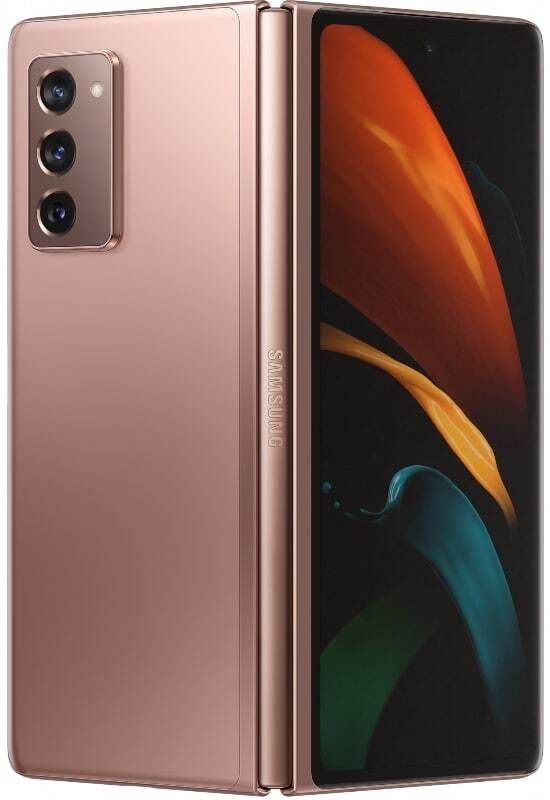
Samsung’s new flagship phone, the Galaxy Z Fold 2, is quickly approaching its release date of September 18th. Now, you can pre-order the premium phone unlocked at Amazon. Available in Mystic Black and Mystic Bronze, is you have Amazon Prime you’ll get your Z Fold 2 on release day. If you have an Amazon Prime Rewards Visa credit card, you can sign up to pay $111.11 a month for 18 months interest-free (or a higher amount on a 12-month interest-free option), making this a cost-effective option.

Wondering if the Galaxy Z Fold 2 is right for you? Here’s a snippet from our hands-on to help you decide:

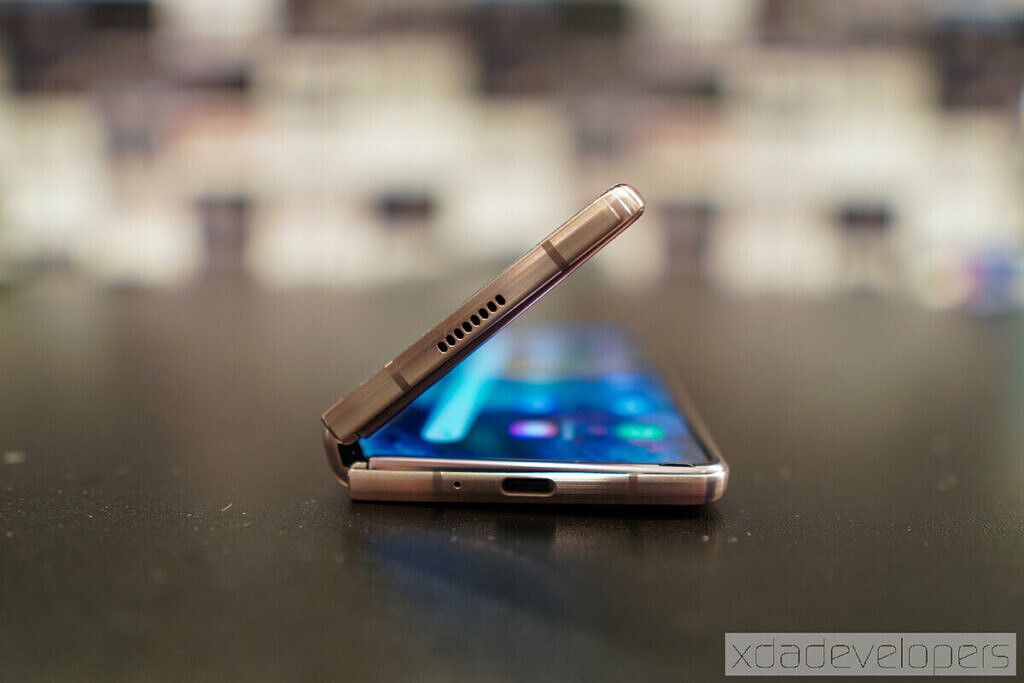
Almost every issue (except for perhaps water resistance) that I and many other reviewers/consumers had with the original Fold is resolved with the Galaxy Z Fold 2. The outside “cover screen” is much larger; the inside screen got rid of the unsightly notch, and the hinge feels significantly more sturdy. There are also improvements in multitasking, closer partnerships with Google and Microsoft to optimize the experience, and further enhancements to the whole experience.

If you were scared away from the unique Galaxy Z Fold line because of how the original Fold performed, you have no need to worry as Samsung has done a lot of work to improve with the Fold 2! As we put it in our ongoing review, the original Fold was a cutting-edge device that’s a hint of the future and the Galaxy Z Fold 2 is confirmation that that future is here.

With Amazon providing the easiest way to purchase the Galaxy Z Fold 2, now is the perfect time for a pre-order.

    Samsung Galaxy Z Fold 2 (Mystic Bronze)
    Now is the time to pre-order Samsung's latest flagship phone, the Galaxy Z Fold 2. The Galaxy Z Fold 2 has a unique 2-in-1 design, offering a mobile experience that no other phone can replicate. Amazon's unlocked model also comes with 5G connectivity right out of the box. With major improvements over the original Z Fold, the Z Fold 2 is sure to impress and turn some heads.

The post You can now pre-order the Galaxy Z Fold 2 on Amazon appeared first on xda-developers.


from xda-developers https://ift.tt/3havcbj
via IFTTT

Galaxy Z Fold 2 Ongoing Review Day 1: Keyboard Dilemmas and more

It is often considered unwise for consumers to buy the very first version — aka “gen one” — of any consumer electronic product that’s the first of its kind. Wait for gen two or three, the belief goes, and get a more refined and polished product.

This is evident the second you pick up the Samsung Galaxy Z Fold 2. I’m not just talking about the much larger outside “cover screen” or notch-less main 7.6-inch screen that immediately attracts attention; but even just holding the Fold 2, you’ll feel that it’s a more polished piece of hardware. It feels denser in the hand, more mature.

The Fold 2 is confirmation the cutting edge future of smartphones is here.

That the Galaxy Z Fold 2 improves over the Fold 1 such a large amount is a huge compliment coming from me because I was not one of the many who doubted the original Galaxy Fold; I was sold on the idea from day one, I paid my own money for a unit and I have never had regrets. The original Fold to me was a cutting-edge device that’s a hint of the future. The Fold 2 is confirmation that that future is here.

I’m on day one of what will surely be a long time with the Fold 2 – when I return this review unit to Samsung, I am already planning to buy my own – and here are my immediate takeaways.

The improved hinge is legit

The original Galaxy Fold, if you hold it tightly in folded form, wobbles from the pressure of your grip. That’s not due to a year of wear-and-tear; it was like that out of the box.

I didn’t think much of it at the time — after all, this is a tablet that’s been bent in half, so of course, there’s a bit of movement if you press into it, right? Well, the Fold 2 doesn’t have this. Even in folded form, it feels like one solid slab, much like the Huawei Mate XS did.

Opening the hinge now feels just like opening a laptop, you need just enough force to pry it open, but the second you stop pushing the hinge stays in place.

We covered why a hinge that stays in place is ideal for this device in our hands-on last week, and we’ll dive deeper to test over the next few days, but just a few hours in I already have found it highly useful. For example, I watched a YouTube video over dinner with the Fold 2 propped on a desk in tent mode.

It is as much a phone, as it is a tablet

The original Fold always felt to me like a tablet that can masquerade as a small phone for short periods of time. I say “short periods” because the outside cover screen is so small you can’t really type on it comfortably. So you’ll want to unfold it more often than not.

With the Fold 2, I have used it folded almost as much as I have in the unfolded form so far, which is a testament to how functional the device is even in smaller form factors. Overall, it feels equally capable as a tablet or a small phone.

Keyboard dilemma in unfolded form

Gboard doesn’t offer a split keyboard option.

The Fold 2 has two keyboards installed out of the box: Samsung’s own and Swiftkey, pushed here due to the close partnership between Samsung and Microsoft. Both have been optimized for the Fold 2’s tablet form factor, as they automatically switch to a split keyboard when unfolded (and standard keyboard form on the smaller outside screen). This is great because the 7.6-inch screen is slightly too wide for most people to type comfortably if the keyboard isn’t split.

But SwiftKey does let you split for easier thumb typing.

However, I prefer to use Gboard (I think many reviewers share the same feelings), but Gboard doesn’t offer a split keyboard option. This has resulted in me using Gboard in folded form, but switching to Swiftkey in unfolded form just to take advantage of the split keyboard. I’m hoping that Google will consider optimizing Gboard for foldable devices because they tend to have larger screens.

One UI takes advantage of more screen

So far, most apps I’ve used work well on the small and large screen. Instagram, in particular, has been “fixed” on the larger screen. On the original Fold, Instagram would stretch the entire canvas, and due to the odd aspect ratio of the large screen, meant Instagram Stories would be cropped at the top and bottom.

That’s been fixed now, although not in the most elegant way: Instagram now runs on the large screen in a rectangular 16:9 aspect ratio, with major pillar boxing – large bars on left and right of the screen – that looks quite odd. But at least now you can see IG stories in its full glory.

Elsewhere, you have the option to display content in a more tablet/computer-like view, with more information on the screen, or just a standard smartphone-like view, but with everything appearing larger on the screen. Apps such as Slack, Gmail, Samsung Internet, and Files all take advantage of the larger screen with a multi-paned layout.

Galaxy Z Fold 2 is the perfect device for digital nomads

The Galaxy Z Fold 2 feels like a device made for someone like me — a digital nomad who writes/edits words for a living and doesn’t like chained to a desk. For years, I have always sought out the lightest laptop/tablet around, all so I can have a work machine that I can whip out wherever I am in the world and work.

No matter how light a laptop gets, however, it is still ultimately a second machine I have to carry in a bag. The Galaxy Z Fold 2 is a single device that sits in my pocket that can, in a pinch, double as a computer. I have a foldable keyboard in my backpack at all times. It should be a great companion for the Z Fold 2.

Join me tomorrow for more after my first full 24 hours with the Galaxy Z Fold 2!

    Pre-order now for $1,999.99 at Amazon!
    Got an Amazon Store card or just prefer shopping on Amazon? You can now pre-order Samsung's foldable on Amazon ahead of its release next week! Both the Mystic Bronze and Mystic Black versions are available, and with the Amazon Store Card, you can pay $166.67 per month over 12 months with 0% finance!

The post Galaxy Z Fold 2 Ongoing Review Day 1: Keyboard Dilemmas and more appeared first on xda-developers.


from xda-developers https://ift.tt/3hblB4h
via IFTTT

Today’s Top Tech Deals: $200 off Galaxy Note 20, Nintendo Switch Lite, and More!

Great news–Android 11 is officially on the way! If you’re interested in whether your phone will be getting the latest OS, we’ve whipped up a handy Android 11 update tracker to keep you informed. My phone, being over two years old at this point, would probably melt if Android 11 was pushed through it. Maybe it’s time for an upgrade?

As a matter of fact, today’s top tech deals include $200 off the Samsung Galaxy Note 20, Nintendo Switch Lites finally in stock, and more. It’s almost as if retailers know people need to upgrade their phones and gadgets!

Kensington Trackball Mouse for $84

Remember trackballs? While almost everyone has moved on to the humble mouse for their computers, there are good reasons to pick up a good quality trackball. Because of the way you use a trackball, you can help prevent injuries to you wrist and forearm, or simply make it easier to use a computer if you suffer from carpal tunnel. Kensington’s bluetooth trackball is on sale for $84, down from the MSRP of $100, so why not grab one and give it a try?

    Kensington Expert Wireless Trackball
    Save your wrist and forearm the pain of constant mouse use with Kensington's trackball. It might take a little getting used to, but your arm will thank you.

Samsung Galaxy Note 20 5G for $800

I’ve been eyeing the Galaxy Note 20, with it’s S Pen functionality, powerful specs, and overall sleek look. But, as you might guess from someone that writes about deals, the $1,000 price tag is a little hard to swallow. Amazon has a flat $200 off an unlocked Galaxy Note 20, and if you don’t want to be signed onto a specific carrier, this is one of the better deals out there.

    Samsung Note 20 (Unlocked)
    Samsung's new flagship phone has an intelligent battery, S Pen functionality, and great specs. If you're in the market for a new phone, now's your chance for a $200 discount!

Aukey’s 1080p Webcam for $40

Webcams are still flying out of stock, but Aukey’s 1080p webcam is not only available, but you can get it for $40! The webcam is $10 off the MSRP of $60, but you can clip a coupon on the page in order to save an additional $10. Aukey is a great budget brand, so you know you’ll be getting a decent webcam at a great price.

    Aukey FHD 1080p Webcam
    Tired of that low-quality webcam you had to quickly buy when you started working from home? Spend $40 and upgrade to Aukey's 1080p webcam. It'll get the job done, and it'll do it well.

Nintendo Switch Lite in Stock at Best Buy

At this point, just seeing a Nintendo Switch or Switch Lite in stock feels like a deal. Sure, the Switch Lites at Best Buy are at MSRP, but if you’ve been spending weeks or months trying to nab something to play Nintendo games on, this is still an easy buy. As of the time of this writing, all four colors are still in stock–that’s including the harder-to-find Coral color. Act fast, because who knows when stock will run dry!

    Nintendo Switch Lite in Stock!
    Have you been trying to pick up a Switch Lite for a while now with no luck? Well, Best Buy has all four colors of the Switch Lite available for purchase as of the time of this writing! What are you waiting for? Grab one before it's too late!

Xbox One Controller Pro Charging Stand for $26

The Xbox Series X and Series S are officially revealed–finally! Better news still, the Xbox One controllers are compatible with the new consoles. That’s great, as my Xbox One controller is my favorite way to play most of my PC games. The only problem is the lack of a rechargable battery… which can be worked around by grabbing the Xbox One Controller Pro Charging Stand straight from the Microsoft Store! It’s on sale for $26, and you can grab a stand and battery cover that matches your controller while giving your controller a nice place to sit.

    Xbox One Controller Charging Stand
    Charge your Xbox One controller while giving it a stylish place to sit with Microsoft's official stand. You can get a color to match your controller, and even use the Xbox One controller on the new Series X and Series S!

More Tech Deals

Looking for even more tech deals? We have them for you below! As it turns out, the Galaxy Book Flex has dropped another $6 since yesterday. Who knows if it’ll keep dropping or shoot back up to MSRP though, so if you’re interested don’t delay.

The post Today’s Top Tech Deals: $200 off Galaxy Note 20, Nintendo Switch Lite, and More! appeared first on xda-developers.


from xda-developers https://ift.tt/3bJv6WY
via IFTTT