LightBlog

jeudi 10 septembre 2020

Google starts rolling out new Wear OS H-MR2 update with better performance and battery life

Google yesterday confirmed the new Wear OS H-MR2 update that introduces improved performance and better battery life is starting to roll out. This is the same update that Google first detailed back in August.

Among the many new features, Wear OS’s improved performance is the most notable. Google claims Wear OS has been improved “from top to bottom,” allowing apps to launch up to 20% faster than before. That might not seem like a significant improvement, but poor performance has been one of the main complaints about Wear OS-powered smartwatches for some time, so it’s nice to see Google address that problem via a software update.

“You’ll see changes to the device controls making it even easier to manage different watch modes and workouts,” Google also said. Furthermore, the Wear OS update introduces a simplified pairing process, improved support for LTE, and a handwashing timer in response to the COVID-19 pandemic. A new Weather Tile design is also included in the update, making it easier to read information while on the go.

The update is currently rolling out to the Suunto 7 smartwatch with firmware version PXDZ.200824.005, with broader availability to come for other smartwatches in the coming months. In addition to bringing the new H-MR2 improvements, the update for the Suunto 7 also adds route navigation, a low power always-on sport display, a battery-saving GPS mode, and popular starting points in the Suunto app. Google told us last month that the new Wear OS update will be based on Android 11, but it doesn’t seem like that’s the case for the H-MR2 update on the Suunto 7.

The post Google starts rolling out new Wear OS H-MR2 update with better performance and battery life appeared first on xda-developers.


from xda-developers https://ift.tt/2FmCLyw
via IFTTT

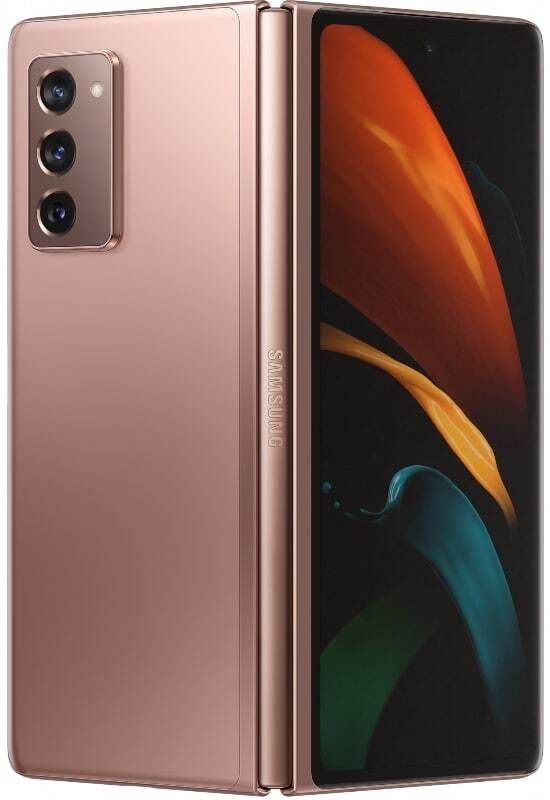
Galaxy Z Fold 2 Ongoing Review Day 2: Is it a laptop replacement?

Welcome to day 2 of our ongoing review of the Samsung Galaxy Z Fold 2. In today’s episode, we look at how it functions as a laptop replacement, while in day 1, we went through initial thoughts around the on-screen keyboard, the hinge and more!

Maybe it’s the workaholic in me, but I’ve always wanted a portable, lightweight device off which I can work anywhere, anytime. In years past that meant either a laptop or a smartphone. The former isn’t pocketable, and the latter lacks screen space. The promise of foldable phones and foldable devices is general is that, if done right, it can offer that happy medium.

For my second day with the Galaxy Z Fold 2, I decided to make it my main work machine and see if the device lives up to that promise. After a whole day, I’d say it does — in fact, I am writing this sentence on the Fold 2 right now.

I have a bit of help though, in the form of a foldable hardware keyboard. With it connected — and the on-screen keyboard out of the way — I can type away at close to the same speeds as if I was working on a laptop. But even if I didn’t have a hardware keyboard, I can still type much faster on it than I could a phone due to the larger, more spaced out onscreen keyboard. 

During my day 1 impressions, I mentioned the dilemma that Gboard does not offer a split option, which makes it slightly unwieldy to use on the Fold 2’s 7.6-inch screen. SwiftKey (and Samsung’s native keyboard) does give the option to split, but I generally prefer to use Gboard due to what I feel is superior autocorrect and support for Cantonese, a version of Chinese I grew up speaking.

Still, after a day of being forced to use SwiftKey because I really want split keyboard typing, I must say it’s grown on me. For one, the autocorrect of SwiftKey is better than I thought (or perhaps it’s improved since the last time I used it years ago). I also enjoy the option to freely resize the keyboard height, whereas Gboard gives you six pre-set keyboard sizes. 

There’s also the option to lay the Fold 2 down on a desk, with the top half bent at 90-degrees, and peck away like it’s a mini laptop. I find this typing method slightly cramped because I’m using eight fingers; I prefer thumb typing on a split keyboard instead.

My morning routine consists of checking emails, various news feeds, and messaging colleagues and contacts via either Slack, WeChat, or WhatsApp. I’m happy to report that all three apps can run in spit-screen mode on the Fold 2, although Slack feels a bit cramped due to its multi-paned layout. 

There is one app I use often that doesn’t quite work on the Fold 2: Adobe Lightroom. For some reason, Samsung’s One UI forces Lightroom into a 16:9 aspect ratio on the full screen, with major pillar-boxing on the sides. This effectively makes editing photos nearly impossible due to editing bar taking up most of the horizontal space. Curiously, this app works fine on the original Galaxy Fold. I’m confident this Lightroom issue should be fixed as the software gets refine.

In the afternoon I had to ship a review unit back to a company, which had kindly provided a UPS return shipping label, so that all I needed to do was bring the package to a UPS office and let them scan the barcode on the label.  

Usually, showing a large piece of information like a shipping label on a smartphone screen to a clerk in Asia is asking for trouble — chances are they’re not too tech-savvy and annoyed to have to scroll and swipe to see the full piece of information. Not with the Fold 2’s large screen, however. I handed the UPS guy my device with the shipping label and he was able to scan and process the shipping directly from my Fold’s screen. I must admit, handing a stranger a $2,000 device had me a bit nervous. 

It started raining on my way out the UPS office, and while I know the Fold 2 doesn’t have official IP water resistance rating, I decided to brave it anyway to navigate to my next spot for a meeting.  The Fold 2 didn’t miss a beat despite being exposed to minor rain. 

In the late afternoon, I used the Fold to watch a live stream of Huawei’s Developer Conference keynote on YouTube while chatting on Slack with my XDA colleagues. Then I continued to work in the back of a cab as I rushed home. 

Battery life has been impressive, considering I have been using the device all day. I left the house with the Fold 2 fully charged at 10:05am, and by 8:30pm as of time of this writing I still have 38% battery life. This should be enough juice to last me through the rest of the night.

One last note: the Galaxy Z Fold 2, with its slightly wider dimensions (5.05-inches) and heavier weight (9.97oz) is a bit tiring to hold with one hand for extended periods of time. But it’s still a heck of a lot lighter than any of my previous portable work machines. 

And that’s what makes foldables – or dual-screened devices like the Microsoft Duo – so exciting: it is more than just a phone, but a mini computer that we can use to make the occasional phone calls. 

Join me tomorrow for day three as I explore the cameras and the unique methods with which you can shoot — including the different camera modes and shooting selfie style vlogs with the main camera system. 

    Up to $800 instant trade-in credit at Samsung
    Forget the rest of the deals – if you want to save a bundle on your unlocked Galaxy Z Fold 2 and have a recent phone, Samsung's trade-in offer is the best. You can get up to $650 credit and if you have the original Z Flip or Galaxy Fold, you can save $800 on your new Galaxy Z Fold 2!

The post Galaxy Z Fold 2 Ongoing Review Day 2: Is it a laptop replacement? appeared first on xda-developers.


from xda-developers https://ift.tt/3hpoSgw
via IFTTT

Today’s Top Tech Deals: Razer Gaming Keyboard for $90, Surface Pro 7 for $600, and More!

As the week goes on, I’m more intrigued by these larger, sometimes foldable phones and tablets. With our Galaxy Z Fold 2 day one review and Surface Pro Duo review, it’s getting more and more tempting to have a smartphone that’s more like a tiny tablet than actual phone. The temptation is quickly tempered with those price points, though. I could probably upgrade my entire PC rig for the price of a Fold 2!

Anyway, today’s top tech deals include a Razer gaming keyboard for $90, a deep discount on the Surface Pro 7, and more!

By the way, all four colors of the Nintendo Switch Lite are still in stock at Best Buy!

Kingston 64GB Flash Drive for $11

I’ve had a Kingston flash drive for literally a decade, and it hasn’t let me down yet. I’m more likely to lose it than it die at this point, and that flash drive has really gone through a lot. So when you see a deal like the Kingston 64GB flash drive for $11, it’s definitely worth a look. It’s simple, effective, and has a little purple on it. What’s not to love?

    Kingston 64GB Flash Drive
    Having a flash drive around is always a good idea, and it's even better if you're not worried about it biting the dust. Kingston's 64GB flash drive will have you covered, and you can get it now for just $11.

Razer Gaming Keyboard, $60 off

There’s nothing quite like a mechanical keyboard. Clacking away with a mechanical keyboard feels really satisfying, and the accuracy over a silicone keyboard can’t be beat. The problem is, mechanical keyboards can be expensive.

Right now, you can get Razer’s Huntsman gaming keyboard for $60 off, which brings it below $100. You can set up macros for your favorite games, and of course, it’s very clicky and has RGB lighting. You can’t ask for much else!

    Razer Huntsman Gaming Keyboard
    Razer claims that their mechanical keyboard switches are the fastest around, with their own custom switch design to stand out from the competition. At only $90 for a new and RGB backlot keyboard, grab one and see if you'll fall in love with the clicky keys.

Garmin’s Birthday Sale is live!

Happy birthday Garmin! Celebrate with a sale on a whole bunch of Garmin stock. Whether you’re looking for a fitness watch that tracks everything or a simple smartwatch that looks stylish while giving you notifications, Garmin probably has what you want, and it’s probably on sale as well. Give the sale a look, you might find your new favorite watch.

    Garmin Birthday Sale
    With discounts on Garmin's Instinct, vivomove, Forerunner, and more, this Birthday Bash has something for everyone. Check out what's on sale and maybe you'll fit your next smartwatch at a smart price.

Deep Surface Pro 7 discounts at Best Buy

Fancy laptops are all well and good, but sometimes you just want a good tablet that you can use like a laptop once and a while instead. In that case, Microsoft’s Surface Pro 7 is going to be one of your best bets. At Best Buy, you can get the Surface Pro 7 with 8GB RAM for $800, saving $230 off the MSRP. 8GB RAM should be enough to run even the most resource heavy productivity app, but if you’re okay with 4GB, you can grab the Surface Pro 7 for an even lower $600.

    Microsoft Surface Pro 7
    If you want a powerful tablet instead of a laptop, the Surface Pro 7 is a no-brainer. Customize the tablet to suit your needs while saving big!

JBL T750BTNC Headphones for $100

If you’re looking for a solid pair of headphones but really don’t pay Sony caliber prices, JBL is a great alternative. Now, you can grab their T750BTNC headphones for an even $100, $30 off the MSRP. These bluetooth headphones have a fifteen hour battery life on a single charge and active noise cancelling, as well as JBL’s Pure Bass Sound. Essentially, you’ll get great quality without breaking the bank.

    JBL T750BTNC Headphones
    JBL's bluetooth headphones have active noise cancelling, so you can enjoy your music without interruption. With a fifteen hour battery life off a single charge, these headphones will keep you in the zone all day.

More Tech Deals

Looking for even more tech deals? We have them for you below!

The post Today’s Top Tech Deals: Razer Gaming Keyboard for $90, Surface Pro 7 for $600, and More! appeared first on xda-developers.


from xda-developers https://ift.tt/3hjF4zM
via IFTTT

The upcoming OnePlus Watch could sport a circular smartwatch design

Later this year, OnePlus will reportedly introduce a smartwatch after years of toying with the idea. Ahead of the device’s anticipated launch, a new leak is providing some details about what to expect for its design.

According to Max J on Twitter, the OnePlus Watch will feature a circular design, rather than the square look popularized and perfected by the Apple Watch. The circular smartwatch design is actually pretty common in the Android world, made most famous by Motorola’s Moto 360 several years ago.

Very few other details are known about the OnePlus Watch outside of its potential circular design. Most likely, it’ll run Google Wear OS and potentially feature the recently-announced Snapdragon Wear 4100 SoC from Qualcomm. We also expect it to offer plenty of health-focused features, as most smartwatches are wont to do.

OnePlus has aggressively diversified its portfolio over the last few years, releasing the OnePlus TV, wireless earbuds, and an excellent mid-range smartphone called the OnePlus Nord. Really, a smartwatch was more or less inevitable. OnePlus has actually been toying with the idea of a smartwatch since 2016 when CEO Pete Lau revealed the company had designed then scrapped a smartwatch concept. Now, four years later, and the company seems to finally satisfied with the design and performance of what it’s developing.

The sister company of OnePlus, OPPO, recently introduced a new smartwatch that many had thought would serve as the blueprint for the OnePlus Watch. That watch is square, however, and Max J’s Tweet claims we’re getting something that will be circular. That doesn’t mean the two smartwatches will be totally different from one another, but it would mean that OnePlus’s offering should at least have a different design. Max J. could be wrong on this detail but given his past history with successful OnePlus product leaks, we have no reason to doubt his claim.

OnePlus is expected to introduce the OnePlus 8T series sometime this fall, in which case we could also see the unveiling of the OnePlus Watch. Seeing as the company’s smartwatch has been incubating for years now, we’re excited to see its final form, circular or not.

The post The upcoming OnePlus Watch could sport a circular smartwatch design appeared first on xda-developers.


from xda-developers https://ift.tt/3hlvTi6
via IFTTT

Google announces Android 11 Go Edition with support for 2GB RAM devices

Following the first stable release of Android 11 earlier this week, Google has now announced Android 11 Go Edition — a toned-down version of Google’s latest software release for devices with low amounts of RAM. The latest update builds upon the features introduced in Android 10 Go Edition last year and brings a couple of new features to further improve speed, reliability, and security on entry-level Android devices.

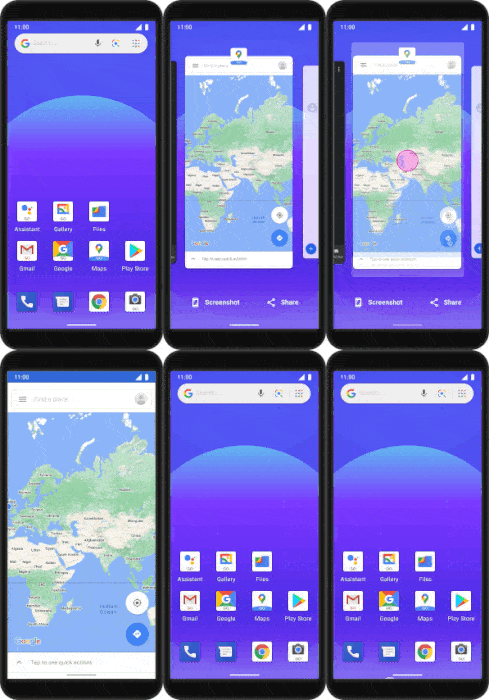
Google claims that Android 11 Go Edition is capable of launching apps 20% faster than Android 10 Go Edition. The company was able to achieve this by pre-fetching app data so that ‘cold’ starts look like ‘warm’ starts. In effect, this change will allow users to easily switch between apps without bogging down their device.

Much like the full-blown Android 11 release, Android 11 Go Edition features a conversation section in the notifications shade. Conversations across all messaging apps will be displayed in this section, making it easier for users to see, respond to, and manage conversations in one place.

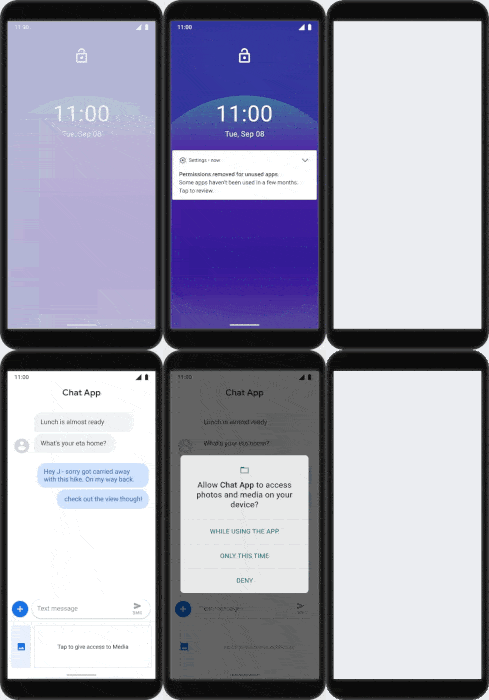
To ensure optimum privacy and security, devices running Android 11 Go Edition will have access to the same industry-leading privacy protections as any other Android device. It also includes some new privacy enhancements, which will make it easy for users to control how and when data on their device is shared. The enhancements include one-time permission, to grant apps access to specific sensors for just one instance, and an auto-reset feature, which will reset permissions when an app hasn’t been used for an extended period of time.

Since large-screen devices are gaining popularity even in the budget segment, Android 11 Go Edition also includes support for gesture-based navigation. Thanks to this, users will be able to go to the home screen, navigate backward, and switch between apps using simple swipe gestures.

Google further added that Android Go Edition will be available starting next month on all devices with up to 2GB of memory (previously limited to devices with 1.5GB RAM or less). With the expansion to 2GB, devices will have an additional 270MB of free memory, which will let users run three to four more apps in the background. Android Go Edition on 2GB devices will also offer up to 900MB of additional free storage space, which is enough for 300 selfies or an entire movie.

Based on our previous report, we asked Google if Android 11 Go Edition will be a requirement for new low-end devices launching with Android 11, provided they have 2GB of RAM or less. In response, the company said that Android Go Edition will be able to support all Android devices with up to 2GB RAM starting next month, but this is not to be construed as a requirement for Android 11 Go Edition specifically (essentially reiterating what is mentioned in the previous paragraph). Google typically doesn’t comment on the terms of its licensing agreements, so this response was to be expected.

Just how popular are low RAM devices these days? Since September 3rd, 2019 (the date when Google released the stable version of Android 10 and uploaded its source code to AOSP), there have been 367 new devices added to the Google Play Console’s Device Catalog that have at most 2GB of RAM and either launched with or upgraded to Android 10. If we include devices added to the catalog after September 3rd, 2019, that either launched with Android 9 Pie or haven’t yet received an update to Android 10, that number jumps to 1,492. Clearly, there are still a lot of low RAM devices being launched.

The post Google announces Android 11 Go Edition with support for 2GB RAM devices appeared first on xda-developers.


from xda-developers https://ift.tt/2ZkIkVp
via IFTTT

Microsoft releases a factory image for the Surface Duo

Microsoft as an Android OEM is a thought that would’ve seemed ridiculous just a few years back, but yet, here we are. Microsoft has launched the Surface Duo: a device with a very unique dual-screen form factor, and it’s running Android. And Microsoft actually seems to be part of the developer-friendly OEM crowd: the device is fully bootloader unlockable, meaning that, if you want to, you can get custom ROMs up and running on your device, not to mention rooting and other mods. But what if you mess up your device while trying to mod it (it happens to the best of us) and it doesn’t boot anymore, who are you gonna call? Well, Microsoft. They’ve put up a factory image for the Surface Duo, actually, and it’s just as easy to download as it is for other Surface devices.

Surface Duo Unboxing – Hands-on with Microsoft’s Dual Screen Android Device

Microsoft also provides a handy support page laying down the steps for installing a factory image onto your Surface Duo. As for the factory image itself, it is provided together with Windows 10 recovery images for other Surface devices. Since the Surface Duo is actually an Android phone, however, Microsoft makes it clear that the procedure for flashing it will be different than that of its Windows-powered family members. For one, you don’t need a USB drive, and the download page links to the tutorial page I mentioned earlier. You will, however, need to sign in to your account and provide your serial number in order to download it.

Once you’re done with that, however, it’s pretty standard stuff: download the image, reboot your Surface Duo into recovery mode, and then use ADB to sideload it. Once that’s done and over, reboot your device.

If you want to grab a Surface Duo, you can rest assured that you will be able to mod your device without a hassle, so far at least.


Are you planning on getting a Surface Duo?

The post Microsoft releases a factory image for the Surface Duo appeared first on xda-developers.


from xda-developers https://ift.tt/3k2pDNX
via IFTTT

Here are the Android 11 features that Google is and isn’t forcing on OEMs

Google just started rolling out the first stable build of Android 11 to its Pixel range of devices. The company’s latest software release comes with a bunch of new user-facing changes like Bubble notifications, built-in screen recording support, redesigned media controls, and much more. Along with these, Android 11 includes several updates aimed at developers and a host of hidden changes that we spotted in the Android 11 source code. But while most of these changes will make their way to the Pixel lineup, Google isn’t forcing a few Android 11 features on OEMs. In this post, we’ll be taking a look at all the Android 11 features that Google is and isn’t forcing on OEMs.

As per the Android 11 Compatibility Definition Document (CDD), Google doesn’t require OEMs to implement 3 of Android 11’s biggest features. The CDD doesn’t list conversation notifications as required, it doesn’t require OEMs to implement the Controls API, and Identity Credential is also not a requirement. We first learned about these requirements earlier this year in June, when a leaked document detailing changes to the CDD surfaced online.

For the unaware, the Android CDD is a list of software and hardware features that devices makers “MUST” implement, are only “STRONGLY RECOMMENDED” to implement, or “SHOULD NOT” implement. If a feature is listed as “MUST” implement, then OEMs have to add the feature or they can’t ship Google apps on their devices. If a feature is listed as “SHOULD NOT” implement, device makers can’t add the feature. Finally, if a feature is listed as “STRONGLY RECOMMENDED,” then it’s up to the OEMs to include or skip the feature.

Since the Android 11 CDD lists all three of the aforementioned features as “STRONGLY RECOMMENDED,” there’s a chance that OEMs could ship their Android 11 updates without the features. However, this doesn’t mean that all OEMs will skip these features, as they could find them beneficial for users. It’s also possible that Google’s stricter Google Mobile Services licensing agreement for Android 11 requires OEMs to implement these features, but we don’t know the terms of those agreements.

Now that we’ve talked about the features that aren’t required, let’s take a look at some of the features that are explicitly required in Android 11:

Disallow facial appearance alteration

It seems that Google is banning OEMs from implementing facial tweaking algorithms during image processing. This means that all images, by default, won’t have faces tweaked. But the tweaks can still be implemented in post. As a result, turning off the beauty mode should actually turn it off, unless the OEM camera app doesn’t let you fully disable beauty mode or it has a hidden level 1 beauty mode that can never be turned off. While most OEM camera apps do let you turn it off, a few devices are known to apply beauty filters even when the beauty mode is turned off. For instance, in Max’s review of the Vivo X50 Pro, he noted how the camera kept altering his face even though he disabled beauty mode.

Roboto as the default font

Google also requires OEMs to ship Roboto as the default font in Android 11. However, device makers can still offer their own fonts to users during setup or in settings. Goog notes that “the intent is to ensure that app developer’s expectations are consistent with the default (e.g. without explicit user consent) on-device presentation of their apps, and the default sans-serif font is a highly-visible aspect of this presentation.”

fs-verity requirement

New devices launching with Android 11 will be required to support fs-verity. According to Google, “fs-verity is similar to dm-verity, but implemented on a per-file basis…it is useful for efficiently verifying the authenticity of, or ‘appraising’, large files of which only a small portion may be accessed — such as Android application (APK) files…fs-verity also provides better protection against malicious disk firmware than an ahead-of-time hash, since fs-verity re-verifies data each time it’s paged in.”


Source: Android 11 CDD

The post Here are the Android 11 features that Google is and isn’t forcing on OEMs appeared first on xda-developers.


from xda-developers https://ift.tt/33d3zcJ
via IFTTT