LightBlog

lundi 5 octobre 2020

The ASUS ROG Phone 3 is the best gaming smartphone, and it’s now available in the U.S.

ASUS on Monday announced that its latest gaming smartphone, the ROG Phone 3, is now available in the U.S., and you can get it through Amazon, B&H, or the ASUS Store for $999. There’s also a version you can get with a whopping 16GB of RAM for $1,099. The phone is compatible with AT&T, T-Mobile, and their various MVNOs, and yes, that includes support for VoLTE/VoWiFi.

The ASUS ROG Phone 3 stands out for its raw power and focus on a premium gaming experience. If all you care about is specs, the device features many of the latest advancements, including a Qualcomm Snapdragon 865 Plus processor with sub-6GHz 5G support, a massive 6000mAh battery, a triple-camera setup, and up to 512GB of storage. There are also ultrasonic shoulder buttons, two USB-C ports, and a clip-on fan accessory called the AeroActive Cooler. These features mean you’ll get a superior gaming experience for titles like PUBG Mobile, Call of Duty Mobile, and more.

ROG Phone 3 features a large 6.59-inch AMOLED display with a 144Hz refresh rate (and a hidden 160Hz refresh rate), Bluetooth 5.1, and integrated dual-band WiFi 6. In other words, this thing is future-proof, making it a great option against other flagships on the market. The device also has an under-display fingerprint sensor, which is convenient in today’s world where wearing a mask has become part of the norm.

ASUS ROG Phone 3 Specifications

Specification ASUS ROG Phone 3
Dimensions & Weight
  • 171 x 78 x 9.85 mm
  • 240g
Display
  • 6.59″ FHD+ AMOLED
  • 19.5:9 aspect ratio
  • 144Hz refresh rate
  • 10-bit HDR
  • 650 nits outdoor brightness; 1000 nits peak brightness
  • DCI-P3 support
  • Supports glove touch
  • Corning Gorilla Glass 6
SoC
  • ROG Phone 3 Strix Edition:
    • Qualcomm Snapdragon 865 SoC
      • 1x Kryo 585 (ARM Cortex-A77-based) Prime core @ 2.84GHz
      • 3x Kryo 585 (ARM Cortex-A77-based) Performance core @ 2.4GHz
      • 4x Kryo 385 (ARM Cortex A55-based) Efficiency cores @ 1.8GHz
    • Adreno 650 GPU
  • ROG Phone 3:
    • Qualcomm Snapdragon 865 Plus SoC
      • 1x Kryo 585 (ARM Cortex-A77-based) Prime core @ 3.1GHz
      • 3x Kryo 585 (ARM Cortex-A77-based) Performance core @ 2.4GHz
      • 4x Kryo 385 (ARM Cortex A55-based) Efficiency cores @ 1.8GHz
    • Adreno 650 GPU (10% faster bin)
RAM & Storage
  • ROG Phone 3 Strix Edition:
    • 8GB LPDDR5 + 256GB UFS 3.1
  • ROG Phone 3:
    • Up to 16GB LPDDR5 + up to 512GB UFS 3.1
Battery & Charging
  • 6000mAh
  • 30W ROG HyperCharge direct charging
  • 30W USB PD 3.0
Fingerprint sensor In-display fingerprint sensor
Rear Camera
  • Primary: 64MP Sony IMX686, f/1.8, 1/1.7″ sensor, 0.8µm pixel
  • Secondary: 13MP wide-angle, 125° FoV, f/2.4
  • Tertiary: 5MP macro, f/2.0

Video:

  • 8K @ 30fps
  • 4K @ 30fps, 60fps (main rear camera)
  • 4K @ 30fps (wide-angle)
  • 1080p @ 30fps, 60fps
  • Slow-motion:
    • 4K @ 120fps
    • 1080p @ 240fps, 120fps
    • 720p @ 480fps
  • Time-lapse: 4K
Front Camera 24MP, f/2.0, 0.9µm pixel
Other Features
  • Ultrasonic sensors for AirTrigger 3 and grip press
  • Wi-Fi 6 — 802.11a/b/g/n/ac/ax 2×2 MIMO
  • Bluetooth 5.1 (BR/EDR+LE)
  • NFC
  • GNSS:
    • GPS (L1/L5)
    • Glonass (L1)
    • Galilio (E1/E5a)
    • BeiDou (B1/B2a)
    • QZSS (L1/L5)
    • NavIC (L5)
  • 2x USB Ports:
    • Side:
      • Custom USB Type-C
      • Supports USB 3.1 Gen 2
      • Supports DisplayPort 1.4 (4K UHD)
      • Supports 30W USB PD 3.0
      • Supports 30W ROG HyperCharge direct charging
    • Bottom:
      • USB Type-C
      • Supports USB 2.0
      • Supports 30W USB PD 3.0
      • Supports direct charging
  • Dual front-facing speakers (stereo) with dual NXP TFA9874 smart amplifiers
  • Band Support:
    • A-version:
      • 5G: N1, N2, N3, N5, N28, N41, N66, N71, N77, N78, N79
      • FDD-LTE: 1, 2, 3, 4, 5, 7, 8, 12, 13, 17, 18, 19, 20, 25, 26, 28, 29, 30, 32, 66, 71
      • TD-LTE: 34, 38, 39, 40, 41, 42, 48
      • WCDMA: 1, 2, 3, 4, 5, 6, 8, 19
      • GSM: 850, 900, 1800, 1900
    • B-version and Strix Edition:
      • 5G: N41, N77, N78, N79
      • FDD-LTE: 1, 2, 3, 4, 5, 7, 8, 20, 28
      • TD-LTE: 34, 38, 39, 40, 41
      • WCDMA: 1, 2, 3, 4, 5, 8
      • GSM: 850, 900, 1800, 1900
Android Version Android 10 with ROG UI or ZenUI

In terms of gaming, the ROG Phone 3 offers a lot of features that elevate the experience, including X-Mode, GameGenie and AirTrigger gestures, AeroActive Cooler 3, Bypass Charging, and more. These features combine to offer an incredible gaming experience — and if you pair a controller with the phone (like the ROG Kunai 3), you’ll never see mobile gaming the same way again, especially with services such as Stadia on the market.

We reviewed the ROG Phone 3 over the summer and concluded that not only is the device the king of gaming smartphones, but it’s among the best smartphones overall. About the only complaint we had is the fact that the device doesn’t feature a 3.5mm headphone jack, which the company said it eliminated in order to accommodate the extra PCB space needed for the external Snapdragon X55 5G modem.

The device runs ROG UI based on Android 10 out of the box, but the stock OS and kernel can be swapped after unlocking the bootloader. ASUS has sent several ROG Phone 3 units to developers on our forums, so if you’re interested in modding this gaming phone, keep an eye out on our forums in the coming weeks.

ASUS ROG Phone 3 Forums

Overall, we think the ROG Phone 3 is the best gaming smartphone of 2020, and now you can buy it in the U.S. The device is powerful, the features are great, and it offers plenty of the market’s latest innovations. Whether you’re searching for a gaming smartphone or simply just want a good smartphone, the ROG Phone 3 is worth checking out.

    ASUS ROG Phone 3
    Looking to play Android games, emulators, or get into cloud gaming on-the-go? The ROG Phone 3 is the best gaming smartphone on the market, period.

You can check out the ROG Phone 3 from the ASUS online store, B&H Photo, or Amazon starting today. You can also pick up a bunch of the phone’s accessories at various prices. We’ll have our reviews up on these accessories soon, so keep an eye out in the coming days!

ASUS ROG Phone 3 Accessories

The post The ASUS ROG Phone 3 is the best gaming smartphone, and it’s now available in the U.S. appeared first on xda-developers.


from xda-developers https://ift.tt/33yd1ZS
via IFTTT

7 Great Deals on Apps This Week Incl. Rosetta Stone

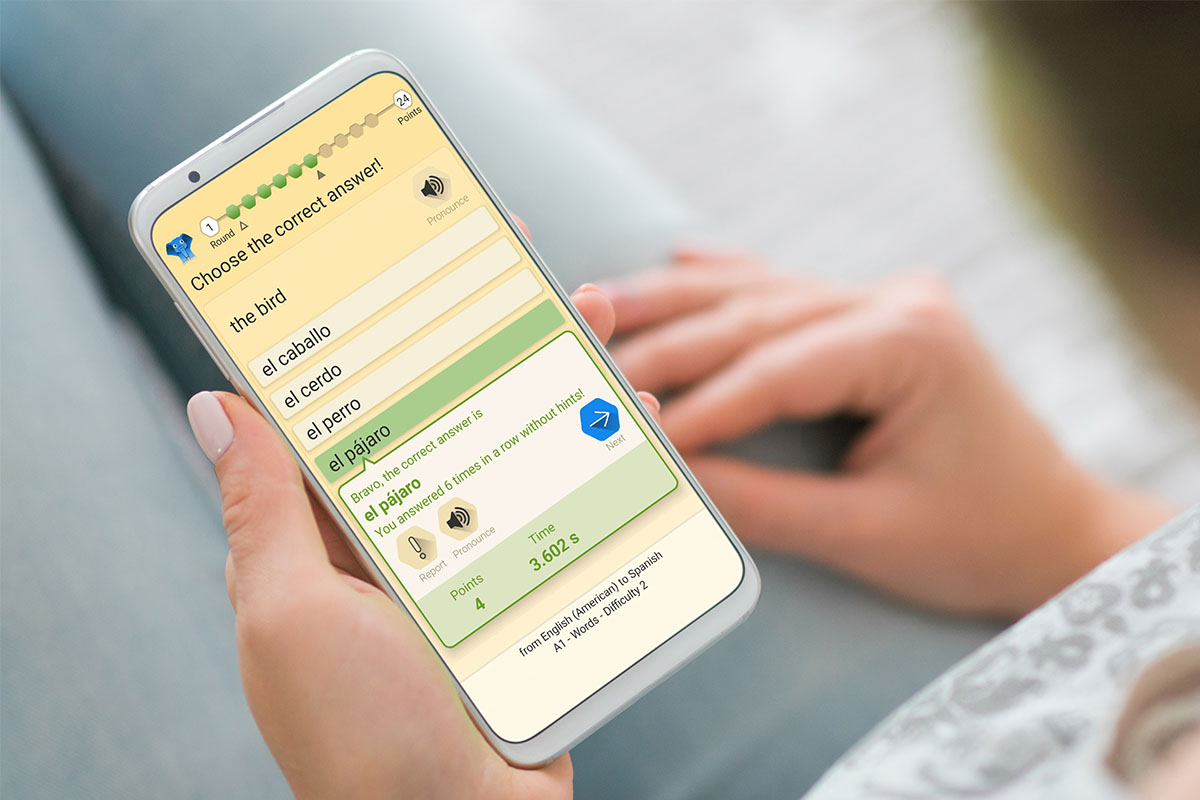
Want to spend your time at home more productively? Whether you are trying to learn a new language, get in shape, or simply protect your privacy, these apps can help. Right now, you can save hundreds on lifetime subscriptions at the XDA Developers Depot.

The Social Distancing Lifetime Subscription Bundle Ft. Rosetta Stone

This bundle gives you lifetime access to Rosetta Stone, winner of PC Mag Best Language-Learning Software five years in a row. You can also enjoy lifetime access to hundreds of non-fiction book summaries with 12min, and lifetime online protection from KeepSolid VPN Unlimited. Worth $844 in total, the bundle is now only $199.

LingvaNex Translator: Lifetime Subscription

Previously Product of the Week on Product Hunt, this app provides flawless translations between 112 languages. LingvaNex works on desktop and mobile devices, with support for text, voice, images, websites, and documents. Order now for $79.99 to get a lifetime subscription, worth $399.

BetterMe Home Workout & Diet: Lifetime Subscription

Want to get fitter or lose weight? BetterMe creates a workout and diet plan especially for you, including specific exercises and meal plans. The app also tracks your hydration levels and counts your steps. Normally $1,200, lifetime subscriptions are now only $39.99.

QLango Language Games: Lifetime Subscription

Another great tool for language learners, QLango helps you hone your skills through loads of fun games. Rated at 4.4 stars on Android, the app covers a long list of languages and has five different learning modes. Right now, lifetime subscriptions are 50% off at $44.99.

Yogaia Interactive Yoga Classes: Lifetime Subscription

If you can’t go to your regular yoga and fitness classes, you will love Yogaia. Available on desktop and mobile devices, this platform gives you access to over 1000 live and on-demand classes from top instructors. Worth $399, lifetime access is now only $299 for a limited time.

ZapReader Speed-Reading: Lifetime Subscription

Want to learn speed reading? ZapReader gives you access to exercises developed by world-leading speed reading experts. You can also upload your own content and use the built-in reader to practice your new skills. Usually priced at $499, lifetime access is currently just $39.99.

Busuu Language Learning Premium Plus: Lifetime Subscription

Named Google Play Store Editors’ Choice, this language learning app uses machine learning to help you start speaking faster. You get over 1,000 lessons created by expert linguists, with instant feedback from native speakers and the chance to earn official McGraw-Hill Education certificates. Worth $450, lifetime Premium Plus subscriptions are now $159.99.

Prices subject to change 

The post 7 Great Deals on Apps This Week Incl. Rosetta Stone appeared first on xda-developers.


from xda-developers https://ift.tt/3izxSA5
via IFTTT

How OPPO‘s ColorOS 11 Pushes the Trend of Android Customization

OPPO has a strong selection of Android devices in 2020, and with them, OPPO has always had a big focus on software. Android 11 is the latest big release for Google’s mobile operating system. To take full advantage of Android 11, OPPO released ColorOS 11 as one of the most significant updates for ColorOS to date. On September 14th, the ColorOS 11 event took place as a virtual launch. This event gave us a look at all of the new features that would be coming to many OPPO devices. There were many different types of feature updates, but the most interesting aspect was the new customization features.

When I hear about OEM customization on Android, I think about bloated theme engines that slow down my phone without offering much of anything else. This seems to be what ColorOS 11 is trying to avoid. Instead of having a heavily themed interface, they seem to be aiming for a more stock Android look, while implementing effective personalization features.


Trends in OEM Android Software

I ran a poll on the @xdadevelopers twitter account, asking our users what they value in OEM software. Some of the biggest trends from OS software this year have been security, privacy, and customization. All of these features are important, but XDA users ended up valuing personalization more.

XDA Twitter Poll

However, you might notice that the most popular feature was a stock Android experience. So an ideal solution is to make an OS that is closer to stock Android while having some personalization features to make it your own. So how is this done? I’ll share some examples of ColorOS 11 running on an OPPO Find X2 Pro.

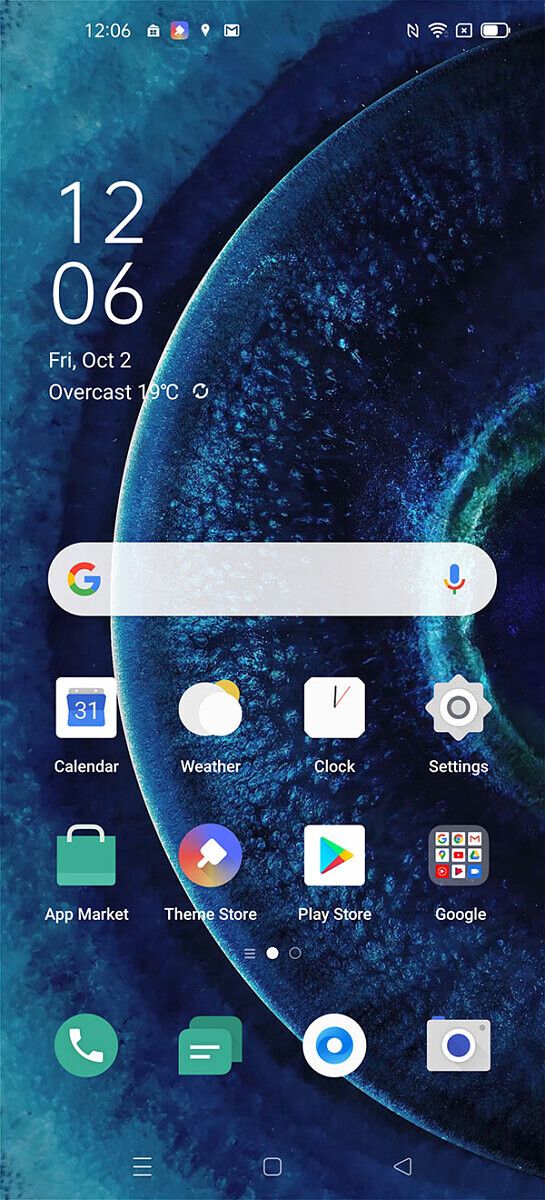
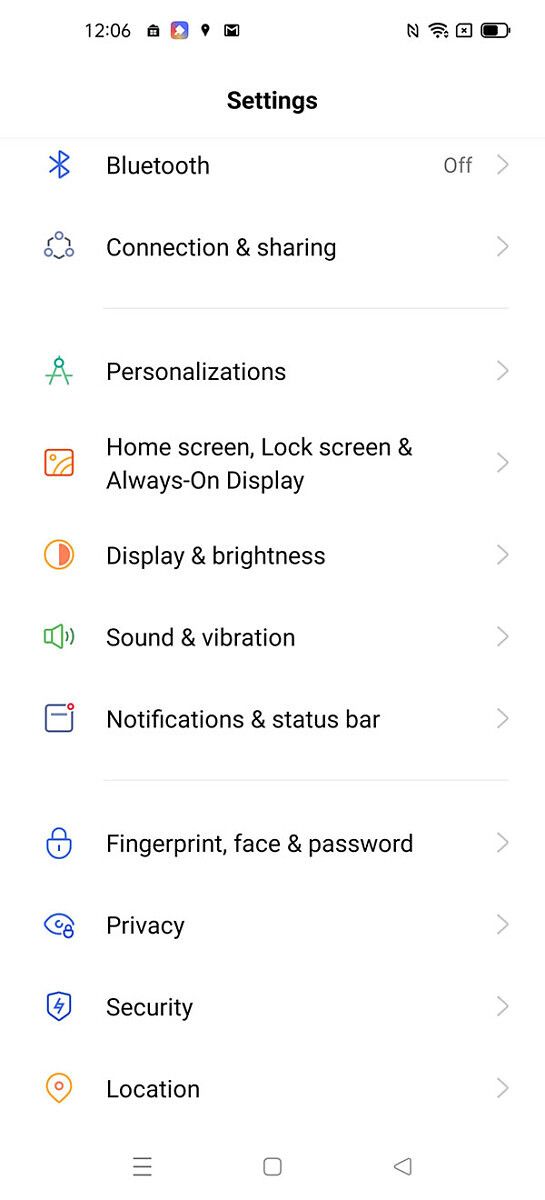
The homescreen of this phone will look very familiar to you because it closely resembles what you’d find on a stock Android device. The material design rules from Google are implemented throughout this software. Everything behaves and performs the way you’d expect it to, from a stock Google phone. There are no bloated elements here. Transitions are simples, icons are stock, the settings menu has the traditional layout, and the notification shade isn’t bogged down with OEM features.

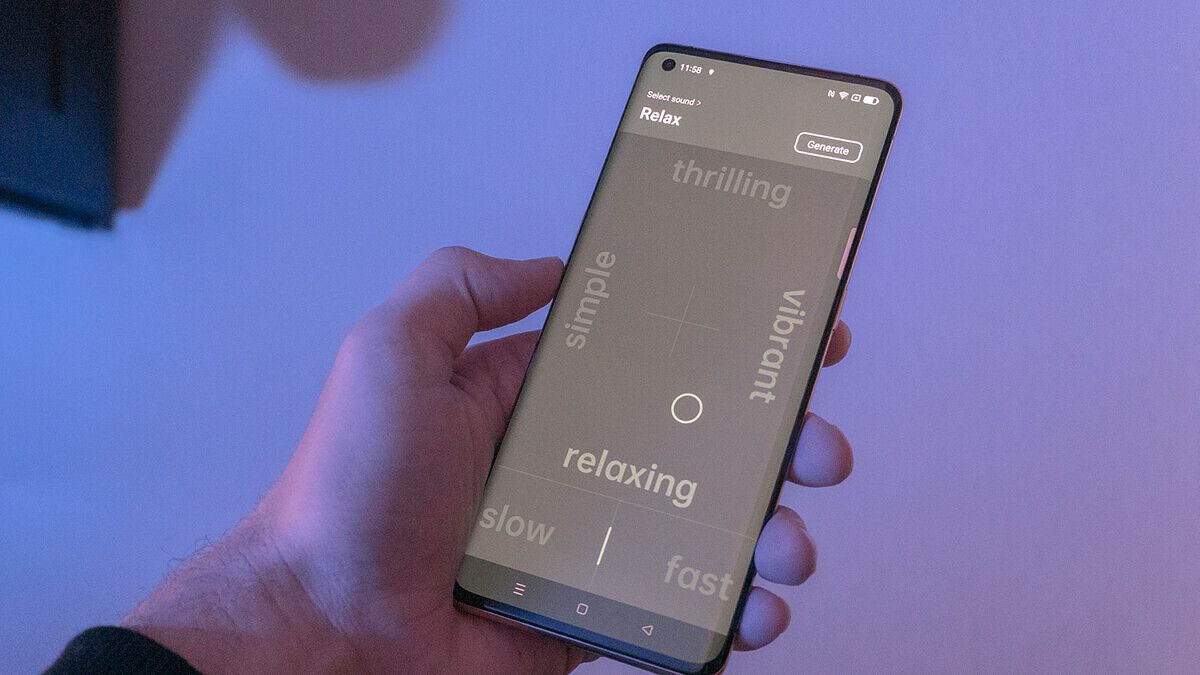
All of these features are ready to be customized to your liking. You can tweak the icons, generate your own wallpapers, make ringtones, and more. There’s no need to download icon packs or heavy themes to achieve this look. You can now use the adaptive personalization features to do this. Some of the best new customization features include:

  • Always on Display
  • Home screen icon style
  • Fingerprint icon animation
  • Accent color
  • Font & display size
  • Notification drawer icon shape
  • Edge lighting
  • Dark mode
  • Wallpaper creation

Now users can have their stock Android experience while being able to enjoy some great customization features. This seems to be the best way forward as OEMs are trying to implement more of what users want to see in their next OS update.


The Future of Personalization on Android

Here at XDA, there has always been a large community around Android themes and custom ROMs. However, this has always required a level of technical knowledge that doesn’t reach the general consumer. It’s also a lot of effort that goes into customizing your phone in this way. This is why we are seeing the trend of users valuing personalization features more, as the above poll shows.

Many phone manufacturers are headed in the same direction with these types of features. Implementing them in the right way is key, to avoid becoming clutter, rather than a feature.

Read about all of the new ColorOS 11 Features is our article here:
ColorOS 11 Review – OPPO adds lots of customization over Android 11

We thank OPPO for sponsoring this post. Our sponsors help us pay for the many costs associated with running XDA, including server costs, full time developers, news writers, and much more. While you might see sponsored content (which will always be labeled as such) alongside Portal content, the Portal team is in no way responsible for these posts. Sponsored content, advertising and XDA Depot are managed by a separate team entirely. XDA will never compromise its journalistic integrity by accepting money to write favorably about a company, or alter our opinions or views in any way. Our opinion cannot be bought.

The post How OPPO‘s ColorOS 11 Pushes the Trend of Android Customization appeared first on xda-developers.


from xda-developers https://ift.tt/3ivf9FW
via IFTTT

Motorola Razr 5G with Snapdragon 765G launched in India for ₹1,24,999 (~$1700)

After launching the Motorola Razr 5G internationally early last month, the company has now brought the device to the Indian market. The second foldable device from Motorola is powered by Qualcomm’s mid-range Snapdragon 765G SoC, and it comes with some minor improvements over its predecessor.

Motorola Razr 5G: Specifications

Specification Motorola Razr 5G
Dimensions and Weight
  • Unfolded: 72.6 x 169.2 x 7.9 mm
  • Folded: 72.6 x 91.7 x 16 mm
  • Gorilla Glass protection on the back with a matte finish
  • Water repellant design
  • 192g
Display
  • Main: 6.2-inch pOLED (2142×876), 21:9
  • External: 2.7-inch gOLED (800×600), 4:3
SoC
  • Qualcomm Snapdragon 765G:
    • 1x Kryo 475 (ARM Cortex-A76-based) Prime core @ 2.4GHz
    • 1x Kryo 475 (ARM Cortex-A76-based) Performance core @ 2.2GHz
    • 6x (ARM Cortex-A55-based) Efficiency cores @ 1.8GHz
    • 7nm EUV process
  • Adreno 620 GPU
RAM and Storage
  • 8GB RAM
  • 256GB flash storage
Battery & Charging
  • 2,800 mAh battery
  • 15W fast charger (inside the box)
Rear Camera
  • Rear: 48MP Quad Pixel f/1.7, 1.6μm
    • OIS
    • Laser autofocus (ToF)
    • 4K@30fps video recording
  • Front: 20MP Quad Pixel, f/2.2, 1.6μm
Connectivity
  • 5G NR Sub-6GHz, 4G LTE
    • (China/Japan/EMEA/ANZ SKU):
      • 5G: sub-6GHz band n1/n3/n5/n7/n28/n41/n41 HPUE/n77/n78/n78 HPUE/n79/n79
      • 4G: LTE band 1/2/3/4/5/7/8/12/13/17/18/19/20/26/28/34/38/39/40/41/42/46/66/71
    • (NA/LATAM/CAN SKU):
      • 5G: sub-6GHz band n2/n5/n25/n41/n41 HPUE/n66/n71/n78
      • 4G: LTE band 1/2/3/4/5/7/8/12/13/14/17/18/19/20/25/26/28/29/30/38/39/40/41/41 HPUE/46/48/66/
  • Bluetooth 5.0
  • NFC
  • Type-C port (USB 3.1)
  • WiFi 802.11.b/g/n/ac (2.4GHz + 5GHz)
  • GPS, A-GPS, GLONASS, Galileo
Other Features
  • Single bottom-firing speaker
  • 4 microphones
  • Dual SIM (1 Nano SIM + 1 eSIM)
Software
  • Android 10 with My UX
  • 2 guaranteed major OS upgrades
  • Bi-monthly security updates for 2 years

Along with the 5G-enabled Snapdragon 765G chip, the new Motorola Razr 5G comes with small changes to the overall build and design. These include the relocation of the fingerprint scanner from the front to the Motorola logo on the back, a glass back with a matte finish and Gorilla Glass protection, a new stainless steel hinge, and a tapered chin made with 7000 Series Aluminum Alloy. The company also addresses durability concerns on the second-gen foldable and it’s now rated for up to 200,000 flips in its lifetime.

Motorola Razr 5G

The primary and external displays on the new Motorola Razr 5G remain unchanged. It still has the same 6.2-inch 2142×876 plastic OLED main display and 2.7-inch 800×600 Quick View glass OLED display. However, Motorola has updated the camera on the device with a new 48MP primary sensor. The camera module features OIS along with a ToF sensor for advanced laser autofocus. The front camera has also been updated from 5MP to 20MP. Additionally, the device comes with Moto Camera 3.0 — the company’s latest camera app that has a new UI and a couple of unique features.

The Razr 5G has also received a RAM and storage bump, with the new model featuring 8GB of RAM and 256GB of flash storage. The device also packs in a larger 2,800mAh battery, which supports 15W fast charging with the included charging brick. The device runs a near-stock version of Android 10 with a couple of Motorola’s software customizations on top.

Pricing & Availability

The new Motorola Razr 5G is priced at ₹1,24,999 (~$1,700) in India and it’s already up for pre-order on Flipkart. The device comes in Black and Gold color variants, and it’s scheduled to go on sale starting from October 12th. The device will also be available in offline retail outlets.

Launch offers for the Motorola Razr 5G include an instant discount worth ₹10,000 for HDFC card users, double data benefits for Jio users with the ₹4,999 annual plan, and an additional one year of unlimited services from Jio at no extra cost. If you’re interested in purchasing the device, you can pre-order it now from the Flipkart link below. It’s also worth noting that Motorola has reduced the price of the first-gen Motorola Razr in the country and it’s now available on Reliance Digital for ₹94,999 (~$1,298).

Pre-order the Motorola Razr 5G from Flipkart


The post Motorola Razr 5G with Snapdragon 765G launched in India for ₹1,24,999 (~$1700) appeared first on xda-developers.


from xda-developers https://ift.tt/2F2ObI3
via IFTTT

YouTube Music is rolling out personal playlist playback through Google Assistant on mobile and casting without Premium membership

Google has officially killed off Google Play Music and, over the last few months, the company has been adding new features to YouTube Music to bring it at par with the outgoing service. Most recently, the company introduced support for recommended music playback via Google Assistant to the app, along with the ability to allow external devices to start playback and a ‘Recent Activity’ section. Now, according to recent posts on Reddit, Google has added support for two more Google Play Music features to the app.

The first Google Play Music to make it to YouTube Music with the recent update is the ability to cast uploaded music without a premium membership. Previously, the service required users to purchase a premium subscription to cast uploaded music to external devices. However, according to a recent post from u/prauschkolb, the app now lets you cast uploaded music without a premium membership.

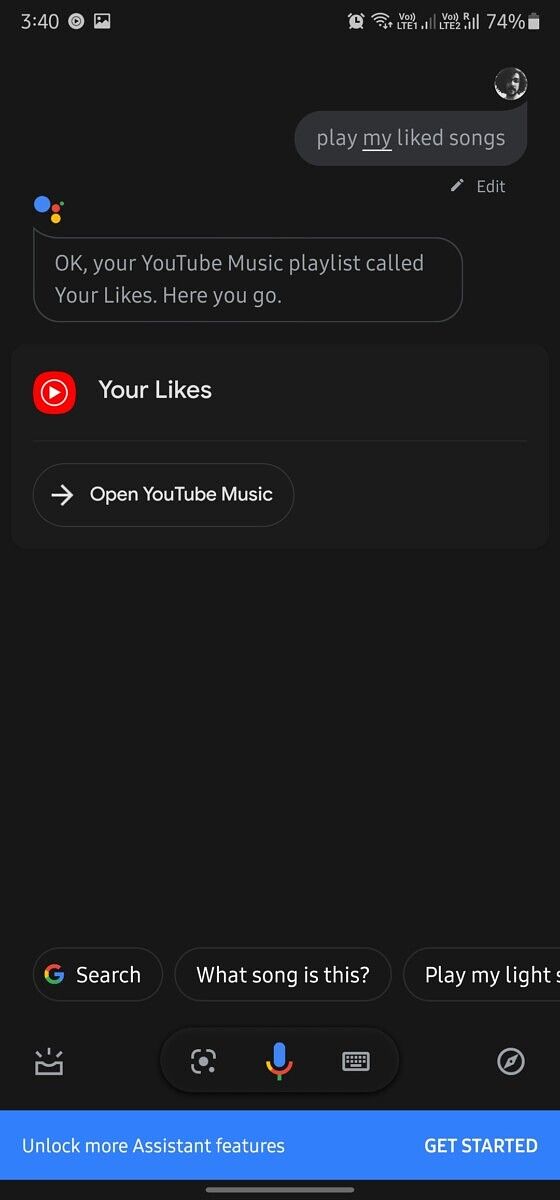
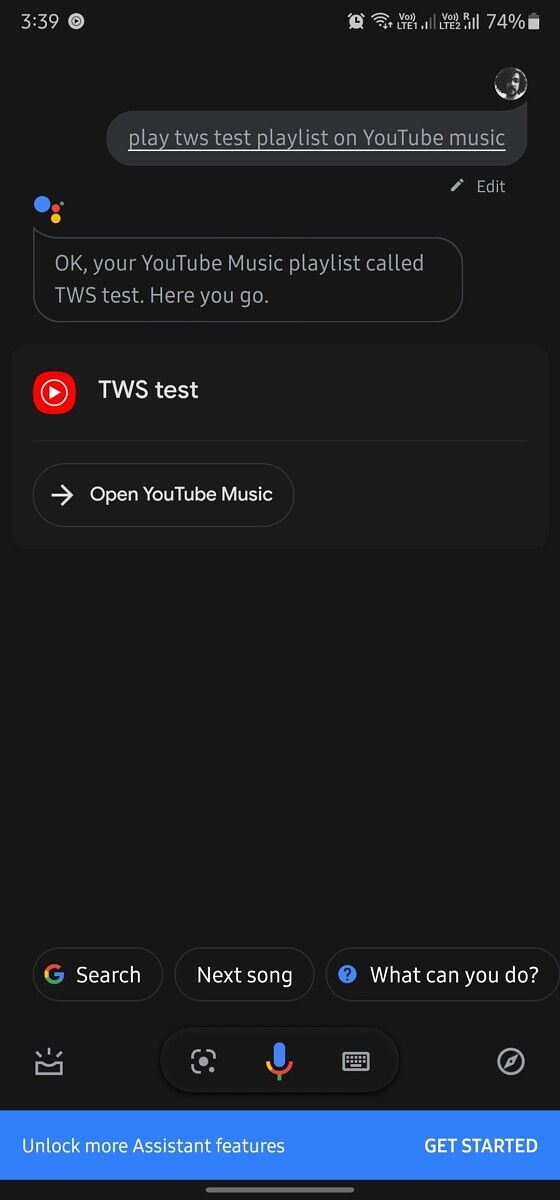
Along with the ability to cast uploaded music without a YouTube Premium subscription, YouTube Music now also lets users play personal playlists via the Google Assistant. According to a Reddit post by u/M00N_Water, the feature will allow you to play your saved YouTube Music playlists by asking the Google Assistant to “play (playlist name) on YouTube Music”. The feature works for all saved playlists and even with the ‘Your Likes’ playlist. However, in order to play the liked music playlist, you’ll need to ask the Assistant to “Play my liked songs”.

YouTube Music GPM features Google Assistant

As per the comments on the respective threads, both the features are now live worldwide and should be available on your device. I tested the features on YouTube Music 3.86.51 and the Google Assistant commands worked as intended. However, I didn’t find the option to cast uploaded music to an external device. Interestingly, I was able to play uploaded music in the background without a premium account, which is another significant addition.

YouTube Music - Stream Songs & Music Videos (Free, Google Play) →


Source: Reddit (1,2)

The post YouTube Music is rolling out personal playlist playback through Google Assistant on mobile and casting without Premium membership appeared first on xda-developers.


from xda-developers https://ift.tt/2HYyB1a
via IFTTT

Flipkart to launch six Nokia Smart TVs with integrated Onkyo soundbar in India tomorrow

Nokia is a nostalgic brand with enough brand value that allows it to license its name to others. While HMD Global handles smartphones under the Nokia brand, Flipkart handles smart TVs in India under the Nokia Smart TV branding. Nokia made its entry into the smart TV segment in India back in December 2019, and we expect to see more TVs launched tomorrow. We now have information relating to the six new TVs that Flipkart is launching tomorrow under the Nokia Smart TV brand.

Nokia already has three 4K TVs in its portfolio: 43CAUHDN, 55CAUHDN, and 65CAUHDN. Teasers on its official website indicate a launch scheduled for tomorrow, October 6, although no other specifics have been shared.

According to our internal sources, the company is planning to expand this lineup with as many as six TVs:

  • UHD: 43″, 50″, 55″, 65″
  • FHD: 43″
  • HD: 32″

The UHD/4K lineup is expected to come with a 3840 x 2160 resolution with HDR 10 support. Flipkart/Nokia will be calling the display technology as “MaxBrite Display” with micro-dimming and Pronto Focal AI Engine, as well as a 5000:1 contrast ratio. The maximum brightness would be 350 nits on the 43″ model, 380 nits on the 50″, 420 nits on the 55″, and 450 nits on the 65″ model. The TVs will come with an integrated Onkyo soundbar, featuring 30W speakers and 18W tweeters.

The FHD and HD lineup is expected to be a bit more humble. The maximum resolution on the 43″ FHD model would be 1920 x 1080, while that on the HD model would be 1366 x 768. Much like the 4K lineup, these two TVs will also come with a “MaxBrite Display” with micro-dimming and Pronto Focal AI Engine, although the contrast ratio is at 3000:1 and the maximum brightness would be at 325 nits on both. These TVs will also come with an integrated Onkyo soundbar, featuring 24W speakers and 15W tweeters.

We do not have information on the pricing or availability. Other reports mention an expected starting price of ₹21,999 for the base model, although we would advise just waiting for the launch tomorrow for a clearer picture. We also expect the TVs to run on Android TV.

The post Flipkart to launch six Nokia Smart TVs with integrated Onkyo soundbar in India tomorrow appeared first on xda-developers.


from xda-developers https://ift.tt/30BFHPz
via IFTTT

Kiwi Browser adds experimental support for Opera desktop extensions

While there are a variety of Chromium-based browsers on the Google Play Store, XDA Senior Member arnaud42‘s Kiwi Browser is in a league of its own. It was one of the first Chromium-based browsers for Android that offered support for Chrome extensions, and it packs in a ton of additional features that you won’t find on other Chrome alternatives. But the best part about the browser is that it’s completely open-source, which allows other Chromium-based browsers to bring some of its features to their users.

For instance, we recently learned that at least three Chromium-based browsers might be adding support for Chrome extensions thanks to the Kiwi Browser. But while other browsers are working on bringing Chrome extension support to their users, arnaud42 has added experimental support for Opera desktop extensions to Kiwi Browser with its latest update, along with a couple of other useful improvements.

The latest update for Kiwi Browser (version Git200930) has started rolling out to users via the Google Play Store, and it brings the following changes:

  • (General) Improved two important stability issues (screen rotation and GPU freezes)
  • (Browsing) Fix related to Facebook Messenger web edition
  • (Browsing) Fix for a minor issue related to Twitter windows not opening.
  • (Extensions) Added partial support for Opera experimental Desktop extensions.

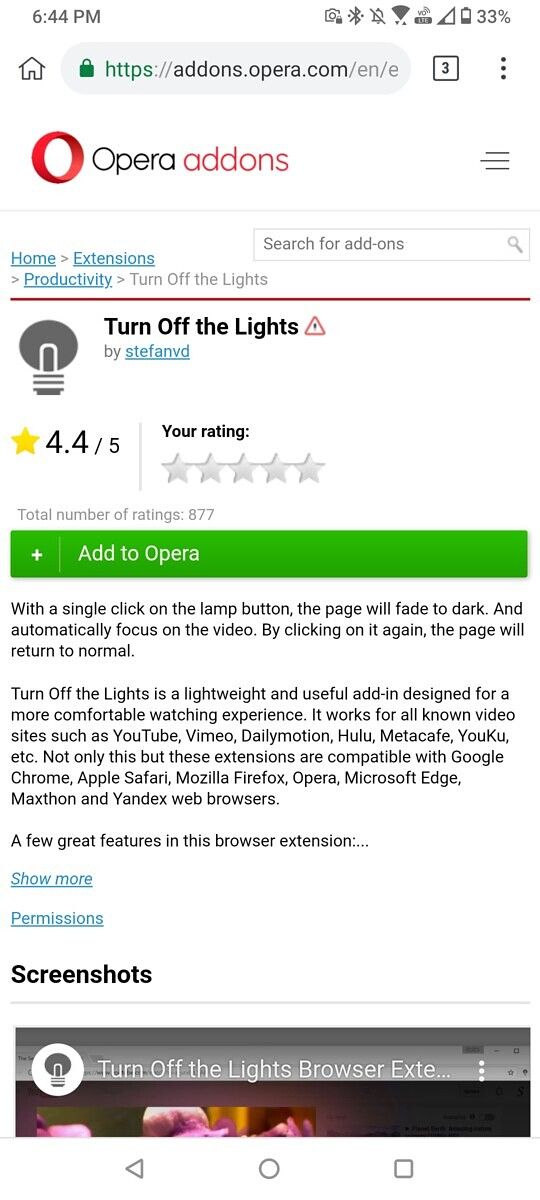
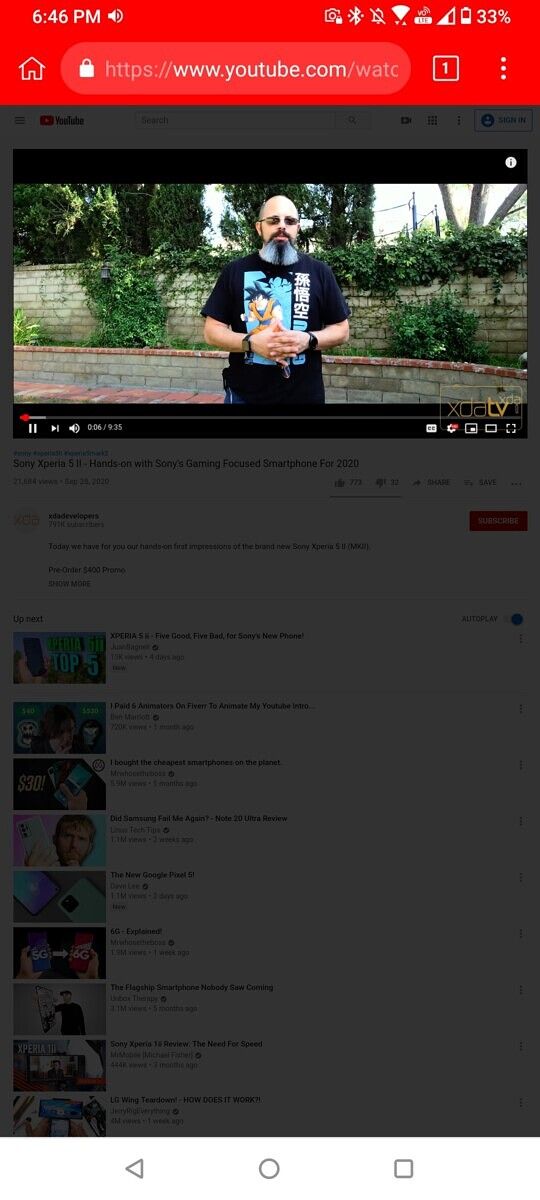
As you can see in the attached screenshots, with the latest version of the Kiwi Browser, you can now install a few Opera desktop extensions on your Android device. To do so, you can navigate to the Opera addons page on the browser and download the extension of your choice.

Kiwi Browser Opera Desktop extensions Kiwi Browser Opera Desktop extensions

Once you have the extension downloaded on your device, you’ll need to navigate to the Extensions settings in the browser, turn on Developer mode, and then tap on Load. In the following screen, you’ll have to select the extension file you just downloaded, and it will automatically be added to the browser. To enable the extension, tap on the toggle in the extension card, tap OK in the following pop-up, and you’re all set. We tested the Turn Off the Lights and uBlock Origin extensions on the latest version of the Kiwi Browser, and they worked exactly as expected. However, since the Opera desktop extension support is currently experimental, your mileage may vary.

Kiwi Browser - Fast & Quiet (Free, Google Play) →

The post Kiwi Browser adds experimental support for Opera desktop extensions appeared first on xda-developers.


from xda-developers https://ift.tt/36xsWct
via IFTTT