LightBlog

jeudi 8 octobre 2020

Here’s your first look at the upcoming OnePlus Buds Z

OnePlus is all set to unveil its next flagship — the OnePlus 8T — later this month. The company has already started dropping teasers for the device, some of which have confirmed that the device will feature a 4,500mAh battery and 65W fast charging support. Along with the OnePlus 8T, the company is expected to unveil its next pair of TWS earphones — the OnePlus Buds Z.

We first heard about the upcoming OnePlus Buds Z early last month, when XDA Senior Member Some_Random_Username spotted a mention of the device in an OxygenOS 11 beta release. While we’ve seen plenty of leaks and teasers about the OnePlus Buds Z since then, we’re yet to see any renders of the TWS earphones. That changes today, as Some_Random_Username has managed to extract images of the earphones from an APK shared by a reliable source.

OnePlus Buds Z

As you can see in the attached images, the OnePlus Buds Z look like a cross between the older OnePlus Buds and the Honor Magic Earbuds. While the earbuds retain most of the same design as the OnePlus Buds, they now feature silicone tips and a charging case that greatly resembles the Magic Earbuds.

OnePlus Buds Z

The charging case features OnePlus branding on the lid and it houses the earbuds horizontally. It has an LED indicator over on the front, a USB Type-C port on the back, and a single function button.

While the APK file mentions three color variants — Black, White, and Silver — it only includes images for the white and silver color variants.

Although the APK reveals no further information about the OnePlus Buds Z, the company has confirmed that the earbuds will be IP55 certified for dust and water resistance. It’s worth noting that the teaser also included an image with a silhouette of the OnePlus Buds Z, which falls in line with these images.

The post Here’s your first look at the upcoming OnePlus Buds Z appeared first on xda-developers.


from xda-developers https://ift.tt/2SER598
via IFTTT

The TCL TAB is a $199 8″ Android tablet available from Verizon

At IFA 2020 early last month, TCL unveiled two new Android tablets — the TCL 10 TabMax and TCL 10 TabMid. Out of the two, the cheaper TCL 10 TabMid featured an 8-inch FHD+ display, Qualcomm’s mid-range Snapdragon 665 SoC, 4GB of RAM, 64GB of storage, and a 5,000mAh battery. The company has now launched a tablet with similar specifications in the US, called the TCL TAB.

TCL TAB: Specifications

Specification TCL TAB
Dimensions & Weight
  • 8.24″ x 4.93″ x 0.34″
  • 11.5 oz
Display
  • 8-inch FHD+
  • 1920 x1200
  • Dragontrail glass
SoC
  • Qualcomm Snapdragon 665
    • 4x Gold 2.0GHz
    • 4x Silver 1.8GHz
RAM & Storage
  • 3GB RAM
  • 32GB storage
  • microSD card slot for expansion up to 256GB
Battery & Charging
  • 5,500mAh
  • 18W fast charging
Rear Camera(s)
  • 8MP
Front Camera(s)
  • 5MP
Port(s)
  • USB Type-C
Connectivity
  • 802.11 b/g/n/ac Wi-Fi
  • Bluetooth 5.0
Software Android 10

The new TCL TAB features the same overall design as the TCL TabMid, with an 8-inch FHD+ display on the front surrounded by chunky bezels. However, over on the back, the TCL TAB features a plain black finish with Verizon branding, instead of the dark blue finish we saw on the TabMid. The company has also made some minor changes to the specifications, and the TCL TAB only packs in 3GB of RAM and 32GB of storage. But on the bright side, it includes a larger 5,500mAh battery.

Other than these changes, the TCL TAB is largely the same as the TCL TabMid. It is also powered by the Snapdragon 665 chipset, it features a single camera module on the back with an 8MP sensor, and it packs in a 5MP selfie shooter. Other features include a USB Type-C port for charging and data syncing, 802.11 b/g/n/ac Wi-Fi, and Bluetooth 5.0. In terms of software, the TCL TAB runs Android 10. The company has also promised at least one major OS update and quarterly security patches for a minimum of two years for the device.

Pricing & Availability

The TCL TAB will be available exclusively on Verizon in the US, which means that it comes with a host of preloaded Verizon apps. These include Digital Secure, Ignite, My Verizon, Verizon Cloud, and Verizon Messages+. The tablet is priced at $199.99, and it will be available for purchase at Verizon stores and other online retailers starting today. As mentioned earlier, the tablet will be available in a single Suede Black color variant.

The post The TCL TAB is a $199 8″ Android tablet available from Verizon appeared first on xda-developers.


from xda-developers https://ift.tt/2SAXGRE
via IFTTT

HMD Global rolls out the Android 10 update to the Nokia 3.1 and Nokia 5.1

Amidst all of the talk about Android 11 updates, some people forget that OEMs are still working on updating their smartphones to Android 10. For example, HMD Global was expected to conclude its Android 10 rollout by Q2 2020, but they unfortunately missed the timeline. The company worked hard over the last few months clearing the backlog and they are now back on track. Just a day ago, we learned that owners of the Nokia 3.1 should look forward to the Android 10 update notification, while a similar update for the Nokia 5.1 should be ready within 24 hours. In keeping with its promise, HMD Global has now started rolling out the Android 10 update to the Nokia 5.1.

Nokia 3.1 XDA Forums ||| Nokia 5.1 XDA Forums

Both the Nokia 3.1 and the Nokia 5.1 debuted with Android 8.1 Oreo, which means the smartphones have now secured their second major Android OS update. Nokia says the OTAs will be rolled out in a phased manner. The first 10% of the userbase will receive the update on the first day, with the rollout steadily expanding to more users in the following days. The initial wave starts in the following regions:

  • Armenia
  • Azerbaijan
  • Bangladesh*
  • Belarus
  • Georgia
  • India
  • Kazakhstan
  • Laos*
  • Malaysia*
  • Mongolia
  • Morocco*
  • Nepal*
  • Philippines*
  • Singapore*
  • Sri Lanka*
  • Thailand*
  • Tunisia*
  • Ukraine
  • Uzbekistan
  • Vietnam*

* indicates a country where only the Nokia 3.1 receives the update, but not the Nokia 5.1

The updates bring along all the standard Android 10 features such as system-wide-dark mode, a new gesture navigation system, Smart Reply, revamped location and privacy controls, new Digital Wellbeing tools with Parental controls and much more. The Android Security Patch Level (SPL) has also been bumped to September 2020.

nokia_5.1_android_10_ota

Thanks to Nokia Community member .SJ for the screenshot!

As mentioned earlier, Android 10 is the Nokia 3.1 and 5.1’s second OS update and the device duo will receive no further OS updates from the OEM. HMD Global, however, allegedly plans to release stable Android 11 updates for several other devices in its lineup starting from Q4 2020.


Source: Nokia Community (1, 2)

The post HMD Global rolls out the Android 10 update to the Nokia 3.1 and Nokia 5.1 appeared first on xda-developers.


from xda-developers https://ift.tt/34CdLw7
via IFTTT

The popular Moovit transit app lands on Huawei’s AppGallery

Huawei’s AppGallery is the company’s homegrown alternative to the Google Play Store. It comes preloaded on all new Huawei and Honor devices, but it offers a significantly smaller collection of apps. To remedy this, Huawei has been making constant efforts to bring more developers to the platform. And developers have taken notice. Over the last few months, several apps have made their way to the platform, including popular ones like HERE WeGo, Deezer, Tidal, BBC News, Tinder, Telegram, and TikTok. Now, Intel-owned mobility service provider Moovit has also published its app on AppGallery.

For the unaware, Moovit is a Mobility as a Service (MaaS) solutions provider that offers guides to help users travel several major cities using any mode of transport. The app generates these guides by collecting information from public transport operators, micro-transport operators, and transport authorities. And it even collects live information from its community to improve its guides.

Moovit

As a result, Moovit’s guides offer accurate, real-time routes for any journey with several urban mobility solutions. Additionally, Moovit gives users the option to plan their journey beforehand, it provides real-time arrival information for public transport, a Live Directions feature with Get Off alerts, and Service Alerts to notify users of any disruptions.

Huawei and Honor users in over 100 countries will now be able to download the Moovit app on their devices directly from the AppGallery. Furthermore, Moovit will also be available in a customized format in the Huawei browser. Huawei has also revealed that it will collaborate with Moovit on in-app promotions for Huawei/Honor users, which will be announced through the app soon.

Download Moovit on AppGallery

The post The popular Moovit transit app lands on Huawei’s AppGallery appeared first on xda-developers.


from xda-developers https://ift.tt/36FShkN
via IFTTT

Android Auto 5.7 prepares to let you add a shortcut to a Google Assistant command

Google recently updated Android Auto’s settings UI with a couple of new elements designed to simplify the connection process. The update added a new ‘Connect a car’ button, instructions to help users connect using a USB cable, and a button to connect wirelessly. Now, Google is rolling out another update for Android Auto with an interesting addition.

An APK teardown can often predict features that may arrive in a future update of an application, but it is possible that any of the features we mention here may not make it in a future release. This is because these features are currently unimplemented in the live build and may be pulled at any time by the developers in a future build.

Android Auto v5.7.603944 doesn’t include any noteworthy user-facing changes. The update only brings some improvements for the Do Not Disturb functionality, optimizations for the Dark Mode, and a few bug fixes. But a teardown of the latest APK has unearthed strings of code that point towards an upcoming feature that will make Google Assistant on the app even more useful.

+ <string name="settings_customize_add_assistant_shortcut_activity_title">Assistant Action</string>
+ <string name="settings_customize_add_assistant_shortcut_add_button">Add</string>
+ <string name="settings_customize_add_assistant_shortcut_error_label_empty">Please enter a valid label</string>
+ <string name="settings_customize_add_assistant_shortcut_error_query_empty">Please enter a valid query</string>
+ <string name="settings_customize_add_assistant_shortcut_label_hint">Label</string>
+ <string name="settings_customize_add_assistant_shortcut_launcher_icon_title">LAUNCHER ICON</string>
+ <string name="settings_customize_add_assistant_shortcut_query_hint">Assistant command</string>
+ <string name="settings_customize_add_launcher_shortcut_button">Add a shortcut to the launcher</string>
+ <string name="settings_customize_add_launcher_shortcut_deleted">Item removed</string>
+ <string name="settings_customize_add_shortcut_dialog_option_assistant">an assistant action</string>
+ <string name="settings_customize_add_shortcut_dialog_option_contact">a contact to call</string>
+ <string name="settings_customize_add_shortcut_dialog_title">Add a shortcut to</string>

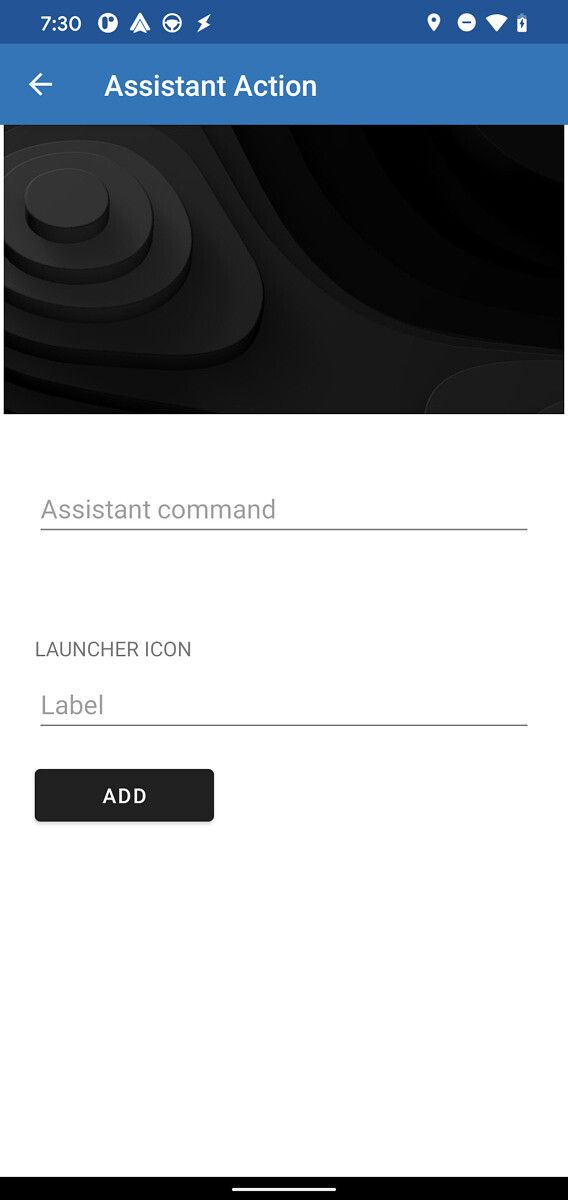
The strings suggest that Google is working on adding a shortcut to a Google Assistant command in Android Auto. Our Editor-in-Chief, Mishaal Rahman, has managed to enable the feature manually, and here’s what it looks like:

Android Auto Assistant Action Android Auto Assistant Action

These screenshots show the setup process for adding a new shortcut for an Assistant Action in Android Auto. The feature will let you pick an Assistant command and Launcher icon label for the shortcut during the process. Once the shortcut is set up, you’ll be able to perform your custom Assistant Action from within the app.

It’s worth noting that although Mishaal was able to enable the onboarding process for the feature, he wasn’t able to get the feature to actually work. This suggests that the feature is currently in its early stages of development, and Google may flesh it out in an upcoming Android Auto update. As of now, we have no official information from Google regarding the feature or its release timeline.


Thanks to PNF Software for providing us a license to use JEB Decompiler, a professional-grade reverse engineering tool for Android applications.

The post Android Auto 5.7 prepares to let you add a shortcut to a Google Assistant command appeared first on xda-developers.


from xda-developers https://ift.tt/36JNej6
via IFTTT

mercredi 7 octobre 2020

Qualcomm and ASUS are reportedly teaming up on a gaming smartphone with the Snapdragon 875

Chipset maker Qualcomm is reportedly working on its own line of gaming smartphones. According to DigiTimes, a Taiwanese publication focusing on semiconductor news, Qualcomm will be partnering with ASUS to produce its first smartphone that could arrive by the end of 2020. ASUS is expected to focus on the hardware and design while Qualcomm will be taking care of “industry design” and “software integration optimizing its Snapdragon 875 platform.” As per tradition, Qualcomm releases its new flagship chipset in the month of December with device manufacturers introducing their new phones in the following year. If the report is anything to go by, we might see the new Snapdragon 875 debut this year alongside the first finished product rocking the new chipset. However, the device is expected to ship by next year itself.

Qualcomm seems to be following the same path that NVIDIA took back in 2016 by introducing its own line of ‘Founders Edition’ GPUs. It was not only a reference design but also helped the company earn some profits by selling its own line of GPUs. On top of that, ASUS seems to be a really good choice considering the company’s pedigree of making one of the best gaming smartphones on the market. Currently, the ROG Phone 3 is rated as the best gaming smartphone packing Qualcomm’s most recent flagship chip, the Snapdragon 865+.

Apparently, there have been agreement calls for the joint purchasing of components needed for both the ASUS ROG Phone gaming phones and Qualcomm’s gaming phones including displays, memory, camera modules, batteries, and cooling solutions. This essentially means that the upcoming Qualcomm gaming smartphones could carry some elements from the ROG Phone lineup. The two companies are also expected to produce about 1 million phones a year, with 500,000 dedicated for Qualcomm while the other falling under the ROG Phone brand.

We reached out to ASUS for comment but a spokesperson told us that they do not comment on rumors or speculations. Qualcomm will presumably unveil its Snapdragon 875 chipset at the upcoming virtual Snapdragon Tech Summit event starting December 1st, so we won’t have to wait long to learn more.

The post Qualcomm and ASUS are reportedly teaming up on a gaming smartphone with the Snapdragon 875 appeared first on xda-developers.


from xda-developers https://ift.tt/3iEhIpb
via IFTTT

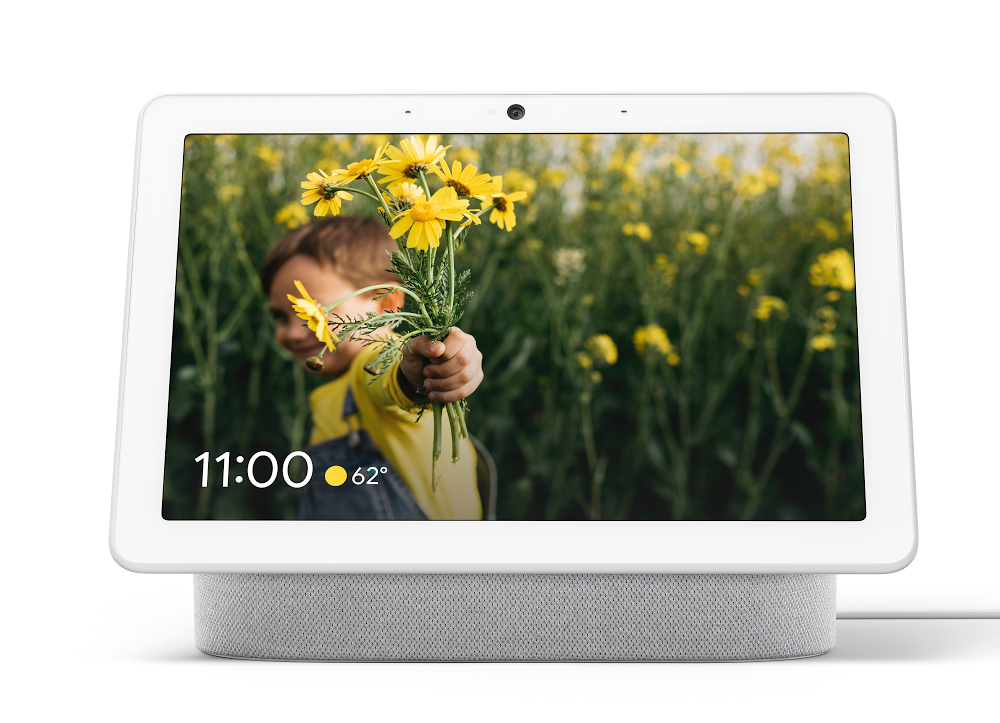
Google is testing a new UI on the Nest Hub Max with tabs, contextual panels, and a dark mode

Google appears to be testing a revamped user interface for the Nest Hub Max. A video showcasing the changes (via AndroidPolice) reveals the UI will feature a touch-centric experience with contextual panels for smart home control, tabs, and much more. There also appears to be a dark mode in the works.

The tabs allow users to quickly access different settings. The default tab appears to be “Your morning,” which shows things like weather and contextual panels for smart home control. This section will also presumably feature what’s on your calendar, too. There are other tabs for things like “Home control,” “Media” and “Communicate,” the last of which will allow you to quickly make a phone call, make a Google Duo call, or broadcast to a room. You’ll also see a panel for contacts so you can easily start a call with friends or family.

It’s quite a big chance for Google’s smart displays, which have largely prioritized an interface that can be navigated by voice. Adding in a more touch-friendly interface makes devices like the Nest Hub Max more accessible; sometimes it’s hard to figure out how to navigate the smart display’s UI, both through voice and touch, so this is a welcome change.

As for the dark mode, it’s pretty self-explanatory. Instead of a stark white background, turning on dark mode will allow users to choose a UI appearance that’s friendlier to low light environments. While you can manually toggle dark mode, it appears there’s also an auto option, which will likely turn on dark mode when the sun goes down.

Finally, speaking of touch controls, it looks like the revamped UI will support a new tap-and-hold gesture. When you tap-and-hold on a card, for example, a menu will come up to open that card or dismiss it.

It’s unclear how widely Google is testing the new UI for the Next Hub Max, but the company has been working on making changes for a few months. Hopefully, it’ll roll out to more Nest Hub smart displays soon — and other Google Assistant-equipped smart displays for that matter. For what it’s worth, the new UI appears to be available in software version v32.24.0 for the tipster.

    Nest Hub Max
    The Nest Hub Max is the do-everything smart display. It's great for controlling your smart home, but also makes for a terrific photo frame. And it's awesome for viewing recipes and making video calls.

The post Google is testing a new UI on the Nest Hub Max with tabs, contextual panels, and a dark mode appeared first on xda-developers.


from xda-developers https://ift.tt/3jGoUSO
via IFTTT