LightBlog

jeudi 29 octobre 2020

[Update: New render for camera] Here’s our first look at the Samsung Galaxy S21 Ultra

Update 1 (10/29/2020 @ 08:22 PM ET): OnLeaks has posted a new render for the rear camera setup. Scroll to the bottom for more information. The article as published on October 18, 2020, is preserved below.

‘Tis the weekend of leaks. In the past two days, we have seen two high-profile upcoming phones leaked through renders. First, we got a good look at the Huawei Mate 40 Pro, and then the Samsung Galaxy S21. Now, we have our first look at the Samsung Galaxy S21 Ultra.

This leak comes to us courtesy of @OnLeaks once again, lending his reputation towards confidence in this leak. As mentioned before, the Samsung Galaxy S series for 2021 could be called either the Samsung Galaxy S21 or the Samsung Galaxy S30 — depending on the name that Samsung settles on eventually. For now, we presume it will be called the Galaxy S21, and the device pictured here is the top-end “Ultra” variant.

As one would expect, the Samsung Galaxy S21 Ultra in these leaked renders looks fairly similar to the Galaxy S21 leaked renders. The difference comes in the display, which is expected to slightly curved, as is usually the case with more “premium” phones. @OnLeaks mentions that the screen diagonal is between 6.7″ to 6.9″, and there is a centered selfie punch-hole camera on the front. The device will measure about 165.1 x 75.6 x 8.9 mm, 10.8mm if you measure thickness at the camera bump.

The next big change will be with the camera. While the camera island follows the same design cues as we saw in the leaked renders for the regular variant, the Galaxy S21 Ultra will have a bigger camera island to accommodate the camera flash as well as the fourth rear camera. The camera specifications are not yet revealed, but one can expect a setup involving regular, ultra-wide, and telephoto/periscope lenses to begin with.

Samsung was widely rumored to be adding in S Pen support to the S-series lineup, possibly reserving the feature for the top models. However, OnLeaks mentions that the Galaxy S21 Ultra does not have a dedicated slot for the S Pen. This means that the stylus cannot rest within the phone as it does on the Note series, but the new devices could still support the stylus and house it externally as it does on a few Galaxy Tabs.

We hope to learn more about the upcoming devices soon.


Update: New render for rear camera setup

OnLeaks has posted a new render for the Samsung Galaxy S21 Ultra.

This render actually shows that the phone has 5 cameras and an LED flash, with the top LED flash being repositioned and its spot being taken by another sensor. The latest DVT (Design Validation Test) stage prototype includes up to five rear cameras, or four cameras plus an unknown sensor. The newest render accommodates this change.

The post [Update: New render for camera] Here’s our first look at the Samsung Galaxy S21 Ultra appeared first on xda-developers.


from xda-developers https://ift.tt/31hCxkv
via IFTTT

Raspberry Pi 4 gets a taste of Android 11 via OmniROM

With the initial rush of developers trying to boot Android 11 on anything that’ll run it, the next big hitter to receive an unofficial port of the latest OS is the Raspberry Pi 4. Android 11 for the popular credit card-sized computer comes in the form of OmniROM, courtesy of XDA Senior Member maxwen. The list of broken features currently include screencast, Wi-Fi hotspot, and hardware accelerated video playback, making this an impressive first port of Android 11 for the widely loved device.

Raspberry Pi XDA Forums

What makes this port rather impressive are the circumstances the Raspberry Pi 4 is in. Raspberry Pi OS (formerly called Raspbian), based on Debian Linux, is the official operating system for all models of this single board computer. While there exists Android Things support for an older version of the Raspberry Pi, there have been no low-level firmware implementation from the makers of the Pi to allow it to run on a regular version of Android. Developers have had to integrate open-source driver stacks from scratch, tinker with closed source blobs, and creating wrappers to piece it all together and thus enabling the device to function correctly. This is a very intensive process and requires a lot of skill and patience.

The ROM supports booting from a regular microSD card as well as an external USB storage media. The relevant parameter can be set in config.txt by enabling the needed overlay. Users who prefer a de-Googled experience can opt for the MicroG variant of the ROM, while the weekly builds are compatible with standard GApps packages.

OmniROM based on Android 11 for the Raspberry Pi 4: Download || XDA Thread

Raspberry Pi SBCs are no stranger to the custom ROM scene, as modders have always tried to get some form of regular Android running on them. While installing Android on a Pi won’t give you the same experience as just buying an Android TV box outright, such a development does justify the “hacking-friendly” nature of the hardware platform.

The post Raspberry Pi 4 gets a taste of Android 11 via OmniROM appeared first on xda-developers.


from xda-developers https://ift.tt/3mymlU5
via IFTTT

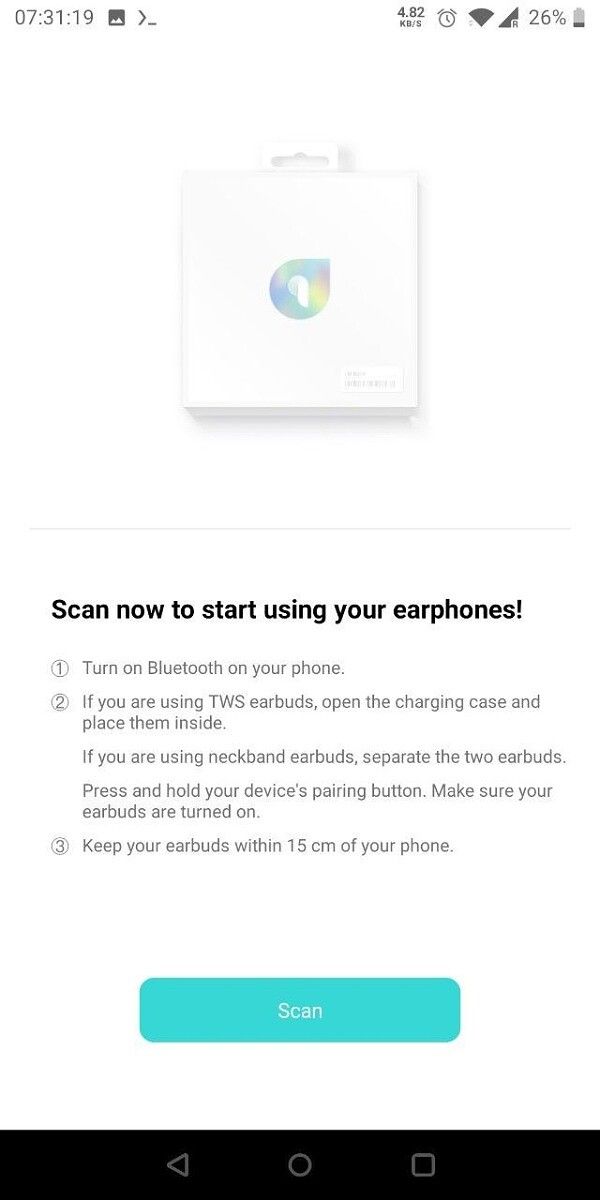
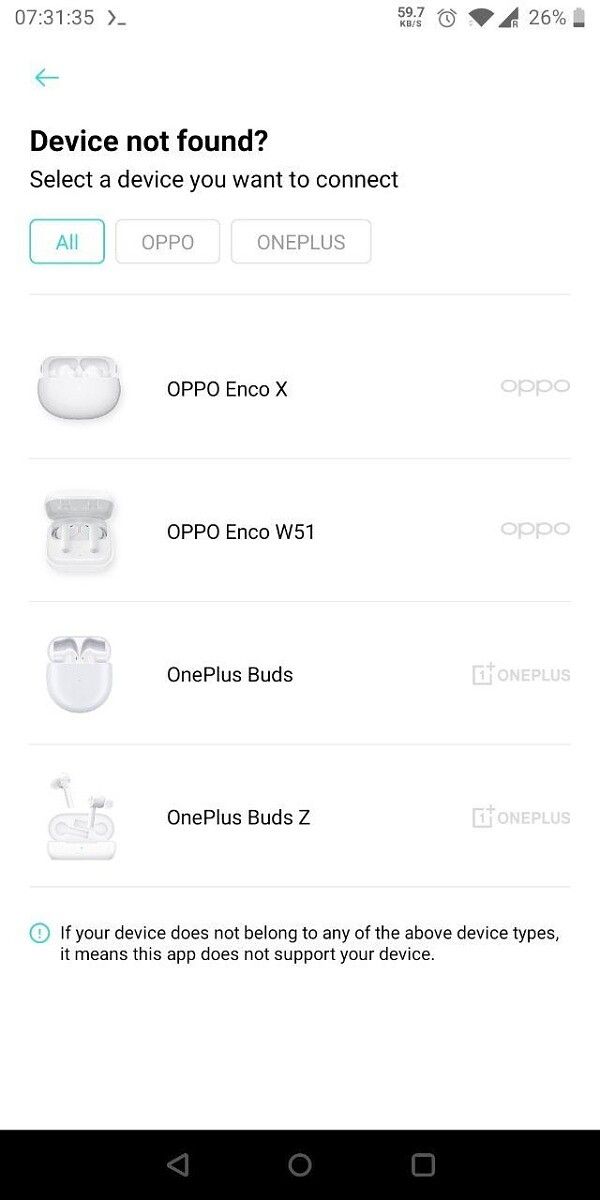
HeyMelody app by OnePlus provides OTA updates for OnePlus and OPPO earbuds on other Android devices

OnePlus recently made its first fully wireless earbuds, called the OnePlus BudsWe’ve reviewed them, and they’re amazing for the price. These were followed up with the OnePlus Buds Z, which provide a more affordable option. OnePlus hopes that you use these accessories with their phones, but that doesn’t mean that they won’t work with other phones. However, features become a little limited, as you need the OnePlus Buds app for certain features such as delivering firmware updates. OnePlus had mentioned that it was working on another app to bring these features to non-OnePlus phones, and now it has delivered. The new HeyMelody app helps users of OnePlus and OPPO earbuds receive firmware updates for their wearables.

The OnePlus Buds app is needed to download and install firmware updates on the OnePlus Buds and Buds Z. The catch here is that the app is only officially available to install on OnePlus devices, specifically those older than the OnePlus 6. If you have the OnePlus 5T or older OnePlus smartphone, or if you have a smartphone from a different OEM, you are stuck with the firmware and features your wearable shipped with. HeyMelody by OnePlus fixes this situation.

HeyMelody app for OnePlus and OPPO earbuds

HeyMelody is published by OnePlus on the Play Store for the Buds and Buds Z, but it also provides OTA updates services for OPPO Enco W51 earbuds and the OPPO Enco X earbuds. The app displays the battery levels of the left and right earbuds, and that of the charging case. The primary purpose of the app is to deliver OTA firmware updates to these earphones.

HeyMelody comes with a minimum API level requirement of 23 (Android 6.0 Marshmallow), and shows up on the Google Play Store for installation on devices the OnePlus 3T and several non-OnePlus devices such as the Xiaomi Redmi Note 8 Pro, Mi A3, Realme 7 Pro, and the Samsung Galaxy M31s. If you have recent earbuds from OnePlus or OPPO, this might be a handy app to keep around.


HeyMelody (Free, Google Play) →

Thanks to XDA Senior Member Some_Random_Username for the tip and screenshots!

The post HeyMelody app by OnePlus provides OTA updates for OnePlus and OPPO earbuds on other Android devices appeared first on xda-developers.


from xda-developers https://ift.tt/2TAUTsg
via IFTTT

Latest ASUS ROG Phone 3, ZenFone 7 updates fix issues with charging, camera, and more

ASUS is rolling out new firmware updates for the ROG Phone 3 and the ZenFone 7 series. As per the information shared on the official ASUS ZenTalk forums, the latest update for the ZenFone 7 Pro and ZenFone 7 goes by version number 29.13.7.47. The new update for the ROG Phone 3 on the other hand is denoted by version 17.0823.2009.98.

Expect a number of bug fixes and optimizations for the ROG Phone 3, ZenFone 7, and the ZenFone 7 Pro. The release notes mention a new Android security patch for the ROG Phone 3 as well as a fix for the bypass charging function that was introduced in September. It is noteworthy that the new updates will be pushed in batches depending on the serial number it might take a while till you see a notification for the OTA (over-the-air) update. One can manually check for the new update by heading to Settings >System. Earlier today, we reported that ASUS had officially announced a price cut for the ROG Phone 3 in India by ₹3000.

Here’s the changelog for the ROG Phone 3 update:

  •     Updated Android security patch
  •     Optimized system vibration
  •     Enabled VoLTE on BSNL (India).
  •     Fixed OK google is difficult to wake up and cannot receive commands
  •     Fixed Bypass Charging function occasionally not working when enabled
  •     Fixed issue with left side misalignment of status bar icons after hiding the clock
  •     Fixed the issue where more than two mouse inputs at once would not work with the Mobile Desktop Dock
  •     Fixed ‘Developer mode’ crashing when connecting to certain specific BT devices
  •     Fixed issue where using ‘Double-Press Power key’ to start Camera would cause the device to automatically sleep after 10 seconds.

Here’s the changelog for the ZenFone 7 series update:

  • Hotfix for camera license expiration at the end of October 2020
  • Please ensure upgrade to this version for proper camera functionality
  • Improved touch stability
  • Applied power-saving notification of dark mode
  • Optimized the logic of camera flipping obstacle detection
  • Updated Sweden Telenor APN

ASUS ROG Phone 3 XDA Forums || ASUS ZenFone 7 Forums

The post Latest ASUS ROG Phone 3, ZenFone 7 updates fix issues with charging, camera, and more appeared first on xda-developers.


from xda-developers https://ift.tt/3jybac4
via IFTTT

YouTube Music finally allows all users to hide liked music from YouTube

One of the highlight features for YouTube Music at its launch was the ability to tap into the vast repertoire of music present on YouTube’s video service, including user-generated remixes and unofficial covers. Another feature was that if these music videos were “liked” by the user on YouTube, these likes would show up on the Music app, influencing music discovery on the service. Now, YouTube Music is finally allowing users to hide liked music from YouTube’s video streaming service.

While the feature set at first might sound like a generally good thing, it ignores the preference nuances of a large audience group that used the video streaming service in different ways, with no knowledge of a future preference-merge. Regular videos on occasion have been classified by YouTube as music, and this causes them to appear in the streaming service. And users may have their preferences evolved over the years, and the likes from YouTube videos may not accurately represent what the user wants and expects from a dedicated music streaming service. A singular coarse option would simply not accommodate all user choices.

This situation is finally getting fixed. YouTube Music is rolling out the ability to disregard the likes from YouTube’s video streaming service. This option flows one way only, so music you like on the music streaming service would still be a part of the video streaming service. The preference change applies retrospectively towards all music videos liked in the past, so your Liked Playlist items will go down in number as soon as you flip the switch (and vice versa). The setting you finally settle on will be applied to your account, so it will reflect wherever you use the music streaming service.

It’s good to see the service finally catching up as a solid offering, especially since Google Play Music is on its last few weeks of existence. There are still some ways to go for feature-parity, but there are other options for features like downloading mp3’s.


Story Via: Reddit

The post YouTube Music finally allows all users to hide liked music from YouTube appeared first on xda-developers.


from xda-developers https://ift.tt/3jAkexf
via IFTTT

Best MicroSD Cards for Nintendo Switch in 2020: Sandisk, Samsung, and more!

Let’s face it–32GB of storage is not nearly enough room on your Nintendo Switch. It may be enough to store some screenshots and maybe one or two smaller games, but if you ever want to buy games digitally, expanding the available memory is a necessity. Thankfully, you can pick up a microSD to pop into your new console and download all the games you want. Of course, this presents a new issue: Which microSD card should you buy? Not all microSDs are created equally. We’ve rounded up the best Nintendo Switch microSDs so you can skip the research, pick one of the below, and be ready to game!

    Sandisk MicroSD for Nintendo Switch

    Official Nintendo Storage

    If you're concerned about compatibility, you can always go with the Nintendo Switch microSD licensed by the company themselves! This SanDisk microSD has Nintendo logos on it, but is otherwise not different from their Ultra line!
    Sandisk Ultra MicroSD Class 10 memory card

    Reliable, Cheap Storage

    The SanDisk Ultra series is the line you want to get for your Switch if you don't have a lot to spend. These microSDs are reliable and affordable, with 128GB carb being only $19. You really can't beat that price without going to brands that have a less proven track record.
    Samsung Evo Select MicroSD

    Samsung Quality MicroSD

    The Samsung EVO Select cards are built for big files and gaming, so you know you'll be getting something that works well with this card. With a 10-year warranty and a water- and temperature-proof guarantee, you can rest easy knowing this memory card won't quit.
    SanDisk Extreme 1TB MicroSD

    Enough Room for Everything

    If you plan on buying a ton of Nintendo Switch games and are planning on having them all digitally, you'll need a bigger microSD. The SanDisk Extreme 1TB microSD is the one to grab--you'll be hard-pressed to fill that up giving Switch game sizes. Don't be scared off by the MSRP, either, as this card regularly receives deep discounts.
    Lexar High Performance MicroSD

    Shorter Load Times

    Lexar's High Performance microSD offers UHS-I technology and a 100mb/s read speed, which translates to games lading faster. While I haven't been able to test the differences for myself, if that is something you value above all else, you'll want to pay the premium for this card.
    Kingston High Endurance MicroSD

    Kingston-brand storage and reliability

    Love Kingston? You can pick up the Kingston High Endurance microSD for your Switch! As with any Kingston product, these are cheap and reliable cards that are proven to be reliable, although they only go up to 128GB capacity.

Not sure which Nintendo Switch microSD to pick? I use the SanDisk Ultra in my Switch, and it works wonderfully. I’ve found that the 128GB model has worked for me, but I also archive games when I’m done with them and trim my screenshots folder from time to time. If you want to keep everything downloaded and still buy physical games, 256GB will be a good amount of storage. Honestly, I use SanDisk for all of my microSDs, Switch, or otherwise, and I’ve never been disappointed.

If you’re one to buy a lot of Switch games and also go with digital-only, you’ll want to go with the SanDisk Extreme 1TB card. Is it expensive? Yes, but It has great read speeds and will absolutely store everything you want on your Switch. Don’t let the MSRP scare you away, either, as these microSDs regularly are often on sale: I regularly see this card for $200 (or more!) off.

The post Best MicroSD Cards for Nintendo Switch in 2020: Sandisk, Samsung, and more! appeared first on xda-developers.


from xda-developers https://ift.tt/329Te1N
via IFTTT

Huawei can reportedly resume buying Samsung displays and Sony image sensors

Huawei has been in the middle of sanctions imposed by the US government. Because of these sanctions, there’s a lot of obstruction with how the Chinese OEM can conduct ordinary business. Even though Huawei has marched forward with the launch of the Huawei Mate 40 series, it still faces a lot of challenges in producing and selling competitive smartphones. The road may have just widened a bit for the company, as reports have emerged that Huawei can now resume buying Samsung displays as well as camera sensors from Sony and OmniVision.

According to a report from Reuters, Samsung’s display division has received licenses from US authorities to continue to supply certain display panel products to Huawei. The report mentions that it still remains unclear whether Samsung Display will be able to export its OLED panels to Huawei, as other firms in the display-manufacturing supply chain would also need licenses.

Another report from Financial Times, mentions that Samsung has indeed received a license for shipping OLED displays for smartphones to Huawei. Further, even Sony and Chinese-owned OmniVision have been granted licenses to supply Huawei CMOS image sensors for use in smartphone cameras. The report further suggests that while license applications are still handled with a view to denial, this can be overcome if the company can demonstrate that the technology involved does not support 5G. So companies that supply Huawei with components for non-5G uses are optimistic on this end.

Intel had also received a license last month to supply “certain products” to Huawei, though the report did not specify what exactly was covered. The company is still blocked from making its own chips, or from buying chips from Qualcomm and MediaTek, so there is still a long way to go. There is some hope, though, and the company may not need to sell off its Honor business division just yet either.


Source: Reuters (1, 2), Financial Times (paywall)

The post Huawei can reportedly resume buying Samsung displays and Sony image sensors appeared first on xda-developers.


from xda-developers https://ift.tt/3jH9nBs
via IFTTT