LightBlog

jeudi 19 novembre 2020

Try your luck with Amazon UK’s PlayStation 5 restock, going live in a few minutes!

Trying to get your hands on Sony’s latest console and not having much luck? You’re not the only one. It has been notoriously difficult to get a PlayStation 5 for many, but rumblings of additional stock going live in the UK have been heard. Now, at noon GMT, you should be able to order some of Amazon UK’s stock on the new console!

Now, I say should, because it’s not absolutely confirmed this stock will go live at this exact time. GamesRadar is reporting that customers are receiving e-mails mentioning that date and time, but Amazon is known to not always being the most timely with putting the stock live. There have been many occasions that they’ll say a time and then the stock won’t go live for a few minutes after. It’s a bit frustrating, but if you’re diligent, watching the page from 12PM GMT onwards should net you a chance at the elusive PlayStation 5.

GamesRadar’s report doesn’t mention if this restock is for the normal PlayStation 5, or the PlayStation 5 Digital Edition. Thankfully, the Amazon UK store page has both of them in different tabs, so it shouldn’t be hard to switch to the version you want.

If you don’t see it right away, or miss out on the restock, don’t give up just yet. The PlayStation 5 is likely to drift in and out of stock throughout the day. Maybe a warehouse finds more stock, or orders are canceled for some reason or another. You never know what may happen, especially on the UK launch day. Keep hitting that F5 key!

    PlayStation 5
    Trying for a PlayStation 5? Amazon UK is reported to have stock at noon GMT. Check in early and hope for a hit... and for Amazon to put the listing live on time!

We’ll try to keep you notified of stock that promises to be live more than a few minutes on the PlayStation 5, as well as advice and tips to try to get one as retailers start to release their Black Friday stock. Keep your eyes peeled!

The post Try your luck with Amazon UK’s PlayStation 5 restock, going live in a few minutes! appeared first on xda-developers.


from xda-developers https://ift.tt/38YDX8a
via IFTTT

Samsung Galaxy Z Fold 3 expected to come with an Under Display Camera

While several Android OEMs have showcased their under-display camera solutions over the last few years, ZTE is currently the only brand that offers a commercial smartphone featuring the technology. However, that may change soon, as Xiaomi’s third-gen under-display camera solution will go into mass production next year. But ZTE and Xiaomi won’t be the only two companies selling devices with an under-display camera sensor for long. Samsung is also working on an under-display camera solution, and it might debut next year with the Galaxy Z Fold 3.

Samsung unveiled the original Galaxy Fold early last year, and it featured a massive notch in the top right corner of the main display for the selfie cameras. The company then launched the Galaxy Z Fold 2 in September this year, and it featured a much better solution — a circular hole-punch cutout. Now, according to a recent report from ETNews, Samsung is planning to take things to the next level with the Galaxy Z Fold 3 and offer its under-display camera solution on the device.

Industry sources familiar with the matter have revealed that Samsung has finalized plans to bring its under-display camera tech to the market with the Galaxy Z Fold 3 in the third quarter of 2021. The report further reveals that Samsung’s solution will use a special display from Samsung Display, while the image sensor will be sourced from Samsung Electronics’ System LSI division. Along with the specialized hardware, the company is also working on an image correction algorithm to improve the under-display camera setup’s output.

An industry insider familiar with the display development told the publication that the display is designed so that only the part where the camera is placed is enlarged to secure an aperture and take pictures smoothly (translated). The report further notes that the Galaxy Z Fold 3 will be the first Samsung device to feature an under-display camera.


Featured image: Samsung Galaxy Z Fold 2

The post Samsung Galaxy Z Fold 3 expected to come with an Under Display Camera appeared first on xda-developers.


from xda-developers https://ift.tt/36Ijp0E
via IFTTT

NewPipe 0.20.3 improves YouTube video loading speed and adds a new two-finger swipe gesture

NewPipe, the open-source YouTube client for Android, received a major update early last month. The update included the unified video player UI that we saw in a previous test release and several other improvements. Shortly after the rollout, the app received another update that patched a bug with the YouTube search. The developers behind NewPipe are now rolling out another update that brings improvements for YouTube video loading speed and a new swipe gesture.

According to a recent post on the NewPipe blog, the latest update (v. 0.20.3) introduces a new two-finger swipe down gesture that makes closing the embedded player much easier. Closing the embedded player was a two-step process on previous versions of the app. You first had to swipe down on the embedded player to switch to the mini player and then swipe down again to close it. Now, you can close the embedded player in one go with the new two-finger swipe down gesture.

The second significant improvement in the latest update is that NewPipe now loads YouTube videos much faster. As the blog post explains, “YouTube has removed obfuscation for most of its URLs, so now we can directly access them, speeding up video loading by a lot! The deobfuscation code is still cached in case it is needed.” Other noteworthy changes include:

  • All the different enqueuing options have now been replaced with a unified one
  • The app now has a new setting that allows users to clear the reCAPTCHA cookies
  • Added a new option to turn off the colorized notification that popped up when playing streams on Android 8.0 and above. Once enabled, the notification has a static color.
  • Added support for YouTube Short URLs
  • Added support for shortened channel links which look like: “youtube.com/username”
  • Added support for discarding the extra cruft on redirect URLs to help users open links from Google in NewPipe.

If you already have NewPipe installed on your device, the app should prompt you to update to the latest release when you open it up. In case you don’t have an older build, you can grab the latest release from NewPipe’s GitHub. To see all the other improvements/fixes in the latest release, check the changelog section below.

NewPipe 0.20.3 Changelog

  • New
    • Replace specific enqueue options with only one #4425
    • Two finger to close player gesture #4476
    • Add button in settings to clear reCAPTCHA cookies #4453
    • Add option to not colorize notification #4643
  • Improved
    • Do not show notification creation / update time #4410
    • Remove remember popup properties setting #4367
    • Ask for confirmation before replacing even single video queues #4463
    • Also delete stream state when deleting stream history #4413
    • Improve age restriction and yt restricted content strings #4354
  • Fixed
    • Fix crash when stream was paused and fast forward / rewind buttons were clicked #4410
    • Fix PlaylistAppendDialog showing when no local playlists exist #4345
    • Don’t rearrange lists by dragging the thumbnails #4550
    • Fix opening VideoDetailFragment and more #4562
      • Fix infinite buffering
      • Better detect when to autoplay and when not to
      • Make sharing to NewPipe more consistent
    •  Fix playlist select dialog and do some refactoring #4771
    • Change YouTube subscription import instructions to Google takeout #4759
    • Correct Gigaget’s license from GPLv2 to GPLv3 #4892
  • Localization
    • Add Santali language #4749
    • Add Central Atlas Tamazight localization
    • Add Korean translation of the README #4845
    • Updated translations
  • Development
    • Use DisplayCutoutCompat in VideoPlayerImpl #4338
    • Use DrawableCompat. #4592
    • Use ContextCompat methods #4276
    • Use TextViewCompat.setCompoundDrawablesRelativeWithIntrinsicBounds(). #4594
    • Hide Leaks launcher icon #4436 #4450
    • Format all XML resources #4471
    • Disable Ktlint pending upstream update #4517
    • Use Core KTX functions #4547
    • Use multidex for all build types. #4557
    • Migrate AboutActivity to ViewPager2 #4553
    • Optimize and shrink app PNGs #4610
    • Convert notification actions to a custom preference #4652
    • Use Java 8 APIs #3817 #4556
    • Separate player gesture logic and UI #4587
    • Use RxJava instead of AsyncTask #4499
    • Change loop index from float to int #4784
    • More miscellaneous little fixes and improvements #4710
    • Fix NullPointerException in queue handling and improved performance #4555
  • Other
    • Pull request template reworked #4317
    • Issue templates reworked #4378 #4379 #4415 #4431 #4606
    • Add info on how to use a local NewPipe Extractor version #4528
    • Add Weblate widget to README #4530

The post NewPipe 0.20.3 improves YouTube video loading speed and adds a new two-finger swipe gesture appeared first on xda-developers.


from xda-developers https://ift.tt/36I02os
via IFTTT

OriginOS is Vivo’s latest software release based on Android 11

Vivo’s primary UX skin has been FunTouch OS for a few years now, and the skin was recently rebased onto Android 11 for certain phones. Surprisingly, the company had even beat Google to launching the first phone with Android 11 with the launch of the Vivo V20. The UX skin is overdue for a refresh, and it’s getting one as Vivo has now released OriginOS, its latest software release based on Android 11.

Vivo’s OriginOS succeeds Funtouch OS and has been announced at the two-day Vivo 2020 Developer Conference held in China. There are a bunch of functional and visual changes in this new UX skin. For one, the homescreen is now arranged in a tidier “Klotski Grid” format that is said to be more efficient than the predecessor.

Users now also get “Nano Alerts” which are tiny popup widgets that provide context-based alerts such as details on upcoming flights, package delivery status, and more.

What further sets Nano Alerts, apart from their compact UI, is that they can also be displayed on the Always-On Display.

The retouching of how alerts are displayed also carries over to Public Alerts such as earthquake alerts and pandemic information, and these have been integrated into the UX in a more intuitive manner.

Beyond health and emergency alerts, the new UX also brings over weather elements as a Live Wallpaper. Vivo says that the shape, size, and density of the cloud layer is simulated after they sampled through data from thousands of different regions. The weather and even the moving speed of the clouds will vary across regions.

If you want to stick to your own wallpaper, OriginOS will give you an option to integrate different effects onto the wallpaper. The wallpaper that you choose can thus change its look by varying light and shadow effects.

And if you are still looking for more live wallpapers, there’s a new live wallpaper that captures the blooming process of several flowers.

Under the hood, OriginOS also packs in several changes. “Enhanced Memory Fusion Technology 1.0” uses a three-step process (memory integration, process optimization, and application pre-loading) to make for a better and smoother experience. “Multi-Turbo 5.0” allows for optimal allocation of computing resources, application preloading 2.0, intelligent app freezing technology 2.0, and more. While all of these sound good, it remains to be seen how they translate into observable, real-life improvements.

And finally, there is also a new pull-down menu for opening a Control Center for direct IoT control.


Vivo OriginOS Rollout Schedule

OriginOS based on Android 11 will roll out in batches for the following phones in China:

  • Batch 0 (Shipping with Origin OS):
    • Next-generation X series
  • Batch 1 – First Open Beta in January 2021:
    • Nex 3S
    • Vivo X50 Pro
    • Vivo X50 Pro+
    • Vivo X50
    • Vivo S7
    • iQOO 5 Pro
    • iQOO 5
    • iQOO 3
    • iQOO
    • iQOO Pro
    • iQOO Neo 3
  • Batch 2 – First Open Beta in February 2021:
    • Nex 3/Nex 3 5G
    • iQOO Neo
    • Vivo X30/X30 Pro
    • iQOO Neo Snapdragon 855 Edition
  • Batch 3 – First Open Beta in Q2 2021:
    • Vivo X27 Pro
    • Vivo X27
    • Vivo X27 (8+128)
    • Vivo S6
    • Vivo Z6
    • Vivo Z5i
    • Vivo S1
    • Vivo Z5x
    • Vivo Z5
    • iQOO Z1X
    • iQOO Z1
    • Nex Dual Display Edition
    • Nex S
    • Nex

Exact dates have not been provided. Vivo has also not provided any information on when these updates will be reaching devices outside of China. We hope to hear more from them soon.


What are your thoughts on Vivo OriginOS based on Android 11? Let us know in the comments below!

The post OriginOS is Vivo’s latest software release based on Android 11 appeared first on xda-developers.


from xda-developers https://ift.tt/2UTwtLv
via IFTTT

Digital Wellbeing preps “Heads Up” to stop you from using your phone while walking

Earlier today, version 1.0.342229637.beta of the Digital Wellbeing app rolled out on the Google Play Store. While the update doesn’t include any significant additions on the surface, we’ve spotted code for an upcoming feature, called Heads Up, that will stop you from using your phone while walking.

An APK teardown can often predict features that may arrive in a future update of an application, but it is possible that any of the features we mention here may not make it in a future release. This is because these features are currently unimplemented in the live build and may be pulled at any time by the developers in a future build.

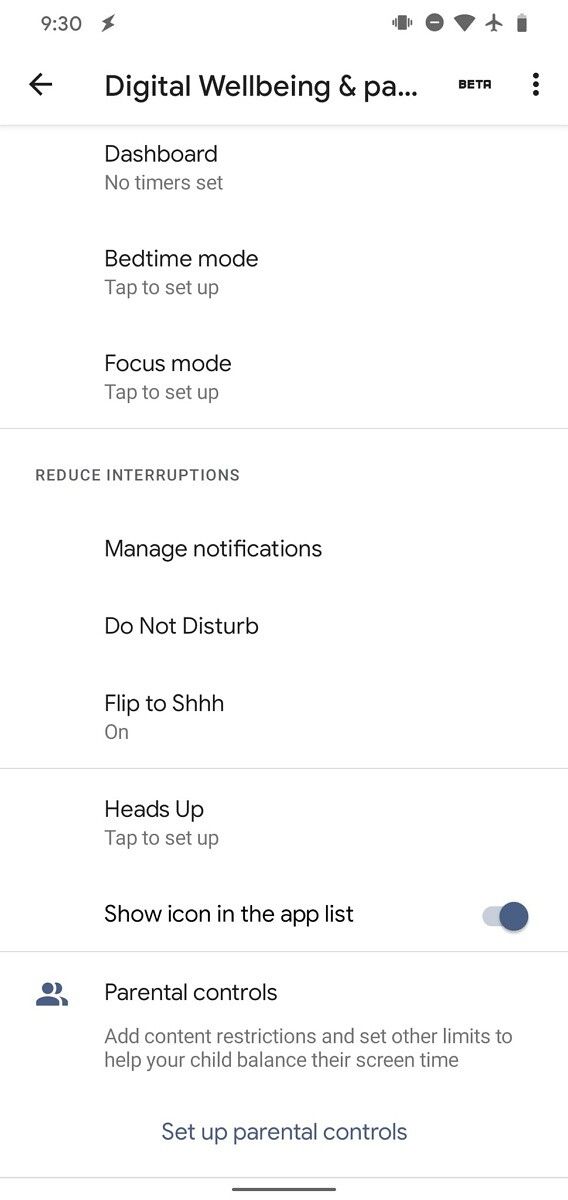
Our Editor-in-Chief, Mishaal Rahman, has managed to enable the feature manually, and here’s what it looks like:

Digital Wellbeing Heads Up feature (4) Digital Wellbeing Heads Up feature (4)

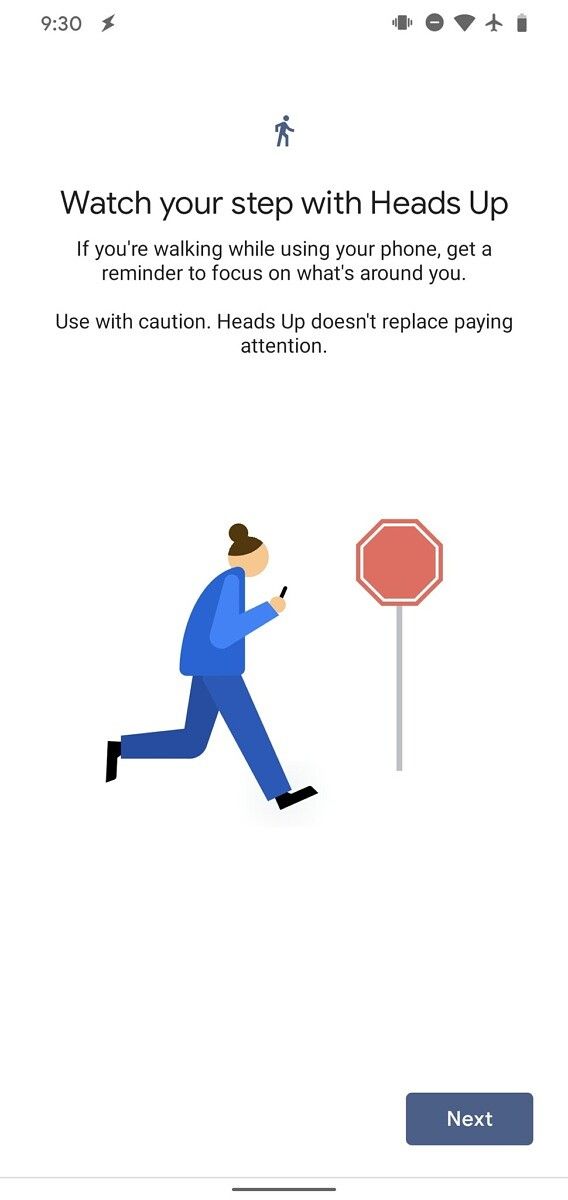
As you can see in the attached screenshots, the unreleased Heads Up feature shows up in the Digital Wellbeing settings within the Reduce Interruptions section. Tapping on the option opens a setup screen, with the description: “Watch your step with Heads Up…If you’re walking while using your phone, get a reminder to focus on what’s around you…Use with caution. Heads Up doesn’t replace paying attention.”

Digital Wellbeing Heads Up feature (4) Digital Wellbeing Heads Up feature (4)

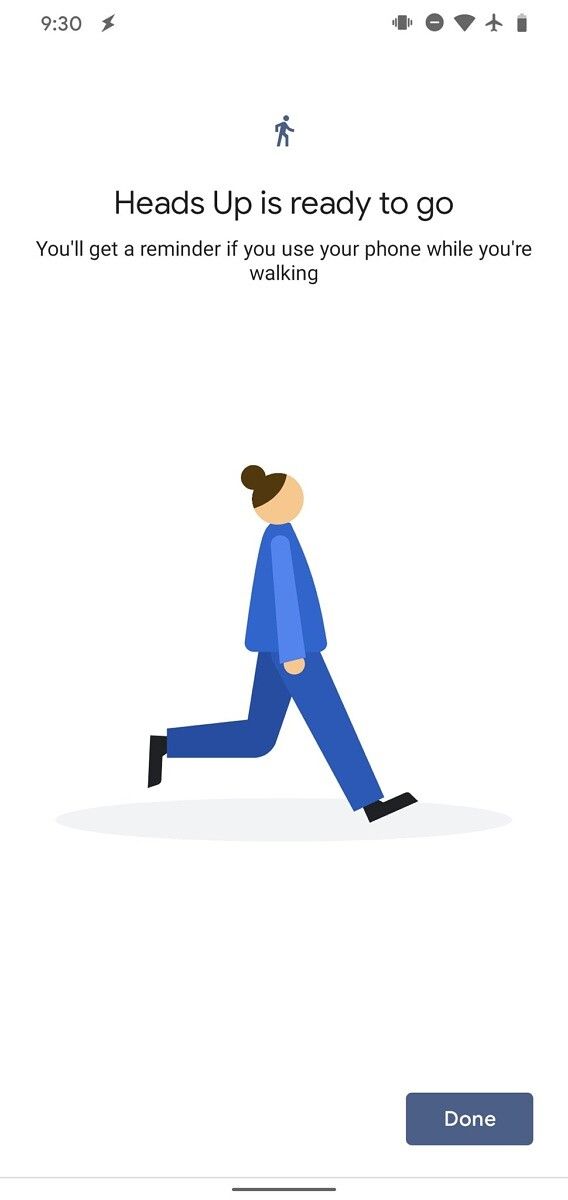
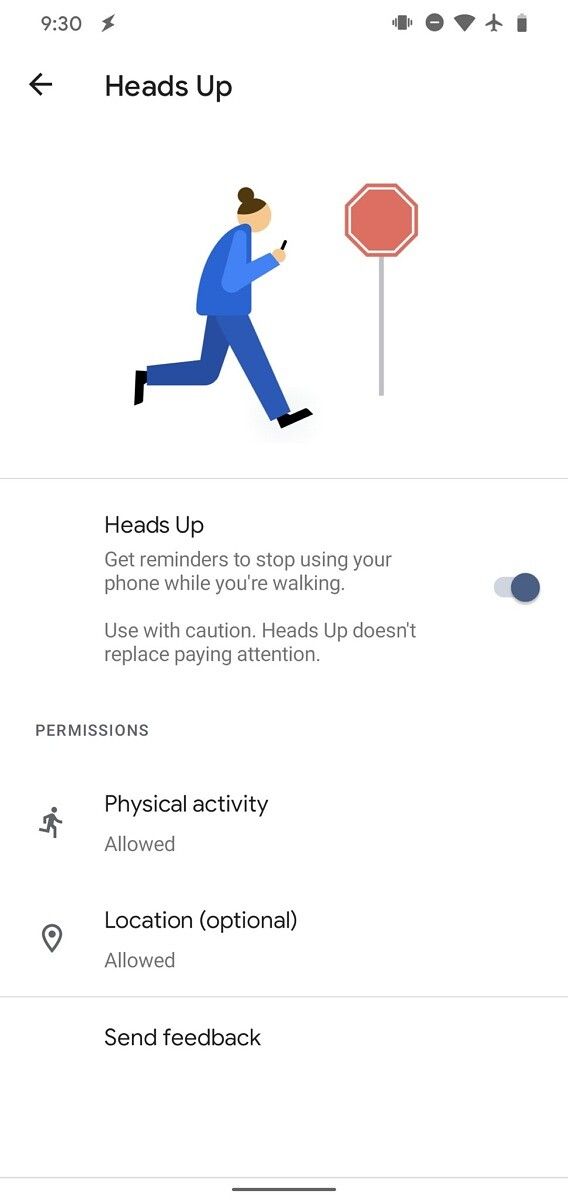
You can then tap on the Next button in the bottom right corner to start the setup process. Once the feature is successfully set up, it will bring up a reminder if you’re using your phone while walking. In case you wish to disable the reminders, you’ll have to tap on the “Heads Up” option in the Digital Wellbeing settings once again and then tap on the toggle next to the Heads Up option on the following page. This page will also show the permissions required by the feature — Physical Activity and Location (optional) — and it will also feature a feedback button at the bottom.

As mentioned earlier, the Heads Up feature is still a work in progress, and it hasn’t rolled out to users. However, the feature appears to be nearly fully functional, so it could roll out soon. We’ll update this post as soon as the feature rolls out to users on the beta channel. Along with the upcoming Heads Up feature, Google is working on bringing a work profile scheduler and a Mindful wallpaper feature to the Digital Wellbeing app. These features were spotted in APK teardowns of the app earlier this year in September.

Digital Wellbeing (Free, Google Play) →


Thanks to PNF Software for providing us a license to use JEB Decompiler, a professional-grade reverse engineering tool for Android applications.

The post Digital Wellbeing preps “Heads Up” to stop you from using your phone while walking appeared first on xda-developers.


from xda-developers https://ift.tt/3nG6L9g
via IFTTT

mercredi 18 novembre 2020

Today only, grab the OnePlus 8T with the OnePlus Buds for just $629 at B&H Photo!

Did you have trouble grabbing the $1 OnePlus Buds for OnePlus Day? I understand, I don’t think OnePlus was expecting so many people to want to take advantage of that deal and the site was having problems! But, OnePlus isn’t the only retailer giving heavy discounts on their products. OnePlus Black Friday prices have started cropping up all around the internet, but today, the other stand-out deal is from B&H Photo and Video. One of their Deal Zone deals is the OnePlus 8T for $629, and they also come with a pair of OnePlus Buds for free.

Of course, Deal Zone deals are typically only available for one day, and this one is no exception. Available in both Aquamarine Green and Lunar Silver, the sale knocks $120 off the MSRP. But the discount is made even better with the additional goodies it comes with.

The big item is, of course, the free pair of OnePlus Buds. I would highly recommend them. Not because I have OnePlus Buds myself, but because my third-party earbuds occasionally have problems with my OnePlus 8 Pro in terms of linking up properly. So, you might as well stay in the OnePlus ecosystem! They’re also pretty good earbuds to boot, so you’re not compromising by going with them.

The other free goodies include a SIM kit for Ultra Mobile, as well as the chance to get a rebate for a free month of unlimited talk, text, and data with the carrier. You don’t need to worry, though, as this is still an unlocked phone that is advertised to work with any carrier. So if you already have a phone plan, you don’t need to go with Ultra Mobile!

Not sure if the OnePlus 8T is the one that’s right for you? Check out our review! It’s one of XDA’s Recommended phones of 2020!

    OnePlus 8T at B&H
    B&H Photo and Video's Deal Zone deal has the OnePlus 8T for just $629! You'll also get a free pair of OnePlus Buds.

Did you miss out on the B&H Photo deal? while it’s $749, you can still get the OnePlus 8T with the free buds at the OnePlus store.

    OnePlus 8T at OnePlus
    If you missed the B&H Photo deal, you can also get the free OnePlus Buds with the OnePlus 8T at OnePlus themselves. However, you'll be paying $749.

Thanks to Wai Yip Chu for the tip!

The post Today only, grab the OnePlus 8T with the OnePlus Buds for just $629 at B&H Photo! appeared first on xda-developers.


from xda-developers https://ift.tt/36MEEyH
via IFTTT

The new Google Pay app is an all-in-one mobile bank, finance tracker, and contactless payment service

Google Pay has launched a new version of its Android app, ahead of the launch of its ‘Plex’ banking service in 2021. The replacement app, which is now live in the Google Play Store, has been completely rewritten in Flutter, Google’s DART-based development kit. We got our first look at the new design when India replaced the Google Tez app with a retooled Google Pay. It was announced today after a series of teasers on Twitter, with a live stream.

We’ll start with the bad news because there’s not much of it. The new version of Google Pay can only be used on one device at a time. If you attempt to log in on a second device, you’ll get a warning telling you that the account is in use on another device. This is not necessarily a bad thing because the increased scope of the app warrants extra security. The second niggling change is that changing your NFC payment source has been put behind a button in the top right of the screen, so it’s not as fluid as it was before.

Google Pay Navigation

The good news is that the changes are the result of a massive upscaling of Google Pay and its capabilities. The new version goes way beyond contactless payments. There’s now an option to pay friends and family members, based on your contact list, search for local retailers who accept Google Pay, and in some cases, order a meal directly from the app. You can view all your receipts and orders, with the app now integrated with Google Photos, allowing it to pull in any paper receipts you’ve photographed. This is on top of the existing order-pull-through from Gmail.

Google Pay Rewards

Google Pay will also be able to store discount codes and automatically apply them. Target, Burger King, and Etsy are amongst the first to join the scheme. Some car parks will let you park and pay from the app, whilst participating gas stations will let you pay for your fuel without visiting the cashier. It looks like this function also ties into Google Assistant, based on an APK teardown we analyzed earlier in the year. Meanwhile, if you’re at a restaurant, you can create a group, split a bill or keep track of who owes for their share. The group feature is also ideal for roommates to keep their financial affairs in one place.

Google Pay Groups

Another integration is with Plaid, a fintech service that acts as a middle-man, allowing you to interact with your bank accounts, view balances, make payments, and so on, directly from within Google Pay. When international rollout begins, functionality will vary from country to country, such as in the UK where the Open Banking Standard means that a partner app won’t be necessary.

Google Pay Plex Account

All these new functions are a mere curtain-raiser to the star attraction, the company’s Plex bank account service, launching in 2021. At launch, Plex accounts  (as in Googolplex -ho ho) will be offered by 9 partner banks. Rather than banking with Google, which, as you may have noticed, isn’t a bank, you’ll have an account with the partner bank, offering deep integration with Google Pay. The debit card will say Google, of course, and Google Pay will become your banking app, putting it in direct competition with other digital-first banks such as Revolut, Curve, and N26.

Google Plex accounts will be free to open, without monthly fees, offer fee-free overdrafts, and free ATM withdrawals in-network. Two partner banks — Citi and Stanford Credit Union — have opened their waitlist for the service. Sign up today and you’ll be sent a debit card when the service goes live. The app experience includes regular spending reports, the ability to categorize spending types, and search by retailer, category, or date.

Any one of these features would have been a significant update for Google Pay. As it is, this is a complete reinvention of the service and a huge leap forward for digital banking. To celebrate, the new app has a new logo, in keeping with Google’s recent form of four-color monstrosities. This one looks like chamois leather, though apparently, it’s a wallet.

Google Pay new logo

The new Google Pay app is now available in the Play Store for U.S. users only (link below). International rollout will come later. In the meantime, the version of Google Pay in your app store is the right one for you. In the US, the old version is still available as Google Pay (old) but will nag you to switch to the new one. Alternatively, download the new app from APK Mirror. (Oh, and in case you were wondering, it’s also available on iOS).

Google Pay - a simple and secure payment app (To be announced, Google Play) →

The post The new Google Pay app is an all-in-one mobile bank, finance tracker, and contactless payment service appeared first on xda-developers.


from xda-developers https://ift.tt/32WbpYO
via IFTTT