LightBlog

lundi 14 décembre 2020

Sony Xperia 1 II starts receiving stable Android 11 update

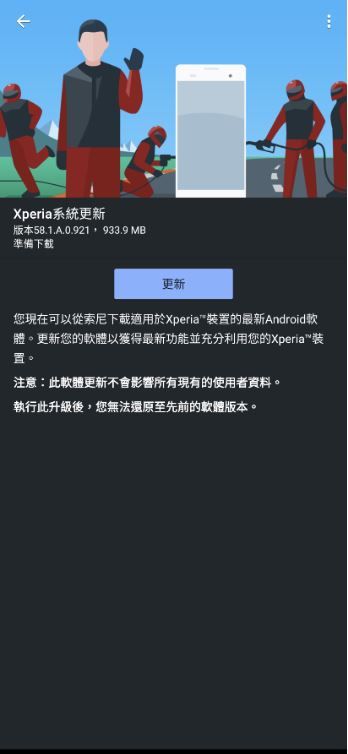
At the end of November, Sony unveiled a roadmap for when its devices would get Android 11, with the first device receiving the update this month. True to its word, the company has initialized an OTA (software version 58.1.A.0.921) for the Sony Xperia 1 II.

Xperia Blog has confirmed that Sony is rolling out Android 11 for the Xperia 1 II. The device, which was originally introduced in Sony’s native Japan in May of this year, is one of the company’s most exciting smartphones, so it’s only natural to be first on the list. This is more or less the schedule that Sony ran with last year when updating its devices to Android 10.

Android 11 update for Xperia 1 II changelog:

Xperia 1 II (Mark 2)
New update: 58.1.A.0.921 (Security patch: 1 November 2020)
Old update: 58.0.A.3.224 (Security patch: 1 November 2020)

Xperia 1 II Android 11 new features
Cinema Pro app adds support for 4K HDR 120fps slow motion video recording (previously 4K HDR 60fps)
Photo Pro app adds new MR mode to set/save frequently used options
5G+4G dual SIM dual-standby capability (previously 4G+4G dual-standby)
BatteryCare now provides custom options for 80% and 90%.
Screen recording added to notification bar
New wallpapers
Long press power button brings smart home control
Wi-Fi and hotspot can be turned on at same time
Modem (baseband version) updated

The Android 11 update appears to be first rolling out to devices in Taiwan, and like other OTA updates, it’ll be a process in case something happens. The download clocks in at 933.9MB, and includes new features such as Chat bubbles, a built-in screen recorder, power menu smart controls, and enhanced privacy controls. Sony has also added some of its own features, including a BatteryCare setting that limits the maximum charge to 80% or 90%. There’s also 5G support for dual-SIM stand-by and 4K HDR 20fps slow-motion recording in the Cinema Pro app.

Xperia 1 II Android 11 update

This same update also includes the November 2020 security patch, despite the December 2020 security patch already rolling out to some devices. Perhaps Sony will release a more updated security patch in the next few weeks. We’ll see how everything shakes out as the Android 11 update is rolled out across the globe, which is likely to happen over the course of this week.

The rollout of Android 11 for the Xperia 1 II lines up with the timeline Sony revealed in November. If Sony keeps its promise, we should see Android 11 made available for the Xperia 5 II and Xperia 10 II around the end of January 2021, following by the Xperia 1 and Xperia 5 sometime in February 2021.

The post Sony Xperia 1 II starts receiving stable Android 11 update appeared first on xda-developers.


from xda-developers https://ift.tt/2WenJjA
via IFTTT

Green Monday: Save an extra 70% on these top-rated course bundles

As one year winds down, it’s only natural to think about the next. If you want to start a new career, earn more, or simply fill the weekends in 2021, these courses can help. For a limited time, you can save an extra 70% this Green Monday when you use the promo code GREEN70 at the XDA Developers Depot.

The Ultimate Microsoft Excel Certification Training Bundle

Data skills are highly valued in many careers, and this training helps you become an expert. Through 33 hours of training, you learn how to use formulas, functions, charts, Power Query, PivotTable, macros, and VBA in Microsoft Excel.

Get the Ultimate Microsoft Excel Certification Training Bundle for $10.20 (reg. $945) with promo code GREEN70.

The Complete 2020 CompTIA Certification Training Bundle

With 14 courses and over 300 hours of content working toward top CompTIA exams, this bundle is perfect for any aspiring IT professional. You get full prep for A+, Network+, Server+, Cloud+, Security+, and more. 

Get the Complete 2020 CompTIA Certification Training Bundle for $20.70 (reg. $,486) with promo code GREEN70. 

The Ultimate 2020 White Hat Hacker Certification Bundle

With 3.5 million vacancies expected by next year, now is a great time to get into cybersecurity. This bundle gives you 98 hours of video tutorials on ethical hacking from top instructors, including Joe Parys and Total Seminars.

Get the Ultimate 2020 White Hat Hacker Certification Bundle for $11.97 (reg. $1,345) with promo code GREEN70. 

The Ultimate Piano Bundle: From Beginner to Advanced

Want to produce your own music? With 140 hours of lessons, this training helps you become a pro on the keys. It covers everything from basic technique to chord progression and melody composition.

Get the Ultimate Piano Bundle: From Beginner to Advanced for $21 (reg. $2,000) with promo code GREEN70.

The Emotional Intelligence & Decision-Making Bundle

Whether you’re trying to make a sale or build a romantic relationship, emotional intelligence is a valuable skill. This bundle helps you improve your interpersonal skills and make better choices, with 10 courses from instructors such as Robin Hills, a business psychologist with 35 years of experience.

Get the Emotional Intelligence & Decision-Making Bundle for $10.50 (reg. $990) with promo code GREEN70.

The Secret to Stock Trading & Profits Bundle

If you want to grow your money, putting it in the bank isn’t a smart move. This bundle shows you how to invest in stocks for better returns. Through 11 hours of lessons, you learn about candlestick patterns, day trading, and more.

Get the Secret to Stock Trading & Profits Bundle for $29.99 (reg. $1,400) with promo code GREEN70.

The Ultimate Raspberry Pi & ROS Robotics Developer Super Bundle

Want to learn more about electronics, programming, and robotics? This 15-course bundle can help. In 39 hours of training, you discover how to build exciting projects with your Raspberry Pi and other microcomputers.

Get the Ultimate Raspberry Pi & ROS Robotics Developer Super Bundle for $15 (reg. $2,391) with promo code GREEN70.

The Google Analytics Master Class Bundle

In the world of digital marketing, Google Analytics is an essential tool. This 12-hour training bundle gives you a guided tour, helping you utilize key features and reveal indicators for your marketing efforts.

Get the Google Analytics Master Class Bundle for $34.99 (reg. $995) with promo code GREEN70. 

The Premium Learn to Code 2021 Certification Bundle

Featuring 270 hours of top-rated training, this bundle is the ultimate introduction to code. You learn HTML, CSS, JavaScript, Python, Ruby, Java, PHP, C++, and much more from the likes of Rob Percival and Rob Merrill — both best-selling instructors. 

Get the Premium Learn to Code 2021 Certification Bundle for $18 (reg. $4,056) with promo code GREEN70.

Prices subject to change  

The post Green Monday: Save an extra 70% on these top-rated course bundles appeared first on xda-developers.


from xda-developers https://ift.tt/37iAtvT
via IFTTT

Samsung is rolling out the One UI 3.0 (Android 11) stable update to the Galaxy Note 20, Galaxy Note 20 Ultra

Samsung has reportedly started rolling out the new One UI 3.0 for the Galaxy Note 20 and Galaxy Note 20 Ultra. Based on the latest Android 11 update, the company had released the same update for the Galaxy S20 series earlier this month. There was also a list of devices recently posted on the Samsung Members app for users in Egypt, which suggested that the Galaxy Note 20 and Galaxy Note 20 UItra would get the stable update in January.

However, SamMobile has reported that Galaxy Note 20 and Galaxy Note 20 Ultra users on the AT&T network in the US, have already started receiving the latest update. The update is said to be rolling out for unlocked and locked variants of the Galaxy Note 20 and Galaxy Note 20 Ultra and is expected to include the latest December 2020 security patches. Having a size of 2.5GB, the new update is being denoted by the build number N98xUSQU1CTL2, and it is advised to use a Wi-Fi connection to download the new update. If you haven’t got a notification yet, you can manually check for the update by heading to the phone’s Settings and then heading to Software update.

samsung galaxy note 20 one ui 3.0 update

Image credits: SamMobile

As of now, Galaxy Note 20 and Galaxy Note 20 Ultra users on AT&T are the only ones that are getting the latest update. There is no confirmation from Samsung on a global rollout, so we would have to wait and see if other regions get the new update in the coming days. Considering Samsung sells the Snapdragon variant of the Galaxy Note 20 series in the US, there is a possibility that the Exynos variants will get the update next month.

Samsung had shared an extensive changelog for the new One UI 3.0 update during the rollout of the beta program in September. You can check out the entire changelog over here. Additionally, we also did an early hands-on of the beta version of One UI 3.0 on a Galaxy S20, which you can read here.

The post Samsung is rolling out the One UI 3.0 (Android 11) stable update to the Galaxy Note 20, Galaxy Note 20 Ultra appeared first on xda-developers.


from xda-developers https://ift.tt/3oQmiEh
via IFTTT

The PlayStation 5 had the biggest US launch month of any previous gaming console

Despite stock shortages and the general state of 2020 affecting people’s wallets, Sony’s latest gaming console has already broken sales records. PlayStation 5 sales for its launch month have beaten every other previous US launch, dethroning the previous record-holder of the PlayStation 4. Overall spending on video games was also over $7 billion in the US in November, which is a marked 35% increase over last year’s numbers.

According to the NPD Group, a US research company, the PlayStation 5 achieved both the highest unit and dollar sales for the launch month of any video game console in US history.

To the many people trying to get a PlayStation 5 and hoping for more restocks, this may come as a shock. Bots have been a serious issue for new technology releases this holiday season; however, while many people may be without a new console, bot sales are still counted as sales.

The Xbox Series X and Xbox Series S did not fare as well as last month, however, as Daniel Ahmad reports:

Microsoft’s new console isn’t making quite the same splash as the PlayStation 5. Part of this can definitely be attributed to Xbox Series X and S restock issues, but there’s also the fact that Microsoft is the underdog in the console gaming market. Even with the Xbox Series S being more budget-conscious than Sony’s PlayStation 5 models, Sony’s brand still holds a lot of sway with console gamers, and Xbox’s excellent Game Pass doesn’t require a console to use.

Nintendo still also saw big numbers this month, even though they did not release any new consoles. The Nintendo Switch is again on top of the best-selling unit charts, making it two years straight that the device has landed in the number one slot. While there were issues with Switch supply earlier in the year, stock for both the Switch and the Switch Lite have evened out, just in time for the holiday season. Simply having the console available to buy, while the PlayStation 5 and Xbox Series consoles are chronically sold out, has helped Nintendo in moving their Switches.

How sales will be in future months, with supply constraints and the end of the holiday shopping season, remains to be seen. But, it’s clear that these new console launches are as healthy as ever, even if bots are hoarding a lot of the stock.

The post The PlayStation 5 had the biggest US launch month of any previous gaming console appeared first on xda-developers.


from xda-developers https://ift.tt/3nmNryg
via IFTTT

[Update: Fixed] It’s not just you: Gmail, YouTube, Play Store and other Google services are having an outage in some regions

Update 1 (12/14/2020 @ 07:45 AM ET): Google services appear to have been restored. Scroll to the bottom for more information. The article as published on December 14, 2020 at 07:00 AM EST, is preserved below.

Some of Google’s services have been facing server issues for the past few hours, causing problems for users around the world. Services affected at the moment include Gmail, YouTube, and Play Store primarily, with users in India, SEA, Europe, and parts of the USA complaining that they are unable to sign in to any of these services.

Down Detector is showing a spike in complaints related to connectivity issues for Gmail. Here is the outage map for the service at the time of writing:

The G Suite Status Dashboard mentions affected services as:

  • Gmail
  • Google Calendar
  • Google Drive
  • Google Docs
  • Google Sheets
  • Google Slides
  • Google Sites
  • Google Groups
  • Google Hangouts
  • Google Chat
  • Google Meet
  • Google Vault
  • Currents
  • Google Forms
  • Google Cloud Search
  • Google Keep
  • Google Tasks
  • Google Voice
  • Admin Console
  • Google Analytics
  • App Maker
  • Google Maps
  • Blogger
  • Google Sync for Mobile
  • Classroom

We can independently confirm that a lot of Google services are affected, though some services like Search and Analytics appear to be working on our end. However, hardware that connects to Google services, such as Google Nest hardware, also appears to be having difficulties even though Google Search is working fine.

Prominent Twitter service handles have not shared any information just yet.

There is currently no ETA on when the services are expected to resume normal functioning. The outage appears to be rather widespread. Curiously, services are working in Incognito, indicating that the issue might actually be centering around Google Accounts and Google’s authentication platform.

We’ll update the article when we get more information on this outage.


Update: Google Account services restored

Most of the affected services appear to have been restored. The outage lasted about 30-40 minutes across a wide variety of Google services, perhaps because it was related to Google Accounts.

Reports continue to roll in of users being restored back, so we presume things are going back to normal.

The post [Update: Fixed] It’s not just you: Gmail, YouTube, Play Store and other Google services are having an outage in some regions appeared first on xda-developers.


from xda-developers https://ift.tt/3ejCdaa
via IFTTT

Google Home app is rolling out a sunset/sunrise Assistant routine trigger for some

Earlier this month, Google started rolling out a new feature in the Google Home app that lets users add shortcuts for Google Assistant routines to their home screen. At the time, the new feature was only available for a handful of users. But over the last few weeks, Google has rolled it out more widely, and most users should see the new add to home screen shortcut in the Routines setup window. Now, Google has started testing another new feature for Google Assistant routines that lets users select sunset/sunrise as triggers for any routine.

According to a recent post from Reddit user u/matha_ric, the new sunset/sunrise trigger is available in the latest beta release of the Google Home app (v2.35.1.5), and it comes with an updated UI for the routine triggers. As you can see in the attached screenshots, the updated UI now lists three options to trigger a routine — Voice command, Time, and Sunrise/sunset.

Google Assistant routine sunrise sunset trigger Google Home Google Assistant routine sunrise sunset trigger Google Home

The Voice command trigger lets you start your routine with a custom voice command, the Time trigger lets you start your routine at a specified time, and the Sunrise/sunset trigger lets you start your routine based on the sunrise/sunset time at a specified location.

Google Assistant routine sunrise sunset trigger Google Home Google Assistant routine sunrise sunset trigger Google Home

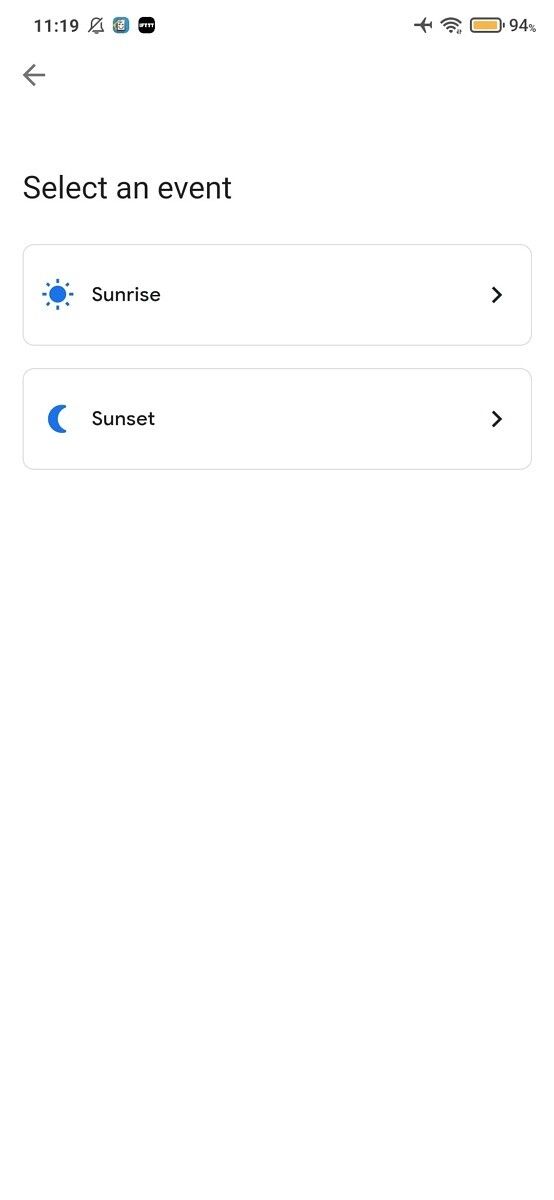
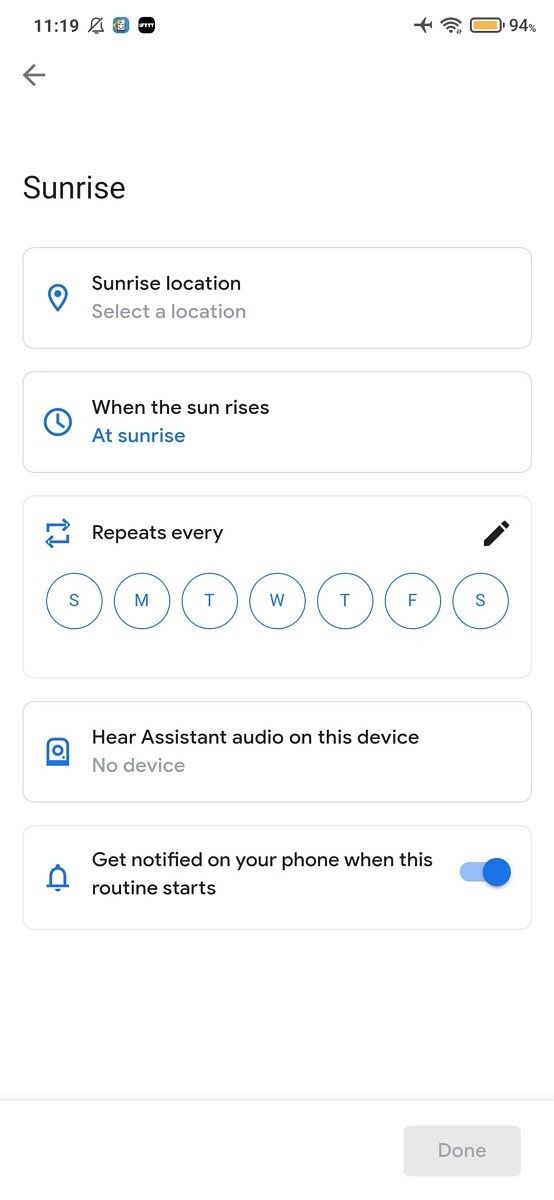
Tapping on the Sunrise/sunset option opens up a new screen that lets you pick Sunrise or Sunset as the routine trigger. Selecting either of the two options opens a customization screen where you can select the sunrise/sunset location, choose a specific timeframe for the trigger based on the sunrise/sunset at a specified location, like 5 minutes before sunset or 4 hours after sunrise, select the days of the week on which you want the routine to trigger based on the sunrise/sunset, and options to select the device on which you want to run the routine and enable/disable notifications for the routine.

As of now, the new UI and sunrise/sunset Assistant routine trigger only seems to be available for a handful of users on the latest Google Home beta. We’ll update this post once the feature starts rolling out to users on the stable channel.

The post Google Home app is rolling out a sunset/sunrise Assistant routine trigger for some appeared first on xda-developers.


from xda-developers https://ift.tt/380X9jx
via IFTTT

These are the best Nintendo Switch Controllers in December 2020: Hori, 8bitdo, PowerA, and More!

Christmas is peeking right around the corner! Do you know what would make a great gift for practically anyone? A Nintendo Switch. Both a console and a handheld device, you can play it at home or on the go, and get to enjoy plenty of classic Nintendo properties you couldn’t find anywhere else. Once you expand the memory a bit with a nice microSD card, what more could you ask for?

Well, you could ask for better controllers. The Nintendo Switch Pro Controller and Joy-Cons are very expensive, and the Joy-Cons, in particular, are known to develop drifting issues in their analog sticks. It’s not the best experience! Instead, you can pick up some third party controllers for cheaper and arguably have a better time.

Many gamers may balk at the idea of not using official controllers – myself included – but Nintendo has officially licensed some of these companies to make controllers on their behalf, and the rest is backed up with tons of positive reviews. Stop worrying and pick up one of the best Nintendo Switch controllers!

Navigate this guide:

Best Nintendo Switch Controller Overall: PowerA Enhanced Wireless Controller

best nintendo switch controller powera wireless animal crossing kk slider on pink background

If you want the absolute best Nintendo Switch controller, you cannot beat PowerA’s Enhanced Wireless Controller. PowerA is one of two companies officially licensed by Nintendo to make controllers for the Switch, and they’re the ones creating controllers that are close to the traditional console experience, without costing you $70 like the official Pro Controller.

The MSRP for these controllers is $50, but they are regularly on discount. At the time of writing, almost all of the 28 different listings for this controller had some sort of discount (if in stock), and on average you’d probably pay close to $35 or $40 for the controller. There are also a bunch of different color and design options, too! Pokemon controllers, Mario controllers, Minecraft controllers… there is definitely something here for everyone!

The only thing that you need to know about this controller is that you need 2 AA batteries to use it (which isn’t all that different from the Xbox One controller). When you can easily stock up on rechargeable batteries, though, it’s far from a deal-breaker!

    PowerA Enhanced Wireless Controller
    Why pay more when you can get the best Nintendo Switch controller for less? PowerA's wireless controller does almost anything the Pro Controller can do at half the price. If you don't need a controller that read Amiibos, then this controller is a solid buy.

Best Retro-style Controller: 8Bitdo SN30 Pro Controller

best nintendo switch controllers 8bitdo sn30 on yellow background

If you sign up for the Nintendo Switch Online subscription, you’ll get access to NES and SNES games as one of the subscription’s benefits. You might quickly come to realize, though, that playing these older titles with analog sticks isn’t the best. You’ll want to get a controller that mimics the old-school experience, and the 8Bitdo SN30 Pro Controller is the one to do it.

The SN30 replicates the look and feel of the classic SNES controllers, including putting a real D-pad at the front and center, so it’ll be easy to play retro titles. Unlike Nintendo’s official and limited SNES controller for the Switch, though, the SN30 Pro also comes with two analog sticks. Basically, you can use this controller to play any game, not just the NES and SNES line-up on the console.

If you like playing retro games on your smart device, you can even set up the SN30 Pro Controller with your Apple or Android device. Who doesn’t like extra functionality with their purchase?

    8Bitdo SN30 Pro Controller
    Want a retro feel with full function? Look no further than 8Bitdo's SN30 Pro Controller. With an old-school D-pad and two analog sticks, you can comfortably play any game on the Switch with this controller.

Best Nintendo Switch Wired Controller: PowerA Wired Controller

best nintendo switch controllers powera wired zelda on Cyan background

Look, I’ve lived in a place where Bluetooth connections inexplicitly don’t work properly. I’m talking “my keyboard and mouse are a foot away from the adapter and it’s still dropping inputs” levels. So I can understand the allure of a wired controller. Wired controllers are going to be more durable overall, too, so they’re a good choice if you have young children around the house that aren’t careful with their electronics.

PowerA has the solution for you with the Wired Controller for the Nintendo Switch. This controller is pretty much the same as their wireless controller, but… well, it has a wire! Also, this is one of the cheaper controllers on the market too, coming in at only $25. If something happens to this controller, it’s not to costly to replace! The wire is 10 feet long, so you should have issues if you want to sit back a little ways from the TV.

If you need something wired and don’t want the USB wire jostled out when playing games, this is the best Nintendo Switch controller to grab.

    PowerA Wired Controller
    Need a wired controller? PowerA's wired controller is only $25, has all the functions of their wireless controller, and has a 10-foot long cable. You can't get better than that!

Best Joy-Con Replacement: Hori Split Pad Pro

best nintendo switch controllers hori split pad red on green background

It’s not that I hate Joy-Cons. It’s just that they have a lot of problems, especially at their price point. Issues with the analog sticks have gotten their own name at this point (the Joy-Con drift), and while Nintendo fixes the drifting Joy-Cons for free, it really shouldn’t be a problem in the first place for something you pay $80 for. On top of that, even the new model Joy-Cons appear to suffer from drifting even with a supposed better build quality. Why bother when you can get Hori’s Split Pad Pro instead?

Available in a few different styles for $50, the Hori Split Pad Pro is bigger, bulkier, and overall more reliable than the Joy-Cons. Will it make it a little harder to tote your Switch around outside the house? For sure, but if you’re like me and like to play the Switch on the couch while watching TV, these controllers are practically a necessity. The thicker grips mean that your hands will be more comfortable, and the many reviews on Amazon rave about the customizable buttons.

There is one thing to note about Split Pad Pro, though. They do not have batteries in the controllers, so you can’t use them detached like you would a Joy-Con. That also means they’re powered by the Nintendo Switch itself, which can drain the battery a bit if you’re on the go. Overall, though, this is the best Nintendo Switch controller for playing the Switch in handheld mode.

    Hori Nintendo Switch Split Pad Pro
    Stop playing with the tiny Joy-Cons, and get the beefier Hori Split Pad Pro. At $50, this is $30 less than a pair of Joy-Cons, and they're more comfortable with a bigger grip. They may not rumble, but you'll avoid hand cramps!

Best GameCube-style Controller: PowerA Wireless GameCube Style Controller

best nintendo switch controllers powera gamecube wireless purple on red background

People love GameCube controllers. I’m not exactly sure why, but they are unique and comfortable. Of course, GameCube controllers generally have the problem of not being compatible with modern-day consoles. Even when you can get GameCube adapters for the Switch, the controllers are aging technology, and are bound to break down sooner or later.

Enter the PowerA Wireless GameCube Style Controller. This controller replicates the look and feel of the classic GameCube controller, down to the iconic purple color. Not only that, though, this controller has all the buttons you need to actually play games on the Switch, like the Home and screenshot buttons. And it’s wireless, which makes the controller easier to use than a standard GameCube controller. If you love Super Smash Bros. Ultimate, this is probably the best Nintendo Switch controller to play the fighter with.

Is it a 100% replica of the decades-old GameCube controller? No, but it’s the next best thing. Heck, it might be the better controller.

    PowerA Wireless GameCube Style Controller
    Craving that GameCube style, but want a controller that's actually easy to use with the Switch? PowerA's wireless GameCube controller is the one to grab. Get the GC form factor with all the buttons you need to play any game, Smash Bros. included.

Best Amiibo-compatible Nintendo Switch Controller: Nintendo Switch Pro Controller

best nintendo switch controller pro controller on purple background

If you want to easily use Amiibos with your Nintendo Switch, then you’ll have to go with a Nintendo controller. PowerA and Hori may be officially licensed by Nintendo to create some great controllers, but they still don’t have access to the technology used to connect the figurines to the game themselves. With that said, you’re left with only two options–the Joy-Cons or the Pro Controller. The best Nintendo Switch controller for this category, then, is for the Pro Controller.

Don’t think it won just by process of elimination, though–Nintendo’s official controller is great in its own right. The Pro Controller is sturdy and feels great in your hands, which is a big step up from the thin Joy-Cons. They also offer a surprisingly long battery life (it feels much longer than my PS4 controllers, at least), and is easy to charge with a USB-C cable, something that most of the competing console providers don’t offer. It would be the best Nintendo Switch controller in general, if not for one thing… its price. $70 is above the average for a controller this console generation, and it’s hard to argue against PowerA’s comparable experience for much less.

But if you are buying Amiibos for more than just decoration, you’ll have to go with the Pro Controller.

    Nintendo Switch Pro Controller
    Sometimes, you just can't argue with the official goods. Nintendo's Pro Controller is great for playing in docked mode, with a comfortable design and a long battery life. A $70 MSRP makes this for the highest-priced item on our list, but as one of the few controller types that offers Amiibo functionality, this controller is the best.

Best Small-form Nintendo Switch Controller: 8Bitdo Lite Bluetooth Gamepad

best nintendo switch controllers 8bitdo lite turquoise on orange background

If you have a Nintendo Switch Lite, you’ve already decided to forgo the ability to play in docked mode in order to have increased portability. But sometimes, you’ll want to sit back and play a game with an actual controller in hand, instead of the whole system. Most of the controllers on this list are big and bulky, as in, they’re not great for the portable experience. Thankfully, 8bitdo has a line of smaller controllers that are easier to pack with your Switch Lite, and the best Nintendo Switch controller of that bunch is the 8Bitdo Lite Bluetooth Gamepad.

Available in Turquoise and Yellow to match those color Switch Lites, the Lite Gamepad is small, making it easy to pack with your game console. However, it’s not too small, like the 8bitdo Zero 2, which I argue was made for ants and only ants. It’s about the same thickness as a Joy-Con, but bigger, having all of the buttons and triggers you need to play any game. No weird half’Joy-Con control schemes here! Finally, the Lite Gamepad uses two full D-Pads as opposed to analog sticks, so it’s less likely to break if it gets jostled around in a bag.

Finally, this gamepad is only $25 and regularly goes on sale. 8bitdo may not be officially licensed by Nintendo, but they’re known as a quality brand, especially among retro gamers.

    8Bitdo Lite Bluetooth Gamepad
    Get the 8bitdo Lite Blutoorth Gamepad and have a controller you can take with you anywhere. With its small form factor and choice of D-Pads over analog sticks, this is easy to pack with your Switch or Switch Lite. At only $25, you can't go wrong!

Best Nintendo Switch Fight Stick: Hori Switch Fighting Stick Mini

best nintendo switch controllers hori fighting stick mini on dark blue background

If you’re a fighting game fan, you know that fight sticks tend to be better than a typical controller. Considering all the finger gymnastics you need to do to pull off difficult combos, it becomes much more manageable if you’re using all of your fingers as opposed to just your thumbs (and occasionally pointer fingers). If you’re picking up titles like Mortal Kombat 11 and DragonBall FighterZ on the Switch, then you’ll want to pick up the Hori Switch Fighting Stick Mini.

Fighting game fans say that this is a good beginner’s fight stick. Most fight sticks are going to be bulkier and way more expensive, so having this smaller fight stick for a smaller price point is great to pick up if you’re not sure you like fight sticks yet. It has everything you need from a Switch controller, and spreads out the face and trigger buttons with the much larger round buttons, making it far easier to pull off those multi-button combos.

Super Smash Bros. fans beware, though! The joystick automatically uses the D-Pad inputs instead of the analog stick inputs (presumably for more accurate commands), with no way to change it. For Super Smash Bros. Ultimate, that means you’re stuck taunting and you can’t move! So in short, you can’t use the Fighting Stick Mini with that game. But honestly, if you love Smash Bros., you’re probably going to choose the GameCube style controller anyway.

    Hori Switch Fighting Stick Mini
    Get the most out of your fighting games with the Hori Switch Fighting Stick Mini. Only $50 and officially licenced by Nintendo, this is a great beginner's fight stick, offering you the comfort to pull off complicated combos with ease. Please note, however, that it is not compatible with Super Smash Bros.!

For myself, I would choose the PowerA Enhanced Wireless over most of these options, simply because it lets me enjoy a more conventional gaming experience, balancing grip, weight, and aesthetics. Though I confess, the Switch Pro Controller also does look appealing on a higher budget. Most of these choices are great for their intended purposes. So recognize your needs and pick one that best suits the same!

The post These are the best Nintendo Switch Controllers in December 2020: Hori, 8bitdo, PowerA, and More! appeared first on xda-developers.


from xda-developers https://ift.tt/2IXERXu
via IFTTT