LightBlog

mercredi 16 décembre 2020

Amazon Luna cloud gaming service now available on these Android devices

Amazon is finally expanding its cloud gaming service ‘Luna’ to Android devices. A competitor to similar services from Google, Microsoft, and NVIDIA, Amazon officially launched Luna back in October and had made it available for Fire TV, Windows, Mac, and iOS users. Starting today, owners of certain Google, Samsung, and OnePlus smartphones can get access to the service at an early access cost of $5.99 per month.

The subscription offers you access to unlimited hours of play along with a library of AAA games, at 1080p/60fps with 4K/60fps in the pipeline. It also offers the ability to stream on two devices simultaneously. You can expect games like Resident Evil 7, Control, Panzer Dragoon, A Plague Tale: Innocence, The Surge 2, Yooka-Laylee, The Impossible Lair, Iconoclasts, GRID, ABZU, Brothers: A Tale of Two Sons, and more.

Luna for Android will be accessible via a web app (similar to iOS) by visiting amazon.com/luna. It is recommended that you use Chrome browser and Android 9 or higher and there will be support for the Luna Controller along with other Bluetooth controllers as well as the Xbox One Controller, and the DualShock 4. Having said that, for some weird reason, the service will only be available on the following Android devices:

  • Pixel 4 XL
  • Pixel 4a
  • Pixel 4a 5G
  • Pixel 5
  • Samsung Galaxy S10
  • Samsung Galaxy S10+
  • Samsung Galaxy Note 10
  • Samsung Galaxy Note 10+
  • Samsung Galaxy S20
  • Samsung Galaxy S20+
  • Samsung Galaxy S20 Ultra
  • OnePlus 7
  • OnePlus 7 Pro
  • OnePlus 8
  • OnePlus 8 Pro
  • OnePlus Nord
  • OnePlus 7T
  • OnePlus 7T Pro
  • OnePlus 7T Pro

We are not sure as to why Amazon has made the service available to only a handful of Android devices, especially since Luna can run via a web browser. The whole point of cloud gaming is that it doesn’t require one to have high-end hardware and just stream games off the internet. Our guess is that Amazon is currently limiting the number of devices only for early access and more devices should be added to the list in the near future. You can check out the full list of supported devices and browsers over here.

The post Amazon Luna cloud gaming service now available on these Android devices appeared first on xda-developers.


from xda-developers https://ift.tt/3aeuuKj
via IFTTT

Among Us officially makes it way to the Nintendo Switch

Winner of the ‘Best Multiplayer Game’ and ‘Best Mobile Game’ at The Game Awards this year, Among Us is now available on the Nintendo Switch. The game will offer cross-platform compatibility, meaning that players on mobile, PC and Switch can play with each other. Announced at the Nintendo Direct Indie World Showcase, Among Us players on the Nintendo Switch will have the option of multiplayer sessions for both online and local.

As per the listing on the Nintendo Store, the game can be purchased for $5 and has a size of 421MB. Among Us was originally launched in 2018 by developer InnerSloth, but has only managed to gain a wider audience this year. Bringing in the Switch expands the horizon for the game to even more players, and the Switch is the perfect platform for a game like this.

During this year’s Game Awards, Among Us developers not only won two awards but also gave us a preview of what players can expect in 2021.

By ‘early next year’ the game will include a brand new map called the ‘The Airship’. This would be the fourth map added to the game and according to the developers, it is expected to be more extensive than the existing ones. The new map will also introduce new tasks and skins, the ability to decide where you start a match, and the addition of ladders and elevators to access certain areas of the ship.

Among Us has been one of the most talked-about games this year. While the game had less than 1,000 downloads in August 2018, two years later the game recorded that it was downloaded more than 18,000 times that figure. One of the reasons for the popularity of the online multiplayer social deduction game has been the pandemic as it allowed players to be social at the same time maintaining social distancing. Another reason has been the large number of content creators who have started playing and livestreaming their gameplays on YouTube and Twitch.

The post Among Us officially makes it way to the Nintendo Switch appeared first on xda-developers.


from xda-developers https://ift.tt/34k3Vjj
via IFTTT

The new Google Pay app now has a dark theme

With the first stable rollout of Android 10 last year, Google finally added a system-wide dark mode toggle to the platform. Following the release, the company started updating its vast portfolio of apps with a new dark theme, and it continues to do so to this day. In the last few months, the company has updated the Google Play Store, the Google App, Google Docs, Sheets and Slides, and Google Translate with a new dark theme. Now, Google is releasing a similar update for the Google Pay app.

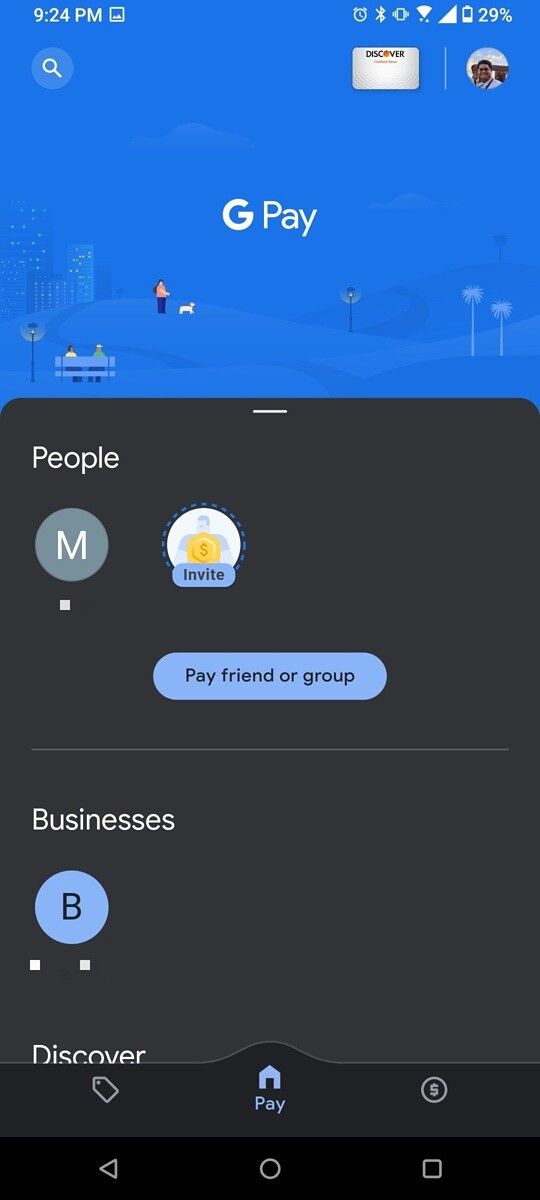
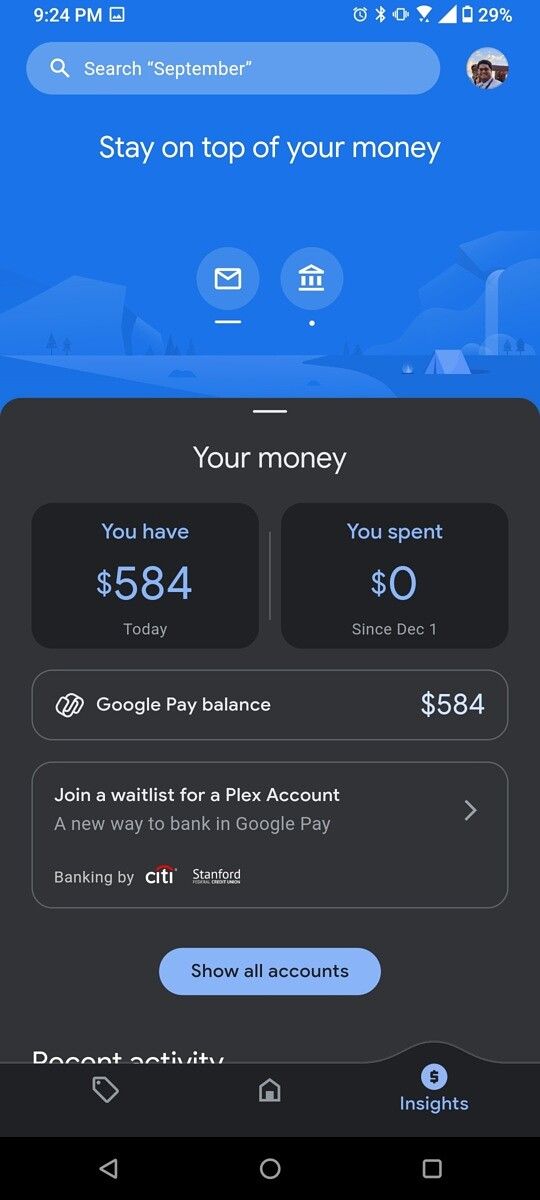
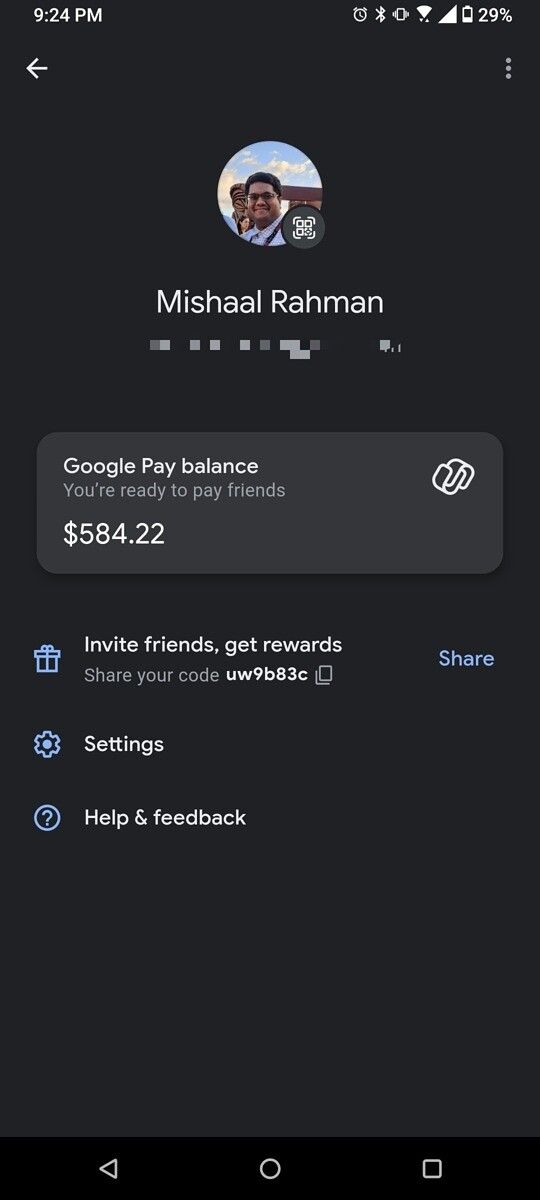
After releasing the new Google Pay app last month, Google has now updated the app with a dark theme. As you can see in the attached screenshots, the latest update for the app (v.119.1.4) brings a new dark theme that changes all the white UI elements in the app to dark gray, except for the Go India event banner at the top, which will be replaced by an appropriate dark theme banner when the event is over.

Google Pay dark mode India

The dark theme is controlled by the system-wide dark mode setting, and the app doesn’t include a dedicated dark mode toggle like the one available on the Google Play Store. This means that the Google Pay dark theme is limited to devices running Android 10 and above.

Google Pay dark mode US Google Pay dark mode US Google Pay dark mode US

Our Editor-in-Chief, Mishaal Rahman, has also confirmed that a similar theme is also available for Google Pay users in the U.S. But, as you can see in the attached screenshots, the dark theme implementation isn’t exactly the same in both regions.

Google Pay dark theme banner US

Since the Google Pay UI for Indian and U.S. users is significantly different, there are some minor differences in the dark theme implementation as well. For instance, the banner image on the U.S. version of the app is predominantly blue, while on the Indian version, it falls in line with the new dark theme.

Google Pay: A safe & helpful way to manage money (Free, Google Play) →


Thanks to XDA Senior Member anishpratheepan for the tip!

The post The new Google Pay app now has a dark theme appeared first on xda-developers.


from xda-developers https://ift.tt/34huF3Q
via IFTTT

mardi 15 décembre 2020

Here are the Best Chromebooks for Students to Buy in 2020

With an increasing number of students attending classes at home, the demand for laptops and Chromebooks is through the roof right now. But finding the right Chromebook could prove to be a bit of a challenge, especially since some eCommerce portals are flooded with older models that aren’t a part of Google’s eight-year update plan for new Chromebooks.

So, if you’re on the lookout for a great Chromebook for school or university, you’ve come to the right place. We’ve curated a list of the best Chromebooks for students available right now, and it includes options that will fit every budget and use case. So, let’s jump right in and find out which Chromebook is best suited to your needs.

Navigate this guide to the best Chromebooks for students:

Best Chromebook for school students: ASUS Chromebook Flip C214

The ASUS Chromebook Flip C214 is the best Chromebook for school students because of two main reasons — it’s affordable and it offers a very durable design. At a starting price of under $400, the Chromebook Flip C214 offers a dual-core Intel Celeron N4000 processor, 4GB of LPDDR4 RAM, 32GB of eMMc storage, an 11.6-inch 360-degree touchscreen, a MIL-STD-810G certified body with rubberized edges, and a spill-proof keyboard.

ASUS Chromebook C214

While its specifications may not seem all that impressive on paper, the ASUS Chromebook Flip C214 is capable enough to handle all your online classes and assignments. And you can easily get a full school day’s worth of use out of it, thanks to its 50Wh battery that can last up to 11 hours on a single charge.

    ASUS Chromebook Flip C214
    The Asus Chromebook Flip C214 is the best pick for school students as it offers a durable construction, a spill-proof keyboard, and decent specifications at a very affordable price!

In terms of I/O, the Chromebook Flip C214 offers a USB 3.1 Type-A port, 2x USB 3.1 Type-C ports, and a 3.5mm combo jack. It also features a microSD card slot for easy expansion, 2W stereo speakers, 802.11 a/b/g/n/ac Wi-Fi, and Bluetooth 5.0 support. ASUS offers the Chromebook in two variants, and if you choose the premium option you even get an EMR stylus that you can use to take notes effortlessly.

Best detachable Chromebook: Lenovo Chromebook Duet

If you’re on a very tight budget and you want a Chromebook that can double up as a tablet, then you may want to consider getting the Lenovo Chromebook Duet. Priced starting at $290, the Chromebook Duet offers a 10.1-inch FHD display with a resolution of 1920 x 1200 pixels and a 16:10 aspect ratio. The Chromebook packs MediaTek’s Helio P60T octa-core processor, coupled with ARM’s Mali-G72 GPU, 4GB of LPDDR4x RAM, and 64GB of eMMC storage. At this price point, it’s a great Chromebook for young students, but it may not be as durable as the ASUS Chromebook Flip C214.

Lenovo Chromebook Duet

With these specs, the Lenovo Chromebook Duet breezes through light workloads but multitasking isn’t one of its strong suits. Battery life, on the other hand, is fantastic and the Chromebook can last up to 10 hours on a single charge. It comes with a detachable keyboard that has a compact TKL layout and a usable trackpad.

    Lenovo Chromebook Duet
    If you're looking for a Chromebook that you can use both as a laptop and as a tablet, then the Lenovo Chromebook Duet is a great choice that won't cost you a fortune.

For connectivity, the Lenovo Chromebook Duet supports 802.11 a/b/gn/ac dual-band MIMO Wi-Fi, Bluetooth 4.2, and a single USB 2.0 Type-C connector for data transfers and charging. Since the Chromebook features a single USB Type-C port, you’ll have to invest in a dock if you wish to connect multiple accessories at the same time. Lucky for you, we have curated a list of the best Chromebook docking stations you can get to add some much-needed ports to this Chromebook.

Best premium pick: Samsung Galaxy Chromebook

In case you’re willing to spend as much as $1000 on a Chromebook, then the Samsung Galaxy Chromebook is the best option you can get right now. It features a 13.3-inch 4K Super AMOLED touchscreen, an Intel Core i5-10210U processor, and 8GB of RAM, which is more than enough for all your school or university needs.

Samsung Galaxy Chromebook

The Samsung Galaxy Chromebook also comes with an S Pen that you can use to take notes during classes. When you’re done with work, you can also use the Chromebook to relax and enjoy some Netflix or YouTube, as it packs a fairly impressive set of stereo speakers.

    Samsung Galaxy Chromebook
    If it's a premium experience that you're looking for, then you just can't go wrong with the Samsung Galaxy Chromebook. Its vivid Super AMOLED display, premium construction, and built-in S Pen are sure to make some heads turn when you open it up in your classroom.

In terms of ports, the Samsung Galaxy Chromebook includes two USB Type-C ports, a headphone/mic combo jack, and a microSD card reader. For connectivity, the Chromebook supports Wi-Fi 6 and Bluetooth.

Best value pick: ASUS Chromebook Flip C434

For those of you who are looking for a sweet spot between the Samsung Galaxy Chromebook and the Lenovo Chromebook Duet, there’s the ASUS Chromebook Flip C434. While it may not be the best Chromebook on this list, it features a decent selection of hardware that will fulfill all your needs without burning a hole in your pocket.

ASUS Chromebook Flip C434

The Chromebook Flip C434 starts at around $450 and it packs Intel’s Core m3-8100Y processor, a 14-inch FHD LED display, 8GB of RAM, and 64GB of storage. The base model is more than sufficient to power through your light workloads without any hassle and it offers great value for your money. But if you’re willing to spend the extra dollar, you can spec it up with an Intel Core i5-8200Y processor, up to 16GB of RAM, and up to 512GB of storage.

    ASUS Chromebook Flip C434
    The ASUS Chromebook Flip C434 may not be the best Chromebook out of this lot, but it certainly offers the best bang for your buck. Starting at around $450, the Chromebook offers decent hardware that will help you breeze through schoolwork without burning a hole in your pocket.

For connectivity, the Chromebook Flip C434 offers two USB 3.1 Type-C ports, one USB 3.1 Type-A port, a microSD card slot, and a headphone/mic combo jack. It features 802.11 ac Wi-Fi and Bluetooth 4.0 for wireless connectivity.

Best battery life: Google Pixelbook Go

If great battery life is what you’re searching for, then you shouldn’t look beyond the Google Pixelbook Go. While it is pricey for its modest specifications, the Pixelbook Go can deliver up to 12 hours of battery life on a single charge. On top of that, it even supports 45W fast charging, which can provide an additional 2 hours of use with just a 20-minute charge.

Google Pixelbook Go

Spec-wise, the base variant of the Google Pixelbook Go won’t blow your mind. It packs an 8th-Gen Intel Core m3 chip, 8GB RAM, and 64GB of storage. It features a 13.3-inch FHD display, a lightweight chassis, and a paltry selection of ports, including just two USB Type-C ports and a 3.5mm headphone/mic combo jack.

    Google Pixelbook Go
    If you often find yourself in situations where you don't have access to a power outlet for hours at a stretch, then the Google Pixelbook Go should be the one for you. It offers up to 12 hours of battery life on a single charge, and it even features 45W fast charging support that can give you an additional 2 hours of use with just a 20-minute charge.

With the aforementioned specifications, you can expect decent performance from the Pixebook Go for day-to-day school tasks. But if you want something a bit more powerful, Google does offer Core i5 and Core i7 powered models with more RAM, more storage, and even a 4K display. However, you’ll have to pay a significant premium to get those features.

Best Chromebook for productivity: Acer Chromebook Spin 713

The Acer Chromebook Spin 713 is a solid option for those looking to maximize their productivity, as it features a tall 3:2 display that lets you view more content on your screen than any of the other Chromebooks on this list. But its display’s aspect ratio isn’t the only thing that makes the Spin 713 a great buy.

Acer Chromebook Spin 713

The Chromebook also offers decent hardware at a relatively affordable price, including Intel’s 10th Gen Core-i5-10210U chip, 8GB of RAM, and a 128GB SSD. With this kind of hardware, it can comfortably handle almost anything you throw at it in day-to-day use.

    Acer Chromebook Spin 713
    With a stunning 3:2 2L display and a built-in HDMI port, the Acer Chromebook Spin 713 is the best Chromebook for productivity that you can get in the market right now.

On top of that, the Acer Chromebook Spin 713 also offers a good selection of ports, including one USB 3.0 Type-A port, two USB 3.2 Type-C ports, a 3.5mm headphone/mic combo jack, an HDMI port, and a microSD card slot. The inclusion of an HDMI port is especially great since it eliminates the need for a dongle if you wish to connect your Chromebook to an external display.

Best display: Lenovo Yoga Chromebook C630

Rounding off the list is the Lenovo Yoga Chromebook C630, which offers a stunning 15.6-inch 4K display that is perfect for media consumption. So if you’re on the lookout for a Chromebook with the best display, the Yoga Chromebook C630 is the one you should go for. And it’s no slouch in terms of performance either.

Lenovo Yoga Chromebook C630

The Lenovo Yoga Chromebook C630 packs an Intel Core i5-8250U processor and 8GB of RAM, which is good enough to help you power through all your assignments and homework. And once you’re done with work, you’ll also be able to enjoy your favorite movies or TV shows in glorious 4K without any stuttering.

    Acer Chromebook Spin 713
    Looking for the best display that's great for both work and media consumption? Then the Lenovo Yoga Chromebook C630 is a great option for you. It features a 15.6-inch 4K display that bigger and better than the displays on any of the other Chromebooks on this list.

In terms of ports, the Lenovo Yoga Chromebook C630 offers two USB Type-C ports, a USB 3.1 Gen 1 Type-A port, a headphone/mic combo jack, and a microSD card reader. For connectivity, it features support for 802.11 ac Wi-Fi and Bluetooth 4.1.


Which one out of the aforementioned Chromebooks for students will be your workhorse for the next few school years? If I had to pick just one, I’d probably go with the Acer Chromebook Spin 713, mostly because of its 3:2 display, built-in HDMI port, and affordable price tag. But if I had money to spare, I’d probably get the top-end variant of the Google Pixelbook Go. That sleek design and exceptional battery life are a bit tough to pass. In case none of the Chromebooks mentioned above sound appealing to you, you can also check out our list of the best Chromebooks you can buy in 2020 for a couple of additional options.

The post Here are the Best Chromebooks for Students to Buy in 2020 appeared first on xda-developers.


from xda-developers https://ift.tt/388Cl9E
via IFTTT

Google Photos uses machine learning to make your images look 3D

Smartphone cameras have become increasingly sophisticated with portrait features, night modes, and more. But how about making your images look more cinematic? Google Photos has announced a new feature that will do just that.

Google is calling the feature “cinematic photos.” Essentially, the feature will “use machine learning to predict an image’s depth and produce a 3D representation of the scene—even if the original image doesn’t include depth information from the camera.” Google will then apply a small animation to the photo, giving it a smooth panning effect.

The result Google shared gives the photo much more life and depth. And it gives the impression that a much more expensive camera was used to take the photo, when in reality it’s all thanks to Google’s sophisticated machine learning technology.

Google Photos will automatically create cinematic photos for you as long as your app is updated. When a cinematic photo is created, it’ll show up in your recent highlights at the top of your photo grid. You can then share the result with friends and family. Keep in mind that every cinematic photo is shared as a video.

As cool as the new feature looks, it gives me slight pause. With Google Photos getting rid of free unlimited storage next year, I wonder how much space each cinematic photo will take up. Regular smartphone images hardly take up any space, but turning many of them into short videos could add up.

In addition to cinematic photos, Google also announced Memories will now regularly surface photos of the most important people in your life and also your favorite activities, such as baking or hiking. Google’s algorithms will apparently determine your favorite things based on the photos you upload.

You’ll start seeing cinematic photos in Google Photos over the next month, so keep an eye out.

Google Photos (Free, Google Play) →

The post Google Photos uses machine learning to make your images look 3D appeared first on xda-developers.


from xda-developers https://ift.tt/3r2s6fF
via IFTTT

Best Galaxy Note 20 Deals December 2020: Amazon, Best Buy, Samsung, Verizon & more!

After months of leaks and speculation, the Galaxy Note 20 is here, and as you might expect, a flagship specs list means a premium price tag. The regular Galaxy Note 20 starts at $999 in the US, while the Galaxy Note 20 Ultra starts at $1399. However, as with every Samsung launch, there are also some deals to be had if you place an early pre-order so below, we’ve rounded up all the best deals for the Galaxy Note 20, including ways to save on multiple devices and the best postpaid deals we can find as well.

Where to buy the Galaxy Note 20

One of the biggest phones of the year is going to be available through every major carrier and most major retailers across the world.

Best Unlocked Galaxy Note 20 Deals in the US

The unlocked Galaxy Note 20 is available at three major retailers: Amazon, Samsung, and Best Buy. They all offer different deals, check them out below!

 Amazon

Thinking of grabbing the Galaxy Note 20 at Amazon? If you have the Amazon Prime Rewards Visa, you can sign up for an 18-month payment plan. Of course, while you’re there you can also pick up a Galaxy Note 20 case (and we’ve summarized the best ones!).

    Samsung Galaxy Note 20
    If you want the easiest check out possible, and the safety of ordering through your existing Amazon account, look no further. You can also sign up for a payment plan if you have the Amazon Prime Rewards Visa.

Samsung

If you have a recent phone to trade-in, you’ll want to get your Note 20 from Samsung. Get up to $550 off with a trade-in, bringing the phone’s grand total down to just $450. Normally you can only get up to $400 off. Also, for the holidays, you can get a special red version of the Galaxy Note 20, exclusively from the Samsung Store.

    Samsung Galaxy Note 20
    Forget the rest of the deals – if you want to save a bundle on your unlocked Galaxy Note 20 and have a recent phone, Samsung's trade-in offer is the best. You can get up to $550 in credit with the right trade-in, making the Note 20 highly affordable.

Best Buy

Best Buy’s deal are actually pretty lacking right now. You can save $50 on an unlocked phone by activating today, but their carrier deals are non-existent at this time. Still, Best Buy isn’t a bad retailer to go with!

    Samsung Galaxy Note 20
    Now that Black Friday is over, Galaxy Note 20 deals are sparse at Best Buy.

Best Carrier Galaxy Note 20 Deals in the US

Of course, each major carrier is also selling the Galaxy Note 20. Here are the best deals for each of them:

Verizon

Verizon usually has a ton of promotions to take advantage of with their phones, and the Galaxy Note 20 is no exception. Here are just a few of those offers:

  • Buy one phone, get a second for up to $1,000 off with a new line
  • Get up to $550 off with a trade-in
  • If switching from another carrier, get a $250 Verizon e-Gift Card on select Unlimited plans
  • Free Verizon Stream TV
  • 12-months of PlayStation Plus and PlayStation Now for free

If you can stack multiple deals, you’ll save big on the Galaxy Note 20 at Verizon!

    Samsung Galaxy Note 20
    Get the full power of Verizon's 5G mmWave network and take advantage of the myriad of deals while you're at it. Whichever one you go for, expect great coverage and blazing fast speeds when you're in a mmWave 5G area!

AT&T

AT&T Next lets you pay for your phone over 30 months, with the Galaxy Note 20 costing $33.34 per month on the plan. But, that’s without taking advantage of AT&T’s trade-in offer! If you’re switching to AT&T from another carrier, adding a line, or upgrading your plan, the Galaxy Note 20 will only cost $10/month! Additionally, you can save $50 on the Galaxy Buds Live if you bundle it and the Note 20 together.

    Samsung Galaxy Note 20
    If you've got a recent phone to trade in, and don't mind being on AT&T, this might be the deal for you. Bring your total down to just $10/month when you switch and trade in a phone!

The post Best Galaxy Note 20 Deals December 2020: Amazon, Best Buy, Samsung, Verizon & more! appeared first on xda-developers.


from xda-developers https://ift.tt/30wmeQP
via IFTTT

Cyberpunk 2077 ‘wasn’t ready’ for PS4 and XBox One X, admit developers

Cyberpunk 2077 is easily the most hyped game of the year, and since its release last week, many have come to the conclusion that it wasn’t the monster it was billed to be. After its share price plummeted yesterday by over 50%, developer CD Projekt Red (CDPR) had an emergency conference call with investors earlier today, to look at what had gone wrong.

CDPR’s business development SVP, Michal Nowakowski was forced to admit that the company had focused resources on the new generation consoles – X Box Series S/X and PS5. A quote from the call, reported at Android Central said: “It is more about us looking – as was previously stated – at the PC and next-gen performance rather than current-gen, we definitely did not spend enough time looking at that. I wouldn’t say that we felt any external or internal pressure to launch on the date – other than the normal pressure, which is typical for any release. So that was not the cause.”

That shouldn’t be mistaken for ‘no pressure at all’ of course. As one of the biggest launch titles for the new-gen. devices and one of the main titles on Christmas lists this year, CDPR would have had a major dent on the industry if it had been delayed any further than the 21 days it already had. In that sense, the pressure was huge to get Cyberpunk 2077 in the shops and online stores in time.

Development of Cyberpunk 2077 went down to the wire, with CEO Marcin Iwiński explaining that the PS4 and Xbox One X versions were being worked on right up until launch. “Unfortunately this resulted in giving it to reviewers just one day before the release, which was definitely too late and the media didn’t get the chance to review it properly. That was not intended; we were just fixing the game until the very last moment.”

CDPR has added that, although it has already apologised for the blunders which made the game look like an early iteration of Apple Maps, there are no special refund procedures, and that dissatisfied users will have to contact their retailer or online store in the usual way.

Seems, then, the best way to experience Cyberpunk 2077 as it was supposed to be is to get hold of a new console. These links will tell you where to find stocks of the PS5 and Xbox Series S/X as they come in. Alternatively, as Google has been at pains to remind us, it plays great on Stadia (maybe on a OnePlus 8T Cyberpunk 2077 edition?)

The post Cyberpunk 2077 ‘wasn’t ready’ for PS4 and XBox One X, admit developers appeared first on xda-developers.


from xda-developers https://ift.tt/37kUG4c
via IFTTT