LightBlog

jeudi 17 décembre 2020

ASUS ROG Phone II latest update enables 90fps on PUBG Mobile, VoLTE for T-Mobile and BSNL

A new update for the ASUS ROG Phone II has been spotted which brings a bunch of new features including support for VoLTE for T-Mobile network in the US and BSNL in India. The update is also said to finally bring support for 90fps gameplay on PUBG Mobile, which has been available on the ROG Phone 3 for a while now.

If you remember, high refresh rate mode for PUBG Mobile was announced back in August for the OnePlus 8, OnePlus 8 Pro, OnePlus 7T, OnePlus 7T Pro, and the OnePlus 7 Pro as a timed exclusive. Starting September 6, this feature was open to all OEMs, however, only a handful of devices including the ROG Phone 3, introduced the feature. Surprisingly, the ROG Phone II did not get the ability to run PUBG Mobile at 90fps, which was weird considering it comes with a 120Hz refresh rate display.

As per the official ASUS ZenTalk forums, the new firmware update comes with version number 17.0240.2012.65 and has begun rolling out today.

Here are the full release notes for this update:

  • Android security patch update to 2020-12
  • Added support for the Kunai 3 Gamepad Controller
  • Add “Auto activation of lock touch function” in Game Genie, where the lock touch function will be turned on after a few minutes when idle in-game.
  • Support India BSNL VOLTE
  • Support US T-Mobile VOLTE
  • Support for 90 FPS in PUBG Mobile
  • Fixed issue where WhatsApp call could crash the application
  • Fixed issue where notifications would not pop up when using Teams

As of now, the update is only available via OTA, which means that you might have to wait for the update to hit your device in the coming days since “the server pushes update notice to different serial numbers by batches.” As per the release notes, the new update also brings the latest Android security patch update for the month of December as well as support for the new Kunai 3 Gamepad Controller.

The post ASUS ROG Phone II latest update enables 90fps on PUBG Mobile, VoLTE for T-Mobile and BSNL appeared first on xda-developers.


from xda-developers https://ift.tt/34lHWbE
via IFTTT

Skype adds Android 11 bubble support as Slack begins testing it

With Android 11, Google finally added support for the long-overdue Bubble notification API, allowing developers to display messages and notifications in a free-floating window on top of other apps. The API was first introduced with Android 10 Beta 2 as an opt-in feature but didn’t make it to the final release. But with the Android 11 Developer preview, the API gained a user-facing setting and was formally incorporated into the OS with the final Andriod 11 release.

However, Android 11 supporting the Bubble API is only half part of the story. To take advantage of the feature, it needs to be implemented by app developers as well. That’s the reason a majority of popular apps don’t support displaying notifications in a bubble yet. So far, we have seen Google Messages and Facebook Messenger adding chat head bubbles support. Telegram is also working on adding the bubbles for a while now. Now, Skype for Android has become the latest app to join the list to support displaying notifications in chat head bubbles.

As first spotted by Twitter user @tonypalus, the latest version of Skype, version 8.67.0.95 to be precise, now supports bubbles for notifications. Our Editor-in-chief, Mishaal Rahman, was able to confirm the same on his smartphone running Android 11.

After updating to the latest version, you should see a new option called Bubbles in Skype’s app settings. Here’s a screenshot showing the feature in action. Skype chat bubble

Skype – free IM & video calls (Free, Google Play) →

Apart from Skype, it looks like Slack is also testing adding support for bubble notifications in Android 11. Android app developer/reverse engineer Alessandro Paluzz has discovered evidence that the popular team communication app might soon bring the floating notifications to its Android app.

The feature isn’t live in the latest stable version of the Slack app yet. However, we’ll be sure to let you known when it finally goes live for Android 11 users.

Slack (Free, Google Play) →

The post Skype adds Android 11 bubble support as Slack begins testing it appeared first on xda-developers.


from xda-developers https://ift.tt/2LJZQOW
via IFTTT

Here’s our first look at Samsung’s Galaxy A72, an upcoming mid-range 5G phone

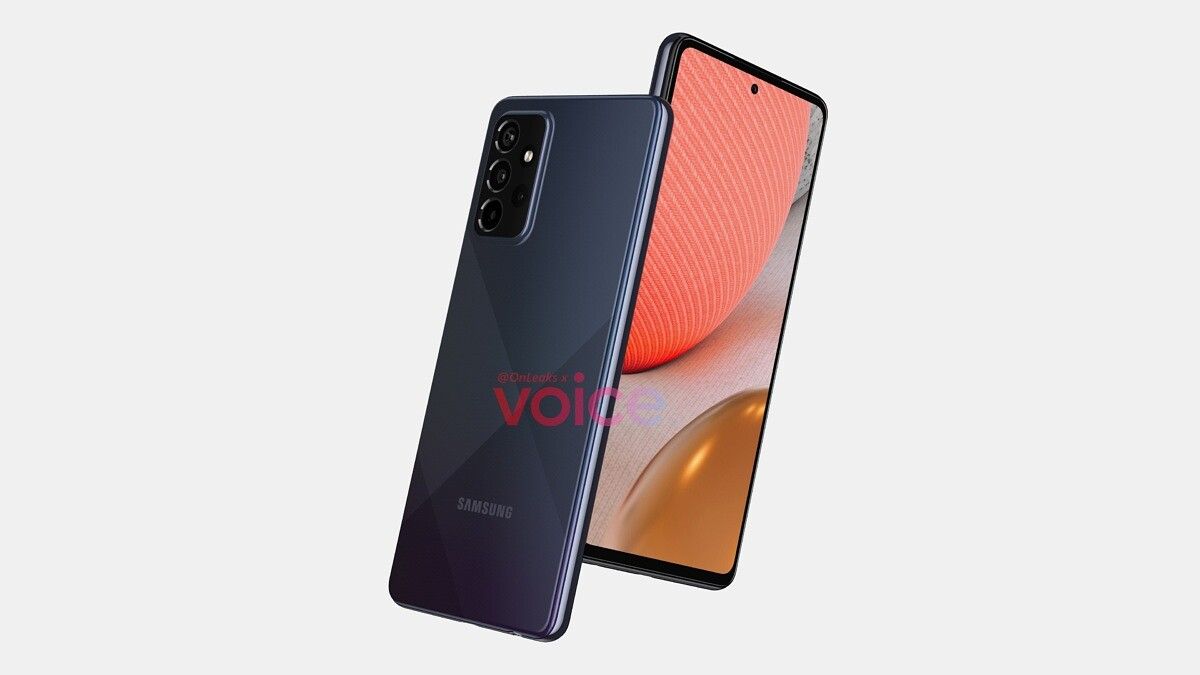
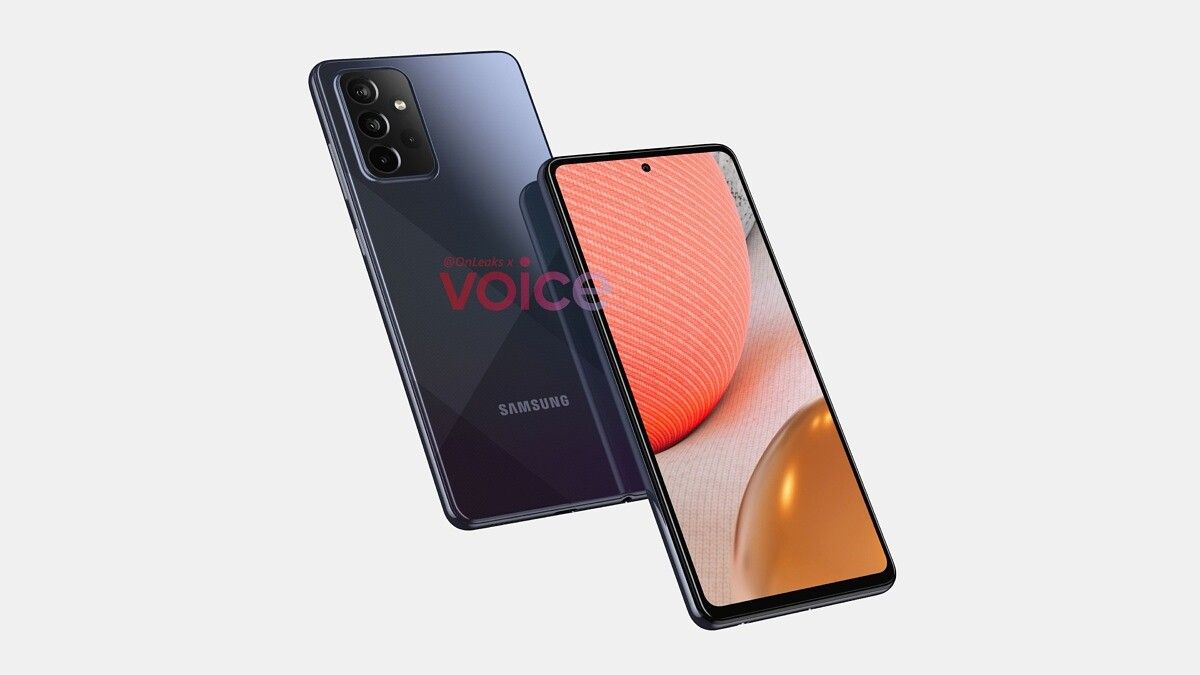
In September, we learned about the Samsung Galaxy A72, an upper mid-range smartphone with five rear cameras that the South Korean smartphone giant was planning to launch in 2021. But apart from the camera, we didn’t know much about the smartphone, including its probable specs and the design. That changes now as a new leak has given us our first look at the Galaxy A72 5G, revealing its design and some of the specifications.

The latest leak comes to us courtesy of prolific smartphone leakster Steve Hemmerstoffer. One of the key revelations from the new leak is that the Galaxy A72 5G will sport four rear cameras and not five as previously reported earlier. The smartphone’s overall design closely resembles that of the Galaxy A52 5G, which is yet another smartphone in the Galaxy A series scheduled for 2021. The only visual difference between the two is the display size: the Galaxy A72 5G sports a 6.7-inch panel, whereas the Galaxy A52 5G has a smaller 6.5-inch display. The phone will feature a Glasstic (a plastic material that looks and feels like glass) back panel and an aluminum frame.

On the back, we can see a rectangular camera module housing the quad cameras and a flash module with Samsung branding visible towards the bottom. Details about the camera sensors are unknown as of yet.

The Galaxy A72 5G is said to measure 165 x 77.4 x 8.1mm (9.9mm with the rear camera bump) and is expected to retain the 3.5mm audio jack. It will also offer an in-display fingerprint scanner similar to the Galaxy A52 5G. The leak didn’t reveal exact details about the processor, memory, battery, and other hardware components, but we expect to hear more on that in months leading up to the official launch.

Apart from the Galaxy A72 5G and Galaxy A52 5G, Samsung is also working on one more 5G-enabled smartphone called Galaxy A32 5G, which is said to be the company’s cheapest 5G smartphone yet.

The post Here’s our first look at Samsung’s Galaxy A72, an upcoming mid-range 5G phone appeared first on xda-developers.


from xda-developers https://ift.tt/34ie4wD
via IFTTT

ASUS ZenBook and VivoBook lineups refreshed with 11th-gen Intel processors in India

ASUS has announced its new lineup of notebooks in India today featuring the latest 11th-gen Intel Tiger Lake processors in India. The ZenBook and VivoBook range are getting the new processors that were announced back in September, along with some new features added to the more premium models. Apart from the new processors, ASUS is also offering some of the models with NVIDIA’s mobile GPUs for improved graphics performance.

ASUS ZenBook

First let’s go through the ZenBook range, which is the company’s mid-to-upper range offering in the consumer notebook series. The new ZenBook Flip S UX371 takes the lead with its 4K UHD NanoEdge OLED HDR touch-screen display offering 400-nits of brightness. The ‘Flip’ denotes the fact that it comes with a 2-in-1 design allowing the display to be folded all the way to 180-degrees. ASUS claims that the panel on the ZenBook Flip S comes with 100% coverage of the DCI-P3 and 133% of the sRGB color gamuts. It is also Pantone validated and is said to offer 1.6-times the color volume compared to LCDs. The touchscreen comes with support for touch-stylus pens with up to 4096 pressure points. Then there is the ZenBook Flip 13 UX363, a slightly affordable 2-in-1 offering compared to the Flip S, that features a 1080p OLED display along with a compact and sleek design.

asus zenbook flip s product image

ASUS ZenBook Flip S UX371

The non-convertible versions of the ZenBook also get the new processor options including the ZenBook 14 UX435, which comes with the company’s ScreenPad feature. This is where the touchpad is actually a touchscreen and can be used to fire-up apps and software or even as a secondary display where you can drag and drop windows for improved multitasking. The slim and lightweight ZenBook 13 UX325 and ZenBook 14 UX425 models that were launched earlier this year with Intel’s 10th-gen processors, are also getting the latest processor options and are notably priced similarly to the last-gen models.

asus zenbook 14 product image

ASUS ZenBook 14 UX435

ASUS VivoBook

The VivoBook range has also been updated with the latest 11th-gen Intel processors, and these are aimed at mainstream notebook users. Hence, this range isn’t as premium as the ZenBook, but should offer a good value for money package.

asus vivobook flip product image

ASUS VivoBook Flip TP470

The VivoBook S range comes in 13-inch (S333), 14-inch (S433), and 15-inch (S532) models while the VivoBook Flip 14 TP470 is a 2-in-1 option. The most affordable option is the VivoBook Ultra which will be offered in 14-inch (K413) and 15-inch (K513) size variants.

asus vivoboook 15 k513

ASUS VivoBook K15 K513

All the above-mentioned notebooks are getting the new Intel Tiger Lake processors ranging from the Core i3-1115G4 to the Core i7-1165G7.

Pricing and Availability

ASUS is offering the notebooks via various distribution channels including online partners Amazon, Flipkart, Reliance Digital, Vijay Sales, Croma as well as various offline retailers including their own distribution channel.

Model Processor Graphics Display RAM and Storage Price
ASUS VivoBook Ultra K413/K513
  • Intel Core i3-1115G4
  • Intel Core i5-1135G7
  • Intel Core i7-1165G7
  • Intel Iris Xe
  • NVIDIA GeForce MX330 2GB (Optional)
14-inch FHD LED-backlit with 45% NTSC coverage
  • 4GB/8GB RAM
  • 256GB/512GB M.2 NVME PCIe SSD /256GB SSD + 1TB HDD
Starting at ₹49,990
ASUS VivoBook Flip 14 TP470
  • Intel Core i3-1115G4
  • Intel Core i5-1135G7
  • Intel Iris Xe graphics
  • Intel Iris Xe graphics Max 4GB LPDDR4X discrete graphics
14-inch FHD LED-backlit with 45% NTSC coverage
  • 8GB 4266MHz DDR4 RAM
  • 256GB/512GB M.2 NVME PCIe SSD
Starting at ₹51,990
ASUS VivoBook S S13/S14/S15 (S333/S433/S532)
  • Intel Core i5-1135G7
  • Intel Core i7-1165G7
  • Intel Iris Xe graphics
  • NVIDIA GeForce MX350 2GB GDDR5 (Optional)
  • 13.3-inch FHD LED‑backlit IPS panel
  • 14-inch FHD LED‑backlit IPS panel
  • 15.6-inch FHD LED-backlit display
  • 8GB 3200MHz LPDDR4
  • 512GB PCIe 3.0 M.2 SSD
  • 32GB Intel Optane (Optional)
Starting at ₹89,990
ASUS ZenBook 13/14 (UX325/UX425)
  • Intel Core i5-1135G7
  • Intel Core i7-1165G7

Intel Iris Xe graphics

  • 13.3-inch FHD IPS-level LCD Panel, Anti-glare display, LED Backlit
  • 14-inch FHD IPS-level LCD Panel, Anti-glare display, LED Backlit
  • Up to 16GB 4266MHz DDR4 RAM
  • Up to 1TB M.2 NVME PCIe SSD
Starting at ₹82,990
ASUS ZenBook 14 UX435
  • Intel Core i5-1135G7
  • Intel Core i7-1165G7
NVIDIA GeForce MX450 2GB GDDR6 

14-inch FHD IPS-level LCD Panel, Anti-glare display, LED Backlit (Optional touchscreen)

  • Up to 16GB 4266MHz DDR4 RAM
  • Up to 1TB M.2 NVME PCIe SSD
Starting at ₹99,990
ASUS ZenBook Flip 13 UX363
  • Intel Core i5-1135G7
  • Intel Core i7-1165G7
Intel Iris Xe graphics 13.3-inch FHD OLED touch panel with 400nits brightness
  • Up to 16GB 4266MHz DDR4 RAM
  • 512GB M.2 NVME PCIe SSD
  • 32GB Intel Optane (Optional)
Starting at ₹94,990
ASUS ZenBook Flip S UX371 Intel Core i7-1165G7 Intel Iris Xe graphics 13.3-inch 4K UHD OLED touch panel with HDR, 100% DCI-P3 coverage, and 400nits brightness
  • 16GB 4266MHz DDR4 RAM
  • 1TB M.2 NVME PCIe SSD
Starting at ₹1,49,990

The post ASUS ZenBook and VivoBook lineups refreshed with 11th-gen Intel processors in India appeared first on xda-developers.


from xda-developers https://ift.tt/3al0bSc
via IFTTT

Sygic now available on Android Auto as an alternative to Google Maps and Waze

In August this year, Google announced that it had started working with developers from prominent navigation, parking, and electric vehicle charging apps to bring new categories of apps to Android Auto. At the time, the company had announced that these apps would make their way to beta testers by the end of the year. Popular third-party map and navigation app Sygic was part of the initial beta testing phase, and a beta version of the app is now finally available on Android Auto.

Reddit user u/jesusbabio first spotted the beta release and shared a screenshot of the Sygic app working on his car’s Android Auto head unit. While the post doesn’t shed any further info, a comment from a Sygic developer reveals that the beta version is now widely available, and users have to follow a couple of simple steps to start using the app in place of Google Maps and Waze.

If you wish to try out Sygic in your car, you’ll first have to head over to the app’s Play Store listing (linked below). On the listing, you’ll have to scroll all the way down and then tap on the “Join the BETA” button to join the app’s beta program. The process will take a few minutes, after which you should see an update for version 19.x of the app. Once you’ve updated the app, you’ll have to head over to the Sygic Store and find the Android Auto trial license. You can then activate it for free to get one month of access to Sygic on Android Auto.

It’s worth noting that the Android Auto trial license may not show up for all users due to a bug. However, Sygic is already working on a fix, and it should roll out in the coming days. If you have any feedback for the beta release, you can share it with the developers on this Facebook group.

Sygic GPS Navigation & Offline Maps (Free+, Google Play) →

The post Sygic now available on Android Auto as an alternative to Google Maps and Waze appeared first on xda-developers.


from xda-developers https://ift.tt/37ta9iw
via IFTTT

mercredi 16 décembre 2020

Google and Qualcomm partner to deliver 4 years of Android updates for new Snapdragon devices

Over 3 years ago, Google announced Project Treble, a major rearchitecting of Android designed to speed up software updates. While the architecture introduced by Project Treble has helped OEMs to speed up the delivery of major Android OS updates and monthly security patches, it has had an adverse effect on SoC providers like Qualcomm. In fact, Treble has actually increased the complexity, and thus the engineering costs, associated with providing Android OS update support for any given chipset. That has limited the length of support that Qualcomm can provide for its SoCs, but that will soon change. All Snapdragon SoCs launching with Android 11 or later—starting with the Snapdragon 888, Qualcomm will support 4 Android OS version updates as well as 4 years of security updates. That’s an additional year than they previously provided for their flagship 800-series chipsets.

Today’s announcement is significant, but it cannot be understood without the background knowledge of what Google tried to accomplish with Project Treble 3 years ago.

Treble created a split between the Android OS framework (including all the UI code, APIs, and system processes that apps interact with) and device-specific, low-level software (including the underlying Linux kernel and hardware abstraction layers, or HALs). The device-specific, low-level software communicates with the Android OS framework through a well-defined, stable vendor interface. Each Android OS version guarantees backward compatibility with the vendor implementation, which Google ensures through the use of the vendor test suite (VTS), a standardized compliance test suite. This means that, for example, the Android 11 OS framework is backward compatible with the vendor implementation designed for Android 10. In fact, for each new Android release, Google publishes Generic System Images (GSIs), source-built system images that are backward-compatible with the last 3 versions of vendor implementations. When an OEM builds a new Android device, they are free to modify the Android OS framework to introduce new proprietary features and APIs, but they must ensure that the device’s vendor implementation is compatible with the GSI.

Thanks to the Treble architecture, the same Android OS framework code can be reused across different vendor implementations. That’s the “Generic” in Generic System Image. Source: Google.

This is primarily how Treble reduces fragmentation and speeds up the delivery of new OS updates — there’s a lot less breakage when pairing the Android OS framework (which is open source and provided by Google) and the device-specific, low-level software (which is often closed source and provided under contracts with SoC vendors) thanks to the stable vendor interface. Ideally, that means OEMs can spend less time fixing bugs with hardware and more time porting their system-level changes on top of the latest Android OS release. In fact, since Treble was introduced, Google says that OEMs have adopted the latest Android OS release much more quickly than before. “At the time Android 11 launched there were 667M active users on Android 10, 82% of whom got their Android 10 build via an over the air (OTA) update” said Google.

Android 11 OS adoption statistics

Adoption of Android 9 Pie versus Android 10 versus Android 11. Source: Google.

Because each new Android release adds support for more hardware features (the OS needs to support new features to keep up with the rapid advancements of the mobile industry), Google needs to update the vendor interface for that release. The company thus defines new HAL requirements and mandates new Linux kernel versions, but they only require devices launching with the new Android OS release to actually support these vendor-impacting changes. For example, if Google modifies Android’s camera HAL to support multiple rear camera sensors, only new devices launching with the new Android version have to support that updated HAL, while older devices upgrading to the new release can reuse their older vendor implementation without this new camera HAL requirement. This reduces the cost and complexity—from an OEM’s perspective—of bringing a new Android OS release to an older device. The problem, however, is that this approach introduces additional complexity for SoC vendors like Qualcomm, MediaTek, and others.

As a result of this design principle, Qualcomm and other SoC vendors have to support multiple combinations of Android OS framework software and vendor implementations. An SoC vendor that supports 3 generations of Android OS versions for a particular chipset has to support 6 combinations of OS framework software and vendor implementations. That’s because while OEMs can get away with reusing an older vendor implementation to sidestep new HAL and Linux kernel version requirements, SoC vendors have to ensure their vendor implementations support both the old and the new requirements. They don’t get to pick and choose. Multiply that by the dozens of chipsets that an SoC vendor has to support and you can see how Treble has actually increased complexity for them.

It’s for this reason that Qualcomm and other SoC vendors generally only provide a maximum of 3 OS letter upgrades and 3 years of security updates for a particular chipset. Although I’m not privy to the exact costs, I presume it’s not economically feasible for SoC vendors like Qualcomm to support chipsets for much longer than that. We’ve seen Qualcomm and other SoC vendors sometimes provide support for longer, but that depends on demand from OEMs to make it economical. If no such demand exists, then it falls on OEMs to bear the brunt of development costs to bring up a new Android release — and that’s not an easy feat. But thanks to the combined efforts from Google and Qualcomm, the latter will now support 4 Android OS versions and 4 years of security updates for select Snapdragon chipsets, starting with the Qualcomm Snapdragon 888.

To make this possible, Google has extended Project Treble’s “no-retroactivity principle” to SoCs in addition to devices. This means that new HAL and Linux kernel version requirements won’t be retroactive for SoCs. So, for example, an SoC that launches with Android 11 (like the Snapdragon 888) can reuse the same vendor implementation to support Android 12 through Android 14. This dramatically reduces engineering costs associated with supporting Android on a particular chipset, giving SoC vendors like Qualcomm the ability to support their chipsets for longer. Google is also reusing the same OS framework software across multiple Qualcomm chipsets, further lowering the number of OS framework and vendor implementation combinations that Qualcomm has to support.

A hypothetical software support timeline for an SoC vendor that has implemented the new no-retroactivity principles.

Devices with the Qualcomm Snapdragon 888 are expected to launch very soon, starting with the Xiaomi Mi 11 and Samsung Galaxy S21 series. While we hope Google and Qualcomm’s announcement means all Snapdragon 888 devices will get 4 years of Android OS and security patch updates, there’s no guarantee this will be the case. OEMs still need to invest significant sums to develop and distribute new OS versions — but it’s much more likely to happen now that Qualcomm themselves can support 4 years of Android updates. Here’s hoping that one or more OEMs take advantage of today’s announcement to announce extended software support for their future flagship phones. Most OEMs only offer 2 years of Android updates at the moment, while both Samsung and Google promise 3 years. That’s far too short compared to Apple and has rightfully been called out many, many times and will continue to be called out until the gap is shortened.

The post Google and Qualcomm partner to deliver 4 years of Android updates for new Snapdragon devices appeared first on xda-developers.


from xda-developers https://ift.tt/34jIeQc
via IFTTT

Microsoft’s Authenticator app now features a password manager

Microsoft has announced a password manager that’s now available for iOS and Android, and also across Google Chrome and Microsoft Edge. The new tool can be accessed in preview through Microsoft’s Authenticator app — something you should be using in your daily life already.

Microsoft’s new password management feature will offer autofill capability, just like other password managers.

“Authenticator will help you autofill strong passwords without having to remember them,” Microsoft said in a blog post. “These passwords can be synced across mobile and desktop, so you can seamlessly autofill passwords as you move across devices.”

To use the Microsoft’s new password management tools, you’ll need a Microsoft account. To turn the feature on, go to the Authenticator app’s settings, beta, and autofill. Turn the feature to on and the app will start automatically entering passwords that you’ve saved.

Microsoft Authenticator password manager

If you visit a website where your username and password is not saved, the Authenticator app’s password manager will offer to save that information.

The autofill part of the experience is rolling out to Microsoft’s Authenticator app and is supported by iOS 12 and above and Android 6 and above. Unfortunately, the feature is currently disabled for enterprise users.

If you’ve never used a password manager, you should start. Using multi-factor authentication features is even better for sites that support it. I personally use 1Password and have turned on two-factor authentication on all websites that support it, and I use 1Password’s built-in authenticator to generate the six digit login codes. Dropbox recently introduced a password manager as well.

A password manager is the best way to keep your passwords protected online, because they can generate complex passwords and also keep them protected in one handy app. Microsoft said that no human generated password can be unique enough to beat hackers, so it’s important you take all the necessary steps to keep your information as safe as possible.

Microsoft Authenticator (Free, Google Play) →

The post Microsoft’s Authenticator app now features a password manager appeared first on xda-developers.


from xda-developers https://ift.tt/3ajtTXJ
via IFTTT