LightBlog

mardi 5 janvier 2021

The Galaxy S21 Ultra may be Samsung’s first phone to finally support 120Hz at QHD resolution

The Samsung Galaxy S20 series was Samsung’s first lineup to feature a high refresh rate (120Hz) display. There was one small problem with the execution, though. You could only run your S20 (and Note 20) at its native QHD resolution or 120Hz refresh rate, but not both simultaneously. It’s not exactly clear why you couldn’t do both; the display processors in the Exynos 990 and Snapdragon 865 were likely capable and the bandwidth was likely there to drive that resolution and frame rate, so it’s possible that Samsung had power consumption concerns with that resolution and frame rate combination. (For what it’s worth, the Tab S7 series supports running its display at its native resolution and 120Hz refresh rate.) Fortunately, for the next-gen Galaxy S21 Ultra, Samsung appears to have finally enabled support for 120Hz refresh rate at the native WQHD+ (3200 x 1400) resolution.

The calls for Samsung to support that feature came from every corner of the tech community, and it seems like Samsung is finally addressing these concerns for its early 2021 flagships. The Galaxy S21 Ultra will be the highest-end model of Samsung’s upcoming lineup, and users will finally have the ability to turn on both display features at the same time if a leak from Ice Universe is to be believed.

The S21 Ultra is set to feature the same 5000 mAh battery as the S20 Ultra, but it’s rumored to feature way better battery life. This is possible because of the improved efficiency of the VRR OLED display tech first used in the Note20 Ultra, allowing the device to switch to seamlessly switch to lower refresh rates when needed to reduce power drain. If this is true, then running both features at the same time shouldn’t be as much of a battery concern. The new Galaxy S21 series should be announced at the upcoming Unpacked event on January 14th, so we should be able to know more about this very soon.

Samsung Galaxy S21 Series Forums

Are you planning on getting a Galaxy S21 device? Let us know down in the comments.

The post The Galaxy S21 Ultra may be Samsung’s first phone to finally support 120Hz at QHD resolution appeared first on xda-developers.


from xda-developers https://ift.tt/38hgkqp
via IFTTT

Bose Sport Open Earbuds are $199 true wireless earbuds designed for workouts

Bose has announced new sport earbuds that the company says don’t go in your ears or cover them. Instead, they feature an all-new design combined with Bose OpenAudio to keep users aware of their surroundings.

Called Bose Sport Open Earbuds, the new earbuds feature a “contoured earhook attached to an entirely new kind of enclosure that sits above — not over, not in, not on — the ear canal to redefine personal listening.” The open design allows users to hear their surroundings while working out, whether they’re on a run or lifting weights in the gym.

“Runners and cyclists have been asking us for headphones that let them stay focused on their performance without wires, neckbands, or having to pop out a bud to hear traffic, a training partner, nature, or anything else they don’t want to miss,” said Bose’s Mehul Trivedi.

Bose Sport Open Earbuds

Many competing headphones have tried to solve the same problem in different ways. Apple’s AirPods Pro, which go inside the ear canal, offer a transparency mode so users can hear what’s going on around them. Bose’s solution doesn’t require any special mode, but instead introduces an innovative design that the company claims is unlike anything on the market.

The Bose Sport Open Earbuds grip the ear’s outer ridge with no ear tip necessary, and virtually no skin contact. Bose said each enclosure uses a tiny dipole transducer for clear audio. The earbuds also feature a microphone system that will isolate your voice while chatting on the phone.

Controlling the Bose Sport Open Earbuds is easy. There’s one button on the left bud to access your smart assistant of choice. There’s also one button on the right bud for playing and pausing music, and answering, declining, and ending calls.

The Bose Sport Open Earbuds feature Bluetooth 5.1, IPX4 rating, and eight hours of battery life. The earbuds are set to launch in mid-January for $199 from Bose.com and Best Buy.

The post Bose Sport Open Earbuds are $199 true wireless earbuds designed for workouts appeared first on xda-developers.


from xda-developers https://ift.tt/35aCWXI
via IFTTT

C by GE gets rebranded to Cync as new smart home products added to the lineup

C by GE is kicking off the new year with some big changes. To start, the smart lighting brand is changing its name to Cync as part of GE Lighting’s sale to Savant Systems. Second, the company is introducing new products that go beyond lighting.

“C by GE’s legacy of smart products is joining together with Cync to create a simple smart home experience that goes beyond lighting,” Cync said in a press release. “With new products like an Indoor Smart Camera, an Outdoor Smart Plug, and an innovative, user-friendly app, the smart home possibilities are absolutely endless. ”

One of the projects is the Indoor Smart Camera, which Cync said will provide 24/7 video and two-way audio communication from anywhere. Users will be able to disable the camera and microphone for extra privacy, while content is stored locally on a built-in SD drive (or in the cloud). The camera provides 1080p resolution video and also supports a night vision setting.

Cync is also planning to introduce an Outdoor Smart Plug and Ceiling Fan Smart Switch in 2021. The Outdoor Smart Plug features a weatherproofing outlet cover, 3-prong compatibility, and an LED indicator light. Meanwhile, the Ceiling Fan Smart Switch allows users to turn the fan on/off and adjust the speed from the switch.

The Outdoor Smart Plug is set to launch in March, followed by the Indoor Smart Camera in May and the Ceiling Fan Smart Switch in June. The company is also planning a smart thermostat for sometime in 2021. Unfortunately, pricing for these products hasn’t been announced, but we’ll be sure to let you know when that information is available.

All of these new products will be compatible with the new Cync app, which is set to launch in March. The new app was built from the ground up and “includes all the features you asked for.” The Cync app supports all C by GE and Cync products, features a dynamic home screen, and improved performance and navigation.

The post C by GE gets rebranded to Cync as new smart home products added to the lineup appeared first on xda-developers.


from xda-developers https://ift.tt/2Xa1NXo
via IFTTT

Save $150 on the Samsung Galaxy Watch Active 2 and get started on your fitness journey

As you may have heard, the first Samsung Unpacked of the year is coming up very soon, and it will include information on the Samsung Galaxy S21 and more. But for frugal shoppers, new technology unveils mean something else entirely… big savings on what is now “outdated” gear! Most Samsung products are on the bleeding edge of technology, so year-old tech is still better than current tech for other companies. One item that’s on a deep discount now that it’s 2021? The Galaxy Watch Active 2.

There are more than a few reasons to get the Galaxy Watch Active 2 now, as well. It’s the start of the new year, which means that many have their New Year’s resolutions in mind. Many people have health and fitness in mind for the new year in the best of times, but even more for 2021, as most of us spent a lot of last year cooped up. The Active 2 is perfect for tracking your health, with readings for your heart rate, automatically tracking exercises, and more. The Active 2’s battery also lasts more than a day on a single charge. Track your health all day, then charge it up at night!

Also, even though I have the Galaxy Fit 2, I find the Samsung Health app very helpful. The app tracks everything you’d need to know about your health, whether it comes from the Active 2 or you are entering it manually, and it does so easily. I had a lot of trouble finding one app to do everything health-related that I wanted it to do, and Samsung Health comes very, very close to having everything I need. Coupled with a smartwatch like the Galaxy Watch Active 2, the app does a great job tracking what you need to know for healthier habits.

Right now, on Amazon, the 44mm model of the Galaxy Watch Active 2 is $150 off, which brings the total down to $250. You can also sign up for a payment plan and pay $50 over five months! No Prime Rewards card is needed.

    Galaxy Watch Active 2 (44mm)
    Looking to track your health this year? The Galaxy Watch Active 2 is a great option. Save $150 on this smartwatch and get healthy in 2021!

The post Save $150 on the Samsung Galaxy Watch Active 2 and get started on your fitness journey appeared first on xda-developers.


from xda-developers https://ift.tt/2XfyBOJ
via IFTTT

The OnePlus Nord N10 5G and N100 land in the US for $299/$179

OnePlus, which is gearing up for their first 2021 flagship release, recently wandered into all-new territory with the launch of the OnePlus Nord lineup. First, it was an incursion into the mid-range scene with the widely praised OnePlus Nord, and then the company also dipped their toes into the budget smartphone market with the OnePlus Nord N10 5G and the OnePlus Nord N100. Confusing names aside, these phones bring some of the features that made newer OnePlus devices so great, such as the software, at a lower price point.

There was one problem with the release of these two phones back in October: They weren’t made available in North America. While we’re still not getting the higher-end OnePlus Nord in North America (bummer), both the Nord N10 5G and the Nord N100 are getting a U.S. and Canada release at long last. These are OnePlus’ entries in the lower mid-range/budget range of the smartphone spectrum, and while unapologetically lackluster in terms of specs, they’re still solid entries at their respective price points. They do away with a lot of signature OnePlus features, such as the alert slider and the AMOLED display, but what you’re getting is not bad at all for the price.

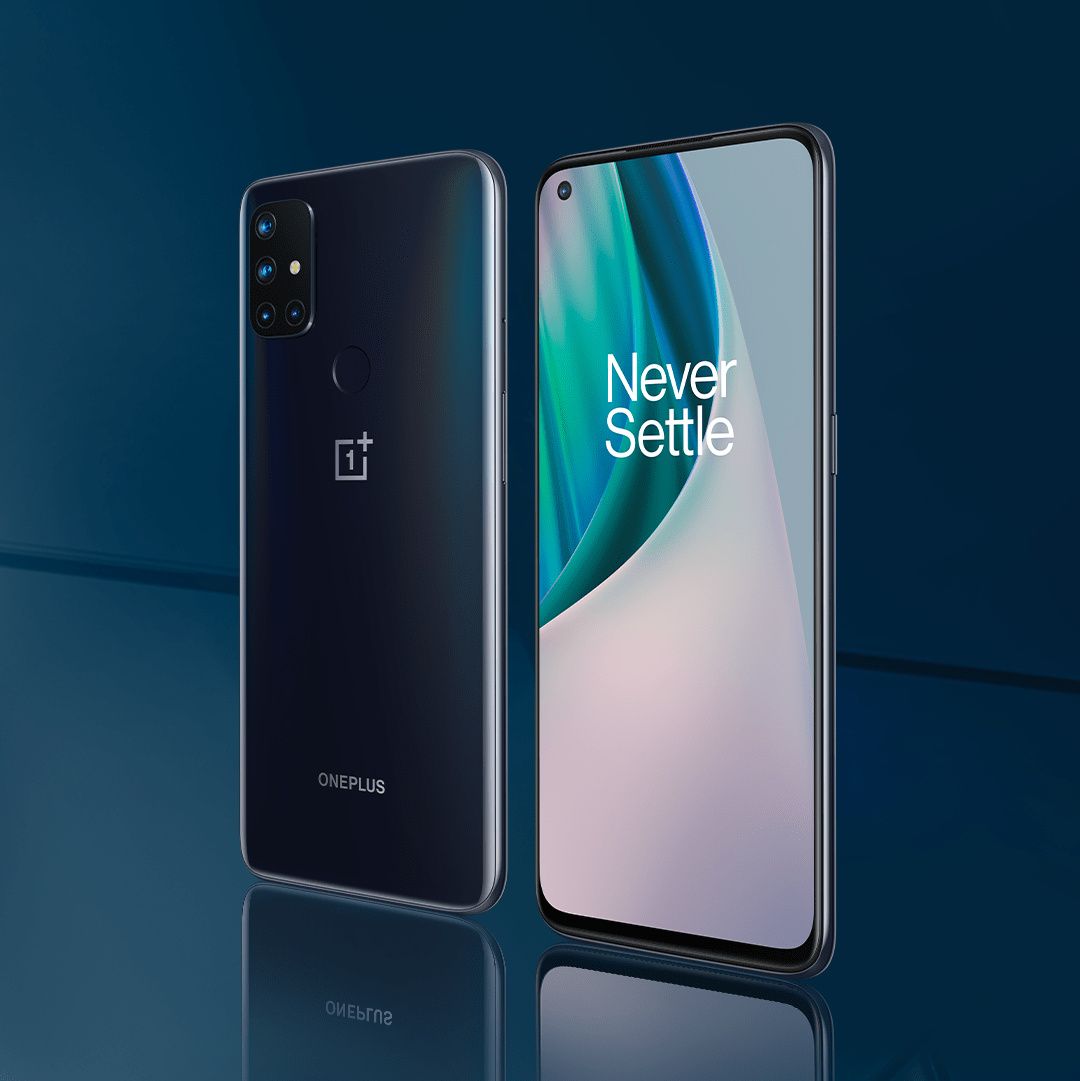
Let’s do a brief recap on the specs. The OnePlus Nord N10 5G, as you may have guessed by the name, comes with support for 5G connectivity thanks to the Snapdragon 690 chipset that powers it, so it’s the cheapest 5G device in OnePlus’s lineup so far. You’re also getting a 64MP quad-camera, up to 6GB of RAM and 128GB of storage, a 1080p LCD panel with a 90Hz refresh rate, and a 4,300 mAh battery. So it’s a pretty respectable entry, albeit one that’s unusual for OnePlus. It’s, for the most part, your average low-mid-range.

The OnePlus Nord N10 5G

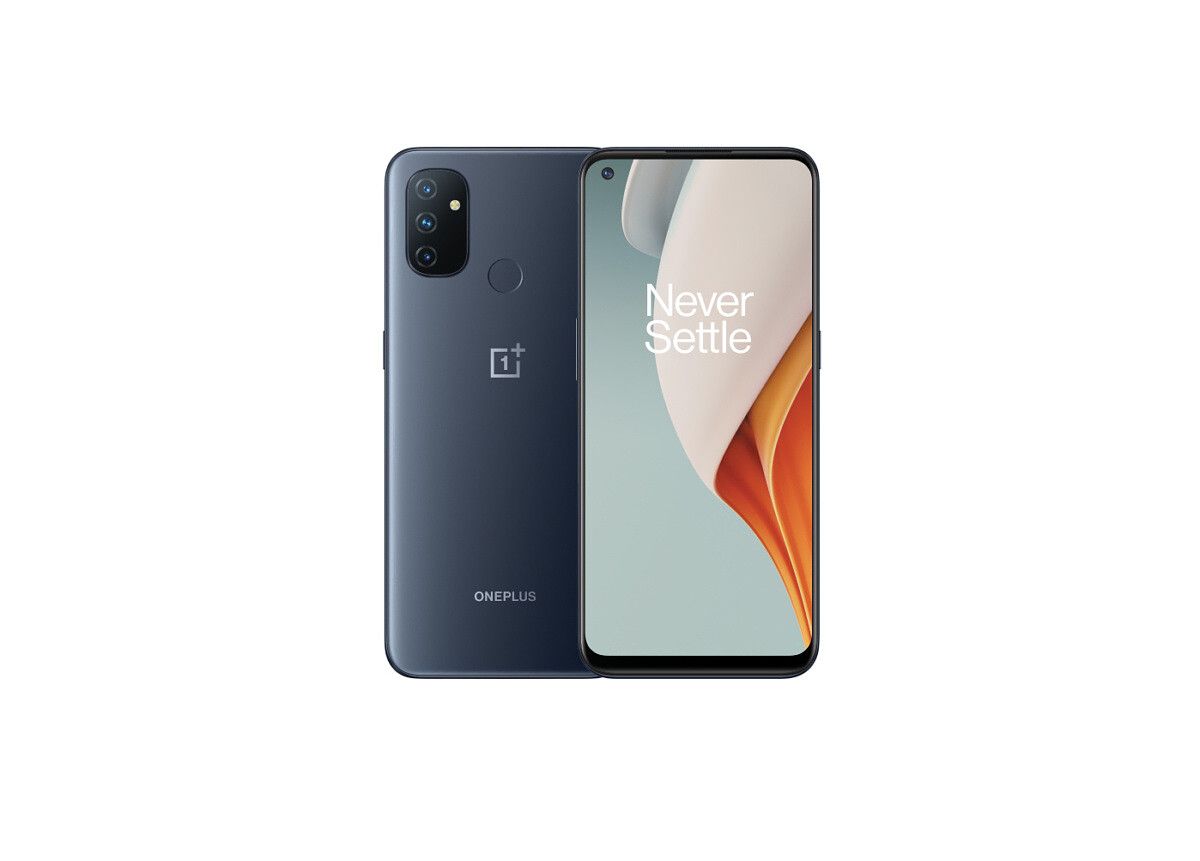
Then, the OnePlus Nord N100 lowers the bar even more: The camera gets a downgrade to a triple 13MP setup, the SoC gets a downgrade to the 4G-only Snapdragon 460, the display gets a downgrade to a 720p panel (although it still manages to support a 90Hz refresh rate), and you only get up to 4GB of RAM and 64GB of storage, which is a configuration we haven’t seen in a OnePlus device since the OnePlus 2. The battery gets a bump up to 5,000 mAh, though, and given the low-end specs this phone is carrying, it’s probably going to last pretty long on a single charge.

oneplus-nord-n100-in-hand-feature OnePlus Nord N100 render

The OnePlus Nord N100

The OnePlus Nord N10 5G will be available for $299 USD in the U.S. and $389 CAD in Canada, while the cheaper OnePlus Nord N100 will only set you back $179 USD in the U.S. and $239 CAD in Canada. This makes for an excellent value proposition given the current prices of other low-mid-range phones in these markets. Furthermore, in the U.S., these devices will be available exclusively through T-Mobile and Metro by T-Mobile, meaning these are the first OnePlus phones to be available for prepaid customers.

OnePlus Nord N10 5G Forums ||| OnePlus Nord N100 Forums

Are you planning to get either of these phones?

Specification OnePlus Nord N10 5G OnePlus Nord N100
Display 6.49-inch with 90Hz refresh rate 6.52-inch
SoC Snapdragon 690 Snapdragon 460
RAM & Storage
  • 6GB of RAM
  • 128GB of storage (microSD expandable to 512GB)
  • 4GB of RAM
  • 64GB of storage
Battery & Charging
  • 4,300mAh
  • Warp Charge 30T
5,000mAh
Rear Camera(s)
  • 64MP main lens
  • 8MP ultra-wide
  • 2MP macro
  • 2MP monochrome
  • 13MP main lens
  • 2MP bokeh
  • 2MP macro
Front Camera(s) 16MP 8MP
Port(s)
  • USB-C
  • 3.5mm audio jack
  • USB-C
  • 3.5mm audio jack
Software Oxygen OS 10.5 Oxygen OS 10.5
Other Features Rear fingerprint sensor Rear fingerprint sensor

The post The OnePlus Nord N10 5G and N100 land in the US for $299/$179 appeared first on xda-developers.


from xda-developers https://ift.tt/3okMRS0
via IFTTT

Tell Google Assistant to “Eat a 5 Star” and watch it do… nothing

Ever since its debut in 2016, the Google Assistant has helped millions of people around the world complete a myriad of tasks using simple voice commands. Over the years, the number of supported voice commands has grown to an extent that the Assistant can now help you with everything from setting the alarm to tracking a shipment. But while a vast majority of the supported commands are designed to help you get stuff done, the Assistant does support a few fun commands that aim to keep you entertained.  But even these fun commands ensure that the Google Assistant is doing something useful, at least to a certain degree. However, a new command launched in partnership with Cadbury India completely goes against this theme and makes the Assistant completely useless, intentionally.

This command, which has been around for a few weeks now, activates the Google Assistant’s “Do Nothing mode,” which converts the Assistant from a helpful companion to one that wants you to chill for a bit. You can activate this new mode on your phone by saying, “OK Google, Eat a 5 star”. Then, as you can see in the attached screenshot, all subsequent commands generate responses that are far from being useful.

Google Assistant Eat a 5 Star

According to the official listing, the Google Assistant’s Do Nothing mode is designed to prevent the Assistant from doing anything productive. It states: “While the Google Assistant helps you become more PRODUCTIVE, with the 5 Star Do Nothing Mode it gives you more PERSPECTIVE. It will act like a chilled-out friend who is always by your side, motivating you to take it easy, and just do nothing.”

A promotional video from the chocolate manufacturer further highlights some of the commands you can try while using the Do Nothing mode and the kind of responses you may receive from the Google Assistant. The video also highlights that the feature supports Hindi queries. I tested it on my device and, while getting it to work for the first time was a bit iffy, once the mode was enabled, the Google Assistant did come up with a bunch of cheeky replies. Since this is a regional command, you’ll have to ensure that the Assistant language is set to English (India) for it to work as intended. The intention is uselessness and humor, in line with the marketing and promotion around the chocolate bar, so keep your expectations aligned.

The post Tell Google Assistant to “Eat a 5 Star” and watch it do… nothing appeared first on xda-developers.


from xda-developers https://ift.tt/3rVHRWf
via IFTTT

The Google Podcasts website now shows your “latest episodes” subscription feed

Over the last year, Google made some major changes to the Google Podcasts web experience in an attempt to get it at par with the service’s Android app. The Google Podcasts website first received a proper homepage back in February last year, which only showed users suggestions and trending shows. A few months down the line, the homepage received new categories, personalized suggestions, and a “Your subscriptions” carousel. However, the Google Podcasts website still lacks a couple of crucial features that are available on the Android app.

Thankfully, Google hasn’t slowed down its efforts to improve the web experience. The company is now rolling out a “Latest episodes” feed to the Google Podcasts website that lets you quickly browse through new episodes from your subscriptions.

google-podcasts-web-subscriptions-feed

According to a recent report from 9to5Google, the new “Latest episodes” subscription feed in the web client is identical to the one that appears within the Home tab on the Google Podcasts Android app. As you can see in the attached screenshot, the homepage now shows the new latest episodes feed right underneath the “Your subscriptions” carousel. The feed lists down all the latest episodes from your subscriptions, with the listing featuring the show art, publish time, title, and a brief show description. Each listing also features a play button underneath the description that notes the duration of the episode.

While it isn’t clear when this change rolled out, the report claims that it’s available widely. You should see the new Latest episodes subscription feed right on the homepage, instead of the Explore page, when you open Google Podcasts on the web. It’s worth noting that the change comes just weeks after Google rolled out another new feature in the Google Podcasts app on Android, which lets you subscribe to RSS feeds for private shows.

The post The Google Podcasts website now shows your “latest episodes” subscription feed appeared first on xda-developers.


from xda-developers https://ift.tt/3nkE0yu
via IFTTT