Apple began updating its Mac lineup with the new ARM-based M1 chipset last year. Ever since then, there have been rumors that the company is working on new and more powerful variants of the processor to power more products in the future. A new report now suggests that Apple is indeed working on two new MacBooks that are going to bring back the handy magnetic charging port.
Just like the recently launched MacBook Pro 13, MacBook Air and the Mac mini, the upcoming notebooks would be Apple’s latest Mac products to move away from Intel. If a report by Bloomberg is anything to go by, the two new laptops include a 14-inch model with the codename J314 and a 16-inch model called the J316. These new notebooks will most likely go on to be the previously rumored MacBook Pro 14 and the new and upgraded MacBook Pro 16. These notebooks are said to be powered by a newer generation of Apple’s in-house processor, featuring more cores and better graphics.
While the chipset upgrade is something that we have already heard in the past, the newest change could be the charging port. The report suggests that Apple is planning to re-introduce MagSafe to its notebooks. Apple moved to USB Type-C five years ago for charging and data transfer purposes, and that has worked flawlessly. However, the company might add the option of its long-forgotten magnetic charging feature on the upcoming MacBooks. Recently, Apple introduced MagSafe charging on its new range iPhone 12 smartphones, which does strengthen this speculation even further. Additionally, the report says that the return of MagSafe on the new MacBook Pro models would also allow for faster charging with the connector having an elongated pill-shaped design of the older MagSafe port. Of course, the notebooks would continue to feature multiple USB Type-C ports, and hopefully, Apple will continue to allow charging via these ports too. There is also a rumor that Apple is planning to remove the Touch Bar from its future MacBook products as the company has been testing versions that do not have the feature.
The new MacBooks are also expected to include updated displays with brighter, higher-contrast panels. This rumor coincides with previous reports of Apple working on bringing mini LED panels to its upcoming products. The new Macs will sadly look similar to the current-gen models with minor design changes, which seems logical at the moment. The new MacBook Pro 16 and MacBook pro 14 are expected to launch by mid-2021.
If you missed Galaxy Unpacked yesterday, Samsung unveiled the Galaxy S21 series, a trio of smartphones with the latest Qualcomm or Samsung-made 5nm chipset and Android 11-based One UI 3.0 software. As always, Samsung’s latest and greatest smartphone series comes with new features that are (for now) exclusive to them. We’ve talked about a few of these features already, but here’s an overview of the new privacy-related features on the Galaxy S21 that Samsung detailed during its Unpacked event.
First up is a feature that doesn’t have a name, but it’s one that will be incredibly useful for the average person. In fact, it’s so useful that I hope Google copies it for the next version of Android. On the Galaxy S21, you’ll be able to easily remove location data from a photo before you share it. All you have to do is select a photo in the gallery app, hit the share button, and then select “remote location data” underneath the picture preview in the share sheet.
Doing so will strip the photo of any location data, including the latitude and longitude of where it was taken, before it’s shared. This data is typically stored in the metadata of the image file, and it’s easily removable by any app that can edit EXIF fields. There are countless apps on Google Play that can do this for you in a few taps, and many social media sites automatically remove EXIF location data while processing your photo. But as a user, it’s hard to know which sites remove it and which don’t, so it’s good to be in control to be sure any location data has been removed.
Private Share
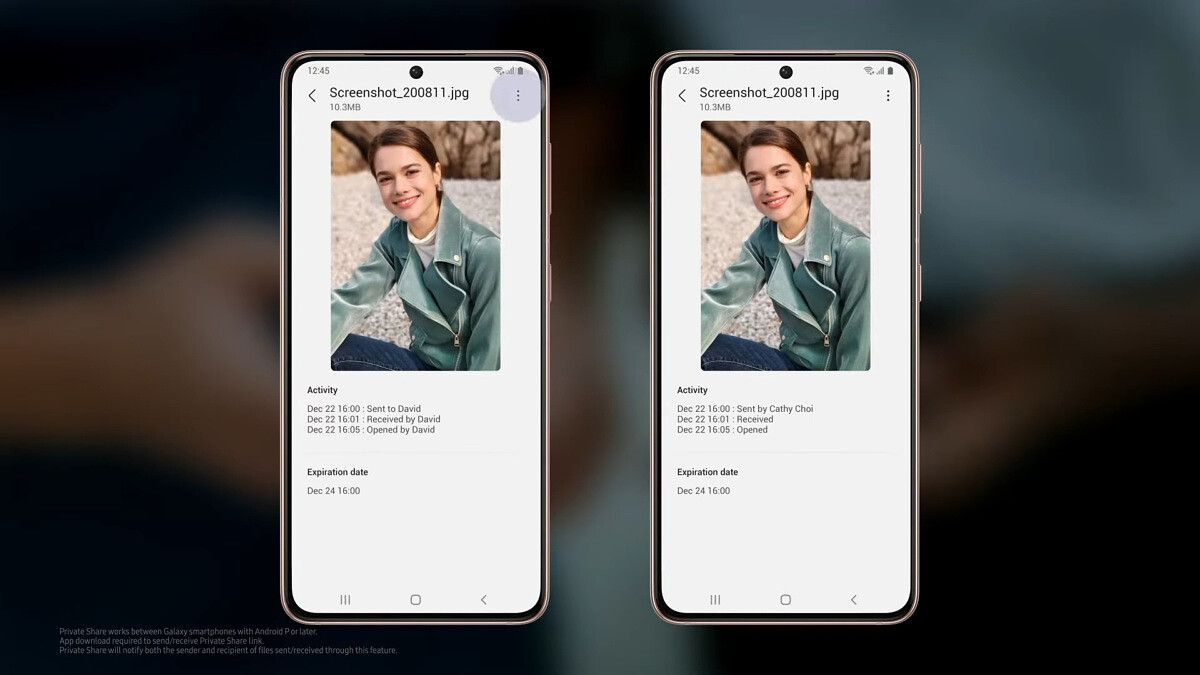
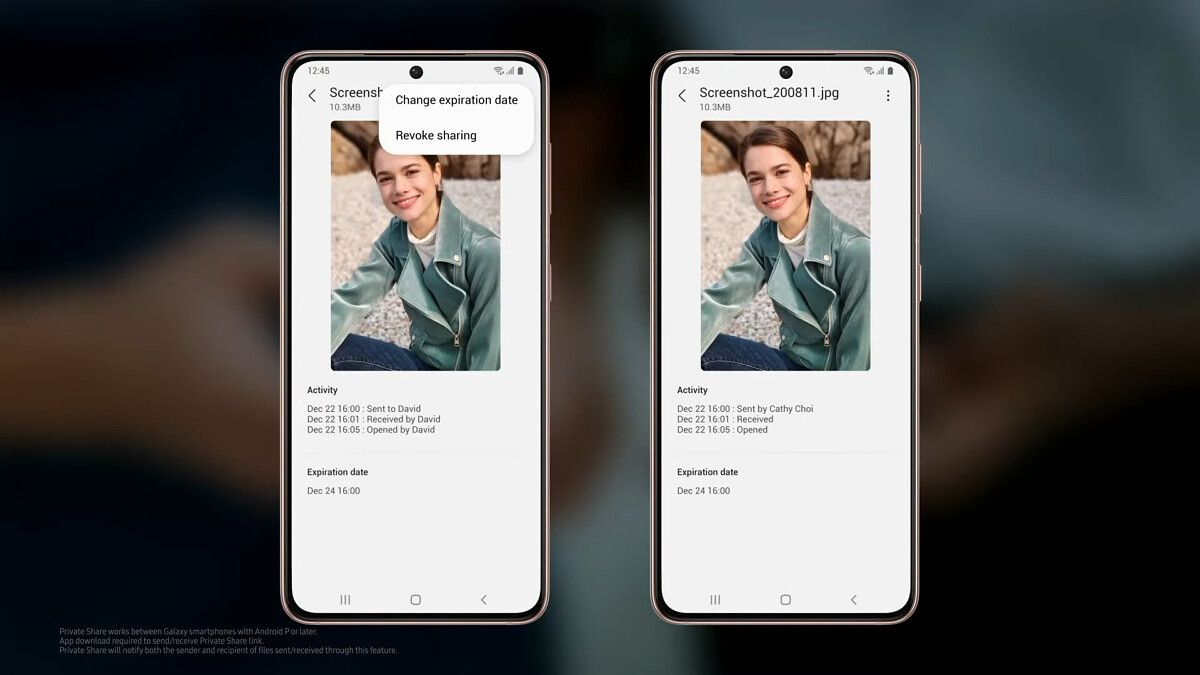
In case you want more control over the content you share, you can use Samsung’s new Private Share app. You can share any file, including pictures, videos, and documents, and choose when to revoke access to the file. You can manually revoke the recipient’s access to the file at any time, or you can wait 2 days for their access to automatically expire. Both the sender and the recipient are notified of any files that are sent or received. Private Share works between any Galaxy smartphone running Android 9 or later, though both the sender and the recipient will have to download the app to share files. It’ll likely come pre-installed on all Samsung Galaxy S21 units, though.
While this app won’t protect your files from being saved by someone really intent on saving what you sent—the app can’t stop someone from taking a picture or recording a video of their phone with another phone or retyping the content manually onto a PC—it will give you some peace of mind that nobody can just go weeks, months, or years back to find the files you shared a long time ago.
Samsung Knox Vault
Lastly, at the heart of the Galaxy S21 is Samsung’s “Enhanced Security System.” Samsung says the Galaxy S21 series is the first from the company to feature Samsung Knox Vault, which is comprised of a secure processor, secure memory, and integrated software to protect your phone credentials and biometric data from being exfiltrated. “At the heart of our ‘Enhanced security system’ is a secure processor which is engineered to ensure your data stays protected even against hardware attacks. For the S21 series, we worked closely with both Qualcomm Technologies and Samsung System LSI Business to develop a secure processor that meets our stringent security requirements. In addition, we brought a whole new layer of protection customized for this processor by adding a physical, tamper-resistant secure memory. We call it Samsung Knox Vault. With a secure processor, secure memory, and integrated software, this vault will safely store your PIN and password, biometrics and blockchain, and Samsung service authentication keys” the company said during its Galaxy Unpacked event.
The all-new Galaxy S21 series is finally here, and Samsung has packed it with a bunch of exciting new tech. The three devices in the lineup feature the latest flagship chipsets from Qualcomm and Samsung, they offer some impressive camera hardware, and the company has even updated its One UI skin for the devices to include some cool new features. These include features like Object Eraser that can remove unwanted objects or people from photos, Private Share to control who gets access to the content you share, and much more. As seen in a previous leak, the Galaxy S21 series also gets Google Discover feed integration in the launcher.
The Google Discover feed integration in the Galaxy S21 lineup is a result of Google closely working with Samsung to offer tighter integration of the former’s services in the new devices. In a recent blog post on the matter, Google notes: “A single swipe from your home screen will give you the option for personalized content with Discover, while our screen reader TalkBack has been revamped so that people with blindness or trouble seeing their displays can use spoken feedback and gestures to navigate their phone without having to look at the screen (varies by carrier and market availability).”
Along with Google Discover feed integration, you’ll also find better Google Duo functionality on the Galaxy S21 lineup and support for Google’s RCS chat in the Samsung Messages app (region/carrier specific). The post further highlights that Google is also adding seamless integration of its Nest smart home products in the Samsung SmartThings app, and Samsung Galaxy S21 users will even be able to see connected Nest devices in the Quick Settings panel on their devices. Furthermore, the company is adding SmartThings support in Android Auto, which will allow users to control their smart home devices from their car’s display. Additionally, Samsung Smart TV users will now also be able to mirror their Google Duo calls to their TV.
As you probably already know, the Galaxy S21 series has been announced after a hot round of leaks and rumors (as well as teasers from Samsung themselves, because they love going with the hype train). There’s a lot of things that we’ve already said about these phones, such as the fact that they carry the latest flagship specifications as well as Samsung’s best camera technology to date, but Samsung decided to remove the charger from the box starting with these devices, following in Apple’s footsteps after they themselves removed it with the iPhone 12 series. Bummer.
So, yes, you have to buy a separate charger if you don’t already have one. Not all is lost, though, as we’ve compiled a list with some of the best Galaxy S21 fast chargers you can grab right now. From first-party options sold by Samsung to third-party chargers made by accessory manufacturers such as Anker, we have a lot of options on the table for you to check out, taking advantage of the fact that the S21 series supports up to 25W wired charging as well as 15W wireless charging. Read on to know more!
You can't go wrong with Samsung's official charging brick. It supports the full 25W charging speeds that are offered across the board on all Galaxy S21 devices, and it's just like the charger you would get in the box.
Anker is a very well reknown brand of third-party chargers, and the Anker Nano retains compatibility with the newest Galaxy S21 smartphones, allowing you to charge them quickly and at a lower price point.
Another 2-port alternative that comes at a cheaper price is one of RAVPower's USB-C chargers, which can charge up to 2 devices at 18W speeds. It won't max out the full 25W charging on the S21, but it's good enough!
If you want to charge your Galaxy S21 and another device simultaneously, then Anker's PowerPort Atom III will give you what you need, letting you to charge 2 devices at the same time.
Keeping it up with Samsung's official options across the table, there's their official wireless fast charger, which will charge the S21 with 15W speeds with no cables involved.
Anker's wireless charger can charge your Galaxy S21 up to 10W, which is a tad lower to what you will be able to find with Samsung's official charger, but also comes in way cheaper than the Samsung alternative.
This wireless stand from Anker provides the same functionality as the regular, pad-like wireless charging, including the same charging speeds, but it comes in a stand form similar to the official Samsung wireless charger. It's also way cheaper than Samsung's offering, too.
This Letscom wireless charger has the fact that it's 'ultra-thin' among its selling points, but it can charge pretty much any wireless charging-compatible device, including the new Galaxy S21 series, at a price that doesn't break the bank.
This charger from WJOY comes with a lot of options, including the ability to fast charge the new Galaxy S21 series + 2 other devices at the same time with 2 USB-C ports and one USB-A port. It also comes with a braided USB-C cable out of the box.
Our list of the best Galaxy S21 fast chargers consists of official Samsung products mainly because they’re the most likely to charge at full speeds and give you the same experience you would be getting with a charger that comes in the box. However, Samsung’s official accessories also come at a premium compared to third party offerings, so we also threw in a bunch of third party chargers and wireless chargers for you to choose from.
In the case of the charging bricks, all of the ones in the list can fast charge your device in similar times to the official 25W charger, while the wireless chargers are a step down from Samsung’s 15W stand, clocking in at 10W: not much can be done here since we weren’t able to find a wireless charger that could actually charge these phones at their full speed.
So, you picked up the Samsung Galaxy S21, Samsung’s newest flagship device. That’s great! Now, it’s time to make sure your expensive new purchase remains in pristine condition. Whether or not you need a case is up to your phone habits, but you can prevent scratches and blemishes by picking up one of the Galaxy S21 screen protectors below. You never know when a stray key may touch your screen! We rounded up some of the best Galaxy S21 screen protectors so that you can make sure your smartphone stays in mint condition.
Make sure you get the right screen protector for your phone! The Galaxy S21, S21 Plus, and S21 Ultra are all slightly different sizes, so each set of screen protectors will only work with one model of the Galaxy S21. The recommendations below are for the standard Galaxy S21 screen protectors – we have other guides for Galaxy S21 Plus screen protectors and Galaxy S21 Ultra screen protectors if you’re buying those phones.
Sometimes the classic tempered glass screen protector is all you need. QHOHQ's three-pack of screen protectors are meant to go on bubble-free and are water-resistant while offering no troubles with the Galaxy S21's touch screen.
Want to make sure your data is protected in a public setting? A privacy screen protector is a smart idea. This screen protector will not only protect your screen from scratches and dings, but it will also make it difficult for others to read what's on your screen!
If you're not a fan of tempered glass, a film screen will also work great! Film screens offer less protection overall, but also generally look and feel better than tempered glass.
Blue light can really affect your ability to sleep! Block the troublesome blue light from your phone with Olixar's anti-blue light screen protector, and sleep better at night.
You have our favorite recommendations, but you may be wondering what the best of the best is. I personally like film screen protectors over tempered glass, as the feel is better, and I don’t need too much protection for my screen. I’ve used ESR in the past, so I know the ESR Liquid Skin screen protector is going to be good. The camera protection is just a bonus! Also, anything that prevents blue-light from shining through at night is a good thing, so Olixar’s Anti-Blue screen protectors are worth the look. Granted, you can also block blue light with software or phone settings, but if you want to always block blue light and are not using your device to watch videos, a screen protector like this can be the least hassle to mess with.
When it comes to Galaxy S21 screen protectors, though, what you’ll want will depend mostly on how much abuse your phone will go through! So make sure to pick the best product for the job and stay tuned as we’ll be updating this post regularly with more options as they become available!
The Samsung Galaxy S21 family is here, and with three different phones to choose from, Samsung says there is a Galaxy S21 for everyone. Unlike previous years, not all of the Galaxy S21 family are created equally: the Galaxy S21 and Galaxy S21 Plus are designed for those who want an affordable flagship experience, while the Galaxy S21 Ultra offers everything you could want in a smartphone.
There are a lot of similarities, but quite a few differences – even between the Galaxy S21 and Galaxy S21 Plus – so what are they and which one should you buy? Here, we break out all the similarities, differences and why you should (or shouldn’t) buy each model!
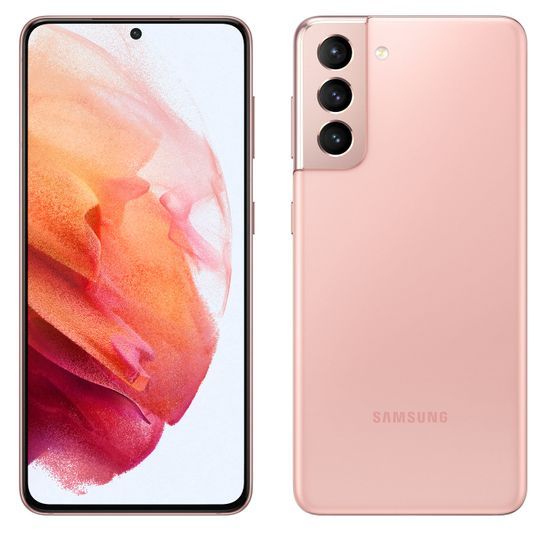
This is the new hero color for the Galaxy S21 series and it looks fantastic! It's a gorgeous light purple (lilac) with a matte finish and a gold trip around the edge of the phone as well as the camera surround. While the Gold and Purple combination is quite unique, it might not be for everyone but we like it!
Very similar in color to the Phantom Gray of the regular Galaxy S21, the Phantom Black color option is for the Plus and Ultra variants and offers a muted color scheme for anyone who doesn't want their phone to stand out or define them. It's reserved but likely to be one of the most popular colors!
Silver is one of my favorite colors and what makes this phone color really stand out for me is that the rear color is a darker shade of silver and the trim and camera surround provide the contrast with a shinier, much lighter silver. It looks unique and stands out while remaining quite reserved.
Each phone has a place in the family, and there are some subtle and not-so-subtle differences between all three devices that are worth considering. Here’s the full specs list for each of the three devices:
Samsung Galaxy S21, Galaxy S21 Plus, and Galaxy S21 Ultra full specs list
Wacom Stylus and S Pen support (sold separately and stored externally)
Colors
Phantom Violet
Phantom Gray
Phantom White
Phantom Pink
Phantom Violet
Phantom Gray
Phantom White
Samsung.com Exclusive:
Phantom Gold
Phantom Red
Phantom Gray
Phantom White
Samsung.com Exclusive:
Phantom Titanium
Phantom Navy
Phantom Brown
What’s common across all three devices, what’s different, and which one should you buy? Let’s find out!
Common features across the Galaxy S21 series
Several features are common across all of the Galaxy S21 family, although some of these have been implemented slightly differently between the Galaxy S21 / S21 Plus and the Galaxy S21 Ultra.
The cameras on all the devices feature a camera surround that is designed to stand out from the rest of the device, with the lenses organized in a vertical layout. The latest Qualcomm Snapdragon 888 processor powers all three phones with various RAM and storage options depending on which model you go for. There are also multiple cameras on each model, and zoom plays a large part in the Galaxy S21 experience, although the zoom level depends on which phone you buy.
All the devices support the new Single Take 2.0 feature in the camera that analyses more frames per second – including things like Dynamic Slo-mo – and finds the most compelling moment of action. Single Take means you can press the camera shutter once, and then it’ll capture a series of different photos and videos using all the different features, which you can then choose from. Rather than have to pick one particular mode, Single Take lets you take multiple shots with just one tap of the camera button, so you’re far less likely to miss the perfect shot. The new Director View and Vlogger View are designed to help you become a videographer on the go. The former lets you see your scene from multiple viewpoints while filming and switch between lenses without needing to stop recording. The Vlogger View lets you capture using both the front and rear cameras so you can capture the action as well as your reactions; this is perfect if you want to capture moments such as your child’s first steps, a sports game, or more. There’s also a host of other Galaxy S21 camera features, including unlimited video recording, multi-mic recording, and a new enhanced portrait mode for studio-like portrait photography.
Like on any Samsung smartphone, the display is one of the best you can find on any smartphone. Each device features an Infinity-O display with a 120Hz refresh rate and Dynamic Refresh Rate that will automatically adjust (from 10Hz or 48Hz depending on the model) up to 120Hz depending on the content that’s displayed on the screen. All the devices also feature an improved in-display fingerprint sensor that’s 1.7 times larger and a new private sharing feature that lets you control how long someone can view the content you share with them, as well as Fast Wireless Charging, USB PD 3.0 fast wired charging, and Wireless reverse charging to help you charge other devices and accessories.
Now that you know the common features across the range let’s look at the key differences between each of the models and who should buy each one.
Who should buy the Galaxy S21?
If you’re looking for a great entry into the Samsung smartphone experience that doesn’t break the bank, the regular Galaxy S21 is a great device to buy. At a starting price of $799 before any discounts, it’s affordable yet offers many features that are available in the more expensive models. Yet, it’s definitely not the powerhouse that the Galaxy S21 Ultra is, so if you’re hoping for the most feature-rich experience, the regular Galaxy S21 is not the device for you. The regular Galaxy S21 offers all of the key Galaxy S21 family features, with the 6.2-inch Infinity-O display offering FHD+ resolution, HDR10+ certification, and adaptive refresh rate that will automatically adjust from 48Hz to 120Hz depending on the content on the screen. There’s also a new Eye Comfort Shield feature that automatically adjusts blue light levels to reduce eye strain.
A great entry into the Galaxy experience at an affordable price
The S21 has three rear cameras, including a 12MP ultra-wide camera with 120° field-of-view, f/2.2 aperture, and 1.4µm pixel size. The 12MP wide camera features dual-pixel technology for faster focusing, OIS for steadier video recording and low-light photography, f/1.8 aperture, and 1.8µm pixel size. The third rear camera is a 64MP telephoto camera, which offers 3X zoom and is equipped with OIS for steadier zoom shots, Phase Detection autofocus, f/2.0 aperture, and 0.8µm pixel size. The Galaxy S21 also supports all of the new camera features, including Single Take 2.0 to take a variety of different shots just by tapping the button once, Director View to see your scene from multiple viewpoints and switch lenses mid-shoot, and Enhanced Portrait mode for better studio-like portrait shots that are captured using AI. The new Qualcomm Snapdragon 888 processor powers the entire package with 8GB of RAM and either 128GB or 256GB of storage.
If you want an affordable yet feature-rich entry into the Galaxy S21 family, this is the device for you. There's tons of features and Samsung hasn't skimped on the features that make the S21 special. You can also get it in Pink and this gorgeous Phantom Violet!
The Galaxy S21 Plus won’t appeal to many people, but it’s not designed for everyone. If you’re interested in the entry-level Galaxy S21 or want a big-screen Galaxy S21 experience that doesn’t break the bank (like the Galaxy S21 Ultra will for many people), the Galaxy S21 Plus is the right phone for you. It offers virtually everything the Galaxy S21 does, including the same processor, RAM, storage, and camera, but there are a few key differences. The screen is substantially larger at 6.7-inches, the battery is 20% larger at 4,800 mAh, and the Galaxy S21 Plus also supports the Ultra Wide Band feature found on the Galaxy S21 Ultra. The back is also glass like the Galaxy S21 Ultra, versus the plastic back found on the Galaxy S21. Other than those differences, however, the Galaxy S21 Plus is basically a larger version of the Galaxy S21.
Not many people should buy the Galaxy S21 Plus but if you want an affordable experience that is less-kitchen-sink and more refined yet has a big enough screen and battery to keep you going, the Galaxy S21 Plus is a good middle-ground phone to buy!
While the Galaxy S21 and Galaxy S21 Plus are designed for those who want the latest flagship experience at a more accessible price point than last year – where the S20 started at $999.99 and the S20 Plus at $1199.99 – the Galaxy S21 Ultra is designed to offer the best-of-the-best experience that leaves no stone unturned. That’s not to say it isn’t also available at a more affordable price: the starting price of $1,199.99 is $200 cheaper than last year’s Note 20 Ultra. To offer the ultimate flagship experience, you have to offer everything, and that’s the best way to look at the Galaxy S21 Ultra: it’s the phone that does everything. Unlike last year where the S20 Ultra was a bit better than the Galaxy S20 Plus, the Ultra is the phone to beat and is considerably different from its namesake siblings.
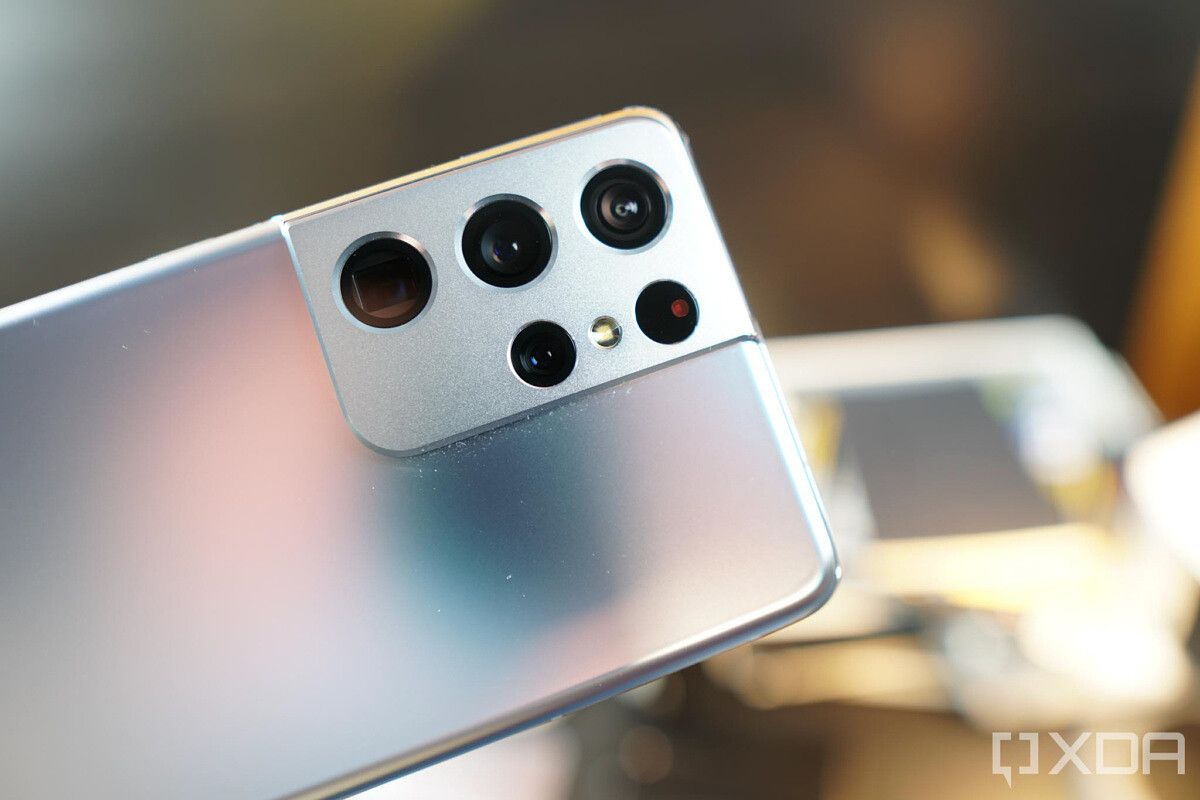
The display is a 6.8-inch curved Dynamic AMOLED display with WQHD+ resolution, and unlike previous smartphones, it supports the full QHD+ resolution at the 120Hz frame rate. Also, unlike its siblings, it can automatically adjust from 10Hz (vs 48Hz) to 120Hz. This means static content like reading books or browsing photos will considerably reduce the refresh rate and, therefore, likely use less battery. The most noticeable differences are in the cameras, where you’ll find several new features and welcome improvements over last year’s devices. The rear has four cameras with, for the first time on a smartphone, two telephoto lenses. The first telephoto lens is a 10MP dual-pixel lens offering 3X, while the second is 10MP and offers 10X zoom. Depending on the range you’re shooting from, the camera will automatically switch between the two telephoto lenses, and when they combine, the Galaxy S21 Ultra offers up to 100X Space Zoom.
Samsung has used the Space Zoom branding before – with last year’s Galaxy S20 Ultra – and one of the biggest problems was how shaky and ultimately unusable the camera was at the highest zoom level. This year, the Galaxy S21 Ultra features a new Zoom Lock feature to stabilize the shot. Samsung claims this offers tripod-like stability – which we’ll reserve judgment on until we test the camera further – but any improvement is bound to be significant over last year’s Space Zoom. Night mode in the camera has also had some improvements with an improved bright night sensor and nona-binning, resulting in improved low light photos. Nona-binning allows Samsung to take the 108MP primary camera and combine 9 pixels to make 1 larger nona-pixel. This means it will output 12MP images, but instead of the 0.8µm hardware pixel size, nona-binning results in a large 2.4µm pixel size that should help let in a lot more light.
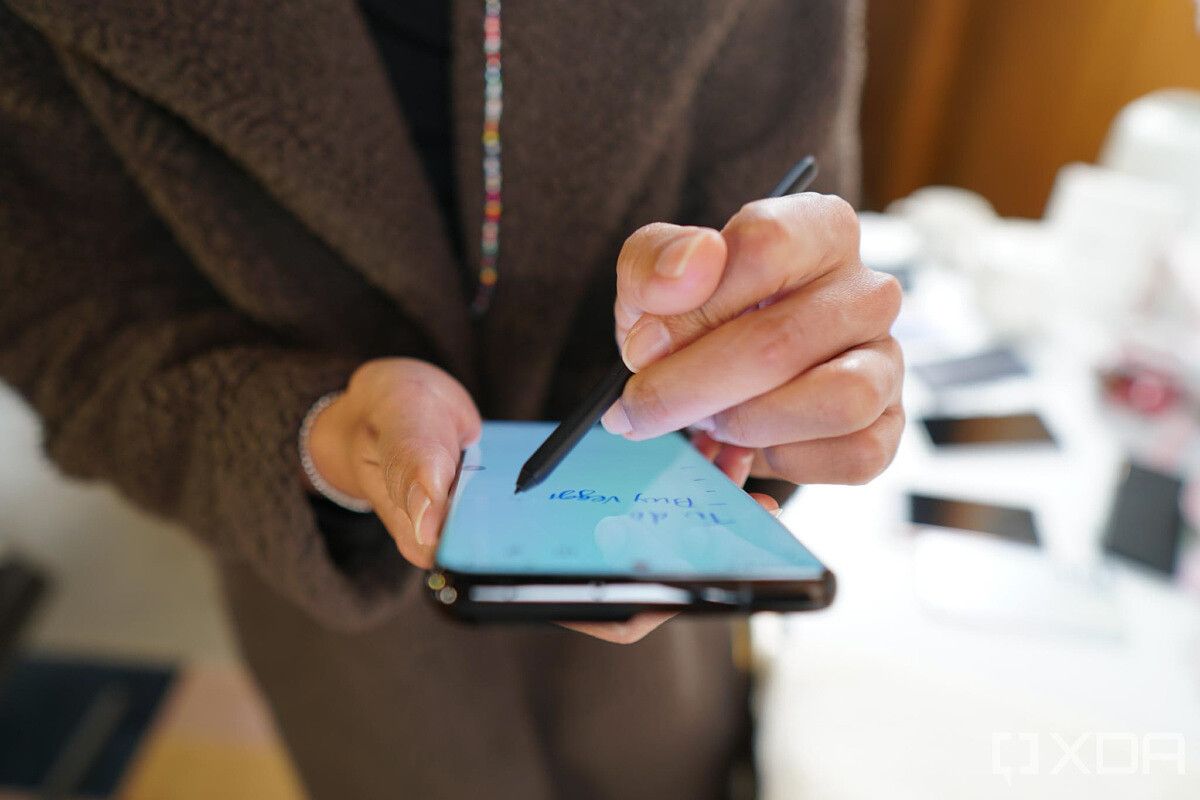
That main camera is still 108MP with Phase Detection autofocus and f/1.8 aperture but uses new hardware. The ultra-wide camera is the same 12MP dual pixel autofocus camera with a 120° field of view found in the Galaxy S21 series. Samsung has also added laser autofocus, which should mean lightning-fast and far more reliable focus speeds regardless of the lighting conditions. The differences don’t just stop at the camera and the display; there are also huge improvements across the rest of the Galaxy S21 Ultra experience. Instead of 8GB RAM, you get either 12GB RAM (with 128GB or 256GB of storage) or 16GB RAM with the top storage variant (512GB). There’s a 5,000 mAh battery, and the Galaxy S21 Ultra also supports Ultra Wide Band and is the first Samsung smartphone to support the latest Wi-Fi 6E standard. One of the biggest reasons to buy the Galaxy S21 Ultra could also be a new feature to the Galaxy S series: a Galaxy S device supports Samsung’s iconic S-Pen for the first time. Unlike the Galaxy Note range, which made the S-Pen so special and ubiquitous to Samsung devices, the Ultra – which is the only member of the S21 family to support the S-Pen – doesn’t come with the S-Pen built-in. Instead, it’s available for $39 standalone or for $69 with a case that features a placeholder for it. If you want all that the Galaxy S21 has to offer and want to use the S-Pen, the Galaxy S21 Ultra is the one for you.
If you want a device that does absolutely everything and/or you're a power user, look no further than the Galaxy S21 Ultra. This is the phone that has it all, does it all, and after a fairly substantial outlay, will keep you going for years to come. If you need the best of the best, the Galaxy S21 Ultra is the phone for you.
Should you buy the Galaxy S21, Galaxy S21 Plus, or Galaxy S21 Ultra?
We’ve already broken down the reason to buy each phone, but should you buy any of them and if so, which one should you buy? The Galaxy S21 is an easy phone to recommend. It offers many flagship features at a great starting price, especially when you consider all the Galaxy S21 deals available to save you further. On the other hand, the Galaxy S21 Plus is a phone that’s hard to recommend for most people as it doesn’t offer a lot of features above and beyond what’s available in the Galaxy S21. If you want that bigger battery and bigger display, then it could be worth buying, but it’s worth considering if that extra $200 outlay is really worth it to you. The Galaxy S21 Ultra is the phone that’s likely to be the most popular, much like the S20 Ultra and Note 20 Ultra were. It’s the phone that does it all and really lives up to Samsung’s billing of catering to the power users. There’s very little you could want that isn’t included in the Galaxy S21 Ultra and at a lower starting price than last year, plus plenty of Galaxy S21 Ultra deals to help you save more, it’s likely to continue being one of Samsung’s most popular product ranges.
The day’s finally here – it’s time to pre-order the next line of Samsung flagship smartphones! The Samsung Galaxy S21 line may feel like it’s been teased for a while now, but the three new smartphones are revealed and not available for pre-order. We’ve rounded up all the Galaxy S21 Plus and Galaxy S21 deals below!
You may be wondering, though, which Galaxy S21 you should buy. The regular Galaxy S21 model is, of course, the most affordable of the bunch, and still offers some upgrades such as an updated SoC without breaking the bank at $800. The Galaxy S21 Plus, meanwhile, will offer additional upgrades, like a slightly larger screen and a Gorilla Glass back, for $1,000. The Galaxy S21 Ultra is the high-end flagship that offers everything you could want from a 2021 flagship, but it has a steeper price tag to match at a whopping $1,200.
If you’re here, then you’re probably opting for one of the less expensive Galaxy S21 phones. But just because they’re less expensive than the S21 Ultra doesn’t mean you can’t save! Check below for some great Galaxy S21 deals and check out our round-up of the Best Galaxy S21 Ultra deals if you want the best that Samsung has to offer!
Unlocked Samsung Galaxy S21 Deals
If you’re looking for an unlocked Galaxy S21, your best bet is grabbing it directly from the Samsung Store. You also have the options of Best Buy and Amazon!
Samsung Store
Did you reserve your Galaxy S21 before pre-order links went live? That’s great because now you’ll get $50 in accessory credit to go with your new S21! That’s far from all, either – pre-ordering your Galaxy S21 before January 28 will net you $100 in pre-order credit on your new smartphone. Finally, you’ll get free GalaxyTag with your purchase and you can save even more if you trade-in a phone!
Get your pre-order in before January 28 to get $100 in pre-order credit on the Galaxy S21! You'll also get a free GalaxyTag with purchase, and if you reserved your pre-order, now's the time to take advantage of those accessory credits!
If you don’t mind being locked to a carrier, you can save big! You can go with Verizon to AT&T.
Verizon
Verizon has tons of different Galaxy S21 deals to take advantage of! It all depends on if you’re switching to Verizon or upgrading to a new line, including:
Save up to $600 with an eligible trade-in
Buy a Galaxy S21, get a second free when you add a new line
25% Galaxy S21 cases and screen protectors
50% off Verizon charging accessories
Get $100 Verizon Dollars when signing up for a Verizon Visa card, plus $100 credit if you use it to pay your bill
At Verizon, the Galaxy S21 will be $33.33 for 24 months at 0% APR.
As always, Verizon is the king of carrier deals! From trade-in promotions to saving on accessories, you'll be sure to find a promotion or two to take advantage of with them, especially if you're switching from another carrier.
Looking for the Galaxy S21 Plus instead of the normal model? You can find it unlocked at the same retailers–the Samsung Store, Best Buy, and Amazon.
Samsung Store
Did you reserve your pre-order for an S21 line phone before they went live? Good move, because now you’ll get $50 in accessory credit to go with your new Galaxy S21 Plus! On top of that, if you pre-order the Galaxy S21 Plus, you’ll get $150 in pre-order credit and a free GalaxyTag. You can also save up to a further $700 by trading in a recent phone!
Get your pre-order in before January 28 to get $150 in pre-order credit on the Galaxy S21 Plus! You'll also get a free GalaxyTag with purchase, and if you reserved your pre-order, now's the time to take advantage of those accessory credits!
Don’t want to deal with the hassle of grabbing a Galaxy S21 Plus unlocked and getting it to work with your SIM card? You can grab your Galaxy S21 Plus from Verizon or AT&T.
Verizon
As always, Verizon has tons of different Galaxy S21 Plus deals to take advantage of! It all depends on if you’re switching to Verizon or upgrading to a new line, including:
Switch to Verizon to get a Galaxy S21 Plus for free with eligible trade-in
Otherwise, save up to $600 with an eligible trade-in
Buy a Galaxy S21 Plus, get $1,000 off a second when you add a new line
25% Galaxy S21 Plus cases and screen protectors
50% off Verizon charging accessories
Get $100 Verizon Dollars when signing up for a Verizon Visa card, plus $100 credit if you use it to pay your bill
For the Galaxy S21 Plus, you can pay $41.66 a month for 24 months, or $33.33 a month for 30 months.
From trade-ins bonuses to promotions for switching, Verizon is the king of carrier deals! Depending on what you're going for, there will be some sort of promotion to take advantage of.
Will you be grabbing the Galaxy S21, the S21 Plus, or the S21 Ultra? Let us know in the comments! Also, don’t forget to pick up a pair of the new Galaxy Bros Pro!