LightBlog

vendredi 5 février 2021

Here are the best Thunderbolt 3 laptops in February 2021: Dell XPS 15, Apple MacBook Air and More

Data transfer speeds have grown exponentially in the past few years, be it mobile networks or your local storage media. Similarly, the good old USB has also become quite reliable when it comes to transferring large amounts of data over a wide bandwidth. Intel had announced Thunderbolt 4 last year and we are expecting new products with the next-gen protocol to finally hit markets soon. Until then, we are checking out some of the best Thunderbolt 3 equipped laptops.

Thunderbolt 3 makes use of the USB Type-C connector to offer up to 40Gbps data transfer speeds. This makes it twice as fast when compared to the latest USB 3.2 standard. Hence, Thunderbolt 3 is an excellent option for photographers, video editors, and other creative professionals, who need to frequently transfer large files. Additionally, Thunderbolt 3 can be used to connect DisplayPort-compatible devices including external 4K monitors. The protocol can also be used to connect PCI Express (PCIe) peripherals including external graphics cards enabling you to play games or accomplish graphics-intensive tasks on even notebooks. Since it uses a standard USB port, one can also make use of various peripherals, hard drives, as well as power delivery. In case you missed it, here is also a list of the best laptops that you should buy.

Apple MacBook Pro 16

apple macbook pro 16

Apple has been one of the early adopters of the Thunderbolt standard. The MacBook Pro 16 offers a total of four Thunderbolt 3 ports. Apart from the 40Gbps bandwidth for Thunderbolt devices, each port brings support for charging, DisplayPort, and USB-C 3.1 Gen 2 (up to 10 Gbps). Now, this is also the biggest and most powerful MacBook in years and an easy recommendation for power users, especially if you are a creative professional. The notebook can be configured with an 8-core Intel Core i9 processor, up to 16GB of 2666MHz DDR4 RAM which is further expandable, and up to 8TB of SSD storage. You also get a gorgeous 3072 x 1920 resolution Retina display and AMD Radeon Pro graphics. Do note that this might be one of the last MacBooks to support external graphics via the Thunderbolt ports as the next refresh might include the M1 chip that was introduced with the new MacBook Air, MacBook Pro 13, and Mac mini.

    Apple MacBook Pro 16
    The MacBook Pro 16 is the most powerful notebook from Apple and offers a total of four Thunderbolt 3 ports.

Dell XPS 15

dell xps 15 laptop

The XPS 15 is an excellent Windows machine for someone who wants a premium, top of the line design as well as performance. This one comes with two Thunderbolt 3 ports with power delivery and DisplayPort support. There is a third USB Type-C port as well with the same power delivery and DisplayPort options. While the machine comes with 4GB discrete graphics, you can make use of the Thunderbolt port to plug in an external graphics card as well. Other than that you get this notebook with up to a 10th-gen Intel Core i9 processor with 32GB of RAM and 1TB NVMe SSD.

    Dell XPS 15
    The XPS 15 is the best 15-inch notebook for someone who is looking for a premium design as well as a promising performance package. Apart from a standard USB Type-C port, the notebook comes with two Thunderbolt 3 ports.

Lenovo ThinkPad X1 Carbon

lenovo thinkpad x1 carbon

The ThinkPad X1 Carbon is regarded as one of the best business notebooks. The two Thunderbolt 3 ports on this machine ensure that users can easily attach external monitors or projectors for quick presentations. The ports also allow you to power other devices as well as the notebook itself. The X1 Carbon comes with the latest 10th-Gen Intel vPro CPUs, up to 16GB of RAM, and 2TB SSD. The notebook is also offered with a variety of display options including 4K IPS with Dolby Vision HDR400. The ThinkPad X1 Carbon is a wise choice if you are looking for a feature-packed, highly durable laptop along with a wide selection of ports.

    Lenovo ThinkPad X1 Carbon
    The ThinkPad is a popular name when it comes to business laptops. The 8th-gen ThinkPad X1 Carbon comes with a total of two Thunderbolt 3 ports.

Dell XPS 13

dell xps 13 9300

The XPS 13 is one of the best Windows notebooks out there. Since it is a fairly small notebook, having Thunderbolt 3 makes a lot of sense. You can hook up two 4K monitors using the two Thunderbolt 3 ports on this machine. Both of the ports also support power delivery. The current generation of the XPS 13 offers up to a 10th-gen Intel Core i7-1065G7 processor, 16GB of memory, and 512GB SSD. The notebook also offers an excellent-looking display with a 16:10 ratio available in 1080p or 2400p resolutions.

    Dell XPS 13 9300
    The Dell XPS 13 is a highly recommended premium notebook that offers a solid balance of style and performance. It offers a total of two Thunderbolt 3 ports, one on each side.

Apple MacBook Air

apple macbook air m1

Similar to the MacBook Pro 16, the latest-gen MacBook Air also features Thunderbolt 3 ports. However, you only get two of them, since the notebook is relatively more affordable. The Thunderbolt ports support external 4K displays, but no longer support external graphics cards due to the new M1 chip. The MacBook Air is also the thinnest and lightest apart from being the most affordable MacBook that you can buy today. You get a healthy set of internals including the new Apple Silicon M1 chip with up to 512GB of SSD storage and 8GB of RAM that can be further upgraded.

    Apple MacBook Air
    The MacBook Air might be the most affordable laptop offering from Apple, but it continues to offer a pair of Thunderbolt 3 ports.

Acer Swift 3

acer swift 3 2020

This is the most affordable option if you are looking for a Thunderbolt 3 port equipped laptop. The Swift 3 is a slim ultrabook packing some really good specifications at its price. There is only one USB Type-C port that supports Thunderbolt 3, but at a starting price of just $678, you can’t really complain. It is also a very lightweight machine at just 1.2kg with a robust finish. You can get the notebook with either a 10th-gen Intel Core i5 or Core i7 CPU with 8GB of memory and a 512GB SSD.

    Acer Swift 3
    The Acer Swift 3 is a lightweight notebook and also one of the most affordable ones out there if you are looking for a Thunderbolt port. Sadly, you only get one such port.

HP Spectre x360 13

hp spectre x360 13

The Spectre x360 makes for a great option if you are looking for a 2-in-1 laptop with Thunderbolt 3. According to the company, the notebook offers two USB 3.1 Gen 2 Type-C ports both of which offer Thunderbolt 3 functionality. This means that each port offers a 40Gbps signaling rate, Power Delivery 3.0, DisplayPort 1.4, and of course letting you charge the laptop itself. The notebook offers a unique design and the option of a vivid 13.3-inch 4K OLED touch display. This is a premium notebook so expect solid hardware on the inside including an option for the 10th-gen Intel Core i5 or Core i7 CPU, 16GB of DDR4 memory, 512GB of NVMe SSD, and speakers tuned by Bang & Olufsen.

    HP Spectre x360 13
    One of the most premium 2-in-1 laptops, the HP Spectre x360 is for the ones who don't want to compromise on style and performance. It comes with a great 4K touchscreen display option along with two Thunderbolt 3 ports.

We saw a bunch of manufacturers announcing new laptops at CES 2021 that feature the next-gen Thunderbolt 4 standard. Expect new features on Thunderbolt 4 including an increase in the minimum video and data requirements provided by host devices, access to the same speeds at Thunderbolt 3 (40Gbps), power delivery (100W), various protocols (DisplayPort, PCIe, USB4) Intel VT-d based DMA protection to avoid unauthorized access while connected, support for connectivity accessories with up to four fully functional and highly flexible downstream and of course, backward compatibility with Thunderbolt 3. OEMs including Dell, HP, Lenovo, Acer, and ASUS are going to start shipping new products with Thunderbolt 4 within the first quarter of 2021, so keep a lookout and hold on to your money if you care about the added benefits.

The post Here are the best Thunderbolt 3 laptops in February 2021: Dell XPS 15, Apple MacBook Air and More appeared first on xda-developers.


from xda-developers https://ift.tt/3kC7YMU
via IFTTT

Samsung Clock integrates Digital Wellbeing’s Bedtime Mode to help you wind down

Google revamped Digital Wellbeing’s Wind Down feature in April last year and gave it a more fitting name — Bedtime mode. The update included an updated UI, new icons for the Quick Setting tile and Focus Mode, a new way to trigger Bedtime mode, and a new fullscreen activity that showed up when a user paused the mode. While you can already access all of these features on Samsung devices running One UI based on Android 10 or later, the company is now making it easier to access Bedtime mode with an update for the One UI Clock app.

The latest update for the One UI Clock app (v. 12.0.05.7) brings Digital Wellbeing’s Bedtime mode to the Alarm tab. As per a recent report from Android Police, you’ll find a new “Set bedtime” option in the overflow menu on the Clock app’s alarm screen following the update.

Samsung One UI Clock app update bedtime mode

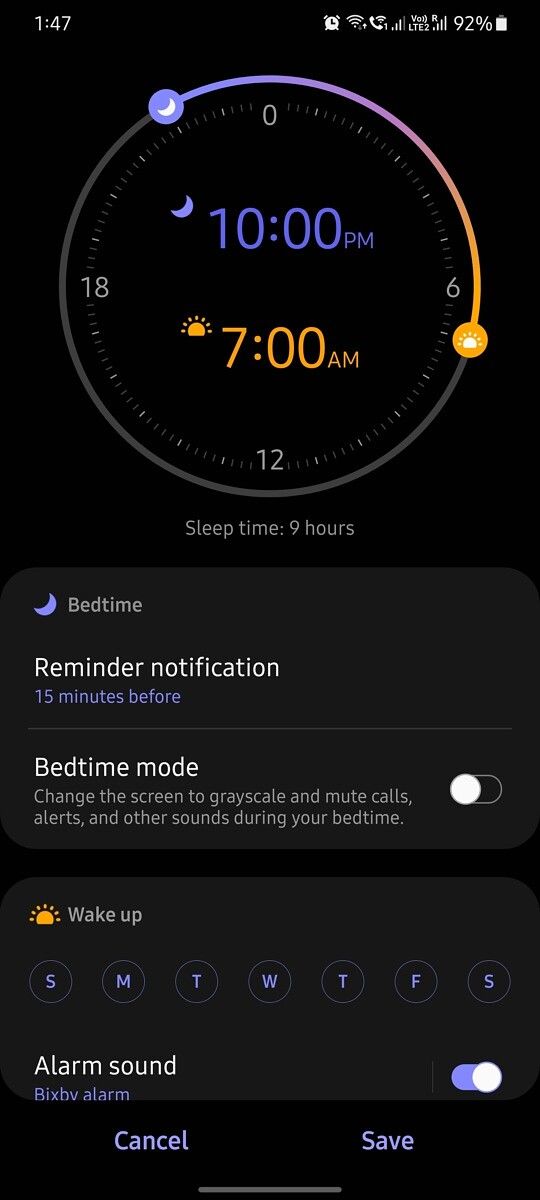
Tapping on it will redirect you to a new setup page where you’ll have to tell the app when you usually go to sleep and when you plan to wake up. Once that’s set, you can tap on the Next button to adjust your bedtime settings.

Samsung One UI Clock app update bedtime mode Samsung One UI Clock app update bedtime mode Samsung One UI Clock app update bedtime mode

On the following page, you’ll get the option to change the Reminder notification setting and a toggle to turn on Bedtime mode. If you choose to turn it on, your phone will automatically turn on DND mode and change the screen to grayscale when it’s close to bedtime. You can then tap on the Next button again to set the wake-up alarm. In case you use a Samsung SmartThings, you’ll also be able to integrate your alarm with supported smart devices.

Samsung One UI Clock app update bedtime mode Samsung One UI Clock app update bedtime mode Samsung One UI Clock app update bedtime mode

Once you’re done with the initial setup process, you’ll see a new alarm at the top of the Alarm section. You can tap on it to adjust your bedtime, alarm, and notification settings further. If you use Samsung’s S Health app, you’ll also see a “Sleep details” button underneath the new alarm that will open S Health’s sleep tracker.

The new Bedtime feature in Samsung’s Clock app has already started rolling out to users with its latest update. However, it only seems to be available on devices running One UI 3.1 at the moment. I wasn’t able to access the feature on my Galaxy Note 20 Ultra running One UI 3.0, however, it was available on my Galaxy S21 Ultra. In case you haven’t received the update on your device yet, you can download the latest APK from APKMirror.

The post Samsung Clock integrates Digital Wellbeing’s Bedtime Mode to help you wind down appeared first on xda-developers.


from xda-developers https://ift.tt/2MEMjsy
via IFTTT

jeudi 4 février 2021

PlayStation 5 Restocks: Walmart stock going live at 3PM ET!

The PlayStation 5 has, in short, been a nightmare to actually get your hands on, so far. With the limited pre-order stock, site outages, and random seconds-long PlayStation 5 restocks, consumers are being left frustrated and without a (massive) new console to adorn their entertainment center. It’s a frustrating situation for sure, and while we can’t offer you a surefire way to get a PlayStation 5, we can help by gathering everything you need to know in one place. Check out below and happy hunting!

By the way, we also have a restock guide for the Xbox Series X and Xbox Series S!

When and where will the PlayStation 5 be restocked?

While we believe the information below is accurate, it’s important to note that sometimes restocks don’t happen as planned. Restocks may go up late, websites may break, or retailers may just change their minds. This information is to help you plan as much as possible for possible restocks.

Things might look a bit rough, but there is hope for some PlayStation 5 restocks! Sony has announced via Twitter that more PS5s will come in stock throughout December:


Walmart is offering another chance with more stock going live February 4 at 3 PM ET. Get your information ready now and you may be able to snag a console before the site crashes!

Your next best bet at this time will be with PlayStation Direct, who is doing something a little different with their PlayStation 5 restocks. They allow you to enter a queue daily, giving you a chance to order the PlayStation 5 or PlayStation 5 Digital Edition. So far, this seems to be a more effective method of trying for the PlayStation 5, but being in the queue doesn’t guarantee a console.

Amazon and Best Buy has the consoles come in and out of stock at random intervals. If you check in occasionally, you may get lucky. However, with no way of knowing when they’ll come in stock, it’s hard to recommend them unless you’re also following a bot or Twitter account that follows stock from minute to minute.

Some other retailers had console stock during Black Friday, but have been silent about PlayStation 5 availability for the rest of the holiday season. Hopefully, we’ll know more soon!

Finally, if you don’t mind paying a hugely inflated price, you can pick up a PlayStation 5 from StockX. While it’s not something I’d recommend, if you need a PlayStation 5 in time for your holidays, then StockX will be the better reseller place to buy from. Unfortunately, eBay is rife with misleading listings that can turn your happy holidays into something miserable.

General advice for restocks

Trying to get your hands on something with limited stock is really, really stressful. Make sure to give yourself the best chance you can by following the advice below!

  • Make sure you have an account at the store, and all personal information is updated. Restocks of popular items like the PlayStation 5 put huge strains on websites. On top of that, when it comes to items like this, retailers will only allow you to hold it in your cart for a few minutes. Don’t waste your chance trying to update your address or payment information!
  • Start refreshing the page early. Often, retailers won’t put stock up at EXACTLY the moment they say. It may be a few minutes early or late. Get to the store page of the item you want before the restock time. You might get lucky!
  • Use Ctrl+F5, not just F5. This gives you a hard refresh that doesn’t pull store information from the cache. So, you won’t get outdated information and will be able to see the “Buy” button as soon as possible!
  • It’s usually better to be on the computer, rather than your phone. While that is not always the case, mobile websites aren’t always optimized for fast refreshing. Or optimized for mobile viewing at all, sometimes. However, sometimes you can have better luck on a mobile app than a browser site. It’s not very often, though, so it’s best to start trying with your computer browser, first.

PlayStation 5 Store Links

Don’t waste time and effort searching for store links when going for a PlayStation 5 restock. We’ve gathered all the potential US retailers and the store pages you need below!

PlayStation 5 Links, online-only:

PlayStation 5 Links, in-store only:

PlayStation 5 links, membership required:

PlayStation 5 Digital Edition links, online-only:

PlayStation 5 Digital Edition links, in-store only:

The post PlayStation 5 Restocks: Walmart stock going live at 3PM ET! appeared first on xda-developers.


from xda-developers https://ift.tt/3lKknQt
via IFTTT

Google just booted The Great Suspender off the Chrome Web Store for being malware

People love to joke about Google Chrome eating a lot of RAM, but there’s definitely some truth to it, especially if you’re a tab hoarder. Currently, I have about 40 tabs open and 20 extensions installed, and Windows Task Manager reports that Chrome is using almost 3GB of RAM. I have plenty of RAM in my PC so that’s not a problem for me, but for those of you running Chrome with 8GB or less of RAM installed, you may run out of memory for other programs. Fortunately, there are a few solutions to this problem. You could close some tabs, but that means you won’t be able to easily pick up where you left off. Alternatively, you can use an extension like The Great Suspender to suspend tabs, freeing up some memory. If you’re one of many who loved The Great Suspender extension, then we have bad news: it’s probably malware.

For some people, this isn’t news. Since November of 2020, close followers of the extension have warned that it may be running malicious code. The old maintainer of the extension sold it to an unknown party in June of 2020, and users alleged that the unknown party quietly slipped some trackers into version 7.1.8 of the extension. Although version 7.1.9 removed the tracker, many users were understandably suspicious of the extension. Then in early January of this year, multiple media outlets picked up on the news, and many, including myself, decided to ditch it. Earlier today, however, Google pulled the plug entirely on the popular Chrome extension, forcibly removing The Great Suspender from people’s Chrome installations and removing the extension’s listing on the Chrome Web Store.

Chrome’s removal message for The Great Suspender. Credits: Redditor /u/justingolden21

Many users on Reddit and Twitter report that The Great Suspender was removed from their PCs. Two threads on Reddit’s /r/Chrome subreddit are full of comments from people complaining about the sudden decision, as the removal resulted in the closing of all their suspended tabs. Fortunately, there’s a way to recover your suspended tabs, as pointed out by Redditor /u/avatar_ENG. Simply open your search history and search for “klbibkeccnjlkjkiokjodocebajanakg”. If that doesn’t work, you can try the other options outlined here.

If you’re looking for an alternative to The Great Suspender, community member TheMageKing — who brought the malicious changes to light back in November — recommends Tabs Outliner, Auto Tab Discard, or Session Buddy. If you enjoyed using The Great Suspender, you can also manually compile the last known safe version of the extension (7.1.6) from the GitHub repo and sideload it by enabling Chrome’s developer mode and selecting “load unpacked extension.” A precompiled version of 7.1.6 is available on the Chrome Web Store under the name “The Marvellous Suspender“, but we can’t vouch for its safety.

The post Google just booted The Great Suspender off the Chrome Web Store for being malware appeared first on xda-developers.


from xda-developers https://ift.tt/36IDuoC
via IFTTT

Google considers “less stringent” version of Apple’s anti-tracking features for Android

Apple made waves when it introduced its App Tracking Transparency feature, which it set to release in iOS 14.5. The tool essentially requires developers to ask for permission to track iOS users for ad targeting. Now, Google is apparently developing a similar feature of its own.

Bloomberg reports that Google is exploring an alternative to Apple’s App Tracking Transparency in an effort to limit data collection and cross-app tracking on Android. Google’s version would be “less stringent,” according to the report’s sources.

“Google is trying to balance the rising demands of privacy-conscious consumers with the financial needs of developers and advertisers,” Bloomberg said.

In a statement to the publication, a Google spokesperson didn’t confirm or deny a feature is incoming, but said the search giant is always looking to balance privacy with an app ecosystem that’s healthy and ad-supported. That means Google’s upcoming version of Apple’s App Tracking Transparency will likely be less strict and may not even require developers to get permission from users to track their data.

“To keep advertisers happy while improving privacy, the discussions around Google’s Android solution indicate that it could be similar to its planned Chrome web browser changes,” Bloomberg said.

Google previously announced plans to phase out third-party cookies in Chrome within two years. Instead, the browser will use an alternative that allows some ad targeting with less specific data collection. Advertisers will be able to target groups of people with similar interest, but not individuals. This could potentially be the approach Google takes on Android.

After introducing App Tracking Transparency last year, Apple has come under fire from companies who claim the new policies will harm small business. Facebook has been one of the most vocal critics of Apple’s new feature, and is even considering an antitrust lawsuit. Apple, meanwhile, says the new features are designed to stand up for users.

“Users should know when their data is being collected and shared across other apps and websites—and they should have the choice to allow that or not,” Apple said last year.

It will be interesting to see how far Google goes when it ultimately introduces its own version of App Tracking Transparency. After all, a big portion of Google’s business is advertising, but with privacy becoming more of a concern for users, the search giant may be forced to follow in Apple’s footsteps—or at least find a happy medium.

The post Google considers “less stringent” version of Apple’s anti-tracking features for Android appeared first on xda-developers.


from xda-developers https://ift.tt/3rkhpEI
via IFTTT

Let’s accessorize with Aukey webcams, Logitech mice, and more for today’s deals

It would be great if your computer accessories would last forever, wouldn’t it? But they don’t, and sometimes they don’t even last as long as you’d like. I know personally, as I’ve had to replace most of my computer accessories this year–which is lame, of course. I’ve come to realize that two brands don’t let me down, however: Logitech and Aukey. Aukey is also a regular brand in many of our smartphone accessories round-ups, so you know they’re good. The two brands also happen to be on sale a lot! So if you’re looking for some new accessories, these brands have you covered!

First up? Webcams. Webcams are almost essential in this new work-from-home world, and it took most of 2020 to get some of the better ones back in stock. But now they’re coming back in stock, and you’ll have a nice variety of webcams to choose from, depending on what you need. If you need something simple for work or school, Aukey’s FHD webcam will be perfect. It provides 1080 recording and a microphone, and it’s under $40! If you need something a little more quality, though, the Logitech C920S Pro with a privacy cover is $70. This is the one I use for streaming, and it’s pretty great! Finally, if you need to record yourself in 4K quality, the Logitech BRIO 4K Ultra HD webcam will be the webcam to purchase, and you can get it on sale at Lenovo for $160.

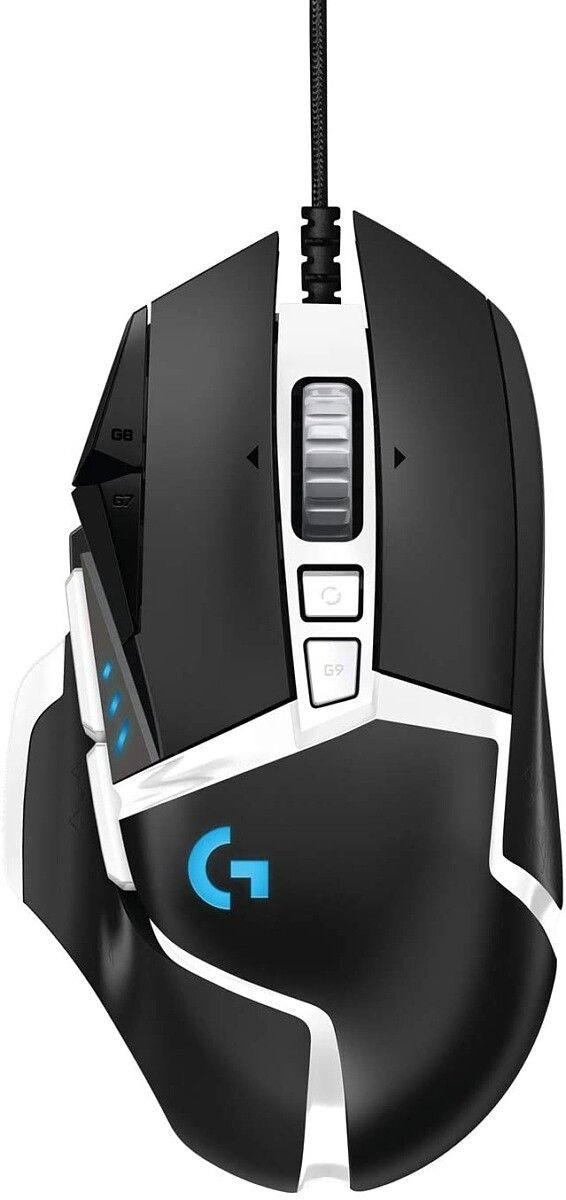
Now, you can’t do much with your computer without a mouse, nor is there anything more frustrating than a mouse on the fritz! Right before Black Friday, I was having trouble with my Roccat mouse–not a great time for issues as an e-commerce writer! So I picked up the Logitech G203 Lightsync mouse as a quick replacement, and I’ve been using it ever since. It’s a cheap, simple, and effective mouse, and only $25 right now. If you want something with a few more programmable buttons, the G502 Hero will be the better bet. With eleven customizable buttons and up to 25,600 dpi, it’s a really good gaming mouse for $49. Finally, The Aukey Knight is a good mouse that errs more on the simple side like the Lightsync, but it’s a little more customizable with the lighting for $25.

What better to complete your accessory refresh than with a new mechanical keyboard? No need to go with an expensive Razer or Corsair keyboard unless you want to because Aukey makes some fantastic keyboards at a fraction of the cost. I’ve given multiple a try myself, and these are keyboards that are built like tanks, are easily customizable with keycaps, and will save your wallet some pain. The only downside of an Aukey keyboard is that they only use Blue switches, so they’ll be on the louder side. But even when directly compared to Brown switches (known to be the quietest), it’s really not all that bad. The full-size Aukey black keyboard is $50 right now, with the tenkeyless version is under $40. There’s also a pink keyboard which is not on sale, but it’s really cute, so you might consider it anyway!

These are only some of the accessories you can grab for yourself today–Logitech’s store page and Aukey’s store page have plenty more deals for you to take advantage of!

The post Let’s accessorize with Aukey webcams, Logitech mice, and more for today’s deals appeared first on xda-developers.


from xda-developers https://ift.tt/3rnEd6m
via IFTTT

Google Fit update to turn Pixel phones into more advanced health tools

Forget your smartwatch: Google is adding a new feature to the Fit app that will allow Pixel phones to measure your heart rate and respiratory health. Google said that these new features take advantage of sensors that are already built into Pixel phones, including the microphone, camera, and accelerometer.

To measure your heart rate, place your finger on the rear-facing camera lens. Meanwhile, to measure your respiratory rate, place your head and upper torso in view of your phone’s front-facing camera and breath as you normally would. Google said these type of measurements are commonly used to assess overall health and wellness.

“Thanks to increasingly powerful sensors and advances in computer vision, these features let you use your smartphone’s camera to track tiny physical signals at the pixel level — like chest movements to measure your respiratory rate and subtle changes in the color of your fingers for your heart rate,” Google said in a blog post.

Google Fit respiratory health

Google said it completed initial clinical studies to validate the new features coming to Google Fit. Internal studies on Pixel phones apparently showed the respiratory rate feature was accurate within one breath per minute, the company said (via The Verge). Meanwhile, the heart rate feature was accurate within 2 percent.

The search giant is warning, however, that these new features aren’t meant to diagnose medical conditions. They’re being introduced in an effort to encourage users to track and improve their day-to-dat wellness, and to make more advanced health tools more accessible. Measurements that are made can be saved in the Google Fit app, which will monitor trends over time.

Google isn’t the first company to introduce heart rate monitoring support using a device’s camera. Last year, Xiaomi introduced a similar feature to its Mi Health app. While these features aren’t quite as helpful as a wearable device, which can continuously monitor your health, taking more regular measurements is better than no measurements at all.

The new features are coming to the Google Fit app on Pixel phones starting next month, with wider support for more Android devices soon.

Google Fit: Health and Activity Tracking (Free, Google Play) →

The post Google Fit update to turn Pixel phones into more advanced health tools appeared first on xda-developers.


from xda-developers https://ift.tt/39SvHXr
via IFTTT