While the Super Bowl is first and foremost an American football match, it’s also a great source of musical entertainment thanks to the Halftime Show.
Whether it’s Beyonce, Justin Timberlake, Madonna, Katy Perry, Lady Gaga, or Bruno Mars, many iconic musical artists have performed on the Super Bowl Halftime Show stage in the last few years.
Like millions of other people, you might be planning to watch the Super Bowl just for the Halftime Show musical performance. But who will be performing on the 2021 Super Bowl Halftime Show, and how can you watch them?
Who’s performing?
During the Super Bowl 2021 Halftime Show, three-time Grammy winner The Weeknd will be performing. While the singer hasn’t unveiled the songs he’ll be singing in his performance, he’ll likely perform a range of his hit songs.
Since debuting a decade ago, the singer has released four studio albums and 43 solo singles. Three of his studio albums, Beauty Behind the Madness, Starboy, and Afterhours, charted at number one on the US Billboard 200.
Meanwhile, five of his singles reached the summit of the US Billboard Hot 100. These include The Hills, Can’t Feel My Face, Starboy, Heartless, and Blinding Lights. The Weeknd has also scored a string of top 10 hits on the US Billboard Hot 100, including Love Me Harder (featuring Ariana Grande), Call Out My Name, Pray For Me (featuring Kendrick Lamar), I Feel It Coming (featuring Daft Punk), Earned It, and Smile (featuring Juice World).
Expect to hear The Weeknd sing several of these hit songs during the Halftime Show. What’s certain is that performing at the Super Bowl Halftime Show has been a lifelong dream for The Weeknd. Last year, he said: “We all grow up watching the world’s biggest acts playing the Super Bowl and one can only dream of being in that position. I’m humbled, honored and ecstatic to be the center of that infamous stage this year.”
Over the past few months, The Weeknd has kept tight-lipped about his Super Bowl Halftime Performance. But on February 2nd, he took to Twitter to post a teaser of his highly-anticipated performance:
This year’s Super Bowl is set to kick off on Sunday, February 7th, at 6.30 pm ET. But as is always the case, there’ll be a musical performance halfway through the show. The Weeknd’s Super Bowl LV Halftime Show is expected to start at around 8 pm ET and could last for up to half an hour.
How can you watch the Halftime Show?
If you have a cable TV package, you’ll be able to watch the whole Super Bowl on CBS. But for those without a cable subscription, there’ll be Super Bowl live streams on CBS All Access, Fubo TV, Hulu with Live TV, and YouTube TV.
Who is performing the national anthem?
Although The Weekend will be the star of the Super Bowl 2021 Halftime Show, there’ll be other musical performances. Before the match kicks off, Jazmine Sullivan and Eric Church will sing the US national anthem. Meanwhile, Grammy Award-winning singer H.E.R will perform America the Beautiful. You’ll be able to watch their performances during The Kickoff Show (CBS), which starts at 6 pm ET and finishes just before the American football match starts.
To stay occupied during the lockdown, you’ve likely spent a lot of your free time binge-watching TV shows and movies on streaming platforms like Netflix, caught up with all that’s good in HBO Max and Peacock, or indulged in the world of live TV with FuboTV or YouTube TV. While modern streaming sites have thousands of TV shows and movies in their catalogs, there’s always something you really want to watch that isn’t available in your region.
What you may not realize is that there is a quick and easy solution to fix this annoying problem: downloading a VPN (virtual private network) app. With one of these services, you have a way around geo-restrictions and can watch streaming content that would typically be out-of-bounds due to location.
VPN apps can also transform the streaming experience by protecting against issues that affect overall performance, with bandwidth throttling and denial-of-service attacks being notable examples. However, which VPN service is the best for streaming? There are certainly loads of them on the market, and ahead of the Super Bowl this Sunday, we’ve ranked our favorites in this article.
As well as being the best overall VPN service of 2021, the British Virgin Islands-based company is also the top provider for unblocking TV streaming services and content across the world.
Because ExpressVPN provides more than 3000 high-speed servers in 94 countries, it’s really easy to access geo-restricted streaming platforms and content via this service. It’s capable of unblocking Netflix, Amazon Prime Video, BBC iPlayer, Disney Plus, Youtube, and many other streaming sites.
With apps for Android, iOS, Windows, Mac, Linux, and other operating systems, ExpressVPN will let you stream TV shows and movies on every device in your home. You’ll also find its apps incredibly easy to use, especially as you can quickly connect to the fastest server with a simple tap. But sadly, ExpressVPN only works on five devices at the same time.
Thanks to unlimited bandwidth, you should never experience slow streaming speeds while connected to one of ExpressVPN’s global servers. It also features IP address masking, a network kill switch, private DNS, AES-256 encryption, a strict no-logging policy, a built-in speed test, VPN split tunneling, TrustedServer technology, how-to guides, 24/7 customer support, and more.
ExpressVPN is the best service for streaming thanks to its high-speed servers, compatibility with top streaming websites, multi-platform apps, and great features.
Best value VPN for streaming VPN for value: Surfshark
Looking for a great streaming VPN that also provides excellent value for money? The provider for you is Surfshark, which charges less than $3 per month for a premium subscription.
Surfshark comprises more than 3200 high-speed servers in 65 countries, meaning you can easily access streaming services in all parts of the globe. It’ll work with a range of top streaming platforms, such as Netflix, Disney Plus, Amazon Prime Video, BBC iPlayer, Hulu, and many more.
But arguably, Surfshark’s most significant appeal is its unlimited devices policy. As a result, you can use a VPN on all your connected devices. It supports a range of operating systems, including Android, iOS, Windows, Mac, and Linux. Overall, the Surfshark app looks excellent and is very easy to use.
Although Surfshark is one of the top streaming VPNs, it’s also great for other use cases. Thanks to its malware, phishing, web tracking, and advert blocking capabilities, Surfshark will add extra protection to your devices. There’s also a no-logging policy, a kill switch, private DNS and leak protection, a camouflage mode, AES-256 encryption, a myriad of secure protocols, a whitelisting function, 24/7 support, and more.
Surfshark is an excellent streaming VPN because it offers thousands of high-speed servers and an unlimited device policy, but it’s also the most affordable provider.
Nord is another big name in the VPN space, and if you’re looking to unblock streaming sites across the world, you’re definitely in luck as it provides more than 5500 VPN servers in over 59 countries.
Along with an extensive server network, NordVPN also provides access to a large list of streaming services. These include Netflix, Hulu, Amazon Prime Video, BBC iPlayer, Disney Plus, DAZN, and others. What’s also useful is that NordVPN has created insightful guides on how to use its platform for accessing streaming services securely.
Like any other top-rate VPN provider, Nord works on a myriad of operating systems and devices. You can download its easy-to-use VPN client on Android, iOS, Windows, Mac, Linux, and other platforms. One of the best things about its app is that there’s a quick connect button for automatically selecting the best available server for speed. While NordVPN’s six-device policy is not the smallest around, it still limits users.
NordVPN may have some excellent streaming capabilities up its sleeves, but it’s also one of the best VPN services based on its security and privacy features. We’re big fans of Double VPN, which uses two VPN servers for web traffic routing, and its built-in malware and advert blocker. Other useful functions include a kill switch, obfuscated servers, VPN split tunneling, Onion Over VPN, support for P2P, a DNS leak test, browser extensions, strong encryption, and much more.
If you want a streaming VPN with lots of other unique features, NordVPN is the best provider. It has developed one of the largest VPN server networks, offers impressive speeds, works with various streaming services, and offers great security protections.
Cyberghost offers one of the largest server networks on a VPN service, totaling an astounding 6800 servers in 89 countries. Naturally, this makes it a real contender for all your streaming needs.
It provides global access to various popular streaming services, including Netflix, Disney Plus, Amazon Prime Video, BBC iPlayer, HBO Max, Hulu, NBC, ESPN, and lots more. Thanks to the fast server speeds and unlimited bandwidth offered by Cyberghost, you should enjoy a flawless streaming experience.
Another great thing about Cyberghost is its comprehensive range of VPN apps, which are not only available on all major mobile and computer operating systems but also smart TVs, game consoles, and routers. What’s more, Cyberghost will let you use its VPN service on up to seven devices simultaneously.
On the whole, CyberGhost is a well-rounded VPN service. Its main features include AES-256 encryption, DNS and IP leak protection, a kill switch, a choice of the OpenVPN, IKEv2, WireGuard protocols, a strict no-logging policy, unlimited bandwidth, and traffic, 24/7 support, and a 45-day refund period.
Cyberghost is a great choice for streaming as it provides such an extensive server network, along with features like a kill switch, strong encryption, different protocols, multi-platform apps, and more.
If you’re going to use a VPN for streaming, incredible speeds are absolutely essential. And what makes Hotspot Shield one of the best streaming VPNs is the impressive performance delivered by its international servers.
To offer the best possible speeds, Hotspot has developed its own proprietary VPN protocol called Hydra. Explicitly designed for streaming and other bandwidth-intensive activities, it can provide speeds twice as fast as other VPN protocols.
Hotspot Shield also runs a global network of over 3200 servers, spanning more than 80 countries. They provide access to Netflix, Amazon Prime Video, Hulu, YouTube, Twitch, and many other notable streaming platforms.
You can download Hotspot Shield on Android, iOS, Windows, Mac, Linux, smart TVs, and routers. The number of devices you can use this VPN on varies by subscription. While the Premium plan supports 5 devices, the Premium Family subscription goes up to 25 devices. But with prices starting at $7.99 per month, Hotspot Shield isn’t the cheapest VPN service on the market.
Given that Hotspot Shield provides some of the fastest speeds on a VPN service, it’s an excellent choice for streaming. It also offers military-grade encryption, unlimited bandwidth, multi-platform apps, and much more.
For anyone on the lookout for a great streaming VPN, IPvanish is also worth considering because it offers 1600 servers in over 75 global locations, 40,000 shared IP addresses, and an unlimited device policy.
In terms of its streaming capabilities, IPVanish will unblock Netflix, Disney Plus, YouTube, Kodi, Spotify, and plenty of other platforms. However, accessing BBC iPlayer and Amazon Prime Video has been impossible for IPVanish users in the past.
IPVanish has developed VPN apps for virtually all operating systems, such as Android, iOS, Windows, Mac, and Linux. It’s also really easy to install and use all these apps thanks to a range of setup guides.
Generally speaking, IPVanish has everything you need (and lots more) in a premium VPN service. That includes a no-logging policy, advanced encryption, a proxy server, the ability to switch between different connection protocols, easy-to-use VPN apps, and 24/7 customer support.
IPVanish offers everything you’d want in a high-quality streaming VPN, including 1600 servers, access to many of the biggest streaming sites, an unlimited device policy, and more.
If you want to get the most out of streaming services, you should definitely download a VPN service. They’re great at bypassing geo-restrictions and improving streaming performance. After reading this article, you can now see that there are many excellent streaming VPNs available. But overall, ExpressVPN is our favorite service for streaming due to its high-speed servers, compatibility with top streaming services, easy-to-use apps, and more.
February is always an exciting month for sports fans because it’s when the Super Bowl takes place. And this year’s game promises to be particularly special.
At the 2021 Super Bowl, 25-year-old Kansa City Chiefs quarterback Patrick Mahomes will play against 43-year-old Tampa Bay Buccaneers quarterback Tom Brady. It’s the biggest age gap between two American football quarterbacks in Super Bowl history.
What’s more, Grammy Award-winning recording artist The Weeknd will perform a medley of hits during the Super Bowl LV Halftime Show. Before the match, Jazmine Sullivan and Eric Church will sing the US national anthem.
There’s no denying that Super Bowl LV is expected to be a fantastic event in the 2021 sporting calendar, and if you’re an American football fan, you don’t want to miss it. So, what day and time will it take place? Read on to find out.
When does Super Bowl LV take place in the US?
In the US, Super Bowl LV will air on CBS on Sunday, February 7th. But the kick-off time will depend on where you live in the US. For those based on the East Coast, the game will begin at 6:30 pm ET.
However, if you live on the West Coast, you’ll be able to tune in to the Super Bowl LV match at 3:30 pm PT. That’ll be great news for people who want to catch the game earlier in the day, rather than in the evening.
Whichever part of the US you live in, the entire show will take place for four hours. While the match will be about three hours and 30 minutes in length, the halftime show could last up to half an hour. On top of the match and halftime show, there’ll also be lots of advertisements.
Pre-match coverage in the US
Before the Super Bowl kicks off, there’ll be plenty of pre-match coverage. Between 1 pm ET and 2 pm ET, CBS will be broadcasting Tony Goes to the Super Bowl. During this show, infamous American football quarterback Tony Romo will speak to Tom Brady, Patrick Mahomes, and other guests.
On CBS, you’ll be able to tune in to The Super Bowl Today at 2 pm ET. The show will comprise pre-match commentary from a range of sporting experts (including James Brown, Nate Burleson Boomer Esiason, Phil Simms, and Bill Cowher) and will finish at 6 pm ET.
At 6 pm ET, the Kickoff Show will begin on CBS. It’ll include musical performances from artists like Jazmine Sullivan, Eric Church, and H.E.R, as well as the iconic coin toss. This show will end at 6.30 pm ET, just in time for the Super Bowl LV kick-off.
What time does Super Bowl LV take place in the UK?
Although the Super Bowl is a US sporting event, it has a global audience in the hundreds of millions. In the UK, millions of Brits will likely tune in to the big event. This year, the BBC will provide a free live stream via the iPlayer streaming platform. It’ll also cover the event on its website and TV channels.
But while it’s great news that the BBC will be offering a free live stream of Super Bowl LV, you’re probably wondering when the match actually starts in the UK. For Brits, it’ll kick off at about 11:30 pm GMT.
What time does Super Bowl LV take place in Canada?
For Canadians, the Super Bowl will start at 6.30 pm ET or 3:30 pm PT. TSN and CTV are expected to provide free coverage of the entire American football match. DAZN will also offer a Super Bowl LV live stream, but you’ll need a subscription to watch it. Although DAZN costs CA$20 per month, there’s a 30-day free trial available.
What time does Super Bowl LV take place in Australia?
In Australia, Foxtel, Kayo Sports, Channel 7, and many other broadcasters are planning to cover the 2021 Super Bowl. Australians will be able to catch Super Bowl LV at 10.30 am AEDT on Monday, February 8th. So, it’ll be an early start Down Under.
Watching Super Bowl LV from other countries
If you’re traveling abroad when the Super Bowl takes place or live in a country where the Super Bowl won’t be broadcast, it’s worth downloading one of the best VPNs. You’ll then be able to connect to a VPN server in a country like the US or UK and watch Super Bowl LV anywhere in the world.
If you have ever used the Xposed Framework before, you probably already know about GravityBox. In case you’re unaware, GravityBox is an all-in-one Android customization toolkit that lets you modify the lockscreen, the navigation bar, the status bar, the display, the actions of software and hardware buttons, and much more. It took a long time for the popular module to be updated with support for Android 11, but after an immense amount of work, XDA Senior Recognized Developer C3C076 recently made it happen.
With the debut of GravityBox 11.0.0-beta-1, one of the single biggest tweak boxes available for Xposed has now become compatible with the latest iteration of Android. Keep in mind that the official version of the Xposed Framework, maintained by XDA Senior Recognized Developer rovo89, has not seen a new release since early 2018, which is why users need to set up Riru and EdXposed Manager via Magisk before installing the module.
The feature highlights for the initial beta of GravityBox 11 include:
Lockscreen tweaks
QuickSettings tile management with additional tiles
Statusbar tweaks
Navigation bar tweaks
Pie controls
Power tweaks
Display tweaks
Phone tweaks
Media tweaks
Hardware/navigation key actions
GravityBox Actions – interface for 3rd party apps
Notification control (per-app notification LED/sounds/vibrations)
Fingerprint launcher
Advanced tuning of Framework and System UI parameters
According to the developer, the module has been developed and tested on the Google Pixel 3a running Android 11. While the current build of GravityBox is quite complete for a beta release, it is worth mentioning that both this and the Riru-EdXposed Magisk module for Android 11 itself are in their early stages. As a consequence, some functionality might not work or there might be unexpected errors. For now, we suggest you flash the module with caution and remember to make a backup.
Smartphones are getting smarter by the minute, and as a result, our smartphone usage is ballooning. This spike in smartphone usage has inspired companies to devise newer methods to improve battery backup. While making batteries bigger is the most obvious choice, the bulking it causes to a smartphone is also unavoidable. The next best alternative is to slash the torturous waiting periods for charging, allowing users to get several hours of usage from just a few minutes of charging. The demand for fast charging is mushrooming parallel to our smartphone needs. That is why almost all smartphone manufacturers are trying to compete by improvising on the existing charging technologies.
In this article, we discuss what exactly is fast charging, how Li-ion batteries in smartphones work and charge, the different universal and proprietary charging standards, and lastly, how to choose the right charger for your smartphone. You can also jump to the relevant sections directly by clicking or tapping one of the attributes listed in the table of contents below:
Smartphone companies often tout their phones’ ability to charge faster than their competitors. The term “fast charging” is used diligently, along with claims about charging a phone’s battery fully in hardly a few minutes. If that is not impressive enough, brands also market the vendable wattage at which their phone charges. What does all that mean, you ask?
A phone's charging capability is defined in watts (W).
A smartphone’s charging capability is often defined by the highest wattage (or simply, electrical power) supported by it. Electric power is the rate at which electric energy is transmitted. It is expressed in watts (W) or joules per second (J/s).
Power is the product of voltage — also known as potential difference and expressed in volts (V) — and current — expressed in amperes (A). For a smartphone, charging power is determined by the amount of current transmitted by a charger and successfully accepted by a smartphone at a particular voltage.
The typical charging rate or power values for smartphones is 10W (5V x 2A). Anything greater than this value can be considered “fast charging.” A smartphone is understood to support fast charging when it can receive power from a charging brick at any rate higher than the minimum rate supported by USB standards. These standard charging rates are 10W for microUSB and 15W USB-C (the value for USB-C can be lower or higher based on a brand’s preferences). The rate of transfer of electrical power is determined by the current and voltage values supported by the smartphone and the charger. In the sections to come, we will elaborate on how these values are decided. Unlike the common perception, fast charging depends as much on a smartphone as it does on a fast charging brick, so finding the right match is significant.
Simply put, any smartphone that can charge at 15W or higher technically supports fast charging. However, the smartphone industry is striving for much faster charging speeds. Companies have pushed their limits and delivered charging rates as high as 120W smartphones. Simultaneously, some other brands are striving to achieve the insanely fast rate of 200W. We will discuss these possibilities in the coming sections.
But before that, we must understand how a smartphone battery charges and how to speed up charging on smartphones.
How does a smartphone battery charge?
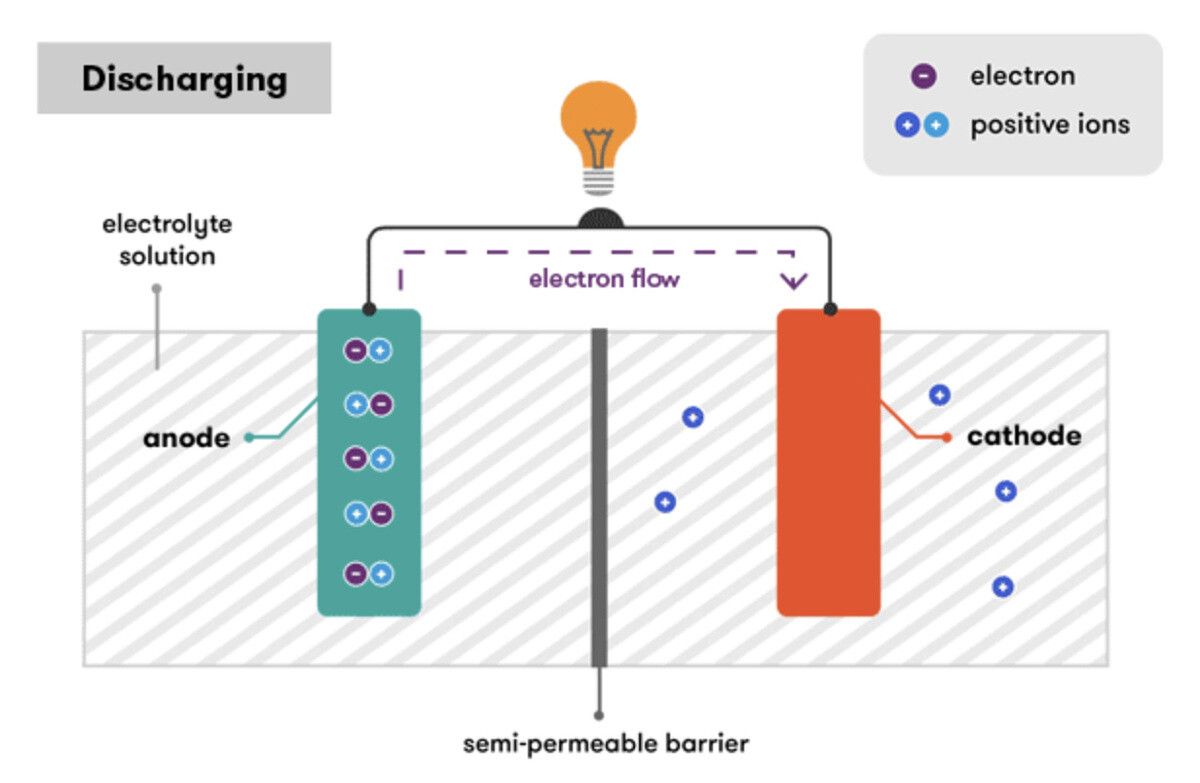
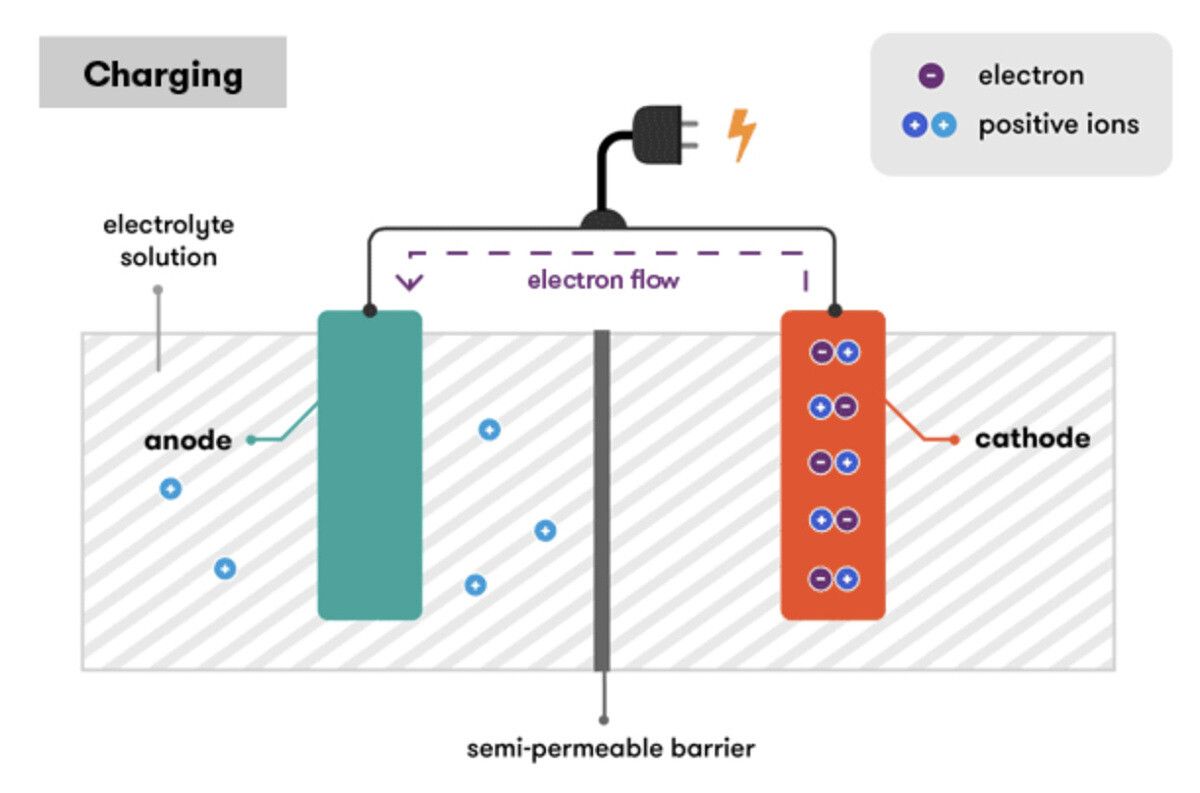
Before we discuss how a lithium-ion battery works or charges, here’s how a traditional battery works and charges. Traditionally, a battery or a chemical cell stores chemical energy. This chemical energy is converted into electrical energy when a device, such as a bulb, is connected between its positive and the negative terminals. Electrons flow from the Anode — or the negative terminal (or electrode) — to Cathode — or the positive terminal — when a battery is in use. This flow of electrons — or negative charge — is what we commonly call “current.”
Over time, this flow from the negative to the positive terminals can deplete the electrodes, and eventually stop. Fortunately, the electrodes on a wide range of batteries can be regenerated by connecting an external source of current, and this process is generally known as recharging. When we join the two terminals across a current source, the direction of the flow of electrons is reversed, and this change allows the electrodes to be replenished.
The rate of flow of current depends on the difference between the energy stored at the electrodes. This difference is called Potential Difference — or commonly known as voltage — and it changes as electrical particles travel from one end of the battery to another.
The images above show the ideal nature of batteries. But as you would expect, the electrodes may not remain the same as before after replenishing the decay. In real life, these irregularities cause rechargeable batteries to erode over time. While these defects rarely occur in Li-ion batteries used in smartphones, they tend to get stressed under high voltage. We shall discuss this in later stages.
How a Li-ion battery charges
A lithium-ion (Li-ion) battery is the most common type of battery found inside smartphones and other electronic devices because of its high energy density. Unlike the ideal system we discussed above, a Li-ion battery does not charge at a constant rate but in three separate stages.
Here are the three stages involved in charging a Li-ion battery:
Constant Current — When a phone is connected to a charger, i.e., an external source of power, the battery’s voltage shoots up instantly while the flow of current remains constant. Soon after the current flow is set up across the battery’s terminals, the voltage increases at a slower rate than before, and the current continues to be constant. This is the maximum amount of current that a battery can hold at any point in time.
Saturation — Li-ion batteries are sensitive to high voltage and are therefore built with protection systems to prevent voltage from crossing a certain prescribed value. When a charging battery tends towards its recommended peak voltage, the current flow reduces, and the voltage increases at a non-steady but slow pace.
Topping — When the battery reaches its peak value eventually, the voltage stops increasing while the current continues to decrease as the battery reaches its full capacity. A battery is fully charged when the current finally stops flowing.
How does Fast Charging work?
Because Li-ion batteries may get damaged due to high voltage, manufacturers typically bank on high current transfer rates to fast-charge a phone’s battery. Fast charging aims to maximize the constant current flow stage’s utility so that maximum charge can be transferred to the battery before the voltage reaches its peak value.
Dedicated circuits inside a smartphone are used to restrict the voltage and the flow of current. Standard voltage regulators limit the voltage without changing the current flow, which is why older phones often heat up while charging. These circuits ensure the battery’s temperature is maintained below the permissible level and the battery’s health is preserved.
In high voltage charging, voltage steps down and current steps up.
Despite the limitations that Li-ion batteries have due to voltage, chargers with high power output support employ a combination of high voltage and low current. The circuits inside smartphones step the current up and the voltage down. Smartphones that feature high voltage charging feature instruments called Buck Converters to convert a high voltage to a low voltage while increasing the current.
This allows smartphone manufacturers to use high current values of up to 20V — or even higher — to charge a Li-ion battery with a typical voltage of 4.2V. As opposed to a standard regulator, a Buck Converter can convert the high voltage into a high current more efficiently without losing much energy in the form of heat.
Even in fast charging, the battery charges very quickly during constant current and saturation stages and eventually slows down during the topping phase. This is why smartphone manufacturers often make claims like charging 60% of the battery under 20 minutes because that is the zone where the fastest charging occurs.
We shall discuss the various smartphone manufacturers’ various methods to ensure the fastest possible charging rates on their devices in the coming section. But before that, there’s a much more important question to be answered, and that has to with keeping our phones plugged into chargers all the time.
Should you use your phone while charging?
A Li-ion battery typically has a peak voltage value of 4.2V per cell. When a battery is connected to a power source and is in the topping phase, it operates near its peak voltage. Because a high voltage causes stress on the battery, it tends to return to a lower voltage when it is fully charged, notes Battery University. As a result, the charge is cut off when a battery is fully charged. However, when the charger is connected continuously for long durations, the battery remains at high voltage, and that may cause instability and may reduce the battery’s health.
Using your smartphone extensively while charging gives rise to what is commonly called a parasitic load. When a battery is being used and charged simultaneously, it reduces battery life and increases heating. This simultaneous charging and discharging can distort the charging cycles of the battery and reduce its life. Furthermore, if the battery is in the constant voltage phase, this might lead to extra stress on the battery, which can impact the battery’s life and even increase the chances of spontaneous ignition or explosion.
While smartphone OEMs have built-in safety mechanisms to mitigate these risks and accommodate wide use cases of simultaneous charging and use, the risk persists, even if very low. And since this matter concerns public safety, it remains a good idea to avoid using your phone while charging.
Universal standards for fast charging
Fast charging is widely prevalent these days, but the foundation for this widespread popularity was set nearly 10 years ago. The early USB standard could deliver a maximum current of 0.5A across a potential difference of 5V, resulting in a total power output of 2.5W. The USB 3.0 specification released in 2010 increased the current transfer limit to up to 0.9A across a 5V potential with a power output of 4.5W on a USB Type-A port.
Simultaneously, traditional chargers with micro-USB cables usually deliver 10W (2A, 5V) power, while a USB Type-C charger typically delivers power at 15W (3A, 5V). However, smartphone manufacturers have pushed charging speeds much further beyond these modest values.
USB Power Delivery (USB-PD)
In 2012, the USB Promoters Group announced a more advanced standard for delivering power to portable devices and titled it USB Power Delivery (USB-PD). This standard was specifically designed to cater to the needs of power-hungry devices. The first generation of USB-PD allowed the transmission of up to 60W power over a micro-USB interface and up to 100W (5A, 20V) via USB Type-A and Type-B connectors. The USB-PD Gen2 specification was released as part of the USB 3.1 standard, and it endorses up to a 100W power transfer via USB Type-C. Modern-day laptops like MacBooks and Dell XPS utilize this standard for superfast charging.
Devices with USB-PD can use various voltage values like 5V, 9V, 15V, 20V, or more. However, these values are non-negotiable, and the maximum common value is chosen for power delivery.
Power Data Objects (PDO)
When we connect a power source such as a USB-PD charger to a supported device (sink), it transmits the values of supported current and voltage specifications. This broadcast is known as Power Data Objects (PDO). In return, the device or the sink responds with the values it supports, and this is known as Request Data Object (RDO). The highest matching value for voltage supported by both parties is chosen for the transmission of electric power. If there is a mismatch, the change of data occurs until a common value is reached. This interaction plays a crucial role in determining the maximum charging rate.
For instance, if the USB-PD charger supports values such as 5V, 9V, 15V, 20V for voltage and the smartphone supports only 5V and 9V, then the charging will happen at 9V with the maximum supported current corresponding to 9V.
While USB-PD only operates in these designated voltage values, a newer standard allows for more dynamic negotiation of voltage between the source and the sink.
USB-PD PPS (Programmable Power Supply)
In 2017, the USB Implementers Forum (USB-IF) Association introduced USB-PD PPS (Programmable Power Supply) to the USB-PD 3.0 specifications. While previous specifications only supported standard voltage increments of about 5V, PPS permits much smaller steps of changes in both — the current (steps of 50mA) and the supply voltage (20mV).
Current and voltage negotiation in systems with USB-PD support; Source: Pengo Home
This sort of micro-control allows voltage to step down and current to step up more efficiently and, therefore, reduce energy loss in the form of heat dissipation. Simultaneously, PPS permits a gradual increase in voltage during the constant current supply stage discussed above.
Even though the open USB specifications have paved the way for uniform and standardized charging methods, smartphone brands and chip manufacturers have also created their own proprietary standards, touting greater than 100W charging on smartphones.
Proprietary standards for fast charging
The proprietary fast-charging standards have evolved much faster than the more widely accepted fast charging specifications for USB. This is because of the USB Implementers Forum (USB-IF) Association’s delay in establishing standard charging protocols on par with the proprietary one. When we look at smartphones exclusively, USB-PD and PPS have been limited to 45W of power output. In contrast, companies such as OPPO, Vivo sub-brand iQOO, and Xiaomi have already demonstrated proprietary charging technologies that breach the 100W mark. In this section, we look at some of the most popular proprietary fast charging solutions employed by OEMs.
Qualcomm Quick Charge
Quick Charge by Qualcomm is one of the most commonly known fast-charging standards. Quite evidently, this widespread popularity can be credited to the popularity of the company’s Snapdragon chipsets. Most importantly, despite different brands implementing Qualcomm’s Quick Charge technology, the chargers are not exclusive to brands and are cross-compatible with all supported devices.
Qualcomm's Quick Charge offers cross-compatibility for different charger and smartphone brands.
The first edition of Quick Charge was introduced in 2013, and Snapdragon 600 was the first chipset to support it. The chargers certified for Quick Charge 1.0 supported the 2A current passage across 5V, amounting to a maximum power output of 10W.
Quick Charge 2.0 arrived in 2014 along with Snapdragon 800 series SoCs. The new specification bumped the maximum supported voltage up to 12V. With this increment in voltage, the maximum permissible current was also increased to 3A. As a result, the total deliverable power went up from 10W to up to 24W using a microUSB cable and up to 36W using a USB Type-C cable. Practically, however, most manufacturers limited charging to 18W as that was fast enough for the time. Quick Charge 2.0 was supported on various Qualcomm chipsets, including the Snapdragon 200, Snapdragon 400, Snapdragon 410, Snapdragon 615, Snapdragon 800, Snapdragon 801, Snapdragon 805, Snapdragon 810, and already had at least 20 OEMs supporting this technology at the time of the launch.
Next year, i.e., in 2015, Qualcomm announced Quick Charge 3.0, and the most significant change was the addition of INOV (Intelligent Negotiation for Optimal Voltage). This allowed power management ICs to negotiate the voltage in small steps of 200mV to ensure a gradual increase during the constant current phase — that would eventually become the basis of the PPS technology we mentioned above. This also allowed OEMs to aim for higher charger voltage values — between 3.6V to 20V. The current limit was also increased to 4.6A. With Quick Charge 3.0, Qualcomm also improved its parallel charging technology — now called Dual Charge+ — that would allow the charger to divide the power input into two parallel streams to avoid overheating. Some of the earliest SoC’s to support Quick Charge 3.0 included Snapdragon 820, Snapdragon 620, Snapdragon 618, Snapdragon 617 Snapdragon 430.
In 2016, Qualcomm announced Quick Charge 4.0 with more efficient heat management and better protection against overcurrent or overvoltage. The key addition was the cross-compatibility with USB-PD. Qualcomm introduced it with the Snapdragon 835 chipset. Quick Charge 4.0+, announced in the following year, was primarily an iteration to improve the thermal protection and safety features. Quick Charge 4.0+ chargers are also backward compatible with smartphones supporting Quick Charge 1.0, 2.0, and 3.0. On the other hand, Quick Charge 4 is not backward compatible.
After a three-year-long gap, Qualcomm announced Quick Charge 5.0 in 2020 with support for power output at more than 100W. Quick Charge 5.0 is cross-compatible with USB-PD PPS. The new standard supports dual battery charging at peak speeds while minimizing heating. To utilize dual charging, a phone must support a battery that is split into two cells. The Xiaomi Mi 10 Ultra was the first smartphone to support Qualcomm’s Quick Charge 5.0.
Qualcomm Quick Charge compatibility chart
Chargers compatible with Quick Charge 4.0, 4.0+, and 5.0 also support faster charging on Apple iPhones, as you can see in the compatibility chart above.
MediaTek Pump Express
MediaTek also has a proprietary fast-charging protocol parallel to its competitor, Qualcomm. MediaTek’s fancy moniker for its fast charging technology is “Pump Express.”
In 2014, MediaTek announced Pump Express Plus with its specifications similar to Qualcomm’s Quick Charge 2.0. It supported voltage up to 12V along with 2A of current. In the following year, MediaTek announced Pump Express Plus 2.0 parallel to Quick Charge 3.0. The protocol supported voltage between 5V and 20V and could vary the voltage in steps of 0.5V.
Pump Express 3.0 was announced in 2016, and it brought support for USB-PD. This version also introduced much finer voltage negotiation steps measuring only 10-20mV, varying between 3V and 6V, with support for more than 5A current. Pump Express 4.0, launched in 2018, has similar current and voltage specifications and brought USB-PD PPS support.
OPPO VOOC/SuperVOOC, OnePlus Dash/Warp, and Realme Dart/SuperDart charging
OPPO was among the earliest brands to pioneer its own exclusive charging technology. It is among the smartphone industry leaders when it comes to fast charging, and announced the first version of the technology in 2014. The OPPO Find 7 — which inspired the design of the OnePlus One to a great degree — was the first smartphone by the company to feature the VOOC (Voltage Open Loop Multi-step Constant-Current Charging) Flash Charge technology. OPPO claimed that the technology could be used to charge the Find 7’s 2800mAh battery from 0% to 75% in just 35 minutes.
As the acronym suggests, chargers designed for the VOOC standard rely on a higher current value while keeping the voltage close to the battery’s voltage. This eliminates the need to step down the voltage purposefully, and that in turn prevents overheating. With VOOC, OPPO smartphones could charge at 20W (5v, 4A).
OPPO’s first commercial standard — marketed as VOOC 2.0 — was used in various phones, including the OPPO R7, R9 Plus, R11, R15, R15 Pro, F1, F1s, F3, F5, F7, F9/F9 Pro. The technology was also licensed to sister brand OnePlus, which marketed it initially as Dash Charge. The Dash Charge technology was available on OnePlus 3/3T, 5/5T, 6. OnePlus later had to drop the moniker due to a trademark debacle, and now refers to 20W charging tech as simply Fast Charge. OPPO’s spin-off brand Realme also used the technology on its Realme 3 Pro and Realme X smartphones.
At MWC 2016, OPPO showcased its futuristic (for the time) Super VOOC technology with a claim of charging a battery to 75% in just 15 minutes thanks to its 50W (10v, 5A) power output. The technology took two years to realize, and it was launched with the company’s first major international head-turner — the OPPO Find X — in 2018. It was later made available on the OPPO R17 Pro, followed by the Realme X2 Pro and the Realme 7 Pro.
In 2019, OPPO introduced VOOC 3.0 with support for 25W charging (5V, 5A) with the OPPO Reno series. This was claimed to be 23.8% faster than the previous VOOC 2.0 (VOOC Flash Charge) technology. It was also supported on the OPPO F11, F15 Pro, and the Realme 5 Pro (limited to 20W). Later on in the year, OPPO launched VOOC 4.0 with the charging rate bumped to 30W (5V, 6A). This technology was available on the Realme 6 and the Realme 7. OnePlus transitioned to 30W a year before OPPO with the Warp Charge technology on the OnePlus 6T McLaren Edition. OnePlus’s Warp Charge was also supported on OnePlus 7 Pro, 7T, 7T Pro, 8, and the 8 Pro.
In 2020, OPPO showcased the SuperVOOC 2.0 charging technology with a 65W (10V, 6.5A) output. The was first introduced with the OPPO Find X2 Pro and later iterated on the OPPO Reno 4 Pro and the OPPO Reno 5 Pro. However, before OPPO’s formal announcement, Realme introduced the same technology but with a different name — SuperDart — on the Realme X50 Pro. Furthermore, OnePlus — which was among the earliest brands to embrace superfast charging — jumped the bandwagon with 65W charging on the OnePlus 8T, adopting a different name, i.e., Warp Charge 65.
Advancing further from the 65W charging technology, OPPO announced its 125W flash charge protocol along with a 110W GaN charger. With this technology, OPPO claims a 4000mAh battery can be charged fully within 20 minutes. The technology uses a high 20V potential to transfer current at a rate of 6.25A. For higher efficiency at high voltage, OPPO uses chargers with Gallium Nitride (GaN) — a more power-efficient semiconductor than silicon.
Here’s a first look at 125W Flash Charge technology in action. It can fully charge a 4,000mAh battery in 20 minutes. #FlashForwardpic.twitter.com/EWtfGcsL4m
The technology is yet to be available commercially within an OPPO or related product.
Vivo 120W Super Flash Charge
iQOO 7 by Vivo’s sub-brand is officially the fastest charging smartphone. Believe it or not, this smartphone is not merely a concept device and is actually available for sale in China. The iQOO 7 uses Vivo’s 120W Super Flash Charge technology that the company first demonstrated back in 2019. We have yet to see a phone with a Vivo branding to support this tech or even an iQOO phone available globally.
iQOO claims that this flagship smartphone with a 4000mAh can charge 100% in just 15 minutes and real-life tests show that the claim is actually pretty solid.
Huawei SuperCharge
Huawei introduced its SuperCharge technology back in 2017 with the Mate 10. Just like OPPO, Huawei’s fast charging technology also utilized a higher current than other competitors using technologies like Quick Charge and Pump Express. The first-generation offered a 22.5W power output (5V, 4.5A). Huawei increased this rating to 40W (10V, 4A) with the Mate 20 Pro and made the same available on the Huawei P30 Pro, Mate 30 Pro, and the P40 Pro/Pro Plus smartphones. This 40W charging technology was first demonstrated by Huawei’s (recently sold) sub-brand Honor on a concept phone — Honor Magic — in 2016.
Huawei incorporated another increment with the Mate 40 Pro/Pro Plus launched in late 2020 to support 66W (11V, 6A) charging. This is limited to just two phones for now but can be expected to be available on Huawei’s upcoming flagship devices.
Xiaomi 100W+ charging
Xiaomi smartphones have supported fast charging for a long time. Its flagships, including the Xiaomi Mi 4 through Mi 6, came with 18W fast charging. However, instead of pouring efforts into its own proprietary charging technology, Xiaomi relies on Qualcomm’s Quick Charge technology. Upon witnessing the fast charging landscape evolve and get more competitive, Xiaomi showcased its own superfast 100W charging technology in 2019.
As per the rumor mill, Xiaomi is currently working to bring 200W fast charging, but there is no official confirmation about the same yet.
Samsung Adaptive/Super Fast Charging
Although Samsung’s Adaptive Fast Charging is similar to Qualcomm’s Quick Charge, i.e., it relies on a high voltage and moderate current values. The first Adaptive Fast Charging protocol supported 18W (up to 9V, 2A) charging but is limited to only flagships, starting with the Galaxy Note 5 and up to the Galaxy S20 series.
Much after other manufacturers, Samsung finally moved to 25W (11W, 2.25A) charging in 2019, and this standard is officially named Samsung Super Fast Charging. The 25W charger is claimed to charge the 4500mAh battery on the Galaxy A70 to approximately 65% in 60 minutes. Contrary to Samsung’s naming scheme, that is not exactly “super fast.” During our Galaxy Note 20 Ultra (Exynos) review, the charger took 35 minutes to charge the 5000mAh battery from 10% to 50% in about 35 minutes and reached 100% in nearly 100 minutes.
Notably, Samsung also launched 45W (10V, 4.5A) charging with the Galaxy Note 10 series and then on the Galaxy S20 series. This technology is called Super Fast Charging 2.0, and it is expected much faster than the first generation. However, Samsung withdrew the 45W charging protocol and went back to 25W charging on the Galaxy Note 20 and the Galaxy S21 series.
Samsung’s fast charging standards rely on USB-PD, while the Super Fast Charging technology used in the Galaxy Note 20 and the Galaxy S21 devices also uses PPS. Ideally, this should allow third-party chargers to charge these devices at their maximum ability. However, there are a few limitations in terms of the input voltage value, determined by Power Data Objects (PDO) as discussed above. For instance, the Galaxy S21 can only charge at 18W instead of 25W with a non-Samsung USB-PD charger. Newer Samsung devices deal with the limitation by adopting USB-PD PPS.
Fast Charging on Apple iPhones
All Apple smartphones starting with the iPhone 8 support charging up to 18W while the iPhone 11 Pro Max and iPhone 12 Pro Max support up to 27W charging. To ensure the fastest possible charging, you need to buy a USB-PD compliant charger — or use a MacBook charger. Since Apple no longer ships a charging brick inside the box, you will be required to buy one separately. You might also need to buy a USB Type-C to Lightning cable to enjoy the fastest possible charging on your iPhone.
Samsung leads the industry with a non-proprietary (PPS) standard.
On one hand, Android manufacturers have been riding the hype train and relentlessly introducing faster-charging technologies. But on the other, Samsung has stuck to more widely acceptable fast charging standards such as USB-PD and USB-PD 3.0 with PPS. These standards are considerably slower than the proprietary ones.
Samsung’s so-called Super Fast Charge is much slower than its counterparts. And although the charging speeds were reduced further from 45W to 25W on the Galaxy Note 20 Ultra and the Galaxy S21 series, PPS ensures that the charging takes place more efficiently. As we mentioned above, PPS allows for much more accurate negotiations of the output voltage and current, which reduces the loss of energy in the form of heat.
Without a doubt, OEMs were forced to develop proprietary standards because the USB Implementers Forum (USB-IF) took so long to announce a dynamic standard like USB-PD PPS. With a single standard such as PPS in place, users with phones from different brands can use the same charging brick without fearing slow charging.
Until 2020, these slower charging speeds would have appeared disadvantageous for Samsung. But this changed when Apple announced its plans to remove the charging brick from the box of the iPhone 12. Following this suit, brands such as Samsung and Xiaomi have also started removing chargers from the boxes of their new phones — except in regions like Brazil where they are compelled to include a compatible charger because of the consumer laws.
Now, brands like Samsung are comfortable asking users to use just any fast charger with UBS-PD PPS support. Because of PPS’s universal nature, users will be able to charge multiple supported devices with a single brick. For now, there is only a handful of chargers, and we sincerely hope other manufacturers include support for USB-PD PPS alongside their proprietary charging technologies — presuming they would not easily abandon their technologies for a universal standard.
We are accustomed to charging our smart devices with rechargeable batteries. So (we hope!) we do not need to tell you how to charge your smartphone. However, you must exercise some caution if you want to ensure the fastest possible charging speeds on your smartphones.
The first and the most obvious caveat is that you must carefully choose the charging brick for your smartphone, and this step becomes even more important if the smartphone you buy does not come with a charger in the box. Along with the proper charger, it is essential to choose a cable that supports the same standard.
There is a wide variety of smartphone chargers that support Quick Charge 3.0, but you might have trouble finding chargers that support Quick Charge 4.0 and above. Meanwhile, MediaTek Pump Express chargers can be hard to come by, so it is better to go for a charger that the manufacturer of your smartphone recommends.
When it comes to proprietary charging technologies by companies under the BBK Group — OPPO, Vivo, OnePlus, Realme, and iQOO, you have no other option but to choose an official charger ensure the fastest charging speeds. Thankfully, these chargers are cross-compatible, and you can use a newer charger from one of these brands with a phone from any other out of the five mentioned above. For instance, the 65W SuperVOOC charger that comes with the OPPO Reno 5 Pro will work seamlessly and ensure 65W charging with the OnePlus 8T.
Likewise, you will also have to go for official chargers when it comes to Huawei and Honor devices.
Meanwhile, for Samsung, numerous USB-PD PPS chargers will allow you to charge your latest flagship, such as the Galaxy S21 Ultra at 25W. However, you will have to ensure that the standards match both — the smartphone and the charger. Newer 25W chargers from Samsung with PPS support might limit the charging rate to 18W if the smartphone only supports USB-PD and not PPS. So make sure you cross-check before buying.
Lastly, if you’re looking for fast chargers for iPhones, you can either go for the official 20W USB-C charger or choose from any of the faster chargers listed on this page. If you own a MacBook with USB-C charging support, Apple recommends you to use the MacBook charging brick with the iPhone without any fears of the higher power output since that — as we learned in this article — is controlled by the smartphone.
We also learned so many other things about fast charging and the past, the present, and the future of fast charging. Do you think we missed out on any crucial piece of information? Let us know in the comments below!
Last month, Xiaomi confirmed plans to launch the Mi 11 globally on February 8. The only problem was the company decided to withhold pricing information ahead of the launch. Thankfully, a new report claims to have that information, and it could be bad news for the Galaxy S21.
91Mobilesreports Xiaomi will launch the Mi 11 in Europe for €799 for the base model with 8GB RAM and 128GB of internal storage. If you want to double the storage, that’ll cost you €899. In comparison, the Galaxy S21 starts at €849 in Europe or £769 in the UK. That’s not a huge difference, but it’s noticeable enough if you’re looking to save some money.
Xiaomi previously launched the Mi 11, which comes equipped with the new Snapdragon 888 chip, in China toward the end of last year. We actually got an early hands on with the device, sharing our impressions back in January.
“If I have to summarize the Xiaomi Mi 11 in a sentence, it’d be ‘like a Xiaomi Mi 10 Ultra but with a Snapdragon 888,’” we said last month. “That’s because Xiaomi has carried over many of the Mi 10 Ultra’s features, from the gorgeous 2K 120Hz OLED screen to the subtle curvature on all four sides of the screen to even that ‘squircle’ shaped camera module, this device feels very similar in look and feel to the Xiaomi Mi 10 Ultra.”
The display is gorgeous, the design premium, and performance is top notch. If the Mi 11 does launch in Europe for €799, it will present consumers with a difficult choice when deciding between the Galaxy S21. That’s a good problem to have, and speaks to the quality of both options.
We’ll wait for official confirmation from Xiaomi about the Mi 11’s launch price in Europe. 91Mobiles warns that the there won’t be a global variant with 12GB RAM, so that’s something to keep in mind. All the other specs, including the triple-camera system, 4,600mAh battery, and 6.81-inch QHD+ display should be the same.
When Google launched the Pixel 5 back in October, we were excited to get our hands on its new apps. (The phone itself is pretty cool, too.) With the Pixel 5’s launch came new versions of the Google Camera and Google Recorder apps that we shared with the community. However, when many users of older Pixel devices tried to sideload the updates, they were met with an error (shown above). Bizarrely, not everyone had issues with installing the updates. Some were able to install them just fine, while others had to factory reset just so they could install the new versions. Because of the seemingly random nature of this issue, many chalked it up to a bug. We’re pretty confident now that this issue doesn’t stem from a bug but rather Google’s use of a new API in Android 11 to block sideloading updates.
If you try to sideload Google Camera 8.0 or later or Google Recorder 2.0 or later on a Pixel device running Android 11, you’ll see an error message that says the verification could not succeed. Even if you try to sideload the APK using a shell command, you won’t get a more specific reason for the installation failure. The installation return code that you’ll be given is “INSTALL_FAILED_VERIFICATION_FAILURE“, which unfortunately doesn’t tell you why the verification doesn’t succeed. By examining the logcat, we can learn exactly why the verification fails:
AppIntegrityManagerServiceImpl: Integrity check of com.google.android.GoogleCamera result: DENY due to [Rule: (PACKAGE_NAME EQ com.google.android.GoogleCamera) AND (VERSION_CODE GTE 32045130) AND (APP_CERTIFICATE EQ F0FD6C5B410F25CB25C3B53346C8972FAE30F8EE7411DF910480AD6B2D60DB83) AND NOT (INSTALLER_NAME EQ com.android.vending), DENY]
According to this message, an integrity check of the Google Camera installation failed because the “INSTALLER_NAME” did not match “com.android.vending”, the package name for the Google Play Store. (I was attempting to install Google Camera 8.0 using the APKMirror Installer app, for what it’s worth.) This message was added to the system log by “AppIntegrityManagerServiceImpl“, which is part of Android’s new “App Integrity” feature. According to the code in AOSP, App Integrity is designed to provide an additional layer of checks on top of the package manager’s existing APK signature verification. The App Integrity API seems to use a set of Rules to decide whether or not to allow or deny the install. Rules are provided by a system app — which we believe to be Google Play Services — and are stored in a file.
In addition, App Integrity also calls another class called SourceStampVerifier if a “source stamp” is embedded in the Manifest’s metadata. For example, here’s what we believe is the “source stamp” from the Google Camera app’s Manifest:
From what we can tell, the source stamp is used to verify the signature of the package installer. So, for example, you can’t trick AppIntegrity into allowing the installation even if you spoofed the Play Store as the installer.
Beyond this, we were unable to find out exactly how Google is using AppIntegrity and related APIs to block sideloading updates to the Google Camera and Google Recorder apps. A quick examination of Google Play Services APK reveals that it is using these APIs, but the code is too obfuscated to really make sense of everything. We even found the directory where the integrity rules are stored — /data/system/integrity_rules — but it was of little use because it only contains serialized data. We also haven’t found a way to disable integrity verification (it doesn’t seem to be as easy as just changing a setting), though we believe the reason that factory resetting works for some is that Google Play Services doesn’t get a chance to initialize its ruleset to block installation. The logcat message and the introduction of these new APIs in Android 11 strongly suggest that this is all by design and not a bug, though.
Google has not publicly commented on its use of these APIs (nor do we expect them to), and they did not respond when reached for comment. We have a few theories why they’re blocking sideloaded updates, though. First, they could be protecting people from installing the wrong version of the app for their device. Google delivers specific versions of its apps to specific Pixel devices. For example, several versions of the Device Personalization Services app can be found online. Even though they’re all installable on Pixel devices, it was possible at one point to lose the Live Captions feature on the Pixel 4 by downloading a version built for an older Pixel device. Another reason could be to “improve traceability of apps with respect to unauthorized distribution”, as explained by Google in the SourceStampVerifier class.
So far, only a few of Google’s apps using the app bundle format (like Google Camera and Google Recorder) are blocking non-Play Store installs, but we don’t know if the company will extend this behavior to its other apps once they all switch to the AAB format. We also considered if the switch to app bundles necessitated implementing App Integrity, but we found that Google already has a solution to handle when users try to install an app that doesn’t have all its required splits. Whatever the case may be, we don’t think Google intends to block all sideloading of its apps, though these tools certainly allow them to do so.
Thanks to developers vvb2060, aviraxp, and Quinny899 for their assistance in this article, and thanks to PNF Software for providing us a license to use JEB Decompiler, a professional-grade reverse engineering tool for Android applications.